# Developing a LIFF app
A LIFF app is a web app based on HTML and JavaScript. Here, we'll explain the process of developing a LIFF app and processes specific to building LIFF apps.
## Setting the title of the LIFF app
The title of the LIFF app will appear in the header of the LIFF app. Specify the name of the LIFF app in the `` element of the HTML source of the LIFF app.
```html
<!DOCTYPE html>
<html lang="en">
<head>
<meta name="viewport" content="width=device-width, initial-scale=1.0">
<title>The title
```
## Integrating the LIFF SDK with the LIFF app
You can embed the LIFF SDK in the LIFF app using these methods:
- [Specify the CDN path](https://developers.line.biz/en/docs/liff/developing-liff-apps/#specify-cdn-path)
- [Use the npm package](https://developers.line.biz/en/docs/liff/developing-liff-apps/#use-npm-package)
### Specify the CDN path
To use the functions of the LIFF SDK, specify the URL of the LIFF SDK in the `src` attribute of the `
```
**LIFF SDK is written in UTF-8**
The LIFF SDK is written in UTF-8, so if your HTML source uses a character encoding different than UTF-8, make sure you also specify `charset="utf-8"`.
### Use the npm package
The LIFF SDK is available as an npm package. You can use npm to install the LIFF SDK.
**Manage your SDK version**
It is the developer's responsibility to use an appropriate SDK version. To keep your SDK version up to date, check the [LIFF release notes](https://developers.line.biz/en/docs/liff/release-notes/) on a regular basis, and update your local SDK frequently. For more information about LIFF's versioning policy, see [LIFF SDK (sdk.js) update policy](https://developers.line.biz/en/docs/liff/versioning-policy/#update-policy).
**An error will occur during the build when using the npm version of LIFF v2.16.0 or earlier in a project using webpack v5.**
[Node.js polyfill has been removed from webpack v5.](https://webpack.js.org/blog/2020-10-10-webpack-5-release/#automatic-nodejs-polyfills-removed) Accordingly, if you use the npm version of LIFF v2.16.0 or earlier in a project using webpack v5, you will get a build error. For more information, see the news from October 26, 2021, [LIFF v2.16.1 released](https://developers.line.biz/en/news/2021/10/26/release-liff-2-16-1/).
To install the LIFF SDK via npm and import it into your app, follow these steps:
1. Run this command in your terminal to install the LIFF SDK via npm:
```bash
$ npm install --save @line/liff
```
Alternatively, you can run this command in your terminal to install the LIFF SDK via Yarn:
```bash
$ yarn add @line/liff
```
1. Import the SDK into your app
Include the following code in your JavaScript or TypeScript file:
```js
import liff from "@line/liff";
liff.init({
liffId: "1234567890-AbcdEfgh", // Use own liffId
});
```
Type definitions for TypeScript are already included in the `@line/liff` package.
**Don't declare or modify window.liff**
For backward compatibility, don't declare or modify the global LIFF instance `window.liff`. Declaring or modifying window.liff may cause malfunctioning of the LINE app.
Related page: [https://www.npmjs.com/package/@line/liff](https://www.npmjs.com/package/@line/liff)
**Reducing the LIFF SDK file size**
Using the pluggable SDK reduces the LIFF SDK file size. For more information, see [Pluggable SDK](https://developers.line.biz/en/docs/liff/pluggable-sdk/).
## Initializing the LIFF app
The [`liff.init()`](https://developers.line.biz/en/reference/liff/#initialize-liff-app) method initializes the LIFF app and enables you to call the other methods of the LIFF SDK from the LIFF app.
LIFF apps must be initialized each time a page is opened. Even if the transition is within the same LIFF app, you should execute the `liff.init()` method when you open a new page.
If you use LIFF features without properly initializing the LIFF app, we don't guarantee that the features will work.
The process from when the user accesses the [LIFF URL](https://developers.line.biz/en/glossary/#liff-url) on the LINE app to when the LIFF app is initialized is as follows:
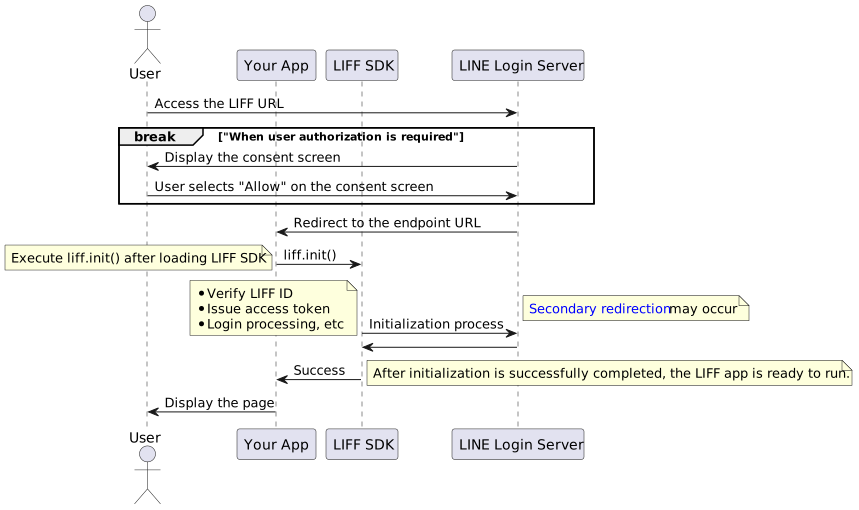
For more information, see [LIFF Behaviors from accessing the LIFF URL to opening the LIFF app](https://developers.line.biz/en/docs/liff/opening-liff-app/#redirect-flow).
**LIFF app's query parameters**
When you access a LIFF URL or perform a transition between LIFF apps, the URL may be given query parameters that begin with `liff.*`.
e.g.
- `liff.state` (indicates additional information specified in LIFF URL)
- `liff.referrer` (indicates where the referrer came from when transitioning between LIFF apps. For more information, see [Get URL from before LIFF-to-LIFF transition](https://developers.line.biz/en/docs/liff/opening-liff-app/#using-liff-referrer))
The above query parameters are given by the SDK so that LIFF apps can function properly. When you independently alter the above query parameters, proper opening of the LIFF app and a transition between LIFF apps may not be guaranteed. Implement your app so that the `liff.*` query parameter is altered after `liff.init()` is resolved.
**Functions that can be executed even before the LIFF app is initialized**
This property or methods are available even before the `liff.init()` method is executed. For example, you can get the environment in which the LIFF app is running before initializing the LIFF app.
- [liff.ready](https://developers.line.biz/en/reference/liff/#ready)
- [liff.getOS()](https://developers.line.biz/en/reference/liff/#get-os)
- [liff.getAppLanguage()](https://developers.line.biz/en/reference/liff/#get-app-language)
- [liff.getLanguage()](https://developers.line.biz/en/reference/liff/#get-language) (deprecated)
- [liff.getVersion()](https://developers.line.biz/en/reference/liff/#get-version)
- [liff.getLineVersion()](https://developers.line.biz/en/reference/liff/#get-line-version)
- [liff.isInClient()](https://developers.line.biz/en/reference/liff/#is-in-client)
- [liff.closeWindow()](https://developers.line.biz/en/reference/liff/#close-window)
- [liff.use()](https://developers.line.biz/en/reference/liff/#use)
- [liff.i18n.setLang()](https://developers.line.biz/en/reference/liff/#i18n-set-lang)
To use the `liff.closeWindow()` method before the initialization of the LIFF app by `liff.init()` has finished, your LIFF SDK version must be v2.4.0 or later.
**Enabling automatic executing of the liff.login() method when the LIFF app is initialized in external browsers**
By specifying `true` in the `withLoginOnExternalBrowser` property of the `config` object of the `liff.init()` method, the `liff.login()` method can be executed automatically when the LIFF app is initialized in external browsers.
```js
liff
.init({
liffId: "1234567890-AbcdEfgh", // Use own liffId
withLoginOnExternalBrowser: true, // Enable automatic login process
})
.then(() => {
// Start to use liff's api
});
```
`liffId` needs a specified LIFF app ID, which you can get by adding the LIFF app to your channel. For more information, see [Adding a LIFF app to your channel](https://developers.line.biz/en/docs/liff/registering-liff-apps/).
```javascript
liff
.init({
liffId: "1234567890-AbcdEfgh", // Use own liffId
})
.then(() => {
// start to use LIFF's api
})
.catch((err) => {
console.log(err);
});
```
Also, with `liff.ready`, you can get the `Promise` object that resolves when you run `liff.init()` for the first time after starting the LIFF app.
For more information, see the [liff.init()](https://developers.line.biz/en/reference/liff/#initialize-liff-app) and [liff.ready](https://developers.line.biz/en/reference/liff/#ready) sections in the LIFF v2 API reference.
### Important points to consider when initializing the LIFF app
The following are important points to consider when initializing your LIFF app. Read and understand these points before you start developing your LIFF app.
- [Execute `liff.init()` at the endpoint URL or at a lower level](https://developers.line.biz/en/docs/liff/developing-liff-apps/#initializing-liff-app-notes-1)
- [Execute `liff.init()` once for both the primary redirect URL and once at the secondary redirect URL](https://developers.line.biz/en/docs/liff/developing-liff-apps/#initializing-liff-app-notes-2)
- [Process URL changes after `liff.init()` completes](https://developers.line.biz/en/docs/liff/developing-liff-apps/#initializing-liff-app-notes-3)
- [Use caution when handling the primary redirect URL](https://developers.line.biz/en/docs/liff/developing-liff-apps/#initializing-liff-app-notes-4)
#### Execute `liff.init()` at the endpoint URL or at a lower level
The `liff.init()` method will only work on URLs that are exactly the same as the endpoint URL, or on URLs that are at a lower level than the endpoint URL. If the LIFF app transitions to a URL other than these, the `liff.init()` method isn't guaranteed to work.
The following example shows whether the behavior is guaranteed for the URL that executes the `liff.init()` method when the endpoint URL is `https://example.com/path1/`. Some LIFF app features, such as the [multi-tab view](https://developers.line.biz/en/docs/liff/overview/#multi-tab-view), may not work properly on URLs where the behavior isn't guaranteed.
| URL to execute `liff.init()` | Guaranteed to work |
| --- | --- |
| `https://example.com/` | ❌ |
| `https://example.com/path1/` | ✅ |
| `https://example.com/path1/language/` | ✅ |
| `https://example.com/path2/` | ❌ |
**When executing the liff.init() method, the warning message "liff.init() was called with a current URL that is not related to the endpoint URL." appears in a console**
In LIFF v2.27.2 or later, a warning message will appear when the `liff.init()` method is executed on a URL where the behavior isn't guaranteed.
For example, if the endpoint URL of a LIFF app is `https://example.com/path1/path2/` and the URL where the `liff.init()` method is executed is `https://example.com/path1/`, the following warning message will appear:
```
liff.init() was called with a current URL that is not related to the endpoint URL.
https://example.com/path1/ is not under https://example.com/path1/path2/
```
If you see the warning message above, consider changing the endpoint URL to `https://example.com/` or `https://example.com/path1/`. Changing to these URLs guarantees the `liff.init()` method works correctly.
#### Execute `liff.init()` once for both the primary redirect URL and once at the secondary redirect URL
The `liff.init()` method performs initialization processing based on information such as `liff.state` and `access_token=xxx` given to the primary redirect URL. If your endpoint URL includes a query parameter or path, to properly initialize the LIFF app, execute the `liff.init()` method once for both the primary redirect URL and the secondary redirect URL. For more information, see [Behaviors from accessing the LIFF URL to opening the LIFF app](https://developers.line.biz/en/docs/liff/opening-liff-app/#redirect-flow).
#### Process URL changes after `liff.init()` completes
Execute processes that change URLs after the `Promise` object returned by the `liff.init()` method is resolved.
```javascript
// Example using window.location.replace()
liff
.init({
liffId: "1234567890-AbcdEfgh", // Use own liffId
})
.then(() => {
// Redirect to another page after the returned Promise object has been resolved
window.location.replace(location.href + "/entry/");
});
```
If you execute any of the following URL manipulations before the `Promise` object resolves, the LIFF app may not open properly:
- Change the URL using the [`Document.location`](https://developer.mozilla.org/en-US/docs/Web/API/Document/location) property or the [`Window.location`](https://developer.mozilla.org/en-US/docs/Web/API/Window/location) property
- Change the URL using the [`history.pushState()`](https://developer.mozilla.org/en-US/docs/Web/API/History/pushState) method or the [`history.replaceState()`](https://developer.mozilla.org/en-US/docs/Web/API/History/replaceState) method of the [History API](https://developer.mozilla.org/en-US/docs/Web/API/History_API)
- Return status code `301` or `302` on the server-side and redirect to another URL
#### Use caution when handling the primary redirect URL
The `access_token=xxx` automatically granted to the primary redirect URL is the user's access token (confidential information). Don't send the primary redirect URL to an external logging tool such as Google Analytics.
Note that in LIFF v2.11.0 or later, credential information is excluded from URLs when the `liff.init()` method is resolved. Therefore, you can prevent leaking credential information by sending the page view in the `then()` method as follows. If you want to use logging tools, we recommend that you upgrade your LIFF app to v2.11.0 or later. For more information about the updates in LIFF v2.11.0, see [Release Notes](https://developers.line.biz/en/docs/liff/release-notes/#liff-v2-11-0).
```javascript
liff
.init({
liffId: "1234567890-AbcdEfgh", // Use own liffId
})
.then(() => {
ga("send", "pageview");
});
```
### To use LINE Login in an external browser
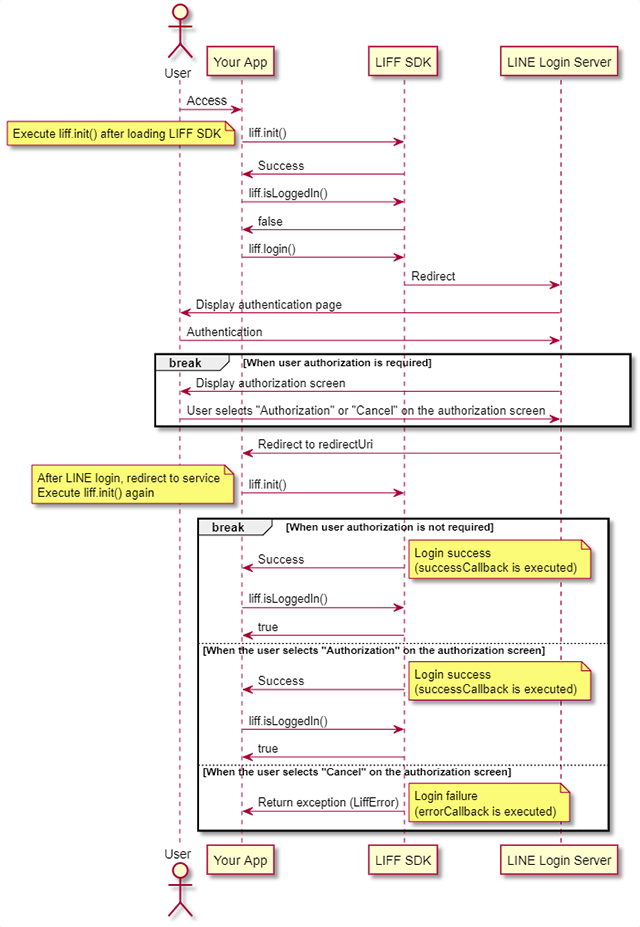
To use LINE Login in an external browser, call the `liff.init()` method twice as shown below.
1. Call the `liff.init()` method after loading the LIFF SDK.
1. Call the `liff.login()` method. Once the processing of the authentication page and the authorization screen is complete, you will be redirected to the LIFF app (`redirectUri`). Call the `liff.init()` method again.
If an error occurs during the processing of the `liff.init()` method, or if the user cancels authorization at the time of login, `errorCallback` will be executed.
**Authorization requests within LIFF browser**
The behavior of LINE Login authorization requests within the LIFF browser isn't guaranteed. Also, when opening LIFF apps from an external browser or LINE's in-app browser, make sure to use the [`liff.login()`](https://developers.line.biz/en/reference/liff/#login) method for the login process, not the [authorization requests with LINE Login](https://developers.line.biz/en/docs/line-login/integrate-line-login/#making-an-authorization-request).
## Calling the LIFF API
You can do these things after the LIFF SDK integration and LIFF initialization.
- [Getting the environment in which the LIFF app is running](https://developers.line.biz/en/docs/liff/developing-liff-apps/#getting-environment)
- [Performing a login process](https://developers.line.biz/en/docs/liff/developing-liff-apps/#login-with-line-login)
- [Opening a URL](https://developers.line.biz/en/docs/liff/developing-liff-apps/#opening-url)
- [Opening the 2D code reader](https://developers.line.biz/en/docs/liff/developing-liff-apps/#opening-two-dimensional-code-reader)
- [Getting the screen type from which the LIFF app was launched](https://developers.line.biz/en/docs/liff/developing-liff-apps/#getting-context)
- [Getting the user's profile](https://developers.line.biz/en/docs/liff/developing-liff-apps/#getting-user-profile)
- [Getting the friendship status between the user and the LINE Official Account](https://developers.line.biz/en/docs/liff/developing-liff-apps/#get-friendship-status)
- [Getting a permanent link for the current page](https://developers.line.biz/en/docs/liff/developing-liff-apps/#get-permanent-link)
- [Sending messages to the current chat room](https://developers.line.biz/en/docs/liff/developing-liff-apps/#sending-messages)
- [Sending messages to a user's friend (share target picker)](https://developers.line.biz/en/docs/liff/developing-liff-apps/#share-target-picker)
- [Closing the LIFF app](https://developers.line.biz/en/docs/liff/developing-liff-apps/#closing-liff-app)
### Getting the environment in which the LIFF app is running
Call the `liff.isInClient()` method and the `liff.getOS()` method to get the environment in which the LIFF app is running.
```javascript
// print the environment in which the LIFF app is running
console.log(liff.getAppLanguage());
console.log(liff.getVersion());
console.log(liff.isInClient());
console.log(liff.isLoggedIn());
console.log(liff.getOS());
console.log(liff.getLineVersion());
```
For more information, see each method in the LIFF API reference.
- [liff.getAppLanguage()](https://developers.line.biz/en/reference/liff/#get-app-language)
- [liff.getVersion()](https://developers.line.biz/en/reference/liff/#get-version)
- [liff.isInClient()](https://developers.line.biz/en/reference/liff/#is-in-client)
- [liff.isLoggedIn()](https://developers.line.biz/en/reference/liff/#is-logged-in)
- [liff.getOS()](https://developers.line.biz/en/reference/liff/#get-os)
- [liff.getLineVersion()](https://developers.line.biz/en/reference/liff/#get-line-version)
### Performing a login process
Call the `liff.login()` method to perform the login process for both the [LINE's in-app browser](https://developers.line.biz/en/glossary/#line-iab) and [external browsers](https://developers.line.biz/en/glossary/#external-browser).
**Note**
You can't use `liff.login()` in a LIFF browser, as it's automatically executed when `liff.init()` is executed.
**If you've specified true in the withLoginOnExternalBrowser property when executing the liff.init() method**
If you've specified `true` in the `withLoginOnExternalBrowser` property of the `liff.init()` method, the `liff.login()` method will be automatically executed when you initialize your LIFF app, even in external browsers. For more information, see [liff.init()](https://developers.line.biz/en/reference/liff/#initialize-liff-app) in the LIFF API reference.
```javascript
// login call, only when external browser or LINE's in-app browser is used
if (!liff.isLoggedIn()) {
liff.login();
}
```
You can also call the `liff.logout()` method to log out.
```javascript
// logout call only when external browse or LINE's in-app browser is used
if (liff.isLoggedIn()) {
liff.logout();
window.location.reload();
}
```
For more information, see [liff.login()](https://developers.line.biz/en/reference/liff/#login) and [liff.logout()](https://developers.line.biz/en/reference/liff/#logout) in the LIFF v2 API reference.
### Opening a URL
The `liff.openWindow()` method opens the specified URL in LINE's in-app browser or an external browser.
The following code opens `https://line.me` in an external browser.
```javascript
// openWindow call
liff.openWindow({
url: "https://line.me",
external: true,
});
```
For more information, see [liff.openWindow()](https://developers.line.biz/en/reference/liff/#open-window) in the LIFF API reference.
### Opening the 2D code reader
Call the `liff.scanCodeV2()` method to launch a 2D code reader, and get the string read by the user.
```javascript
// scanCodeV2 call
liff
.scanCodeV2()
.then((result) => {
// e.g. result = { value: 'Hello LIFF app!' }
})
.catch((err) => {
console.log(err);
});
```
For more information, see [liff.scanCodeV2()](https://developers.line.biz/en/reference/liff/#scan-code-v2) in the LIFF API reference.
**liff.scanCode() method deprecated**
The traditional `liff.scanCode()` method has been [deprecated](https://developers.line.biz/en/glossary/#deprecated). We recommend using the `liff.scanCodeV2()` method for implementing a 2D code reader.
**The operation environment of the liff.scanCode2() method**
The `liff.scanCodeV2()` method works in the following environments:
- iOS: iOS 14.3 or later
- Android: All versions
- External browser: Web browsers that support [WebRTC API](https://developer.mozilla.org/en-US/docs/Web/API/WebRTC_API)
| OS |
Version |
LIFF browser |
External browser |
| iOS |
11-14.2 |
❌ |
✅ *1 |
| 14.3 or later |
✅ *2 |
✅ *1 |
| Android |
All versions |
✅ *2 |
✅ *1 |
| PC |
All versions |
❌ |
✅ *1 |
\*1 You can only use web browsers that support [WebRTC API](https://developer.mozilla.org/en-US/docs/Web/API/WebRTC_API).
\*2 Only available when the screen size of the LIFF browser is `Full`. For details, see [Size of the LIFF browser](https://developers.line.biz/en/docs/liff/overview/#screen-size) in the LIFF documentation.
**Turn [Scan QR] on to launch the 2D code reader**
When [Adding a LIFF app to your channel](https://developers.line.biz/en/docs/liff/registering-liff-apps/), turn on **Scan QR**. The **Scan QR** setting can be updated from the LIFF tab on the [LINE Developers Console](https://developers.line.biz/console/), even after adding a LIFF app to your channel.
### Getting the screen type from which the LIFF app was launched
Execute the `liff.getContext()` method to get a value that specifies the screen type (1-on-1 chat, group chat, multi-person chat, or external browser) from which the LIFF app is launched.
```javascript
const context = liff.getContext();
console.log(context);
// {"type": "utou", "userId": "U70e153189a29f1188b045366285346bc", "viewType": "full", "accessTokenHash": "ArIXhlwQMAZyW7SDHm7L2g", "availability": {"shareTargetPicker": {"permission": true, "minVer": "10.3.0"}, "multipleLiffTransition": {"permission": true, "minVer": "10.18.0"}}}
```
For more information, see [liff.getContext()](https://developers.line.biz/en/reference/liff/#get-context) in the LIFF v2 API reference.
### Get user profile
There are two ways to get a user's profile through getting an ID token in the LIFF app. Use the method for your intended purpose.
- [Send user data to the server](https://developers.line.biz/en/docs/liff/developing-liff-apps/#getting-tokens)
- [Display user data to the LIFF app](https://developers.line.biz/en/docs/liff/developing-liff-apps/#getting-decoded-id-token)
**Select a scope**
When [adding a LIFF app to your channel](https://developers.line.biz/en/docs/liff/registering-liff-apps/), select the `openid` scope. You can't get the ID tokens if you don't select the scope, or the users don't grant permission. The scope selections can be changed in the LIFF tab of the [LINE Developers Console](https://developers.line.biz/console/) even after adding the LIFF app.
**You can get the user's email address**
To get the email addresses of users, select the `email` scope when [adding a LIFF app to your channel](https://developers.line.biz/en/docs/liff/registering-liff-apps/). You will get the email address once the user grants permission. The scope selections can be changed in the LIFF tab of the [LINE Developers Console](https://developers.line.biz/console/) even after adding the LIFF app.
#### Send user data to the server
When the LIFF app sends user data to the server, it sends the access token or ID token obtained via this method. For more information, see [Using user data in LIFF apps and servers](https://developers.line.biz/en/docs/liff/using-user-profile/) in the LIFF documentation.
- Execute the `liff.getAccessToken()` method to get the access token of the current user. For more information, see [liff.getAccessToken()](https://developers.line.biz/en/reference/liff/#get-access-token) in the LIFF API reference.
```javascript
// get access token
if (!liff.isLoggedIn() && !liff.isInClient()) {
window.alert(
'To get an access token, you need to be logged in. Tap the "login" button below and try again.',
);
} else {
const accessToken = liff.getAccessToken();
console.log(accessToken);
}
```
- Execute the `liff.getIDToken()` method to get the raw ID token of the current user. For more information, see [liff.getIDToken()](https://developers.line.biz/en/reference/liff/#get-id-token) in the LIFF API reference.
```javascript
liff.init(() => {
const idToken = liff.getIDToken();
console.log(idToken); // print raw idToken object
});
```
#### Display user data to the LIFF app
Execute the `liff.getDecodedIDToken()` method to get the profile information and email address of the current user.
Use this API to use the user's display name in the LIFF app.
**Don't send user data to the server**
Don't send the user data obtained by `liff.getDecodedIDToken()` to the server. Send the ID token obtained with [`liff.getIDToken()`](https://developers.line.biz/en/docs/liff/developing-liff-apps/#getting-tokens) instead.
```javascript
liff.init(() => {
const idToken = liff.getDecodedIDToken();
console.log(idToken); // print decoded idToken object
});
```
For more information, see [liff.getDecodedIDToken()](https://developers.line.biz/en/reference/liff/#get-decoded-id-token) in the LIFF v2 API reference.
### Getting the friendship status between the user and the LINE Official Account
Gets the friendship status between the user and the LINE Official Account that's linked to the LINE Login channel to which the LIFF app is added.
Learn more on how to [Add a LINE Official Account as a friend when logged in (add friend option)](https://developers.line.biz/en/docs/line-login/link-a-bot/) in the LINE Login documentation.
```javascript
liff.getFriendship().then((data) => {
if (data.friendFlag) {
// something you want to do
}
});
```
Learn more from [liff.getFriendship()](https://developers.line.biz/en/reference/liff/#get-friendship) in the LIFF v2 API reference.
**Select a scope**
When [adding a LIFF app to your channel](https://developers.line.biz/en/docs/liff/registering-liff-apps/), select the `profile` scope. You can't get the friendship statuses if you don't select the scope, or the users don't grant permission. The scope selections can be changed in the LIFF tab of the [LINE Developers Console](https://developers.line.biz/console/) even after adding the LIFF app.
### Getting the permanent link of any page in the LIFF app
Execute the `liff.permanentLink.createUrlBy()` method to get the permanent link of any page in the LIFF app.
```javascript
// For example, if the endpoint URL of the LIFF app is https://example.com/path1?q1=v1 and its LIFF ID is 1234567890-AbcdEfgh
liff.permanentLink
.createUrlBy("https://example.com/path1?q1=v1")
.then((permanentLink) => {
// https://liff.line.me/1234567890-AbcdEfgh
console.log(permanentLink);
});
liff.permanentLink
.createUrlBy("https://example.com/path1/path2?q1=v1&q2=v2")
.then((permanentLink) => {
// https://liff.line.me/1234567890-AbcdEfgh/path2?q=2=v2
console.log(permanentLink);
});
```
For more information, see [liff.permanentLink.createUrlBy()](https://developers.line.biz/en/reference/liff/#permanent-link-create-url-by) in the LIFF v2 API reference.
### Sending messages to the current chat room
The `liff.sendMessages()` method sends messages on behalf of the user to the chat room where the LIFF app is opened. You can send up to 5 message objects in a single request.
This code sends "Hello, World!" as the user's message to the chat room where the LIFF app is displayed.
```javascript
liff
.sendMessages([
{
type: "text",
text: "Hello, World!",
},
])
.then(() => {
console.log("message sent");
})
.catch((err) => {
console.log("error", err);
});
```
For more information, see [liff.sendMessages()](https://developers.line.biz/en/reference/liff/#send-messages) in the LIFF API reference.
### Sending messages to a user's friend (share target picker)
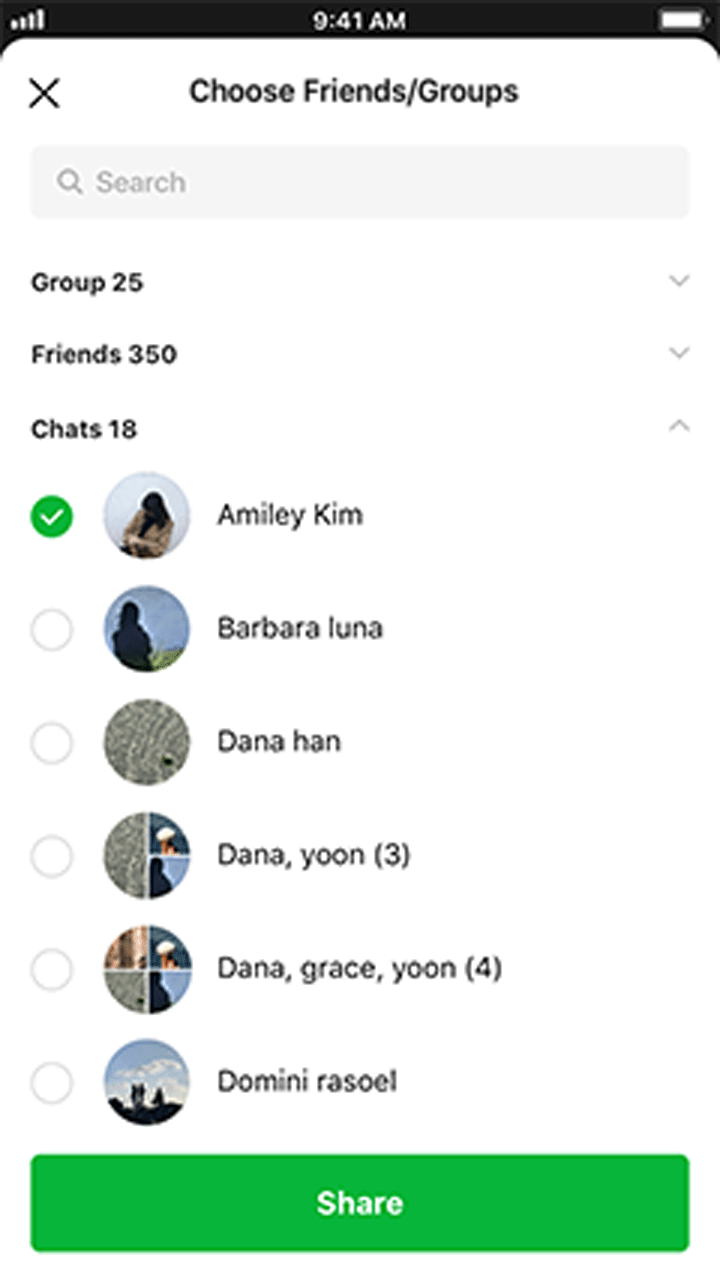
Execute the `liff.shareTargetPicker()` method to display the target picker (screen for selecting a group or friend) and send the message created by the developer to the selected target. This message appears to your group or friends as if you had sent it.
In the target picker, only friends (including LINE Official Accounts) and groups that the user participates in can be selected. OpenChats are not included.
#### Using the share target picker
To use the share target picker, developers need to consent to "Agreement Regarding Use of Information" by following the instructions below. This consent is required for each channel.
1. In the [LINE Developers Console](https://developers.line.biz/console/), select the LINE Login channel to add the LIFF app.
1. Click **shareTargetPicker** on the **LIFF** tab and "Agreement Regarding Use of Information" will be displayed.
1. Carefully read the content displayed and check **I have read and agree to the Agreement Regarding Use of Information**, then click **Enable**.
#### Sample code of the share target picker
The following code displays the target picker and sends "Hello, World!" as the user's message to the selected group or friends. If you want to confirm that the target picker can be used in the environment where the LIFF app is started, execute `liff.isApiAvailable()` first.
```javascript
if (liff.isApiAvailable("shareTargetPicker")) {
liff.shareTargetPicker([
{
type: "text",
text: "Hello, World!",
},
]);
}
```
For more information, see [liff.isApiAvailable()](https://developers.line.biz/en/reference/liff/#is-api-available) and [liff.shareTargetPicker()](https://developers.line.biz/en/reference/liff/#share-target-picker) in the LIFF v2 API reference.
### Closing the LIFF app
The `liff.closeWindow()` method closes the opened LIFF app.
```javascript
// closeWindow call
if (!liff.isInClient()) {
window.alert(
"This button is unavailable as LIFF is currently being opened in an external browser.",
);
} else {
liff.closeWindow();
}
```
For more information, see [liff.closeWindow()](https://developers.line.biz/en/reference/liff/#close-window) in the LIFF v2 API reference.
**Note**
`liff.closeWindow()` isn't guaranteed to work in an external browser.
## Setting the OGP tags
By setting an OGP tag for each page of the LIFF app, for example, you can display any title, description, or thumbnail image when sharing the URL of your LIFF app (`https://liff.line.me/{liffId}`) in the LINE chat room, and so on.
These are the OGP tags supported by LIFF. For more information on OGP tags, see [The Open Graph protocol](https://ogp.me/).
```html
```
**Note**
When sharing the URL of the LIFF app in the format of `line://app/{liffId}` (deprecated), the OGP tag will be ignored.
## When opening an external site that isn't a LIFF app
When opening an external site that isn't a LIFF app from a LIFF app opened in the LIFF browser, a popup will appear indicating that "This is an external page".
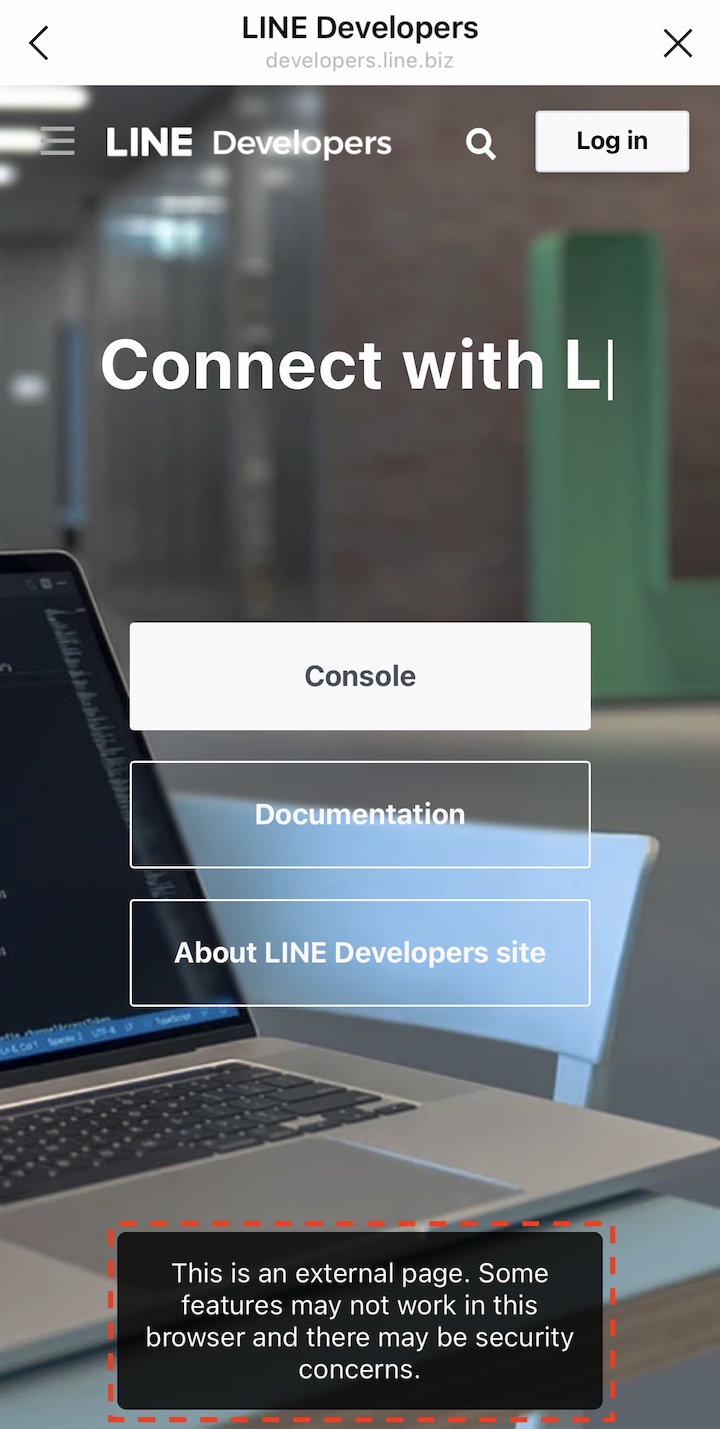
The popup will only appear when opening the external site in the same window. If the external site is opened in a different window, the popup doesn't appear.
**Transitioning up to a higher level than the LIFF endpoint URL**
When transitioning up to a higher level (e.g. `https://example.com/`) than the endpoint URL (e.g. `https://example.com/path`) itself in a LIFF app, the behavior isn't guaranteed.
## Behavior when closing the LIFF app
The behavior when a LIFF app opened in the LIFF browser is closed by the user or via the [`liff.closeWindow()`](https://developers.line.biz/en/reference/liff/#close-window) method varies depending on the LINE app version and the LIFF app settings.
### If the LINE app version is 15.12.0 or later
If the LINE app version is 15.12.0 or later, the behavior when closing the LIFF app will change depending on whether the LIFF app meets the [conditions for appearing in the "recently used services" section](https://developers.line.biz/en/docs/liff/overview/#multi-tab-view-condition) in the multi-tab view.
| | |
| --- | --- |
| If the conditions are met | A user can restart the LIFF app within 12 hours, even if they close it. The access token, browsing history, and screen scroll positions will be retained. |
| If the conditions are not met | When a user closes the LIFF app, the LIFF app exits. Therefore, the access token will be expired when the LIFF app is closed. |
For more information, see [Recently used services](https://developers.line.biz/en/docs/liff/overview/#multi-tab-view-recent-service).
### If the LINE app version is earlier than 15.12.0
If the LINE app version is earlier than 15.12.0, when a user closes the LIFF app, the LIFF app exits. Therefore, the access token will be expired when the LIFF app is closed.
## Next steps
After developing the LIFF app, deploy it on any server. Once deployed, do these things:
1. [Add the LIFF app to your channel.](https://developers.line.biz/en/docs/liff/registering-liff-apps/)
1. [Open the LIFF app](https://developers.line.biz/en/docs/liff/opening-liff-app/)