# The differences between LIFF browser and LINE's in-app browser
When you open a LIFF app within the LINE app, the LIFF app will open in either the [LIFF browser](https://developers.line.biz/en/glossary/#liff-browser) or [LINE's in-app browser](https://developers.line.biz/en/glossary/#line-iab). The LIFF browser and LINE's in-app browser are different browsers, and some LIFF app features are only available in the LIFF browser.
This page explains how to identify whether a browser is the LIFF browser or LINE's in-app browser and the differences in available features.
## LIFF browser
A browser dedicated to LIFF apps. When you open a LIFF app using the following ways, the LIFF app will open in the LIFF browser:
- Tap the [LIFF URL](https://developers.line.biz/en/glossary/#liff-url) in a chat room of the LINE app.
- Tap the LIFF URL in an external browser.
## LINE's in-app browser
A browser dedicated to use within the LINE app. When you open a LIFF app using the following way, the LIFF app will open in LINE's in-app browser:
- Tap the endpoint URL of the LIFF app in a chat room of the LINE app.
Note that in LIFF, LINE's in-app browser is treated as a type of external browser. For example if you execute the [`liff.getContext()`](https://developers.line.biz/en/reference/liff/#get-context) method in LINE's in-app browser, the value of the `type` property in the return value will be `external` (external browser).
## Identify whether a browser is the LIFF browser or LINE's in-app browser
There are two ways to identify whether the browser running a LIFF app is the LIFF browser or LINE's in-app browser:
- [Identify from the user interface](https://developers.line.biz/en/docs/liff/differences-between-liff-browser-and-line-in-app-browser/#identify-from-ui)
- [Identify using the `liff.isInClient()` method](https://developers.line.biz/en/docs/liff/differences-between-liff-browser-and-line-in-app-browser/#identify-using-liff-is-in-client)
### Identify from the user interface
The interface of headers and footers differs between the LIFF browser and LINE's in-app browser. Therefore, you can identify whether a browser is the LIFF browser or LINE's in-app browser by checking the user interface of the browser where a LIFF app is open.
| LIFF browser | LINE's in-app browser |
| --- | --- |
| 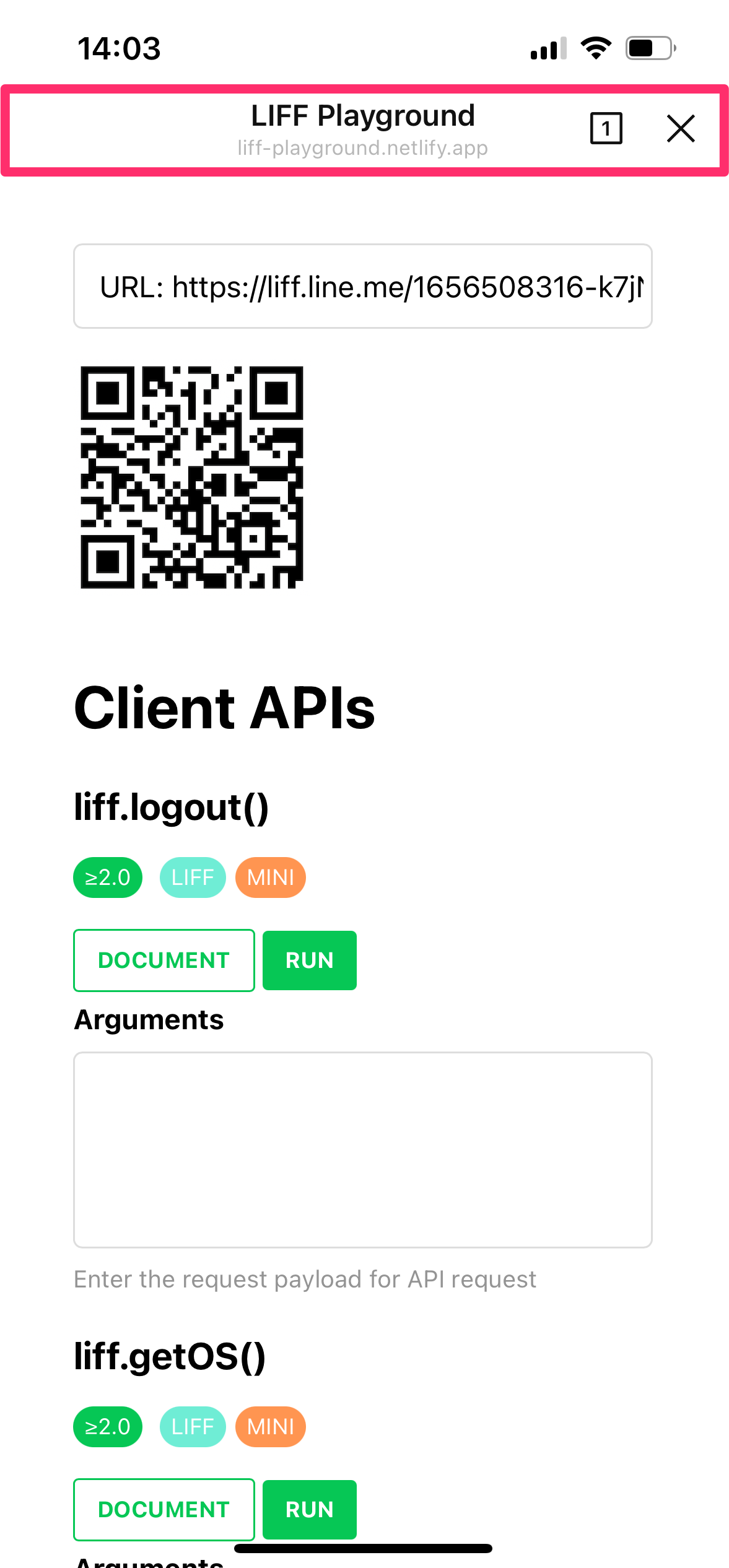- Header
- Minimizing button is not present
- Action button is present (\*)
- Footer is not present
| 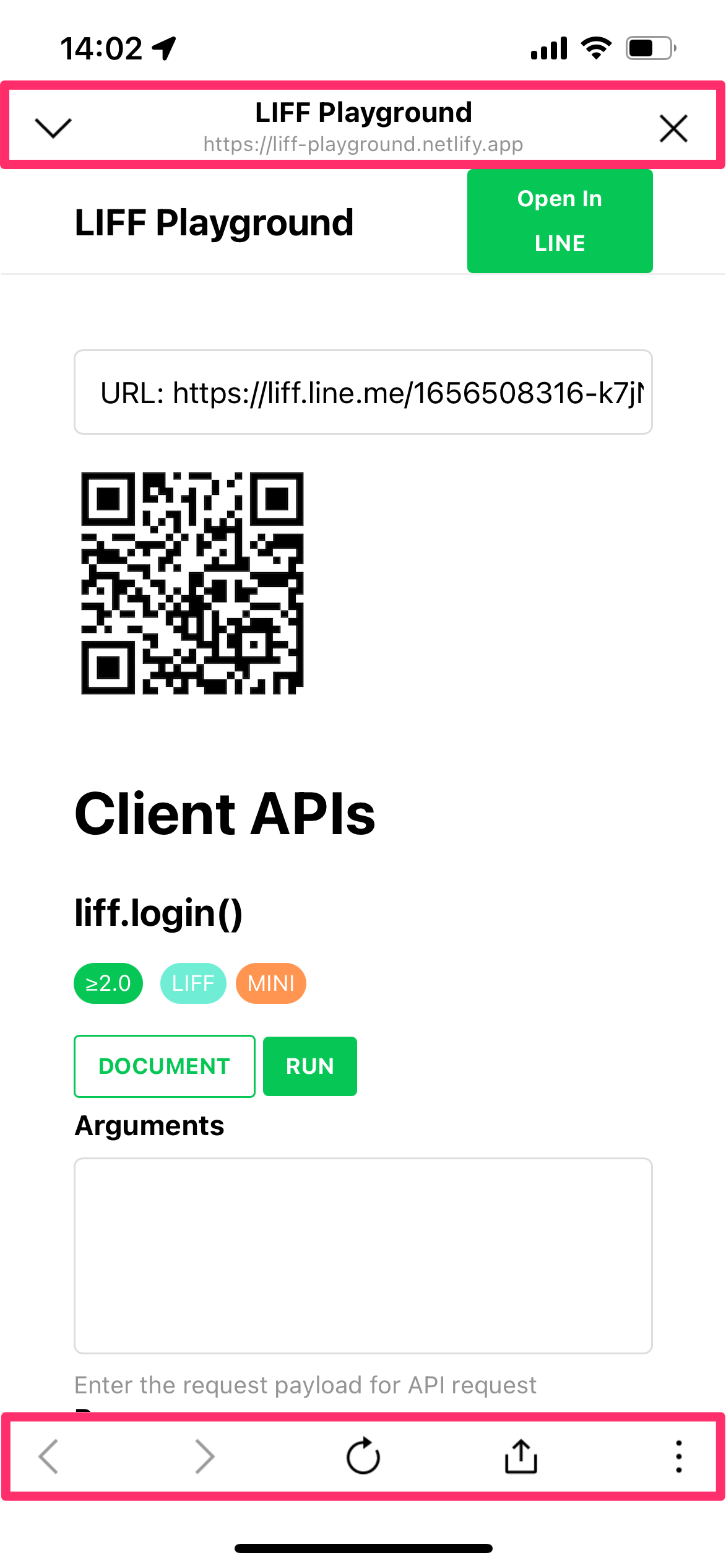- Header
- Minimizing button is present
- Action button is not present
- Footer is present
|
\* The action button isn't displayed in module mode. For more information, see [Adding the LIFF app to your channel](https://developers.line.biz/en/docs/liff/registering-liff-apps/#registering-liff-app).
### Identify using the `liff.isInClient()` method
You can identify whether a browser is the LIFF browser using the `liff.isInClient()` method. For more information, see [liff.isInClient()](https://developers.line.biz/en/reference/liff/#is-in-client) in the LIFF API reference.
## The differences in features available between the LIFF browser and LINE's in-app browser
The differences in features available between the LIFF browser and LINE's in-app browser are as follows:
| Feature | LIFF browser | LINE's in-app browser |
| --- | --- | --- |
| Specifying the [view size](https://developers.line.biz/en/docs/liff/overview/#screen-size) | ✅ | ❌ |
| [Action button](https://developers.line.biz/en/docs/liff/overview/#action-button) | ✅ | ❌ |
| [Multi-tab view](https://developers.line.biz/en/docs/liff/overview/#multi-tab-view) | ✅ | ❌ |
| [2D code reader](https://developers.line.biz/en/docs/liff/developing-liff-apps/#opening-two-dimensional-code-reader) | ✅ | ❌ |
| [Sending messages to the chat room](https://developers.line.biz/en/docs/liff/developing-liff-apps/#sending-messages) | ✅ | ❌ |
| [Share target picker](https://developers.line.biz/en/docs/liff/developing-liff-apps/#share-target-picker) | ✅ | ❌ |
| [Popup display when navigating to an external site that isn't a LIFF app](https://developers.line.biz/en/docs/liff/developing-liff-apps/#transition-to-external-site) | ✅ | ❌ |
| [LIFF-to-LIFF transition](https://developers.line.biz/en/docs/liff/opening-liff-app/#move-liff-to-liff) | ✅ | ❌ |
✅: Available
❌: Not available