# PKCE support for LINE Login
## What is PKCE?
PKCE (Proof Key for Code Exchange) is an OAuth2.0 extension specification defined in [RFC7636](https://datatracker.ietf.org/doc/html/rfc7636), intended to combat authorization code interception attacks.
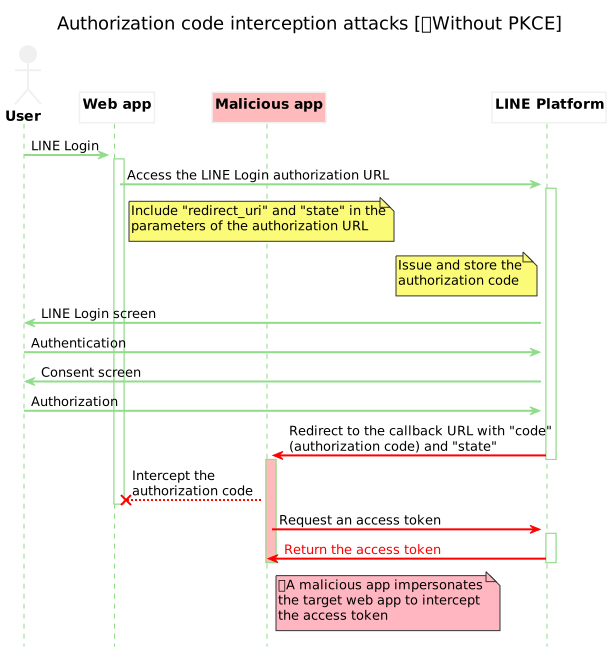
The OAuth2.0 authorization flow that doesn't use PKCE is vulnerable to user-specific access tokens being stolen if a malicious app somehow gets the custom URI containing the authorization code. By implementing the PKCE authorization flow into web apps that incorporate LINE Login, you can further improve the security of LINE Login v2.1 and prevent authorization code interception attacks.
## Benefits of implementing PKCE for LINE Login
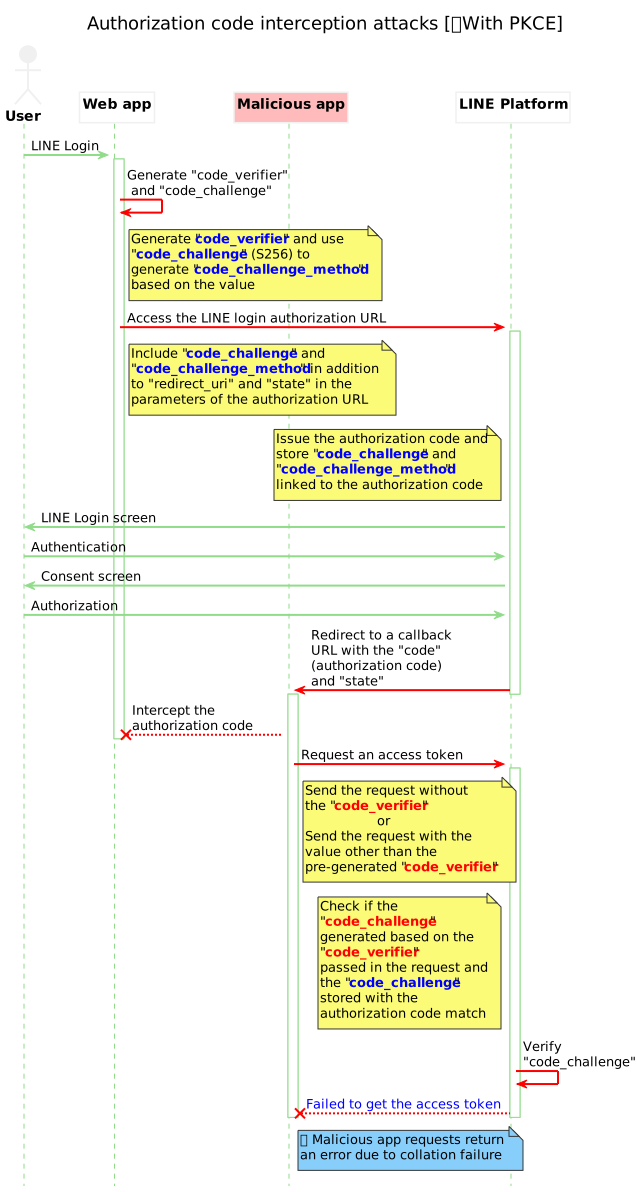
The behavior against authorization code interception attacks differs depending on whether PKCE is implemented or not in the web app that uses LINE Login. We recommend implementing PKCE to make your web app more secure.
| Without PKCE implemented |
With PKCE implemented |
If a malicious app somehow gets a callback URL containing an authorization code, it can steal an access token.
 |
Even if a malicious application steals the information passed during the redirection, it can be checked against a unique code_challenge to prevent access tokens from being stolen.
 |
**Another benefit of implementing PKCE**
If you access a web app that incorporates PKCE-implemented LINE login from the [Yahoo! JAPAN app](https://promo-mobile.yahoo.co.jp/yjapp/), the [auto login](https://developers.line.biz/en/docs/line-login/integrate-line-login/#line-auto-login) function that lets you skip the login process using your email address and password will be enabled.

## Implement PKCE for LINE Login
To implement PKCE for LINE Login, follow these four steps, as well as the [Integrating LINE Login with your web app](https://developers.line.biz/en/docs/line-login/integrate-line-login/) process.

1. [Generate `code_verifier`.](https://developers.line.biz/en/docs/line-login/integrate-pkce/#generate-code-verifier)
2. [Generate `code_challenge` based on the` code_verifier` generated in step 1.](https://developers.line.biz/en/docs/line-login/integrate-pkce/#generate-code-challenge)
3. [Redirect a user to the authorization URL given to the query parameter with the `code_challenge` and `code_challenge_method` generated in step 2.](https://developers.line.biz/en/docs/line-login/integrate-pkce/#add-to-authentication-url)
4. [Add the `code_verifier` generated in step 1 to the request body of the "Issue access token" API endpoint and execute it.](https://developers.line.biz/en/docs/line-login/integrate-pkce/#execute-issuing-access-token)
**New parameters for PKCE support**
To support PKCE, these parameters have been added to the LINE Login "Authorization URL" and "Issue access token" API endpoints.
- `code_verifier`
- `code_challenge`
- `code_challenge_method`
For more information about each parameter, see the detailed description of each step below.
### 1. Generate `code_verifier`
On the web app side, a unique `code_verifier` is generated when the user executes a LINE Login. The `code_verifier` spec is based on [RFC7636](https://datatracker.ietf.org/doc/html/rfc7636).
**Parameter**
| Parameter | Specs | Example |
| --- | --- | --- |
| code_verifier | **Available character types**: A random string consisting of half-width alphanumeric characters (`a`-`z`, `A`-`Z`, `0`-`9`) and symbols (`-._~`)
**Character count**: 43-128 characters | wJKN8qz5t8SSI9lMFhBB6qwNkQBkuPZoCxzRhwLRUo1 |
**Sample code**
This is a sample code for generating `code_verifier` using Node.js:
``` js
// randomAlphaNumericString() is supported to be a function that generates and returns a random string consisting of
// available characters (half-width alphanumeric characters and symbols) for the integer specified in the argument (43 to 128).
const code_verifier = randomAlphaNumericString(43);
```
### 2. Generate `code_challenge`
You can generate a `code_challenge` by hashing the generated `code_verifier` with SHA256 and then encoding it in Base64URL format.
**Parameter**
| Parameter | Specs | Example |
| --- | --- | --- |
| code_challenge | The value of `code_verifier` hashed with SHA256 and encoded in Base64URL format | BSCQwo_m8Wf0fpjmwkIKmPAJ1A7tiuRSNDnXzODS7QI |
**Format for URL query parameters**
The value of `code_challenge` needs to be deleted or replaced from the normal Base64 format string so that it can be used as a URL query parameter. For more information, see [5. Base 64 Encoding with URL and Filename Safe Alphabet](https://datatracker.ietf.org/doc/html/rfc4648#section-5) in RFC 4648.
- Remove padding (character stuffing `=`)
- Replace `+` with `-`
- Replace `/` with `_`
| Base64 format example | Deletion and replacement for `code_challenge` example |
| --- | --- |
| BSCQwo_m8Wf0fpjmwk+KmPAJ1A/tiuRSNDnXzODS7== | BSCQwo_m8Wf0fpjmwk-KmPAJ1A_tiuRSNDnXzODS7 |
**Sample code**
This is a sample code for generating `code_challenge` using Node.js:
``` js
// This sample code uses the Node.js "crypto" module.
// See: https://nodejs.org/api/crypto.html#crypto_crypto
const crypto = require("crypto");
// Encode BASE64 format into BASE64URL format.
function base64UrlEncode(str) {
return str
.replace(/\+/g, '-')
.replace(/\//g, '_')
.replace(/=/g, '');
}
// Hash code_verifier with SHA256 and encode it into BASE64URL format to generate code_challenge.
const code_challenge = base64UrlEncode(crypto
.createHash('sha256')
.update(code_verifier)
.digest('base64'));
```
### 3. Add `code_challenge` and` code_challenge_method` in the query parameters of the authorization URL
Include `code_challenge` and` code_challenge_method` in the query parameters of the normal LINE Login authorization URL.
**Parameter**
| Parameter | Type | Required | Description |
| --- | --- | --- | --- |
| `code_challenge` | String | Optional | The `code_challenge` generated in [step 2](https://developers.line.biz/en/docs/line-login/integrate-pkce/#generate-code-challenge). The default value is `null`. If no value is specified, the request doesn't support PKCE. |
| code_challenge_method | String | Optional | `S256` (Represents the hash function `SHA256`.)
Note: The [RFC7636 "Client Creates the Code Challenge"](https://datatracker.ietf.org/doc/html/rfc7636#section-4.2) defines `plain` (no transformation) as well as `S256` as the method for generating `code_challenge`, but LINE Login only supports `S256` for security reasons. |
**Authorization URL example**
```sh
https://access.line.me/oauth2/v2.1/authorize?response_type=code&client_id=1234567890&redirect_uri=https%3A%2F%2Fexample.com%2Fauth%3Fkey%3Dvalue&state=12345abcde&scope=profile%20openid&nonce=09876xyz
&code_challenge={The value of code_challenge calculated in step 2}&code_challenge_method=S256
```
For more information on other query parameters for authorization URLs, see [Authenticating users and making authorization requests](https://developers.line.biz/en/docs/line-login/integrate-line-login/#making-an-authorization-request).
### 4. Issue an access token by specifying `code_verifier` in the request body
Run with `code_verifier` in the request body of the [Issue access token](https://developers.line.biz/en/reference/line-login/#issue-access-token) API endpoint.
**Request body**
code_verifier
String
The `code_verifier` generated in [step 1](https://developers.line.biz/en/docs/line-login/integrate-pkce/#generate-code-verifier).
(e.g. `wJKN8qz5t8SSI9lMFhBB6qwNkQBkuPZoCxzRhwLRUo1`)
**Example request**
```sh
curl -v -X POST https://api.line.me/oauth2/v2.1/token \
-H 'Content-Type: application/x-www-form-urlencoded' \
-d 'grant_type=authorization_code' \
-d 'code=1234567890abcde' \
--data-urlencode 'redirect_uri=https://example.com/auth?key=value' \
-d 'client_id=1234567890' \
-d 'client_secret=1234567890abcdefghij1234567890ab' \
-d 'code_verifier={The code_verifier generated in step 1}'
```
For more information about the "Issue access token" API endpoint, see [Issue access token](https://developers.line.biz/en/reference/line-login/#issue-access-token) in the LINE Login v2.1 API reference.