# Getting started
Before you dive straight into developing a LINE MINI App, we recommend that you carefully read this content:
- Discover LINE MINI App
- [Specifications](https://developers.line.biz/en/docs/line-mini-app/discover/specifications/)
- Design
- [LINE MINI App icon](https://developers.line.biz/en/docs/line-mini-app/design/line-mini-app-icon/)
- [Safe area for landscape mode](https://developers.line.biz/en/docs/line-mini-app/design/landscape/)
- [Loading icon](https://developers.line.biz/en/docs/line-mini-app/design/loading-icon/)
- Develop
- [Performance guidelines](https://developers.line.biz/en/docs/line-mini-app/develop/performance-guidelines/)
- Submit Application
- [Submit Application for Review](https://developers.line.biz/en/docs/line-mini-app/submit/submission-guide/)
- [LINE MINI App policy](https://terms2.line.me/LINE_MINI_App?lang=en)
## Create a LINE MINI App Channel
A [Channel](https://developers.line.biz/en/docs/line-developers-console/overview/#channel) is the communication channel that connects your app to the LINE Platform. Create a LINE MINI App channel on the LINE Developers Console for each LINE MINI App.
1. Access the [LINE Developers Console](https://developers.line.biz/console/) and select a provider.
2. Click in the order of **Channels** > **Create a new channel** > **LINE MINI App**.
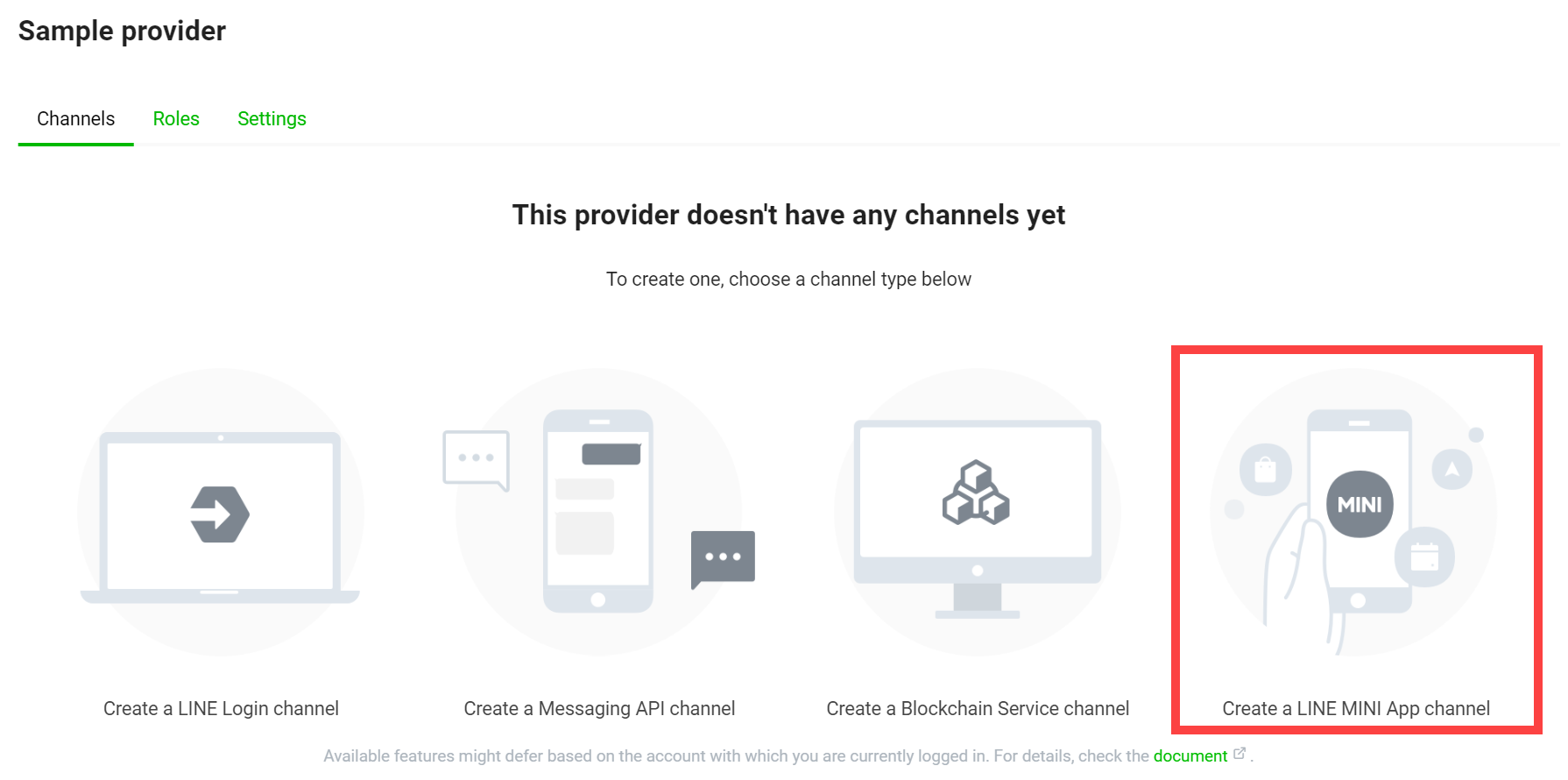
When creating a LINE MINI App channel, there may be restrictions depending on the conditions of the region to provide the service, etc. For more information, see [Precautions for LINE MINI App channel creation](https://developers.line.biz/en/docs/line-mini-app/develop/develop-overview/#precautions-for-channel-creation).
3. Enter the information in the items below to create a LINE MINI App channel.
| Item | Required? | Description | Location displayed to users |
| --- | --- | --- | --- |
| **Channel type** | ✅ | The channel type. Select LINE MINI App to create your LINE MINI App channel. | - |
| **Provider** | ✅ | The channel's [provider](https://developers.line.biz/en/docs/line-developers-console/overview/#provider) | Permission consent screen when launching LINE Login or LIFF App |
| **Region to provide the service** | ✅ | The region you want to provide your LINE MINI App. One of:
\*If you want to provide your LINE MINI App in multiple regions, create a channel for each region. | - |
| **Channel icon** | ❌ | The channel's icon. For more information on the icon size and design, see [Creating a LINE MINI App icon](https://developers.line.biz/en/docs/line-mini-app/design/line-mini-app-icon/). | - Permission consent screen when launching LINE MINI App
- The target chat room when you use an [action button](https://developers.line.biz/en/docs/line-mini-app/develop/configure-console/#built-in-share-settings) to share a LINE MINI App page
- [Multi-tab view](https://developers.line.biz/en/docs/line-mini-app/develop/configure-console/#multi-tab-view-settings)
- Footer section of the [Service message](https://developers.line.biz/en/docs/line-mini-app/develop/service-messages/#template-elements)
- [Discover the LINE MINI App (Home tab, search feature, etc.)](https://developers.line.biz/en/docs/line-mini-app/discover/introduction/#access-line-mini-app-methods-for-users)
- [Add Shortcut screen](https://developers.line.biz/en/docs/line-mini-app/develop/configure-console/#add-shortcut-screen)
|
| **Channel name** | ✅ | The channel's name
\*Channel name can't contain "LINE" or similar strings. | - Permission consent screen when launching LINE MINI App
- The target chat room when you use an [action button](https://developers.line.biz/en/docs/line-mini-app/develop/configure-console/#built-in-share-settings) to share a LINE MINI App page
- [Multi-tab view](https://developers.line.biz/en/docs/line-mini-app/develop/configure-console/#multi-tab-view-settings)
- Footer section of the [Service message](https://developers.line.biz/en/docs/line-mini-app/develop/service-messages/#template-elements)
- [Discover the LINE MINI App (Home tab, search feature, etc.)](https://developers.line.biz/en/docs/line-mini-app/discover/introduction/#access-line-mini-app-methods-for-users)
- [Add Shortcut screen](https://developers.line.biz/en/docs/line-mini-app/develop/configure-console/#add-shortcut-screen)
|
| **Channel description** | ✅ | The channel's description. If the company in charge of developing the LINE MINI App and the company providing the service are different, notify the user. For more information, see Company information in the [LINE MINI App Policy](https://terms2.line.me/LINE_MINI_App?lang=en). | Permission consent screen when launching LINE MINI App |
| **Email address** | ✅ | Email address to receive important updates about the channel | - |
| **Privacy policy URL** | ✅ \* | The app's privacy policy URL | Permission consent screen when launching LINE MINI App |
| **Terms of use URL** | ❌ | The app's terms of use URL | Permission consent screen when launching LINE MINI App |
| **LINE Developers Agreement** | ✅ | Read and agree to the LINE Developers Agreement. | - |
| **LINE MINI App Platform Agreemeent** | ✅ | Read and agree to the LINE MINI App Platform Agreement. | - |
| **LINE MINI App Policy** | ✅ | Read and agree to the LINE MINI App Policy. | - |
| **Service company's country or region** | ✅ | Represent and warrant that the region to provide the LINE MINI App and service company's country or region are the same. | Permission consent screen when launching LINE MINI App |
| **LY Corporation Privacy Policy** | See description | Required only if you've selected Thailand as **Region to provide the service**. Read and acknowledge [LY Corporation Privacy Policy](https://line.me/th/terms/policy/). | - |
\* Only for certified providers, the privacy policy URL must be entered when creating a LINE MINI App channel.
4. Be sure to read starting with "By creating a LINE MINI App and agreeing to the terms and conditions herein, I hereby warrant and represent that I have the full authority to execute and bind my company to the terms hereof." and check the box to indicate you warrant and represent said authority.
5. Click **Create**.
6. Be sure to read "Regarding Consent to Usage of the Information" and click **Accept** if you consent.
The above process will create a channel for the LINE MINI App, and it will be ready to use as an unverified MINI App.
For more information on changing the settings of the LINE MINI App channel you've created, see [When settings on the LINE Developers Console are reflected](https://developers.line.biz/en/docs/line-mini-app/discover/console-guide/#timing-of-settings-reflection).
### Precautions for LINE MINI App channel creation
When creating a LINE MINI App channel, there may be restrictions depending on the conditions of the region to provide the service, etc.
- If your service area is Japan, anyone who is a permitted customer in the [LINE MINI App Policy](https://terms2.line.me/LINE_MINI_App?lang=en) can create a LINE MINI App channel.
- If you are unable to create a LINE MINI App channel even though your service area is Japan, try the following:
- Link the Business ID that you use to log in to the [LINE Developers Console](https://developers.line.biz/console/) to your LINE account. For more information on linking your business account to your LINE account, see [Link your Business ID with your LINE account](https://developers.line.biz/en/docs/line-developers-console/login-account/#link-business-account-with-line-account) in the LINE Developers Console documentation.
- If your service area is Taiwan, you can only create a LINE MINI App channel if you are approved by our local subsidiary. For more information, see [LINE MINI App official site for Taiwan users](https://tw.linebiz.com/service/other-solutions/line-mini-app/).
- If your service area is Thailand, you can only create a LINE MINI App channel if you are approved by our local subsidiary. The contact details for receiving approval are currently being prepared.
### Privacy policy URL settings
If the company in charge of developing the LINE MINI App and the service provider are different, you will need to configure the **Channel description** and **Privacy policy URL** in order to pass the review. For more information, see "Company information" in the [LINE MINI App Policy](https://terms2.line.me/LINE_MINI_App?lang=en).
When creating a LINE MINI App channel, you can set the **Privacy policy URL** if you are a certified provider. But if you're not, you can't. In that case, create a LINE MINI App channel first, and then edit the **Privacy policy URL**.
### Precautions for channel and provider linkage
Once you create a channel, you can't move the channel to another provider later.
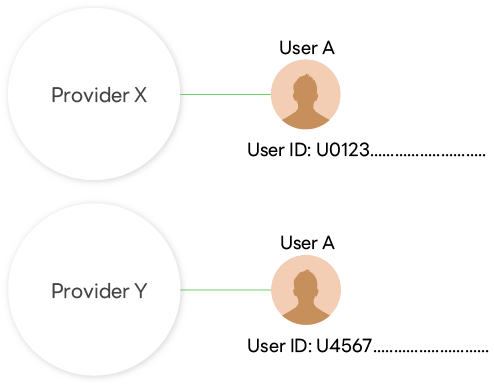
A LINE user who uses services provided by developers is given a different user ID for each provider. User IDs can't be used to identify the same user across channels under different providers.
**Cases that require special attention when creating a channel**
For example, the following cases require special attention:
- Channels and providers are managed by individuals or companies.
- Create channels of unrelated services or companies under one provider.
- Channels are created under a provider managed by a service (company) that operates channel management tools, etc.
In such cases, problems may arise in the future due to the inability to move channels later between providers and the fact that a user is given different user IDs for different providers. After considering the risks involved, create a channel under the appropriate provider.
**Best practices for provider and channel management**
There is a page that explains, with specific examples, how to manage admin roles for providers and channels, and which provider you should create channels under.
For more information, see [Best practices for provider and channel management](https://developers.line.biz/en/docs/line-developers-console/best-practices-for-provider-and-channel-management/) in the LINE Developers Console documentation.
## Develop a LINE MINI App
Once you create a LINE MINI App channel, you can start developing a LINE MINI App. Think of developing a LINE MINI App as using [LIFF](https://developers.line.biz/en/docs/liff/overview/) with additional requirements and restrictions as explained in this guide.
For more information, see the [Specifications](https://developers.line.biz/en/docs/line-mini-app/discover/specifications/).
### Internal structure of a LINE MINI App channel
From the **Channels** tab of the LINE Developers Console, a LINE MINI App appears as a single channel, but internally it consists of the following three channels (hereafter called "internal channels"):
| Internal channels | Description |
| --- | --- |
| LINE MINI App channel in Developing | LINE MINI App channel used for development. The channel status is always "Developing". |
| LINE MINI App channel in Review | LINE MINI App channel used for review by LY Corporation. The channel status is always "Developing". |
| LINE MINI App channel in Published | LINE MINI App channel that is published and made available to users. The channel status is always "Publishing". |
For more information on internal channels, see [LINE Developers Console Guide for LINE MINI App](https://developers.line.biz/en/docs/line-mini-app/discover/console-guide/).
### Using APIs
Two types of APIs are available for you to develop LINE MINI Apps: the LIFF API and the [Service Message API](https://developers.line.biz/en/reference/line-mini-app/). The LIFF API is called from your LINE MINI App, while the Service Message API is called from the server-side of your service. For more information on using the LIFF API, see [LIFF documentation](https://developers.line.biz/en/docs/liff/overview/).
For instance, to [implement a custom action button](https://developers.line.biz/en/docs/line-mini-app/develop/share-messages/), you would need to call the LIFF API from your LINE MINI App. But to send [service messages](https://developers.line.biz/en/docs/line-mini-app/develop/service-messages/), you would need to call the Service Message API from your server.
**LIFF API is constantly being improved**
To enhance user experience, the LIFF API is constantly adding new features and improving existing features.
## Use basic authentication to restrict access to your LINE MINI App before it is released
Basic authentication is available for LINE MINI Apps with the status "Not yet reviewed" or "Reviewing". You can restrict access to pre-publishing LINE MINI Apps by using basic authentication.
### How to use basic authentication
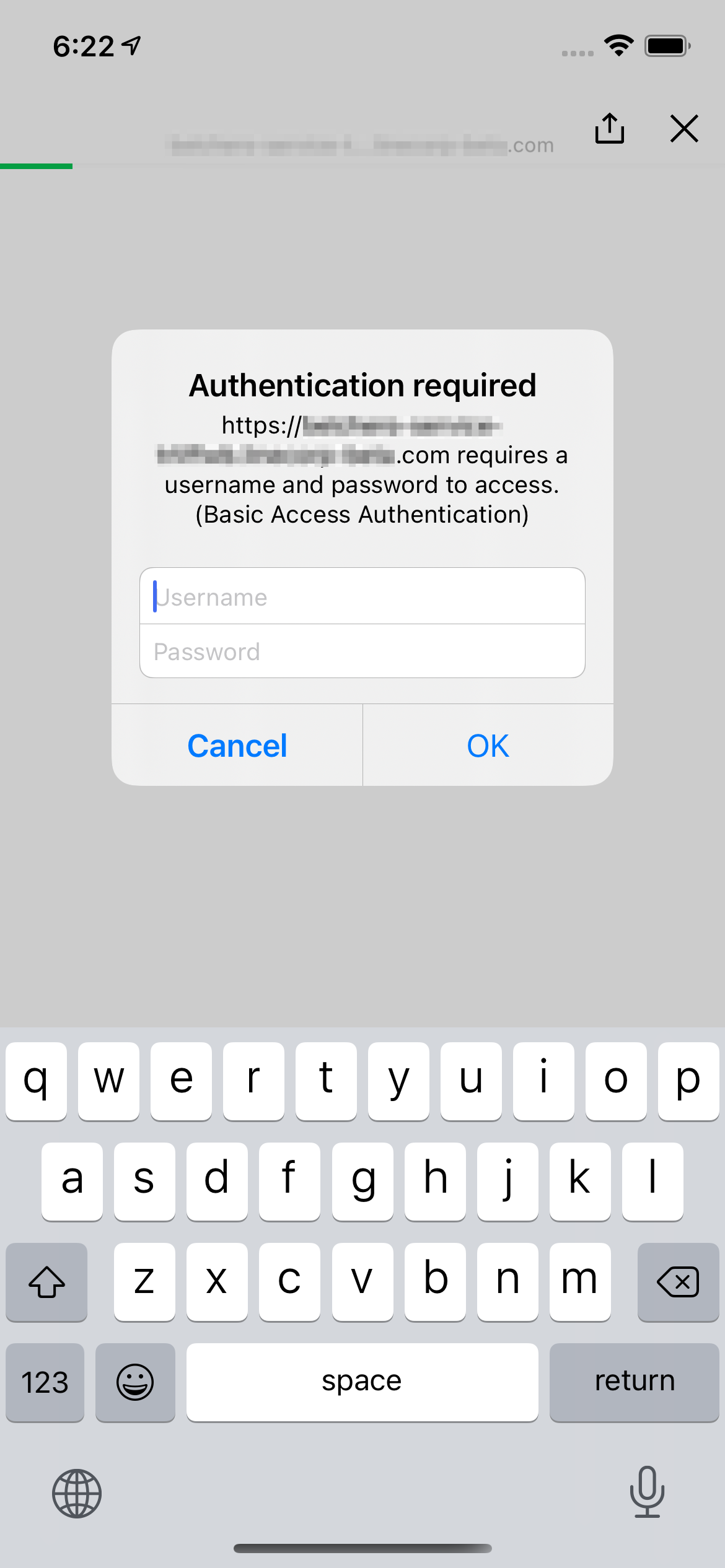
In the **Web app settings** tab on the [LINE Developers Console](https://developers.line.biz/console/), specify the URL with basic authentication in the **Endpoint URL** for **Developing** or **Review**. Then open the LINE MINI App in the [LIFF browser](https://developers.line.biz/en/glossary/#liff-browser) and a dialog box will appear prompting you to enter your username and password.
### Conditions for basic authentication
Basic authentication is available when all of the following conditions are met:
- The status of your LINE MINI App is "Not yet reviewed" or "Reviewing".
- LINE MINI App is open in [LIFF Browser](https://developers.line.biz/en/glossary/#liff-browser).
Basic Authentication isn't available for the LIFF App and LINE MINI Apps whose status is "Reflected". Also, you can't use digest authentication.
**When basic authentication isn't available even though the conditions are met**
Basic authentication isn't available in a LINE MINI App after a LIFF-to-LIFF transition. For more information, see [Opening a LIFF app from another LIFF app (LIFF-to-LIFF transition)](https://developers.line.biz/en/docs/liff/opening-liff-app/#move-liff-to-liff) in the LIFF documentation.
For more information about basic authentication specifications on LIFF browser, see [LIFF browser specifications](https://developers.line.biz/en/docs/liff/overview/#liff-browser-spec) in the LIFF documentation.
### Notes on using basic authentication
Basic authentication is an authentication method used for simple access restrictions, and developers of LINE MINI Apps should evaluate and judge for themselves whether basic authentication meets their security requirements before using it.
The addition of this functionality doesn't recommend the use of basic authentication, nor does it guarantee the security of access restrictions based on basic authentication.
## Our recommendations for development
Develop your LINE MINI App in a way that helps users to access your core features easily and quickly. Here are a couple of our suggestions:
- Use HTML5 [Geolocation API](https://www.w3.org/TR/geolocation/) for locating users.
- Utilize users' LINE profile information, which can be obtained with the LIFF API. For instance, auto-generating users' LINE profile information for restaurant reservations spares users from having to enter their personal information each time they make a new reservation.
- Optimize your LINE MINI App's performance to provide better user experience for your LINE MINI App users. For more information, see the [Performance guidelines](https://developers.line.biz/en/docs/line-mini-app/develop/performance-guidelines/).
## Request LINE MINI App review
When you create a LINE MINI App channel, the LINE MINI App is an unverified MINI App, and some features are restricted. To make the developed LINE MINI App a verified MINI App, it's necessary to undergo the verification review by LY Corporation. For more information, see [Submitting LINE MINI App](https://developers.line.biz/en/docs/line-mini-app/submit/submission-guide/).