# Implementing a custom action button
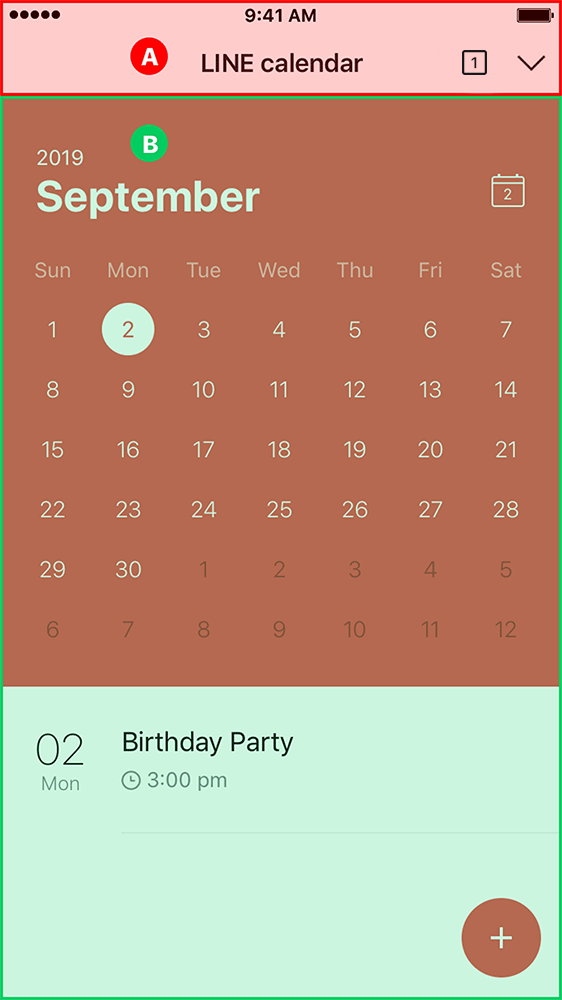
LINE MINI Apps come with a built-in action button in the (A) [header](https://developers.line.biz/en/docs/line-mini-app/discover/ui-components/#header) that enables users to share the currently-opened page with their friends. As this action button is implemented by LINE and is displayed by default, the behavior of the button and the content of the share message can't be customized.
However, if you implement a custom action button in the (B) body, you can customize the content of the share message before sharing the LINE MINI App.
## Guidelines
When you implement a custom action button to enable sending custom share messages, follow these guidelines to help your users understand the content of the message quickly and accurately.
**Note**
If you cannot meet the design requirements herein because of the nature of the service you provide, contact us at [mini_request@linecorp.com](mailto:mini_request@linecorp.com).
**LIFF URL for LINE MINI App has been changed**
As of [December 13, 2023](https://developers.line.biz/en/news/2023/12/13/change-of-liff-url-for-line-mini-app/), the LIFF URL of the LINE MINI App has been changed to `https://miniapp.line.me/{liffId}`.
If a user accesses existing `https://liff.line.me/{liffId}`, the LINE MINI App will also open. Therefore, you can continue to use the QR code that you've already issued.
### Using share target picker
Implement a custom action button in the body and display the target picker (screen for selecting a group or friend) when the button is tapped. When the user selects the recipient in the target picker, the user can send the share message created by the developer, such as [Flex Message](https://developers.line.biz/en/docs/messaging-api/using-flex-messages/).
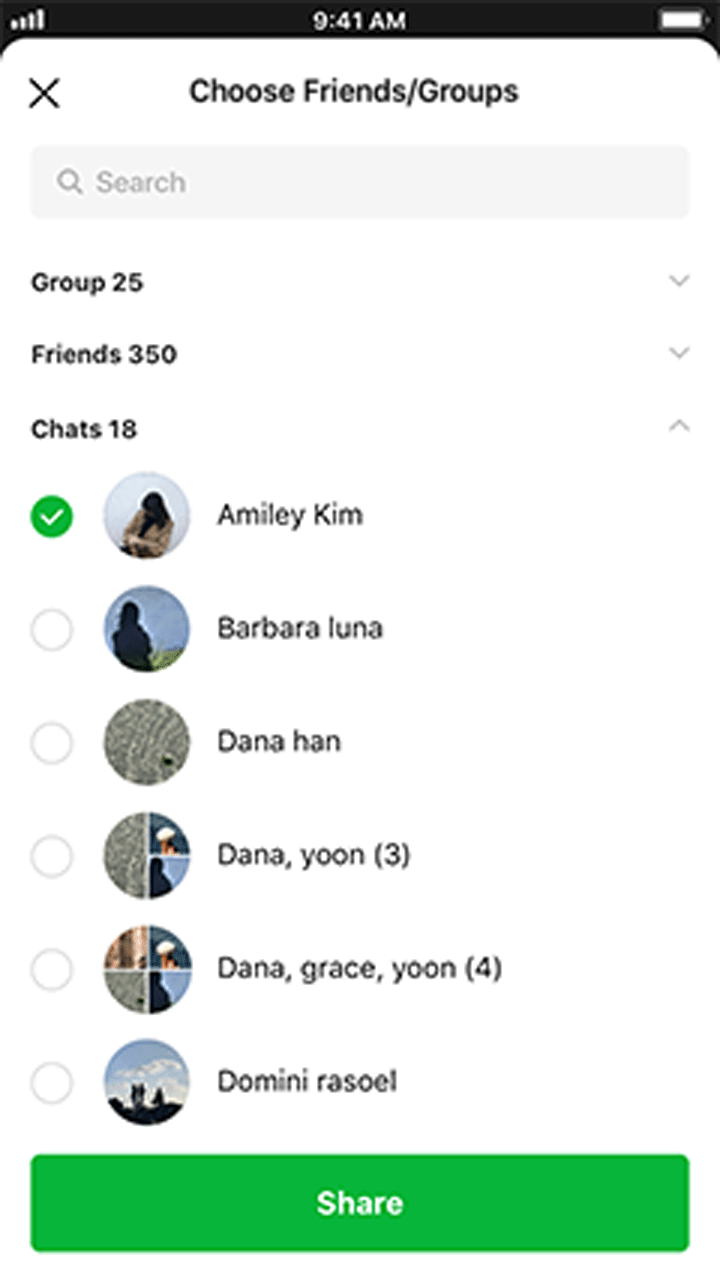
See [Sending messages to a user's friend](https://developers.line.biz/en/docs/liff/developing-liff-apps/#share-target-picker) for detailed guide on using the share target picker.
### Custom share message format
Use a [Bubble](https://developers.line.biz/en/docs/messaging-api/flex-message-elements/#bubble) container of the Flex Message to compose custom share messages. Do not use a [Carousel](https://developers.line.biz/en/docs/messaging-api/flex-message-elements/#carousel) container of the Flex Message.
The custom share message includes [standard type](https://developers.line.biz/en/docs/line-mini-app/develop/share-messages/#standard) and [image list type](https://developers.line.biz/en/docs/line-mini-app/develop/share-messages/#image-list), both of which are then respectively divided into sections A to F below:
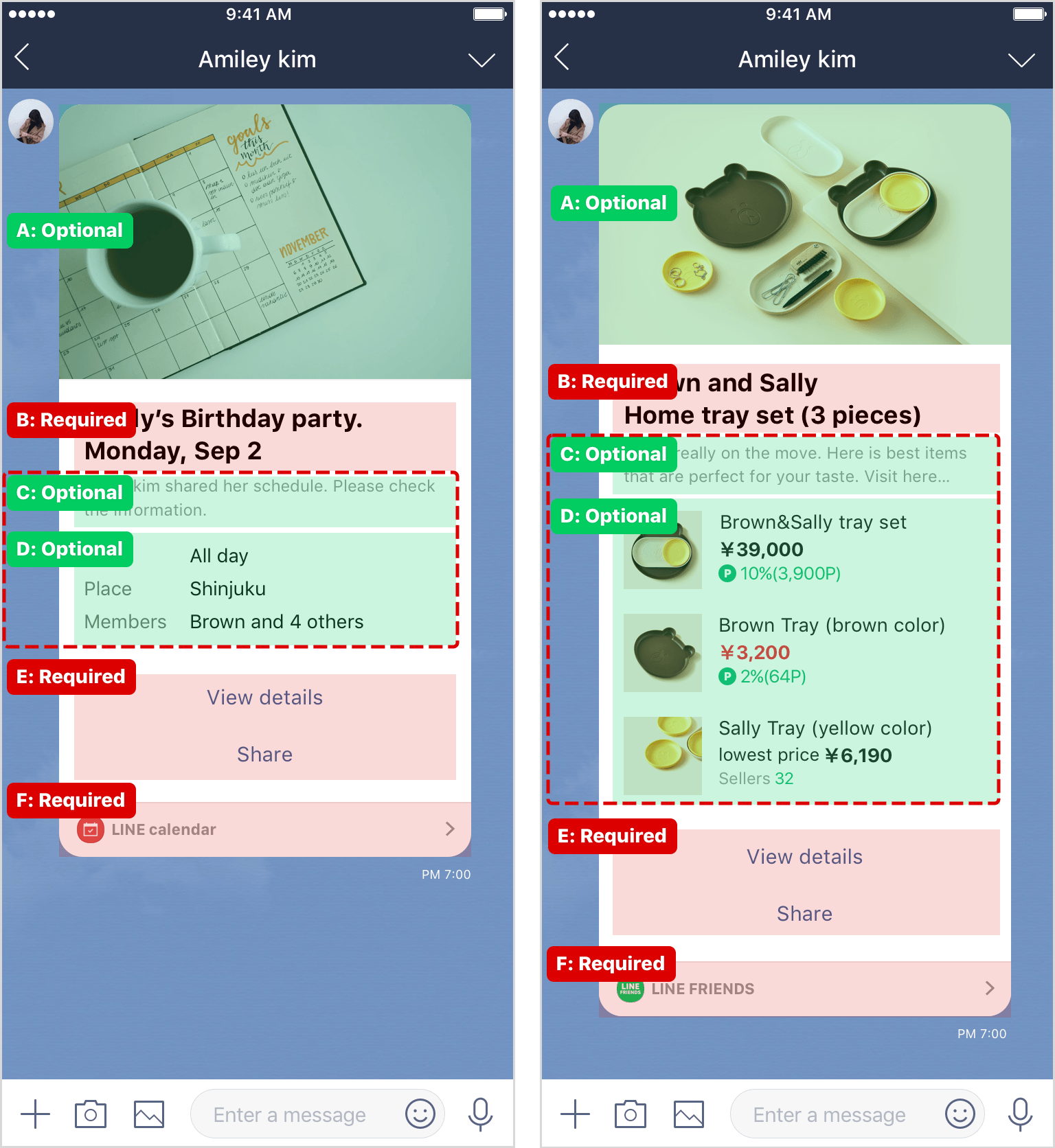
| Label | Section | Required | Description |
| --- | --- | --- | --- |
| A | Image | Optional | Image size must be small enough for the whole message to be contained within the screen, eliminating the need for scrolling. |
| B | Title | Required | Summarize the content of the message. |
| C | Subtitle | \* | This is the subtitle of your message. |
| D | Detail | \* | A list of items with a label and description: The maximum number of items differs between the standard type and the image list type:- Standard type: A list of 10 items at maximum
- Image list type: A list of 5 items at maximum
|
| E | Button | Required | - You can insert up to three buttons.
- At least one button should be configured to display a page (detail page) detailing the content you wish to share.
|
| F | Footer | Required | Compose with your LINE MINI App icon, LINE MINI App name, and a image . Don't change this image. Specify the URI action to display the LINE MINI App top page (`https://miniapp.line.me/{your-liffId}`) when the user taps this image. |
\* You must insert either C, the sub-title or D, the detail section. You may use both.
#### Standard type
For standard types of Flex Message, follow these guidelines:
For an example JSON file, see [Example JSON file following guidelines](https://developers.line.biz/en/docs/line-mini-app/develop/share-messages-standard/).
**Note**
- Actions can only be set on the specified components of buttons (E) and footer (F).
- Don't change any properties not described here.
##### Standard type - Image (A)
Put the image (A) in the hero block.
| Label | Section | Type | Description |
| --- | --- | --- | --- |
| A | Image | [Hero block](https://developers.line.biz/en/docs/messaging-api/flex-message-elements/#block) > [Image](https://developers.line.biz/en/docs/messaging-api/flex-message-elements/#image) | - `"url": "{URL}"`
- `"size": "full"`
- `"aspectRatio": "{width}:{height}"`
However, set `{width} * 2` or less for `{height}`. - `"aspectMode": "cover"`
|
```json
{
"type": "bubble",
"hero": { // Hero block
// Image (A)
"type": "image",
"url": "https://example.com/hero-image.png",
"size": "full",
"aspectRatio": "20:13",
"aspectMode": "cover"
},
"body": {. . .}
}
```
##### Standard type - Body
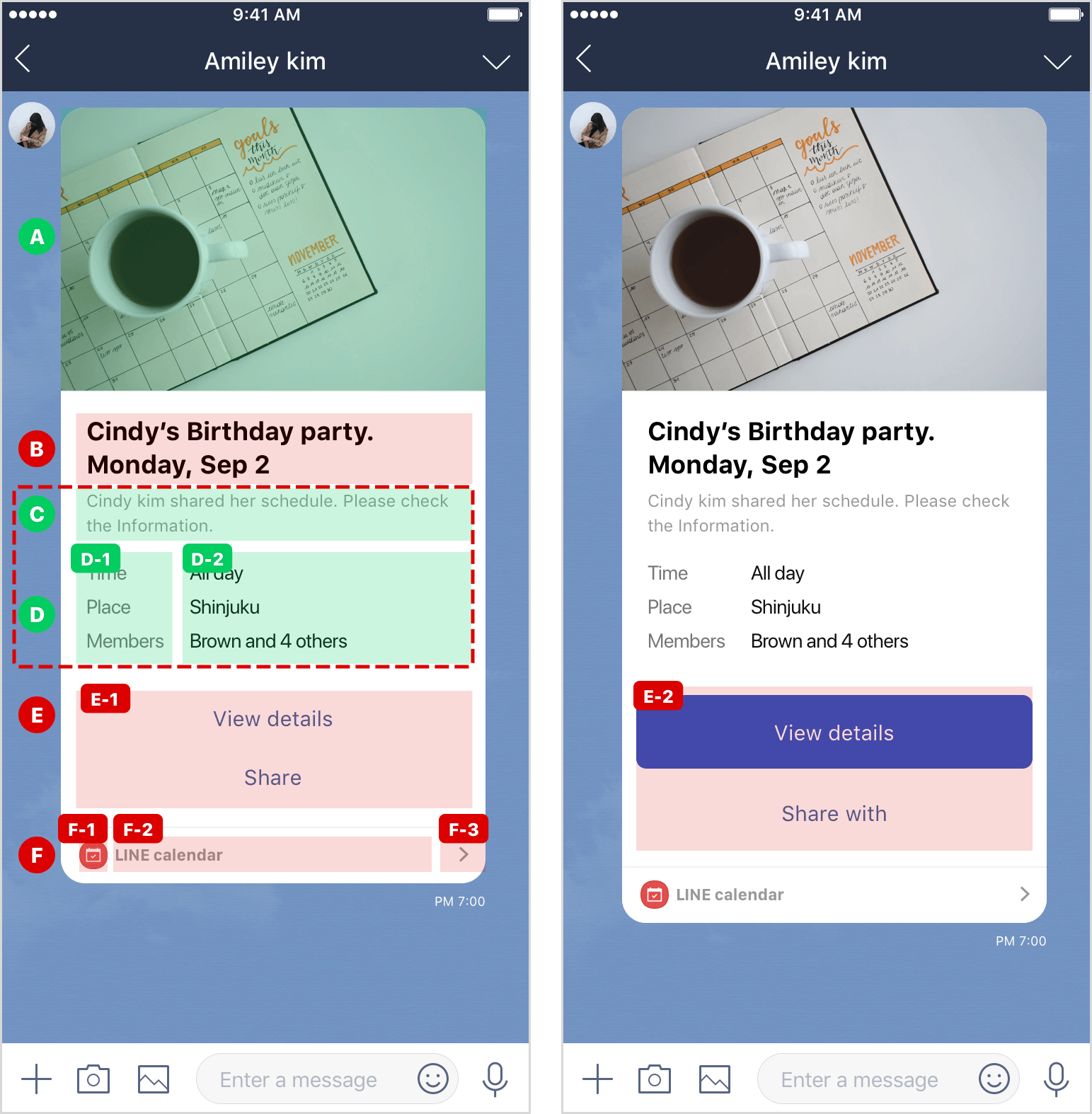
Specify the body block that contains the title (B), sub-title (C), details (D), and buttons (E) as follows:
| Label | Section | Type | Description |
| --- | --- | --- | --- |
| - | - | [Body block](https://developers.line.biz/en/docs/messaging-api/flex-message-elements/#block) > [Box](https://developers.line.biz/en/docs/messaging-api/flex-message-elements/#box) | - `"layout": "vertical"`
- `"spacing": "md"`
|
```json
{
"type": "bubble",
"hero": { ... },
"body": { // Body block
// Box
"type": "box",
"layout": "vertical",
"contents": [ ... ],
"spacing": "md"
}
}
```
##### Standard type - Title (B)
| Label | Section | Type | Description |
| --- | --- | --- | --- |
| B | Title | [Box](https://developers.line.biz/en/docs/messaging-api/flex-message-elements/#box) | - `"layout": "vertical"`
- `"spacing": "none"`
|
| B | Title | [Text](https://developers.line.biz/en/docs/messaging-api/flex-message-elements/#text) | - `"text": "{Title}"`
Text maximum lines: 2 - `"size": "lg"`
- `"color": "#000000"`
- `"weight": "bold"`
- `"wrap": true`
|
```json
{
"type": "bubble",
"hero": { ... },
"body": {
"type": "box",
"layout": "vertical",
"contents": [
{ // Title (B) - Box
"type": "box",
"layout": "vertical",
"contents": [
{ // Text
"type": "text",
"text": "Main title",
"size": "lg",
"color": "#000000",
"weight": "bold",
"wrap": true
}
],
"spacing": "none"
}
],
"spacing": "md"
}
}
```
##### Standard type - Sub-title (C)
| Label | Section | Type | Description |
| --- | --- | --- | --- |
| C | Sub-title | [Box](https://developers.line.biz/en/docs/messaging-api/flex-message-elements/#box) | - `"layout": "vertical"`
- `"spacing": "none"`
|
| C | Sub-title | [Text](https://developers.line.biz/en/docs/messaging-api/flex-message-elements/#text) | - `"text": "{Sub-title}"`
Text maximum lines: 2 - `"size": "sm"`
- `"color": "#999999"`
- `"wrap": true`
|
```json
{
"type": "bubble",
"hero": { ... },
"body": {
"type": "box",
"layout": "vertical",
"contents": [
{ // Title (B) - Box
...
},
{ // Sub-title (C) - Box
"type": "box",
"layout": "vertical",
"contents": [
{ // Text
"type": "text",
"text": "Sub-title",
"size": "sm",
"color": "#999999",
"wrap": true
}
],
"spacing": "none"
}
],
"spacing": "md"
}
}
```
##### Standard type - Details (D)
| Label | Section | Type | Description |
| --- | --- | --- | --- |
| D | Details | [Box](https://developers.line.biz/en/docs/messaging-api/flex-message-elements/#box) | - `"layout": "vertical"`
- `"spacing": "sm"`
- `"margin": "lg"`
- `"flex": 1`
|
| D | Details - item | [Box](https://developers.line.biz/en/docs/messaging-api/flex-message-elements/#box) | This is a box containing only one set of D-1 and D-2.- `"layout": "horizontal"`
- `"spacing": "sm"`
- `"flex": 1`
|
| D-1 | Details - label | [Text](https://developers.line.biz/en/docs/messaging-api/flex-message-elements/#text) | - `"text": "{Label}"`
Text maximum lines: 1 - `"size": "sm"`
- `"color": "#555555"`
- `"wrap": false`
- `"flex": 20`
|
| D-2 | Details - description | [Text](https://developers.line.biz/en/docs/messaging-api/flex-message-elements/#text) | - `"text": "{Description}"`
Text maximum lines: 1 - `"size": "sm"`
- `"color": "#111111"`
- `"wrap": false`
- `"flex": 55`
|
```json
{
"type": "bubble",
"hero": { ... },
"body": {
"type": "box",
"layout": "vertical",
"contents": [
{ // Title (B) - Box
...
},
{ // Sub-title (C) - Box
...
},
{ // Details (D) - Box
"type": "box",
"layout": "vertical",
"contents": [
{ // Label (D-1) - Box
"type": "box",
"layout": "horizontal",
"contents": [
{ // Text
"type": "text",
"text": "Label 1",
"size": "sm",
"color": "#555555",
"wrap": false
"flex": 20
},
{ Description
"type": "text",
"text": "Description 1",
"size": "sm",
"color": "#111111",
"wrap": false,
"flex": 55
}
],
"flex": 1,
"spacing": "sm"
},
{ // Detail (D-2) - Box
"type": "box",
"layout": "horizontal",
"contents": [
{ // Text
"type": "text",
"text": "Label 2",
"size": "sm",
"color": "#555555",
"wrap": false
"flex": 20
},
{ // Text
"type": "text",
"text": "Description 2",
"size": "sm",
"color": "#111111",
"wrap": false,
"flex": 55
}
],
"flex": 1,
"spacing": "sm"
}
],
"spacing": "sm",
"margin": "lg",
"flex": 1
}
],
"spacing": "md"
}
}
```
##### Standard type - Button (E)
| Label | Section | Type | Description |
| --- | --- | --- | --- |
| E | Button | [Box](https://developers.line.biz/en/docs/messaging-api/flex-message-elements/#box) | A box containing of E-1 and E-2.- `"layout": "vertical"`
- `"spacing": "xs"`
- `"margin": "lg"`
|
| E-1 | Button
(When using only link style) | [Button](https://developers.line.biz/en/docs/messaging-api/flex-message-elements/#button) | - `"style": "link"`
- `"height": "sm"`
- `"color": "{Text Color}"`
- `"action" : { ... }`
Specify the URI action so that the LINE MINI App page will be displayed when the user taps this button. If the page isn't the top page of your LINE MINI App, you must assign a [permanent link](https://developers.line.biz/en/docs/line-mini-app/develop/permanent-links/).
|
| E-2 | Button
(When using primary style) | [Button](https://developers.line.biz/en/docs/messaging-api/flex-message-elements/#button) | - Specify `"style": "primary"` for the top button and `"style": "link"` for all other buttons. You can't use `"secondary"`.
- `"height": "md"`
- `"color": "{Text or Background Color}"`
- `"action" : { ... }`
Specify the URI action so that the LINE MINI App page will be displayed when the user taps this button. If the page isn't the top page of your LINE MINI App, you must assign a [permanent link](https://developers.line.biz/en/docs/line-mini-app/develop/permanent-links/).
|
When using primary style:
```json
{
"type": "bubble",
"hero": { ... }
},
"body": {
"type": "box",
"layout": "vertical",
"contents": [
{ // Title (B) - Box
...
},
{ // Sub-title (C) - Box
...
},
{ // Details (D) - Box
...
},
{ // Button (E) - Box
"type": "box",
"layout": "vertical",
"contents": [
{ // Button (primary)
"type": "button",
"action": {
"type": "uri",
"label": "View details",
"uri": "https://miniapp.line.me/123456-abcedfg"
},
"style": "primary",
"height": "md",
"color": "#17c950"
},
{ // Button (link)
"type": "button",
"action": {
"type": "uri",
"label": "Share",
"uri": "https://miniapp.line.me/123456-abcedfg/share"
},
"style": "link",
"height": "md",
"color": "#469fd6"
}
],
"spacing": "xs",
"margin": "lg"
}
],
"spacing": "md"
}
}
```
##### Standard type - Footer (F)
Place the footer (F) in the footer block.
| Label | Section | Element | Description |
| --- | --- | --- | --- |
| - | - | [Footer block](https://developers.line.biz/en/docs/messaging-api/flex-message-elements/#block) > [Box](https://developers.line.biz/en/docs/messaging-api/flex-message-elements/#box) | |
| - | - | [Separator](https://developers.line.biz/en/docs/messaging-api/flex-message-elements/#separator) | |
| F | Footer | [Box](https://developers.line.biz/en/docs/messaging-api/flex-message-elements/#box) | A box containing of F-1 to F-3.- `"layout": "horizontal"`
- `"flex": 1`
- `"spacing": "md"`
- `"margin": "md"`
|
| F-1 | LINE MINI App icon | [Image](https://developers.line.biz/en/docs/messaging-api/flex-message-elements/#image) | - `"url": "{Image URL}"`
- `"flex": 1`
- `"gravity": "center"`
|
| F-2 | LINE MINI App name | [Text](https://developers.line.biz/en/docs/messaging-api/flex-message-elements/#text) | - `"text": "{LINE MINI App Name}"`
Text maximum lines: 1 - `"flex": 19`
- `"size": "xs"`
- `"color": "#999999"`
- `"weight": "bold"`
- `"gravity": "center"`
- `"wrap": false`
|
| F-3 |  | [Image](https://developers.line.biz/en/docs/messaging-api/flex-message-elements/#image) | - `"url": "https://vos.line-scdn.net/service-notifier/footer_go_btn.png"`
- `"flex": 1`
- `"gravity": "center"`
- `"size": "xxs"`
- `"action" : { ... }`
Specify the URI action to display the LINE MINI App top page (`https://miniapp.line.me/{your-liffId}`) when the user taps this image.
|
```json
{
"type": "bubble",
"hero": { ... },
"body": { ... },
"footer": { // Footer block
// Box
"type": "box",
"layout": "vertical",
"contents": [
{ // Separator
"type": "separator",
"color": "#f0f0f0"
},
{ // Footer (F) - Box
"type": "box",
"layout": "horizontal",
"contents": [
{ // LINE MINI App icon (F-1)
"type": "image",
"url": "https://example.com/line-mini-app-icon.png",
"flex": 1,
"gravity": "center"
},
{ // LINE MINI App name (F-2)
"type": "text",
"text": "Service name",
"flex": 19,
"size": "xs",
"color": "#999999",
"weight": "bold",
"gravity": "center",
"wrap": false
},
{ // > (F-3)
"type": "image",
"url": "https://vos.line-scdn.net/service-notifier/footer_go_btn.png",
"flex": 1,
"gravity": "center",
"size": "xxs",
"action": {
"type": "uri",
"label": "action",
"uri": "https://miniapp.line.me/123456-abcedfg"
}
}
],
"flex": 1,
"spacing": "md",
"margin": "md"
}
]
}
}
```
#### Image list type
For image list types of Flex Message, follow these guidelines:
For an example JSON file, see [Example JSON file following guidelines](https://developers.line.biz/en/docs/line-mini-app/develop/share-messages-standard/).
**Note**
- Actions can only be set on the specified components of buttons (E) and footer (F).
- Don't change any properties not described herein.
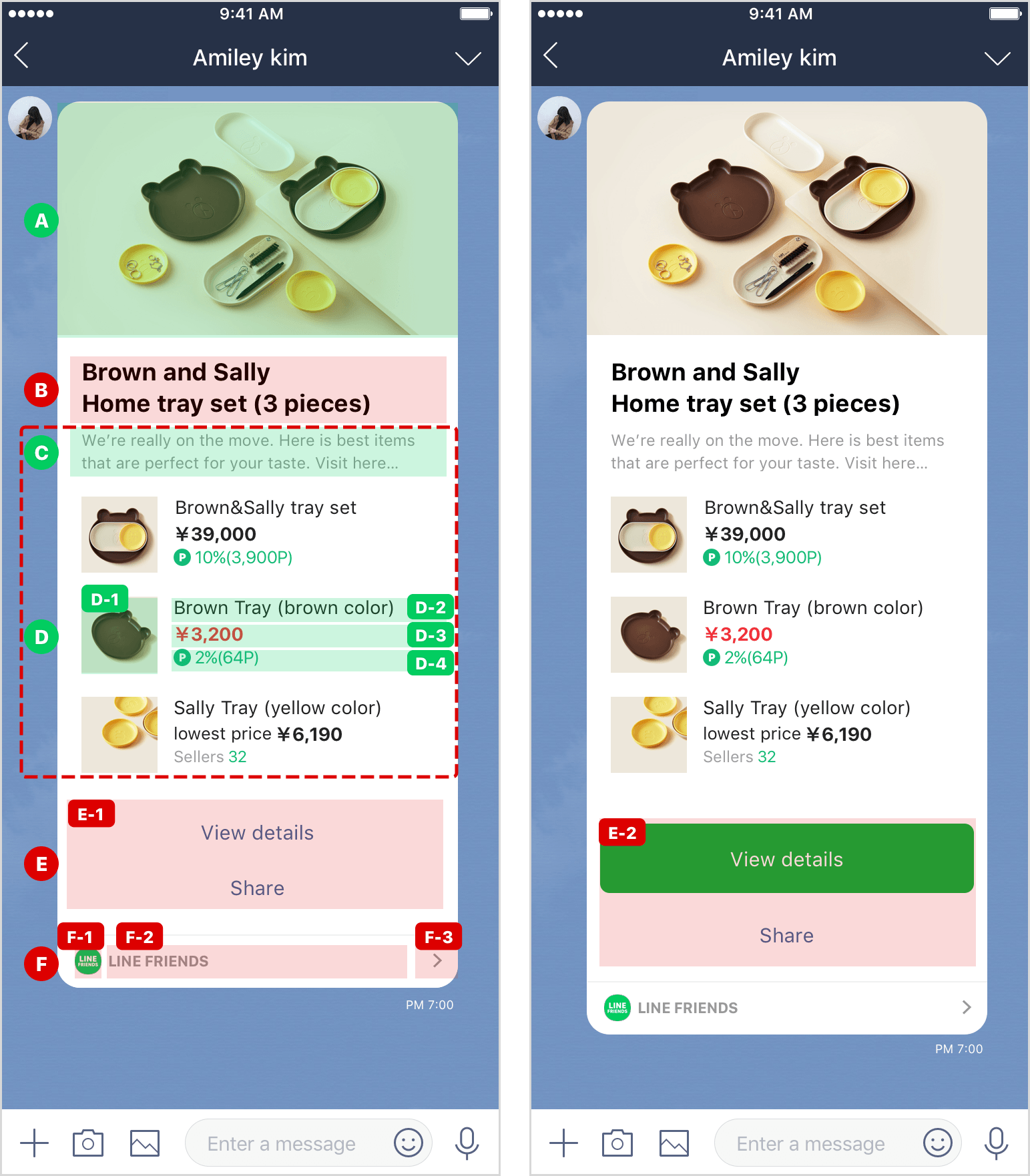
##### Image list type - Image (A)
Put the image (A) in the hero block.
| Label | Section | Type | Description |
| --- | --- | --- | --- |
| A | Image | [Hero block](https://developers.line.biz/en/docs/messaging-api/flex-message-elements/#block) > [Image](https://developers.line.biz/en/docs/messaging-api/flex-message-elements/#image) | - `"url": "{Image URL}"`
- `"size": "full"`
- `"aspectRatio": "{width}:{height}"`
However, set `{width} * 2` or less for `{height}`. - `"aspectMode": "cover"`
|
```json
{
"type": "bubble",
"hero": { // Hero block
// Image (A)
"type": "image",
"url": "https://example.com/hero-image.png",
"size": "full",
"aspectRatio": "20:13",
"aspectMode": "cover"
},
"body": {. . .}
}
```
##### Image list type - Body
Specify the body block that contains the title (B), sub-title (C), details (D), and buttons (E) as follows:
| Label | Section | Type | Description |
| --- | --- | --- | --- |
| - | - | [Body block](https://developers.line.biz/en/docs/messaging-api/flex-message-elements/#block) > [Box](https://developers.line.biz/en/docs/messaging-api/flex-message-elements/#box) | - `"layout": "vertical"`
- `"spacing": "md"`
|
```json
{
"type": "bubble",
"hero": { ... },
"body": { // Body block
// Box
"type": "box",
"layout": "vertical",
"contents": [ ... ],
"spacing": "md"
}
}
```
##### Image list type - Title (B)
| Label | Section | Type | Description |
| --- | --- | --- | --- |
| B | Title | [Box](https://developers.line.biz/en/docs/messaging-api/flex-message-elements/#box) | - `"layout": "vertical"`
- `"spacing": "none"`
|
| B | Title | [Text](https://developers.line.biz/en/docs/messaging-api/flex-message-elements/#text) | - `"text": "{Title}"`
Text maximum lines: 2 - `"size": "lg"`
- `"color": "#000000"`
- `"weight": "bold"`
- `"wrap": true`
|
```json
{
"type": "bubble",
"hero": { ... },
"body": {
"type": "box",
"layout": "vertical",
"contents": [
{ // Title (B) - Box
"type": "box",
"layout": "vertical",
"contents": [
{ // Text
"type": "text",
"text": "Main title",
"size": "lg",
"color": "#000000",
"weight": "bold",
"wrap": true
}
],
"spacing": "none"
}
],
"spacing": "md"
}
}
```
##### Image list type - Sub-title (C)
| Label | Section | Type | Description |
| --- | --- | --- | --- |
| C | Sub-title | [Box](https://developers.line.biz/en/docs/messaging-api/flex-message-elements/#box) | - `"layout": "vertical"`
- `"spacing": "none"`
|
| C | Sub-title | [Text](https://developers.line.biz/en/docs/messaging-api/flex-message-elements/#text) | - `"text": "{Sub-title}"`
Text maximum lines: 2 - `"size": "sm"`
- `"color": "#999999"`
- `"wrap": true`
|
```json
{
"type": "bubble",
"hero": { ... },
"body": {
"type": "box",
"layout": "vertical",
"contents": [
{ // Title (B) - Box
...
},
{ // Sub-title (C) - Box
"type": "box",
"layout": "vertical",
"contents": [
{ // Text
"type": "text",
"text": "Sub-title",
"size": "sm",
"color": "#999999",
"wrap": true
}
],
"spacing": "none"
}
],
"spacing": "md"
}
}
```
##### Image list type - Details (D)
| Label | Section | Type | Description |
| --- | --- | --- | --- |
| D | Details | [Box](https://developers.line.biz/en/docs/messaging-api/flex-message-elements/#box) | - `"layout": "vertical"`
- `"spacing": "xl"`
- `"margin": "lg"`
|
| - | Details - Item | [Box](https://developers.line.biz/en/docs/messaging-api/flex-message-elements/#box) | A box containing only one set of D-1 to D-4.- `"layout": "horizontal"`
- `"flex": 1`
|
| D-1 | Details - Image | [Image](https://developers.line.biz/en/docs/messaging-api/flex-message-elements/#image) | - `"url": "{Image URL}"`
- `"flex": 3`
- `"size": "sm"`
- `"aspectRatio": "1:1"`
- `"aspectMode": "cover"`
|
| - | Details - Text area | [Box](https://developers.line.biz/en/docs/messaging-api/flex-message-elements/#box) | A box containing of D-2 to D-4.- `"layout": "vertical"`
- `"flex": 8`
- `"spacing": "xs"`
- `"margin": "md"`
|
| D-2 | Details - General text | [Text](https://developers.line.biz/en/docs/messaging-api/flex-message-elements/#text) | - `"text": "{General Text}"`
- `"size": "md"`
- `"color": "#111111"`
|
| D-3 | Details - Text to emphasize | [Text](https://developers.line.biz/en/docs/messaging-api/flex-message-elements/#text) | - `"text": "{Text to emphasize}"`
- `"size": "md"`
- `"color": "#111111"`
|
| D-4 | Details - Image+text | [Box](https://developers.line.biz/en/docs/messaging-api/flex-message-elements/#box) | A box containing of image and text of D-4:- `"layout": "horizontal"`
- `"flex": 1`
[Image](https://developers.line.biz/en/docs/messaging-api/flex-message-elements/#image) of D-4:- `"flex": 8`
- `"url": "{Image URL}"`
- `"gravity": "center"`
- `"size": "xxs"`
- `"aspectRatio": "1:1"`
[Text](https://developers.line.biz/en/docs/messaging-api/flex-message-elements/#text) of D-4:- `"flex": 85`
- `"margin": "xs"`
- `"text": "{Text}"`
- `"size": "sm"`
- `"color": "{Color}"`
- `"gravity": "center"`
|
```json
{
"type": "bubble",
"hero": { ... },
"body": {
"type": "box",
"layout": "vertical",
"contents": [
{ // Title (B) - Box
...
},
{ // Sub-title (C) - Box
...
},
{ // Details (D) - Box
"type": "box",
"layout": "vertical",
"contents": [
{ // Item
"type": "box",
"layout": "horizontal",
"contents": [
{ // Image
"type": "image",
"url": "https://example.com/item-image01.png",
"flex": 3,
"size": "sm",
"aspectRatio": "1:1",
"aspectMode": "cover"
},
{ // Text area
"type": "box",
"layout": "vertical",
"contents": [
{ // General text (D-2)
"type": "text",
"text": "General text",
"size": "md",
"color": "#111111"
},
{ // Text to emphasize (D-3)
"type": "text",
"text": "Text to emphasize",
"size": "md",
"color": "#111111"
},
{ // Image+text (D-4)
"type": "box",
"layout": "horizontal",
"contents": [
{ // Image
"type": "image",
"url": "https://example.com/item-image02.png",
"flex": 8,
"gravity": "center",
"size": "xxs",
"aspectRatio": "1:1"
},
{ // Text
"type": "text",
"text": "Text",
"flex": 85,
"gravity": "center",
"size": "sm",
"color": "#17c950",
"margin": "xs"
}
],
"flex": 1
}
],
"flex": 8,
"spacing": "xs",
"margin": "md"
}
],
"flex": 1
}
],
"spacing": "xl",
"margin": "lg"
}
],
"spacing": "md"
}
}
```
##### Image list type - Button (E)
| Label | Section | Type | Description |
| --- | --- | --- | --- |
| E | Button | [Box](https://developers.line.biz/en/docs/messaging-api/flex-message-elements/#box) | A box containing of E-1 and E-2.- `"layout": "vertical"`
- `"spacing": "xs"`
|
| E-1 | Button
(When using only link) | [Button](https://developers.line.biz/en/docs/messaging-api/flex-message-elements/#button) | - `"style": "link"`
- `"height": "sm"`
- `"color": "{Text Color}"`
- `"action" : { ... }`
Specify the URI action so that the LINE MINI App page will be displayed when the user taps this button. When displaying a page other than the top page of your LINE MINI App, you must assign the [permanent link](https://developers.line.biz/en/docs/line-mini-app/develop/permanent-links/).
|
| E-2 | Button
(When using primary style) | [Button](https://developers.line.biz/en/docs/messaging-api/flex-message-elements/#button) | - Specify `"style": "primary"` for the top button and `"style": "link"` for other buttons. You can't use `"secondary"`.
- `"height": "md"`
- `"color": "{Text or Background Color}"`
- `"action" : { ... }`
Specify the URI action so that the LINE MINI App page will be displayed when the user taps this button. When displaying a page other than the top page of your LINE MINI App, you must assign the [permanent link](https://developers.line.biz/en/docs/line-mini-app/develop/permanent-links/).
|
When using primary style:
```json
{
"type": "bubble",
"hero": { ... }
},
"body": {
"type": "box",
"layout": "vertical",
"contents": [
{ // Title (B) - Box
...
},
{ // Sub-title (C) - Box
...
},
{ // Details (D) - Box
...
},
{ // Button (E) - Box
"type": "box",
"layout": "vertical",
"contents": [
{ // Button (primary)
"type": "button",
"action": {
"type": "uri",
"label": "View details",
"uri": "https://miniapp.line.me/123456-abcedfg"
},
"style": "primary",
"height": "md",
"color": "#17c950"
},
{ // Button (link)
"type": "button",
"action": {
"type": "uri",
"label": "Share",
"uri": "https://miniapp.line.me/123456-abcedfg/share"
},
"style": "link",
"height": "md",
"color": "#469fd6"
}
],
"spacing": "xs"
}
],
"spacing": "md"
}
}
```
##### Image list type - Footer (F)
| Label | Section | Type | Description |
| --- | --- | --- | --- |
| - | - | [Footer block](https://developers.line.biz/en/docs/messaging-api/flex-message-elements/#block) > [Box](https://developers.line.biz/en/docs/messaging-api/flex-message-elements/#box) | |
| - | - | [Separator](https://developers.line.biz/en/docs/messaging-api/flex-message-elements/#separator) | |
| F | Footer | [Box](https://developers.line.biz/en/docs/messaging-api/flex-message-elements/#box) | A box containing of F-1 to F-3.- `"layout": "horizontal"`
- `"flex": 1`
- `"spacing": "md"`
- `"margin": "md"`
|
| F-1 | LINE MINI App icon | [Image](https://developers.line.biz/en/docs/messaging-api/flex-message-elements/#image) | - `"url": "{Image URL}"`
- `"flex": 1`
- `"gravity": "center"`
|
| F-2 | LINE MINI App name | [Text](https://developers.line.biz/en/docs/messaging-api/flex-message-elements/#text) | - `"text": "{LINE MINI App Name}"`
Text maximum lines: 1 - `"flex": 19`
- `"size": "xs"`
- `"color": "#999999"`
- `"weight": "bold"`
- `"gravity": "center"`
- `"wrap": false`
|
| F-3 |  | [Image](https://developers.line.biz/en/docs/messaging-api/flex-message-elements/#image) | - `"url": "https://vos.line-scdn.net/service-notifier/footer_go_btn.png"`
- `"flex": 1`
- `"gravity": "center"`
- `"size": "xxs"`
- `"action" : { ... }`
Specify the URI action to display the LINE MINI App top page (`https://miniapp.line.me/{your-liffId}`) when the user taps this image.
|
```json
{
"type": "bubble",
"hero": { ... },
"body": { ... },
"footer": { // Footer block
// Box
"type": "box",
"layout": "vertical",
"contents": [
{ // Separator
"type": "separator",
"color": "#f0f0f0"
},
{ // Footer (F) - Box
"type": "box",
"layout": "horizontal",
"contents": [
{ // LINE MINI App icon (F-1)
"type": "image",
"url": "https://example.com/line-mini-app-icon.png",
"flex": 1,
"gravity": "center"
},
{ // LINE MINI App name (F-2)
"type": "text",
"text": "Service name",
"flex": 19,
"size": "xs",
"color": "#999999",
"weight": "bold",
"gravity": "center",
"wrap": false
},
{ // > (F-3)
"type": "image",
"url": "https://vos.line-scdn.net/service-notifier/footer_go_btn.png",
"flex": 1,
"gravity": "center",
"size": "xxs",
"action": {
"type": "uri",
"label": "action",
"uri": "https://miniapp.line.me/123456-abcedfg"
}
}
],
"flex": 1,
"spacing": "md",
"margin": "md"
}
]
}
}
```