# Built-in features
LINE MINI App comes with the following built-in features:
## Action button
By default, an action button is displayed on the common [header](https://developers.line.biz/en/docs/line-mini-app/discover/ui-components/#header) provided on every page of your LINE MINI App.

When the user taps the action button, either the [multi-tab view](https://developers.line.biz/en/docs/line-mini-app/discover/builtin-features/#multi-tab-view) or the [options](https://developers.line.biz/en/docs/line-mini-app/discover/builtin-features/#multi-tab-view-option) will be displayed depending on the LINE app version. In LINE version 15.12.0 or later, the multi-tab will be displayed, and in LINE version earlier than 15.12.0, the options will be displayed.
**Tip**
- You can implement a [custom action button](https://developers.line.biz/en/docs/line-mini-app/discover/custom-features/#custom-action-button) and place it anywhere you want in the format of your choice.
- New features, such as the ability to move back and forth between multiple chat rooms without closing the LINE MINI App, are underway.
- You can't hide the action button on the LINE MINI App. Also, **Module mode** can't be set for LIFF apps added to a LINE MINI App channel.
## Multi-tab view
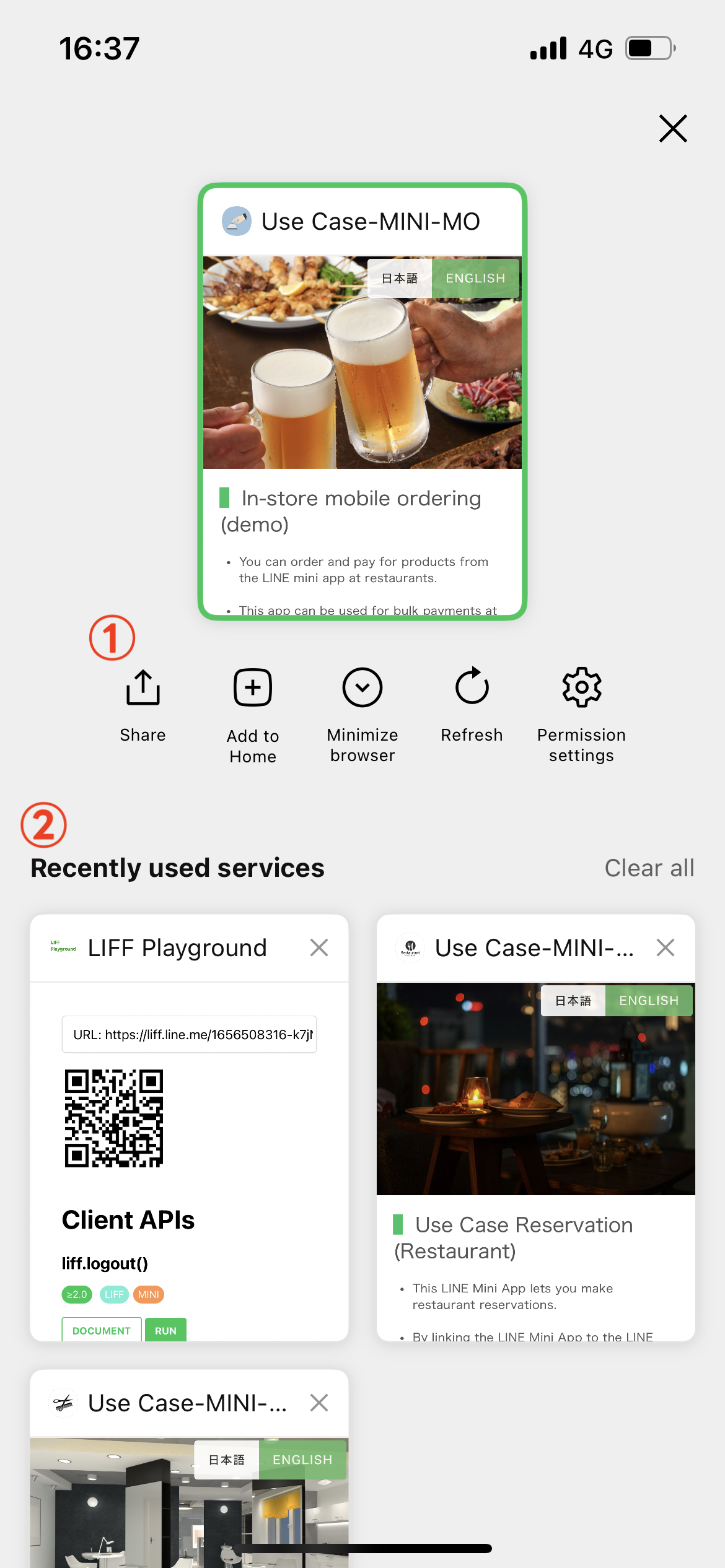
The multi-tab view displays options for the LINE MINI App currently in use and recently used services.
1. [Options](https://developers.line.biz/en/docs/line-mini-app/discover/builtin-features/#multi-tab-view-option)
1. [Recently used services](https://developers.line.biz/en/docs/line-mini-app/discover/builtin-features/#multi-tab-view-recent-service)
### Options
The following options appear in the language settings of the user's LINE app:
| Item | Description |
| --- | --- |
| **Refresh** | Refresh the current page on the screen. |
| **Share** | Share the LIFF URL or permanent link of the current page as a LINE message. If the current page doesn't start with the endpoint URL of the LINE MINI App, the LIFF URL of the LINE MINI App will be shared instead. The share message includes the following elements:- URL: The permanent link of the current page.
- Title: The LIFF app name entered in the **LIFF app name** on the **Web app settings** tab of the [LINE Developers Console](https://developers.line.biz/console/).
- Description: Automatically set text
- Image: Image registered as **Channel icon** on the **Channel Basic settings** tab on the [LINE Developers Console](https://developers.line.biz/console/)
|
| **Add to Home** | The Add Shortcut screen to the current page will be displayed. If the current page doesn't start with the endpoint URL of the LINE MINI App, an error will occur. Available for verified MINI Apps in LINE version 14.3.0 or later. For more information, see [Add a shortcut to your LINE MINI App to the home screen of the user's device](https://developers.line.biz/en/docs/line-mini-app/develop/add-to-home-screen/). |
| **Favorites** | Add the current LINE MINI App to the user's favorites. This feature is only available if all of the following conditions are met:
- The LINE MINI App is a [verified MINI App](https://developers.line.biz/en/docs/line-mini-app/discover/introduction/#verified-mini-app).
- The user is located in Japan.
- The user's LINE version is 15.18.0 or later.
LINE MINI Apps that have been added to the user's favorites can be viewed in the Wallet tab of the LINE app.
|
| **Minimize browser** | Minimize LIFF browser. This feature can only be used for verified MINI Apps. For more information, see [Minimizing LIFF browser](https://developers.line.biz/en/docs/liff/minimizing-liff-browser/) in the LIFF documentation. |
| **Permission settings** | Opens the Permission Settings screen. The Permission Settings screen allows the user to view and change the camera and microphone permissions of the currently open LINE MINI App. Available in LINE versions 14.6.0 or later.
If a user changes the permissions, the changes may not be reflected unless the page is reloaded on the LINE MINI App.
|
| **About the service** | Display the [Provider page](https://developers.line.biz/en/docs/partner-docs/provider-page/). This feature can only be used for verified MINI Apps. |
| **Report** | Open the LINE app inquiry form in an external browser. This feature is only available if all of the following conditions are met:
- **Region to provide the service** on the **Basic settings** tab of the LINE MINI App channel is set to "Japan".
- The user's LINE version is 15.6.0 or later.
|
**Note**
To share the current page, users need to tap the action button on a LINE version that officially supports LINE MINI App. In case of LINE versions lower than the [supported versions](https://developers.line.biz/en/docs/line-mini-app/discover/specifications/#supported-platforms-and-versions), the action button in the header will always lead to the LINE MINI App's top page, regardless of the individual page being shared.
### Recently used services
The recently used services section includes LINE MINI Apps and LIFF apps opened by the user, displayed in order of most recent use, up to a maximum of 50 items. The user can use the usage history to reopen the LINE MINI Apps and LIFF apps.
For more information, see [Recently used services](https://developers.line.biz/en/docs/liff/overview/#multi-tab-view-recent-service) in the LIFF documentation.
## Channel consent screen
This Channel consent screen appears when a user uses your LINE MINI App for the first time. The screen prompts the user to grant permissions to your service.
If the LINE MINI App is a verified MINI App, a verified badge will be displayed next to the LINE MINI App name. If the LINE MINI App provider isn't a certified provider, a note saying "LY Corporation hasn't verified this service provider." will be displayed.
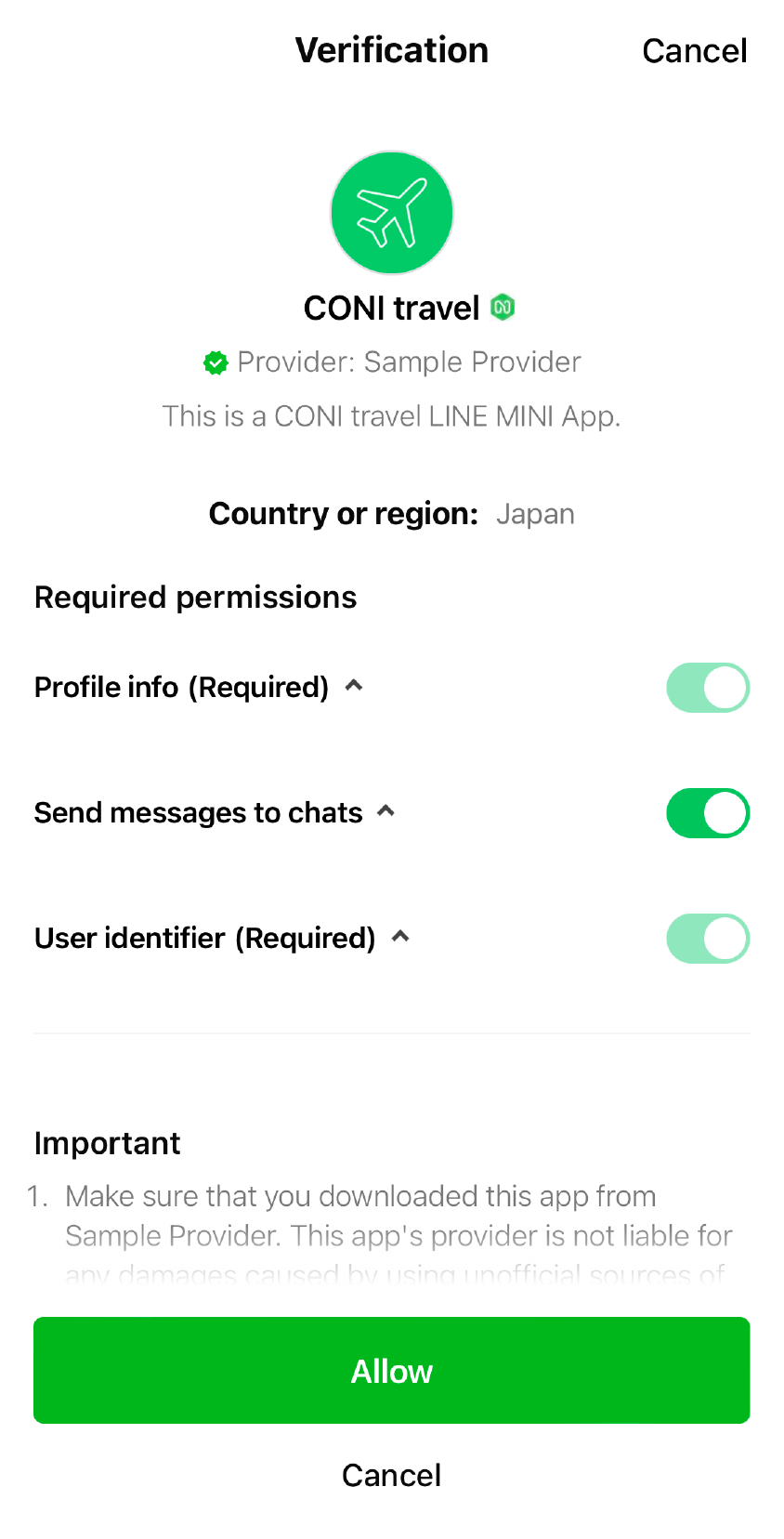
All LINE MINI Apps request the following permissions by default.
- Permission to acquire the user's LINE profile information
- Permission to send messages to chats
**Note**
The Channel consent screen for your LINE MINI App prompts users to grant only the permissions that have been approved by LY Corporation. You can specify the items that require permission from the user in the settings of the LINE MINI App channel on the [LINE Developers Console](https://developers.line.biz/console/).