# Overview of Common Profile Quick-fill
**Available only in verified MINI Apps**
To use Common Profile Quick-fill, your LINE MINI App must be verified and you must apply to use Quick-fill. For more information, see [Steps for using Quick-fill](https://developers.line.biz/en/docs/line-mini-app/quick-fill/overview/#process).
## What is Common Profile Quick-fill
Quick-fill is a feature that automatically fills in the necessary profile information by tapping the **Auto-fill** button on the LINE MINI App. You can easily use the Common Profile information that a user has set in the Account Center in the LINE MINI App.
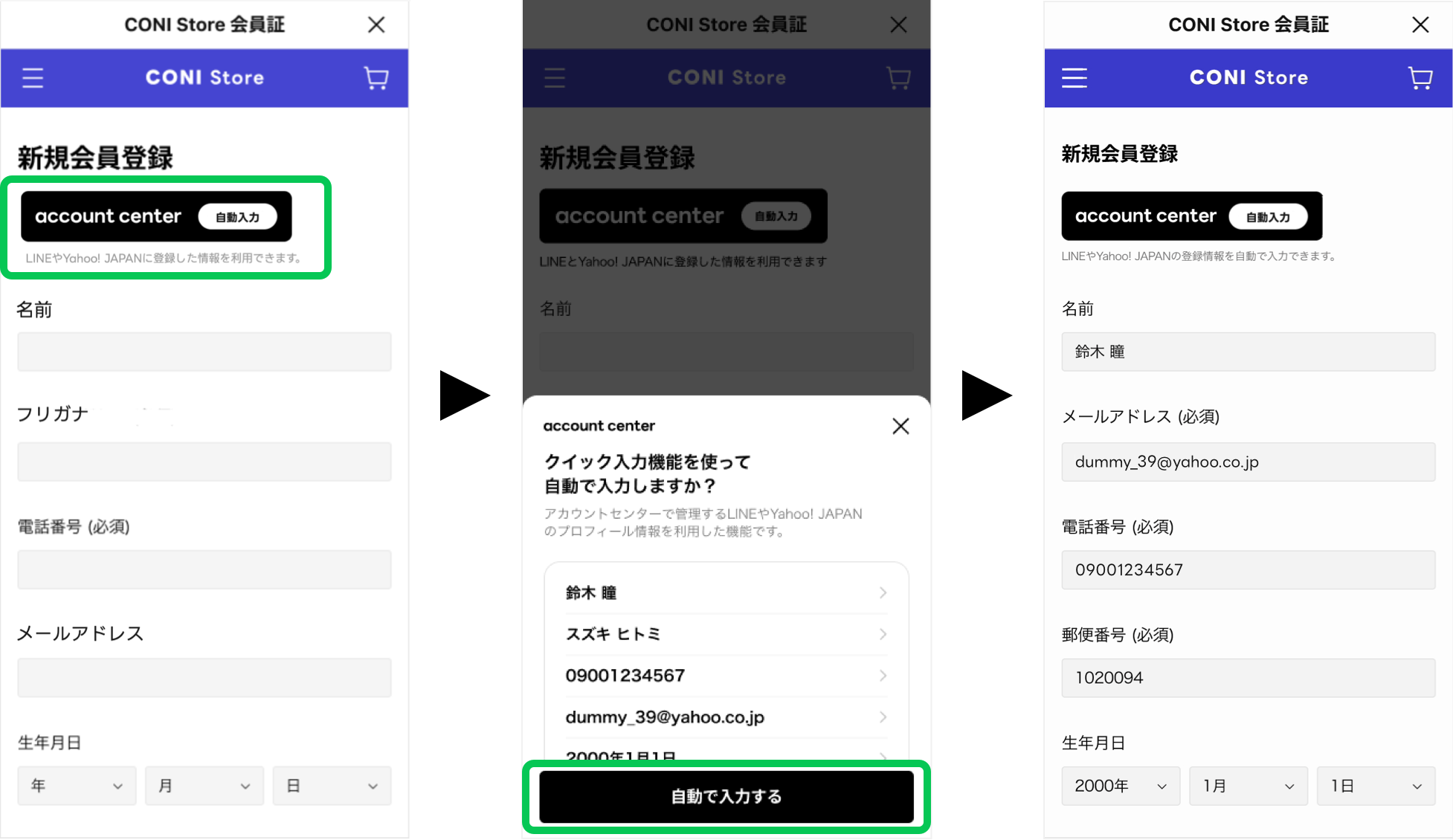
By integrating Quick-fill into your LINE MINI App, users can automatically enter an address or phone number with a single tap. For example, when making a reservation at a restaurant or ordering from an online store, users can save themselves the hassle of entering the information manually.
This page explains how to integrate Quick-fill into your LINE MINI App.
For information on how to use Quick-fill on the LINE MINI App, see [Set Common Profile to use Quick-fill](https://guide.line.me/ja/services/quick-fill.html) (only available in Japanese) in the LINE user's guide.
### Languages that support Quick-fill
Quick-fill currently supports Japanese only. Therefore, the Quick-fill screen will be displayed in Japanese regardless of the language setting in the LINE app.
## Steps for using Quick-fill
To use Quick-fill, your LINE MINI App must be verified and you must apply to use Quick-fill. This is done by following the steps below:
- [Step 1. Prepare a verified MINI App](https://developers.line.biz/en/docs/line-mini-app/quick-fill/overview/#process-step-1)
- [Step 2. Apply to use Quick-fill and develop](https://developers.line.biz/en/docs/line-mini-app/quick-fill/overview/#process-step-2)
### Step 1. Prepare a verified MINI App
Quick-fill is only available in verified MINI Apps. Therefore, you must first prepare a verified MINI App to integrate Quick-fill. For more information, see [Process from LINE MINI App development to release](https://developers.line.biz/en/docs/line-mini-app/quickstart/#overall-process).
### Step 2. Apply to use Quick-fill and develop
After preparing your verified MINI App, the next step is to apply for and develop Quick-fill. Follow these steps:
- [Step 2-1. Apply for Quick-fill and obtain approval](https://developers.line.biz/en/docs/line-mini-app/quick-fill/overview/#process-step-2-1)
- [Step 2-2. Specify the Quick-fill scope in the LINE Developers Console](https://developers.line.biz/en/docs/line-mini-app/quick-fill/overview/#process-step-2-2)
- [Step 2-3. Integrate Quick-fill](https://developers.line.biz/en/docs/line-mini-app/quick-fill/overview/#process-step-2-3)
- [Step 2-4. Request review of the LINE MINI App](https://developers.line.biz/en/docs/line-mini-app/quick-fill/overview/#process-step-2-4)
#### Step 2-1. Apply for Quick-fill and obtain approval
To use Quick-fill, first fill out the usage application form and submit it via the application form. If the same service provider is applying for multiple LINE MINI Apps at once, you can use the application form for multiple applications.
- [[Single application] Usage application form (Excel file)](https://workers-hub.ent.box.com/s/06w8vzqxfwx2e031oq2q9ztj7ca8p7h8) (Only available in Japanese)
- [[Multiple applications] Usage application form (Excel file)](https://workers-hub.ent.box.com/s/xrwjm892d1uxsiblptfgoj07r0v5zwbp) (Only available in Japanese)
After completing the usage application form, submit your application via the following form. We'll notify you via email regarding the receipt of your application and the results of the review.
[Application form](https://form-business.yahoo.co.jp/claris/enqueteForm?inquiry_type=miniapp-quick-fill) (Only available in Japanese)
#### Step 2-2. Specify the scope of Quick-fill in the LINE Developers Console
After your application has been accepted to use Quick-fill, specify the scope of the information you want to use. In the [LINE Developers Console](https://developers.line.biz/console/), select the target LINE MINI App channel, and in the **Scope** section of the **Web app settings** tab, check the box for the scope you want to use.
To specify the scope for a verified MINI App, you must click the **Search enable** button in the **Review request** tab to enable search for the LINE MINI App.
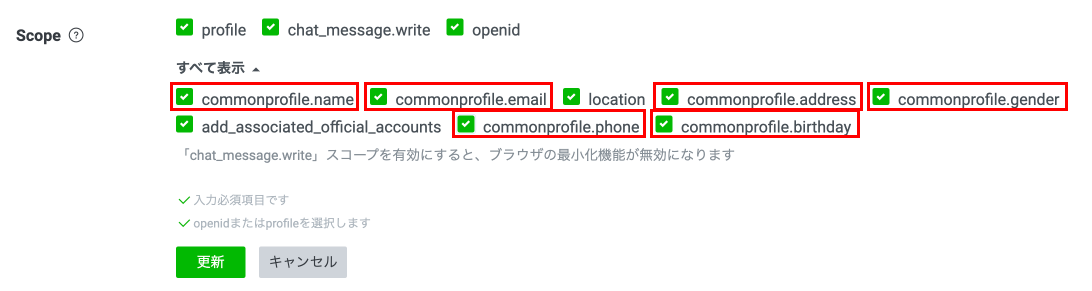
For more information about the types of scope that you can use with Quick-fill, see [Types of scope that can be selected in the LINE Developers Console](https://developers.line.biz/en/docs/line-mini-app/quick-fill/overview/#scope).
**Behavior when Quick-fill and Channel consent simplification are both enabled at the same time**
If you enable both Quick-fill and [Channel consent simplification](https://developers.line.biz/en/docs/line-mini-app/develop/channel-consent-simplification/) at the same time, users won't be able to disable the toggle button for the Common Profile on the Verification screen. We plan to make a fix for this behavior in the future. For more information about the Verification screen, see [Detailed workflow of "Channel consent simplification"](https://developers.line.biz/en/docs/line-mini-app/develop/channel-consent-simplification/#detailed-workflow).
#### Step 2-3. Integrate Quick-fill
After specifying the scope, integrate Quick-fill into your LINE MINI App. For more information on development, see [Integrate Quick-fill with the LIFF Plugin](https://developers.line.biz/en/docs/line-mini-app/quick-fill/overview/#use-liff-plugin).
When developing a LINE MINI App that integrates Quick-fill, follow the instructions below:
- [Common Profile Quick-fill design regulations](https://developers.line.biz/en/docs/line-mini-app/quick-fill/design-regulations/)
- [LINE MINI App development guidelines](https://developers.line.biz/en/docs/line-mini-app/development-guidelines/)
- [LIFF app development guidelines](https://developers.line.biz/en/docs/liff/development-guidelines/)
- [LINE Login development guidelines](https://developers.line.biz/en/docs/line-login/development-guidelines/)
#### Step 2-4. Request review of the LINE MINI App
After integrating Quick-fill, submit your LINE MINI App for review via the **Review request** tab in the LINE MINI App channel. Once your LINE MINI App passes review, you can apply the changes to your published LINE MINI App.
## Integrate Quick-fill with the LIFF Plugin
To develop Quick-fill, you need to use the LIFF SDK and the [LIFF plugin](https://developers.line.biz/en/docs/liff/liff-plugin/). For information about the LIFF SDK version that the LIFF plugin works with, see [LIFF SDK version](https://developers.line.biz/en/docs/line-mini-app/quick-fill/overview/#liff-sdk-version).
You can integrate the LIFF SDK into your LINE MINI App in one of two ways:
- [Specify a CDN path to integrate Quick-fill](https://developers.line.biz/en/docs/line-mini-app/quick-fill/overview/#specify-cdn-path)
- [Use the npm package to integrate Quick-fill](https://developers.line.biz/en/docs/line-mini-app/quick-fill/overview/#use-npm-package)
Once you've integrated the LIFF SDK into your LINE MINI App, you can enable the Quick-fill LIFF plugin by passing the Quick-fill LIFF plugin to the [`liff.use()`](https://developers.line.biz/en/reference/liff/#use) method as shown below:
```javascript
liff.use(new LiffCommonProfilePlugin());
await liff.init({ liffId: "xxx" });
const { data, error } = await liff.$commonProfile.get();
liff.$commonProfile.fill(data);
```
The `$commonProfile` property is added to the `liff` object, and the following Quick-fill client API can be used:
- [`liff.$commonProfile.get()`](https://developers.line.biz/en/reference/line-mini-app/#get-common-profile)
- [`liff.$commonProfile.getDummy()`](https://developers.line.biz/en/reference/line-mini-app/#get-dummy-common-profile)
- [`liff.$commonProfile.fill()`](https://developers.line.biz/en/reference/line-mini-app/#fill-common-profile)
### Specify a CDN path to integrate Quick-fill
When specifying a CDN path, by loading the package with the `script` tag, the `liffCommonProfile` property is added to the window object. An instance of the `LiffCommonProfilePlugin` class that exists within `liffCommonProfile` is passed as an argument to `liff.use()`.
```html
LIFF App
```
```js
liff.use(new liffCommonProfile.LiffCommonProfilePlugin());
const { data, error } = await liff.$commonProfile.get();
liff.$commonProfile.fill(data);
```
For more information, see [Specify the CDN path](https://developers.line.biz/en/docs/liff/developing-liff-apps/#specify-cdn-path) in the LIFF documentation.
### Use the npm package to integrate Quick-fill
When using the npm package, import the `LiffCommonProfilePlugin` class from the package and pass an instance of it as an argument to `liff.use()`.
```sh
$ npm install @line/liff-common-profile-plugin
```
```js
import liff from "@line/liff";
import { LiffCommonProfilePlugin } from "@line/liff-common-profile-plugin";
liff.use(new LiffCommonProfilePlugin());
const { data, error } = await liff.$commonProfile.get();
liff.$commonProfile.fill(data);
```
For more information, see [Use the npm package](https://developers.line.biz/en/docs/liff/developing-liff-apps/#use-npm-package) in the LIFF documentation.
## Quick-fill operating environment
Quick-fill only works when the user is using LINE for iOS or LINE for Android.
The following is the operating environment for Quick-fill on your system:
- [LIFF SDK version](https://developers.line.biz/en/docs/line-mini-app/quick-fill/overview/#liff-sdk-version)
- [Node.js version](https://developers.line.biz/en/docs/line-mini-app/quick-fill/overview/#nodejs-version)
LINE MINI Apps use the [LINE Front-end Framework (LIFF)](https://developers.line.biz/en/docs/liff/overview/). For more information about the recommended environment for Quick-fill, see the [Recommended operating environment](https://developers.line.biz/en/docs/liff/overview/#operating-environment) section of the LIFF documentation.
**Transition destinations where the LIFF app is guaranteed to work**
LIFF apps will only work if the URL is exactly the same as the endpoint URL (e.g. `https://example.com/path`) or is at a lower level than the endpoint URL (e.g. `https://example.com/path/to/lower?key1=value1#URL-fragment`). If you transition the LIFF app to something other than the above, the operation of the LIFF app isn't guaranteed.
### LIFF SDK version
Use LIFF SDK v2.19.0 or later, as the LIFF plugin is used in the development of Quick-fill. For more information on LIFF plugin, see [LIFF plugin](https://developers.line.biz/en/docs/liff/liff-plugin/) in the LIFF documentation.
### Node.js version
When installing the LIFF SDK using npm, use Node.js version 18.15.0 or later. Note that Node.js isn't required when using the LIFF SDK with a specified CDN path.
For more information on integrating the LIFF SDK into your LIFF app, see [Integrating the LIFF SDK with the LIFF app](https://developers.line.biz/en/docs/liff/developing-liff-apps/#integrating-sdk) in the LIFF documentation.
## Types of scope that can be selected in the LINE Developers Console
You can select the following types of Quick-fill scopes in the LINE Developers Console.
| Scope | Description |
| --- | --- |
| `commonprofile.name` | Permission to obtain the name registered by the user |
| `commonprofile.email` | Permission to obtain the email address registered by the user |
| `commonprofile.address` | Permission to obtain the address registered by the user |
| `commonprofile.gender` | Permission to obtain the gender registered by the user |
| `commonprofile.birthday` | Permission to obtain the birthday registered by the user |
| `commonprofile.phone` | Permission to obtain the phone number registered by the user |
If these scopes don't display on the LINE Developers Console, see [Step 2-1. Apply for Quick-fill and obtain approval](https://developers.line.biz/en/docs/line-mini-app/quick-fill/overview/#process-step-2-1).
Users cannot select and allow some scopes on the [channel consent screen](https://developers.line.biz/en/docs/line-mini-app/develop/configure-console/#consent-screen-settings). They can either allow or disallow these scopes as "Management Information (Common Profile) in the Account Center" in bulk.
## The `scopes` parameters that can be specified and its return value
The `scopes` parameters that can be specified for [`liff.$commonProfile.get()`](https://developers.line.biz/en/reference/line-mini-app/#get-common-profile) and [`liff.$commonProfile.getDummy()`](https://developers.line.biz/en/reference/line-mini-app/#get-dummy-common-profile) and the return values for each are as follows:
| Number | `scopes` | Description | Data type | Max chars
(half-width) | Max chars
(Hiragana and kanji) | Explanation of the return value |
| --- | --- | --- | --- | --- | --- | --- |
| 1 | `family-name` | Family name | string | 100 | 50 | |
| 2 | `given-name` | Given name | string | 100 | 50 | |
| 3 | `family-name-kana` | Phonetic family name | string | 100 | 50 | |
| 4 | `given-name-kana` | Phonetic given name | string | 100 | 50 | |
| 5 | `sex-enum` | Gender | number | 1 (fixed length) | N/A | - `0`: Male
- `1`: Female
- `2`: Other
- `3`: No answer
|
| 6 | `bday-day` | Day of birth | number | 2 | N/A | |
| 7 | `bday-month` | Month of birth | number | 2 | N/A | |
| 8 | `bday-year` | Month of birth of year | number | 4 | N/A | |
| 9 | `tel` | Phone number | string | 200 | N/A | |
| 10 | `email` | Email address | string | 200 | N/A | |
| 11 | `postal-code` | Postal code | string | 47 | N/A | |
| 12 | `address-level1` | Address 1 | string | 53 | 53 | |
| 13 | `address-level2` | Address 2 | string | 53 | 53 | |
| 14 | `address-level3` | Address 3 | string | 100 | 69 | |
| 15 | `address-level4` | Address 4 | string | 100 | 69 | |
The Common Profile for the Account Center is created by combining the profile registered with LINE and Yahoo! JAPAN. If the user doesn't use the Account Center, the profile information from LINE will be filled in automatically.
## Dummy data for Common Profile that can be obtained
You can use [`liff.$commonProfile.getDummy()`](https://developers.line.biz/en/reference/line-mini-app/#get-dummy-common-profile) to get dummy data for Common Profile. You can specify the dummy data to get with `caseId` from the 10 types provided.
| `caseId` | `family-name` | `given-name` | `family-name-kana` | `given-name-kana` | `sex-enum` | `bday-day` | `bday-month` | `bday-year` | `tel` | `email` | `postal-code` | `address-level1` | `address-level2` | `address-level3` | `address-level4` |
| --- | --- | --- | --- | --- | --- | --- | --- | --- | --- | --- | --- | --- | --- | --- | --- |
| 1 | 見本田 | 見本夫 | ダミータ | ダミーオ | 0 | 12 | 3 | 1998 | 09001234567 | dummy_39@yahoo.co.jp | 1020094 | 東京都 | 千代田区 | 紀尾井町1-2 | 東京ガーデンテラス紀尾井町 |
| 2 | | | | | 1 | 12 | 3 | 1998 | 09001234567 | dummy_39@yahoo.co.jp | N5X 1N7 | 東京都 | | 紀尾井町1-2 | 東京ガーデンテラス紀尾井町 |
| 3 | 見本田 | | ダミータ | | 2 | | | | 09001234567 | dummy_39dummy_39dummy_39dummy_39dummy_39dummy_39dummy_39dummy_39dummy_39dummy_39dummy_39dummy_39dummy_39dummy_39dummy_39dummy_39dummy_39dummy_39dummy_39dummy_39dummy_39dummy_39dummy_39dumm@yahoo.co.jp | 102-0094 | 東京都 | 千代田区 | | 東京ガーデンテラス紀尾井町 |
| 4 | | 見本夫 | | ダミーオ | 3 | 12 | 3 | 1998 | 0901234567 | dummy_39@yahoo.co.jp | 1077 AA2 15000N5X 1N7107715000X 1077 AA2 15000N5X 1N71 | 東京都 | 千代田区 | 紀尾井町1-2 | |
| 5 | Daimta | Damio | ダミータ | ダミーオ | 0 | 12 | 3 | 1998 | 09001234567 | | 1020094 | Tokyo | Chiyoda-ku | Kioi-cho,1-2 | Tokyo Garden terrace Kioi-cho, |
| 6 | 1234 | 4321 | ダミータ | ダミーオ | 1 | | | 1998 | 090-1234-5678 | dummy_39@yahoo.co.jp | | トウキョウト | チヨダク | キオイチョウ1-2 | トウキョウガーデンテラスキオイチョウ |
| 7 | ダミータ | ダミオ | ダミータ | ダミーオ | 2 | | 3 | | 09001234567090012345670900123456709001234567090012345670900123456709001234567090012345670900123456709001234567090012345670900123456709001234567090012345670900123456709001234567090012345670900123456709 | dummy_39@yahoo.co.jp | 1020094 | | | | |
| 8 | ダミ!? | ダミ夫@ | ダミータ | ダミーオ | 3 | 12 | | 1998 | 09001234567 | dummy_39@yahoo.co.jp | 1020094 | 🍀 | 🍀🍀 | 🍀🍀🍀 | 🍀🍀🍀🍀 |
| 9 | 🐶🐶🐶 | ダミ💚 | ダミータ | ダミーオ | 0 | 12 | 3 | 1998 | | dummy_39@yahoo.co.jp | 102-0094 | 東京都東京都東京都東京都東京都東京都東京都東京都東京都東京都東京都東京都東京都東京都東京都東京都東京都東京都東京都東京都東京都東京都東京都東京都東京都東京都 | 千代田区千代田区千代田区千代田区千代田区千代田区千代田区千代田区千代田区千代田区千代田区千代田区千代田区千 | 紀尾井町1-2紀尾井町1-2紀尾井町1-2紀尾井町1-2紀尾井町1-2紀尾井町1-2紀尾井町1-2紀尾井町1-2紀尾井町1-2紀尾井町1-2紀尾井町1-2紀尾井町1-2紀尾井町1-2紀尾井町1-2紀尾井町1-2紀尾井町1-2紀尾井町1-2紀尾井町1-2紀尾井町1-2紀尾井町1-2 | 東京ガーデンテラス紀尾井町東京ガーデンテラス紀尾井町東京ガーデンテラス紀尾井町東京ガーデンテラス紀尾井町東京ガーデンテラス紀尾井町東京ガーデンテラス紀尾井町東京ガーデンテラス紀尾井町 |
| 10 | ダミー田ダミー田ダミー田ダミー田ダミー田ダミー田ダミー田ダミー田ダミー田ダミー田ダミー田ダミー田ダミー田ダミー田ダミー田ダミー田ダミー田ダミー田ダミー田ダミー田ダミー田ダミー田ダミー田ダミー田ダミー田 | ダミー夫ダミー夫ダミー夫ダミー夫ダミー夫ダミー夫ダミー夫ダミー夫ダミー夫ダミー夫ダミー夫ダミー夫ダミー夫ダミー夫ダミー夫ダミー夫ダミー夫ダミー夫ダミー夫ダミー夫ダミー夫ダミー夫ダミー夫ダミー夫ダミー夫 | ダミータダミータダミータダミータダミータダミータダミータダミータダミータダミータダミータダミータダミータダミータダミータダミータダミータダミータダミータダミータダミータダミータダミータダミータダミータ | ダミーオダミーオダミーオダミーオダミーオダミーオダミーオダミーオダミーオダミーオダミーオダミーオダミーオダミーオダミーオダミーオダミーオダミーオダミーオダミーオダミーオダミーオダミーオ | 1 | 12 | 3 | 1998 | 09001234567 | dummy_39@yahoo.co.jp | N5X 1N7 | | 千代田区 | 紀尾井町1-2 | 東京ガーデンテラス紀尾井町 |
## Options for getting Common Profile information
When getting Common Profile information using [`liff.$commonProfile.get()`](https://developers.line.biz/en/reference/line-mini-app/#get-common-profile), you can specify the following options for each scope. These options are all set to `true` by default, so specify `false` to disable them.
| Property | Default value | Description | Specifiable scope |
| --- | --- | --- | --- |
| `excludeEmojis` | true | Whether to remove emojis from the string. | - `given-name`
- `family-name`
|
| `excludeNonJp` | true | Whether to exclude phone numbers with 12 or more digits. If `true`, an empty string and error information are returned when the phone number has 12 or more digits. | |
| `digitsOnly` | true | Whether to exclude postal codes that aren't numbers. If `true`, an empty string and error information are returned when the postal code contains characters other than numbers. | |
## API reference
For more information about the client API used for Quick-fill, see [Common Profile Quick-fill](https://developers.line.biz/en/reference/line-mini-app/#quick-fill) in the LINE MINI App API reference.