# Rich menus overview
Learn about the rich menus you can display in chat rooms your LINE Official Account is participating in:
## What is rich menu
Rich menus are the menus displayed at the bottom of a chat room with a LINE Official Account. Set rich menus with links to external sites, reservation pages, and LINE Official Account features to make your user experience more "rich". Use [tools to create rich menus](https://developers.line.biz/en/docs/messaging-api/rich-menus-overview/#choosing-tool-for-creating-rich-menus) based on the [rich menu structure](https://developers.line.biz/en/docs/messaging-api/rich-menus-overview/#rich-menu-structure).
**Rich menus are unavailable on LINE for PC**
Rich menus aren't displayed on LINE for PC (macOS, Windows).
## Rich menu structure
Rich menus are composed of a menu image, tappable areas, and a chat bar.
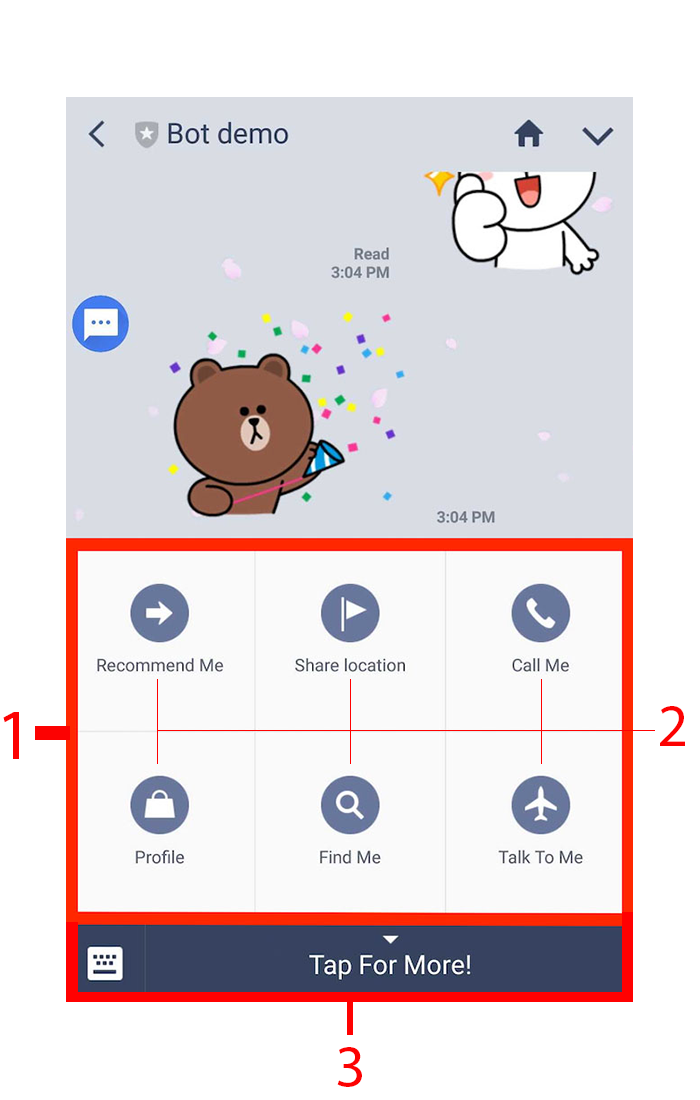
1. Rich menu image: A single JPEG or PNG image file that has menu items. For more information about image requirements, see [Requirements for rich menu image](https://developers.line.biz/en/reference/messaging-api/#upload-rich-menu-image-requirements) in the Messaging API reference.
1. Tappable areas: Areas you divide as menu items. Assign an [action](https://developers.line.biz/en/reference/messaging-api/#action-objects) on each menu item, such as getting a postback event and opening a URL.
1. Chat bar: A menu that opens and closes the rich menu. You can customize the text of this menu.
## Tools for setting rich menus
To create rich menus, use [LINE Official Account Manager](https://developers.line.biz/en/docs/messaging-api/rich-menus-overview/#creating-a-rich-menu-with-the-line-manager) or the [Messaging API](https://developers.line.biz/en/docs/messaging-api/rich-menus-overview/#creating-a-rich-menu-using-the-messaging-api). Find which tool best suits your needs.
**Only one tool for one rich menu**
You can't use both tools to retrieve or edit the same instance of rich menu. A rich menu created with the LINE Official Account Manager is retrievable and editable only through the LINE Official Account Manager. Likewise, you can't use the LINE Official Account Manager on the rich menu created with the Messaging API.
| Tool | Benefits |
| --- | --- |
| [LINE Official Account Manager](https://manager.line.biz/) | - Fast development time
- Easy-to-use graphical interface
- Display period is available
- Statistics such as display count and click-through rate are available
For more information, see [How to use the rich menus](https://www.lycbiz.com/jp/column/line-official-account/technique/20180731-01/) (only available in Japanese) and [Insight - Rich menus](https://www.lycbiz.com/jp/manual/OfficialAccountManager/insight_rich-menus/) (only available in Japanese) in LINE for Business.
|
| Messaging API | - Advanced customization
- You can set [postback action](https://developers.line.biz/en/reference/messaging-api/#postback-action) and [datetime picker action](https://developers.line.biz/en/reference/messaging-api/#datetime-picker-action) on a rich menu.
- You can [switch between tabs on rich menus](https://developers.line.biz/en/docs/messaging-api/switch-rich-menus/).
If you want to try out rich menu features, see [Play with rich menus](https://developers.line.biz/en/docs/messaging-api/try-rich-menu/).
|
You can't get statistics like display count and click-through rate with Messaging API rich menus.
### Set rich menus with LINE Official Account Manager
You can create and set a rich menu as default from the LINE Official Account Manager. Users see the default rich menu unless a different rich menu is set with a higher [display priority](https://developers.line.biz/en/docs/messaging-api/rich-menus-overview/#rich-menu-display).
Using the GUI of the LINE Official Account Manager, you can set tappable areas of a rich menu based on predefined templates. For more information, see the [LINE Official Account Manager manual](https://www.lycbiz.com/jp/manual/OfficialAccountManager/rich-menus/) (only available in Japanese).
### Set rich menus with the Messaging API
To set a rich menu with the Messaging API, the required endpoints must be called in sequence. The basic steps are as follows:
1. Prepare a rich menu image.
1. Use the [Create rich menu](https://developers.line.biz/en/reference/messaging-api/#create-rich-menu) endpoint.
1. Use the [Upload rich menu image](https://developers.line.biz/en/reference/messaging-api/#upload-rich-menu-image) endpoint.
1. Use the [Set default rich menu](https://developers.line.biz/en/reference/messaging-api/#set-default-rich-menu) endpoint.
For more information on how to set a rich menu with the Messaging API, see [Use rich menus](https://developers.line.biz/en/docs/messaging-api/using-rich-menus/).
## Scope of rich menus
Rich menus have two scopes, which you can set using different tools.
| Scope | Tool |
| --- | --- |
| All users who opened the chat screen of the LINE Official Account (Default rich menu) | - LINE Official Account Manager
- Messaging API
|
| Per user (Per-user rich menu) | Messaging API |
Depending on the scope and the setting tool, the display priority of the rich menu and the timing of when the change takes effect on the user's chat screen will vary.
- [Display priority of rich menus](https://developers.line.biz/en/docs/messaging-api/rich-menus-overview/#rich-menu-display)
- [When rich menu setting changes take effect](https://developers.line.biz/en/docs/messaging-api/rich-menus-overview/#when-setting-change-takes-effect)
### Display priority of rich menus
Three types of rich menus are available, different by how you set them and who they target. The display priority of the types are the order they are listed, from the highest to the lowest:
1. Per-user rich menu set with the Messaging API
1. Default rich menu set with the Messaging API
1. Default rich menu set with the [LINE Official Account Manager](https://manager.line.biz)
### When rich menu setting changes take effect
When you change the settings of a rich menu, the change takes place at different timings, depending on the scope and the setting tool of the rich menu.
| Scope and setting tool | When change takes effect |
| --- | --- |
| Per-user rich menu set with the Messaging API | Immediately. But if you delete the rich menu without [unlinking it from the user](https://developers.line.biz/en/reference/messaging-api/#unlink-rich-menu-from-user), the deletion takes effect when the user re-opens the chat. |
| Default rich menu set with the Messaging API | When the user re-opens the chat. It may take up to a minute until the change takes effect. |
| Default rich menu set with the LINE Official Account Manager | When the user re-opens the chat |
### When users who are not friends with your LINE Official Account open the chat screen
When users who are not friends with your LINE Official Account open the chat screen, the default rich menu set in the LINE Official Account manager or with the Messaging API will be displayed.
Note that you can't link a rich menu to a user who are not friends with your LINE Official Account. For more information, see [Conditions for linking rich menu](https://developers.line.biz/en/reference/messaging-api/#link-rich-menu-to-user-conditions) in the Messaging API reference.
## Rich menu API reference
- [Rich menu](https://developers.line.biz/en/reference/messaging-api/#rich-menu)
- [Per-user rich menu](https://developers.line.biz/en/reference/messaging-api/#per-user-rich-menu)
- [Rich menu alias](https://developers.line.biz/en/reference/messaging-api/#rich-menu-alias)