# Attach Module Channel
**Procedures are required to use optional functions**
The functions described in this document are available only to corporate customers who have made the prescribed applications. If you would like to publish the extension function using the module, contact the sales representative or contact us from [LINE Marketplace Inquiry](https://line-marketplace.com/jp/inquiry) (only available in Japanese).
To use the module channel feature, you need authorization from the admin of the LINE Official Account and connect (attach) the module channel by following these steps:
## Attach module channels using the OAuth 2.0 authorization mechanism
Following the flow of the OAuth 2.0 authorization mechanism, you can attach the module channel by getting authorization from the admin of the LINE Official Account.
## Flow for attaching the module
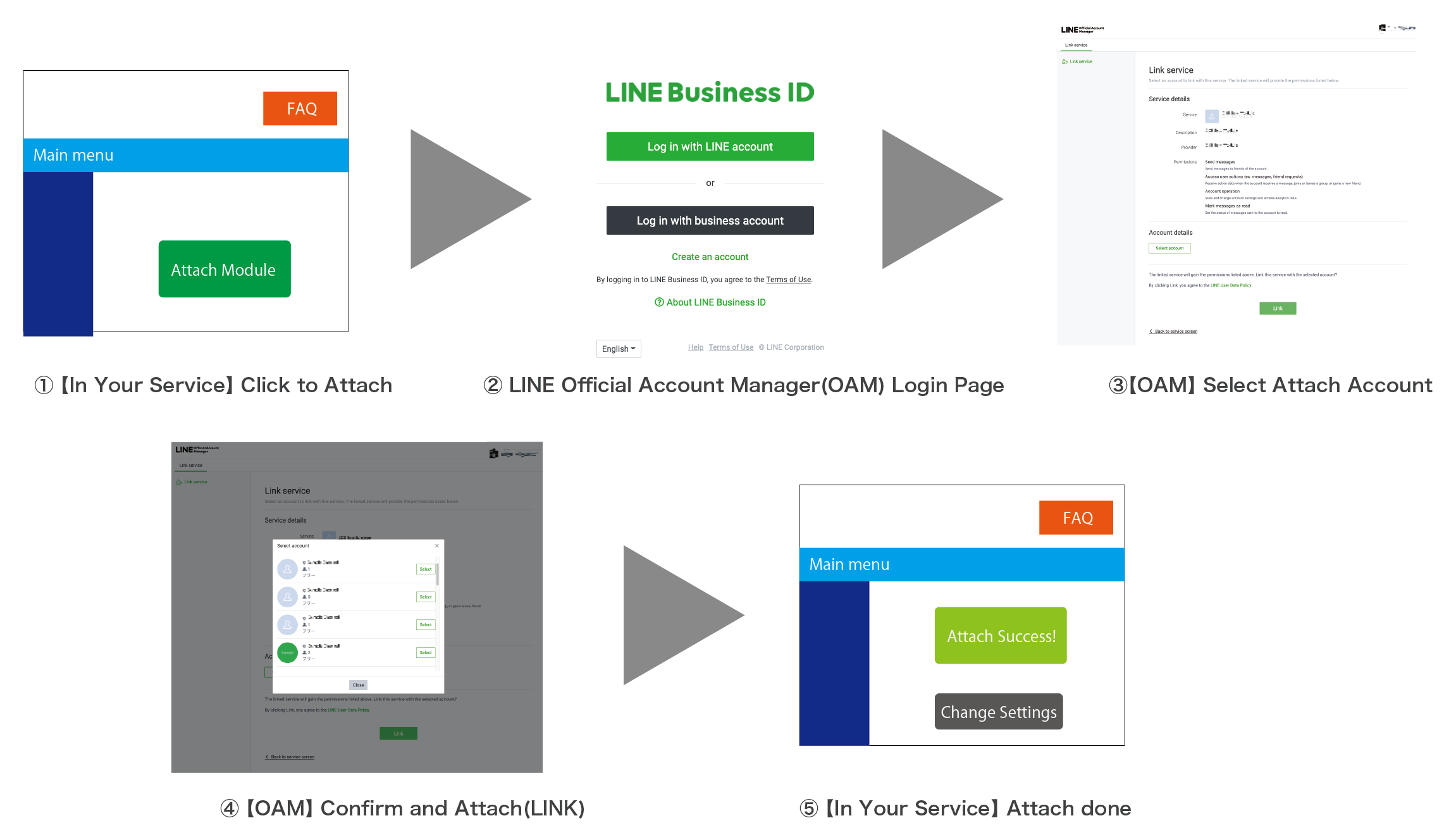
The first screen and the fifth screen should be prepared by the company in charge of developing the module channel.
**Restrictions on attaching multiple module channels to the LINE Official Account**
Only one module channel with the "Default Active" feature can be attached to a single LINE Official Account.
1. [Request authorization from the LINE Official Account admin](https://developers.line.biz/en/docs/partner-docs/module-technical-attach-channel/#request-auth-from-line-oa-admin)
1. [About the linkage screen](https://developers.line.biz/en/docs/partner-docs/module-technical-attach-channel/#about-linkage-screen)
1. [Receive the authorization code or error response](https://developers.line.biz/en/docs/partner-docs/module-technical-attach-channel/#get-auth-code)
1. [Attach by operation of the module channel provider](https://developers.line.biz/en/docs/partner-docs/module-technical-attach-channel/#link-attach-by-operation-of-module-channel-provider)
### 1. Request authorization from the LINE Official Account admin
By having the admin of the LINE Official Account access the URL for authentication and authorization (authorization URL `https://manager.line.biz/module/auth/v1/authorize` with query parameters), the process of attaching the module channel to the LINE Official Account will begin.
**Example URL for authentication and authorization**
```
https://manager.line.biz/module/auth/v1/authorize?response_type=code&client_id=1234567890&redirect_uri=https%3A%2F%2Fexample.com%2Fcallback&scope=message%3Asend%20message%3Areceive&state={CSRF token}®ion=JP&basic_search_id={LINE Official Account basic ID}&brand_type=premium
```
Generally, you'll set a link to access this URL on the page to start linking module channels, and then ask the LINE Official Account admin to click the link. In the flow in the above example, the URL can be accessed when you click **Attach Module** button on the "'In Your Service" Click to Attach page.
#### Query Parameters
response_type
String
`code`
redirect_uri
String
Redirect URL. The URL for the module channel developer to receive the authorization code. After authentication and authorization (operation on the link screen), the LINE Official Account admin will be redirected to this URL.
This URL should be provided by the module channel developer. This URL must match the redirect URL that you previously registered for the module channel in the [LINE Developers Console](https://developers.line.biz/console/).
**The value specified for redirect_uri should be URL-encoded**
If you forget the URL encoding of the query parameters, the second and subsequent query parameters will be recognized as query parameters for the authentication URL and won't be passed to the redirect destination.
Example of specifying `https://example.com/auth?param1=value1¶m2=value2`as the `redirect_uri` in the authentication URL is `https://manager.line.biz/module/auth/v1/authorize?response_type=code&client_id=1234567890&redirect_uri=https%3A%2F%2Fexample.com%2Fauth%3Fparam1%3Dvalue1%26param2%3Dvalue2&scope=message%3Asend%20message%3Areceive&state={CSRF token}®ion=JP&basic_search_id={LINE Official Account basic id}&brand_type=premium`.
client_id
String
The channel ID of the module channel. A channel-specific identifier issued by the LINE Platform.
scope
String
Specify at permission (scope) that you want to request the LINE Official Account admin to allow. To specify multiple scopes, separate them with a URL-encoded space (%20). For more information, see [scopes](https://developers.line.biz/en/docs/partner-docs/module-technical-attach-channel/#scopes).
state
String
A unique alphanumerical string to prevent [cross-site request forgery (CSRF)](https://datatracker.ietf.org/doc/html/rfc6749#section-10.12). This value should be unique string randomly generated in the system of the company responsible for the development of the module channel. URL-encoded strings can't be used.
region
String
The region of the LINE Official Account to which the module channel is attached. Specify `JP` or `TW`.
basic_search_id
String
LINE Official Account [basic ID](https://help.linebiz.com/lineadshelp/s/article/L000001191?language=ja). Specify when you want to allow the module channel to be attached only to specific LINE Official Accounts.
brand_type
String
Specify to limit the [account types of LINE Official Accounts](https://www.lycbiz.com/jp/service/line-official-account/account-type/) that can be attached.
- Premium Account: `premium`
- Verified Account: `verified`
- Unverified Account: `unverified`
To specify multiple account types, concatenate a URL-encoded space (%20). For example, to limit the attachment of only premium accounts and authenticated accounts, you would specify `brand_type=premium%20verified`.
code_challenge
String
Specify when using PKCE (Proof Key for Code Exchange) defined in the OAuth 2.0 extension specification as a countermeasure against authorization code interception attacks. Compliant with [RFC 7636](https://datatracker.ietf.org/doc/html/rfc7636).
code_challenge_method
String
`S256`
Specify when using PKCE (Proof Key for Code Exchange) defined in the OAuth 2.0 extension specification as a countermeasure against authorization code interception attacks. Compliant with [RFC 7636](https://datatracker.ietf.org/doc/html/rfc7636).
#### Scopes
You can specify the following scopes with the `scope` parameter. To specify multiple scopes, separate them with a URL-encoded space (%20).
| Scope | APIs available for the module channel |
| --- | --- |
| Specification not required (default) | You can be used without a scope.- [Issue link token (/v2/bot/user/{userId}/linkToken)](https://developers.line.biz/en/reference/messaging-api/#issue-link-token)
|
| `message%3Asend`
(message:send) | - [Send reply message (/v2/bot/message/reply)](https://developers.line.biz/en/reference/messaging-api/#send-reply-message)
- [Send push message (/v2/bot/message/push)](https://developers.line.biz/en/reference/messaging-api/#send-push-message)
- [Send multicast message (/v2/bot/message/multicast)](https://developers.line.biz/en/reference/messaging-api/#send-multicast-message)
- [Send broadcast message (/v2/bot/message/broadcast)](https://developers.line.biz/en/reference/messaging-api/#send-broadcast-message)
- [Send narrowcast message (/v2/bot/message/narrowcast)](https://developers.line.biz/en/reference/messaging-api/#send-narrowcast-message) and related APIs
- [Managing Audience (/v2/bot/audienceGroup/\*\*\*)](https://developers.line.biz/en/reference/messaging-api/#manage-audience-group)
- [Get the target limit for additional messages (/v2/bot/message/quota)](https://developers.line.biz/en/reference/messaging-api/#get-quota)
- [Get number of messages sent this month (/v2/bot/message/quota/consumption)](https://developers.line.biz/en/reference/messaging-api/#get-consumption)
- [Display a loading animation (/v2/bot/chat/loading/start)](https://developers.line.biz/en/reference/messaging-api/#display-a-loading-indicator)
|
| `message%3Areceive`
(message:receive) | - Get webhook events for Messaging API and Module Channel
- [Webhooks](https://developers.line.biz/en/reference/messaging-api/#webhooks)
- [Webhook Event Objects](https://developers.line.biz/en/reference/messaging-api/#webhook-event-objects)
- [Chat control (Chat Control)](https://developers.line.biz/en/docs/partner-docs/module-technical-chat-control/#what-is-chat-control)
|
| `account%3Amanage`
(account:manage) | - [Set default rich menu (/v2/bot/user/all/richmenu/{richMenuId})](https://developers.line.biz/en/reference/messaging-api/#set-default-rich-menu)
- [Get number of message deliveries (/v2/bot/insight/message/delivery?date={date})](https://developers.line.biz/en/reference/messaging-api/#get-number-of-delivery-messages)
- [Get number of followers (/v2/bot/insight/followers?date={date})](https://developers.line.biz/en/reference/messaging-api/#get-number-of-followers)
- [Get friend demographics (/v2/bot/insight/demographic)](https://developers.line.biz/en/reference/messaging-api/#get-demographic)
- [Get user interaction statistics (/v2/bot/insight/message/event?requestId={requestId})](https://developers.line.biz/en/reference/messaging-api/#get-message-event)
- [Get statistics per unit (/v2/bot/insight/message/event/aggregation?customAggregationUnit={customAggregationUnit}&from={from}&to={to})](https://developers.line.biz/en/reference/messaging-api/#get-statistics-per-unit)
|
| `message%3Amark_as_read`
(message:mark_as_read) | - [Mark messages from users as read (/v2/bot/message/markAsRead)](https://developers.line.biz/en/reference/partner-docs/#mark-messages-from-users-as-read)
|
| `message%3Atemplated_pnp`
(message:templated_pnp) | - [Send a LINE notification message (template) (/v2/bot/message/pnp/templated/push)](https://developers.line.biz/en/reference/line-notification-messages/#send-line-notification-message-template)
- [Get number of sent LINE notification messages (template) (/v2/bot/message/delivery/pnp/templated)](https://developers.line.biz/en/reference/line-notification-messages/#get-number-of-sent-line-notification-messages-template)
- Receive webhook events when LINE notification messages are delivered ([Webhook delivery completion event](https://developers.line.biz/en/docs/partner-docs/line-notification-messages/message-sending-complete-webhook-event/))
|
| `profile%3Aread`
(profile:read) | - [Get profile (/v2/bot/profile/{userId})](https://developers.line.biz/en/reference/messaging-api/#get-profile)
- [Get group chat summary (/v2/bot/group/{groupId}/summary)](https://developers.line.biz/en/reference/messaging-api/#get-group-summary)
- [Get group chat member profile (/v2/bot/group/{groupId}/member/{userId})](https://developers.line.biz/en/reference/messaging-api/#get-group-member-profile)
- [Get multi-person chat member profile (/v2/bot/room/{roomId}/member/{userId})](https://developers.line.biz/en/reference/messaging-api/#get-room-member-profile)
- [Get number of users in a group chat (/v2/bot/group/{groupId}/members/count)](https://developers.line.biz/en/reference/messaging-api/#get-members-group-count)
- [Get number of users in a multi-person chat (/v2/bot/room/{roomId}/members/count)](https://developers.line.biz/en/reference/messaging-api/#get-members-room-count)
|
| `coupon%3Amanage`
(coupon:manage) | - [Create a coupon (/v2/bot/coupon)](https://developers.line.biz/en/reference/messaging-api/#create-coupon)
- [Discontinue a coupon (/v2/bot/coupon/{couponId}/close)](https://developers.line.biz/en/reference/messaging-api/#discontinue-coupon)
- [Get a list of coupons (/v2/bot/coupon)](https://developers.line.biz/en/reference/messaging-api/#get-coupons-list)
- [Get details of a coupon (/v2/bot/coupon/{couponId})](https://developers.line.biz/en/reference/messaging-api/#get-coupon)
- Send messages with the message type set to [Coupon message](https://developers.line.biz/en/docs/messaging-api/message-types/#coupon-messages)
|
| `crm%3Amanage`
(crm:manage) | This scope can only be specified for module channels that use the Chat Plugin function\*. Otherwise, don't specify.
Required when using Chat Plugin. If this scope isn't specified for a module channel that uses the Chat Plugin functions, the functions provided by the Chat Plugin may not be available in the future. |
\* The Chat Plugin function is currently only available to select corporate users.
### 2. About the linkage screen
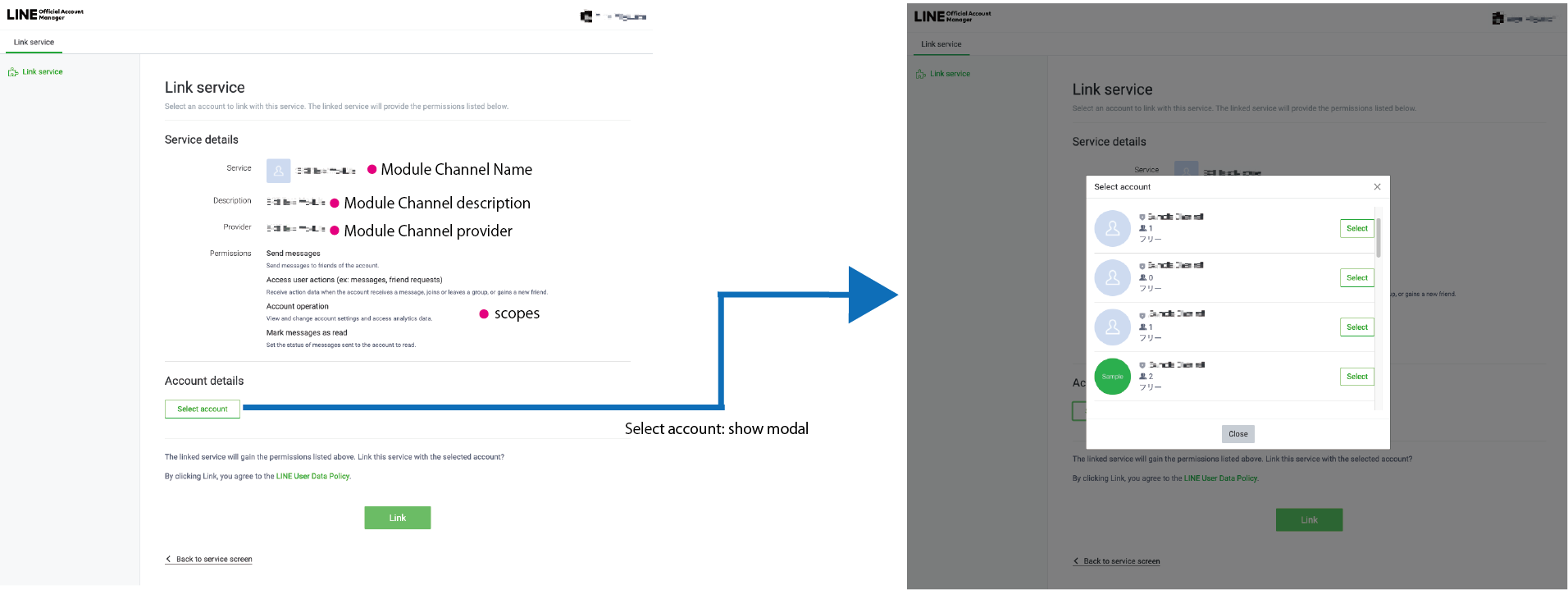
When the admin of the LINE Official Account accesses the URL for authentication and authorization, the LINE Official Account Manager linkage screen will be displayed. The linkage screen shows what you applied for when creating a module channel. You can check the settings in the [LINE Developers Console](https://developers.line.biz/console/).
### 3. Receive the authorization code or error response
When the admin of the LINE Official Account completes authentication and authorization, the authorization code and error code are passed to the redirect URL (`redirect_uri`) specified in the URL for authentication and authorization through these query parameters. In [the flow](https://developers.line.biz/en/docs/partner-docs/module-technical-attach-channel/#attach-flow) presented in the above example, the authorization code and error code are passed when the **Link** button is clicked on the "OAM Confirm and Attach" screen.
#### Receiving the authorization code
Once the admin of the LINE Official Account has been authenticated and has completed the authorization, they are redirected to the redirect URL (`redirect_uri`) with these query parameters.
##### Query Parameters
code
String
This is the authorization code required to link (attach) to the LINE Official Account. This authorization code has a validity period and can be used only once.
state
String
Anti-CSRF string. Make sure this string is the same as specified in the `state` query parameter of the URL for authentication and authorization.
#### Receiving an error response
If authentication by the admin of the LINE Official Account fails, you'll be redirected to the redirect URL (`redirect_uri`) with these query parameters.
##### Query Parameters
error
String
Error code.
error_description
String
Error details.
state
String
Anti-CSRF string. Make sure this string is the same as specified in the `state` query parameter of the URL for authentication and authorization.
### 4. Attach by operation of the module channel provider
Once you get the authorization code and confirm that the string passed in the `state` query parameter is okay, attach the module channel to the LINE Official Account.
For more information, see [Attach by operation of the module channel provider](https://developers.line.biz/en/reference/partner-docs/#link-attach-by-operation-module-channel-provider) in the options for corporate customers API reference.