# Using the Messaging API from a module channel
**Procedures are required to use optional functions**
The functions described in this document are available only to corporate customers who have made the prescribed applications. If you would like to publish the extension function using the module, contact the sales representative or contact us from [LINE Marketplace Inquiry](https://line-marketplace.com/jp/inquiry) (only available in Japanese).
Module channels, like Messaging API channels, can use the Messaging API to send messages and switch between rich menus.
- [Using the Messaging API with the channel access token of a module channel](https://developers.line.biz/en/docs/partner-docs/module-technical-using-messaging-api/#using-msg-api-with-module-channel-access-token)
- [Receiving a webhook](https://developers.line.biz/en/docs/partner-docs/module-technical-using-messaging-api/#get-webhook)
- [Getting the LINE Official Account information from a module channel](https://developers.line.biz/en/docs/partner-docs/module-technical-using-messaging-api/#get-line-oa-info-from-module-channel)
- [Notes](https://developers.line.biz/en/docs/partner-docs/module-technical-using-messaging-api/#notes)
## Using the Messaging API with the channel access token of a module channel
- [User ID used in a module channel](https://developers.line.biz/en/docs/partner-docs/module-technical-using-messaging-api/#user-id-used-in-module-channel)
- [Channel access token of a module channel](https://developers.line.biz/en/docs/partner-docs/module-technical-using-messaging-api/#module-channel-access-token)
- [Calling a Messaging API endpoint](https://developers.line.biz/en/docs/partner-docs/module-technical-using-messaging-api/#call-msg-api-endpoint)
- [Rate limits for using the Messaging API](https://developers.line.biz/en/docs/partner-docs/module-technical-using-messaging-api/#rate-limits)
### User ID used in a module channel
In a module channel provided by LINE Market Place, the identifier for each user, which is the [user ID](https://developers.line.biz/en/faq/#what-are-userid-groupid-and-roomid), is an identifier consisting of a 68-digit character string starting with the letter "L".
This identifier will be different between LINE Official Accounts, even if they are the same user.
**Example 68-digit identifier starting with L:**
```
LUb577ef3cbe786a8da85ff8e902a03fc6-U5fac33f633e72c192759f09afc41fa28
```
### Channel access token of a module channel
Once a module channel has switched to Active Channel, you can call the Messaging API or Module Channel API using the channel access token of your module channel.
You can use one of these channel access tokens for module channels.
- [Short-lived channel access token](https://developers.line.biz/en/docs/basics/channel-access-token/#short-lived-channel-access-token)
- [Channel access token with a user-specified expiration (Channel access token v2.1)](https://developers.line.biz/en/docs/basics/channel-access-token/#user-specified-expiration)
- [Stateless channel access token](https://developers.line.biz/en/docs/basics/channel-access-token/#stateless-channel-access-token)
You can find the information you need to issue a channel access token under the **Basic settings** tab of your module channel on the [LINE Developers Console](https://developers.line.biz/console/).
**Long-lived channel access tokens can't be used**
Long-lived channel access tokens are not available for module channels.
### Calling a Messaging API endpoint
You can use the Messaging API by using the channel access token of the module channel.
However, pay attention to the scope and request headers.
#### Scope
To use the Messaging API, you must have a scope defined for each endpoint.
The scope must be specified when attaching the module channel and permission to use it must be obtained from the LINE Official Account admin. For details, see [Request authorization from the LINE Official Account admin](https://developers.line.biz/en/docs/partner-docs/module-technical-attach-channel/#request-auth-from-line-oa-admin).
#### Request headers
When calling a Messaging API endpoint from a module channel, specify the channel access token of your module channel in the `Authorization` header. Furthermore, module channel is a service designed to attach to multiple LINE Official Accounts, so be sure to specify "header specifying the bot's user ID" described below.
Authorization
`Bearer {channel access token}`
For `{channel access token}`, specify the channel access token of your module channel.
Header specifying the bot's user ID
The user ID of the LINE Official Account bot attached to the module channel.
You can get the user ID of the bot from the response of [attaching the module channel](https://developers.line.biz/en/reference/partner-docs/#link-attach-by-operation-module-channel-provider) or the [Attached event](https://developers.line.biz/en/reference/partner-docs/#attached-event).
**The specific header will be provided after participation**
The name (parameter name) of this header is open only to customers who participate in the [LINE Marketplace](https://line-marketplace.com/jp/inquiry) (only available in Japanese).
The following is an example of sending a [push message](https://developers.line.biz/en/reference/messaging-api/#send-push-message) from a module channel via Messaging API.
```sh
curl -v -X POST https://api.line.me/v2/bot/message/push \
-H 'Content-Type:application/json' \
-H 'Authorization: Bearer {channel access token}' \
-H 'Header specifying the bot user ID: xxxxxxxxxxxxxxxxxxxxxxxx' \ // NEED THIS HEADER
-d '{
"to": "LUb577ef3cbe...",
"messages":[
{
"type":"text",
"text":"Hello, world1"
}
]
}'
```
### Rate limits for using the Messaging API
The rate limit for using the Messaging API from a module channel applies to each API function (endpoint) by each LINE Official Account bot attached to the module channel on a per module channel basis.
Even if your module channel is attached to multiple LINE Official Account bots, the rate limit applies separately to each combination of `module channel x LINE Official Account bot x API function`.
For more information about the rate limit per endpoint, see [Rate limits](https://developers.line.biz/en/reference/messaging-api/#rate-limits) in the Messaging API reference.
### Get statistics of sent messages from a module channel
You can get statistics per aggregation unit of how users interact with [push messages](https://developers.line.biz/en/reference/messaging-api/#send-push-message) and [multicast messages](https://developers.line.biz/en/reference/messaging-api/#send-multicast-message) you send to multiple users.
Statistics for module channels are aggregated using a combination of a LINE Official Account bot and a unit name.
For example, a message with the unit name "Unit A" is sent from LINE Official Account A and B in a single module channel. At this time, the statistics for each unit are aggregated for each of the LINE Official Accounts.
The number of unit name types assigned during the current month (from the 1st to the last day of the month) is also counted in the same way, using a combination of a LINE Official Account bot and a unit name.
For more information, see [Get statistics of sent messages](https://developers.line.biz/en/docs/messaging-api/unit-based-statistics-aggregation/) in the Messaging API documentation.
## Receiving a webhook
When you receive a webhook event on the webhook URL server registered in your module channel, check the values of the `mode` and `destination` properties.
**Note**
If the module channel webhook URL server doesn't receive the webhook event, check the following:
- The module channel must be attached to a LINE Official Account. Make sure you can send push messages from the module channel to users who have added the LINE Official Account as a friend.
- When requesting authorization from the LINE Official Account admin to attach the module channel, `message%3Areceive` (message:receive) must be specified in the scope query parameter of the authorization URL.
For more information on scope, see [Request authorization from the LINE Official Account admin](https://developers.line.biz/en/docs/partner-docs/module-technical-attach-channel/#request-auth-from-line-oa-admin).
- [`mode` property](https://developers.line.biz/en/docs/partner-docs/module-technical-using-messaging-api/#mode-property)
- [`destination` property](https://developers.line.biz/en/docs/partner-docs/module-technical-using-messaging-api/#destination-property)
- [Receiving module channel-specific webhook events](https://developers.line.biz/en/docs/partner-docs/module-technical-using-messaging-api/#get-module-channel-specific-webhook-events)
### `mode` property
Webhook events such as messages from users and adding friends will be sent to all channels connected to the LINE Official Account (Primary Channel and Module Channels attached to the LINE Official Account) at the same time.
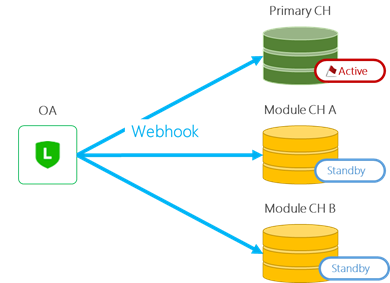
Before processing the webhook event, make sure that each channel has the initiative (Chat Control) to respond to the end user.
To check the initiative (Chat Control), use the `mode` property of the webhook event.
| Value of `mode` property | Description |
| --- | --- |
| `active` | The channel that received the webhook event is active.
The webhook URL server that receives this webhook event can send reply messages, push messages, etc. |
| `standby` | The channel that received the webhook event is waiting.
The webhook URL server that receives this webhook event should not send messages.
Webhook events arriving at the waiting channel won't include the `replyToken` property. Therefore, the response message isn't available. |
Of the channels attached to the LINE Official Account, only one channel has the `mode` property set to `active`. For all other channels, the `mode` property is set to `standby`.
The following are examples of the webhook event sent when the value of the `mode` property is `active` or `standby`:
```sh
#Example of a webhook sent to Active Channel
{
"replyToken": "0f3779fba3b349968c5d07db31eab56f", // NOTICE THIS PROPERTY
"type": "message",
"mode": "active", // NOTICE THIS PROPERTY
"timestamp": 1462629479859,
"source": {
"type": "user",
"userId": "LUb577ef3cbe..."
},
"message": {
"id": "325708",
"type": "text",
"text": "Hello, world"
}
}
#Example of a webhook event sent to the Standby Channel
{
// replyToken PROPERTY DOES NOT EXIST
"type": "message",
"mode": "standby", // NOTICE THIS PROPERTY
"timestamp": 1462629479859,
"source": {
"type": "user",
"userId": "U4af4980629..."
},
"message": {
"id": "325708",
"type": "text",
"text": "Hello, world!"
}
}
```
### `destination` property
Module channels may be attached to multiple LINE Official Accounts (OA "X", OA "Y", OA "Z", ...) as shown in the figure below.
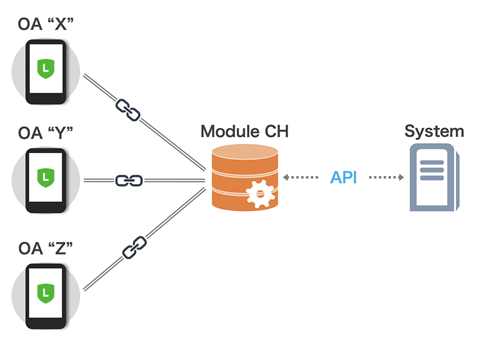
Therefore, use the destination property to determine which LINE Official Account the webhook was sent from.
destination
String
User ID of the bot of the LINE Official Account that sent the webhook event.
The value of the bot's user ID is a string that matches the regular expression `U[0-9a-f]{32}`.
The following is an example of a webhook event:
```sh
{
"destination": "U53387d54817...", // CHECK THIS PROPERTY
"events": [...]
}
```
### Receiving module channel-specific webhook events
These webhook events are sent to the module channel's webhook URL server.
| Event type | Description |
| --- | --- |
| [Attached event](https://developers.line.biz/en/reference/partner-docs/#attached-event) | This event indicates that the module channel has been attached to the LINE Official Account. |
| [Detached event](https://developers.line.biz/en/reference/partner-docs/#detached-event) | This event indicates that the module channel has been detached from the LINE Official Account. |
| [Activated event](https://developers.line.biz/en/reference/partner-docs/#activated-event) | This event indicates that the module channel has been switched to Active Channel by calling the [Acquire Control API](https://developers.line.biz/en/reference/partner-docs/#acquire-control-api). |
| [Deactivated event](https://developers.line.biz/en/reference/partner-docs/#deactivated-event) | This event indicates that the module channel has been switched to Standby Channel by calling [Acquire Control API](https://developers.line.biz/en/reference/partner-docs/#acquire-control-api) or [Release Control API](https://developers.line.biz/en/reference/partner-docs/#release-control-api). |
| [botSuspend event](https://developers.line.biz/en/reference/partner-docs/#botsuspend-event) | This event indicates that the LINE Official Account has been suspended (Suspend). |
| [botResumed event](https://developers.line.biz/en/reference/partner-docs/#botresumed-event) | This event indicates that the LINE Official Account has returned from the suspended state. |
**How to detect a change in initiative (Chat Control)**
When the module channel is set to Active Channel, the initiative (Chat Control) may change automatically without calling the Release Control API. You can detect a change in initiative (Chat Control) in the following ways:
| Event type | Description |
| --- | --- |
| - [Activated event](https://developers.line.biz/en/reference/partner-docs/#activated-event)
- [Deactivated event](https://developers.line.biz/en/reference/partner-docs/#deactivated-event)
| This event is sent when a module channel that is attached to a LINE Official Account calls the Acquire Control API or Release Control API and the initiative (Chat Control) of chat will be switched. |
| - [Follow event](https://developers.line.biz/en/reference/messaging-api/#follow-event)
- [Unfollow event](https://developers.line.biz/en/reference/messaging-api/#unfollow-event)
| This event is sent when an end user blocks the LINE Official Account and adds it as a friend again.
When the end user blocks the LINE official account and adds it as a friend again, the initiative (Chat Control) will be automatically reset to the default state. If the module channel has the [Default Active](https://developers.line.biz/en/docs/partner-docs/module-technical-chat-control/#default-active) function, it will automatically become the Active Channel. |
**About the suspended state (Suspend) of the LINE Official Account**
Regardless of the module channel settings or service availability, the LINE Official Account may be suspended (Suspend) at the convenience of the LINE Official Account operator. Specifically, the LINE Official Account will be suspended in these situations:
- When the operator deletes the LINE Official Account
- When the use of the LINE Official Account is suspended for any reason
In some cases, the LINE Official Account may be restored from its suspended status. A webhook event will be sent when the LINE Official Account is suspended or restored.
Implement the module so that there's no conflict in the information managed by the module channel side.
## Getting the LINE Official Account information from a module channel
You can obtain information about each LINE Official Account that is attached to a module channel by using the following APIs:
- [Get bot information](https://developers.line.biz/en/docs/partner-docs/module-technical-using-messaging-api/#get-bot-info)
- [Get a list of bots to which the module is attached](https://developers.line.biz/en/docs/partner-docs/module-technical-using-messaging-api/#get-multiple-bot-info)
### Get bot information
Gets basic information about the bots of LINE Official Accounts that have attached module channels. For more information, see [Get bot info](https://developers.line.biz/en/reference/messaging-api/#get-bot-info) in the Messaging API documentation.
Also, specify this content in the request header:
Authorization
Bearer `{channel access token}`
For `{channel access token}`, specify the channel access token of your module channel.
Header specifying the bot's user ID
The user ID of the LINE Official Account bot attached to the module channel.
You can get the user ID of the bot from the response of the [Attach by operation of the module channel provider](https://developers.line.biz/en/docs/partner-docs/module-technical-using-messaging-api/#link-attach-by-operation-module-channel-provider) or the [Attached event](https://developers.line.biz/en/reference/partner-docs/#attached-event).
**The specific header will be provided when after participation**
The name (parameter name) of this header is open only to customers who participate in [LINE Marketplace](https://line-marketplace.com/jp/inquiry) (only available in Japanese).
### Get a list of bots to which the module is attached
Gets a list of basic information about the bots of multiple LINE Official Accounts that have attached module channels. For more information, see [Get a list of bots to which the module is attached](https://developers.line.biz/en/reference/partner-docs/#get-multiple-bot-info-api) in the options for corporate customers API reference.
## Notes
- When detaching a module channel, there will be a time lag before the settings are reflected. Don't send requests after detaching.
- If you want to add a scope to a target account, you can do so even for accounts that have already been attached.