# LINE MINI App API reference
## Service Messages
**This feature can only be used for verified MINI Apps**
This feature is only available for verified MINI Apps. For unverified MINI Apps, you can test the feature on the internal channel for Developing, but you can't use the feature on the internal channel for Published.
The Service Message API enables you to send service messages from your service to your LINE MINI App users.
Sending service messages requires a service notification token and a [template](https://developers.line.biz/en/docs/line-mini-app/develop/service-messages/#service-message-templates).
- [Issue a service notification token](https://developers.line.biz/en/reference/line-mini-app/#issue-notification-token)
- [Send a service message](https://developers.line.biz/en/reference/line-mini-app/#send-service-message)
### Issuing a service notification token
Issues a service notification token. Service notification tokens are used to send a service message to the associated user.
Service notification tokens have the following features:
- A service notification token expires 1 year (31,536,000 seconds) after being issued. While it is still valid, up to 5 service messages can be sent.
- Every time you use the service notification token, the token value is renewed unless it expired or no longer has remaining message counts. If you are planning to send successive service messages to a user, keep the renewed service notification token.
**Don't issue more than one service notification token with a single access token**
Issuing multiple service notification tokens reusing an access token obtained by [`liff.getAccessToken()`](https://developers.line.biz/en/reference/liff/#get-access-token) (LIFF access token) is not allowed.
Only one service notification token can be issued per LIFF access token.
**Note**
Each service notification token is associated with one user. You cannot use a service notification token associated with one user to send a service message to other users.
_Example request_
```sh
curl -X POST https://api.line.me/message/v3/notifier/token \
-H 'Content-Type: application/json' \
-H 'Authorization: Bearer W1TeHCgfH2Liwa...' \
-d '{
"liffAccessToken": "eyJhbGciOiJIUzI1NiJ9..."
}'
```
#### HTTP request
`POST https://api.line.me/message/v3/notifier/token`
#### Request headers
Content-Type
application/json
Authorization
Bearer `{channel access token}`\
For more information, see [Channel access token](https://developers.line.biz/en/docs/basics/channel-access-token/) in the LINE Platform basics.
**Use of stateless channel access tokens is recommended**
[Long-lived channel access tokens](https://developers.line.biz/en/docs/basics/channel-access-token/#long-lived-channel-access-token) and [channel access token with a user-specified expiration (Channel Access Token v2.1)](https://developers.line.biz/en/docs/basics/channel-access-token/#user-specified-expiration) cannot be used for LINE MINI App channels.
When developing LINE MINI Apps, either [stateless channel access tokens](https://developers.line.biz/en/docs/basics/channel-access-token/#stateless-channel-access-token) or [short-lived channel access tokens](https://developers.line.biz/en/docs/basics/channel-access-token/#short-lived-channel-access-token) can be used. Stateless channel access tokens are recommended among those two. Stateless channel access tokens have an unlimited number of issuances, so there is no need for the application to manage the token lifecycle.
#### Request body
liffAccessToken
String
User access token obtained by [`liff.getAccessToken()`](https://developers.line.biz/en/reference/liff/#get-access-token) (LIFF access token).
#### Response
Returns status code `200` and a JSON object with the following information.
notificationToken
String
Service notification token
expiresIn
Number
The amount of time remaining in seconds before the service notification token expires. A service notification token expires 1 year (31,536,000 seconds) after being issued.
remainingCount
Number
The number of times you can send a service message with the issued service notification token
sessionId
String
The session ID. For more information, see [Sending service messages](https://developers.line.biz/en/docs/line-mini-app/develop/service-messages/).
_Example response_
```json
{
"notificationToken": "34c11a03-b726-49e3-8ce0-949387a9..",
"expiresIn": 31536000,
"remainingCount": 5,
"sessionId": "xD06...."
}
```
#### Error response
Returns one of the following status codes and error messages.
| Status code | Description |
| --- | --- |
| 400 Bad request | This status code means one of the following:
There is a problem with the request body.
The LIFF access token specified in the `liffAccessToken` property was used multiple times in a short span of time to request the issuing of service notification tokens.
|
| 401 Unauthorized | This status code means one or both of the following:
A valid channel access token hasn't been specified.
A valid LIFF access token hasn't been specified.
When [the user closes the LIFF app](https://developers.line.biz/en/docs/liff/developing-liff-apps/#behavior-when-closing-liff-app), the LIFF access token will be revoked even if it hasn't expired.
|
| 403 Forbidden | This channel isn't authorized to issue service messages. |
| 500 Internal Server Error | Error on the internal server |
_Example error response_
```json
{
"message": "[liffAccessToken] must not be blank"
}
```
### Sending service messages
Sends a service message to a user specified in the service notification token.
Once a service message is sent, the token's value is renewed unless the token expired or no longer has remaining message counts. If you are planning to send successive service messages to a user, keep the renewed service notification token.
_Example request_
```sh
curl -X POST https://api.line.me/message/v3/notifier/send?target=service \
-H 'Authorization: Bearer W1TeHCgfH2Liwa...' \
-H 'Content-Type: application/json' \
-d '{
"templateName": "thankyou_msg_en",
"params": {
"date": "2020-04-23",
"username": "Brown & Cony"
},
"notificationToken": "34c11a03-b726-49e3-8ce0-949387a9.."
}'
```
#### HTTP request
`POST https://api.line.me/message/v3/notifier/send`
#### Request headers
Content-Type
application/json
Authorization
Bearer `{channel access token}`\
For more information, see [Channel access token](https://developers.line.biz/en/docs/basics/channel-access-token/) in the LINE Platform basics.
**Use of stateless channel access tokens is recommended**
[Long-lived channel access tokens](https://developers.line.biz/en/docs/basics/channel-access-token/#long-lived-channel-access-token) and [channel access token with a user-specified expiration (Channel Access Token v2.1)](https://developers.line.biz/en/docs/basics/channel-access-token/#user-specified-expiration) cannot be used for LINE MINI App channels.
When developing LINE MINI Apps, either [stateless channel access tokens](https://developers.line.biz/en/docs/basics/channel-access-token/#stateless-channel-access-token) or [short-lived channel access tokens](https://developers.line.biz/en/docs/basics/channel-access-token/#short-lived-channel-access-token) can be used. Stateless channel access tokens are recommended among those two. Stateless channel access tokens have an unlimited number of issuances, so there is no need for the application to manage the token lifecycle.
#### Query parameters
target
`service`
#### Request body
templateName
String
The name of a pre-registered template to use for the service message, with a BCP 47 language tag suffix.\
Format: `{template name}_{BCP 47 language tag}`\
Max character limit: 30
**Note**
The languages and language tags supported by the service message are as follows.
- Arabic: `ar`
- Chinese (Simplified): `zh-CN`
- Chinese (Traditional): `zh-TW`
- English: `en`
- French: `fr`
- German: `de`
- Indonesian: `id`
- Italian: `it`
- Japanese: `ja`
- Korean: `ko`
- Malay: `ms`
- Portuguese (Brazil): `pt-BR`
- Portuguese (Portugal): `pt-PT`
- Russian: `ru`
- Spanish (Spain): `es-ES`
- Thai: `th`
- Turkish: `tr`
- Vietnamese: `vi`
params
object
JSON Object to specify each template variable-value pair. \
If the template has no template variable, specify an empty JSON object (`{ }`). \
The template variables are defined for each template. If a template variable is part of the required elements, be sure to specify a template variable-value pair. \
For more information, see [Adding service message templates](https://developers.line.biz/en/docs/line-mini-app/develop/service-messages/#service-message-templates).
notificationToken
String
Service notification token
#### Response
Returns status code `200` and a JSON object with the following information.
notificationToken
String
A renewed service notification token. Use this service notification token to send successive service messages.
expiresIn
Number
The remaining amount of time in seconds until renewed service notification token expires
remainingCount
Number
The number of times you can send successive service messages with the renewed service notification token.
sessionId
String
The session ID. For more information, see [Sending service messages](https://developers.line.biz/en/docs/line-mini-app/develop/service-messages/).
**Note**
If the values of `expiresIn` and `remainingCount` are `0`, it means that the service message was sent, but the service notification token couldn't be renewed.
_Example response_
```json
// Request was successful,
// renewed service notification
// token issued
{
"notificationToken": "c9884874-bf6a-4241-8999-2767241c...",
"expiresIn": 31535906,
"remainingCount": 3,
"sessionId": "xD06...."
}
// Request was successful,
// the service message
// was sent, but the LINE Platform
// cannot renew the token
{
"expiresIn": 0,
"remaningCount": 0
}
```
#### Error response
Returns one of the following status codes and error messages.
| Status code | Description |
| --- | --- |
| 400 Bad request | This status code means one of the following:
There is a problem with the request body.
The target recipient of the service message doesn't exist.
|
| 401 Unauthorized | This status code means one or both of the following:
A valid channel access token hasn't been specified.
A valid service notification token hasn't been specified.
|
| 403 Forbidden | This status code means one of the following:
This channel is not authorized to send service messages.
The specified template cannot be found.
|
_Example error response_
```json
{
"message": "Invalid notifier token"
}
```
## Common Profile Quick-fill
**Available only in verified MINI Apps**
To use Common Profile Quick-fill, your LINE MINI App must be verified and you must apply to use Quick-fill. For more information, see [Steps for using Quick-fill](https://developers.line.biz/en/docs/line-mini-app/quick-fill/overview/#process).
Quick-fill is a feature that automatically fills in the necessary profile information by tapping the **Auto-fill** button on the LINE MINI App. You can easily use the Common Profile information that a user has set in the Account Center in the LINE MINI App. For more information, see [Overview of Common Profile Quick-fill](https://developers.line.biz/en/docs/line-mini-app/quick-fill/overview/).
### liff.$commonProfile.get()
Gets the information in the Common Profile that the user has set in the Account Center.
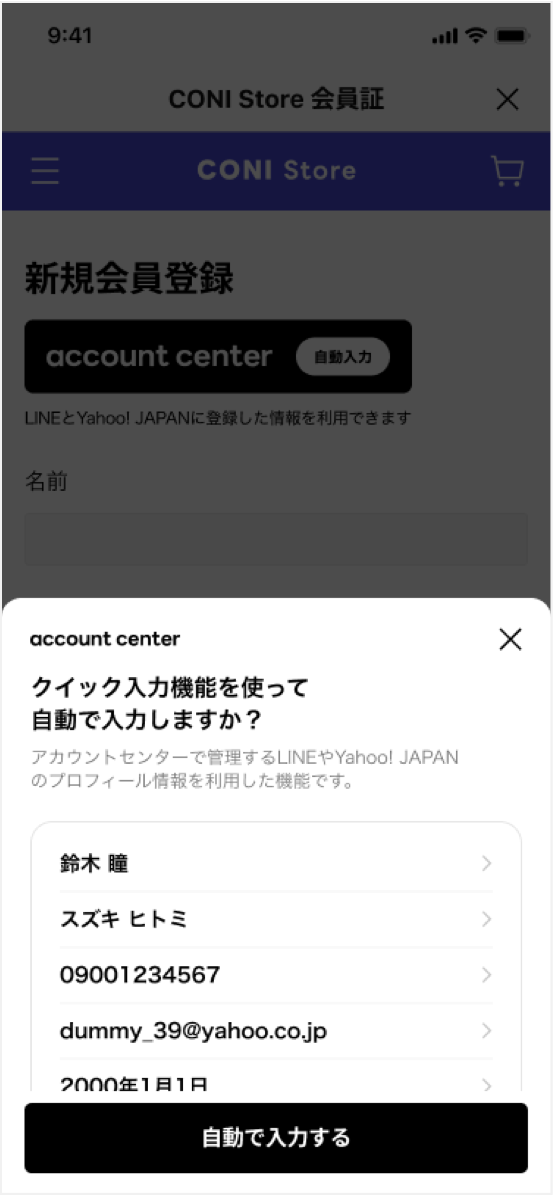
When you execute the `liff.$commonProfile.get()` method, a modal will appear to confirm the user's profile. After confirming the profile in the displayed modal, the user can tap **Auto-fill** and the profile information will be entered automatically.
Example of a modal display:
_Example_
```javascript
const { data, error } = await liff.$commonProfile.get(
["family-name", "given-name", "email", "tel", "postal-code"],
{
formatOptions: {
givenName: {
excludeEmojis: false,
},
tel: {
excludeNonJp: false,
},
postalCode: {
digitsOnly: false,
},
},
},
);
console.log(data);
console.log(error);
```
#### Syntax
```javascript
liff.$commonProfile.get(scopes, options);
```
#### Arguments
scopes
Array of strings
Specify the scope of the Common Profile you want to obtain.
For information on the values that can be specified for `scopes`, see [The `scopes` parameters that can be specified and its return value](https://developers.line.biz/en/docs/line-mini-app/quick-fill/overview/#common-profile-scope).
options
Object
Options for getting Common Profile information
options.formatOptions
Object
Options related to the format of information. Specify a [`formatOptions` object](https://developers.line.biz/en/reference/line-mini-app/#get-common-profile-format-options) for each scope specified in the `scopes` property.
Specify the scope for which you want to set the option in camel case format as the key. For example, when the scope is `given-name`, the key is `givenName`.
#### `formatOptions` object
excludeEmojis
Boolean
Whether to remove emojis from the string. The default is `true`. This can only be specified in the following scopes:
- givenName
- familyName
excludeNonJp
Boolean
Whether to exclude phone numbers with 12 or more digits. The default is `true`. If `true`, an empty string and error information are returned when the phone number has 12 or more digits. This can only be specified in the following scope:
- tel
digitsOnly
Boolean
Whether to exclude postal codes that contain non-numeric characters. The default is `true`. If `true`, an empty string and error information are returned when the postal code contains characters other than numbers. This can only be specified in the following scope:
- postalCode
_Example_
```javascript
{
givenName: {
excludeEmojis: false,
},
tel: {
excludeNonJp: false,
},
postalCode: {
digitsOnly: false,
},
}
```
#### Return value
Returns `Promise` object of type `{ data: Partial, error: Partial}`.
When `Promise` is resolved, an object of type `Partial` containing the user's Common Profile information is passed to the `data` property, and an object of type `Partial` containing error information is passed to the `error` property.
In the following cases, the property of `data` will be `undefined` or `null`:
- Cases where the property value becomes `undefined`
- If the target item isn't specified in the `scopes` parameter
- If the target item is specified in the `scopes` parameter, but the user doesn't authorized permission for that item
- Cases where the property value becomes `null`
- If the user hasn't set a value for the target item in the Common Profile
- If an error occurs when retrieving the target item in the Common Profile
For information on the values of the properties that can be obtained according to the specified `scopes`, see [The `scopes` parameters that can be specified and its return value](https://developers.line.biz/en/docs/line-mini-app/quick-fill/overview/#common-profile-scope).
_Example of an object of type `Partial`_
```javascript
{
"family-name": "Yamada",
"given-name": "Taro",
"email": "sample@example.com",
"tel": "09001234567",
"postal-code": "1020094"
}
```
_Example of an object of type `Partial`_
```javascript
{
"tel": ["Phone number has 12 or more digits"],
"postal-code": ["Postal code contains non-numeric characters"]
}
```
#### Error response
When the `Promise` is rejected, [`LiffError`](https://developers.line.biz/en/reference/liff/#liff-errors) is passed.
_Example of calling the API without installing the plugin correctly_
```javascript
new Error(
"LiffCommonProfilePlugin isn't installed properly. Did you call liff.use(new LiffCommonProfilePlugin()) before using it?"
);
```
_Example of API being called in a browser other than LIFF browser_
```javascript
new Error("liff.$commonProfile API is available only in LIFF browser.");
```
### liff.$commonProfile.getDummy()
Gets the dummy data for the Common Profile. There are 10 types of dummy data available, and you can specify the dummy data to get using the `caseId`.
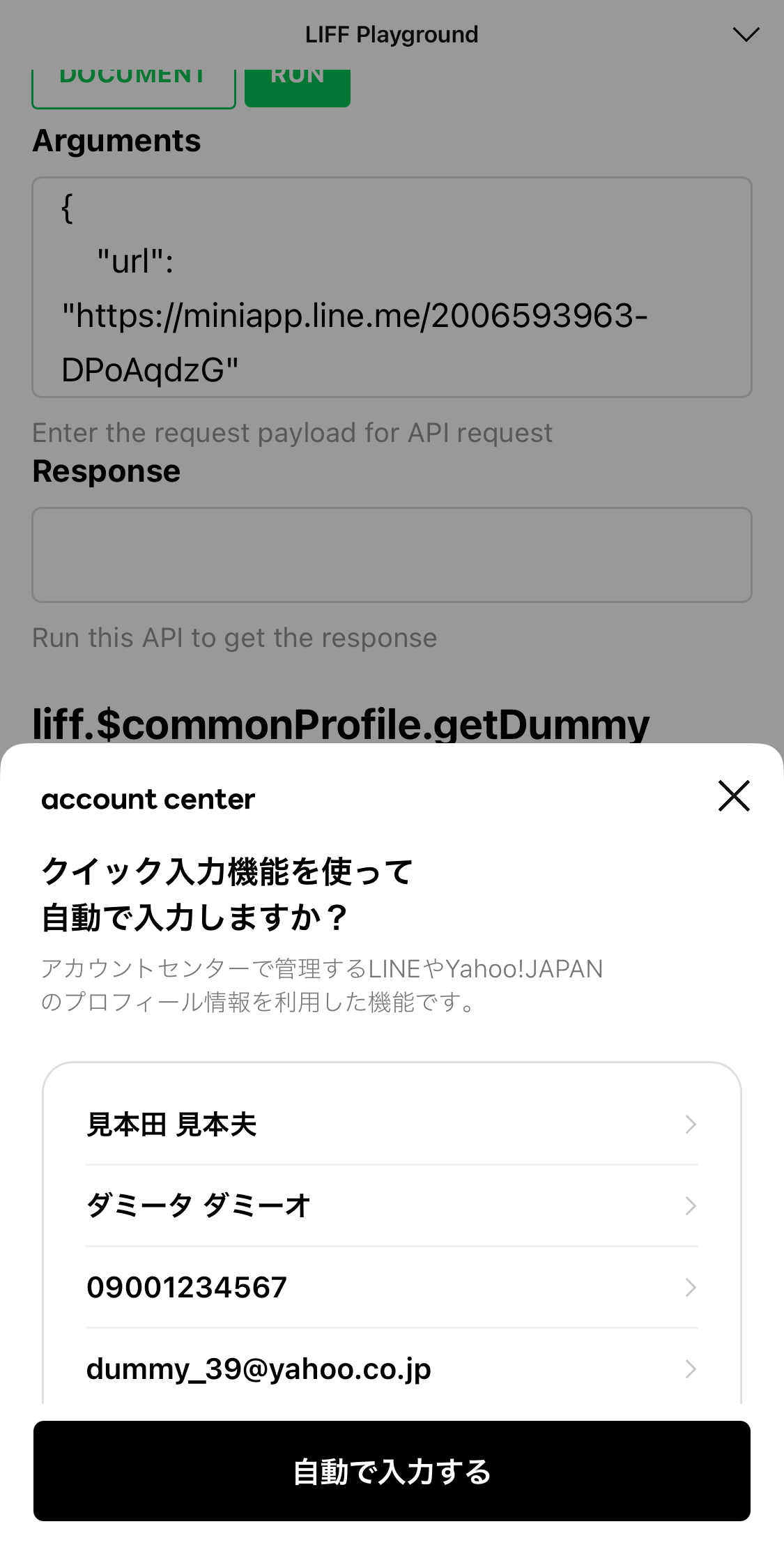
When you execute the `liff.$commonProfile.getDummy()` method, a modal will appear to confirm the dummy profile. You can get dummy data for the Common Profile by tapping **Auto-fill**.
Example of a modal display:
_Example_
```javascript
const { data, error } = await liff.$commonProfile.getDummy(
["family-name", "given-name", "email", "tel", "postal-code"],
{
formatOptions: {
givenName: {
excludeEmojis: false,
},
tel: {
excludeNonJp: false,
},
postalCode: {
digitsOnly: false,
},
},
},
1,
);
console.log(data);
console.log(error);
```
#### Syntax
```javascript
liff.$commonProfile.getDummy(scopes, options, caseId);
```
#### Arguments
scopes
Array of strings
Specify the scope of the Common Profile you want to obtain.
For information on the values that can be specified for `scopes`, see [The `scopes` parameters that can be specified and its return value](https://developers.line.biz/en/docs/line-mini-app/quick-fill/overview/#common-profile-scope).
options
Object
Options for getting Common Profile information
options.formatOptions
Object
Options related to the format of information. Specify a [`formatOptions` object](https://developers.line.biz/en/reference/line-mini-app/#get-common-profile-format-options) for each scope specified in the `scopes` property.
Specify the scope for which you want to set the option in camel case format as the key. For example, when the scope is `given-name`, the key is `givenName`.
caseId
number
Specify the ID of the dummy data you want to get. Dummy data with IDs from `1` to `10` is available.
For information about dummy data for each `caseId`, see [Dummy data for Common Profile that can be obtained](https://developers.line.biz/en/docs/line-mini-app/quick-fill/overview/#get-dummy-common-profile).
#### Return value
Returns `Promise` object of type `{ data: Partial, error: Partial}`.
When `Promise` is resolved, an object of type `Partial` containing the dummy data of the Common Profile is passed to the `data` property, and an object of type `Partial` containing error information is passed to the `error` property.
In the following cases, the property of `data` will be `undefined` or `null`:
- Cases where the property value becomes `undefined`
- If the target item isn't specified in the `scopes` parameter
- Cases where the property value becomes `null`
- If the dummy data doesn't have a value for the target item
For information on the dummy data you can get for the specified ID, see [Dummy data for Common Profile that can be obtained](https://developers.line.biz/en/docs/line-mini-app/quick-fill/overview/#get-dummy-common-profile).
_Example of an object of type `Partial`_
```javascript
{
"family-name": "見本田",
"given-name": "見本夫",
"family-name-kana": "ダミータ",
"given-name-kana": "ダミーオ",
"sex-enum": 0,
"bday-day": 12,
"bday-month": 3,
"bday-year": 1998,
"tel": "09001234567",
"email": "dummy_39@yahoo.co.jp",
"postal-code": "1020094",
"address-level1": "東京都",
"address-level2": "千代田区",
"address-level3": "紀尾井町1-2",
"address-level4": "東京ガーデンテラス紀尾井町"
}
```
_Example of an object of type `Partial`_
```javascript
{
"tel": ["Phone number has 12 or more digits"],
"postal-code": ["Postal code contains non-numeric characters"]
}
```
##### Error response
When the `Promise` is rejected, [`LiffError`](https://developers.line.biz/en/reference/liff/#liff-errors) is passed.
_Example of calling the API without installing the plugin correctly_
```javascript
new Error(
"LiffCommonProfilePlugin isn't installed properly. Did you call liff.use(new LiffCommonProfilePlugin()) before using it?"
);
```
_Example of API being called in a browser other than LIFF browser_
```javascript
new Error("liff.$commonProfile API is available only in LIFF browser.");
```
### liff.$commonProfile.fill()
Automatically fills the form with the Common Profile information you have obtained. The `data-liff-autocomplete` attribute is used to link each profile information to the form.
**Automatically filling that doesn't match the scope**
Automatic input using `liff.$commonProfile.fill()` is performed using the `data-liff-autocomplete` attribute of the form. At this time, the value specified in the `data-liff-autocomplete` attribute of the form must match the scope of the profile information obtained (`family-name`, `tel`, `bday-year`, etc.)
For example, if you want to automatically fill in a form after retrieving the year of birth (`bday-year`), month of birth (`bday-month`), and day of birth (`bday-day`) information and then process it into a format like `20110623`, you can use `document.getElementById().value` or `document.querySelector().value` instead of `liff.$commonProfile.fill()`.
_Example of automatically filling the family name, phone number, and gender as they were obtained_
```javascript
// HTML
// JavaScript
const { data, error } = await liff.$commonProfile.get([
"family-name",
"tel",
"sex-enum",
]);
liff.$commonProfile.fill(data);
```
_Example of automatically filling some of the common profile information that has been obtained in a slightly different format_
```javascript
// HTML
// JavaScript
const { data, error } = await liff.$commonProfile.get([
"bday-year",
"bday-month",
"bday-day",
]);
const year = data["bday-year"];
const month = data["bday-month"];
const day = data["bday-day"];
// If the month or day is one digit, pad with 0s to
const formattedMonth = month.toString().padStart(2, '0');
const formattedDay = day.toString().padStart(2, '0');
// Automatically fills the value after processing
liff.$commonProfile.fill({
"bday-year": year,
"bday-month": formattedMonth,
"bday-day": formattedDay,
});
```
#### Syntax
```javascript
liff.$commonProfile.fill(profile);
```
#### Arguments
profile
Partial\
Specify the profile information that is automatically fill into the form as a `Partial` type.
For information on the `scopes`, that can be specified, see [The `scopes` parameters that can be specified and its return value](https://developers.line.biz/en/docs/line-mini-app/quick-fill/overview/#common-profile-scope).
#### Return value
None