# Messaging API reference
## Common specifications
Common specifications for Messaging API, such as the domain name of endpoints, response when a request succeeds or fails, and rate limit.
- [Domain name](https://developers.line.biz/en/reference/messaging-api/#domain-name)
- [Rate limits](https://developers.line.biz/en/reference/messaging-api/#rate-limits)
- [Status codes](https://developers.line.biz/en/reference/messaging-api/#status-codes)
- [Response headers](https://developers.line.biz/en/reference/messaging-api/#response-headers)
- [Error responses](https://developers.line.biz/en/reference/messaging-api/#error-responses)
- [Other common specifications](https://developers.line.biz/en/reference/messaging-api/#other-common-specifications)
### Domain name
In Messaging API, the domain name differs depending on the endpoint. Be careful to use the correct domain name for each endpoint.
| Domain name | Endpoint |
| --- | --- |
| `api-data.line.me` |
[Create audience for uploading user IDs (by file)](https://developers.line.biz/en/reference/messaging-api/#create-upload-audience-group-by-file)
[Add user IDs or Identifiers for Advertisers (IFAs) to an audience for uploading user IDs (by file)](https://developers.line.biz/en/reference/messaging-api/#update-upload-audience-group-by-file)
[Upload rich menu image](https://developers.line.biz/en/reference/messaging-api/#upload-rich-menu-image)
[Download rich menu image](https://developers.line.biz/en/reference/messaging-api/#download-rich-menu-image)
|
| `api.line.me` | Other API endpoints |
### Rate limits
The Messaging API applies the following rate limits for each API function (endpoint) on a per-channel. For more information about the scope of rate limits apply, see [Scope of rate limits](https://developers.line.biz/en/reference/messaging-api/#rate-limits-scope).
**Don't submit requests exceeding the rate limit**
If you send requests exceeding the rate limit, you will receive an error message saying, `429 Too Many Requests`. When developing a LINE Bot using the Messaging API, follow the [Messaging API development guidelines](https://developers.line.biz/en/docs/messaging-api/development-guidelines/), including the guidelines on rate limits.
| Endpoint | Rate limit |
| --- | --- |
|
[Send a narrowcast message](https://developers.line.biz/en/reference/messaging-api/#send-narrowcast-message)
[Send a broadcast message](https://developers.line.biz/en/reference/messaging-api/#send-broadcast-message)
[Get number of message deliveries](https://developers.line.biz/en/reference/messaging-api/#get-number-of-delivery-messages)
[Get number of friends](https://developers.line.biz/en/reference/messaging-api/#get-number-of-followers)
[Create audience for uploading user IDs (by JSON)](https://developers.line.biz/en/reference/messaging-api/#create-upload-audience-group)
[Create audience for uploading user IDs (by file)](https://developers.line.biz/en/reference/messaging-api/#create-upload-audience-group-by-file)
[Add user IDs or Identifiers for Advertisers (IFAs) to an audience for uploading user IDs (by JSON)](https://developers.line.biz/en/reference/messaging-api/#update-upload-audience-group)
[Add user IDs or Identifiers for Advertisers (IFAs) to an audience for uploading user IDs (by file)](https://developers.line.biz/en/reference/messaging-api/#update-upload-audience-group-by-file)
| 370 requests per second |
| Other API endpoints | 2,000 requests per second |
\* Creating and deleting rich menus using the [LINE Official Account Manager](https://developers.line.biz/en/glossary/#line-oa-manager) is not subject to this restriction.
#### Scope of rate limits
The Messaging API applies rate limits for each API function (endpoint) on a per-channel. Note also the following points about the scope of rate limits:
- Even if the endpoint URL is the same, it is a different endpoint if the HTTP method is different.
- We apply rate limits without distinguishing between the value of parameters in the URL or the contents of the request body.
- We apply rate limits without distinction, even if you use the endpoint from a different IP address.
- If you use endpoints for the same LINE Official Account from different channels, we'll apply rate limits independently for each channel.
#### Limit on the number of concurrent operations
We have set a limit on the number of concurrent endpoint operations per audience ID (`audienceGroupId`), for creating an audience for uploading user IDs and adding user IDs to an audience.
The total number of requests processed concurrently by the following endpoints is counted as the number of concurrent operations.
| Endpoint | Maximum number of concurrent operations |
| --- | --- |
|
[Create audience for uploading user IDs (by JSON)](https://developers.line.biz/en/reference/messaging-api/#create-upload-audience-group)
[Create audience for uploading user IDs (by file)](https://developers.line.biz/en/reference/messaging-api/#create-upload-audience-group-by-file)
[Add user IDs or Identifiers for Advertisers (IFAs) to an audience for uploading user IDs (by JSON)](https://developers.line.biz/en/reference/messaging-api/#update-upload-audience-group)
[Add user IDs or Identifiers for Advertisers (IFAs) to an audience for uploading user IDs (by file)](https://developers.line.biz/en/reference/messaging-api/#update-upload-audience-group-by-file)
| 10 |
Requests that exceed the limit on the number of concurrent operations will return an error with [status code](https://developers.line.biz/en/reference/messaging-api/#status-codes) `429 Too Many Requests`. If you've received an error, wait a while before making a request again.
You can check the number of requests being processed with the `jobs` property of the following endpoint response. If the status of a job (`jobs[].jobStatus` property) is waiting to run (`QUEUED`) or running (`WORKING`), it will be counted as an operation.
- [Get audience data](https://developers.line.biz/en/reference/messaging-api/#get-audience-group)
### Status codes
These HTTP status codes are returned after an API call. We follow the [HTTP status code specification](https://datatracker.ietf.org/doc/html/rfc7231#section-6) unless otherwise stated.
| Status code | Description |
| --- | --- |
| 200 OK | Request successful. |
| 400 Bad Request | Problem with the request. |
| 401 Unauthorized | Valid channel access token is not specified. |
| 403 Forbidden | Not authorized to access the resource. Confirm that your account or plan is authorized to access the resource. |
| 404 Not Found | Unable to get profile information. Consider these reasons:
Target user ID doesn't exist.
The user hasn't consented to their profile information being obtained.
The user hasn't added the target LINE Official Account as a friend.
The user blocked the target LINE Official Account after adding it as a friend.
For more information, see [Consent on getting user profile information](https://developers.line.biz/en/docs/messaging-api/user-consent/) in the Messaging API documentation. |
| 409 Conflict | An API request with the same retry key has already been accepted. For details, see [Retry failed API request](https://developers.line.biz/en/docs/messaging-api/retrying-api-request/). |
| 410 Gone | Access to the resource that is no longer available. |
| 413 Payload Too Large | Request exceeds the max size of 2MB. Make the request smaller than 2MB and try again. |
| 415 Unsupported Media Type | Media type of the uploaded file is unsupported. |
| 429 Too Many Requests |
Exceeded the [rate limit](https://developers.line.biz/en/reference/messaging-api/#rate-limits) for requests.
Exceeded the [Limit on the number of concurrent operations](https://developers.line.biz/en/reference/messaging-api/#limit-on-the-number-of-concurrent-operations) for requests.
Exceeded the number of free messages.
Exceeded your maximum number of additional messages allowed to be sent.
For more information about the number of free messages and the maximum number of additional messages allowed to be sent, see [Messaging API pricing](https://developers.line.biz/en/docs/messaging-api/pricing/) in the Messaging API documentation. |
| 500 Internal Server Error | Error on the internal server. |
### Response headers
The following HTTP headers are included in Messaging API responses:
| Response headers | Description |
| --- | --- |
| X-Line-Request-Id | Request ID. An ID is issued for each request. |
| X-Line-Accepted-Request-Id Not always included | If the request has already been accepted using the same retry key, the `x-line-request-id` of the accepted request is shown. For more information, see [Retrying an API request](https://developers.line.biz/en/reference/messaging-api/#retry-api-request). |
### Error responses
The following JSON data is returned in the response body when an error occurs.
message
String
Message containing information about the error. For more details, see [Error messages](https://developers.line.biz/en/reference/messaging-api/#error-messages).
details
Array
An array of error details. If the array is empty, this property will not be included in the response.
details\[].message
String
Details of the error. Not included in the response under certain situations.
For more information about details of the error on the Managing Audience endpoints, see [Details of the error related to audience management](https://developers.line.biz/en/reference/messaging-api/#manage-audience-error).
details\[].property
String
Location of where the error occurred. Returns the JSON field name or query parameter name of the request. Not included in the response under certain situations.
_Example error response_
```json
{
"message": "The request body has 2 error(s)",
"details": [
{
"message": "May not be empty",
"property": "messages[0].text"
},
{
"message": "Must be one of the following values: [text, image, video, audio, location, sticker, template, imagemap]",
"property": "messages[1].type"
}
]
}
```
#### Error messages
The main error messages that are found in the `message` property of the JSON error responses are shown below.
| Message | Description |
| --- | --- |
| The request body has X error(s) | An error was found in the JSON data of the request body. The number of errors is displayed for "X". Further details are shown in the `details[].message` and `details[].property` properties. |
| Invalid reply token | The reply token specified in `replyToken` to [send reply message](https://developers.line.biz/en/reference/messaging-api/#send-reply-message) is invalid. Consider these reasons:
Sent a reply message using an expired reply token.
Sent a reply message using a used reply token.
|
| The property, XXX, in the request body is invalid (line: XXX, column: XXX) | An invalid property was specified in the request body. The specific property is displayed for "XXX". |
| The request body could not be parsed as JSON (line: XXX, column: XXX) | The JSON in the request body could not be parsed. The specific line and column are displayed. |
| The content type, XXX, is not supported | A content type not supported by the API is requested. |
| Authentication failed due to the following reason: XXX | Authentication failed when the API was called. The reason is displayed for "XXX". |
| Access to this API is not available for your account | Appears when calling an API that you do not have permission to use. |
| Failed to send messages | Appears when the message fails to be sent. One reason this may appear is if the user ID specified doesn't exist. |
| You have reached your monthly limit. |
Exceeded the number of free messages.
Exceeded your maximum number of additional messages allowed to be sent.
For more information about the number of free messages and the maximum number of additional messages allowed to be sent, see [Messaging API pricing](https://developers.line.biz/en/docs/messaging-api/pricing/) in the Messaging API documentation. |
| The API rate limit has been exceeded. Try again later. | Exceeded the [rate limit](https://developers.line.biz/en/reference/messaging-api/#rate-limits) for requests. |
| Not found | Unable to get profile information. Consider these reasons:
Target user ID doesn't exist
The user hasn't consented to their profile information being obtained
The user hasn't added the target LINE Official Account as a friend
The user blocked the target LINE Official Account after adding it as a friend
For more information, see [Consent on getting user profile information](https://developers.line.biz/en/docs/messaging-api/user-consent/) in the Messaging API documentation. |
### Other common specifications
#### About the encoding of a URL specified in a request body property
Domain names, paths, query parameters, and fragments in the property should be [percent-encoded](https://en.wikipedia.org/wiki/Percent-encoding) using UTF-8.
For example, if you specify a URI with the following components, it should be `https://example.com/path?q=Good%20morning#Good%20afternoon`.
| Scheme | Domain name | Path | Query parameter | Fragment |
| --- | --- | --- | --- | --- |
| https | example.com | /path | q=Good morning | Good afternoon |
## Webhooks
When an event occurs, such as when a user adds your LINE Official Account as a friend or sends a message, the LINE Platform sends an HTTPS POST request to the webhook URL (bot server).
The webhook URL is configured for each channel in the [LINE Developers Console](https://developers.line.biz/console/).
**We recommend that you make the event processing asynchronous**
We recommend that you make the event processing asynchronous so that the processing of HTTP POST requests does not delay the processing of subsequent events.
**The IP address of the LINE Platform isn't disclosed**
The IP address of the LINE Platform from which the webhook request is sent isn't disclosed. For better security, use [signature validation](https://developers.line.biz/en/reference/messaging-api/#signature-validation) instead of access control by IP address.
### Request headers
x-line-signature
Used for [signature validation](https://developers.line.biz/en/reference/messaging-api/#signature-validation)
**Request header field names are case insensitive**
Uppercase and lowercase letters in the [Request headers](https://developers.line.biz/en/reference/messaging-api/#request-headers) field names may change without notice. The bot server that receives the webhook should handle the header field name without case distinction. \*1
| | Before change | After change |
| --- | --- | --- |
| Header field name example | `X-Line-Signature` | `x-line-signature` |
\*1 [https://datatracker.ietf.org/doc/html/rfc7230#section-3.2](https://datatracker.ietf.org/doc/html/rfc7230#section-3.2)
### Request body
The request body contains a JSON object with the user ID of a bot that should receive webhook events and an array of [webhook event objects](https://developers.line.biz/en/reference/messaging-api/#webhook-event-objects).
destination
String
User ID of a bot that should receive webhook events. The user ID value is a string that matches the regular expression, `U[0-9a-f]{32}`.
events
Array
Array of [webhook event objects](https://developers.line.biz/en/reference/messaging-api/#webhook-event-objects). The LINE Platform may send an empty array that doesn't include a webhook event object to confirm communication.
### Response
The bot server must return status code `200` after it receives the HTTP POST request sent from the LINE Platform.
**Note**
- Even if the bot server fails to receive the HTTP POST request sent from the LINE Platform, the bot server can receive this request again. For more information, see [Redeliver a webhook that failed to be received](https://developers.line.biz/en/docs/messaging-api/receiving-messages/#webhook-redelivery).
- The LINE Platform may send an HTTP POST request that doesn't include a webhook event to confirm communication. In this case, send a `200` status code.
Example HTTP POST request without a webhook event:
```json
{
"destination": "xxxxxxxxxx",
"events": []
}
```
### Signature validation
When the bot server receives a webhook event, verify the signature included in the request header before processing the [webhook event objects](https://developers.line.biz/en/reference/messaging-api/#webhook-event-objects). This verification step is important to confirm that the webhook came from the LINE Platform and wasn’t tampered with during transmission.
For more information, see [Verify webhook signature](https://developers.line.biz/en/docs/messaging-api/verify-webhook-signature/).
_Example of signature validation_
```java
String channelSecret = '...'; // Channel secret string
String httpRequestBody = '...'; // Request body string
SecretKeySpec key = new SecretKeySpec(channelSecret.getBytes(), "HmacSHA256");
Mac mac = Mac.getInstance("HmacSHA256");
mac.init(key);
byte[] source = httpRequestBody.getBytes("UTF-8");
String signature = Base64.encodeBase64String(mac.doFinal(source));
// Compare x-line-signature request header string and the signature
```
```ruby
CHANNEL_SECRET = '...' # Channel secret string
http_request_body = request.raw_post # Request body string
hash = OpenSSL::HMAC::digest(OpenSSL::Digest::SHA256.new, CHANNEL_SECRET, http_request_body)
signature = Base64.strict_encode64(hash)
# Compare x-line-signature request header string and the signature
```
```go
defer req.Body.Close()
body, err := ioutil.ReadAll(req.Body)
if err != nil {
// ...
}
decoded, err := base64.StdEncoding.DecodeString(req.Header.Get("x-line-signature"))
if err != nil {
// ...
}
hash := hmac.New(sha256.New, []byte(""))
hash.Write(body)
// Compare decoded signature and `hash.Sum(nil)` by using `hmac.Equal`
```
```php
$channelSecret = '...'; // Channel secret string
$httpRequestBody = '...'; // Request body string
$hash = hash_hmac('sha256', $httpRequestBody, $channelSecret, true);
$signature = base64_encode($hash);
// Compare x-line-signature request header string and the signature
```
```perl
use Digest::SHA 'hmac_sha256';
use MIME::Base64 'encode_base64';
my $channel_secret= '...'; # Channel secret string
my $http_body = '...'; # Request body string
my $signature = encode_base64(hmac_sha256($http_body, $channel_secret));
# Compare x-line-signature request header string and the signature
```
```python
import base64
import hashlib
import hmac
channel_secret = '...' # Channel secret string
body = '...' # Request body string
hash = hmac.new(channel_secret.encode('utf-8'),
body.encode('utf-8'), hashlib.sha256).digest()
signature = base64.b64encode(hash)
# Compare x-line-signature request header and the signature
```
```javascript
const crypto = require("crypto");
const channelSecret = "..."; // Channel secret string
const body = "..."; // Request body string
const signature = crypto
.createHmac("SHA256", channelSecret)
.update(body)
.digest("base64");
// Compare x-line-signature request header and the signature
```
## Webhook Event Objects
These are JSON objects containing events generated by the LINE Platform.
Some properties of these event objects may lack a value. Generated event objects don't contain properties without any value.
**A single webhook may contain multiple webhook event objects**
A webhook sent from the LINE Platform may contain multiple webhook event objects. There is not necessarily one user per webhook. A [message event](https://developers.line.biz/en/reference/messaging-api/#message-event) from person A and a [follow event](https://developers.line.biz/en/reference/messaging-api/#follow-event) from person B may be in the same webhook.
Even when you receive a webhook containing multiple event objects, implement it so that the bot server can process it appropriately according to its contents. For more information, see [request body](https://developers.line.biz/en/reference/messaging-api/#request-body) under Webhook.
_Example webhook event object_
```json
{
"destination": "xxxxxxxxxx",
"events": [
{
"type": "message",
"message": {
"type": "text",
"id": "14353798921116",
"text": "Hello, world"
},
"timestamp": 1625665242211,
"source": {
"type": "user",
"userId": "U80696558e1aa831..."
},
"replyToken": "757913772c4646b784d4b7ce46d12671",
"mode": "active",
"webhookEventId": "01FZ74A0TDDPYRVKNK77XKC3ZR",
"deliveryContext": {
"isRedelivery": false
}
},
{
"type": "follow",
"timestamp": 1625665242214,
"source": {
"type": "user",
"userId": "Ufc729a925b3abef..."
},
"replyToken": "bb173f4d9cf64aed9d408ab4e36339ad",
"mode": "active",
"webhookEventId": "01FZ74ASS536FW97EX38NKCZQK",
"deliveryContext": {
"isRedelivery": false
}
},
{
"type": "unfollow",
"timestamp": 1625665242215,
"source": {
"type": "user",
"userId": "Ubbd4f124aee5113..."
},
"mode": "active",
"webhookEventId": "01FZ74B5Y0F4TNKA5SCAVKPEDM",
"deliveryContext": {
"isRedelivery": false
}
}
]
}
```
### Common properties
The following properties are common properties in webhook event objects.
type
String
Identifier for the type of event
mode
String
Channel state.
- `active`: The channel is active. You can send a reply message or push message, etc. from the bot server that received this webhook event.
- `standby`: The channel is waiting. When the channel state is `standby`, the webhook event won't contain a reply token to [send reply message](https://developers.line.biz/en/reference/messaging-api/#send-reply-message). For more information about the timing of the channel state set to `standby`, see [Get webhook event](https://developers.line.biz/en/docs/partner-docs/module/#bot-module-channel-receive-webhook) in the module documentation.
**When the channel state is standby, the bot server shouldn't send any messages**
When the channel state is `standby`, the [module](https://developers.line.biz/en/docs/partner-docs/module/) may be replying or otherwise reacting to the content of the received webhook event. Sending messages from the bot while the user and the module are interacting will confuse the user. Therefore, the bot server that received a Webhook event with a `mode` property of `standby` shouldn't send any messages.
timestamp
Number
UNIX time of the event occurred (in milliseconds). Even in the case of a redelivered webhook, it represents the time the event occurred, not the time it was redelivered.
**Check timestamp if webhook redelivery is enabled**
If [webhook redelivery](https://developers.line.biz/en/docs/messaging-api/receiving-messages/#webhook-redelivery) is enabled, the order in which webhook events occur and the order in which they reach the bot server can be different significantly. If this is an issue, check the context by looking at the `timestamp`.
source
Object
Source [user](https://developers.line.biz/en/reference/messaging-api/#source-user), [group chat](https://developers.line.biz/en/reference/messaging-api/#source-group), or [multi-person chat](https://developers.line.biz/en/reference/messaging-api/#source-room) object with information about the source of the event.
This property won't be included in the [account link event](https://developers.line.biz/en/reference/messaging-api/#account-link-event) if linking the account has failed.
webhookEventId
String
Webhook Event ID. An ID that uniquely identifies a webhook event. This is a string in ULID format.
deliveryContext.isRedelivery
Boolean
Whether the webhook event is a redelivered one or not. For more information, see [Redelivered webhooks](https://developers.line.biz/en/docs/messaging-api/receiving-messages/#redelivered-webhooks).
- `true`: Redelivered webhook event.
- `false`: First webhook event sent.
#### Source user
type
String
`user`
userId
String
ID of the source user
_Source user example_
```json
"source": {
"type": "user",
"userId": "U4af4980629..."
}
```
#### Source group chat
type
String
`group`
groupId
String
Group ID of the source group chat
userId
String
ID of the source user. Only included in [message events](https://developers.line.biz/en/reference/messaging-api/#message-event). Only users of LINE for iOS and LINE for Android are included in `userId`. For more information, see [Consent on getting user profile information](https://developers.line.biz/en/docs/messaging-api/user-consent/).
_Source group chat example_
```json
"source": {
"type": "group",
"groupId": "Ca56f94637c...",
"userId": "U4af4980629..."
}
```
#### Source multi-person chat
type
String
`room`
roomId
String
Room ID of the source multi-person chat
userId
String
ID of the source user. Only included in [message events](https://developers.line.biz/en/reference/messaging-api/#message-event). Only users of LINE for iOS and LINE for Android are included in `userId`. For more information, see [Consent on getting user profile information](https://developers.line.biz/en/docs/messaging-api/user-consent/).
_Source multi-person chat example_
```json
"source": {
"type": "room",
"roomId": "Ra8dbf4673c...",
"userId": "U4af4980629..."
}
```
### Message event
Webhook event object which contains the sent message from a user. The `message` property contains a message object which corresponds with the message type. You can reply to message events.
timestamp, source, etc.
See [Common Properties](https://developers.line.biz/en/reference/messaging-api/#common-properties).
type
String
`message`
replyToken
String
Reply token used to [send reply message](https://developers.line.biz/en/reference/messaging-api/#send-reply-message) to this event
message
Object
Object containing the contents of the message. Message types include:
- [Text](https://developers.line.biz/en/reference/messaging-api/#wh-text)
- [Image](https://developers.line.biz/en/reference/messaging-api/#wh-image)
- [Video](https://developers.line.biz/en/reference/messaging-api/#wh-video)
- [Audio](https://developers.line.biz/en/reference/messaging-api/#wh-audio)
- [File](https://developers.line.biz/en/reference/messaging-api/#wh-file)
- [Location](https://developers.line.biz/en/reference/messaging-api/#wh-location)
- [Sticker](https://developers.line.biz/en/reference/messaging-api/#wh-sticker)
#### Text
Message object which contains the text sent from the source.
id
String
Message ID
type
String
`text`
quoteToken
String
Quote token of the message. For more information, see [Get quote tokens](https://developers.line.biz/en/docs/messaging-api/get-quote-tokens/) in the Messaging API documentation.
markAsReadToken
String
Read token. This token allows you to mark messages as read. It has no expiration date. For more information, see [Mark messages as read](https://developers.line.biz/en/docs/messaging-api/mark-as-read/) in the Messaging API documentation.
text
String
Message text.
- If the end user sends a LINE emoji, the LINE emoji will be included as a string, like `(hello)` or `(love)`. You can find the LINE emoji details in the `emojis` property.
- If the end user mentions someone, the display name of the recipient's LINE account will be included as a string, like `@example`. You can find the mention details in the `mention` property.
emojis
Array
Array of one or more LINE emoji objects. Only included in the message event when the `text` property contains a LINE emoji.
**Sent LINE emoji may not be included in the emojis property**
- The default LINE emojis sent from LINE for Android won't be included.
- Unicode-defined emojis and older versions of LINE emojis may not be retrieved correctly.
emojis\[].index
Number
Index position for a character in `text`, with the first character being at position `0`.
emojis\[].length
Number
The length of the LINE emoji string. For LINE emoji `(hello)`, `7` is the length.
emojis\[].productId
String
Product ID for a LINE emoji set. See [LINE emoji](https://developers.line.biz/en/docs/messaging-api/emoji-list/) for an example of a product ID.
emojis\[].emojiId
String
ID for a LINE emoji inside a set. See [LINE emoji](https://developers.line.biz/en/docs/messaging-api/emoji-list/) for an example of an emoji ID.
mention
Object
Object containing the contents of the mentioned user. Only included in the message event when the `text` property contains a mention.
mention.mentionees[]
Array of objects
Array of one or more mention objects.
Max: 20 mentions
mention.mentionees[].index
Number
Index position of the user mention for a character in `text`, with the first character being at position `0`.
mention.mentionees[].length
Number
The length of the text of the mentioned user. For a mention `@example`, 8 is the length.
mention.mentionees[].type
String
Mentioned target.
- `user`: User or bot.
- `all`: Entire group.
mention.mentionees[].userId
String
User ID of the mentioned user or bot. Only included if `mention.mentions[].type` is `user`. If the mentionee is a user, only included if the [user consents](https://developers.line.biz/en/docs/messaging-api/user-consent/) to the LINE Official Account obtaining their user profile information.
mention.mentionees[].isSelf
Boolean
Whether the mention is to the bot (`destination`) that received the webhook event. This is only included when the value of the `mention.mentionees[].type` property is `user`.
- `true`: This is a mention to the bot that received the webhook event.
- `false`: This is a mention to another user.
For more information, see [Webhook when a message including a mention to a bot is sent](https://developers.line.biz/en/docs/messaging-api/receiving-messages/#webhook-message-with-mention-to-bot) in the Messaging API documentation.
quotedMessageId
String
Message ID of a quoted message. Only included when the received message quotes a past message.
_Text message example_
```json
// When a user sends a text message containing mention and an emoji in a group chat
{
"destination": "xxxxxxxxxx",
"events": [
{
"replyToken": "nHuyWiB7yP5Zw52FIkcQobQuGDXCTA",
"type": "message",
"mode": "active",
"timestamp": 1462629479859,
"source": {
"type": "group",
"groupId": "Ca56f94637c...",
"userId": "U4af4980629..."
},
"webhookEventId": "01FZ74A0TDDPYRVKNK77XKC3ZR",
"deliveryContext": {
"isRedelivery": false
},
"message": {
"id": "444573844083572737",
"type": "text",
"quoteToken": "q3Plxr4AgKd...",
"markAsReadToken": "30yhdy232...",
"text": "@All @example Good Morning!! (love)",
"emojis": [
{
"index": 29,
"length": 6,
"productId": "5ac1bfd5040ab15980c9b435",
"emojiId": "001"
}
],
"mention": {
"mentionees": [
{
"index": 0,
"length": 4,
"type": "all"
},
{
"index": 5,
"length": 8,
"userId": "U49585cd0d5...",
"type": "user",
"isSelf": false
}
]
}
}
}
]
}
```
#### Image
Message object which contains the image content sent from the source.
id
String
Message ID
type
String
`image`
quoteToken
String
Quote token of the message. For more information, see [Get quote tokens](https://developers.line.biz/en/docs/messaging-api/get-quote-tokens/) in the Messaging API documentation.
markAsReadToken
String
Read token. This token allows you to mark messages as read. It has no expiration date. For more information, see [Mark messages as read](https://developers.line.biz/en/docs/messaging-api/mark-as-read/) in the Messaging API documentation.
contentProvider.type
String
Provider of the image file.
- `line`: The image was sent by a LINE user. The binary data of the image file can be retrieved by specifying the message ID and calling the [Get content](https://developers.line.biz/en/reference/messaging-api/#get-content) endpoint.
- `external`: The URL of the image file is included in the `contentProvider.originalContentUrl` property. If the provider of the image file is `external`, the binary data of the image file can't be retrieved by using the [Get content](https://developers.line.biz/en/reference/messaging-api/#get-content) endpoint.
contentProvider.originalContentUrl
String
URL of the image file. Only included when `contentProvider.type` is `external`. The server where the image file is located isn't provided by LY Corporation.
contentProvider.previewImageUrl
String
URL of the preview image. Only included when `contentProvider.type` is `external`. The server where the preview image file is located isn't provided by LY Corporation.
imageSet.id
String
Image set ID. Only included when multiple images are sent simultaneously.
imageSet.index
Number
An index starting from `1`, indicating the image number in a set of images sent simultaneously. Only included when multiple images are sent simultaneously. However, it won't be included if the sender is using LINE 11.15 or earlier for Android.
**The order in which webhooks are delivered is undefined**
If a user simultaneously sends multiple images, multiple webhook events are sent to the bot server from the LINE Platform. The webhooks are delivered in an undefined order, not in the order of the values in `imageSet.index`.
imageSet.total
Number
The total number of images sent simultaneously. If two images are sent simultaneously, the number is `2`. Only included when multiple images are sent simultaneously. However, it won't be included if the sender is using LINE 11.15 or earlier for Android.
_Image message example_
```json
// When two images are sent simultaneously (First image)
{
"destination": "xxxxxxxxxx",
"events": [
{
"type": "message",
"message": {
"type": "image",
"id": "354718705033693859",
"quoteToken": "q3Plxr4AgKd...",
"markAsReadToken": "30yhdy232...",
"contentProvider": {
"type": "line"
},
"imageSet": {
"id": "E005D41A7288F41B65593ED38FF6E9834B046AB36A37921A56BC236F13A91855",
"index": 1,
"total": 2
}
},
"timestamp": 1627356924513,
"source": {
"type": "user",
"userId": "U4af4980629..."
},
"webhookEventId": "01FZ74A0TDDPYRVKNK77XKC3ZR",
"deliveryContext": {
"isRedelivery": false
},
"replyToken": "7840b71058e24a5d91f9b5726c7512c9",
"mode": "active"
}
]
}
// When two images are sent simultaneously (Second image)
{
"destination": "xxxxxxxxxx",
"events": [
{
"type": "message",
"message": {
"type": "image",
"id": "354718705033693861",
"quoteToken": "yHAz4Ua2wx7...",
"markAsReadToken": "30yhdy232...",
"contentProvider": {
"type": "line"
},
"imageSet": {
"id": "E005D41A7288F41B65593ED38FF6E9834B046AB36A37921A56BC236F13A91855",
"index": 2,
"total": 2
}
},
"timestamp": 1627356924722,
"source": {
"type": "user",
"userId": "U4af4980629..."
},
"webhookEventId": "01FZ74A0TDDPYRVKNK77XKC3ZR",
"deliveryContext": {
"isRedelivery": false
},
"replyToken": "fbf94e269485410da6b7e3a5e33283e8",
"mode": "active"
}
]
}
```
#### Video
Message object which contains the video content sent from the source. The preview image is displayed in the chat and the video is played when the image is tapped.
id
String
Message ID
type
String
`video`
quoteToken
String
Quote token of the message. For more information, see [Get quote tokens](https://developers.line.biz/en/docs/messaging-api/get-quote-tokens/) in the Messaging API documentation.
markAsReadToken
String
Read token. This token allows you to mark messages as read. It has no expiration date. For more information, see [Mark messages as read](https://developers.line.biz/en/docs/messaging-api/mark-as-read/) in the Messaging API documentation.
duration
Number
Length of video file (milliseconds)
contentProvider.type
String
Provider of the video file.
- `line`: The video was sent by a LINE user. The binary data of the video file can be retrieved by specifying the message ID and calling the [Get content](https://developers.line.biz/en/reference/messaging-api/#get-content) endpoint.
- `external`: The URL of the video file is included in the `contentProvider.originalContentUrl` property. If the provider of the video file is `external`, the binary data of the video file can't be retrieved by using the [Get content](https://developers.line.biz/en/reference/messaging-api/#get-content) endpoint.
contentProvider.originalContentUrl
String
URL of the video file. Only included when `contentProvider.type` is `external`. The server where the video file is located isn't provided by LY Corporation.
contentProvider.previewImageUrl
String
URL of the preview image. Only included when `contentProvider.type` is `external`. The server where the preview image file is located isn't provided by LY Corporation.
_Video message example_
```json
{
"destination": "xxxxxxxxxx",
"events": [
{
"replyToken": "nHuyWiB7yP5Zw52FIkcQobQuGDXCTA",
"type": "message",
"mode": "active",
"timestamp": 1462629479859,
"source": {
"type": "user",
"userId": "U4af4980629..."
},
"webhookEventId": "01FZ74A0TDDPYRVKNK77XKC3ZR",
"deliveryContext": {
"isRedelivery": false
},
"message": {
"id": "325708",
"type": "video",
"quoteToken": "q3Plxr4AgKd...",
"markAsReadToken": "30yhdy232...",
"duration": 60000,
"contentProvider": {
"type": "external",
"originalContentUrl": "https://example.com/original.mp4",
"previewImageUrl": "https://example.com/preview.jpg"
}
}
}
]
}
```
#### Audio
Message object which contains the audio content sent from the source.
id
String
Message ID
type
String
`audio`
markAsReadToken
String
Read token. This token allows you to mark messages as read. It has no expiration date. For more information, see [Mark messages as read](https://developers.line.biz/en/docs/messaging-api/mark-as-read/) in the Messaging API documentation.
duration
Number
Length of audio file (milliseconds)
contentProvider.type
String
Provider of the audio file:
- `line`: The audio was sent by a LINE user. The binary data of the audio file can be retrieved by specifying the message ID and calling the [Get content](https://developers.line.biz/en/reference/messaging-api/#get-content) endpoint.
- `external`: The URL of the audio file is included in the `contentProvider.originalContentUrl` property. If the provider of the audio file is `external`, the binary data of the audio file can't be retrieved by using the [Get content](https://developers.line.biz/en/reference/messaging-api/#get-content) endpoint.
contentProvider.originalContentUrl
String
URL of the audio file. Only included when `contentProvider.type` is `external`. The server where the audio file is located isn't provided by LY Corporation.
_Audio message example_
```json
{
"destination": "xxxxxxxxxx",
"events": [
{
"replyToken": "nHuyWiB7yP5Zw52FIkcQobQuGDXCTA",
"type": "message",
"mode": "active",
"timestamp": 1462629479859,
"source": {
"type": "user",
"userId": "U4af4980629..."
},
"webhookEventId": "01FZ74A0TDDPYRVKNK77XKC3ZR",
"deliveryContext": {
"isRedelivery": false
},
"message": {
"id": "325708",
"type": "audio",
"markAsReadToken": "30yhdy232...",
"duration": 60000,
"contentProvider": {
"type": "line"
}
}
}
]
}
```
#### File
Message object which contains the file sent from the source. The binary data of the file can be retrieved by specifying the message ID and calling the API. For more information, see [Get content](https://developers.line.biz/en/reference/messaging-api/#get-content).
id
String
Message ID
type
String
`file`
markAsReadToken
String
Read token. This token allows you to mark messages as read. It has no expiration date. For more information, see [Mark messages as read](https://developers.line.biz/en/docs/messaging-api/mark-as-read/) in the Messaging API documentation.
fileName
String
File name
fileSize
Number
File size in bytes
_File message example_
```json
{
"destination": "xxxxxxxxxx",
"events": [
{
"replyToken": "nHuyWiB7yP5Zw52FIkcQobQuGDXCTA",
"type": "message",
"mode": "active",
"timestamp": 1462629479859,
"source": {
"type": "user",
"userId": "U4af4980629..."
},
"webhookEventId": "01FZ74A0TDDPYRVKNK77XKC3ZR",
"deliveryContext": {
"isRedelivery": false
},
"message": {
"id": "325708",
"type": "file",
"markAsReadToken": "30yhdy232...",
"fileName": "file.txt",
"fileSize": 2138
}
}
]
}
```
#### Location
Message object which contains the location data sent from the source.
id
String
Message ID
type
String
`location`
markAsReadToken
String
Read token. This token allows you to mark messages as read. It has no expiration date. For more information, see [Mark messages as read](https://developers.line.biz/en/docs/messaging-api/mark-as-read/) in the Messaging API documentation.
title
String
Title
address
String
Address
latitude
Decimal
Latitude
longitude
Decimal
Longitude
_Location message example_
```json
{
"destination": "xxxxxxxxxx",
"events": [
{
"replyToken": "nHuyWiB7yP5Zw52FIkcQobQuGDXCTA",
"type": "message",
"mode": "active",
"timestamp": 1462629479859,
"source": {
"type": "user",
"userId": "U4af4980629..."
},
"webhookEventId": "01FZ74A0TDDPYRVKNK77XKC3ZR",
"deliveryContext": {
"isRedelivery": false
},
"message": {
"id": "325708",
"type": "location",
"markAsReadToken": "30yhdy232...",
"title": "my location",
"address": "1-3 Kioicho, Chiyoda-ku, Tokyo, 102-8282 Japan",
"latitude": 35.67966,
"longitude": 139.73669
}
}
]
}
```
#### Sticker
Message object which contains the sticker data sent from the source. For a list of basic LINE stickers and sticker IDs, see [Stickers](https://developers.line.biz/en/docs/messaging-api/sticker-list/).
**You can't retrieve the sticker image**
The package ID and sticker ID of the sticker sent by the user can be retrieved by webhook, but the sticker image itself can't be retrieved.
**The Sticker Arranging feature isn't supported**
The Messaging API doesn't currently support the Sticker Arranging feature, so you can't get information about what kind of stickers are being combined. When a user sends a sticker message using the Sticker Arranging feature, the following sticker information is always received by the webhook.
- Package ID: `30563`
- Sticker ID: `651698630`
- Sticker resource type: `STATIC`
id
String
Message ID
type
String
`sticker`
quoteToken
String
Quote token of the message. For more information, see [Get quote tokens](https://developers.line.biz/en/docs/messaging-api/get-quote-tokens/) in the Messaging API documentation.
markAsReadToken
String
Read token. This token allows you to mark messages as read. It has no expiration date. For more information, see [Mark messages as read](https://developers.line.biz/en/docs/messaging-api/mark-as-read/) in the Messaging API documentation.
packageId
String
Package ID
stickerId
String
Sticker ID
stickerResourceType
String
Sticker resource type. One of:
- `STATIC`: Still image
- `ANIMATION`: Animated sticker
- `SOUND`: Sticker with sound
- `ANIMATION_SOUND`: Animated sticker with sound
- `POPUP`: Pop-up sticker or Effect sticker
- `POPUP_SOUND`: Pop-up sticker with sound or Effect sticker with sound
- `CUSTOM`: Custom sticker. Text entered by user can't be retrieved.
- `MESSAGE`: Message sticker
- `NAME_TEXT`: Custom sticker (discontinued)
- `PER_STICKER_TEXT`: Message sticker (discontinued)
**About stickerResourceType**
In the future, we may add new resource types without notice. Make sure your implementation can handle both current and future sticker resource types.
keywords
Array of strings
Array of up to 15 keywords describing the sticker. If a sticker has 16 or more keywords, a random selection of 15 keywords will be returned. The keyword selection is random for each event, so different keywords may be returned for the same sticker.
**About keywords**
The `keywords` property is currently in an experimental phase and discontinuation or spec changes may occur in the future.
text
String
Any text entered by the user. This property is only included for message stickers.\
Max character limit: 100
**You can't retrieve the text of custom stickers**
In the case of custom stickers, the text entered by the user can't be retrieved.
quotedMessageId
String
Message ID of a quoted message. Only included when the received message quotes a past message.
_Sticker message example_
```json
// Example of animated sticker
{
"destination": "xxxxxxxxxx",
"events": [
{
"replyToken": "nHuyWiB7yP5Zw52FIkcQobQuGDXCTA",
"type": "message",
"mode": "active",
"timestamp": 1462629479859,
"source": {
"type": "user",
"userId": "U4af4980629..."
},
"webhookEventId": "01FZ74A0TDDPYRVKNK77XKC3ZR",
"deliveryContext": {
"isRedelivery": false
},
"message": {
"type": "sticker",
"id": "1501597916",
"quoteToken": "q3Plxr4AgKd...",
"markAsReadToken": "30yhdy232...",
"stickerId": "52002738",
"packageId": "11537",
"stickerResourceType": "ANIMATION",
"keywords": [
"cony",
"sally",
"Staring",
"hi",
"whatsup",
"line",
"howdy",
"HEY",
"Peeking",
"wave",
"peek",
"Hello",
"yo",
"greetings"
]
}
}
]
}
// Example of message sticker
{
"destination": "xxxxxxxxxx",
"events": [
{
"type": "message",
"message": {
"type": "sticker",
"id": "123456789012345678",
"quoteToken": "q3Plxr4AgKd...",
"markAsReadToken": "30yhdy232...",
"stickerId": "738839",
"packageId": "12287",
"stickerResourceType": "MESSAGE",
"keywords": [
"Anticipation",
"Sparkle",
"Straight face",
"Staring",
"Thinking"
],
"text": "Let's\nhang out\nthis weekend!"
},
"timestamp": 1635756190879,
"source": {
"type": "group",
"groupId": "C99ae82bcd...",
"userId": "Ub82c8fd9b..."
},
"webhookEventId": "01FZ74A0TDDPYRVKNK77XKC3ZR",
"deliveryContext": {
"isRedelivery": false
},
"replyToken": "ce8c57ec18374a4b94f40abab97145f8",
"mode": "active"
}
]
}
```
### Unsend event
Event object for when the user unsends a message.
When a user unsends a sent message, an unsend event is sent to the bot server. When the unsend event is received, we recommend that service providers respect the user's intent to unsend a sent message and handle the message appropriately with the utmost care so that the target message can't be seen or used in the future. For more information, see [Processing on receipt of unsend event](https://developers.line.biz/en/docs/messaging-api/receiving-messages/#webhook-unsend-message) in the Messaging API documentation.
timestamp, source, etc.
See [Common Properties](https://developers.line.biz/en/reference/messaging-api/#common-properties).
type
String
`unsend`
unsend.messageId
String
The message ID of the unsent message
_Unsend event example_
```json
{
"destination": "xxxxxxxxxx",
"events": [
{
"type": "unsend",
"mode": "active",
"timestamp": 1462629479859,
"source": {
"type": "group",
"groupId": "Ca56f94637c...",
"userId": "U4af4980629..."
},
"webhookEventId": "01FZ74A0TDDPYRVKNK77XKC3ZR",
"deliveryContext": {
"isRedelivery": false
},
"unsend": {
"messageId": "325708"
}
}
]
}
```
### Follow event
Event object for when your LINE Official Account is added as a friend (or unblocked). You can reply to follow events.
timestamp, source, etc.
See [Common Properties](https://developers.line.biz/en/reference/messaging-api/#common-properties).
type
String
`follow`
replyToken
String
Reply token used to [send reply message](https://developers.line.biz/en/reference/messaging-api/#send-reply-message) to this event
follow.isUnblocked
Boolean
- `true`: The user has unblocked the LINE Official Account.
- `false`: The user has added the LINE Official Account as a friend.
**Accuracy of follow.isUnblocked**
The `follow.isUnblocked` property doesn't guarantee the complete accuracy of "add friend" and "unblock".
_Follow event example_
```json
// When the user has added the LINE Official Account as a friend
{
"destination": "xxxxxxxxxx",
"events": [
{
"replyToken": "85cbe770fa8b4f45bbe077b1d4be4a36",
"type": "follow",
"mode": "active",
"timestamp": 1705891467176,
"source": {
"type": "user",
"userId": "U3d3edab4f36c6292e6d8a8131f141b8b"
},
"webhookEventId": "01HMQGW40RZJPJM3RAJP7BHC2Q",
"deliveryContext": {
"isRedelivery": false
},
"follow": {
"isUnblocked": false
}
}
]
}
// When the user has unblocked the LINE Official Account
{
"destination": "xxxxxxxxxx",
"events": [
{
"replyToken": "nHuyWiB7yP5Zw52FIkcQobQuGDXCTA",
"type": "follow",
"mode": "active",
"timestamp": 1462629479859,
"source": {
"type": "user",
"userId": "U4af4980629..."
},
"webhookEventId": "01FZ74A0TDDPYRVKNK77XKC3ZR",
"deliveryContext": {
"isRedelivery": false
},
"follow": {
"isUnblocked": true
}
}
]
}
```
### Unfollow event
Event object for when your LINE Official Account is blocked.
timestamp, source, etc.
See [Common Properties](https://developers.line.biz/en/reference/messaging-api/#common-properties).
type
String
`unfollow`
_Unfollow event example_
```json
{
"destination": "xxxxxxxxxx",
"events": [
{
"type": "unfollow",
"mode": "active",
"timestamp": 1462629479859,
"source": {
"type": "user",
"userId": "U4af4980629..."
},
"webhookEventId": "01FZ74A0TDDPYRVKNK77XKC3ZR",
"deliveryContext": {
"isRedelivery": false
}
}
]
}
```
### Join event
Event object for when your LINE Official Account joins a [group chat](https://developers.line.biz/en/docs/messaging-api/group-chats/#group) or [multi-person chat](https://developers.line.biz/en/docs/messaging-api/group-chats/#room). You can reply to join events.
A join event is triggered at different times for group chats and multi-person chats.
- For group chats: A join event is sent when a user invites your LINE Official Account.
- For multi-person chats: A join event is sent when the first event (for example when a user sends a message or is added to the multi-person chat) occurs after your LINE Official Account is added.
timestamp, source, etc.
See [Common Properties](https://developers.line.biz/en/reference/messaging-api/#common-properties).
type
String
`join`
replyToken
String
Reply token used to [send reply message](https://developers.line.biz/en/reference/messaging-api/#send-reply-message) to this event
_Join event example_
```json
{
"destination": "xxxxxxxxxx",
"events": [
{
"replyToken": "nHuyWiB7yP5Zw52FIkcQobQuGDXCTA",
"type": "join",
"mode": "active",
"timestamp": 1462629479859,
"source": {
"type": "group",
"groupId": "C4af4980629..."
},
"webhookEventId": "01FZ74A0TDDPYRVKNK77XKC3ZR",
"deliveryContext": {
"isRedelivery": false
}
}
]
}
```
### Leave event
Event object for when a user removes your LINE Official Account from a [group chat](https://developers.line.biz/en/docs/messaging-api/group-chats/#group) or when your LINE Official Account leaves a [group chat](https://developers.line.biz/en/docs/messaging-api/group-chats/#group) or [multi-person chat](https://developers.line.biz/en/docs/messaging-api/group-chats/#room).
timestamp, source, etc.
See [Common Properties](https://developers.line.biz/en/reference/messaging-api/#common-properties).
type
String
`leave`
_Leave event example_
```json
{
"destination": "xxxxxxxxxx",
"events": [
{
"type": "leave",
"mode": "active",
"timestamp": 1462629479859,
"source": {
"type": "group",
"groupId": "C4af4980629..."
},
"webhookEventId": "01FZ74A0TDDPYRVKNK77XKC3ZR",
"deliveryContext": {
"isRedelivery": false
}
}
]
}
```
### Member join event
Event object for when a user joins a [group chat](https://developers.line.biz/en/docs/messaging-api/group-chats/#group) or [multi-person chat](https://developers.line.biz/en/docs/messaging-api/group-chats/#room) that the LINE Official Account is in.
timestamp, source, etc.
See [Common Properties](https://developers.line.biz/en/reference/messaging-api/#common-properties).
type
String
`memberJoined`
joined.members
Array
Users who joined. Array of [source user](https://developers.line.biz/en/reference/messaging-api/#source-user) objects.
replyToken
String
Reply token used to [send reply message](https://developers.line.biz/en/reference/messaging-api/#send-reply-message) to this event
_Member join event example_
```json
{
"destination": "xxxxxxxxxx",
"events": [
{
"replyToken": "0f3779fba3b349968c5d07db31eabf65",
"type": "memberJoined",
"mode": "active",
"timestamp": 1462629479859,
"source": {
"type": "group",
"groupId": "C4af4980629..."
},
"webhookEventId": "01FZ74A0TDDPYRVKNK77XKC3ZR",
"deliveryContext": {
"isRedelivery": false
},
"joined": {
"members": [
{
"type": "user",
"userId": "U4af4980629..."
},
{
"type": "user",
"userId": "U91eeaf62d9..."
}
]
}
}
]
}
```
### Member leave event
Event object for when a user leaves a [group chat](https://developers.line.biz/en/docs/messaging-api/group-chats/#group) or [multi-person chat](https://developers.line.biz/en/docs/messaging-api/group-chats/#room) that the LINE Official Account is in.
timestamp, source, etc.
See [Common Properties](https://developers.line.biz/en/reference/messaging-api/#common-properties).
type
String
`memberLeft`
left.members
Array
Users who left. Array of [source user](https://developers.line.biz/en/reference/messaging-api/#source-user) objects.
_Member leave event example_
```json
{
"destination": "xxxxxxxxxx",
"events": [
{
"type": "memberLeft",
"mode": "active",
"timestamp": 1462629479960,
"source": {
"type": "group",
"groupId": "C4af4980629..."
},
"webhookEventId": "01FZ74A0TDDPYRVKNK77XKC3ZR",
"deliveryContext": {
"isRedelivery": false
},
"left": {
"members": [
{
"type": "user",
"userId": "U4af4980629..."
},
{
"type": "user",
"userId": "U91eeaf62d9..."
}
]
}
}
]
}
```
### Postback event
Event object for when a user performs a [postback action](https://developers.line.biz/en/reference/messaging-api/#postback-action) which initiates a postback. You can reply to postback events.
timestamp, source, etc.
See [Common Properties](https://developers.line.biz/en/reference/messaging-api/#common-properties).
type
String
`postback`
replyToken
String
Reply token used to [send reply message](https://developers.line.biz/en/reference/messaging-api/#send-reply-message) to this event
postback.data
String
Postback data
[postback.params](https://developers.line.biz/en/reference/messaging-api/#postback-params-object)
Object
Any of these JSON objects:
- [`postback.params` object for date-time selection action](https://developers.line.biz/en/reference/messaging-api/#postback-params-object).
- JSON object with date and time selected by the user via [Datetime picker action](https://developers.line.biz/en/reference/messaging-api/#datetime-picker-action).
- Returned only for postback actions by [Datetime picker action](https://developers.line.biz/en/reference/messaging-api/#datetime-picker-action).
- [`postback.params`object for rich menu switch action](https://developers.line.biz/en/reference/messaging-api/#postback-params-object-for-richmenu-switch-action).
- JSON object with rich menu alias ID selected by the user via [Rich menu switch action](https://developers.line.biz/en/reference/messaging-api/#richmenu-switch-action).
- Returned only for postback actions by [Rich menu switch action](https://developers.line.biz/en/reference/messaging-api/#richmenu-switch-action).
_Postback event example_
```json
// Postback event for date-time selection action
{
"destination": "xxxxxxxxxx",
"events": [
{
"replyToken": "b60d432864f44d079f6d8efe86cf404b",
"type": "postback",
"mode": "active",
"source": {
"userId": "U91eeaf62d...",
"type": "user"
},
"timestamp": 1513669370317,
"webhookEventId": "01FZ74A0TDDPYRVKNK77XKC3ZR",
"deliveryContext": {
"isRedelivery": false
},
"postback": {
"data": "storeId=12345",
"params": {
"datetime": "2017-12-25T01:00"
}
}
}
]
}
// Postback event for rich menu switch action
{
"destination": "xxxxxxxxxx",
"events": [
{
"replyToken": "b60d432864f44d079f6d8efe86cf404b",
"type": "postback",
"mode": "active",
"source": {
"userId": "U91eeaf62d...",
"type": "user"
},
"timestamp": 1619754620404,
"webhookEventId": "01FZ74A0TDDPYRVKNK77XKC3ZR",
"deliveryContext": {
"isRedelivery": false
},
"postback": {
"data": "richmenu-changed-to-b",
"params": {
"newRichMenuAliasId": "richmenu-alias-b",
"status": "SUCCESS"
}
}
}
]
}
```
#### `postback.params` object for date-time selection action
Object with the date and time selected by a user through a [datetime picker action](https://developers.line.biz/en/reference/messaging-api/#datetime-picker-action). The `full-date`, `time-hour`, and `time-minute` formats follow the [RFC3339 protocol](https://www.ietf.org/rfc/rfc3339.txt).
| Property | Format | Description |
| --- | --- | --- |
| date | full-date | Date selected by user. Only included in the `date` mode. |
| time | time-hour ":" time-minute | Time selected by the user. Only included in the `time` mode. |
| datetime | full-date "T" time-hour ":" time-minute | Date and time selected by the user. Only included in the `datetime` mode. |
_postback.params object for date-time selection action example_
```json
{
"datetime": "2017-12-25T01:00"
}
```
#### `postback.params`object for rich menu switch action
Object with rich menu alias ID selected by user via [rich menu switch action](https://developers.line.biz/en/reference/messaging-api/#richmenu-switch-action).
| Property | Format | Description |
| --- | --- | --- |
| newRichMenuAliasId Not always included | String | Rich menu alias ID to switch to. This property won't be included if switching the rich menu has failed. |
| status | String | `SUCCESS`: Rich menu changed successfully. `RICHMENU_ALIAS_ID_NOTFOUND`: The specified rich menu alias ID wasn't found. `RICHMENU_NOTFOUND`: The rich menu ID associated with the specified rich menu alias ID wasn't found. `FAILED`: Rich menu switch failed. |
_postback.params object for rich menu switch action example_
```json
{
"newRichMenuAliasId": "richmenu-alias-b",
"status": "SUCCESS"
}
```
### Video viewing complete event
Event for when a user finishes viewing a video at least once with the specified `trackingId` sent by the LINE Official Account.
**The number of video views**
A video viewing complete event doesn't necessarily indicate the number of times a user has watched a video.
Watching a video multiple times in a single session in a chat room doesn't result in a duplicate event. However, if you close the chat room and reopen it to watch the video again, the event may reoccur.
**Video in imagemap messages and flex messages is not supported by the video viewing complete event**
The `trackingId` can't be specified for a video in [imagemap messages](https://developers.line.biz/en/reference/messaging-api/#imagemap-message) and [flex messages](https://developers.line.biz/en/reference/messaging-api/#flex-message).
timestamp, source, etc.
See [Common Properties](https://developers.line.biz/en/reference/messaging-api/#common-properties).
type
String
`videoPlayComplete`
replyToken
String
Reply token used to [send reply message](https://developers.line.biz/en/reference/messaging-api/#send-reply-message) to this event
videoPlayComplete.trackingId
String
ID used to identify a video. Returns the same value as the `trackingId` assigned to the [video message](https://developers.line.biz/en/reference/messaging-api/#video-message).
_Video viewing complete event example_
```json
{
"destination": "xxxxxxxxxx",
"events": [
{
"replyToken": "nHuyWiB7yP5Zw52FIkcQobQuGDXCTA",
"type": "videoPlayComplete",
"mode": "active",
"timestamp": 1462629479859,
"source": {
"type": "user",
"userId": "U4af4980629..."
},
"webhookEventId": "01FZ74A0TDDPYRVKNK77XKC3ZR",
"deliveryContext": {
"isRedelivery": false
},
"videoPlayComplete": {
"trackingId": "track-id"
}
}
]
}
```
### Beacon event
Event object for when a user enters the range of a [LINE Beacon](https://developers.line.biz/en/docs/messaging-api/using-beacons/). You can reply to beacon events.
timestamp, source, etc.
See [Common Properties](https://developers.line.biz/en/reference/messaging-api/#common-properties).
type
String
`beacon`
replyToken
String
Reply token used to [send reply message](https://developers.line.biz/en/reference/messaging-api/#send-reply-message) to this event
beacon.hwid
String
Hardware ID of the beacon that was detected
beacon.type
String
Type of beacon event. See [Beacon event types](https://developers.line.biz/en/reference/messaging-api/#beacon-event-types).
beacon.dm
String
Device message of beacon that was detected. This message consists of data generated by the beacon to send notifications to bot servers. Only included in webhook events from devices that support the "device message" property.\
For more information, see the [LINE Simple Beacon specification](https://github.com/line/line-simple-beacon/blob/master/README.en.md#line-simple-beacon-frame).
_Beacon event example_
```json
{
"destination": "xxxxxxxxxx",
"events": [
{
"replyToken": "nHuyWiB7yP5Zw52FIkcQobQuGDXCTA",
"type": "beacon",
"mode": "active",
"timestamp": 1462629479859,
"source": {
"type": "user",
"userId": "U4af4980629..."
},
"webhookEventId": "01FZ74A0TDDPYRVKNK77XKC3ZR",
"deliveryContext": {
"isRedelivery": false
},
"beacon": {
"hwid": "d41d8cd98f",
"type": "enter"
}
}
]
}
```
#### Beacon event types
| beacon.type | Description |
| --- | --- |
| `enter` | Entered beacon's reception range. |
| `banner` | Tapped [beacon banner](https://developers.line.biz/en/docs/messaging-api/using-beacons/#beacon-banner). |
| `stay` | A user is within the range of the beacon's reception. This event is sent repeatedly at a minimum interval of 10 seconds. |
**Registration has been suspended in Japan**
As of January 2021, we are no longer accepting new applications for `banner` and `stay` events in Japan, while other regions except Japan still accept new application.
### Account link event
Event object for when a user has linked their LINE account with a provider's service account. You can reply to account link events.
If the link token has expired or has already been used, no webhook event will be sent and the user will be shown an error.
timestamp, source, etc.
See [Common Properties](https://developers.line.biz/en/reference/messaging-api/#common-properties).
The `source` property won't be included in the account link event if linking the account has failed.
type
String
`accountLink`
replyToken
String
Reply token used to [send reply message](https://developers.line.biz/en/reference/messaging-api/#send-reply-message) to this event. This property won't be included if linking the account has failed.
link.result
String
One of the following values to indicate whether linking the account was successful or not:
- `ok`: Indicates linking the account was successful.
- `failed`: Indicates linking the account failed for any reason, such as due to a user impersonation.
link.nonce
String
Specified nonce (number used once) when verifying the user ID. For more information, see [Generate a nonce and redirect the user to the LINE Platform](https://developers.line.biz/en/docs/messaging-api/linking-accounts/#step-four-verifying-user-id) in the Messaging API documentation.
_Account link event example_
```json
{
"destination": "xxxxxxxxxx",
"events": [
{
"replyToken": "b60d432864f44d079f6d8efe86cf404b",
"type": "accountLink",
"mode": "active",
"source": {
"userId": "U91eeaf62d...",
"type": "user"
},
"timestamp": 1513669370317,
"webhookEventId": "01FZ74A0TDDPYRVKNK77XKC3ZR",
"deliveryContext": {
"isRedelivery": false
},
"link": {
"result": "ok",
"nonce": "xxxxxxxxxxxxxxx"
}
}
]
}
```
### Membership event
This event indicates that a user has joined, renewed, or left a membership of your LINE Official Account.
If your LINE Official Account provides multiple membership plans, and a user who is currently joined one plan changes to another plan during the same month, webhook events will be sent for both the leaving and joining. If a user hasn't consented to allow access to their profile information, no webhook event will be sent. For more information, see [Consent on getting user profile information](https://developers.line.biz/en/docs/messaging-api/user-consent/) in the Messaging API documentation.
timestamp, source, etc.
See [Common properties](https://developers.line.biz/en/reference/messaging-api/#common-properties).
type
String
`membership`
replyToken
String
Reply token used to [send a reply message](https://developers.line.biz/en/reference/messaging-api/#send-reply-message) to this event
membership.type
String
Type of membership event. One of the following values:
- `joined`: User joined the membership.
- `left`: User left the membership.
- `renewed`: User renewed the membership.
membership.membershipId
Number
A membership ID that the user has joined, left, or renewed.
_Membership event example_
```json
{
"destination": "xxxxxxxxxx",
"events": [
{
"type": "membership",
"source": {
"type": "user",
"userId": "U4af4980629..."
},
"replyToken": "nHuyWiB7yP5Zw52FIkcQobQuGDXCTA",
"membership": {
"type": "joined",
"membershipId": 3189
},
"timestamp": 1462629479859,
"mode": "active",
"webhookEventId": "01FZ74A0TDDPYRVKNK77XKC3ZR",
"deliveryContext": {
"isRedelivery": false
}
}
]
}
```
## Webhook settings
You can configure, test, and get information on channel webhook endpoints.
### Set webhook endpoint URL
Endpoint: `PUT` `https://api.line.me/v2/bot/channel/webhook/endpoint`
Sets the webhook endpoint URL. It may take up to 1 minute for changes to take place due to caching.
**Webhook URL validation rules**
Ensure these webhook URL validation rules are met:
- Enter a valid HTTPS URL.
- Must be 500 characters or less.
_Example request_
```sh
curl -X PUT \
-H 'Authorization: Bearer {CHANNEL_ACCESS_TOKEN}' \
-H 'Content-Type:application/json' \
-d '{"endpoint":"https://example.com/hoge"}' \
https://api.line.me/v2/bot/channel/webhook/endpoint
```
#### Rate limit
1,000 requests per minute
For more information on rate limits, see [Rate limits](https://developers.line.biz/en/reference/messaging-api/#rate-limits).
#### Request headers
Authorization
Bearer `{channel access token}`
Content-Type
`application/json`
#### Request body
endpoint
String
A valid webhook URL.
#### Response
Returns status code `200` and an empty JSON object.
_Example response_
```json
{}
```
#### Error response
Returns the following HTTP status code and an error response:
| Code | Description |
| --- | --- |
| `400` | An invalid webhook endpoint URL is specified. |
For more information, see [Status codes](https://developers.line.biz/en/reference/messaging-api/#status-codes) and [Error responses](https://developers.line.biz/en/reference/messaging-api/#error-responses) in the [Common specifications](https://developers.line.biz/en/reference/messaging-api/#common-specifications) section.
_Example error response_
```json
// If you specify an invalid webhook endpoint URL (400 Bad Request)
{
"message": "Invalid webhook endpoint URL"
}
```
### Get webhook endpoint information
Endpoint: `GET` `https://api.line.me/v2/bot/channel/webhook/endpoint`
Gets information on a webhook endpoint.
_Example request_
```sh
curl -X GET \
-H 'Authorization: Bearer {CHANNEL_ACCESS_TOKEN}' \
-H 'Content-Type:application/json' \
https://api.line.me/v2/bot/channel/webhook/endpoint
```
#### Rate limit
1,000 requests per minute
For more information on rate limits, see [Rate limits](https://developers.line.biz/en/reference/messaging-api/#rate-limits).
#### Request headers
Authorization
Bearer `{channel access token}`
Content-Type
`application/json`
#### Response
Returns status code `200` and a JSON object with the following information.
endpoint
String
Webhook URL
active
Boolean
Webhook usage status. Send a webhook event from the LINE Platform to the webhook URL only if enabled.
- `true`: Webhook usage is enabled.
- `false`: Webhook usage is disabled.
_Example response_
```json
// If the webhook URL was set and the webhook usage is enabled
{
"endpoint": "https://example.com/test",
"active": true
}
// If the webhook URL was set and the webhook usage is disabled
{
"endpoint": "https://example.com/test",
"active": false
}
```
#### Error response
Returns the following HTTP status code and an error response:
| Code | Description |
| --- | --- |
| `404` | The webhook URL isn't set to the channel. |
For more information, see [Status codes](https://developers.line.biz/en/reference/messaging-api/#status-codes) and [Error responses](https://developers.line.biz/en/reference/messaging-api/#error-responses) in the [Common specifications](https://developers.line.biz/en/reference/messaging-api/#common-specifications) section.
_Error response example_
```json
// If the webhook URL isn't set (404 Not Found)
{
"message": "Webhook endpoint not found"
}
```
### Test webhook endpoint
Endpoint: `POST` `https://api.line.me/v2/bot/channel/webhook/test`
Checks if the configured webhook endpoint can receive a test webhook event.
**Webhook URL validation rules**
Ensure these webhook URL validation rules are met:
- Enter a valid HTTPS URL.
- Must be 500 characters or less.
_Example request_
```sh
# To verify a specified URL
curl -X POST \
-H 'Authorization: Bearer {CHANNEL_ACCESS_TOKEN}' \
-H 'Content-Type:application/json' \
-d '{"endpoint":"https://example.com/webhook"}' \
https://api.line.me/v2/bot/channel/webhook/test
# To verify the URL set in the "Webhook URL" section of the LINE Developers Console
curl -X POST \
-H 'Authorization: Bearer {CHANNEL_ACCESS_TOKEN}' \
-H 'Content-Type:application/json' \
-d '{}' \
https://api.line.me/v2/bot/channel/webhook/test
```
#### Rate limit
60 requests per hour
For more information on rate limits, see [Rate limits](https://developers.line.biz/en/reference/messaging-api/#rate-limits).
#### Request headers
Authorization
Bearer `{channel access token}`
Content-Type
`application/json`
#### Request body
endpoint
String
A webhook URL to be validated.
**Behaviors with/without endpoint parameter**
The behavior of this API endpoint will differ depending on if the `endpoint` parameter is included in, or excluded from, the **Request body**.
**With endpoint parameter**
Validates that the endpoint URL specified in the `endpoint` parameter is valid and, if valid, sends a test webhook event to the specified endpoint URL.
**Without endpoint parameter**
Sends a test webhook event to a webhook endpoint that is already set to the channel. `404` is returned if the channel doesn't have a webhook endpoint configured.
#### Response
Returns status code `200` and a JSON object with the following information.
**Return status code 200 for the communication request**
- The LINE Platform sends an HTTP POST request that doesn't include a webhook event to the webhook URL (bot server) to confirm communication. Design your bot server to return status code `200`.
Example HTTP POST request without a webhook event:
```json
{
"destination": "xxxxxxxxxx",
"events": []
}
```
success
Boolean
Result of the communication from the LINE Platform to the webhook URL.
- `true`: Success
- `false`: Failure
If `false`, see [Check the reason for errors](https://developers.line.biz/en/docs/messaging-api/check-webhook-error-statistics/#check-error-reason) in the Messaging API documentation.
timestamp
String
See [Common Properties](https://developers.line.biz/en/reference/messaging-api/#common-properties).
statusCode
Number
The HTTP status code. If the webhook response isn't received, the status code is set to zero or a negative number.
reason
String
Reason for the response. See table below for more information.
detail
String
Details of the response. See table below for more information.
| `reason` | `detail` | Description |
| --- | --- | --- |
| OK | HTTP status code (e.g. `200`) | Successfully sent the webhook. |
| [COULD_NOT_CONNECT](https://developers.line.biz/en/docs/messaging-api/check-webhook-error-statistics/#reason-could-not-connect) | Failure to connect | Failed to connect to the webhook endpoint. For more information, see [The reason is could_not_connect](https://developers.line.biz/en/docs/messaging-api/check-webhook-error-statistics/#reason-could-not-connect) in the Messaging API documentation. |
| [REQUEST_TIMEOUT](https://developers.line.biz/en/docs/messaging-api/check-webhook-error-statistics/#reason-request-timeout) | Request timeout | Request time out. For more information, see [The reason is request_timeout](https://developers.line.biz/en/docs/messaging-api/check-webhook-error-statistics/#reason-request-timeout) in the Messaging API documentation. |
| [ERROR_STATUS_CODE](https://developers.line.biz/en/docs/messaging-api/check-webhook-error-statistics/#reason-status-code) | HTTP status code (e.g. `400`) | HTTP status code error response. For more information, see [The reason is error_status_code](https://developers.line.biz/en/docs/messaging-api/check-webhook-error-statistics/#reason-status-code) in the Messaging API documentation. |
| [UNCLASSIFIED](https://developers.line.biz/en/docs/messaging-api/check-webhook-error-statistics/#reason-unclassified) | N/A | Unknown error. For more information, see [The reason is unclassified](https://developers.line.biz/en/docs/messaging-api/check-webhook-error-statistics/#reason-unclassified) in the Messaging API documentation. |
_Response example (If the webhook is successfully sent)_
```json
{
"success": true,
"timestamp": "2020-09-30T05:38:20.031Z",
"statusCode": 200,
"reason": "OK",
"detail": "200"
}
```
_Response example (If communication to the webhook URL fails due to the bot server's SSL/TLS settings)_
```json
{
"success": false,
"timestamp": "2023-07-07T04:29:51.043124Z",
"statusCode": 0,
"reason": "COULD_NOT_CONNECT",
"detail": "TLS handshake failure: https://example.com/webhook"
}
```
#### Error response
Returns the following HTTP status code and an error response:
| Code | Description |
| --- | --- |
| `400` | An invalid webhook URL is specified. |
| `404` | The webhook URL isn't set to the channel. |
For more information, see [Status codes](https://developers.line.biz/en/reference/messaging-api/#status-codes) and [Error responses](https://developers.line.biz/en/reference/messaging-api/#error-responses) in the [Common specifications](https://developers.line.biz/en/reference/messaging-api/#common-specifications) section.
_Example error response_
```json
// If the domain name specified in the Webhook URL can't be resolved (400 Bad Request)
{
"message": "Invalid webhook endpoint URL"
}
// If the webhook URL isn't set (404 Not Found)
{
"message": "Webhook endpoint not found"
}
```
## Getting content
You can get the content that a user has sent to your LINE Official Account by using the message IDs received via the [webhook](https://developers.line.biz/en/reference/messaging-api/#webhooks).
### Get content
Endpoint: `GET` `https://api-data.line.me/v2/bot/message/{messageId}/content`
**This domain name is different from that of other endpoints**
The domain name (`api-data.line.me`) of this endpoint is for sending and receiving large amounts of data in the LINE Platform for Messaging API. This domain name differs from that of other endpoints (`api.line.me`).
Gets [images](https://developers.line.biz/en/reference/messaging-api/#wh-image), [videos](https://developers.line.biz/en/reference/messaging-api/#wh-video), [audio](https://developers.line.biz/en/reference/messaging-api/#wh-audio), and [files](https://developers.line.biz/en/reference/messaging-api/#wh-file) sent by users using message IDs received via the webhook.
This endpoint is only available if the `contentProvider.type` property of [webhook event objects](https://developers.line.biz/en/reference/messaging-api/#webhook-event-objects) is `line`.
When a user sends a large video or audio file, it may take some time until the preparation to get the binary data of the content is completed. If you try to get the content while the binary data is being prepared, the status code `202` will be returned and you can't get the binary data. You can use the [Verify the preparation status of a video or audio for getting](https://developers.line.biz/en/reference/messaging-api/#verify-video-or-audio-preparation-status) endpoint to verify whether or not binary data can be obtained.
Content sent by users may be transformed internally, such as shrinking.
**No API for retrieving text**
You can get the text sent by the user via the [text](https://developers.line.biz/en/reference/messaging-api/#wh-text) message object of the webhook. There is no API to get the text sent by users again after receiving the webhook.
_Example request_
```sh
curl -v -X GET https://api-data.line.me/v2/bot/message/{messageId}/content \
-H 'Authorization: Bearer {channel access token}'
```
#### Request headers
Authorization
Bearer `{channel access token}`
#### Path parameters
messageId
Message ID
#### Response
Returns status code `200` and the content in binary. The file format of the binary data is indicated in the [`Content-Type`](https://developer.mozilla.org/en-US/docs/Web/HTTP/Reference/Headers/Content-Type) header of the response.
Content is automatically deleted after a certain period from when the message was sent. There is no guarantee for how long content is stored.
#### Error response
Returns the following HTTP status code and an error response:
- `404 Not Found`
- `410 Gone`
For more information, see [Status codes](https://developers.line.biz/en/reference/messaging-api/#status-codes) and [Error responses](https://developers.line.biz/en/reference/messaging-api/#error-responses) in [Common specifications](https://developers.line.biz/en/reference/messaging-api/#common-specifications) section.
_Example error response_
```json
// If you specify a non-existent message ID (404 Not Found)
{
"message": "not found"
}
// If the user unsends a message (410 Gone)
{
"message": "The content is gone"
}
```
### Verify the preparation status of a video or audio for getting
Endpoint: `GET` `https://api-data.line.me/v2/bot/message/{messageId}/content/transcoding`
**This domain name is different from that of other endpoints**
The domain name (`api-data.line.me`) of this endpoint is for sending and receiving large amounts of data in the LINE Platform for Messaging API. This domain name differs from that of other endpoints (`api.line.me`).
Gets the preparation status to get the [video](https://developers.line.biz/en/reference/messaging-api/#wh-video) or [audio](https://developers.line.biz/en/reference/messaging-api/#wh-audio) sent by users using message IDs received via the webhook.
This endpoint is only available if the `contentProvider.type` property of [webhook event objects](https://developers.line.biz/en/reference/messaging-api/#webhook-event-objects) is `line`.
_Example request_
```sh
curl -v -X GET https://api-data.line.me/v2/bot/message/{messageId}/content/transcoding \
-H 'Authorization: Bearer {channel access token}'
```
#### Request headers
Authorization
Bearer `{channel access token}`
#### Path parameters
messageId
Message ID of [video](https://developers.line.biz/en/reference/messaging-api/#wh-video) or [audio](https://developers.line.biz/en/reference/messaging-api/#wh-audio)
#### Response
Returns status code `200` and a JSON object with the following information.
status
String
The preparation status. One of:
- `processing`: Preparing to get content.
- `succeeded`: Ready to get the content. You can [get the content](https://developers.line.biz/en/reference/messaging-api/#get-content) sent by users.
- `failed`: Failed to prepare to get the content.
#### Error response
Returns the following HTTP status code and an error response:
- `400 Bad Request`
- `404 Not Found`
- `410 Gone`
For more information, see [Status codes](https://developers.line.biz/en/reference/messaging-api/#status-codes) and [Error responses](https://developers.line.biz/en/reference/messaging-api/#error-responses) in [Common specifications](https://developers.line.biz/en/reference/messaging-api/#common-specifications) section.
_Example error response_
```json
// If you specify a message ID other than video or audio (400 Bad Request)
{
"message": "Transcoding status doesn't support this type of content"
}
// If you specify a non-existent message ID (404 Not Found)
{
"message": "not found"
}
// If the user unsends a message (410 Gone)
{
"message": "The content is gone"
}
```
### Get a preview image of the image or video
Endpoint: `GET` `https://api-data.line.me/v2/bot/message/{messageId}/content/preview`
**This domain name is different from that of other endpoints**
The domain name (`api-data.line.me`) of this endpoint is for sending and receiving large amounts of data in the LINE Platform for Messaging API. This domain name differs from that of other endpoints (`api.line.me`).
Gets a preview image of the [image](https://developers.line.biz/en/reference/messaging-api/#wh-image) or [video](https://developers.line.biz/en/reference/messaging-api/#wh-video) sent by users using message IDs received via the webhook. The preview image is image data converted to a smaller data size than the original content.
This endpoint is only available if the `contentProvider.type` property of [webhook event objects](https://developers.line.biz/en/reference/messaging-api/#webhook-event-objects) is `line`.
_Example request_
```sh
curl -v -X GET https://api-data.line.me/v2/bot/message/{messageId}/content/preview \
-H 'Authorization: Bearer {channel access token}'
```
#### Request headers
Authorization
Bearer `{channel access token}`
#### Path parameters
messageId
Message ID of [image](https://developers.line.biz/en/reference/messaging-api/#wh-image) or [video](https://developers.line.biz/en/reference/messaging-api/#wh-video)
#### Response
Returns status code `200` and the preview image in binary.
Preview image is automatically deleted after a certain period from when the message was sent. There is no guarantee for how long preview image is stored.
#### Error response
Returns the following HTTP status code and an error response:
- `400 Bad Request`
- `404 Not Found`
- `410 Gone`
For more information, see [Status codes](https://developers.line.biz/en/reference/messaging-api/#status-codes) and [Error responses](https://developers.line.biz/en/reference/messaging-api/#error-responses) in [Common specifications](https://developers.line.biz/en/reference/messaging-api/#common-specifications) section.
_Example error response_
```json
// If you specify a message ID other than image or video (400 Bad Request)
{
"message": "The content can not be previewed"
}
// If you specify a non-existent message ID (404 Not Found)
{
"message": "not found"
}
// If the user unsends a message (410 Gone)
{
"message": "The content is gone"
}
```
## Channel access token
You can issue, get, or revoke the channel access token required when calling the Messaging API from the app. For more information, see [Channel access token](https://developers.line.biz/en/docs/basics/channel-access-token/) in the LINE Platform basics.
### Issue channel access token v2.1
Endpoint: `POST` `https://api.line.me/oauth2/v2.1/token`
Issues a channel access token that allows you to specify a desired validity period. This method lets you use JWT assertion for authentication.
You can issue up to 30 tokens per channel for channel access tokens v2.1. If you reach the maximum limit, additional requests of issuing channel access tokens are blocked. An expired channel access token isn't counted as issued.
_Example request_
```sh
curl -v -X POST https://api.line.me/oauth2/v2.1/token \
-H 'Content-Type: application/x-www-form-urlencoded' \
--data-urlencode 'grant_type=client_credentials' \
--data-urlencode 'client_assertion_type=urn:ietf:params:oauth:client-assertion-type:jwt-bearer' \
--data-urlencode 'client_assertion={JWT}'
```
#### Request headers
Content-Type
application/x-www-form-urlencoded
#### Request body
grant_type
String
`client_credentials`
client_assertion_type
String
URL-encoded value of `urn:ietf:params:oauth:client-assertion-type:jwt-bearer`
client_assertion
String
Specify a JSON Web Token assertion that must be generated by the client and signed with the private key of the assertion signing key.
JWT assertions must be set to expire within 30 minutes of generation. For more information about generating a JWT assertion, see [Generate a JWT](https://developers.line.biz/en/docs/messaging-api/generate-json-web-token/#generate-jwt).
#### Response
Returns a `200` HTTP status code and a JSON object with the following information.
access_token
String
Channel access token.
expires_in
Number
Amount of time in seconds from issue to expiration of the channel access token
token_type
String
`Bearer`
key_id
String
Unique key ID for identifying the channel access token.
_Example response_
```json
{
"access_token": "eyJhbGciOiJIUz.....",
"token_type": "Bearer",
"expires_in": 2592000,
"key_id": "sDTOzw5wIfxxxxPEzcmeQA"
}
```
#### Error response
Returns the following HTTP status code and an error response:
| Code | Description |
| --- | --- |
| `400` | Problem with the request. Consider these reasons:
The JWT assertion verification failed.
The JWT assertion has expired.
The maximum number of channel access tokens that can be issued has been reached.
|
| `404` | The signature key associated with the JWT assertion isn't registered in the channel. |
_Example error response_
```json
// When the maximum number of channel access tokens that can be issued is reached (400 Bad Request)
{
"message": "The maximum number of access tokens has already been issued"
}
// If the JWT assertion verification fails (400 Bad Request)
{
"error": "invalid_client",
"error_description": "iss and clientId of key do not match"
}
// If the signature key associated with the JWT assertion isn't registered in the channel (404 Not Found)
{
"message": "Cannot find channel key that satisfies the conditions"
}
```
### Verify the validity of the channel access token v2.1
Endpoint: `GET` `https://api.line.me/oauth2/v2.1/verify`
You can verify whether a [Channel access token with a user-specified expiration (Channel Access Token v2.1)](https://developers.line.biz/en/docs/basics/channel-access-token/#user-specified-expiration) is valid.
_Request example_
```sh
curl -v -X GET https://api.line.me/oauth2/v2.1/verify \
-H 'Content-Type: application/x-www-form-urlencoded' \
--data-urlencode 'access_token=eyJhbGciOiJIUzI1NiJ9.UnQ_o-GP0VtnwDjbK0C8E_NvK...' \
-G
```
#### Query parameter
access_token
Channel access token with a user-specified expiration (Channel Access Token v2.1).
#### Response
If the channel access token is valid, returns a `200` HTTP status code and a JSON object with this information.
client_id
String
The channel ID for which the channel access token was issued.
expires_in
Number
Number of seconds before the channel access token expires.
scope
String
Permissions granted to the channel access token.
_Response example_
```json
{
"client_id": "1573163733",
"expires_in": 2591659,
"scope": "profile chat_message.write"
}
```
#### Error response
Returns the following HTTP status code and an error response:
| Code | Description |
| --- | --- |
| `400` | Problem with the request. Consider these reasons:
An invalidly formatted channel access token is specified.
The channel access token has expired.
A non-existent channel access token is specified.
|
_Error response example_
```json
// If the channel access token has expired (400 Bad Request)
{
"error": "invalid_request",
"error_description": "The access token expired"
}
// If you specify an invalidly formatted channel access token (400 Bad Request)
{
"error": "invalid_request",
"error_description": "The access token not JWS"
}
```
### Get all valid channel access token key IDs v2.1
Endpoint: `GET` `https://api.line.me/oauth2/v2.1/tokens/kid`
Gets all valid channel access token key IDs.
_Example request_
```sh
curl -X GET https://api.line.me/oauth2/v2.1/tokens/kid \
--data-urlencode 'client_assertion_type=urn:ietf:params:oauth:client-assertion-type:jwt-bearer' \
--data-urlencode 'client_assertion={JWT}' \
-G
```
#### Query parameters
client_assertion_type
String
URL-encoded value of `urn:ietf:params:oauth:client-assertion-type:jwt-bearer`
client_assertion
String
A [JSON Web Token (JWT)](https://datatracker.ietf.org/doc/html/rfc7519) the client needs to create and sign with the private key.
#### Response
Returns a `200` HTTP status code and a JSON object with this information.
kids
Array of strings
Array of channel access token key IDs.
_Example response_
```json
{
"kids": [
"U_gdnFYKTWRxxxxDVZexGg",
"sDTOzw5wIfWxxxxzcmeQA",
"73hDyp3PxGfxxxxD6U5qYA",
"FHGanaP79smDxxxxyPrVw",
"CguB-0kxxxxdSM3A5Q_UtQ",
"G82YP96jhHwyKSxxxx7IFA"
]
}
```
#### Error response
Returns the following HTTP status code and an error response:
| Code | Description |
| --- | --- |
| `400` | Problem with the request. Consider these reasons:
The JWT assertion verification failed.
The JWT assertion has expired.
|
| `404` | The signature key associated with the JWT assertion isn't registered in the channel. |
_Example error response_
```json
// If the JWT assertion has expired (400 Bad Request)
{
"error": "invalid_client",
"error_description": "Invalid exp"
}
// If the signature key associated with the JWT assertion isn't registered in the channel (404 Not Found)
{
"message": "Cannot find channel key that satisfies the conditions"
}
```
### Revoke channel access token v2.1
Endpoint: `POST` `https://api.line.me/oauth2/v2.1/revoke`
Revokes a channel access token v2.1.
Revokes channel access token in these instances:
- When old channel access tokens are no longer needed because channel access tokens have been reissued
- When a channel access token is suspected to have been leaked
There is no need to revoke a channel access token that has already expired.
_Example request_
```sh
curl -X POST https://api.line.me/oauth2/v2.1/revoke \
--data-urlencode 'client_id={channel ID}' \
--data-urlencode 'client_secret={channel secret}' \
--data-urlencode 'access_token={access token}'
```
#### Request body
client_id
String
Channel ID
client_secret
String
Channel Secret
access_token
String
Channel access token
#### Response
Returns status code `200` and an empty response body.
**Note**
No error occurs if an invalid channel access token is specified.
#### Error response
Returns the following HTTP status code and an error response:
| Code | Description |
| --- | --- |
| `400` | Problem with the request. Consider these reasons:
An invalidly formatted channel access token is specified.
A non-existent channel access token is specified.
A malformed channel access is specified.
|
_Example error response_
```json
// If you specify an invalidly formatted channel access token (400 Bad Request)
{
"error": "invalid_request",
"error_description": "The access token not JWS"
}
// If you specify a malformed channel access (400 Bad Request)
{
"error": "invalid_request",
"error_description": "The access token malformed"
}
```
### Issue stateless channel access token
Endpoint: `POST` `https://api.line.me/oauth2/v3/token`
Issues channel access tokens that are only valid for 15 minutes. There is no limit to the number of tokens that can be issued. Once a stateless channel access token is issued, it can't be revoked.
_Example of a request to issue from channel ID and channel secret_
```sh
curl -v -X POST https://api.line.me/oauth2/v3/token \
-H 'Content-Type: application/x-www-form-urlencoded' \
--data-urlencode 'grant_type=client_credentials' \
--data-urlencode 'client_id={channel ID}' \
--data-urlencode 'client_secret={channel secret}'
```
_Example of a request to issue from JWT assertion_
```sh
curl -v -X POST https://api.line.me/oauth2/v3/token \
-H 'Content-Type: application/x-www-form-urlencoded' \
--data-urlencode 'grant_type=client_credentials' \
--data-urlencode 'client_assertion_type=urn:ietf:params:oauth:client-assertion-type:jwt-bearer' \
--data-urlencode 'client_assertion={JWT assertion}'
```
#### Request headers
Content-Type
application/x-www-form-urlencoded
#### Request body
There are two ways to issue stateless channel access tokens. Regardless of which method is used, the format of the response body is the same:
- [Issue from channel ID and channel secret](https://developers.line.biz/en/reference/messaging-api/#issue-stateless-channel-access-token-request-body-channel-id)
- [Issue from JWT assertion](https://developers.line.biz/en/reference/messaging-api/#issue-stateless-channel-access-token-request-body-jwt)
##### Issue from channel ID and channel secret
grant_type
String
`client_credentials`
client_id
String
Channel ID. Found on the [LINE Developers Console](https://developers.line.biz/console/).
client_secret
String
Channel secret. Found on the [LINE Developers Console](https://developers.line.biz/console/).
##### Issue from JWT assertion
grant_type
String
`client_credentials`
client_assertion_type
String
URL-encoded value of `urn:ietf:params:oauth:client-assertion-type:jwt-bearer`
client_assertion
String
Specify a JSON Web Token assertion that must be generated by the client and signed with the private key of the assertion signing key.
JWT assertions must be set to expire within 30 minutes of generation. For more information about generating a JWT assertion, see [Generate a JWT](https://developers.line.biz/en/docs/messaging-api/generate-json-web-token/#generate-jwt).
#### Response
Returns a `200` HTTP status code and a JSON object with the following information.
token_type
String
`Bearer`
access_token
String
Channel access token
expires_in
Number
The number of seconds between the issuance of the channel access token and its expiration
_Example response_
```json
{
"token_type": "Bearer",
"access_token": "ey....",
"expires_in": 900
}
```
#### Error response
Returns the following HTTP status code and an error response:
| Code | Description |
| --- | --- |
| `400` | Problem with the request. Consider these reasons:
An invalid channel ID is specified.
An invalid channel secret is specified.
The JWT assertion verification failed.
The JWT assertion has expired.
|
| `404` | The signature key associated with the JWT assertion isn't registered in the channel. |
_Example error response_
```json
// If you specify an invalid channel secret (400 Bad Request)
{
"error": "invalid_request",
"error_description": "Invalid 'client_credentials'."
}
// If the signature key associated with the JWT assertion isn't registered in the channel (404 Not Found)
{
"message": "Cannot find channel key that satisfies the conditions"
}
```
### Issue short-lived channel access token
Endpoint: `POST` `https://api.line.me/v2/oauth/accessToken`
Issues a short-lived channel access token that's valid for 30 days.
You can issue up to 30 tokens per channel for short-lived channel access tokens. If the maximum is exceeded, the oldest existing channel access token is revoked. An expired channel access token isn't counted as issued.
**Tip**
- For Messaging API channels, you can issue a long-term channel access token, a channel access token with a user-specified expiration (channel access token v2.1), or a stateless channel access token. For more information, see [Channel access token](https://developers.line.biz/en/docs/basics/channel-access-token/) in the LINE Platform basics.
- Channel access tokens for LINE Login channels can also be issued with this API. The channel access token for the LINE Login channel is available in the [LIFF Server API](https://developers.line.biz/en/reference/liff-server/).
_Example request_
```sh
curl -v -X POST https://api.line.me/v2/oauth/accessToken \
-H "Content-Type: application/x-www-form-urlencoded" \
--data-urlencode 'grant_type=client_credentials' \
--data-urlencode 'client_id={channel ID}' \
--data-urlencode 'client_secret={channel secret}'
```
#### Rate limit
370 requests per second
For more information on rate limits, see [Rate limits](https://developers.line.biz/en/reference/messaging-api/#rate-limits).
#### Request headers
Content-Type
application/x-www-form-urlencoded
#### Request body
grant_type
String
`client_credentials`
client_id
String
Channel ID. Found on the [LINE Developers Console](https://developers.line.biz/console/).
client_secret
String
Channel secret. Found on the [LINE Developers Console](https://developers.line.biz/console/).
#### Response
Returns a `200` HTTP status code and a JSON object with the following information.
access_token
String
Short-lived channel access token. Valid for 30 days.
**Note**
Channel access tokens cannot be refreshed.
expires_in
Number
Time until channel access token expires in seconds from time the token is issued
token_type
String
`Bearer`
_Example response_
```json
{
"access_token": "W1TeHCgfH2Liwa.....",
"expires_in": 2592000,
"token_type": "Bearer"
}
```
#### Error response
Returns the following HTTP status code and an error response:
| Code | Description |
| --- | --- |
| `400` | Problem with the request. Consider these reasons:
An invalid channel ID is specified.
An invalid channel secret is specified.
The request parameters are in the wrong format.
|
| `429` | Exceeded the [rate limit](https://developers.line.biz/en/reference/messaging-api/#issue-channel-access-token-rate-limit). |
_Example error response_
```json
// If you specify an invalid channel ID (400 Bad Request)
{
"error": "invalid_client",
"error_description": "invalid client_id"
}
// If you specify an invalid channel secret (400 Bad Request)
{
"error": "invalid_client",
"error_description": "invalid client_secret"
}
```
### Verify the validity of short-lived and long-lived channel access tokens
Endpoint: `POST` `https://api.line.me/v2/oauth/verify`
You can verify whether a [short-lived channel access token](https://developers.line.biz/en/docs/basics/channel-access-token/#short-lived-channel-access-token) or a [long-lived channel access token](https://developers.line.biz/en/docs/basics/channel-access-token/#long-lived-channel-access-token) is valid.
_Request example_
```sh
curl -v -X POST https://api.line.me/v2/oauth/verify \
-H 'Content-Type: application/x-www-form-urlencoded' \
--data-urlencode 'access_token=bNl4YEFPI/hjFWhTqexp4MuEw5YPs7qhr6dJDXKwNPuLka...'
```
#### Request header
Content-Type
application/x-www-form-urlencoded
#### Request body
access_token
String
A short-lived or long-lived channel access token.
#### Response
If the channel access token is valid, returns a `200` HTTP status code and a JSON object with this information.
client_id
String
The channel ID for which the channel access token was issued.
expires_in
Number
Number of seconds before the channel access token expires.
scope
String
Permissions granted to the channel access token.
_Response example_
```json
{
"client_id": "1350031035",
"expires_in": 3138007490,
"scope": "P CM"
}
```
#### Error response
Returns the following HTTP status code and an error response:
| Code | Description |
| --- | --- |
| `400` | Problem with the request. Consider these reasons:
An invalid channel access token is specified.
An invalidly formatted channel access token is specified.
The channel access token has expired.
|
_Error response example_
```json
// If you specify an invalid channel access (400 Bad Request)
{
"error": "invalid_request",
"error_description": "access_token invalid"
}
// If you specify an invalidly formatted channel access token (400 Bad Request)
{
"error": "invalid_request",
"error_description": "access_token in invalid format"
}
```
### Revoke short-lived or long-lived channel access token
Endpoint: `POST` `https://api.line.me/v2/oauth/revoke`
Revokes a short-lived or long-lived channel access token.
Revokes channel access token in these instances:
- When old channel access tokens are no longer needed because channel access tokens have been reissued
- When a channel access token is suspected to have been leaked
There is no need to revoke a channel access token that has already expired.
_Example request_
```sh
curl -v -X POST https://api.line.me/v2/oauth/revoke \
-H "Content-Type: application/x-www-form-urlencoded" \
--data-urlencode 'access_token={channel access token}'
```
#### Request headers
Content-Type
application/x-www-form-urlencoded
#### Request body
access_token
String
Channel access token
#### Response
Returns status code `200` and an empty response body. No error occurs if an invalid channel access token is specified.
#### Error response
Returns the following HTTP status code and an error response:
| Code | Description |
| --- | --- |
| `400` | An invalidly formatted channel access token is specified. |
_Example error response_
```json
// If you specify an invalidly formatted channel access token (400 Bad Request)
{
"error": "invalid_request"
}
```
## Message
You can send a message and obtain information about the sent message.
### Send reply message
Endpoint: `POST` `https://api.line.me/v2/bot/message/reply`
Sends a reply message in response to an event from a user, group chat, or multi-person chat. To send reply messages, you need a reply token which is included in the webhook event object.
When an event occurs, you'll be notified by a [webhook](https://developers.line.biz/en/reference/messaging-api/#webhooks). If the event can be responded to, the reply token is issued.
**You can display loading animations while preparing a reply message**
After your LINE Official Account receives a message from a user, the response may takes some time due to message preparation or reservation processing. In such cases, you can visually tell the user that you want them to wait by displaying a loading animation. For more information, see [Display a loading animation](https://developers.line.biz/en/docs/messaging-api/use-loading-indicator/) in the Messaging API documentation.
#### Reply token
When using reply tokens, check the following:
- Reply tokens can only be used once.
- Reply tokens must be used within one minute after receiving the webhook. Use beyond one minute isn't guaranteed to work.
- Reply tokens included in redelivered webhooks can also be used within one minute after receiving the redelivered webhook. However, the reply token can't be used in the following cases:
- The reply token included in the original webhook has already been used.
- 20 minutes have passed since the event occurred.
**Reply tokens should be used as soon as possible**
The time limit for reply tokens is subject to change without notice. In addition, the actual duration of use may vary due to network delays and other factors.
For this reason, don't rely on the time limit for implementation. Also, use reply tokens as soon as possible.
_Example request_
```sh
curl -v -X POST https://api.line.me/v2/bot/message/reply \
-H 'Content-Type: application/json' \
-H 'Authorization: Bearer {channel access token}' \
-d '{
"replyToken":"nHuyWiB7yP5Zw52FIkcQobQuGDXCTA",
"messages":[
{
"type":"text",
"text":"Hello, user"
},
{
"type":"text",
"text":"May I help you?"
}
]
}'
```
#### Rate limit
2,000 requests per second
For more information on rate limits, see [Rate limits](https://developers.line.biz/en/reference/messaging-api/#rate-limits).
#### Request headers
Content-Type
application/json
Authorization
Bearer `{channel access token}`
#### Request body
replyToken
String
Reply token received via webhook
messages
Array of [message objects](https://developers.line.biz/en/reference/messaging-api/#message-objects)
Messages to send\
Max: 5
By using the [Validate message objects of a reply message](https://developers.line.biz/en/reference/messaging-api/#validate-message-objects-of-reply-message) endpoint, you can validate the message objects.
notificationDisabled
Boolean
- `true`: The user doesn't receive a push notification when the message is sent.
- `false`: The user receives a push notification when the message is sent (unless they have disabled push notifications in LINE and/or their device).
Default: `false`
#### Response
Returns status code `200` and a JSON object with the following information.
sentMessages
Array
Array of sent messages. Max: 5
sentMessages.id
Number
ID of the sent message.
sentMessages.quoteToken
String
Quote token of the message. Only included when a message object that can be specified as a quote target was sent as a reply message. For more information, see [Get quote tokens](https://developers.line.biz/en/docs/messaging-api/get-quote-tokens/) in the Messaging API documentation.
_Example response_
```json
{
"sentMessages": [
{
"id": "461230966842064897",
"quoteToken": "IStG5h1Tz7b..."
}
]
}
```
#### Error response
Returns the following HTTP status code and an error response:
| Code | Description |
| --- | --- |
| `400` | Couldn't send the message. Consider these reasons:
An invalid reply token is specified.
An invalid message object is specified.
|
For more information, see [Status codes](https://developers.line.biz/en/reference/messaging-api/#status-codes) and [Error responses](https://developers.line.biz/en/reference/messaging-api/#error-responses) in [Common specifications](https://developers.line.biz/en/reference/messaging-api/#common-specifications) section.
The messages aren't sent if an error is returned.
_Example error response_
```json
// If you specify an invalid reply token such as expired or used (400 Bad Request)
{
"message": "Invalid reply token"
}
```
### Send push message
Endpoint: `POST` `https://api.line.me/v2/bot/message/push`
Sends a message to a user, group chat, or multi-person chat at any time.
#### Conditions for sending push message
You can send a push message under one of the following conditions:
- Users who have added your LINE Official Account as a friend
- Group chats or multi-person chats which your LINE Official Account has been joined
- Users who have sent a message to your LINE Official Account within 7 days in the one-to-one chat (\*)
When you send a push message to these users, status code `200` will be returned, but the users won't receive the message:
- Users who deleted their LINE accounts
- Users who blocked the LINE Official Account from which the push message was sent
- Users who haven't added your LINE Official Account as a friend (\*)
\*Users can also send a message to your LINE Official Account which they haven't added as a friend. If your LINE Official Account receives a message in the one-to-one chat from a user who hasn't been a friend of yours, you can send a push message to the user within 7 days of receiving the message.
_Example request_
```sh
curl -v -X POST https://api.line.me/v2/bot/message/push \
-H 'Content-Type: application/json' \
-H 'Authorization: Bearer {channel access token}' \
-H 'X-Line-Retry-Key: {UUID}' \
-d '{
"to": "U4af4980629...",
"messages":[
{
"type":"text",
"text":"Hello, world1"
},
{
"type":"text",
"text":"Hello, world2"
}
]
}'
```
#### Rate limit
2,000 requests per second
For more information on rate limits, see [Rate limits](https://developers.line.biz/en/reference/messaging-api/#rate-limits).
#### Request headers
Content-Type
application/json
Authorization
Bearer `{channel access token}`
X-Line-Retry-Key
Retry key. Specifies the UUID in hexadecimal format (e.g., 123e4567-e89b-12d3-a456-426614174000) generated by any method. The retry key isn't generated by LINE. Each developer must generate their own retry key. For more information, see [Retry failed API requests](https://developers.line.biz/en/docs/messaging-api/retrying-api-request/) in the Messaging API documentation.
#### Request body
to
String
ID of the target recipient. Use a `userId`, `groupId`, or `roomId` value returned in a [webhook event object](https://developers.line.biz/en/reference/messaging-api/#common-properties).
messages
Array of [message objects](https://developers.line.biz/en/reference/messaging-api/#message-objects)
Messages to send\
Max: 5
By using the [Validate message objects of a push message](https://developers.line.biz/en/reference/messaging-api/#validate-message-objects-of-push-message) endpoint, you can validate the message objects.
notificationDisabled
Boolean
- `true`: The user doesn't receive a push notification when the message is sent.
- `false`: The user receives a push notification when the message is sent (unless they have disabled push notifications in LINE and/or their device).
Default: `false`
customAggregationUnits
Array of strings
Name of aggregation unit. Case-sensitive. For example, `Promotion_a` and `Promotion_A` are regarded as different unit names.\
Max unit number: 1\
Max character limit: 30\
Supported character types: Half-width alphanumeric characters (`a-z`, `A-Z`, `0-9`) and underscore (`_`)
For more information about assigning a unit name, see [Assign a unit name](https://developers.line.biz/en/docs/messaging-api/unit-based-statistics-aggregation/#assign-names-to-units-when-sending-messages) in the Messaging API documentation.
**Unit names may not be assigned**
During the current month (from the 1st to the last day of the month), you can send messages with up to 1,000 different unit names. If you try to assign the 1,001st or later unit name, the messages will be sent. However, the unit name won't be assigned.
If you have many types of unit names, confirm that unit names can be assigned or have been assigned using one of the following methods:
- Before sending a message, use the [Get the number of unit name types assigned during this month](https://developers.line.biz/en/reference/messaging-api/#get-the-number-of-unit-name-types-assigned-during-this-month) endpoint to confirm that the number of unit names for the current month has not yet reached 1,000
- After sending a message, use the [Get a list of unit names assigned during this month](https://developers.line.biz/en/reference/messaging-api/#get-a-list-of-unit-names-assigned-during-this-month) endpoint to confirm that the assigned unit name exists
#### Response
Returns status code `200` and a JSON object with the following information.
sentMessages
Array
Array of sent messages. Max: 5
sentMessages.id
Number
ID of the sent message.
sentMessages.quoteToken
String
Quote token of the message. Only included when a message object that can be specified as a quote target was sent as a push message. For more information, see [Get quote tokens](https://developers.line.biz/en/docs/messaging-api/get-quote-tokens/) in the Messaging API documentation.
_Example response_
```json
{
"sentMessages": [
{
"id": "461230966842064897",
"quoteToken": "IStG5h1Tz7b..."
}
]
}
```
#### Error response
Returns the following HTTP status code and an error response:
| Code | Description |
| --- | --- |
| `400` | Couldn't send the message. Consider these reasons:
A user ID that doesn't exist in this channel is specified, such as a user ID obtained from channels under other providers.
A non-existent group or a group that your LINE Official Account doesn't participate in is specified.
A non-existent multi-person chat or a multi-person chat that your LINE Official Account doesn't participate in is specified.
An invalid message object is specified.
|
| `409` | A request containing the same retry key has already been accepted. For more information, see [Response if the request has already been accepted](https://developers.line.biz/en/reference/messaging-api/#retry-api-request-response) in the Retrying an API request. |
| `429` | The number of requests has exceeded the limit. Consider these reasons:
Exceeded the [rate limit](https://developers.line.biz/en/reference/messaging-api/#send-push-message-rate-limit) for this endpoint.
A large number of messages were sent to the same user.
Exceeded [the target limit for sending messages this month](https://developers.line.biz/en/reference/messaging-api/#get-quota).
For more information about the target limit for sending messages, see [Messaging API pricing](https://developers.line.biz/en/docs/messaging-api/pricing/) in the Messaging API documentation. |
For more information, see [Status codes](https://developers.line.biz/en/reference/messaging-api/#status-codes) and [Error responses](https://developers.line.biz/en/reference/messaging-api/#error-responses) in [Common specifications](https://developers.line.biz/en/reference/messaging-api/#common-specifications) section.
The messages aren't sent if an error is returned.
_Example error response_
```json
// If you failed to send a message (400 Bad Request)
{
"message": "Failed to send messages"
}
```
### Send multicast message
Endpoint: `POST` `https://api.line.me/v2/bot/message/multicast`
An API that efficiently sends the same message to multiple user IDs. You can't send messages to group chats or multi-person chats.
It is also possible to send a multicast message to one user. However, we recommend using [push message](https://developers.line.biz/en/reference/messaging-api/#send-push-message) when the recipient is only one user. Push message is suitable for sending a message for the purpose of low latency.
#### Conditions for sending multicast message
You can send a multicast message to users who have added your LINE Official Account as a friend.
When you send a multicast message to these users, status code `200` will be returned, but the users won't receive the message:
- Users who deleted their LINE accounts
- Users who blocked your LINE Official Account from which the multicast message was sent
- Users who haven't added your LINE Official Account as a friend
- User IDs that don't exist in the channel such as those that were taken from another channel under a different provider
_Example request_
```sh
curl -v -X POST https://api.line.me/v2/bot/message/multicast \
-H 'Content-Type: application/json' \
-H 'Authorization: Bearer {channel access token}' \
-H 'X-Line-Retry-Key: {UUID}' \
-d '{
"to": ["U4af4980629...","U0c229f96c4..."],
"messages":[
{
"type":"text",
"text":"Hello, world1"
},
{
"type":"text",
"text":"Hello, world2"
}
]
}'
```
#### Rate limit
200 requests per second
For more information on rate limits, see [Rate limits](https://developers.line.biz/en/reference/messaging-api/#rate-limits).
#### Request headers
Content-Type
application/json
Authorization
Bearer `{channel access token}`
X-Line-Retry-Key
Retry key. Specifies the UUID in hexadecimal format (e.g., 123e4567-e89b-12d3-a456-426614174000) generated by any method. The retry key isn't generated by LINE. Each developer must generate their own retry key. For more information, see [Retry failed API requests](https://developers.line.biz/en/docs/messaging-api/retrying-api-request/) in the Messaging API documentation.
#### Request body
to
Array of strings
Array of user IDs. Use `userId` values which are returned in [webhook event objects](https://developers.line.biz/en/reference/messaging-api/#common-properties). Do not use LINE IDs found on LINE.\
Max: 500 user IDs
messages
Array of [message objects](https://developers.line.biz/en/reference/messaging-api/#message-objects)
Messages to send\
Max: 5
By using the [Validate message objects of a multicast message](https://developers.line.biz/en/reference/messaging-api/#validate-message-objects-of-multicast-message) endpoint, you can validate the message objects.
notificationDisabled
Boolean
- `true`: The user doesn't receive a push notification when the message is sent.
- `false`: The user receives a push notification when the message is sent (unless they have disabled push notifications in LINE and/or their device).
Default: `false`
customAggregationUnits
Array of strings
Name of aggregation unit. Case-sensitive. For example, `Promotion_a` and `Promotion_A` are regarded as different unit names.\
Max unit number: 1\
Max character limit: 30\
Supported character types: Half-width alphanumeric characters (`a-z`, `A-Z`, `0-9`) and underscore (`_`)
For more information about assigning a unit name, see [Assign a unit name](https://developers.line.biz/en/docs/messaging-api/unit-based-statistics-aggregation/#assign-names-to-units-when-sending-messages) in the Messaging API documentation.
**Unit names may not be assigned**
During the current month (from the 1st to the last day of the month), you can send messages with up to 1,000 different unit names. If you try to assign the 1,001st or later unit name, the messages will be sent. However, the unit name won't be assigned.
If you have many types of unit names, confirm that unit names can be assigned or have been assigned using one of the following methods:
- Before sending a message, use the [Get the number of unit name types assigned during this month](https://developers.line.biz/en/reference/messaging-api/#get-the-number-of-unit-name-types-assigned-during-this-month) endpoint to confirm that the number of unit names for the current month has not yet reached 1,000
- After sending a message, use the [Get a list of unit names assigned during this month](https://developers.line.biz/en/reference/messaging-api/#get-a-list-of-unit-names-assigned-during-this-month) endpoint to confirm that the assigned unit name exists
#### Response
Returns status code `200` and an empty JSON object.
_Example response_
```json
{}
```
#### Error response
Returns the following HTTP status code and an error response:
| Code | Description |
| --- | --- |
| `400` | Couldn't send the message. Consider these reasons:
A user ID that doesn't exist in this channel is specified, such as a user ID obtained from channels under other providers.
A non-user ID, such as a group ID, is specified.
An invalid message object is specified.
|
| `409` | A request containing the same retry key has already been accepted. For more information, see [Response if the request has already been accepted](https://developers.line.biz/en/reference/messaging-api/#retry-api-request-response) in the Retrying an API request. |
| `429` | The number of requests has exceeded the limit. Consider these reasons:
Exceeded the [rate limit](https://developers.line.biz/en/reference/messaging-api/#send-multicast-rate-limit) for this endpoint.
Exceeded [the target limit for sending messages this month](https://developers.line.biz/en/reference/messaging-api/#get-quota).
For more information about the target limit for sending messages, see [Messaging API pricing](https://developers.line.biz/en/docs/messaging-api/pricing/) in the Messaging API documentation. |
For more information, see [Status codes](https://developers.line.biz/en/reference/messaging-api/#status-codes) and [Error responses](https://developers.line.biz/en/reference/messaging-api/#error-responses) in [Common specifications](https://developers.line.biz/en/reference/messaging-api/#common-specifications) section.
The messages aren't sent to any user if an error is returned.
_Example error response_
```json
// If your request contains invalid parameters(400 Bad Request)
{
"message": "The property, to[1], in the request body is invalid (line: -, column: -)"
}
```
### Send narrowcast message
Endpoint: `POST` `https://api.line.me/v2/bot/message/narrowcast`
Sends a message to multiple users. You can specify recipients using attributes (such as age, gender, OS, and region) or by retargeting (audiences). Messages can't be sent to group chats or multi-person chats.
Narrowcast messages are sent asynchronously in the background after the LINE Platform receives the request. Therefore, even if a request to send a narrowcast message is successful, failures can occur once the message starts to be delivered. You can verify if the message was sent successfully by [getting the progress of the narrowcast message](https://developers.line.biz/en/reference/messaging-api/#get-narrowcast-progress-status).
**About sending narrowcast messages to users under the age of 20 in Thailand**
When you filter recipients by certain conditions, users under the age of 20 in Thailand will be excluded.
#### Conditions for sending narrowcast message
You can send a narrowcast message to users who have added your LINE Official Account as a friend.
If you send a narrowcast message to the following users, status code `202` will be returned, but the users will be excluded from recipients:
- Users who deleted their LINE accounts
- Users who blocked your LINE Official Account
- Users who haven't added your LINE Official Account as a friend
- User IDs that don't exist in the channel such as those that were taken from another channel under a different provider
#### Restrictions on sending messages using attributes and audiences
When using attributes or audiences, restrictions to protect the user's privacy may apply to the sent message, depending on the conditions of sending. If the sent message meets the restrictions, an error will occur when sending a request or delivering a message.
- To specify attribute data as a condition of sending, your LINE Official Account's [target reach](https://developers.line.biz/en/glossary/#target-reach) number must be 100 people or more. Returns a `403` HTTP status code if your target reach is less than 100 people.
- When you specify attribute data or audiences (\*) as a condition of sending, the final number of recipients must be 50 or more. The `202` HTTP status code will be also returned if the final number of recipients is less than 50 people, but an error will occur when message delivery starts.
- When you specify more than one audience as a condition of sending, each audience (\*) must have at least 50 recipients. The `202` HTTP status code will be also returned if the audience has less than 50 recipients, but an error will occur when message delivery starts.
\* The following audiences have no restrictions regarding the number of recipients. However, for audiences created by other LINE Official Account, the restrictions apply even to the following audiences:
- Audiences created by uploading user IDs from LINE Official Account Manager or the Messaging API
- Chat tag audiences
#### Note regarding the number of remaining messages to be sent during the current month
In LINE Official Account Manager and the Messaging API, the number of messages scheduled to be sent will be reserved for the remaining messages until the number of messages to be sent is determined after the sending messages is started. If the number of messages scheduled to be sent can't be reserved at the start of the message delivery, the message will fail to deliver.
Narrowcast messages require reservations for the target reach of the LINE Official Account, regardless of the actual number of recipients. Therefore, when sending narrowcast messages, take note of the following:
- If the number of remaining messages that can be sent during the current month is less than the target reach of your LINE Official Account, an error will occur when starting to deliver narrowcast messages.
- Even though the actual number of recipients is sufficiently small, the number of remaining messages for the current month may be temporarily depleted, making it impossible to send other messages during the delivery of narrowcast messages.
You may be able to avoid these situations by limiting the number of messages to send when sending a narrowcast message. For more information, see [Limit objects](https://developers.line.biz/en/reference/messaging-api/#send-narrowcast-limit) on the [Request body](https://developers.line.biz/en/reference/messaging-api/#send-narrowcast-request-body).
_Example request_
```sh
curl -v -X POST https://api.line.me/v2/bot/message/narrowcast \
-H 'Authorization: Bearer {channel access token}' \
-H 'Content-Type: application/json' \
-H 'X-Line-Retry-Key: {UUID}' \
-d '{
"messages": [
{
"type": "text",
"text": "test message"
}
],
"recipient": {
"type": "operator",
"and": [
{
"type": "audience",
"audienceGroupId": 5614991017776
},
{
"type": "operator",
"not": {
"type": "audience",
"audienceGroupId": 4389303728991
}
}
]
},
"filter": {
"demographic": {
"type": "operator",
"or": [
{
"type": "operator",
"and": [
{
"type": "gender",
"oneOf": [
"male",
"female"
]
},
{
"type": "age",
"gte": "age_20",
"lt": "age_25"
},
{
"type": "appType",
"oneOf": [
"android",
"ios"
]
},
{
"type": "area",
"oneOf": [
"jp_23",
"jp_05"
]
},
{
"type": "subscriptionPeriod",
"gte": "day_7",
"lt": "day_30"
}
]
},
{
"type": "operator",
"and": [
{
"type": "age",
"gte": "age_35",
"lt": "age_40"
},
{
"type": "operator",
"not": {
"type": "gender",
"oneOf": [
"male"
]
}
}
]
}
]
}
},
"limit": {
"max": 100,
"upToRemainingQuota": true
}
}'
```
#### Rate limit
60 requests per hour
For more information on rate limits, see [Rate limits](https://developers.line.biz/en/reference/messaging-api/#rate-limits).
#### Request headers
Authorization
Bearer `{channel access token}`
Content-Type
`application/json`
X-Line-Retry-Key
Retry key. Specifies the UUID in hexadecimal format (e.g., 123e4567-e89b-12d3-a456-426614174000) generated by any method. The retry key isn't generated by LINE. Each developer must generate their own retry key. For more information, see [Retry failed API requests](https://developers.line.biz/en/docs/messaging-api/retrying-api-request/) in the Messaging API documentation.
#### Request body
messages
Array of [message objects](https://developers.line.biz/en/reference/messaging-api/#message-objects)
Messages to send\
Max: 5
By using the [Validate message objects of a narrowcast message](https://developers.line.biz/en/reference/messaging-api/#validate-message-objects-of-narrowcast-message) endpoint, you can validate the message objects.
recipient
Object
[Recipient object](https://developers.line.biz/en/reference/messaging-api/#narrowcast-recipient). You can use up to a combined total of 10 audiences and request IDs of the narrowcast messages previously sent to specify message recipients. There is no upper limit on the number of operator objects that you can specify. \
If this is omitted, messages will be sent to all users who have added your LINE Official Account as a friend.
filter.demographic
Object
[Demographic filter object](https://developers.line.biz/en/reference/messaging-api/#narrowcast-demographic-filter). You can use friends' attributes to filter the list of recipients. \
If this is omitted, messages are sent to everyone—including users with attribute values of "unknown".
limit
Object
[Limit object](https://developers.line.biz/en/reference/messaging-api/#send-narrowcast-limit). You can set a limit on the maximum number of narrowcast messages that can be sent.
notificationDisabled
Boolean
- `true`: The user doesn't receive a push notification when the message is sent.
- `false`: The user receives a push notification when the message is sent (unless they have disabled push notifications in LINE and/or on their device).
Default: `false`
##### Recipient objects
Recipient objects represent audience objects or redelivery objects. You can specify recipients based on a combination of criteria using logical operator objects. You can specify up to a combined total of 10 audience objects and redelivery objects per request.
###### Audience objects
type
String
`audience`
audienceGroupId
Number
The audience ID. Create audiences with the [manage audience](https://developers.line.biz/en/reference/messaging-api/#manage-audience-group) API.
###### Redelivery object
type
String
`redelivery`
requestId
String
The request ID of the narrowcast message previously sent. The request IDs is an ID issued for each Messaging API request. It is included in the [response header](https://developers.line.biz/en/reference/messaging-api/#response-headers).
**Conditions for specifying the request ID**
The request ID specified in the `requestId` property must satisfy all of these conditions. If you specify the request ID that does not satisfy these conditions, a `400` HTTP status code is returned.
- The request ID was issued by the delivering a narrowcast message.
- The narrowcast message was delivered within less than 14 days (336 hours) from the timestamp displayed in `acceptedTime` of the [Get narrowcast message status](https://developers.line.biz/en/reference/messaging-api/#get-narrowcast-progress-status-response) API endpoint.
- The delivery process is completed (The value of the `phase` property is `succeeded` in the response of the [Get narrowcast message status](https://developers.line.biz/en/reference/messaging-api/#get-narrowcast-progress-status-response) API endpoint).
###### Logical operator objects
Use logical AND, OR, and NOT operators to combine multiple recipient objects together.
type
String
`operator`
and
Array of recipient objects
Create a new recipient object by taking the logical conjunction (AND) of the specified array of recipient objects.
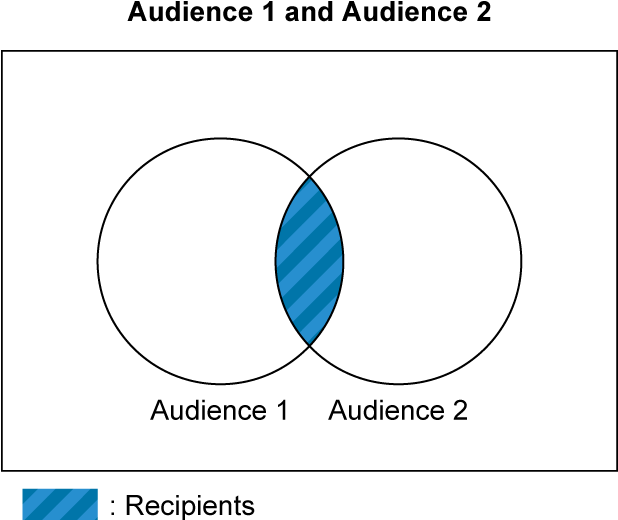
or
Array of recipient objects
Create a new recipient object by taking the logical disjunction (OR) of the specified array of recipient objects.
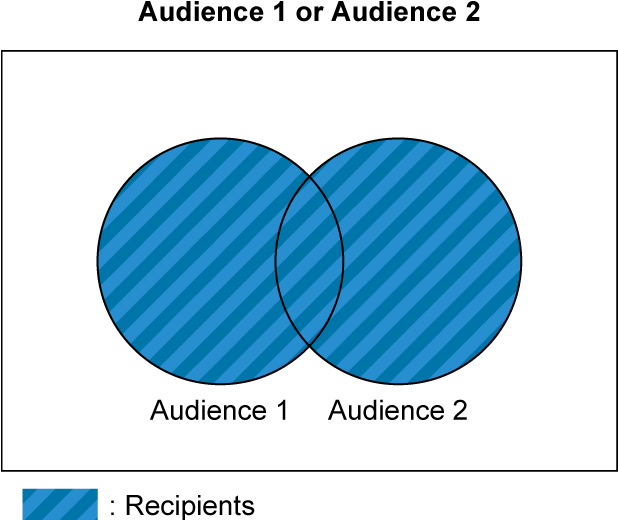
not
Recipient object
Create a new recipient object that excludes the specified recipient object.
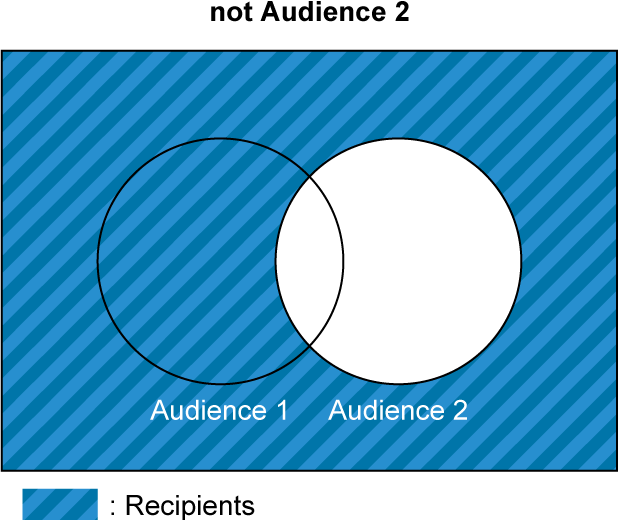
\* Be sure to specify only one of these three properties (`and`, `or`, or `not`). You cannot specify an empty array.
_Example recipient object_
```json
{
"type": "operator",
"and": [
{
"type": "audience",
"audienceGroupId": 5614991017776
},
{
"type": "operator",
"not": {
"type": "redelivery",
"requestId": "5b59509c-c57b-11e9-aa8c-2a2ae2dbcce4"
}
}
]
}
```
##### Demographic filter objects
Demographic filter objects represent criteria (e.g. age, gender, OS, region, and friendship duration) on which to filter the list of recipients. You can filter recipients based on a combination of different criteria using logical operator objects.
**Using attribute data**
- The attribute data used for demographic filters is approximately 3 days old (may be earlier or later).
- If you don't specify any attributes, messages are sent to everyone—even users with attribute values of "unknown".
- To use attribute data, your ["Target reach"](https://developers.line.biz/en/glossary/#target-reach) number must be 100 or more.
- Returns a `403` HTTP status code if your Target reach is less than 100.
###### Gender
type
String
`gender`
oneOf
Array of strings
Send messages to users of a given gender. One of:
- `male`
- `female`
###### Age
This lets you filter recipients with a given age range.
type
String
`age`
gte
String
Send messages to users at least as old as the specified age.
You can specify one of the following values. However, specify a value smaller than the value specified by the `lt` property.
- `age_15`
- `age_20`
- `age_25`
- `age_30`
- `age_35`
- `age_40`
- `age_45`
- `age_50`
- `age_55`
- `age_60`
- `age_65`
- `age_70`
lt
String
Send messages to users younger than the specified age.
You can specify one of the following values. However, specify a value greater than the value specified by the `gte` property.
- `age_15`
- `age_20`
- `age_25`
- `age_30`
- `age_35`
- `age_40`
- `age_45`
- `age_50`
- `age_55`
- `age_60`
- `age_65`
- `age_70`
\* Be sure to specify either `gte`, `lt`, or both.
###### Operating system
type
String
`appType`
oneOf
Array of strings
Send messages to users with the specified OS. One of:
- `ios`
- `android`
###### Region
type
String
`area`
oneOf
Array of strings
Send messages to users in the specified region. One of: \
**日本 // JP (country code=392)**
- `jp_01`: 北海道 // Hokkaido
- `jp_02`: 青森県 // Aomori
- `jp_03`: 岩手県 // Iwate
- `jp_04`: 宮城県 // Miyagi
- `jp_05`: 秋田県 // Akita
- `jp_06`: 山形県 // Yamagata
- `jp_07`: 福島県 // Fukushima
- `jp_08`: 茨城県 // Ibaraki
- `jp_09`: 栃木県 // Tochigi
- `jp_10`: 群馬県 // Gunma
- `jp_11`: 埼玉県 // Saitama
- `jp_12`: 千葉県 // Chiba
- `jp_13`: 東京都 // Tokyo
- `jp_14`: 神奈川県 // Kanagawa
- `jp_15`: 新潟県 // Niigata
- `jp_16`: 富山県 // Toyama
- `jp_17`: 石川県 // Ishikawa
- `jp_18`: 福井県 // Fukui
- `jp_19`: 山梨県 // Yamanashi
- `jp_20`: 長野県 // Nagano
- `jp_21`: 岐阜県 // Gifu
- `jp_22`: 静岡県 // Shizuoka
- `jp_23`: 愛知県 // Aichi
- `jp_24`: 三重県 // Mie
- `jp_25`: 滋賀県 // Shiga
- `jp_26`: 京都府 // Kyoto
- `jp_27`: 大阪府 // Osaka
- `jp_28`: 兵庫県 // Hyougo
- `jp_29`: 奈良県 // Nara
- `jp_30`: 和歌山県 // Wakayama
- `jp_31`: 鳥取県 // Tottori
- `jp_32`: 島根県 // Shimane
- `jp_33`: 岡山県 // Okayama
- `jp_34`: 広島県 // Hiroshima
- `jp_35`: 山口県 // Yamaguchi
- `jp_36`: 徳島県 // Tokushima
- `jp_37`: 香川県 // Kagawa
- `jp_38`: 愛媛県 // Ehime
- `jp_39`: 高知県 // Kouchi
- `jp_40`: 福岡県 // Fukuoka
- `jp_41`: 佐賀県 // Saga
- `jp_42`: 長崎県 // Nagasaki
- `jp_43`: 熊本県 // Kumamoto
- `jp_44`: 大分県 // Oita
- `jp_45`: 宮崎県 // Miyazaki
- `jp_46`: 鹿児島県 // Kagoshima
- `jp_47`: 沖縄県 // Okinawa
**台湾 // TW (country code=158)**
- `tw_01`: 台北市 // Taipei City
- `tw_02`: 新北市 // New Taipei City
- `tw_03`: 桃園市 // Taoyuan City
- `tw_04`: 台中市 // Taichung City
- `tw_05`: 台南市 // Tainan City
- `tw_06`: 高雄市 // Kaohsiung City
- `tw_07`: 基隆市 // Keelung City
- `tw_08`: 新竹市 // Hsinchu City
- `tw_09`: 嘉義市 // Chiayi City
- `tw_10`: 新竹県 // Hsinchu County
- `tw_11`: 苗栗県 // Miaoli County
- `tw_12`: 彰化県 // Changhua County
- `tw_13`: 南投県 // Nantou County
- `tw_14`: 雲林県 // Yunlin County
- `tw_15`: 嘉義県 // Chiayi County
- `tw_16`: 屏東県 // Pingtung County
- `tw_17`: 宜蘭県 // Yilan County
- `tw_18`: 花蓮県 // Hualien County
- `tw_19`: 台東県 // Taitung County
- `tw_20`: 澎湖県 // Penghu County
- `tw_21`: 金門県 // Kinmen County
- `tw_22`: 連江県 // Lienchiang County
**タイ // TH (country code=764)**
- `th_01`: バンコク // Bangkok
- `th_02`: パタヤ // Pattaya
- `th_03`: 北部 // Northern
- `th_04`: 中央部 // Central
- `th_05`: 南部 // Southern
- `th_06`: 東部 // Eastern
- `th_07`: 東北部 // NorthEastern
- `th_08`: 西部 // Western
###### Friendship duration
This lets you filter recipients with a given range of friendship durations.
type
String
`subscriptionPeriod`
gte
String
Send messages to users who have been friends of yours for at least the specified number of days.\
You can specify one of the following values. However, specify a value smaller than the value specified by the `lt` property.
- `day_7`
- `day_30`
- `day_90`
- `day_180`
- `day_365`
lt
String
Send messages to users who have been friends of yours for less than the specified number of days.\
You can specify one of the following values. However, specify a value greater than the value specified by the `gte` property.
- `day_7`
- `day_30`
- `day_90`
- `day_180`
- `day_365`
\* Be sure to specify either `gte`, `lt`, or both.
###### Logical operator objects
Use logical AND, OR, and NOT operators to combine multiple demographic filter objects together. You can specify up to 10 demographic filter objects per request.
type
String
`operator`
and
Array of demographic filter objects
Create a new demographic filter object by taking the logical conjunction (AND) of the specified array of demographic filter objects.
or
Array of demographic filter objects
Create a new demographic filter object by taking the logical disjunction (OR) of the specified array of demographic filter objects.
not
Demographic filter object
Create a new demographic filter object that excludes the specified array of demographic filter objects.
\* Be sure to specify only one of these three properties (`and`, `or`, or `not`). You cannot specify an empty array.
_Example demographic filter object for gender_
```json
{
"type": "gender",
"oneOf": ["male", "female"]
}
```
##### Limit objects
You can set a limit on the maximum number of narrowcast messages that can be sent by setting limit objects.
For more information on controlling the maximum number of sending through property settings, see [Controlling the maximum number of messages to send with limit objects](https://developers.line.biz/en/docs/messaging-api/sending-messages/#maximum-send-numbers-control) in the Messaging API documentation.
max
Number
The maximum number of narrowcast messages to send. Use this parameter to limit the number of narrowcast messages sent. The recipients will be chosen at random.
upToRemainingQuota
Boolean
If `true`, the message will be sent within the maximum number of deliverable messages. The default value is `false`. Targets will be selected at random.
forbidPartialDelivery
Boolean
This option prevents messages from being delivered to only a subset of the target audience. When you set the `upToRemainingQuota` property to `true` and also set the `forbidPartialDelivery` property to `true`, the message will not be delivered if the number of recipients exceeds the maximum number of sending.
You can check whether message delivery was canceled by [retrieving the narrowcast message progress](https://developers.line.biz/en/reference/messaging-api/#get-narrowcast-progress-status). If delivery is canceled, the `phase` property in the response will be `failed`, and the `errorCode` property will be `5`.
The `forbidPartialDelivery` property can only be specified if the `upToRemainingQuota` property is set to `true`.
_Example limit object_
```json
{
"max": 100,
"upToRemainingQuota": true,
"forbidPartialDelivery": true
}
```
This table shows the relationship between the `max` property settings and `upToRemainingQuota` property settings, and the number of reservations and the maximum number of sending.
| `max` property | `upToRemainingQuota` property | Number of reservation and maximum number of sending |
| --- | --- | --- |
| Not set | false | Number of target reach |
| Any number | false | Minimum value from target reach and `max` property |
| Not set | true | Minimum value from target reach and estimated upper limit for the current month |
| Any number | true | Minimum value from target reach, estimated upper limit for the current month, and `max` property |
#### Response
Returns the `202` HTTP status code and an empty JSON object.
Narrowcast messages are sent asynchronously. For more information on how to check the status of a narrowcast message, see [Get narrowcast message status](https://developers.line.biz/en/reference/messaging-api/#get-narrowcast-progress-status).
#### Error response
Returns the following HTTP status code and an error response:
| Code | Description |
| --- | --- |
| `400` | Couldn't send the message. Consider these reasons:
An invalid request ID is specified in the [redelivery object](https://developers.line.biz/en/reference/messaging-api/#narrowcast-recipient-redelivery-object).
An invalid audience is specified, such as a status other than `READY`.
An invalid message object is specified.
An invalid combination of request parameters is specified.
|
| `403` | Not enough recipients. For more information, see [Restrictions on sending messages using attributes and audiences](https://developers.line.biz/en/reference/messaging-api/#send-narrowcast-message-restrictions). |
| `409` | A request containing the same retry key has already been accepted. For more information, see [Response if the request has already been accepted](https://developers.line.biz/en/reference/messaging-api/#retry-api-request-response) in the Retrying an API request. |
| `429` | The number of requests has exceeded the limit. Consider these reasons:
Exceeded the [rate limit](https://developers.line.biz/en/reference/messaging-api/#send-narrowcast-rate-limit) for this endpoint.
Exceeded [the target limit for sending messages this month](https://developers.line.biz/en/reference/messaging-api/#get-quota).
For more information about the target limit for sending messages, see [Messaging API pricing](https://developers.line.biz/en/docs/messaging-api/pricing/) in the Messaging API documentation. |
For more information, see [Status codes](https://developers.line.biz/en/reference/messaging-api/#status-codes) and [Error responses](https://developers.line.biz/en/reference/messaging-api/#error-responses) in [Common specifications](https://developers.line.biz/en/reference/messaging-api/#common-specifications) section.
The messages aren't sent to any user if an error is returned.
_Error response example_
```json
// If you specify an invalid audience ID (400 Bad Request)
{
"message": "Invalid audience group id: {audience ID}"
}
// If you specify an invalid request ID for redelivery object (400 Bad Request)
{
"message": "Invalid request id: {request ID}"
}
// If you set limit.forbidPartialDelivery to true without setting limit.upToRemainingQuota to true (400 Bad Request)
{
"message": "The option forbidPartialDelivery must be used with upToRemainingQuota."
}
// If there are not enough friends (403 Forbidden)
{
"message": "Your account does not have enough friends"
}
```
### Get narrowcast message status
Endpoint: `GET` `https://api.line.me/v2/bot/message/progress/narrowcast`
Gets the status of a narrowcast message.
**Narrowcast messages can't be sent if the number of recipients is less than the required amount**
To prevent someone from guessing the recipients' attributes, narrowcast messages can't be sent when the number of recipients is below the required minimum amount. For more information, see [Restrictions on sending messages using attributes and audiences](https://developers.line.biz/en/reference/messaging-api/#send-narrowcast-message-restrictions).
**Window of availability for status requests**
You can't get the status of a narrowcast message anymore after 14 days (336 hours) past the timestamp displayed in `acceptedTime`.
_Example request_
```sh
curl -v -X GET 'https://api.line.me/v2/bot/message/progress/narrowcast?requestId={request_id}' \
-H 'Authorization: Bearer {channel access token}'
```
#### Rate limit
2,000 requests per second
For more information on rate limits, see [Rate limits](https://developers.line.biz/en/reference/messaging-api/#rate-limits).
#### Request headers
Authorization
Bearer `{channel access token}`
#### Query parameters
requestId
The narrowcast message's request ID. Each Messaging API request has a request ID. Find it in the [response headers](https://developers.line.biz/en/reference/messaging-api/#response-headers).
#### Response
Returns a `200` HTTP status code and a JSON object with the following information.
phase
String
The current status. One of:
- `waiting`: Messages are not yet ready to be sent. They are currently being filtered or processed in some way.
- `sending`: Messages are currently being sent.
- `succeeded`: Messages were sent successfully. This may not mean the messages were successfully received.
- `failed`: Messages failed to be sent. Use the `failedDescription` property to find the cause of the failure.
successCount
Number
The number of users who successfully received the message. \*
failureCount
Number
The number of users who failed to send the message. \* \
Even if the `phase` is `succeeded`, some users may not be able to receive narrowcast messages unless the `failureCount` is 0. For example, if a user blocks the LINE Official Account while sending a narrowcast message, it will be added to the `failureCount`.
targetCount
Number
The number of intended recipients of the message. \*
failedDescription
String
The reason the message failed to be sent. This is only included with a `phase` property value of `failed`.
errorCode
Number
Error summary. This is only included with a `phase` property value of `failed`.\
One of:
- `1`: An internal error occurred.
- `2`: An error occurred because there weren't enough recipients.
- `3`: A conflict error of requests occurs because a request that has already been accepted is retried.
- `4`: An audience of less than 50 recipients is included as a condition of sending.
- `5`: To prevent messages from being delivered only to a subset of the target audience, message delivery has been canceled. This error occurs when messages are sent with [`limit.forbidPartialDelivery`](https://developers.line.biz/en/reference/messaging-api/#send-narrowcast-limit) set to `true` and the number of recipients exceeds the maximum number of sending.
acceptedTime
String
Narrowcast message request accepted time in milliseconds.
- Format: [ISO 8601](https://en.wikipedia.org/wiki/ISO_8601) (e.g. `2020-12-03T10:15:30.121Z`)
- Timezone: UTC
completedTime
String
Processing of narrowcast message request completion time in milliseconds. Returned when the `phase` property is `succeeded` or `failed`.
- Format: [ISO 8601](https://en.wikipedia.org/wiki/ISO_8601) (e.g. `2020-12-03T10:15:30.121Z`)
- Timezone: UTC
\* Not available when the `phase` property is `waiting`.
#### Error response
Returns the following HTTP status code and an error response:
| Code | Description |
| --- | --- |
| `400` | An invalid request ID is specified. |
| `404` | Unable to get the status. Consider these reasons:
The period of time to get a status has expired.
A request ID other than narrowcast message is specified.
|
For more information, see [Status codes](https://developers.line.biz/en/reference/messaging-api/#status-codes) and [Error responses](https://developers.line.biz/en/reference/messaging-api/#error-responses) in the [Common specifications](https://developers.line.biz/en/reference/messaging-api/#common-specifications) section.
_Example error response_
```json
// If you couldn't get the status (404 Not Found)
{
"message": "Not found"
}
```
### Send broadcast message
Endpoint: `POST` `https://api.line.me/v2/bot/message/broadcast`
Sends a message to all users who are friends with your LINE Official Account at any time.
_Example request_
```sh
curl -v -X POST https://api.line.me/v2/bot/message/broadcast \
-H 'Content-Type: application/json' \
-H 'Authorization: Bearer {channel access token}' \
-H 'X-Line-Retry-Key: {UUID}' \
-d '{
"messages":[
{
"type":"text",
"text":"Hello, world1"
},
{
"type":"text",
"text":"Hello, world2"
}
]
}'
```
#### Rate limit
60 requests per hour
For more information on rate limits, see [Rate limits](https://developers.line.biz/en/reference/messaging-api/#rate-limits).
#### Request headers
Content-Type
application/json
Authorization
Bearer `{channel access token}`
X-Line-Retry-Key
Retry key. Specifies the UUID in hexadecimal format (e.g., 123e4567-e89b-12d3-a456-426614174000) generated by any method. The retry key isn't generated by LINE. Each developer must generate their own retry key. For more information, see [Retry failed API requests](https://developers.line.biz/en/docs/messaging-api/retrying-api-request/) in the Messaging API documentation.
#### Request body
messages
Array of [message objects](https://developers.line.biz/en/reference/messaging-api/#message-objects)
Messages to send\
Max: 5
By using the [Validate message objects of a broadcast message](https://developers.line.biz/en/reference/messaging-api/#validate-message-objects-of-broadcast-message) endpoint, you can validate the message objects.
notificationDisabled
Boolean
- `true`: The user doesn't receive a push notification when the message is sent.
- `false`: The user receives a push notification when the message is sent (unless they have disabled push notifications in LINE and/or their device).
Default: `false`
#### Response
Returns status code `200` and an empty JSON object.
_Example response_
```json
{}
```
#### Error response
Returns the following HTTP status code and an error response:
| Code | Description |
| --- | --- |
| `400` | An invalid message object is specified. |
| `409` | A request containing the same retry key has already been accepted. For more information, see [Response if the request has already been accepted](https://developers.line.biz/en/reference/messaging-api/#retry-api-request-response) in the Retrying an API request. |
| `429` | The number of requests has exceeded the limit. Consider these reasons:
Exceeded the [rate limit](https://developers.line.biz/en/reference/messaging-api/#send-broadcast-rate-limit) for this endpoint.
Exceeded [the target limit for sending messages this month](https://developers.line.biz/en/reference/messaging-api/#get-quota).
For more information about the target limit for sending messages, see [Messaging API pricing](https://developers.line.biz/en/docs/messaging-api/pricing/) in the Messaging API documentation. |
For more information, see [Status codes](https://developers.line.biz/en/reference/messaging-api/#status-codes) and [Error responses](https://developers.line.biz/en/reference/messaging-api/#error-responses) in [Common specifications](https://developers.line.biz/en/reference/messaging-api/#common-specifications) section.
The messages aren't sent if an error is returned.
_Example error response_
```json
// If your request contains invalid parameters(400 Bad Request)
{
"message": "The request body has 1 error(s)",
"details": [
{
"message": "May not be empty",
"property": "messages[0].type"
}
]
}
```
### Mark messages as read
Endpoint: `POST` `https://api.line.me/v2/bot/chat/markAsRead`
Mark all messages sent before the specified message as read. For more information, see [Mark messages as read](https://developers.line.biz/en/docs/messaging-api/mark-as-read/) in the Messaging API documentation.
_Example request_
```sh
curl -v -X POST https://api.line.me/v2/bot/chat/markAsRead \
-H 'Content-Type: application/json' \
-H 'Authorization: Bearer {channel access token}' \
-d '{
"markAsReadToken": "{mark as read token}"
}'
```
#### Rate limit
2,000 requests per second
For more information on rate limits, see [Rate limits](https://developers.line.biz/en/reference/messaging-api/#rate-limits).
#### Request headers
Content-Type
application/json
Authorization
Bearer `{channel access token}`
#### Request body
markAsReadToken
String
Read token. Contained in the `markAsReadToken` property of the [message event object](https://developers.line.biz/en/reference/messaging-api/#message-event) in the webhook.
#### Response
Returns status code `200` and an empty JSON object.
_Example response_
```json
{}
```
#### Error response
Returns the following HTTP status code and an error response:
| Code | Description |
| --- | --- |
| `400` | An invalid read token has been specified. |
For more information, see [Status codes](https://developers.line.biz/en/reference/messaging-api/#status-codes) and [Error responses](https://developers.line.biz/en/reference/messaging-api/#error-responses) in the [Common specifications](https://developers.line.biz/en/reference/messaging-api/#common-specifications) section.
_Example error response_
```json
// If an invalid read token is specified (400 Bad Request)
{
"message": "Invalid markAsReadToken. Tokens must be used by the bot that received them via Webhook."
}
```
### Display a loading animation
Endpoint: `POST` `https://api.line.me/v2/bot/chat/loading/start`
Display a loading animation in one-on-one chats between users and LINE Official Accounts.
The loading animation will automatically disappear after the specified number of seconds (5 to 60 seconds) has elapsed or when a new message arrives from your LINE Official Account.
The loading animation is only displayed when the user is viewing the chat screen with your LINE Official Account. If you request to display the loading animation when the user isn't viewing the chat screen, no notification will be displayed. Even if the user opens the chat screen later, the animation won't be displayed.
If you request to display the loading animation again while it is still visible, the animation will continue to be displayed and the time until it disappears will be overridden by the number of seconds specified in the second request.
A loading animation will be displayed on the following versions of LINE:
- LINE for iOS or Android: 13.16.0 or later
For more information, see [Display a loading animation](https://developers.line.biz/en/docs/messaging-api/use-loading-indicator/) in the Messaging API documentation.
_Example request_
```sh
curl -v -X POST https://api.line.me/v2/bot/chat/loading/start \
-H 'Content-Type: application/json' \
-H 'Authorization: Bearer {channel access token}' \
-d '{
"chatId": "U4af4980629...",
"loadingSeconds": 5
}'
```
#### Rate limit
100 requests per second
For more information on rate limits, see [Rate limits](https://developers.line.biz/en/reference/messaging-api/#rate-limits).
#### Request headers
Content-Type
application/json
Authorization
Bearer `{channel access token}`
#### Request body
chatId
String
User ID of the target user for whom the loading animation is to be displayed.
For more information on how to get user IDs, see [Get user IDs](https://developers.line.biz/en/docs/messaging-api/getting-user-ids/) in the Messaging API documentation.
loadingSeconds
Number
Number of seconds to display a loading animation. You can specify a any one of `5`, `10`, `15`, `20`, `25`, `30`, `35`, `40`, `45`, `50`, `55`, or `60`.
The default value is `20`.
#### Response
Returns status code `202` and an empty JSON object.
If you request to display a loading animation to the following user, the status code `202` will be returned, but the loading animation won't be displayed:
- Users who aren't opening a chat screen with your LINE Official Account
- Users who haven't added your LINE Official Account as a friend
- Users who have blocked your LINE Official Account
- Users who deleted their LINE accounts
_Example response_
```json
{}
```
#### Error response
Returns the following HTTP status code and an error response:
| Code | Description |
| --- | --- |
| `400` | Couldn't display the loading animation. Consider these reasons:
An invalid number of seconds is specified.
An invalid user ID is specified.
A group chat or a multi-person chat is specified.
|
For more information, see [Status codes](https://developers.line.biz/en/reference/messaging-api/#status-codes) and [Error responses](https://developers.line.biz/en/reference/messaging-api/#error-responses) in the [Common specifications](https://developers.line.biz/en/reference/messaging-api/#common-specifications) section.
No loading animation is displayed if an error is returned.
_Example error response_
```json
// If you specify an invalid number of seconds (400 Bad Request)
{
"message": "The request body has 2 error(s)",
"details": [
{
"message": "Must be between 5 and 60",
"property": "loadingSeconds"
},
{
"message": "must be a multiple of five",
"property": "loadingSeconds"
}
]
}
// If you specify a group chat or a multi-person chat as the destination (400 Bad Request)
{
"message": "The request body has 1 error(s)",
"details": [
{
"message": "Only user id is acceptable, please confirm if there are any group/room ids or illegal ids.",
"property": "chatId"
}
]
}
```
### Get the target limit for sending messages this month
Endpoint: `GET` `https://api.line.me/v2/bot/message/quota`
Gets the target limit for sending messages in the current month. The total number of the free messages and the additional messages is returned.
The number of messages retrieved by this endpoint includes the number of messages sent from LINE Official Account Manager.
Set a target limit for the additional messages with LINE Official Account Manager. For more information about configuration, see [Using and billing (plan changes and payment management)](https://www.lycbiz.com/jp/manual/OfficialAccountManager/account-settings_plan/?list=7171) (only available in Japanese) in LINE for Business.
_Example request_
```sh
curl -v -X GET https://api.line.me/v2/bot/message/quota \
-H 'Authorization: Bearer {channel access token}'
```
#### Rate limit
2,000 requests per second
For more information on rate limits, see [Rate limits](https://developers.line.biz/en/reference/messaging-api/#rate-limits).
#### Request headers
Authorization
Bearer `{channel access token}`
#### Response
Returns status code `200` and a JSON object with the following information.
type
String
One of the following values to indicate whether a target limit is set or not.
- `none`: This indicates that a target limit is not set.
- `limited`: This indicates that a target limit is set.
value
Number
The target limit for sending messages in the current month. This property is returned when the `type` property has a value of `limited`.
_Example response_
```json
{
"type": "limited",
"value": 1000
}
```
#### Error Response
For more information, see [Status codes](https://developers.line.biz/en/reference/messaging-api/#status-codes) and [Error responses](https://developers.line.biz/en/reference/messaging-api/#error-responses) in the [Common specifications](https://developers.line.biz/en/reference/messaging-api/#common-specifications) section.
### Get number of messages sent this month
Endpoint: `GET` `https://api.line.me/v2/bot/message/quota/consumption`
Gets the number of messages sent in the current month.
The number of messages retrieved by this operation includes the number of messages sent from LINE Official Account Manager.
The number of messages retrieved by this operation is approximate. To get the correct number of sent messages, use LINE Official Account Manager or execute API operations for getting the number of sent messages.
_Example request_
```sh
curl -v -X GET https://api.line.me/v2/bot/message/quota/consumption \
-H 'Authorization: Bearer {channel access token}'
```
#### Rate limit
2,000 requests per second
For more information on rate limits, see [Rate limits](https://developers.line.biz/en/reference/messaging-api/#rate-limits).
#### Request headers
Authorization
Bearer `{channel access token}`
#### Response
Returns status code `200` and a JSON object with the following information.
totalUsage
Number
The number of sent messages in the current month
_Example response_
```json
{
"totalUsage": 500
}
```
#### Error Response
For more information, see [Status codes](https://developers.line.biz/en/reference/messaging-api/#status-codes) and [Error responses](https://developers.line.biz/en/reference/messaging-api/#error-responses) in the [Common specifications](https://developers.line.biz/en/reference/messaging-api/#common-specifications) section.
### Get number of sent reply messages
Endpoint: `GET` `https://api.line.me/v2/bot/message/delivery/reply`
Gets the number of messages sent with the [`/bot/message/reply`](https://developers.line.biz/en/reference/messaging-api/#send-reply-message) endpoint.
The number of messages retrieved by this operation does not include the number of messages sent from LINE Official Account Manager.
_Example request_
```sh
curl -v -X GET "https://api.line.me/v2/bot/message/delivery/reply?date={yyyyMMdd}" \
-H 'Authorization: Bearer {channel access token}'
```
#### Rate limit
2,000 requests per second
For more information on rate limits, see [Rate limits](https://developers.line.biz/en/reference/messaging-api/#rate-limits).
#### Request headers
Authorization
Bearer `{channel access token}`
#### Query parameters
date
Date the messages were sent
- Format: `yyyyMMdd` (e.g. `20191231`)
- Timezone: UTC+9
#### Response
Returns status code `200` and a JSON object with the following information.
status
String
Status of the counting process. One of the following values is returned:
- `ready`: You can get the number of messages.
- `unready`: The message counting process for the date specified in `date` has not been completed yet. Retry your request later. Normally, the counting process is completed within the next day.
- `out_of_service`: The date specified in `date` is earlier than March 31, 2018, when the operation of the counting system started.
success
Number
The number of messages sent with the Messaging API on the date specified in `date`. The response has this property only when the value of `status` is `ready`.
_Example response_
```json
{
"status": "ready",
"success": 10000
}
```
#### Error response
Returns the following HTTP status code and an error response:
| Code | Description |
| --- | --- |
| `400` | An invalid date format is specified. |
For more information, see [Status codes](https://developers.line.biz/en/reference/messaging-api/#status-codes) and [Error responses](https://developers.line.biz/en/reference/messaging-api/#error-responses) in the [Common specifications](https://developers.line.biz/en/reference/messaging-api/#common-specifications) section.
_Example error response_
```json
// If you specify a date in an invalid format (400 Bad Request)
{
"message": "The value for the 'date' parameter is invalid"
}
```
### Get number of sent push messages
Endpoint: `GET` `https://api.line.me/v2/bot/message/delivery/push`
Gets the number of messages sent with the [`/bot/message/push`](https://developers.line.biz/en/reference/messaging-api/#send-push-message) endpoint.
The number of messages retrieved by this operation does not include the number of messages sent from LINE Official Account Manager.
_Example request_
```sh
curl -v -X GET "https://api.line.me/v2/bot/message/delivery/push?date={yyyyMMdd}" \
-H 'Authorization: Bearer {channel access token}'
```
#### Rate limit
2,000 requests per second
For more information on rate limits, see [Rate limits](https://developers.line.biz/en/reference/messaging-api/#rate-limits).
#### Request headers
Authorization
Bearer `{channel access token}`
#### Query parameters
date
Date the messages were sent
- Format: `yyyyMMdd` (e.g. `20191231`)
- Timezone: UTC+9
#### Response
Returns status code `200` and a JSON object with the following information.
status
String
Status of the counting process. One of the following values is returned:
- `ready`: You can get the number of messages.
- `unready`: The message counting process for the date specified in `date` has not been completed yet. Retry your request later. Normally, the counting process is completed within the next day.
- `out_of_service`: The date specified in `date` is earlier than March 31, 2018, when the operation of the counting system started.
success
Number
The number of messages sent with the Messaging API on the date specified in `date`. The response has this property only when the value of `status` is `ready`.
_Example response_
```json
{
"status": "ready",
"success": 10000
}
```
#### Error response
Returns the following HTTP status code and an error response:
| Code | Description |
| --- | --- |
| `400` | An invalid date format is specified. |
For more information, see [Status codes](https://developers.line.biz/en/reference/messaging-api/#status-codes) and [Error responses](https://developers.line.biz/en/reference/messaging-api/#error-responses) in the [Common specifications](https://developers.line.biz/en/reference/messaging-api/#common-specifications) section.
_Example error response_
```json
// If you specify a date in an invalid format (400 Bad Request)
{
"message": "The value for the 'date' parameter is invalid"
}
```
### Get number of sent multicast messages
Endpoint: `GET` `https://api.line.me/v2/bot/message/delivery/multicast`
Gets the number of messages sent with the [`/bot/message/multicast`](https://developers.line.biz/en/reference/messaging-api/#send-multicast-message) endpoint.
The number of messages retrieved by this operation does not include the number of messages sent from LINE Official Account Manager.
_Example request_
```sh
curl -v -X GET "https://api.line.me/v2/bot/message/delivery/multicast?date={yyyyMMdd}" \
-H 'Authorization: Bearer {channel access token}'
```
#### Rate limit
2,000 requests per second
For more information on rate limits, see [Rate limits](https://developers.line.biz/en/reference/messaging-api/#rate-limits).
#### Request headers
Authorization
Bearer `{channel access token}`
#### Query parameters
date
Date the messages were sent
- Format: `yyyyMMdd` (e.g. `20191231`)
- Timezone: UTC+9
#### Response
Returns status code `200` and a JSON object with the following information.
status
String
Status of the counting process. One of the following values is returned:
- `ready`: You can get the number of messages.
- `unready`: The message counting process for the date specified in `date` has not been completed yet. Retry your request later. Normally, the counting process is completed within the next day.
- `out_of_service`: The date specified in `date` is earlier than March 31, 2018, when the operation of the counting system started.
success
Number
The number of messages sent with the Messaging API on the date specified in `date`. The response has this property only when the value of `status` is `ready`.
_Example response_
```json
{
"status": "ready",
"success": 10000
}
```
#### Error response
Returns the following HTTP status code and an error response:
| Code | Description |
| --- | --- |
| `400` | An invalid date format is specified. |
For more information, see [Status codes](https://developers.line.biz/en/reference/messaging-api/#status-codes) and [Error responses](https://developers.line.biz/en/reference/messaging-api/#error-responses) in the [Common specifications](https://developers.line.biz/en/reference/messaging-api/#common-specifications) section.
_Example error response_
```json
// If you specify a date in an invalid format (400 Bad Request)
{
"message": "The value for the 'date' parameter is invalid"
}
```
### Get number of sent broadcast messages
Endpoint: `GET` `https://api.line.me/v2/bot/message/delivery/broadcast`
Gets the number of messages sent with the [`/bot/message/broadcast`](https://developers.line.biz/en/reference/messaging-api/#send-broadcast-message) endpoint.
The number of messages retrieved by this operation does not include the number of messages sent from LINE Official Account Manager.
_Example request_
```sh
curl -v -X GET "https://api.line.me/v2/bot/message/delivery/broadcast?date={yyyyMMdd}" \
-H 'Authorization: Bearer {channel access token}'
```
#### Rate limit
2,000 requests per second
For more information on rate limits, see [Rate limits](https://developers.line.biz/en/reference/messaging-api/#rate-limits).
#### Request headers
Authorization
Bearer `{channel access token}`
#### Query parameters
date
Date the messages were sent
- Format: `yyyyMMdd` (e.g. `20191231`)
- Timezone: UTC+9
#### Response
Returns status code `200` and a JSON object with the following information.
status
String
Status of the counting process. One of the following values is returned:
- `ready`: You can get the number of messages.
- `unready`: The message counting process for the date specified in `date` has not been completed yet. Retry your request later. Normally, the counting process is completed within the next day.
- `out_of_service`: The date specified in `date` is earlier than March 31, 2018, when the operation of the counting system started.
success
Number
The number of messages sent with the Messaging API on the date specified in `date`. The response has this property only when the value of `status` is `ready`.
_Example response_
```json
{
"status": "ready",
"success": 10000
}
```
#### Error response
Returns the following HTTP status code and an error response:
| Code | Description |
| --- | --- |
| `400` | An invalid date format is specified. |
For more information, see [Status codes](https://developers.line.biz/en/reference/messaging-api/#status-codes) and [Error responses](https://developers.line.biz/en/reference/messaging-api/#error-responses) in the [Common specifications](https://developers.line.biz/en/reference/messaging-api/#common-specifications) section.
_Example error response_
```json
// If you specify a date in an invalid format (400 Bad Request)
{
"message": "The value for the 'date' parameter is invalid"
}
```
### Validate message objects of a reply message
Endpoint: `POST` `https://api.line.me/v2/bot/message/validate/reply`
You can validate that an array of [message objects](https://developers.line.biz/en/reference/messaging-api/#message-objects) is valid as a value for the `messages` property of the [request body](https://developers.line.biz/en/reference/messaging-api/#send-reply-message-request-body) for the [Send reply message](https://developers.line.biz/en/reference/messaging-api/#send-reply-message) endpoint. This endpoint doesn't validate the values of the properties other than the `messages` property.
_Example request_
```sh
curl -v -X POST https://api.line.me/v2/bot/message/validate/reply \
-H 'Authorization: Bearer {channel access token}' \
-H 'Content-Type: application/json' \
-d \
'{
"messages": [
{
"type": "text",
"text": "Hello, world"
}
]
}'
```
#### Rate limit
2,000 requests per second
For more information on rate limits, see [Rate limits](https://developers.line.biz/en/reference/messaging-api/#rate-limits).
#### Request headers
Authorization
Bearer `{channel access token}`
Content-Type
application/json
#### Request body
messages
Array of objects
Array of [message objects](https://developers.line.biz/en/reference/messaging-api/#message-objects) to validate
#### Response
Returns status code `200` and an empty JSON object.
_Example response_
```json
{}
```
#### Error response
Returns the following HTTP status code and an error response:
| Code | Description |
| --- | --- |
| `400` | An invalid message object is specified. |
For more information, see [Status codes](https://developers.line.biz/en/reference/messaging-api/#status-codes) and [Error responses](https://developers.line.biz/en/reference/messaging-api/#error-responses) in [Common specifications](https://developers.line.biz/en/reference/messaging-api/#common-specifications) section.
_Error response example (If more message objects are specified than the maximum number)_
```json
{
"message": "The request body has 1 error(s)",
"details": [
{
"message": "Size must be between 1 and 5",
"property": "messages"
}
]
}
```
_Error response example (If more characters are specified in a text message than the maximum number of characters)_
```json
{
"message": "The request body has 1 error(s)",
"details": [
{
"message": "Length must be between 0 and 5000",
"property": "messages[0].text"
}
]
}
```
### Validate message objects of a push message
Endpoint: `POST` `https://api.line.me/v2/bot/message/validate/push`
You can validate that an array of [message objects](https://developers.line.biz/en/reference/messaging-api/#message-objects) is valid as a value for the `messages` property of the [request body](https://developers.line.biz/en/reference/messaging-api/#send-push-message-request-body) for the [Send push message](https://developers.line.biz/en/reference/messaging-api/#send-push-message) endpoint. This endpoint doesn't validate the values of the properties other than the `messages` property.
_Example request_
```sh
curl -v -X POST https://api.line.me/v2/bot/message/validate/push \
-H 'Authorization: Bearer {channel access token}' \
-H 'Content-Type: application/json' \
-d \
'{
"messages": [
{
"type": "text",
"text": "Hello, world"
}
]
}'
```
#### Rate limit
2,000 requests per second
For more information on rate limits, see [Rate limits](https://developers.line.biz/en/reference/messaging-api/#rate-limits).
#### Request headers
Authorization
Bearer `{channel access token}`
Content-Type
application/json
#### Request body
messages
Array of objects
Array of [message objects](https://developers.line.biz/en/reference/messaging-api/#message-objects) to validate
#### Response
Returns status code `200` and an empty JSON object.
_Example response_
```json
{}
```
#### Error response
Returns the following HTTP status code and an error response:
| Code | Description |
| --- | --- |
| `400` | An invalid message object is specified. |
For more information, see [Status codes](https://developers.line.biz/en/reference/messaging-api/#status-codes) and [Error responses](https://developers.line.biz/en/reference/messaging-api/#error-responses) in [Common specifications](https://developers.line.biz/en/reference/messaging-api/#common-specifications) section.
_Error response example (If more message objects are specified than the maximum number)_
```json
{
"message": "The request body has 1 error(s)",
"details": [
{
"message": "Size must be between 1 and 5",
"property": "messages"
}
]
}
```
_Error response example (If more characters are specified in a text message than the maximum number of characters)_
```json
{
"message": "The request body has 1 error(s)",
"details": [
{
"message": "Length must be between 0 and 5000",
"property": "messages[0].text"
}
]
}
```
### Validate message objects of a multicast message
Endpoint: `POST` `https://api.line.me/v2/bot/message/validate/multicast`
You can validate that an array of [message objects](https://developers.line.biz/en/reference/messaging-api/#message-objects) is valid as a value for the `messages` property of the [request body](https://developers.line.biz/en/reference/messaging-api/#send-multicast-request-body) for the [Send multicast message](https://developers.line.biz/en/reference/messaging-api/#send-multicast-message) endpoint. This endpoint doesn't validate the values of the properties other than the `messages` property.
_Example request_
```sh
curl -v -X POST https://api.line.me/v2/bot/message/validate/multicast \
-H 'Authorization: Bearer {channel access token}' \
-H 'Content-Type: application/json' \
-d \
'{
"messages": [
{
"type": "text",
"text": "Hello, world"
}
]
}'
```
#### Rate limit
2,000 requests per second
For more information on rate limits, see [Rate limits](https://developers.line.biz/en/reference/messaging-api/#rate-limits).
#### Request headers
Authorization
Bearer `{channel access token}`
Content-Type
application/json
#### Request body
messages
Array of objects
Array of [message objects](https://developers.line.biz/en/reference/messaging-api/#message-objects) to validate
#### Response
Returns status code `200` and an empty JSON object.
_Example response_
```json
{}
```
#### Error response
Returns the following HTTP status code and an error response:
| Code | Description |
| --- | --- |
| `400` | An invalid message object is specified. |
For more information, see [Status codes](https://developers.line.biz/en/reference/messaging-api/#status-codes) and [Error responses](https://developers.line.biz/en/reference/messaging-api/#error-responses) in [Common specifications](https://developers.line.biz/en/reference/messaging-api/#common-specifications) section.
_Error response example (If more message objects are specified than the maximum number)_
```json
{
"message": "The request body has 1 error(s)",
"details": [
{
"message": "Size must be between 1 and 5",
"property": "messages"
}
]
}
```
_Error response example (If more characters are specified in a text message than the maximum number of characters)_
```json
{
"message": "The request body has 1 error(s)",
"details": [
{
"message": "Length must be between 0 and 5000",
"property": "messages[0].text"
}
]
}
```
### Validate message objects of a narrowcast message
Endpoint: `POST` `https://api.line.me/v2/bot/message/validate/narrowcast`
You can validate that an array of [message objects](https://developers.line.biz/en/reference/messaging-api/#message-objects) is valid as a value for the `messages` property of the [request body](https://developers.line.biz/en/reference/messaging-api/#send-narrowcast-request-body) for the [Send narrowcast message](https://developers.line.biz/en/reference/messaging-api/#send-narrowcast-message) endpoint. This endpoint doesn't validate the values of the properties other than the `messages` property.
_Example request_
```sh
curl -v -X POST https://api.line.me/v2/bot/message/validate/narrowcast \
-H 'Authorization: Bearer {channel access token}' \
-H 'Content-Type: application/json' \
-d \
'{
"messages": [
{
"type": "text",
"text": "Hello, world"
}
]
}'
```
#### Rate limit
2,000 requests per second
For more information on rate limits, see [Rate limits](https://developers.line.biz/en/reference/messaging-api/#rate-limits).
#### Request headers
Authorization
Bearer `{channel access token}`
Content-Type
application/json
#### Request body
messages
Array of objects
Array of [message objects](https://developers.line.biz/en/reference/messaging-api/#message-objects) to validate
#### Response
Returns status code `200` and an empty JSON object.
_Example response_
```json
{}
```
#### Error response
Returns the following HTTP status code and an error response:
| Code | Description |
| --- | --- |
| `400` | An invalid message object is specified. |
For more information, see [Status codes](https://developers.line.biz/en/reference/messaging-api/#status-codes) and [Error responses](https://developers.line.biz/en/reference/messaging-api/#error-responses) in [Common specifications](https://developers.line.biz/en/reference/messaging-api/#common-specifications) section.
_Error response example (If more message objects are specified than the maximum number)_
```json
{
"message": "The request body has 1 error(s)",
"details": [
{
"message": "Size must be between 1 and 5",
"property": "messages"
}
]
}
```
_Error response example (If more characters are specified in a text message than the maximum number of characters)_
```json
{
"message": "The request body has 1 error(s)",
"details": [
{
"message": "Length must be between 0 and 5000",
"property": "messages[0].text"
}
]
}
```
### Validate message objects of a broadcast message
Endpoint: `POST` `https://api.line.me/v2/bot/message/validate/broadcast`
You can validate that an array of [message objects](https://developers.line.biz/en/reference/messaging-api/#message-objects) is valid as a value for the `messages` property of the [request body](https://developers.line.biz/en/reference/messaging-api/#send-broadcast-request-body) for the [Send broadcast message](https://developers.line.biz/en/reference/messaging-api/#send-broadcast-message) endpoint. This endpoint doesn't validate the values of the properties other than the `messages` property.
_Example request_
```sh
curl -v -X POST https://api.line.me/v2/bot/message/validate/broadcast \
-H 'Authorization: Bearer {channel access token}' \
-H 'Content-Type: application/json' \
-d \
'{
"messages": [
{
"type": "text",
"text": "Hello, world"
}
]
}'
```
#### Rate limit
2,000 requests per second
For more information on rate limits, see [Rate limits](https://developers.line.biz/en/reference/messaging-api/#rate-limits).
#### Request headers
Authorization
Bearer `{channel access token}`
Content-Type
application/json
#### Request body
messages
Array of objects
Array of [message objects](https://developers.line.biz/en/reference/messaging-api/#message-objects) to validate
#### Response
Returns status code `200` and an empty JSON object.
_Example response_
```json
{}
```
#### Error response
Returns the following HTTP status code and an error response:
| Code | Description |
| --- | --- |
| `400` | An invalid message object is specified. |
For more information, see [Status codes](https://developers.line.biz/en/reference/messaging-api/#status-codes) and [Error responses](https://developers.line.biz/en/reference/messaging-api/#error-responses) in [Common specifications](https://developers.line.biz/en/reference/messaging-api/#common-specifications) section.
_Error response example (If more message objects are specified than the maximum number)_
```json
{
"message": "The request body has 1 error(s)",
"details": [
{
"message": "Size must be between 1 and 5",
"property": "messages"
}
]
}
```
_Error response example (If more characters are specified in a text message than the maximum number of characters)_
```json
{
"message": "The request body has 1 error(s)",
"details": [
{
"message": "Length must be between 0 and 5000",
"property": "messages[0].text"
}
]
}
```
### Retrying an API request
By including a retry key (`X-Line-Retry-Key`) in the HTTP header of a push message, multicast message, narrowcast message, or broadcast message, the same API request can be reattempted to prevent duplicate processing.
The retry key management period on the LINE Platform side is 24 hours. If you use the same retry key for more than 24 hours, the request will be treated as a new API request.
For more information on retrying an API request, see [Retry failed API requests](https://developers.line.biz/en/docs/messaging-api/retrying-api-request/) in the Messaging API documentation.
**Don't use the same retry key for more than 24 hours**
If you use the same retry key for more than 24 hours, the request will succeed as a new API request even if an API request containing the same retry key has already succeeded. As a result, duplicate messages will be sent.
_Example request_
```sh
curl -v -X POST https://api.line.me/v2/bot/message/push \
-H 'Content-Type: application/json' \
-H 'Authorization: Bearer {CHANNEL_ACCESS_TOKEN}' \
-H 'X-Line-Retry-Key: {UUID}' \
-d '{
"messages": [
{
"type": "text",
"text": "Hello, user"
}
]
}'
```
#### Request headers
X-Line-Retry-Key
Arbitrarily generated UUID in hexadecimal notation (e.g. 123e4567-e89b-12d3-a456-426614174000)
\* Required when retrying API requests.
#### Response if the request has already been accepted
If a request containing the same retry key has already been accepted, returns the `409` status code, the `x-line-accepted-request-id` header indicating the request ID of the request already accepted, and a JSON object containing this information.
message
String
A message informing the same request has already been accepted
sentMessages
Array
Array of sent messages. The response has this property only when a push message was sent. Max: 5
sentMessages.id
Number
ID of the sent message. The response has this property only when a push message was sent.
sentMessages.quoteToken
String
Quote token of the message. Only included when a message object that can be specified as a quote target was sent as a push message. For more information, see [Get quote tokens](https://developers.line.biz/en/docs/messaging-api/get-quote-tokens/) in the Messaging API documentation.
_Example response_
```json
HTTP/1.1 409 Conflict
x-line-request-id: 123e4567-e89b-12d3-a456-426655440002
x-line-accepted-request-id: 123e4567-e89b-12d3-a456-426655440001
{
"message": "The retry key is already accepted",
"sentMessages": [
{
"id": "461230966842064897",
"quoteToken": "IStG5h1Tz7b..."
}
]
}
```
## Managing Audience
You can create, update, activate, or delete an audience. Specify the audience when sending narrowcast messages.
Audiences can also be created using [LINE Official Account Manager](https://manager.line.biz/). To learn more, see [Audience](https://www.lycbiz.com/jp/manual/OfficialAccountManager/messages-audience/) in LINE for Business.
| Audience | How to create |
| --- | --- |
| An audience used for uploading user IDs |
[LINE Official Account Manager](https://manager.line.biz/)
|
| Chat tag audience | [LINE Official Account Manager](https://manager.line.biz/) |
| Friend path audience | [LINE Official Account Manager](https://manager.line.biz/) |
| Reservation audience | [LINE Official Account Manager](https://manager.line.biz/) |
| Rich menu impression audience | [LINE Official Account Manager](https://manager.line.biz/) |
| Rich menu click audience | [LINE Official Account Manager](https://manager.line.biz/) |
| Web traffic audience |
[LINE Official Account Manager](https://manager.line.biz/)
[LINE Ads](https://admanager.line.biz/)
|
| App event audience | [LINE Ads](https://admanager.line.biz/) |
| Video view audience | [LINE Ads](https://admanager.line.biz/) |
| Image click audience | [LINE Ads](https://admanager.line.biz/) |
| LINE Beacon Network ad impression audience \* | [LINE Ads](https://admanager.line.biz/) |
\* LINE Beacon Network ad impression audience is only available for LINE Official Accounts created by users in Taiwan.
**Note**
- Only Japanese (JP), Thai (TH), and Taiwanese (TW) users with LINE Official Accounts can create audiences.
- You can't create the following types of audiences with the Messaging API:
- Chat tag audience
- Friend path audience
- Reservation audience
- Rich menu impression audience
- Rich menu click audience
- Web traffic audience
- App event audience
- Video view audience
- Image click audience
- LINE Beacon Network ad impression audience
### Details of the error related to audience management
The details of the error that occurs on the Managing Audience endpoints are included in the `details[].message` property of the JSON response. The details of the main error are as follows:
| Message | Description |
| --- | --- |
| `AUDIENCE_GROUP_CAN_NOT_UPLOAD_STATUS_EXPIRED` | This audience can't be used because it's been more than 180 days (15,552,000 seconds) since this audience was created. |
| `AUDIENCE_GROUP_COUNT_MAX_OVER` | You have already created the maximum number of audiences (1,000). |
| `AUDIENCE_GROUP_NAME_SIZE_OVER` | The audience's name is too long. |
| `AUDIENCE_GROUP_NAME_WRONG` | The audience's name contains an invalid character (such as `\n` or some other control character). |
| `AUDIENCE_GROUP_NAME_EMPTY` | The audience's name is empty or contains only spaces. |
| `AUDIENCE_GROUP_NOT_FOUND` | Audience not found. |
| `AUDIENCE_GROUP_REQUESTID_DUPLICATE` | There is already an audience with the specified request ID. |
| `AUDIENCE_GROUP_UPLOAD_DESCRIPTION_SIZE_OVER` | The audience's description is too long. |
| `REQUEST_NOT_FOUND` | The specified request ID is incorrect or LINE not ready to create an audience with the specified request ID. |
| `TOO_OLD_MESSAGES` | You can't create an audience for a message (request ID) that was sent over 60 days (5,184,000 seconds) ago. |
| `UPLOAD_AUDIENCE_GROUP_INVALID_AUDIENCE_ID_FORMAT` |
`file` contains an invalid user ID or IFA.
`audiences[].id` is an invalid user ID or IFA.
If this message is returned, see [Error-handling methods](https://developers.line.biz/en/reference/messaging-api/#manage-audience-error-handling). |
| `UPLOAD_AUDIENCE_GROUP_NO_VALID_AUDIENCE_IDS` |
`file` doesn't contain a valid user ID or IFA.
`audiences[].id` isn't a valid user ID or IFA.
|
| `UPLOAD_AUDIENCE_GROUP_TOO_MANY_AUDIENCE_IDS` | Exceeded the maximum number of user IDs or IFAs. |
| `WRONG_BOT_ID` | The bot ID in the specified request ID doesn't match the bot linked to the channel that issued the channel access token. |
| `ALREADY_ACTIVE` | The audience group is already active. |
#### Error-handling methods
**If the audiences property contains invalid user IDs**
In the case that `UPLOAD_AUDIENCE_GROUP_INVALID_AUDIENCE_ID_FORMAT` is returned, use the [Get profile information](https://developers.line.biz/en/reference/messaging-api/#get-profile) endpoint to get profile information of all user IDs specified in JSON. After excluding all user IDs that return anything other than status code `200`, execute the failed endpoint once again.
### Create audience for uploading user IDs (by JSON)
Endpoint: `POST` `https://api.line.me/v2/bot/audienceGroup/upload`
Creates an audience for uploading user IDs.
For this endpoint, use JSON to specify recipients. You can also use [Endpoint that specifies recipients with text file](https://developers.line.biz/en/reference/messaging-api/#create-upload-audience-group-by-file).
For more information on how to get user IDs, see [Get user IDs](https://developers.line.biz/en/docs/messaging-api/getting-user-ids/) in the Messaging API documentation.
#### Conditions for users that can be added to the audience
You can add users who are friends with your LINE Official Account to an audience for uploading user IDs. Even if status code `202` is returned, these users are added to the audience.
- Users who deleted their LINE accounts
- Users who blocked your LINE Official Account that created the audience
- Users who haven't added your LINE Official Account that created the audience as a friend
If you send a message using the created audience, the message won't be sent to the users listed above.
**We have set a limit on the number of concurrent endpoint operations**
We have set a limit on the number of concurrent endpoint operations per audience ID (`audienceGroupId`), for creating an audience for uploading user IDs and adding user IDs to an audience. For more information, see [Limit on the number of concurrent operations](https://developers.line.biz/en/reference/messaging-api/#limit-on-the-number-of-concurrent-operations).
**You must complete additional application forms to specify recipients using Identifiers for Advertisers (IFAs)**
You can use IFAs to specify recipients, but this feature is only available to corporate users who have completed certain applications. To use it with your LINE Official Account, contact your sales representative or contact [our Sales partners](https://www.lycbiz.com/jp/partner/sales/).
**Audience used for uploading user IDs**
Audience specifications are as follows:
| Item | Limit |
| --- | --- |
| The number of audiences per channel | Max limit: 1,000 |
| Retention period of an audience | Up to 180 days (15,552,000 seconds) |
| The number of user IDs or IFAs you can upload to an audience per request | When using JSON: Max limit: 10,000 When using file: Max limit: 1,500,000 |
| The number of users per audience | Audience for uploading user IDs: No limit |
For information on narrowcast message restrictions, see [Restrictions on sending messages using attributes and audiences](https://developers.line.biz/en/reference/messaging-api/#send-narrowcast-message-restrictions).
**Verifying a valid user ID**
If an invalid user ID is specified in the `audiences` property of JSON, the error response (`details[].message`: `UPLOAD_AUDIENCE_GROUP_INVALID_AUDIENCE_ID_FORMAT`) will be returned, and adding a user ID will fail. Before you execute this endpoint, check whether all the user IDs specified in the `audiences` property of JSON are valid.
To confirm whether a user ID is valid, use the [Get profile information](https://developers.line.biz/en/reference/messaging-api/#get-profile) endpoint. If the user ID is valid, HTTP status code `200` will be returned. If a value other than `200` is returned, the user ID is invalid and should not be included in the `audiences` property.
**Status of an audience without a user ID**
If the `audiences` property is omitted or an empty array is specified in the JSON when creating an audience, an empty audience will be created.
The number of users included in the audience (`audienceGroup.audienceCount`) of an empty audience is 0 and the audience can't accept messages. Therefore, the `audienceGroup.status` in the response remains `IN_PROGRESS` and doesn't become `READY`.
**Only users who have agreed to the LY Corporation Privacy Policy (revised March 2022) will be added**
When adding user IDs to an audience for uploading user IDs, if the user IDs include those of users who haven't agreed to [the privacy policy (revised March 2022)](https://guide.line.me/privacy-policy_update/2022/0001/?lang=en-jp), users who haven't agreed will be ignored and only users who have agreed will be added.
Therefore, the number of valid recipients of the audience may be less than that of user IDs specified.
_Example request_
```sh
curl -v -X POST https://api.line.me/v2/bot/audienceGroup/upload \
-H 'Authorization: Bearer {channel access token}' \
-H 'Content-Type: application/json' \
-d '{
"description": "audienceGroupName_01"
}'
```
#### Rate limit
60 requests per minute
For more information on rate limits, see [Rate limits](https://developers.line.biz/en/reference/messaging-api/#rate-limits).
#### Request headers
Authorization
Bearer `{channel access token}`
Content-Type
`application/json`
#### Request body
description
String
The audience's name. This is case-insensitive, meaning `AUDIENCE` and `audience` are considered identical. \
Max character limit: 120
isIfaAudience
Boolean
- To specify recipients by IFAs: set `true`.
- To specify recipients by user IDs: set `false` or omit `isIfaAudience` property.
uploadDescription
String
The description to register for the job (in `jobs[].description`).\
Max character limit: 300
audiences
Array
An array of user IDs or IFAs.\
If omitted, an empty audience will be created.\
Max number: 10,000
audiences\[].id
String
A user ID or IFA. You can specify an empty array.\
If you specify an empty array, an empty audience will be created.
#### Response
Returns a `202` HTTP status code and a JSON object with the following information.
**Audience is created asynchronously**
Before using an audience, [confirm that the audience can be used for delivery](https://developers.line.biz/en/docs/messaging-api/sending-messages/#get-audience-status).
audienceGroupId
Number
The audience ID.
createRoute
String
How the audience was created.
- `MESSAGING_API`: An audience created with Messaging API.
type
String
The audience type.
- `UPLOAD`: An audience used for uploading user IDs
description
String
The audience's name.
created
Number
When the audience was created in UNIX time (in seconds).
permission
String
Update permissions for the created audience.
- `READ_WRITE`: Can use and update the audience.
expireTimestamp
Number
Audience expiration time in UNIX time (in seconds)
isIfaAudience
Boolean
The value indicating the type of account to be sent, as specified when creating the audience for uploading user IDs. One of:
- `true`: Accounts are specified with IFAs.
- `false` (default): Accounts are specified with user IDs.
_Example response_
```json
{
"audienceGroupId": 1234567890123,
"createRoute": "MESSAGING_API",
"type": "UPLOAD",
"description": "audienceGroupName_01",
"created": 1613698278,
"permission": "READ_WRITE",
"expireTimestamp": 1629250278,
"isIfaAudience": false
}
```
#### Error response
Returns the following HTTP status code and an error response:
| Code | Description |
| --- | --- |
| `400` | Problem with the request. Consider these reasons:
You have already created the maximum number of audiences (1,000).
A name longer than the maximum number of characters (120) is specified in the `description` property.
An invalid character (such as `\n` or some other control character) is specified in the `description` property.
The `description` property is empty or contains only spaces.
A string longer than the maximum number of characters (300) is specified in the `uploadDescription` property.
An invalid user ID or IFA is specified in the `audiences[].id` property.
More user IDs or IFAs than the maximum number (10,000) are specified in the `audiences` property.
|
| `429` | The limit on the number of concurrent operations has exceeded. For more information, see [Limit on the number of concurrent operations](https://developers.line.biz/en/reference/messaging-api/#limit-on-the-number-of-concurrent-operations). |
For more information, see [Status codes](https://developers.line.biz/en/reference/messaging-api/#status-codes) and [Error responses](https://developers.line.biz/en/reference/messaging-api/#error-responses) in the [Common specifications](https://developers.line.biz/en/reference/messaging-api/#common-specifications) section.
_Example error response_
```json
// If you specify a name longer than the maximum number of characters (120) in the description property (400 Bad Request)
{
"message": "size over audienceGroupName",
"details": [
{
"message": "AUDIENCE_GROUP_NAME_SIZE_OVER"
}
]
}
```
### Create audience for uploading user IDs (by file)
Endpoint: `POST` `https://api-data.line.me/v2/bot/audienceGroup/upload/byFile`
**This domain name is different from that of other endpoints**
The domain name (`api-data.line.me`) of this endpoint is for sending and receiving large amounts of data in the LINE Platform for Messaging API. This domain name differs from that of other endpoints (`api.line.me`).
Creates an audience for uploading user IDs.
For this endpoint, use a text file to specify recipients. You can also use [Endpoint that specifies recipients with JSON](https://developers.line.biz/en/reference/messaging-api/#create-upload-audience-group).
For more information on how to get user IDs, see [Get user IDs](https://developers.line.biz/en/docs/messaging-api/getting-user-ids/) in the Messaging API documentation.
#### Conditions for users that can be added to the audience
You can add users who are friends with your LINE Official Account to an audience for uploading user IDs. Even if status code `202` is returned, these users are added to the audience.
- Users who deleted their LINE accounts
- Users who blocked your LINE Official Account that created the audience
- Users who haven't added your LINE Official Account that created the audience as a friend
If you send a message using the created audience, the message won't be sent to the users listed above.
**We have set a limit on the number of concurrent endpoint operations**
We have set a limit on the number of concurrent endpoint operations per audience ID (`audienceGroupId`), for creating an audience for uploading user IDs and adding user IDs to an audience. For more information, see [Limit on the number of concurrent operations](https://developers.line.biz/en/reference/messaging-api/#limit-on-the-number-of-concurrent-operations).
**You must complete additional application forms to specify recipients using Identifiers for Advertisers (IFAs)**
You can use IFAs to specify recipients, but this feature is only available to corporate users who have completed certain applications. To use it with your LINE Official Account, contact your sales representative or contact [our Sales partners](https://www.lycbiz.com/jp/partner/sales/).
**Audience used for uploading user IDs**
Audience specifications are as follows:
| Item | Limit |
| --- | --- |
| The number of audiences per channel | Max limit: 1,000 |
| Retention period of an audience | Up to 180 days (15,552,000 seconds) |
| The number of user IDs or IFAs you can upload to an audience per request | When using JSON: Max limit: 10,000 When using file: Max limit: 1,500,000 |
| The number of users per audience | Audience for uploading user IDs: No limit |
For information on narrowcast message restrictions, see [Restrictions on sending messages using attributes and audiences](https://developers.line.biz/en/reference/messaging-api/#send-narrowcast-message-restrictions).
**Only users who have agreed to the LY Corporation Privacy Policy (revised March 2022) will be added**
When adding user IDs to an audience for uploading user IDs, if the user IDs include those of users who haven't agreed to [the privacy policy (revised March 2022)](https://guide.line.me/privacy-policy_update/2022/0001/?lang=en-jp), users who haven't agreed will be ignored and only users who have agreed will be added.
Therefore, the number of valid recipients of the audience may be less than that of user IDs specified.
_Example request_
```sh
curl -v -X POST https://api-data.line.me/v2/bot/audienceGroup/upload/byFile \
-H 'Authorization: Bearer {channel access token}' \
-F 'description=audienceGroupName_01' \
-F 'file=@audiences.txt;type=text/plain'
```
_Text file example_
```
U4af4980627...
U4af4980628...
U4af4980629...
```
#### Rate limit
60 requests per minute
For more information on rate limits, see [Rate limits](https://developers.line.biz/en/reference/messaging-api/#rate-limits).
#### Request headers
Authorization
Bearer `{channel access token}`
Content-Type
`multipart/form-data`
#### Request body
description
String
The audience's name. This is case-insensitive, meaning `AUDIENCE` and `audience` are considered identical. \
Max character limit: 120
isIfaAudience
Boolean
- To specify recipients by IFAs: set `true`.
- To specify recipients by user IDs: set `false` or omit `isIfaAudience` property.
uploadDescription
String
The description to register for the job (in `jobs[].description`).\
Max character limit: 300
file
File
A text file with one user ID or IFA entered per line. Specify `text/plain` as Content-Type.\
Max file number: 1\
Max number: 1,500,000
#### Response
Returns a `202` HTTP status code and a JSON object with the following information.
**Audience is created asynchronously**
Before using an audience, [confirm that the audience can be used for delivery](https://developers.line.biz/en/docs/messaging-api/sending-messages/#get-audience-status).
audienceGroupId
Number
The audience ID.
createRoute
String
How the audience was created.
- `MESSAGING_API`: An audience created with Messaging API.
type
String
The audience type.
- `UPLOAD`: An audience used for uploading user IDs.
description
String
The audience's name.
created
Number
When the audience was created in UNIX time (in seconds).
permission
String
Update permissions for the created audience.
- `READ_WRITE`: Can use and update the audience.
expireTimestamp
Number
Audience expiration time in UNIX time (in seconds)
isIfaAudience
Boolean
The value indicating the type of account to be sent, as specified when creating the audience for uploading user IDs. One of:
- `true`: Accounts are specified with IFAs.
- `false` (default): Accounts are specified with user IDs.
_Example response_
```json
{
"audienceGroupId": 1234567890123,
"createRoute": "MESSAGING_API",
"type": "UPLOAD",
"description": "audienceGroupName_01",
"created": 1613700237,
"permission": "READ_WRITE",
"expireTimestamp": 1629252237,
"isIfaAudience": false
}
```
#### Error response
Returns the following HTTP status code and an error response:
| Code | Description |
| --- | --- |
| `400` | Problem with the request. Consider these reasons:
The file specified in the `file` property contains an invalid user ID or IFA.
A file with more user IDs or IFAs than the maximum number (1,500,000) is specified in the `file` property.
The file specified in the `file` property doesn't contain a valid user ID or IFA.
You have already created the maximum number of audiences (1,000).
A name longer than the maximum number of characters (120) is specified in the `description` property.
An invalid character (such as `\n` or some other control character) is specified in the `description` property.
The `description` property is empty or contains only spaces.
A string longer than the maximum number of characters (300) is specified in the `uploadDescription` property.
|
| `415` | An unsupported media format file is specified in the `file` property. |
| `429` | The limit on the number of concurrent operations has exceeded. For more information, see [Limit on the number of concurrent operations](https://developers.line.biz/en/reference/messaging-api/#limit-on-the-number-of-concurrent-operations). |
For more information, see [Status codes](https://developers.line.biz/en/reference/messaging-api/#status-codes) and [Error responses](https://developers.line.biz/en/reference/messaging-api/#error-responses) in the [Common specifications](https://developers.line.biz/en/reference/messaging-api/#common-specifications) section.
_Example error response_
```json
// If you specify a name longer than the maximum number of characters (120) in the description property (400 Bad Request)
{
"message": "size over audienceGroupName",
"details": [
{
"message": "AUDIENCE_GROUP_NAME_SIZE_OVER"
}
]
}
```
### Add user IDs or Identifiers for Advertisers (IFAs) to an audience for uploading user IDs (by JSON)
Endpoint: `PUT` `https://api.line.me/v2/bot/audienceGroup/upload`
Adds new user IDs or IFAs to an audience for uploading user IDs.
For this endpoint, use JSON to specify recipients. You can also use [Endpoint that specifies recipients with text file](https://developers.line.biz/en/reference/messaging-api/#update-upload-audience-group-by-file).
#### Conditions for users that can be added to the audience
You can add users who are friends with your LINE Official Account to an audience for uploading user IDs. Even if status code `202` is returned, these users are added to the audience.
- Users who deleted their LINE accounts
- Users who blocked your LINE Official Account that created the audience
- Users who haven't added your LINE Official Account that created the audience as a friend
If you send a message using the created audience, the message won't be sent to the users listed above.
**We have set a limit on the number of concurrent endpoint operations**
We have set a limit on the number of concurrent endpoint operations per audience ID (`audienceGroupId`), for creating an audience for uploading user IDs and adding user IDs to an audience. For more information, see [Limit on the number of concurrent operations](https://developers.line.biz/en/reference/messaging-api/#limit-on-the-number-of-concurrent-operations).
**Request timeout values**
We strongly recommend using request timeout values of 30 seconds or more.
**Verifying a valid user ID**
If an invalid user ID is specified in the `audiences` property of JSON, the error response (`details[].message`: `UPLOAD_AUDIENCE_GROUP_INVALID_AUDIENCE_ID_FORMAT`) will be returned, and audience creation will fail. Before you execute this endpoint, check whether all the user IDs specified in the `audiences` property of JSON are valid.
To confirm whether a user ID is valid, use the [Get profile information](https://developers.line.biz/en/reference/messaging-api/#get-profile) endpoint. If the user ID is valid, HTTP status code `200` will be returned. If a value other than `200` is returned, the user ID is invalid and should not be included in the `audiences` property.
**You can't switch between user IDs and IFAs**
Add the same type of data (user IDs or IFAs) to an audience for uploading user IDs as you originally specified when creating that audience. For example, you can't add user IDs to an audience that originally used IFAs when it was created.
You can use an audience's `isIfaAudience` property to determine which type of recipient (user IDs or IFAs) was specified when the audience was created. For more details, see [Get audience data](https://developers.line.biz/en/reference/messaging-api/#get-audience-group).
**You can't delete user IDs or IFAs**
You cannot delete a user ID or IFA after adding it.
**Only users who have agreed to the LY Corporation Privacy Policy (revised March 2022) will be added**
When adding user IDs to an audience for uploading user IDs, if the user IDs include those of users who haven't agreed to [the privacy policy (revised March 2022)](https://guide.line.me/privacy-policy_update/2022/0001/?lang=en-jp), users who haven't agreed will be ignored and only users who have agreed will be added.
Therefore, the number of valid recipients of the audience may be less than that of user IDs specified.
_Example request_
```sh
curl -v -X PUT https://api.line.me/v2/bot/audienceGroup/upload \
-H 'Authorization: Bearer {channel access token}' \
-H 'Content-Type: application/json' \
-d '{
"audienceGroupId": 4389303728991,
"uploadDescription": "fileName",
"audiences": [
{
"id": "U4af4980627..."
},
{
"id": "U4af4980628..."
}
]
}'
```
#### Rate limit
60 requests per minute
For more information on rate limits, see [Rate limits](https://developers.line.biz/en/reference/messaging-api/#rate-limits).
#### Request headers
Authorization
Bearer `{channel access token}`
Content-Type
`application/json`
#### Request body
audienceGroupId
Number
The audience ID
uploadDescription
String
The description to register with the job (in `jobs[].description`).\
Max character limit: 300
audiences
Array
An array of user IDs or IFAs\
Max number: 10,000
audiences\[].id
String
A user ID or IFA
#### Response
Returns status code `202` and an empty JSON object.
**Audience is created asynchronously**
Before using an audience, [confirm that the audience can be used for delivery](https://developers.line.biz/en/docs/messaging-api/sending-messages/#get-audience-status).
_Example response_
```json
{}
```
#### Error response
Returns the following HTTP status code and an error response:
| Code | Description |
| --- | --- |
| `400` | Problem with the request. Consider these reasons:
An invalid user ID or IFA is specified in the `audiences[].id` property.
More user IDs or IFAs than the maximum number (10,000) are specified in the `audiences` property.
A invalid user ID or IFA isn't specified in the `audiences[].id` property.
The audience that has exceeded the retention period is specified.
A non-existent audience is specified.
A string longer than the maximum number of characters (300) is specified in the `uploadDescription` property.
|
| `429` | The limit on the number of concurrent operations has exceeded. For more information, see [Limit on the number of concurrent operations](https://developers.line.biz/en/reference/messaging-api/#limit-on-the-number-of-concurrent-operations). |
For more information, see [Status codes](https://developers.line.biz/en/reference/messaging-api/#status-codes) and [Error responses](https://developers.line.biz/en/reference/messaging-api/#error-responses) in the [Common specifications](https://developers.line.biz/en/reference/messaging-api/#common-specifications) section.
_Example error response_
```json
// If you specify an invalid user ID in the audiences[].id property (400 Bad Request)
{
"message": "Invalid audience id format",
"details": [
{
"message": "UPLOAD_AUDIENCE_GROUP_INVALID_AUDIENCE_ID_FORMAT",
"property": "audiences"
}
]
}
```
### Add user IDs or Identifiers for Advertisers (IFAs) to an audience for uploading user IDs (by file)
Endpoint: `PUT` `https://api-data.line.me/v2/bot/audienceGroup/upload/byFile`
**This domain name is different from that of other endpoints**
The domain name (`api-data.line.me`) of this endpoint is for sending and receiving large amounts of data in the LINE Platform for Messaging API. This domain name differs from that of other endpoints (`api.line.me`).
Adds new user IDs or IFAs to an audience for uploading user IDs.
For this endpoint, use a text file to specify recipients. You can also use [Endpoint that specifies recipients with JSON](https://developers.line.biz/en/reference/messaging-api/#update-upload-audience-group).
#### Conditions for users that can be added to the audience
You can add users who are friends with your LINE Official Account to an audience for uploading user IDs. Even if status code `202` is returned, these users are added to the audience.
- Users who deleted their LINE accounts
- Users who blocked your LINE Official Account that created the audience
- Users who haven't added your LINE Official Account that created the audience as a friend
If you send a message using the created audience, the message won't be sent to the users listed above.
**We have set a limit on the number of concurrent endpoint operations**
We have set a limit on the number of concurrent endpoint operations per audience ID (`audienceGroupId`), for creating an audience for uploading user IDs and adding user IDs to an audience. For more information, see [Limit on the number of concurrent operations](https://developers.line.biz/en/reference/messaging-api/#limit-on-the-number-of-concurrent-operations).
**Request timeout values**
We strongly recommend using request timeout values of 30 seconds or more.
**You can't switch between user IDs and IFAs**
Add the same type of data (user IDs or IFAs) to an audience for uploading user IDs as you originally specified when creating that audience. For example, you can't add user IDs to an audience that originally used IFAs when it was created.
You can use an audience's `isIfaAudience` property to determine which type of recipient (user IDs or IFAs) was specified when the audience was created. For more details, see [Get audience data](https://developers.line.biz/en/reference/messaging-api/#get-audience-group).
**You can't delete user IDs or IFAs**
You cannot delete a user ID or IFA after adding it.
**Only users who have agreed to the LY Corporation Privacy Policy (revised March 2022) will be added**
When adding user IDs to an audience for uploading user IDs, if the user IDs include those of users who haven't agreed to [the privacy policy (revised March 2022)](https://guide.line.me/privacy-policy_update/2022/0001/?lang=en-jp), users who haven't agreed will be ignored and only users who have agreed will be added.
Therefore, the number of valid recipients of the audience may be less than that of user IDs specified.
_Example request_
```sh
curl -v -X PUT https://api-data.line.me/v2/bot/audienceGroup/upload/byFile \
-H 'Authorization: Bearer {channel access token}' \
-F 'audienceGroupId=4389303728991' \
-F 'uploadDescription=fileName' \
-F 'file=@audiences.txt;type=text/plain'
```
_Example text_
```sh
U4af4980627...
U4af4980628...
U4af4980629...
```
#### Rate limit
60 requests per minute
For more information on rate limits, see [Rate limits](https://developers.line.biz/en/reference/messaging-api/#rate-limits).
#### Request headers
Authorization
Bearer `{channel access token}`
Content-Type
`multipart/form-data`
#### Request body
audienceGroupId
Number
The audience ID
uploadDescription
String
The description to register with the job (in `jobs[].description`)\
Max character limit: 300
file
File
A text file with one user ID or IFA entered per line. Specify `text/plain` as Content-Type.\
Max file number: 1\
Max number: 1,500,000
#### Response
Returns status code `202` and an empty JSON object.
**Audience is created asynchronously**
Before using an audience, [confirm that the audience can be used for delivery](https://developers.line.biz/en/docs/messaging-api/sending-messages/#get-audience-status).
_Example response_
```json
{}
```
#### Error response
Returns the following HTTP status code and an error response:
| Code | Description |
| --- | --- |
| `400` | Problem with the request. Consider these reasons:
The file specified in the `file` property contains an invalid user ID or IFA.
A file with more user IDs or IFAs than the maximum number (1,500,000) is specified in the `file` property.
The file specified in the `file` property doesn't contain a valid user ID or IFA.
The audience that has exceeded the retention period is specified.
A non-existent audience is specified.
A string longer than the maximum number of characters (300) is specified in the `uploadDescription` property.
|
| `415` | An unsupported media format file is specified in the `file` property. |
| `429` | The limit on the number of concurrent operations has exceeded. For more information, see [Limit on the number of concurrent operations](https://developers.line.biz/en/reference/messaging-api/#limit-on-the-number-of-concurrent-operations). |
For more information, see [Status codes](https://developers.line.biz/en/reference/messaging-api/#status-codes) and [Error responses](https://developers.line.biz/en/reference/messaging-api/#error-responses) in the [Common specifications](https://developers.line.biz/en/reference/messaging-api/#common-specifications) section.
_Example error response_
```json
// If you specify a file that contains an invalid user ID or IFA (400 Bad Request)
{
"message": "UPLOAD_AUDIENCE_GROUP_INVALID_AUDIENCE_ID_FORMAT",
"details": [
{
"message": "UPLOAD_AUDIENCE_GROUP_INVALID_AUDIENCE_ID_FORMAT",
"property": "file"
}
]
}
```
### Create message click audience
Endpoint: `POST` `https://api.line.me/v2/bot/audienceGroup/click`
Creates a message click audience.
A message click audience is a collection of users who have clicked a URL contained in a broadcast or narrowcast message. The message is sent to any user who has clicked at least one link.
Use a request ID to specify the message.
**Message click audience**
Audience's specifications are as follows:
| Item | Limit |
| --- | --- |
| The number of audiences per channel | Max limit: 1,000 |
| Retention period of an audience | Up to 180 days (15,552,000 seconds) |
| The number of users per audience | Minimum: 50 per message click audience |
| The period during which the retargeting audience\* can be created after the message is sent | Max limit: 60 days (5,184,000 seconds) |
\* Message click audience and message impression audience.
Learn more from [Restrictions on sending messages using attributes and audiences](https://developers.line.biz/en/reference/messaging-api/#send-narrowcast-message-restrictions).
_Example request_
```sh
curl -v -X POST https://api.line.me/v2/bot/audienceGroup/click \
-H 'Authorization: Bearer {channel access token}' \
-H 'Content-Type: application/json' \
-d '{
"description": "audienceGroupName_01",
"requestId": "bb9744f9-47fa-4a29-941e-1234567890ab",
"clickUrl": "https://developers.line.biz/"
}'
```
#### Rate limit
60 requests per minute
For more information on rate limits, see [Rate limits](https://developers.line.biz/en/reference/messaging-api/#rate-limits).
#### Request headers
Authorization
Bearer `{channel access token}`
Content-Type
`application/json`
#### Request body
description
String
The audience's name. This is case-insensitive, meaning `AUDIENCE` and `audience` are considered identical. \
Max character limit: 120
requestId
String
The request ID of a broadcast or narrowcast message sent in the past 60 days. Each Messaging API request has a request ID. Find it in the [response headers](https://developers.line.biz/en/reference/messaging-api/#response-headers).
**Note**
The request IDs of reply messages, push messages, and multicast messages cannot be used.
clickUrl
String
The URL clicked by the user. If empty, users who clicked any URL in the message are added to the list of recipients. \
Max character limit: 2,000
#### Response
Returns a `202` HTTP status code and a JSON object with the following information.
**Audience is created asynchronously**
Before using an audience, [confirm that the audience can be used for delivery](https://developers.line.biz/en/docs/messaging-api/sending-messages/#get-audience-status).
audienceGroupId
Number
The audience ID.
createRoute
String
How the audience was created.
- `MESSAGING_API`: An audience created with Messaging API
type
String
The audience type.
- `CLICK`: Message click audience
description
String
The audience's name.
created
Number
When the audience was created in UNIX time (in seconds).
permission
String
Update permissions for the created audience.
- `READ_WRITE`: Can use and update the audience.
expireTimestamp
Number
Audience expiration time in UNIX time (in seconds)
isIfaAudience
Boolean
The value indicating the type of account to be sent, as specified when creating the audience for uploading user IDs. One of:
- `true`: Accounts are specified with IFAs.
- `false` (default): Accounts are specified with user IDs.
requestId
String
The request ID that was specified when the audience was created.
clickUrl
String
The URL that was specified when the audience was created. Only included if you specify a value with the `clickUrl` property in your request.
_Example response_
```json
{
"audienceGroupId": 1234567890123,
"createRoute": "MESSAGING_API",
"type": "CLICK",
"description": "audienceGroupName_01",
"created": 1613705240,
"permission": "READ_WRITE",
"expireTimestamp": 1629257239,
"isIfaAudience": false,
"requestId": "bb9744f9-47fa-4a29-941e-1234567890ab",
"clickUrl": "https://developers.line.biz/"
}
```
#### Error response
Returns the following HTTP status code and an error response:
| Code | Description |
| --- | --- |
| `400` | Problem with the request. Consider these reasons:
You have already created the maximum number of audiences (1,000).
A name longer than the maximum number of characters (120) is specified in the `description` property.
An invalid character (such as `\n` or some other control character) is specified in the `description` property.
The `requestID` and `clickUrl` properties have the same combination of values as the existing audience.
The time limit for creating an audience has expired.
A non-existent request ID is specified.
The LINE Platform isn't ready to create an audience with the specified request ID.
|
For more information, see [Status codes](https://developers.line.biz/en/reference/messaging-api/#status-codes) and [Error responses](https://developers.line.biz/en/reference/messaging-api/#error-responses) in the [Common specifications](https://developers.line.biz/en/reference/messaging-api/#common-specifications) section.
_Example error response_
```json
// If you specify a name longer than the maximum number of characters (120) in the description property (400 Bad Request)
{
"message": "size over audienceGroupName",
"details": [
{
"message": "AUDIENCE_GROUP_NAME_SIZE_OVER"
}
]
}
```
### Create message impression audience
Endpoint: `POST` `https://api.line.me/v2/bot/audienceGroup/imp`
Creates a message impression audience.
A message impression audience is a collection of users who have viewed a broadcast or narrowcast message. The audience will include any user who has viewed at least one message bubble.
Use a request ID to specify the message.
**Message impression audience**
Audience's specifications are as follows:
| Item | Limit |
| --- | --- |
| The number of audiences per channel | Max limit: 1,000 |
| Retention period of an audience | Up to 180 days (15,552,000 seconds) |
| The number of users per audience | Minimum: 50 per message impression audience |
| The period during which the retargeting audience\* can be created after the message is sent | Max limit: 60 days (5,184,000 seconds) |
\* Message click audience and message impression audience.
Learn more from [Restrictions on sending messages using attributes and audiences](https://developers.line.biz/en/reference/messaging-api/#send-narrowcast-message-restrictions).
_Example request_
```sh
curl -v -X POST https://api.line.me/v2/bot/audienceGroup/imp \
-H 'Authorization: Bearer {channel access token}' \
-H 'Content-Type: application/json' \
-d '{
"description": "audienceGroupName_01",
"requestId": "bb9744f9-47fa-4a29-941e-1234567890ab"
}'
```
#### Rate limit
60 requests per minute
For more information on rate limits, see [Rate limits](https://developers.line.biz/en/reference/messaging-api/#rate-limits).
#### Request headers
Authorization
Bearer `{channel access token}`
Content-Type
`application/json`
#### Request body
description
String
The audience's name. This is case-insensitive, meaning `AUDIENCE` and `audience` are considered identical. \
Max character limit: 120
requestId
String
The request ID of a broadcast or narrowcast message sent in the past 60 days. Each Messaging API request has a request ID. Find it in the [response headers](https://developers.line.biz/en/reference/messaging-api/#response-headers).
#### Response
Returns a `202` HTTP status code and a JSON object with the following information.
**Audience is created asynchronously**
Before using an audience, [confirm that the audience can be used for delivery](https://developers.line.biz/en/docs/messaging-api/sending-messages/#get-audience-status).
audienceGroupId
Number
The audience ID.
createRoute
String
How the audience was created.
- `MESSAGING_API`: Audiences created with Messaging API.
type
String
The audience type.
- `IMP`: Message impression audience.
description
String
The audience's name.
created
Number
When the audience was created in UNIX time (in seconds).
permission
String
Update permissions for the created audience.
- `READ_WRITE`: Can use and update the audience.
expireTimestamp
Number
Audience expiration time in UNIX time (in seconds)
isIfaAudience
Boolean
The value indicating the type of account to be sent, as specified when creating the audience for uploading user IDs. One of:
- `true`: Accounts are specified with IFAs.
- `false` (default): Accounts are specified with user IDs.
requestId
String
The request ID that was specified when the audience was created.
_Example response_
```json
{
"audienceGroupId": 1234567890123,
"createRoute": "MESSAGING_API",
"type": "IMP",
"description": "audienceGroupName_01",
"created": 1613707097,
"permission": "READ_WRITE",
"expireTimestamp": 1629259095,
"isIfaAudience": false,
"requestId": "bb9744f9-47fa-4a29-941e-1234567890ab"
}
```
#### Error response
Returns the following HTTP status code and an error response:
| Code | Description |
| --- | --- |
| `400` | Problem with the request. Consider these reasons:
You have already created the maximum number of audiences (1,000).
A name longer than the maximum number of characters (120) is specified in the `description` property.
An invalid character (such as `\n` or some other control character) is specified in the `description` property.
There is already an audience with the specified request ID.
The time limit for creating an audience has expired.
A non-existent request ID is specified.
The LINE Platform isn't ready to create an audience with the specified request ID.
|
For more information, see [Status codes](https://developers.line.biz/en/reference/messaging-api/#status-codes) and [Error responses](https://developers.line.biz/en/reference/messaging-api/#error-responses) in the [Common specifications](https://developers.line.biz/en/reference/messaging-api/#common-specifications) section.
_Example error response_
```json
// If you specify a name longer than the maximum number of characters (120) in the description property (400 Bad Request)
{
"message": "size over audienceGroupName",
"details": [
{
"message": "AUDIENCE_GROUP_NAME_SIZE_OVER"
}
]
}
```
### Rename an audience
Endpoint: `PUT` `https://api.line.me/v2/bot/audienceGroup/{audienceGroupId}/updateDescription`
Renames an existing audience.
_Example request_
```sh
curl -v -X PUT https://api.line.me/v2/bot/audienceGroup/{audienceGroupId}/updateDescription \
-H 'Authorization: Bearer {channel access token}' \
-H 'Content-Type: application/json' \
-d '{
"description": "audienceGroupName"
}'
```
#### Rate limit
60 requests per minute
For more information on rate limits, see [Rate limits](https://developers.line.biz/en/reference/messaging-api/#rate-limits).
#### Request headers
Authorization
Bearer `{channel access token}`
Content-Type
`application/json`
#### Path parameters
audienceGroupId
The audience ID.
#### Request body
description
String
The audience's name. This is case-insensitive, meaning `AUDIENCE` and `audience` are considered identical. \
Max character limit: 120
#### Response
Returns the `200` HTTP status code and an empty JSON object.
#### Error response
Returns the following HTTP status code and an error response:
| Code | Description |
| --- | --- |
| `400` | Problem with the request. Consider these reasons:
A name longer than the maximum number of characters (120) is specified in the `description` property.
An invalid character (such as `\n` or some other control character) is specified in the `description` property.
A non-existent audience is specified.
|
For more information, see [Status codes](https://developers.line.biz/en/reference/messaging-api/#status-codes) and [Error responses](https://developers.line.biz/en/reference/messaging-api/#error-responses) in the [Common specifications](https://developers.line.biz/en/reference/messaging-api/#common-specifications) section.
_Example error response_
```json
// If you specify a name longer than the maximum number of characters (120) in the description property (400 Bad Request)
{
"message": "size over audienceGroupName",
"details": [
{
"message": "AUDIENCE_GROUP_NAME_SIZE_OVER"
}
]
}
```
### Delete audience
Endpoint: `DELETE` `https://api.line.me/v2/bot/audienceGroup/{audienceGroupId}`
Deletes an audience.
**You can't undo deleting an audience**
Make sure that an audience is no longer in use before you delete it.
_Example request_
```sh
curl -v -X DELETE https://api.line.me/v2/bot/audienceGroup/{audienceGroupId} \
-H 'Authorization: Bearer {channel access token}'
```
#### Rate limit
60 requests per minute
For more information on rate limits, see [Rate limits](https://developers.line.biz/en/reference/messaging-api/#rate-limits).
#### Request headers
Authorization
Bearer `{channel access token}`
#### Path parameters
audienceGroupId
The audience ID.
#### Response
Returns the `202` HTTP status code and an empty JSON object.
#### Error response
Returns the following HTTP status code and an error response:
| Code | Description |
| --- | --- |
| `400` | A non-existent audience is specified. |
For more information, see [Status codes](https://developers.line.biz/en/reference/messaging-api/#status-codes) and [Error responses](https://developers.line.biz/en/reference/messaging-api/#error-responses) in the [Common specifications](https://developers.line.biz/en/reference/messaging-api/#common-specifications) section.
_Example error response_
```json
// If you specify a non-existent audience (400 Bad Request)
{
"message": "audience group not found",
"details": [
{
"message": "AUDIENCE_GROUP_NOT_FOUND"
}
]
}
```
### Get audience data
Endpoint: `GET` `https://api.line.me/v2/bot/audienceGroup/{audienceGroupId}`
Gets audience data.
_Example request_
```sh
curl -v -X GET https://api.line.me/v2/bot/audienceGroup/{audienceGroupId} \
-H 'Authorization: Bearer {channel access token}'
```
#### Rate limit
60 requests per minute
For more information on rate limits, see [Rate limits](https://developers.line.biz/en/reference/messaging-api/#rate-limits).
#### Request headers
Authorization
Bearer `{channel access token}`
#### Path parameters
audienceGroupId
The audience ID.
#### Response
Returns a `200` HTTP status code and a JSON object with the following information.
audienceGroup
Object
Audience group object.
audienceGroup.audienceGroupId
Number
The audience ID.
audienceGroup.createRoute
String
How the audience was created. One of:
- `OA_MANAGER`: Audience created with [LINE Official Account Manager](https://manager.line.biz/)
- `MESSAGING_API`: Audience created with Messaging API
- `POINT_AD`: Audience created with [LINE Points Ads](https://www.lycbiz.com/jp/service/line-point-ad/) (Japanese only)
- `AD_MANAGER`: Audience created with [LINE Ads](https://admanager.line.biz/)
audienceGroup.type
String
The audience type. One of:
- `UPLOAD`: An audience used for uploading user IDs
- `CLICK`: Message click audience
- `IMP`: Message impression audience
- `CHAT_TAG`: Chat tag audience
- `FRIEND_PATH`: Friend path audience
- `RESERVATION`: Reservation audience
- `RICHMENU_IMP`: Rich menu impression audience
- `RICHMENU_CLICK`: Rich menu click audience
- `APP_EVENT`: App event audience
- `VIDEO_VIEW`: Video view audience
- `WEBTRAFFIC`: Web traffic audience
- `IMAGE_CLICK`: Image click audience
- `POP_AD_IMP`: LINE Beacon Network ad impression audience
For more information, see the [Audience](https://www.lycbiz.com/jp/manual/OfficialAccountManager/messages-audience/) page on LINE for Business. This page isn't currently available in English.
audienceGroup.description
String
The audience's name.
audienceGroup.status
String
The audience's status. One of:
- `IN_PROGRESS`: Pending. It may take several hours for the status to change to `READY`. If the number of users included in the audience is insufficient (at least 50 are required) for an audience with a user count restriction, the status will remain `IN_PROGRESS` and won't be updated.
- `READY`: Ready to accept messages.
- `FAILED`: An error occurred while creating the audience.
- `EXPIRED`: Expired. Audiences are automatically deleted a month after they expire.
- `INACTIVE`: The audience is inactive.
- `ACTIVATING`: The audience is activating.
audienceGroup.audienceCount
Number
The number of users included in the audience. To protect the users' privacy, 0 is returned when it is less than 20, unless the audience type is one of the following:
- An audience used for uploading user IDs (in case of recipients being specified by their user IDs)
- Chat tag audience
Since the audience may include users who have already blocked LINE Official Account, the value of `audienceGroup.audienceCount` and the number of users to whom messages will be sent will differ.
audienceGroup.created
Number
When the audience was created in UNIX time (in seconds).
audienceGroup.permission
String
Update permissions for the audience. Returns `READ_WRITE` if the current Messaging API channel can update the target audience, or `READ` if it can't.
- `READ`: Can use, but can't update the audience.
- `READ_WRITE`: Can use and update the audience.
audienceGroup.isIfaAudience
Boolean
The value indicating the type of account to be sent, as specified when creating the audience for uploading user IDs. One of:
- `true`: Accounts are specified with IFAs.
- `false` (default): Accounts are specified with user IDs.
audienceGroup.requestId
String
The request ID that was specified when the audience was created. This is only included when `audienceGroup.type` is `CLICK` or `IMP`.
audienceGroup.clickUrl
String
The URL that was specified when the audience was created. This is only included when `audienceGroup.type` is `CLICK` and link URL is specified.
audienceGroup.failedType
String
The reason why the operation failed. This is only included when `audienceGroup.status` is `FAILED`. One of:
- `AUDIENCE_GROUP_AUDIENCE_INSUFFICIENT`: Insufficient number of users included in the audience (at least 50 are needed)
- `INTERNAL_ERROR`: Internal server error
audienceGroup.activated
Number
Time the audience was activated. Only returned for audiences created with [LINE Ads](https://admanager.line.biz/) or [LINE Points Ads](https://www.lycbiz.com/jp/service/line-point-ad/) (Japanese only).
audienceGroup.inactivatedTimestamp
Number
Time of audience inactivation. Only returned for audiences created with [LINE Ads](https://admanager.line.biz/) or [LINE Points Ads](https://www.lycbiz.com/jp/service/line-point-ad/) (Japanese only).
audienceGroup.expireTimestamp
Number
Audience expiration time in UNIX time (in seconds). Only returned for specific audiences.
jobs
Array
An array of jobs. This array is used to keep track of each attempt to add new user IDs or IFAs to an audience for uploading user IDs. Empty array is returned for any other type of audience. Max: 50
jobs\[].audienceGroupJobId
Number
A job ID.
jobs\[].audienceGroupId
Number
An audience ID.
jobs\[].description
String
The job's description. If you don't specify a value with the `uploadDescription` property when adding a user ID or IFA, `null` will be returned.
jobs\[].type
String
The job's type. One of:
- `DIFF_ADD`: Indicates that a user ID or IFA was added via the Messaging API.
jobs\[].status
String
This property is deprecated. See `jobs[].jobStatus` for the status of jobs.
jobs\[].failedType
String
The reason why the operation failed. This is only included when `jobs[].jobStatus` is `FAILED`. One of:
- `AUDIENCE_GROUP_AUDIENCE_INSUFFICIENT`: Insufficient number of users included in the audience (at least 50 are needed)
- `INTERNAL_ERROR`: Internal server error
If `jobs[].jobStatus` isn't `FAILED`, `null` is returned.
jobs\[].audienceCount
Number
The number of accounts (recipients) that were added or removed.
jobs\[].created
Number
When the job was created in UNIX time (in seconds).
jobs\[].jobStatus
String
The job's status. One of:
- `QUEUED`: Waiting to run
- `WORKING`: Running
- `FINISHED`: Completed
- `FAILED`: Failed
adaccount
Object
Ad account object. Only returned for audiences created with [LINE Ads](https://admanager.line.biz/) or [LINE Points Ads](https://www.lycbiz.com/jp/service/line-point-ad/) (Japanese only).
adaccount\[].name
String
Name of the ad account that created the shared audience.
_Example response_
```json
// Example of an audience used for uploading user IDs
{
"audienceGroup": {
"audienceGroupId": 1234567890123,
"createRoute": "OA_MANAGER",
"type": "UPLOAD",
"description": "audienceGroupName_01",
"status": "READY",
"audienceCount": 1887,
"created": 1608617466,
"permission": "READ",
"isIfaAudience": false,
"expireTimestamp": 1624342266
},
"jobs": [
{
"audienceGroupJobId": 12345678,
"audienceGroupId": 1234567890123,
"description": "audience_list.txt",
"type": "DIFF_ADD",
"status": "FINISHED",
"failedType": null,
"audienceCount": 0,
"created": 1608617472,
"jobStatus": "FINISHED"
}
]
}
// Example of a message click audience
{
"audienceGroup": {
"audienceGroupId": 1234567890987,
"createRoute": "OA_MANAGER",
"type": "CLICK",
"description": "audienceGroupName_02",
"status": "IN_PROGRESS",
"audienceCount": 8619,
"created": 1611114828,
"permission": "READ",
"isIfaAudience": false,
"expireTimestamp": 1626753228,
"requestId": "c10c3d86-f565-...",
"clickUrl": "https://example.com/"
},
"jobs": []
}
// Example of an audience used for app events
{
"audienceGroup": {
"audienceGroupId": 2345678909876,
"createRoute": "AD_MANAGER",
"type": "APP_EVENT",
"description": "audienceGroupName_03",
"status": "READY",
"audienceCount": 8619,
"created": 1608619802,
"permission": "READ",
"activated": 1610068515,
"inactiveTimestamp": 1625620516,
"isIfaAudience": false
},
"jobs": [],
"adaccount": {
"name": "Ad Account Name"
}
}
```
#### Error response
Returns the following HTTP status code and an error response:
| Code | Description |
| --- | --- |
| `400` | A non-existent audience is specified. |
For more information, see [Status codes](https://developers.line.biz/en/reference/messaging-api/#status-codes) and [Error responses](https://developers.line.biz/en/reference/messaging-api/#error-responses) in the [Common specifications](https://developers.line.biz/en/reference/messaging-api/#common-specifications) section.
_Example error response_
```json
// If you specify a non-existent audience (400 Bad Request)
{
"message": "audience group not found",
"details": [
{
"message": "AUDIENCE_GROUP_NOT_FOUND"
}
]
}
```
### Get data for multiple audiences
Endpoint: `GET` `https://api.line.me/v2/bot/audienceGroup/list`
Gets data for more than one audience.
_Example request_
```sh
curl -v -X GET https://api.line.me/v2/bot/audienceGroup/list \
--data-urlencode 'page=1' \
--data-urlencode 'description=audienceGroupName' \
--data-urlencode 'size=40' \
--data-urlencode 'createRoute=OA_MANAGER' \
-G \
-H 'Authorization: Bearer {channel access token}'
```
#### Rate limit
60 requests per minute
For more information on rate limits, see [Rate limits](https://developers.line.biz/en/reference/messaging-api/#rate-limits).
#### Request headers
Authorization
Bearer `{channel access token}`
#### Query parameters
page
The page to return when getting (paginated) results. Must be `1` or higher.
description
The name of the audience(s) to return. You can search for partial matches. This is case-insensitive, meaning `AUDIENCE` and `audience` are considered identical. If omitted, the name of the audience(s) will not be used as a search criterion.
status
The status of the audience(s) to return. If omitted, the status of the audience(s) will not be used as a search criterion. One of:
- `IN_PROGRESS`: Pending.
- `READY`: Ready to accept messages.
- `FAILED`: An error occurred while creating the audience.
- `EXPIRED`: Expired. Audiences are automatically deleted a month after they expire.
- `INACTIVE`: The audience is inactive.
- `ACTIVATING`: The audience is activating.
size
The number of audiences per page. Default: `20` \
Max: `40`
includesExternalPublicGroups
- `true` (default): Get public audiences created in all channels linked to the same bot.
- `false`: Get audiences created in the same channel.
createRoute
How the audience was created. If omitted, all audiences are included.
- `OA_MANAGER`: Return only audiences created with [LINE Official Account Manager](https://manager.line.biz/).
- `MESSAGING_API`: Return only audiences created with Messaging API.
- `POINT_AD`: Return only audiences created with [LINE Points Ads](https://www.lycbiz.com/jp/service/line-point-ad/) (Japanese only).
- `AD_MANAGER`: Return only audiences created with [LINE Ads](https://admanager.line.biz/).
If you specify multiple parameters, the OR condition is used.
#### Response
Returns a `200` HTTP status code and a JSON object with the following information.
audienceGroups
Array
An array of audience data. If there are no audiences that match the specified filter, an empty array will be returned.
audienceGroups\[].audienceGroupId
Number
The audience ID.
audienceGroups\[].createRoute
String
How the audience was created. One of:
- `OA_MANAGER`: Audience created with [LINE Official Account Manager](https://manager.line.biz/)
- `MESSAGING_API`: Audience created with Messaging API
- `POINT_AD`: Audience created with [LINE Points Ads](https://www.lycbiz.com/jp/service/line-point-ad/) (Japanese only)
- `AD_MANAGER`: Audience created with [LINE Ads](https://admanager.line.biz/)
audienceGroups\[].type
String
The audience type. One of:
- `UPLOAD`: An audience used for uploading user IDs
- `CLICK`: Message click audience
- `IMP`: Message impression audience
- `CHAT_TAG`: Chat tag audience
- `FRIEND_PATH`: Friend path audience
- `RESERVATION`: Reservation audience
- `RICHMENU_IMP`: Rich menu impression audience
- `RICHMENU_CLICK`: Rich menu click audience
- `APP_EVENT`: App event audience
- `VIDEO_VIEW`: Video view audience
- `WEBTRAFFIC`: Web traffic audience
- `IMAGE_CLICK`: Image click audience
- `POP_AD_IMP`: LINE Beacon Network ad impression audience
For more information, see the [Audience](https://www.lycbiz.com/jp/manual/OfficialAccountManager/messages-audience/) page on LINE for Business. This page isn't currently available in English.
audienceGroups\[].description
String
The audience's name.
audienceGroups\[].status
String
The audience's status. One of:
- `IN_PROGRESS`: Pending. It may take several hours for the status to change to `READY`. If the number of users included in the audience is insufficient (at least 50 are required) for an audience with a user count restriction, the status will remain `IN_PROGRESS` and won't be updated.
- `READY`: Ready to accept messages.
- `FAILED`: An error occurred while creating the audience.
- `EXPIRED`: Expired. Audiences are automatically deleted a month after they expire.
- `INACTIVE`: The audience is inactive.
- `ACTIVATING`: The audience is activating.
audienceGroups\[].audienceCount
Number
The number of users included in the audience. To protect the users' privacy, 0 is returned when it is less than 20, unless the audience type is one of the following:
- An audience used for uploading user IDs (in case of recipients being specified by their user IDs)
- Chat tag audience
Since the audience may include users who have already blocked LINE Official Account, the value of `audienceGroups[].audienceCount` and the number of users to whom messages will be sent will differ.
audienceGroups\[].created
Number
When the audience was created in UNIX time (in seconds).
audienceGroups\[].permission
String
Update permissions for the audience. Returns `READ_WRITE` if the current Messaging API channel can update the target audience, or `READ` if it can't.
- `READ`: Can use, but can't update the audience.
- `READ_WRITE`: Can use and update the audience.
audienceGroups\[].isIfaAudience
Boolean
The value indicating the type of account to be sent, as specified when creating the audience for uploading user IDs. One of:
- `true`: Accounts are specified with IFAs.
- `false` (default): Accounts are specified with user IDs.
audienceGroups\[].activated
Number
Time the audience was activated. Only returned for audiences created with [LINE Ads](https://admanager.line.biz/) or [LINE Points Ads](https://www.lycbiz.com/jp/service/line-point-ad/) (Japanese only).
audienceGroups\[].inactivatedTimestamp
Number
Time of audience inactivation. Only returned for audiences created with [LINE Ads](https://admanager.line.biz/) or [LINE Points Ads](https://www.lycbiz.com/jp/service/line-point-ad/) (Japanese only).
audienceGroups\[].expireTimestamp
Number
Audience expiration time in UNIX time (in seconds). Only returned for specific audiences.
audienceGroups\[].requestId
String
The request ID that was specified when the audience was created. This is only included when `audienceGroups[].type` is `CLICK` or `IMP`.
audienceGroups\[].clickUrl
String
The URL that was specified when the audience was created. This is only included when `audienceGroups[].type` is `CLICK` and the link URL is specified.
audienceGroups\[].failedType
String
The reason why the operation failed. This is only included when `audienceGroups[].status` is `FAILED` or `EXPIRED`. One of:
- `AUDIENCE_GROUP_AUDIENCE_INSUFFICIENT`: Insufficient number of users included in the audience (at least 50 are needed)
- `INTERNAL_ERROR`: Internal server error
hasNextPage
Boolean
`true` when this is not the last page.
totalCount
Number
The total number of audiences that can be returned with the specified filter.
readWriteAudienceGroupTotalCount
Number
Of the audiences you can get with the specified filter, the number of audiences with the update permission (`audienceGroups[].permission`) is `READ_WRITE`.
page
Number
The current page number.
size
Number
The maximum number of audiences on the current page.
_Example response_
```json
// Example of when there are two audiences that match the specified filter
{
"audienceGroups": [
{
"audienceGroupId": 1234567890123,
"createRoute": "OA_MANAGER",
"type": "CLICK",
"description": "audienceGroupName_01",
"status": "IN_PROGRESS",
"audienceCount": 8619,
"created": 1611114828,
"permission": "READ",
"isIfaAudience": false,
"expireTimestamp": 1626753228,
"requestId": "c10c3d86-f565-...",
"clickUrl": "https://example.com/"
},
{
"audienceGroupId": 2345678901234,
"createRoute": "AD_MANAGER",
"type": "APP_EVENT",
"description": "audienceGroupName_02",
"status": "READY",
"audienceCount": 3368,
"created": 1608619802,
"permission": "READ",
"activated": 1610068515,
"inactiveTimestamp": 1625620516,
"isIfaAudience": false
}
],
"hasNextPage": false,
"totalCount": 2,
"readWriteAudienceGroupTotalCount": 0,
"size": 40,
"page": 1
}
// Example of when there is no audience that matches the specified filter
{
"audienceGroups": [],
"hasNextPage": false,
"totalCount": 0,
"readWriteAudienceGroupTotalCount": 0,
"size": 40,
"page": 1
}
```
#### Error response
Returns the following HTTP status code and an error response:
| Code | Description |
| --- | --- |
| `400` | An invalid query parameter is specified. |
For more information, see [Status codes](https://developers.line.biz/en/reference/messaging-api/#status-codes) and [Error responses](https://developers.line.biz/en/reference/messaging-api/#error-responses) in the [Common specifications](https://developers.line.biz/en/reference/messaging-api/#common-specifications) section.
_Example error response_
```json
// If you specify an invalid query parameter (400 Bad Request)
{
"message": "size: must be less than or equal to 40",
"details": [
{
"message": "TOO_HIGH"
}
]
}
```
### Get shared audience data in Business Manager
Endpoint: `GET` `https://api.line.me/v2/bot/audienceGroup/shared/{audienceGroupId}`
Gets a shared audience in [Business Manager](https://data.linebiz.com/solutions/business-manager) (only available in Japanese).
**About Business Manager**
Business Manager allows you to share specific audiences across multiple services. By sharing audiences in Business Manager, you can better communicate with your end users.
For more information, see [Business Manager](https://data.linebiz.com/solutions/business-manager) (only available in Japanese) in LINE DATA SOLUTION.
_Example request_
```sh
curl -v -X GET https://api.line.me/v2/bot/audienceGroup/shared/{audienceGroupId} \
-H 'Authorization: Bearer {channel access token}'
```
#### Rate limit
60 requests per minute
For more information on rate limits, see [Rate limits](https://developers.line.biz/en/reference/messaging-api/#rate-limits).
#### Request headers
Authorization
Bearer `{channel access token}`
#### Path parameters
audienceGroupId
The audience ID of the audience you want to get information about.
#### Response
Returns a `200` HTTP status code and a JSON object with the following information.
audienceGroup
Object
Audience group object.
audienceGroup.audienceGroupId
Number
The audience ID.
audienceGroup.createRoute
String
How the audience was created. One of:
- `OA_MANAGER`: Audience created with [LINE Official Account Manager](https://manager.line.biz/)
- `MESSAGING_API`: Audience created with Messaging API
- `POINT_AD`: Audience created with [LINE Points Ads](https://www.lycbiz.com/jp/service/line-point-ad/) (only available in Japanese)
- `AD_MANAGER`: Audience created with [LINE Ads](https://admanager.line.biz/)
- `BUSINESS_MANAGER`: Audience created with [Business Manager](https://data.linebiz.com/solutions/business-manager)
- `YAHOO_DISPLAY_ADS`: Audience created with [Yahoo! JAPAN Ads Display Ads](https://www.lycbiz.com/jp/service/yahoo-ads/displayads-auc/)
audienceGroup.type
String
The audience type. One of:
- `UPLOAD`: An audience used for uploading user IDs
- `CLICK`: Message click audience
- `IMP`: Message impression audience
- `CHAT_TAG`: Chat tag audience
- `FRIEND_PATH`: Friend path audience
- `RESERVATION`: Reservation audience
- `RICHMENU_IMP`: Rich menu impression audience
- `RICHMENU_CLICK`: Rich menu click audience
- `APP_EVENT`: App event audience
- `VIDEO_VIEW`: Video view audience
- `WEBTRAFFIC`: Web traffic audience
- `IMAGE_CLICK`: Image click audience
- `POP_AD_IMP`: LINE Beacon Network ad impression audience
For more information, see the [Audience](https://www.lycbiz.com/jp/manual/OfficialAccountManager/messages-audience/) page on LINE for Business. This page isn't currently available in English.
audienceGroup.description
String
The audience's name.
audienceGroup.status
String
The audience's status. One of:
- `IN_PROGRESS`: Pending. It may take several hours for the status to change to `READY`. If the number of users included in the audience is insufficient (at least 50 are required) for an audience with a user count restriction, the status will remain `IN_PROGRESS` and won't be updated.
- `READY`: Ready to accept messages.
- `FAILED`: An error occurred while creating the audience.
- `EXPIRED`: Expired. Audiences are automatically deleted a month after they expire.
- `INACTIVE`: The audience is inactive.
- `ACTIVATING`: The audience is activating.
audienceGroup.audienceCount
Number
The number of users included in the audience. To protect the users' privacy, 0 is returned when it is less than 20, unless the audience type is one of the following:
- An audience used for uploading user IDs (in case of recipients being specified by their user IDs)
- Chat tag audience
Since the audience may include users who have already blocked LINE Official Account, the value of `audienceGroup.audienceCount` and the number of users to whom messages will be sent will differ.
audienceGroup.created
Number
When the audience was created in UNIX time (in seconds).
audienceGroup.permission
String
Update permissions for the audience. Returns `READ_WRITE` if the current Messaging API channel can update the target audience, or `READ` if it can't.
- `READ`: Can use, but can't update the audience.
- `READ_WRITE`: Can use and update the audience.
audienceGroup.isIfaAudience
Boolean
The value indicating the type of account to be sent, as specified when creating the audience for uploading user IDs. One of:
- `true`: Accounts are specified with IFAs.
- `false` (default): Accounts are specified with user IDs.
audienceGroups\[].webtraffic
Object
[Web traffic object](https://developers.line.biz/en/reference/messaging-api/#get-shared-audience-response-webtraffic). This is only included when `audienceGroups[].type` is `WEBTRAFFIC`.
audienceGroup.requestId
String
The request ID that was specified when the audience was created. This is only included when `audienceGroup.type` is `CLICK` or `IMP`.
audienceGroup.clickUrl
String
The URL that was specified when the audience was created. This is only included when `audienceGroup.type` is `CLICK` and link URL is specified.
audienceGroup.failedType
String
The reason why the operation failed. This is only included when `audienceGroup.status` is `FAILED`. One of:
- `AUDIENCE_GROUP_AUDIENCE_INSUFFICIENT`: Insufficient number of users included in the audience (at least 50 are needed)
- `INTERNAL_ERROR`: Internal server error
audienceGroup.activated
Number
Time the audience was activated. Only returned for audiences created with [LINE Ads](https://admanager.line.biz/) or [LINE Points Ads](https://www.lycbiz.com/jp/service/line-point-ad/) (Japanese only).
audienceGroup.inactivatedTimestamp
Number
Time of audience inactivation. Only returned for audiences created with [LINE Ads](https://admanager.line.biz/) or [LINE Points Ads](https://www.lycbiz.com/jp/service/line-point-ad/) (Japanese only).
audienceGroup.expireTimestamp
Number
Audience expiration in UNIX time (in seconds). Only returned for specific audiences.
jobs
Array
An array of jobs. This array is used to keep track of each attempt to add new user IDs or IFAs to an audience for uploading user IDs. Empty array is returned for any other type of audience. Max: 50
jobs\[].audienceGroupJobId
Number
A job ID.
jobs\[].audienceGroupId
Number
An audience ID.
jobs\[].description
String
The job's description. If you don't specify a value with the `uploadDescription` property when adding a user ID or IFA, `null` will be returned.
jobs\[].type
String
The job's type. One of:
- `DIFF_ADD`: Indicates that a user ID or IFA was added via the Messaging API.
jobs\[].status
String
This property is deprecated. See `jobs[].jobStatus` for the status of jobs.
jobs\[].failedType
String
The reason why the operation failed. This is only included when `jobs[].jobStatus` is `FAILED`. One of:
- `AUDIENCE_GROUP_AUDIENCE_INSUFFICIENT`: Insufficient number of users included in the audience (at least 50 are needed)
- `INTERNAL_ERROR`: Internal server error
If `jobs[].jobStatus` isn't `FAILED`, `null` is returned.
jobs\[].audienceCount
Number
The number of accounts (recipients) that were added or removed.
jobs\[].created
Number
When the job was created in UNIX time (in seconds).
jobs\[].jobStatus
String
The job's status. One of:
- `QUEUED`: Waiting to run
- `WORKING`: Running
- `FINISHED`: Completed
- `FAILED`: Failed
owner.serviceType
String
Name of the service that created the audience. One of:
- `bm`: Business Manager
- `lap`: LINE Ads
- `account`: LINE Official Account
- `yda`: Yahoo! JAPAN Ads
owner.id
String
ID of the account that created the audience.
owner.name
String
Name of the account that created the audience.
_Example response_
```json
// Example of a web traffic audience
{
"audienceGroup": {
"audienceGroupId": 1234567890123,
"createRoute": "BUSINESS_MANAGER",
"type": "WEBTRAFFIC",
"description": "Web traffic audience",
"status": "READY",
"audienceCount": 0,
"created": 1668179144,
"permission": "READ",
"isIfaAudience": true,
"webtraffic": {
"webtrafficIsMyTag": false,
"webtrafficBmTagSharingStatus": "SHARED",
"webtrafficIsTagDeleted": false,
"webtrafficTagCreateRoute": "OA_MANAGER",
"webtrafficVisitType": "VISIT_ALL",
"webtrafficRetentionDays": 30,
"webtrafficTagId": "01234567-8901-2345-6789-012345678901",
"webtrafficConditionGroup": [],
"webtrafficTagOwnerName": "LINE Developers (@linedevelopers)"
}
},
"jobs": [],
"owner": {
"serviceType": "bm",
"id": "0123456789ABCDEFGHIJKLMNOP",
"name": "LINE Developers"
}
}
```
##### Web traffic object
Web traffic object represent webtraffic audience data.
webtrafficIsMyTag
Boolean
Returns `true` if the LINE Tag is created by the LINE Official Account linked to your Messaging API channel.
webtrafficBmTagSharingStatus
String
The value that indicates whether the LINE Tag is shared on Business Manager.
- `SHARED`: Shared on Business Manager
- `UNSHARED`: Not shared on Business Manager
webtrafficIsTagDeleted
Boolean
Returns `true` if the LINE Tag used in this webtraffic audience has already been deleted.
webtrafficTagCreateRoute
String
Routes that created the webtraffic audience. One of the following values:
- `OA_MANAGER`: Audience created with [LINE Official Account Manager](https://manager.line.biz/)
- `AD_MANAGER`: Audience created with [LINE Ads](https://admanager.line.biz/)
- `BUSINESS_MANAGER`: Audience created with [Business Manager](https://data.linebiz.com/solutions/business-manager)
webtrafficVisitType
String
Matching method of LINE Tag. One of:
- `VISIT_ALL`: All visiting users
- `URL_MATCHING`: URL condition
- `EVENT_MATCHING`: Event specification
webtrafficRetentionDays
String
Retention period for the web traffic audience.
webtrafficTagEventType
String
Type of event code. Only included if `webtrafficVisitType` is `EVENT_MATCHING`. One of:
- `CONVERSION_EVENT`: Conversion codes
- `CUSTOM_EVENT`: Custom event codes
webtrafficCustomEventName
String
Custom event name. Only included if `webtrafficVisitType` is `EVENT_MATCHING` and `webtrafficTagEventType` is `CUSTOM_EVENT`.
webtrafficMatchingType
String
Event matching method of LINE Tag. Only included if `webtrafficVisitType` is `EVENT_MATCHING` or `URL_MATCHING`. Value is always `NORMAL`.
webtrafficConditionGroup
Array
Array of matching conditions.
webtrafficConditionGroup\[].conditionType
String
Matching condition for keywords in the `keywords` array. One of:
- `CONTAIN`: Contains keywords
- `NOT_CONTAIN`: Does not contain keywords
- `EQUAL_TO`: Matches keywords
webtrafficConditionGroup[].keywords[]
Array of strings
Array of keywords used for matching criteria.
webtrafficTagId
String
Tag ID for LINE Tag.
webtrafficTagOwnerName
String
Name of the account that issued the LINE Tag.
_Example_
```json
{
"webtrafficIsMyTag": false,
"webtrafficBmTagSharingStatus": "SHARED",
"webtrafficIsTagDeleted": false,
"webtrafficTagCreateRoute": "OA_MANAGER",
"webtrafficVisitType": "VISIT_ALL",
"webtrafficRetentionDays": 30,
"webtrafficTagId": "01234567-8901-2345-6789-012345678901",
"webtrafficConditionGroup": [],
"webtrafficTagOwnerName": "LINE Developers (@linedevelopers)"
}
```
#### Error response
Returns the following HTTP status code and an error response:
| Code | Description |
| --- | --- |
| `400` | A non-existent audience is specified. |
For more information, see [Status codes](https://developers.line.biz/en/reference/messaging-api/#status-codes) and [Error responses](https://developers.line.biz/en/reference/messaging-api/#error-responses) in the [Common specifications](https://developers.line.biz/en/reference/messaging-api/#common-specifications) section.
_Example error response_
```json
// If you specify a non-existent audience (400 Bad Request)
{
"message": "audience group not found",
"details": [
{
"message": "AUDIENCE_GROUP_NOT_FOUND"
}
]
}
```
### Get a list of shared audiences in Business Manager
Endpoint: `GET` `https://api.line.me/v2/bot/audienceGroup/shared/list`
Gets a list of shared audiences in [Business Manager](https://data.linebiz.com/solutions/business-manager) (only available in Japanese).
You can get more detailed information about each audience by using the [Get shared audience data in Business Manager](https://developers.line.biz/en/reference/messaging-api/#get-shared-audience) endpoint.
**About Business Manager**
Business Manager allows you to share specific audiences across multiple services. By sharing audiences in Business Manager, you can better communicate with your end users.
For more information, see [Business Manager](https://data.linebiz.com/solutions/business-manager) (only available in Japanese) in LINE DATA SOLUTION.
_Example request_
```sh
curl -v -X GET https://api.line.me/v2/bot/audienceGroup/shared/list \
--data-urlencode 'page=1' \
--data-urlencode 'description=audienceGroupName' \
--data-urlencode 'size=40' \
--data-urlencode 'createRoute=OA_MANAGER' \
-G \
-H 'Authorization: Bearer {channel access token}'
```
#### Rate limit
60 requests per minute
For more information on rate limits, see [Rate limits](https://developers.line.biz/en/reference/messaging-api/#rate-limits).
#### Request headers
Authorization
Bearer `{channel access token}`
#### Query parameters
page
The page to return when getting (paginated) results. Must be `1` or higher. If omitted, page 1 is retrieved.
If you want to retrieve all audiences, repeat the request while incrementing the `page` parameter until the `audienceGroups` array in the response is less than the page size (`size`).
description
The name of the audience(s) to return. You can search for partial matches. This is case-insensitive, meaning `AUDIENCE` and `audience` are considered identical. If omitted, the name of the audience(s) will not be used as a search criterion.
status
The status of the audience(s) to return. If omitted, the status of the audience(s) will not be used as a search criterion. One of:
- `IN_PROGRESS`: Pending.
- `READY`: Ready to accept messages.
- `FAILED`: An error occurred while creating the audience.
- `EXPIRED`: Expired. Audiences are automatically deleted a month after they expire.
size
The number of audiences per page. Default: `20` \
Max: `40`
createRoute
How the audience was created. If omitted, all audiences are included.
- `OA_MANAGER`: Return only audiences created with [LINE Official Account Manager](https://manager.line.biz/).
- `MESSAGING_API`: Return only audiences created with Messaging API.
- `POINT_AD`: Return only audiences created with [LINE Points Ads](https://www.lycbiz.com/jp/service/line-point-ad/) (only available in Japanese).
- `AD_MANAGER`: Return only audiences created with [LINE Ads](https://admanager.line.biz/).
- `BUSINESS_MANAGER`: Return only audiences created with [Business Manager](https://data.linebiz.com/solutions/business-manager).
- `YAHOO_DISPLAY_ADS`: Return only audiences created with [Yahoo! JAPAN Ads Display Ads](https://www.lycbiz.com/jp/service/yahoo-ads/displayads-auc/).
If you specify multiple parameters, the OR condition is used.
includesOwnedAudienceGroups
The setting that indicates whether to include the audiences created by your LINE Official Account in addition to the shared audiences in Business Manager. The default value is `false`.
- `true`: Get the audiences, including those created by your LINE Official Account
- `false`: Get only the shared audiences in Business Manager
#### Response
Returns a `200` HTTP status code and a JSON object with the following information.
audienceGroups
Array
An array of audience data. If there are no audiences that match the specified filter, an empty array will be returned.
audienceGroups\[].audienceGroupId
Number
The audience ID.
audienceGroups\[].createRoute
String
How the audience was created. One of:
- `OA_MANAGER`: Audience created with [LINE Official Account Manager](https://manager.line.biz/)
- `MESSAGING_API`: Audience created with Messaging API
- `POINT_AD`: Audience created with [LINE Points Ads](https://www.lycbiz.com/jp/service/line-point-ad/) (only available in Japanese)
- `AD_MANAGER`: Audience created with [LINE Ads](https://admanager.line.biz/)
- `BUSINESS_MANAGER`: Audience created with [Business Manager](https://data.linebiz.com/solutions/business-manager)
- `YAHOO_DISPLAY_ADS`: Audience created with [Yahoo! JAPAN Ads Display Ads](https://www.lycbiz.com/jp/service/yahoo-ads/displayads-auc/)
audienceGroups\[].type
String
The audience type. One of:
- `UPLOAD`: An audience used for uploading user IDs
- `CLICK`: Message click audience
- `IMP`: Message impression audience
- `CHAT_TAG`: Chat tag audience
- `FRIEND_PATH`: Friend path audience
- `RESERVATION`: Reservation audience
- `RICHMENU_IMP`: Rich menu impression audience
- `RICHMENU_CLICK`: Rich menu click audience
- `APP_EVENT`: App event audience
- `VIDEO_VIEW`: Video view audience
- `WEBTRAFFIC`: Web traffic audience
- `IMAGE_CLICK`: Image click audience
- `POP_AD_IMP`: LINE Beacon Network ad impression audience
For more information, see the [Audience](https://www.lycbiz.com/jp/manual/OfficialAccountManager/messages-audience/) (only available in Japanese) in LINE for Business.
audienceGroups\[].description
String
The audience's name.
audienceGroups\[].status
String
The audience's status. One of:
- `IN_PROGRESS`: Pending. It may take several hours for the status to change to `READY`. If the number of users included in the audience is insufficient (at least 50 are required) for an audience with a user count restriction, the status will remain `IN_PROGRESS` and won't be updated.
- `READY`: Ready to accept messages.
- `FAILED`: An error occurred while creating the audience.
- `EXPIRED`: Expired. Audiences are automatically deleted a month after they expire.
- `INACTIVE`: The audience is inactive.
- `ACTIVATING`: The audience is activating.
audienceGroups\[].audienceCount
Number
The number of users included in the audience. To protect the users' privacy, 0 is returned when it is less than 20, unless the audience type is one of the following:
- An audience used for uploading user IDs (in case of recipients being specified by their user IDs)
- Chat tag audience
Since the audience may include users who have already blocked LINE Official Account, the value of `audienceGroups[].audienceCount` and the number of users to whom messages will be sent will differ.
audienceGroups\[].created
Number
When the audience was created in UNIX time (in seconds).
audienceGroups\[].permission
String
Update permissions for the audience. Returns `READ_WRITE` if the current Messaging API channel can update the target audience, or `READ` if it can't.
- `READ`: Can use, but can't update the audience.
- `READ_WRITE`: Can use and update the audience.
audienceGroups\[].isIfaAudience
Boolean
The value indicating the type of account to be sent, as specified when creating the audience for uploading user IDs. One of:
- `true`: Accounts are specified with IFAs.
- `false` (default): Accounts are specified with user IDs.
audienceGroups\[].activated
Number
Time the audience was activated. Only returned for audiences created with [LINE Ads](https://admanager.line.biz/) or [LINE Points Ads](https://www.lycbiz.com/jp/service/line-point-ad/) (only available in Japanese).
audienceGroups\[].inactivatedTimestamp
Number
Time of audience inactivation. Only returned for audiences created with [LINE Ads](https://admanager.line.biz/) or [LINE Points Ads](https://www.lycbiz.com/jp/service/line-point-ad/) (only available in Japanese).
audienceGroups\[].expireTimestamp
Number
Audience expiration in UNIX time (in seconds). Only returned for specific audiences.
audienceGroups\[].webtraffic
Object
[Web traffic object](https://developers.line.biz/en/reference/messaging-api/#get-shared-audience-list-response-webtraffic). This is only included when `audienceGroups[].type` is `WEBTRAFFIC`.
audienceGroups\[].requestId
String
The request ID that was specified when the audience was created. This is only included when `audienceGroups[].type` is `CLICK` or `IMP`.
audienceGroups\[].clickUrl
String
The URL that was specified when the audience was created. This is only included when `audienceGroups[].type` is `CLICK` and the link URL is specified.
audienceGroups\[].failedType
String
The reason why the operation failed. This is only included when `audienceGroups[].status` is `FAILED` or `EXPIRED`. One of:
- `AUDIENCE_GROUP_AUDIENCE_INSUFFICIENT`: Insufficient number of users included in the audience (at least 50 are needed)
- `INTERNAL_ERROR`: Internal server error
hasNextPage
Boolean
`true` when this is not the last page.
totalCount
Number
The total number of audiences that can be returned with the specified filter.
readWriteAudienceGroupTotalCount
Number
Of the audiences you can get with the specified filter, the number of audiences with the update permission (`audienceGroups[].permission`) is `READ_WRITE`.
page
Number
The current page number.
size
Number
The maximum number of audiences on the current page.
_Example response_
```json
// Example of when there are two audiences that match the specified filter
{
"audienceGroups": [
{
"audienceGroupId": 1234567890123,
"createRoute": "BUSINESS_MANAGER",
"type": "WEBTRAFFIC",
"description": "Web traffic audience",
"status": "READY",
"audienceCount": 4871,
"created": 1668179144,
"permission": "READ",
"isIfaAudience": true,
"webtraffic": {
"webtrafficIsMyTag": false,
"webtrafficBmTagSharingStatus": "SHARED",
"webtrafficIsTagDeleted": false,
"webtrafficTagCreateRoute": "OA_MANAGER"
}
},
{
"audienceGroupId": 3210987654321,
"createRoute": "AD_MANAGER",
"type": "IMAGE_CLICK",
"description": "Image click audience",
"status": "IN_PROGRESS",
"audienceCount": 2234,
"created": 1718895503,
"permission": "READ",
"isIfaAudience": true
}
],
"hasNextPage": false,
"totalCount": 2,
"readWriteAudienceGroupTotalCount": 0,
"size": 40,
"page": 1
}
// Example of when there is no audience that matches the specified filter
{
"audienceGroups": [],
"hasNextPage": false,
"totalCount": 0,
"readWriteAudienceGroupTotalCount": 0,
"size": 40,
"page": 1
}
```
##### Web traffic object
Web traffic object represent webtraffic audience data.
webtrafficIsMyTag
Boolean
Returns `true` if the LINE Tag is created by the LINE Official Account linked to your Messaging API channel.
webtrafficBmTagSharingStatus
String
The value that indicates whether the LINE Tag is shared on Business Manager.
- `SHARED`: Shared on Business Manager
- `UNSHARED`: Not shared on Business Manager
webtrafficIsTagDeleted
Boolean
Returns `true` if the LINE Tag used in this webtraffic audience has already been deleted.
webtrafficTagCreateRoute
String
Routes that created the webtraffic audience. One of the following values:
- `OA_MANAGER`: Audience created with [LINE Official Account Manager](https://manager.line.biz/)
- `AD_MANAGER`: Audience created with [LINE Ads](https://admanager.line.biz/)
- `BUSINESS_MANAGER`: Audience created with [Business Manager](https://data.linebiz.com/solutions/business-manager)
_Example_
```json
{
"webtrafficIsMyTag": false,
"webtrafficBmTagSharingStatus": "UNSHARED",
"webtrafficIsTagDeleted": false,
"webtrafficTagCreateRoute": "BUSINESS_MANAGER"
}
```
#### Error response
Returns the following HTTP status code and an error response:
| Code | Description |
| --- | --- |
| `400` | An invalid query parameter is specified. |
For more information, see [Status codes](https://developers.line.biz/en/reference/messaging-api/#status-codes) and [Error responses](https://developers.line.biz/en/reference/messaging-api/#error-responses) in the [Common specifications](https://developers.line.biz/en/reference/messaging-api/#common-specifications) section.
_Example error response_
```json
// If you specify an invalid query parameter (400 Bad Request)
{
"message": "size: must be less than or equal to 40",
"details": [
{
"message": "TOO_HIGH"
}
]
}
```
## Insights
You can obtain information on the number of messages sent from the LINE Official Account, number of friends, and other statistical data.
### Get number of message deliveries
Endpoint: `GET` `https://api.line.me/v2/bot/insight/message/delivery?date={date}`
Returns the number of messages sent from LINE Official Account on the date specified in `date`.
_Example request_
```sh
curl -v -X GET 'https://api.line.me/v2/bot/insight/message/delivery?date=20190418' \
-H 'Authorization: Bearer {channel access token}'
```
#### Rate limit
60 requests per hour
For more information on rate limits, see [Rate limits](https://developers.line.biz/en/reference/messaging-api/#rate-limits).
#### Request headers
Authorization
Bearer `{channel access token}`
#### Query parameters
date
Date for which to retrieve number of sent messages.
- Format: `yyyyMMdd` (e.g. `20191231`)
- Timezone: UTC+9
#### Response
Returns status code `200` and a JSON object with these properties:
status
String
Status of the counting process. One of:
- `ready`: Calculation has finished; the numbers are up-to-date.
- `unready`: We haven't finished calculating the number of sent messages for the specified `date`. Try again later. Calculation usually takes about a day.
- `out_of_service`: The specified `date` is earlier than the date on which we first started calculating sent messages (March 1, 2017).
The properties after the `broadcast` property are only included if the `state` property is `ready`.
broadcast
Number
Number of messages sent by selecting **All Friends** as recipients in the LINE Official Account Manager.
targeting
Number
Number of messages sent by selecting **Targeting** as recipients in the LINE Official Account Manager.
stepMessage
Number
Number of messages sent with step messages in the LINE Official Account Manager.
For more information, see [Step messages](https://www.linebiz.com/jp/manual/OfficialAccountManager/step-message/) (only available in Japanese) in LINE for Business.
autoResponse
Number
Number of auto-response messages automatically sent when a message is received from a user.
For more information, see [Auto-response messages](https://www.lycbiz.com/jp/manual/OfficialAccountManager/Auto-response-messages/) (only available in Japanese) in LINE for Business.
welcomeResponse
Number
Number of greeting messages automatically sent when a user adds the LINE Official Account as a friend.
For more information, see [Set greeting messages](https://www.lycbiz.com/jp/manual/OfficialAccountManager/greeting-message/) (only available in Japanese) in LINE for Business.
chat
Number
Number of messages sent from LINE Official Account Manager [Chat screen](https://www.lycbiz.com/jp/manual/OfficialAccountManager/chats/) (only available in Japanese).
apiBroadcast
Number
Number of messages sent with the [Send broadcast message](https://developers.line.biz/en/reference/messaging-api/#send-broadcast-message) endpoint.
apiPush
Number
Number of messages sent with the [Send push message](https://developers.line.biz/en/reference/messaging-api/#send-push-message) endpoint.
apiMulticast
Number
Number of messages sent with the [Send multicast message](https://developers.line.biz/en/reference/messaging-api/#send-multicast-message) endpoint.
apiNarrowcast
Number
Number of messages sent with the [Send narrowcast message](https://developers.line.biz/en/reference/messaging-api/#send-narrowcast-message) endpoint.
apiReply
Number
Number of messages sent with the [Send reply message](https://developers.line.biz/en/reference/messaging-api/#send-reply-message) endpoint.
ccAutoReply
Number
Number of messages sent by auto reply with LINE Chat Plus.
ccManualReply
Number
Number of messages sent by manual chat support with LINE Chat Plus.
pnpNoticeMessage
Number
Number of messages sent with [LINE notification messages](https://developers.line.biz/en/docs/partner-docs/line-notification-messages/overview/) on the options for corporate customers.
pnpCallToLine
Number
Number of messages sent with Call to LINE. \*
\* New registration for Call to LINE has been discontinued.
thirdPartyChatTool
Number
Number of messages sent from third party chat tools.
_Example response_
```json
// If the calculation has finished
{
"status": "ready",
"broadcast": 5385,
"targeting": 522
}
// if the calculation hasn't finished yet
{
"status": "unready"
}
```
#### Error response
Returns the following HTTP status code and an error response:
| Code | Description |
| --- | --- |
| `400` | An invalid date is specified. |
For more information, see [Status codes](https://developers.line.biz/en/reference/messaging-api/#status-codes) and [Error responses](https://developers.line.biz/en/reference/messaging-api/#error-responses) in the [Common specifications](https://developers.line.biz/en/reference/messaging-api/#common-specifications) section.
_Example error response_
```json
// If you specify an invalid date (400 Bad Request)
{
"message": "Bad Request"
}
```
### Get number of followers
Endpoint: `GET` `https://api.line.me/v2/bot/insight/followers?date={date}`
Returns the number of users who have added the LINE Official Account on or before a specified date.
_Example request_
```sh
curl -v -X GET 'https://api.line.me/v2/bot/insight/followers?date=20190418' \
-H 'Authorization: Bearer {channel access token}'
```
#### Rate limit
60 requests per hour
For more information on rate limits, see [Rate limits](https://developers.line.biz/en/reference/messaging-api/#rate-limits).
#### Request headers
Authorization
Bearer `{channel access token}`
#### Query parameters
date
Date for which to retrieve the number of followers.
- Format: `yyyyMMdd` (e.g. `20191231`)
- Timezone: UTC+9
#### Response
Returns status code `200` and a JSON object with these properties:
status
String
Calculation status. One of:
- `ready`: Calculation has finished. The numbers are up-to-date.
- `unready`: We haven't finished calculating followers for the specified `date`. Try again later. Calculation usually takes about a day.
- `out_of_service`: The specified `date` is earlier than the date on which we first started calculating followers (November 1, 2016).
followers
Number
The number of times, as of the specified `date`, that a user added this LINE Official Account as a friend for the first time. The number doesn't decrease even if a user later blocks the account or when they delete their LINE account.
This value is `null` if the `status` property isn't `ready`.
targetedReaches
Number
The number of users, as of the specified `date`, that the LINE Official Account can reach through targeted messages based on gender, age, and/or region. This number only includes users who are active on LINE or LINE services and whose demographics have a high level of certainty.
This value is `null` if the `status` property isn't `ready`.
blocks
Number
The number of users blocking the account as of the specified `date`. The number decreases when a user unblocks the account.
This value is `null` if the `status` property isn't `ready`.
_Example response_
```json
// If the calculation has finished
{
"status": "ready",
"followers": 7620,
"targetedReaches": 5848,
"blocks": 237
}
// if the calculation hasn't finished yet
{
"status": "unready",
"followers": null,
"targetedReaches": null,
"blocks": null
}
```
#### Error response
Returns the following HTTP status code and an error response:
| Code | Description |
| --- | --- |
| `400` | No date or an invalid date is specified. |
For more information, see [Status codes](https://developers.line.biz/en/reference/messaging-api/#status-codes) and [Error responses](https://developers.line.biz/en/reference/messaging-api/#error-responses) in the [Common specifications](https://developers.line.biz/en/reference/messaging-api/#common-specifications) section.
_Example error response_
```json
// If you don't specify a date (400 Bad Request)
{
"message": "date is required"
}
// If you specify an invalid date (400 Bad Request)
{
"message": "Bad Request"
}
```
### Get friend demographics
Endpoint: `GET` `https://api.line.me/v2/bot/insight/demographic`
Retrieves the friend demographic information of the friends of the LINE Official Account. To retrieve the friend demographic information, all of the following conditions must be met:
- The target reach is 20 or more people.
- The LINE Official Account was created by a user in Japan (JP), Thailand (TH) or Taiwan (TW).
**Not real-time data**
It takes approximately 3 days for the friend demographic information to be reflected. Therefore, the information that can be obtained will be approximately 3 days old. Note that the timing may vary.
**About friend demographic information**
Friend demographic information is classified as "deemed attributes" based on the gender, age, area information, and action history registered by LINE users in the LINE Family service. Mobile carriers and operating systems aren't included in the deemed attributes.
Deemed Attributes are classified based on trends such as stickers purchased and used on LINE, content of interest, and the types of LINE Official Accounts that users are friends with. Sensitive information such as phone numbers, email addresses, address books, and chat content isn't included in the information used as the basis for classification.
The estimation of friend demographic information is statistical and doesn't identify specific individuals. Information that could identify specific individuals isn't shared with third parties (e.g., advertisers).
_Example request_
```sh
curl -v -X GET https://api.line.me/v2/bot/insight/demographic \
-H 'Authorization: Bearer {channel access token}'
```
#### Rate limit
60 requests per hour
For more information on rate limits, see [Rate limits](https://developers.line.biz/en/reference/messaging-api/#rate-limits).
#### Request headers
Authorization
Bearer `{channel access token}`
#### Response
Returns status code `200` and a JSON object with these properties:
available
Boolean
- `true`: Friend demographic information is available.
- `false`: Friend demographic information isn't available. Consider these reasons:
- The target reach is less than 20 people.
- The LINE Official Account wasn't created by a user in Japan (JP), Thailand (TH) or Taiwan (TW).
The elements of each array in the response (`genders`, `ages`, `areas`, `appTypes`, `subscriptionPeriods`) are only included in the response if the value of `available` is `true`.
genders
Array
Percentage per gender. If the friend demographic information isn't available, an empty array is returned.
genders\[].gender
String
Returns these values based on the users' gender:
- `male`
- `female`
- `unknown`
genders\[].percentage
Number
Percentage
ages
Array
Percentage per age group. If the friend demographic information isn't available, an empty array is returned.
ages\[].age
String
Returns these values based on the users' age:
**When you are using a Thai LINE Official Account**
When you retrieve the demographic information of a Thai LINE Official Account, the percentages with `ages[].age` values of `from0to14` and `from15to19` won't be included in the response. Users under the age of 20 will be counted as `unknown`.
- `from0to14`
- `from15to19`
- `from20to24`
- `from25to29`
- `from30to34`
- `from35to39`
- `from40to44`
- `from45to49`
- `from50`
- As of September 5, 2024, [you can now get the percentage of friends between the ages of 50 and 70](https://developers.line.biz/en/news/2024/09/05/age-percentage-subdivision/).
- `from50to54`
- `from55to59`
- `from60to64`
- `from65to69`
- `from70`
- `unknown`
ages\[].percentage
Number
Percentage
areas
Array
Percentage per area. If the friend demographic information isn't available, an empty array is returned.
areas\[].area
String
Returns these values based on the users' country and region: \
**JP**
- `北海道` (Hokkaido)
- `青森` (Aomori)
- `岩手` (Iwate)
- `宮城` (Miyagi)
- `秋田` (Akita)
- `山形` (Yamagata)
- `福島` (Fukushima)
- `茨城` (Ibaraki)
- `栃木` (Tochigi)
- `群馬` (Gunma)
- `埼玉` (Saitama)
- `千葉` (Chiba)
- `東京` (Tokyo)
- `神奈川` (Kanagawa)
- `新潟` (Niigata)
- `富山` (Toyama)
- `石川` (Ishikawa)
- `福井` (Fukui)
- `山梨` (Yamanashi)
- `長野` (Nagano)
- `岐阜` (Gifu)
- `静岡` (Shizuoka)
- `愛知` (Aichi)
- `三重` (Mie)
- `滋賀` (Shiga)
- `京都` (Kyoto)
- `大阪` (Osaka)
- `兵庫` (Hyogo)
- `奈良` (Nara)
- `和歌山` (Wakayama)
- `鳥取` (Tottori)
- `島根` (Shimane)
- `岡山` (Okayama)
- `広島` (Hiroshima)
- `山口` (Yamaguchi)
- `徳島` (Tokushima)
- `香川` (Kagawa)
- `愛媛` (Ehime)
- `高知` (Kochi)
- `福岡` (Fukuoka)
- `佐賀` (Saga)
- `長崎` (Nagasaki)
- `熊本` (Kumamoto)
- `大分` (Oita)
- `宮崎` (Miyazaki)
- `鹿児島` (Kagoshima)
- `沖縄` (Okinawa)
- `unknown`
**TW**
- `台北市` (Taipei City)
- `新北市` (New Taipei City)
- `桃園市` (Taoyuan City)
- `台中市` (Taichung)
- `台南市` (Tainan City)
- `高雄市` (Kaohsiung)
- `基隆市` (Keelung)
- `新竹市` (Hsinchu City)
- `嘉義市` (Chiayi City)
- `新竹縣` (Hisnchu County)
- `苗栗縣` (Miaoli County)
- `彰化縣` (Changhua County)
- `南投縣` (Nantou County)
- `雲林縣` (Yunlin County)
- `嘉義縣` (Chiayi County)
- `屏東縣` (Pingtung County)
- `宜蘭縣` (Yilan County)
- `花蓮縣` (Hualien County)
- `台東縣` (Taitung County)
- `澎湖縣` (Penghu County)
- `金門縣` (Kinmen County)
- `連江縣` (Lianjiang County)
- `unknown`
**TH**
- `Bangkok`
- `Pattaya`
- `Northern`
- `Central`
- `Southern`
- `Eastern`
- `NorthEastern`
- `Western`
- `unknown`
areas\[].percentage
Number
Percentage
appTypes
Array
Percentage by OS. If the friend demographic information isn't available, an empty array is returned.
appTypes\[].appType
String
Returns these values based on the users' OS:
- `ios`
- `android`
- `others`
appTypes\[].percentage
Number
Percentage
subscriptionPeriods
Array
Percentage per friendship duration. If the friend demographic information isn't available, an empty array is returned.
subscriptionPeriods\[].subscriptionPeriod
String
Returns these values for friendship duration. "Friendship duration" is defined as the time period counted from the day after a user adds a LINE Official Account as a friend.
- `within7days`: Less than 7 days
- `within30days`: Equal to or greater than 7 days but less than 30 days
- `within90days`: Equal to or greater than 30 days but less than 90 days
- `within180days`: Equal to or greater than 90 days but less than 180 days
- `within365days`: Equal to or greater than 180 days but less than 365 days
- `over365days`: Equal to or greater than 365 days
- `unknown`: Unknown
subscriptionPeriods\[].percentage
Number
Percentage of users corresponding to the respective `subscriptionPeriod` values.
_Example response_
```json
// If the friend demographic information isn't available because the target reach is lower than 20
{
"available": false,
"genders": [],
"ages": [],
"areas": [],
"appTypes": [],
"subscriptionPeriods": []
}
// If the friend demographic information is available because the target reach is 20 or higher
{
"available": true,
"genders": [
{
"gender": "unknown",
"percentage": 37.6
},
{
"gender": "male",
"percentage": 31.8
},
{
"gender": "female",
"percentage": 30.6
}
],
"ages": [
{
"age": "unknown",
"percentage": 37.6
},
{
"age": "from50",
"percentage": 17.3
},
...
],
"areas": [
{
"area": "unknown",
"percentage": 42.9
},
{
"area": "徳島",
"percentage": 2.9
},
...
],
"appTypes": [
{
"appType": "ios",
"percentage": 62.4
},
{
"appType": "android",
"percentage": 27.7
},
{
"appType": "others",
"percentage": 9.9
}
],
"subscriptionPeriods": [
{
"subscriptionPeriod": "over365days",
"percentage": 96.4
},
{
"subscriptionPeriod": "within365days",
"percentage": 1.9
},
{
"subscriptionPeriod": "within180days",
"percentage": 1.2
},
{
"subscriptionPeriod": "within90days",
"percentage": 0.5
},
{
"subscriptionPeriod": "within30days",
"percentage": 0.1
},
{
"subscriptionPeriod": "within7days",
"percentage": 0
}
]
}
```
#### Error response
For more information, see [Status codes](https://developers.line.biz/en/reference/messaging-api/#status-codes) and [Error responses](https://developers.line.biz/en/reference/messaging-api/#error-responses) in the [Common specifications](https://developers.line.biz/en/reference/messaging-api/#common-specifications) section.
### Get user interaction statistics
Endpoint: `GET` `https://api.line.me/v2/bot/insight/message/event?requestId={requestId}`
Returns statistics about how users interact with narrowcast messages or broadcast messages sent from your LINE Official Account.
You can get statistics per message or per bubble.
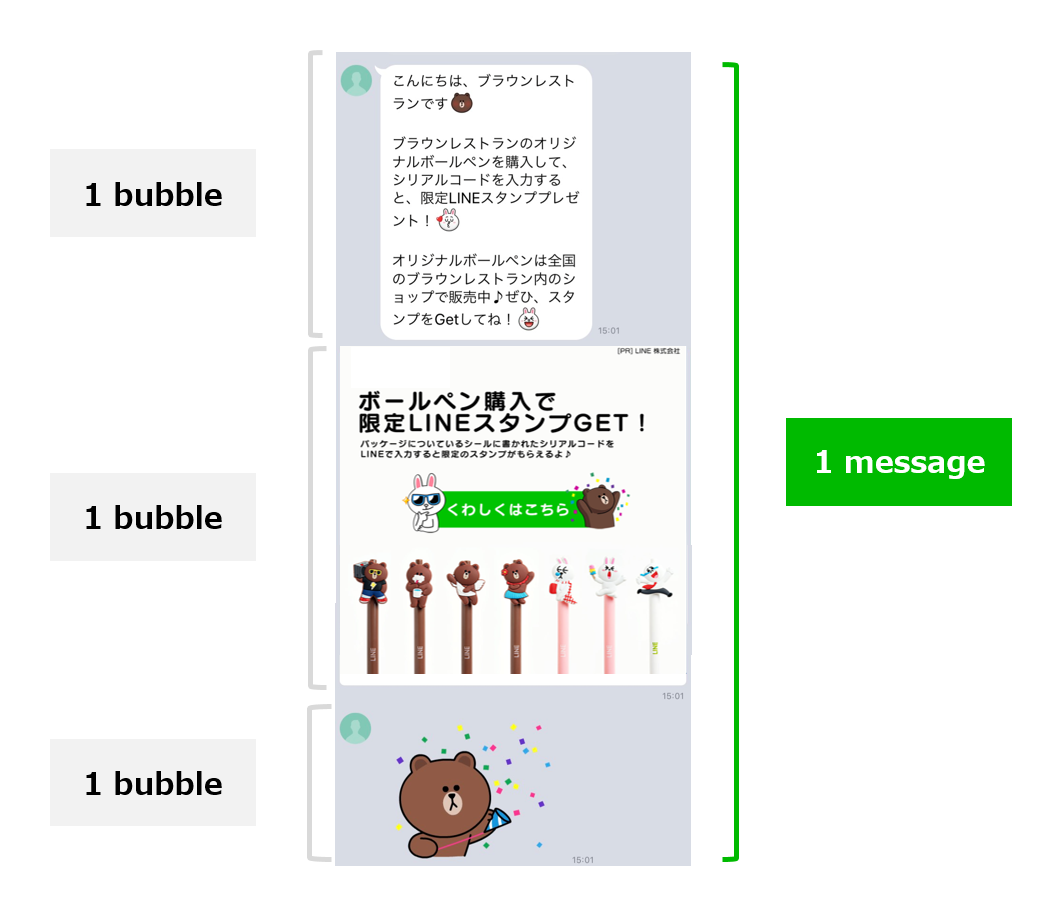
**On the recorded statistics recorded**
Interactions are updated for only 14 days (1,209,600 seconds) from the time a message was sent. After that time, interactions aren't updated.
For example, if you send a message at 15:00 on February 1, 2021, interactions will be updated until 15:00 on February 15, 2021.
_Example request_
```sh
curl -v -X GET 'https://api.line.me/v2/bot/insight/message/event?requestId=f70dd685-499a-4231-a441-f24b8d4fba21' \
-H 'Authorization: Bearer {channel access token}'
```
#### Rate limit
60 requests per hour
For more information on rate limits, see [Rate limits](https://developers.line.biz/en/reference/messaging-api/#rate-limits).
#### Request headers
Authorization
Bearer `{channel access token}`
#### Query parameters
requestId
Request ID of a narrowcast message or broadcast message. Each Messaging API request has a request ID. Find it in the [response headers](https://developers.line.biz/en/reference/messaging-api/#response-headers).
#### Response
Returns status code `200` and a JSON object with these properties:
**Note**
The statistical data may contain some errors.
To protect users' privacy, the values of some properties related to user interactions will be displayed as `null` in the following cases:
- The property value is less than 20
- Even if the property value is higher than or equal to 20, the actual number of users who generated the event is less than 20 (for example, if `messages[].mediaPlayed` is 30, but `messages[].uniqueMediaPlayed` is 15, both will be displayed as `null`
overview
Object
Summary of message statistics.
overview.requestId
String
Request ID.
overview.timestamp
Number
Message delivery time in UNIX time (in seconds).
overview.delivered
Number
Number of messages delivered. This property shows values of less than 20. However, if all messages have not been sent, it will be null.
overview.uniqueImpression
Number
Number of users who opened the message, meaning they displayed at least 1 bubble.
overview.uniqueClick
Number
Number of users who opened any URL in the message.
overview.uniqueMediaPlayed
Number
Number of users who started playing any video or audio in the message.
overview.uniqueMediaPlayed100Percent
Number
Number of users who played the entirety of any video or audio in the message.
messages
Array
Array of information about individual message bubbles. If the statistic isn't available, an empty array is returned.
messages\[].seq
Number
Bubble's serial number.
messages\[].impression
Number
Number of times the bubble was displayed.
messages\[].mediaPlayed
Number
Number of times audio or video in the bubble started playing. This count also includes the number of times a video is automatically played.
messages\[].mediaPlayed25Percent
Number
Number of times audio or video in the bubble started playing and was played 25% of the total time.
messages\[].mediaPlayed50Percent
Number
Number of times audio or video in the bubble started playing and was played 50% of the total time.
messages\[].mediaPlayed75Percent
Number
Number of times audio or video in the bubble started playing and was played 75% of the total time.
messages\[].mediaPlayed100Percent
Number
Number of times audio or video in the bubble started playing and was played 100% of the total time.
messages\[].uniqueMediaPlayed
Number
Number of users that started playing audio or video in the bubble.
messages\[].uniqueMediaPlayed25Percent
Number
Number of users that started playing audio or video in the bubble and played 25% of the total time.
messages\[].uniqueMediaPlayed50Percent
Number
Number of users that started playing audio or video in the bubble and played 50% of the total time.
messages\[].uniqueMediaPlayed75Percent
Number
Number of users that started playing audio or video in the bubble and played 75% of the total time.
messages\[].uniqueMediaPlayed100Percent
Number
Number of users that started playing audio or video in the bubble and played 100% of the total time.
clicks
Array
Array of information about opened URLs in the message. If the message doesn't contain any URLs or the statistic isn't available, an empty array is returned.
clicks\[].seq
Number
The URL's serial number.
clicks\[].url
String
URL.
clicks\[].click
Number
Number of times the URL was opened.
clicks\[].uniqueClick
Number
Number of users that opened the URL.
clicks\[].uniqueClickOfRequest
Number
Number of users who opened this `url` through any link in the message. If a message contains two links to the same URL and a user opens both links, they're counted only once.
_Example response_
```json
// If the statistic isn't available because the value of each property is lower than 20
{
"overview": {
"requestId": "a425a5cd-6510-43fe-95be-a27f222e5dc0",
"timestamp": 1711684800,
"delivered": 1,
"uniqueImpression": null,
"uniqueClick": null,
"uniqueMediaPlayed": null,
"uniqueMediaPlayed100Percent": null
},
"messages": [],
"clicks": []
}
// If the statistic is available because the value of each property is 20 or higher
{
"overview": {
"requestId": "f70dd685-499a-4231-a441-f24b8d4fba21",
"timestamp": 1568214000,
"delivered": 320,
"uniqueImpression": 82,
"uniqueClick": 51,
"uniqueMediaPlayed": null,
"uniqueMediaPlayed100Percent": null
},
"messages": [
{
"seq": 1,
"impression": 136,
"mediaPlayed": null,
"mediaPlayed25Percent": null,
"mediaPlayed50Percent": null,
"mediaPlayed75Percent": null,
"mediaPlayed100Percent": null,
"uniqueMediaPlayed": null,
"uniqueMediaPlayed25Percent": null,
"uniqueMediaPlayed50Percent": null,
"uniqueMediaPlayed75Percent": null,
"uniqueMediaPlayed100Percent": null
}
],
"clicks": [
{
"seq": 1,
"url": "https://line.me/",
"click": 41,
"uniqueClick": 30,
"uniqueClickOfRequest": 30
},
{
"seq": 1,
"url": "https://www.lycorp.co.jp/",
"click": 59,
"uniqueClick": 38,
"uniqueClickOfRequest": 38
}
]
}
```
#### Error response
For more information, see [Status codes](https://developers.line.biz/en/reference/messaging-api/#status-codes) and [Error responses](https://developers.line.biz/en/reference/messaging-api/#error-responses) in the [Common specifications](https://developers.line.biz/en/reference/messaging-api/#common-specifications) section.
### Get statistics per unit
Endpoint: `GET` `https://api.line.me/v2/bot/insight/message/event/aggregation?customAggregationUnit={customAggregationUnit}&from={from}&to={to}`
You can check the per-unit statistics of how users interact with push messages and multicast messages sent from your LINE Official Account.
You can get statistics on a per-message and per-message bubble basis for each unit.

If you send messages with the same unit name, the statistics are aggregated together, regardless of message contents or the number and order of message bubbles.
**On recorded statistics**
Interactions are updated for only 14 days (1,209,600 seconds) from the time a message was sent. After that time, interactions aren't updated.
For example, if you send a message at 15:00 on February 1, 2021, interactions will be updated until 15:00 on February 15, 2021.
**To get statistics per message**
Use this endpoint to get statistics per narrowcast message or broadcast message.
- [Get user interaction statistics](https://developers.line.biz/en/reference/messaging-api/#get-message-event)
_Example request_
```sh
curl -v -X GET https://api.line.me/v2/bot/insight/message/event/aggregation \
-H 'Authorization: Bearer {channel access token}' \
--data-urlencode 'customAggregationUnit=promotion_a' \
--data-urlencode 'from=20210301' \
--data-urlencode 'to=20210331' \
-G
```
#### Rate limit
60 requests per hour
For more information on rate limits, see [Rate limits](https://developers.line.biz/en/reference/messaging-api/#rate-limits).
#### Request headers
Authorization
Bearer `{channel access token}`
#### Query parameters
customAggregationUnit
String
Name of aggregation unit specified when sending the message. Case-sensitive. For example, `Promotion_a` and `Promotion_A` are regarded as different unit names.
For more information about assigning a unit name, see [Assign a unit name](https://developers.line.biz/en/docs/messaging-api/unit-based-statistics-aggregation/#assign-names-to-units-when-sending-messages) in the Messaging API documentation.
from
String
Start date of aggregation period.
- Format: `yyyyMMdd` (e.g. `20210301`)
- Time zone: UTC+9
to
String
End date of aggregation period. The end date can be specified for up to 30 days later. For example, if the start date is `20210301`, the latest end date is `20210331`.
- Format: `yyyyMMdd` (e.g. `20210301`)
- Time zone: UTC+9
#### Response
Returns a `200` HTTP status code and a JSON object with this information.
**Note**
The statistical data may contain some errors.
To protect users' privacy, the values of some properties related to user interactions will be displayed as `null` in these cases:
- The property value is less than 20
- Even if the property value is higher than or equal to 20, the actual number of users who generated the event is less than 20 (for example, if `messages[].mediaPlayed` is 30, but `messages[].uniqueMediaPlayed` is 15, both will be displayed as `null`
overview
Object
Statistics related to messages.
overview.uniqueImpression
Number
Number of users who opened the message, meaning they displayed at least 1 bubble.
overview.uniqueClick
Number
Number of users who opened any URL in the message.
overview.uniqueMediaPlayed
Number
Number of users who started playing any video or audio in the message.
overview.uniqueMediaPlayed100Percent
Number
Number of users who played the entirety of any video or audio in the message.
messages
Array
Array of information about individual message bubbles. If the statistic isn't available, an empty array is returned.
messages\[].seq
Number
Bubble's serial number.
messages\[].impression
Number
Number of times the bubble was displayed.
messages\[].uniqueImpression
Number
Number of users that displayed the bubble.
messages\[].mediaPlayed
Number
Number of times audio or video in the bubble started playing. This count also includes the number of times a video is automatically played.
messages\[].mediaPlayed25Percent
Number
Number of times audio or video in the bubble started playing and was played 25% of the total time.
messages\[].mediaPlayed50Percent
Number
Number of times audio or video in the bubble started playing and was played 50% of the total time.
messages\[].mediaPlayed75Percent
Number
Number of times audio or video in the bubble started playing and was played 75% of the total time.
messages\[].mediaPlayed100Percent
Number
Number of times audio or video in the bubble started playing and was played 100% of the total time.
messages\[].uniqueMediaPlayed
Number
Number of users that started playing audio or video in the bubble.
messages\[].uniqueMediaPlayed25Percent
Number
Number of users that started playing audio or video in the bubble and played 25% of the total time.
messages\[].uniqueMediaPlayed50Percent
Number
Number of users that started playing audio or video in the bubble and played 50% of the total time.
messages\[].uniqueMediaPlayed75Percent
Number
Number of users that started playing audio or video in the bubble and played 75% of the total time.
messages\[].uniqueMediaPlayed100Percent
Number
Number of users that started playing audio or video in the bubble and played 100% of the total time.
clicks
Array
Array of information about opened URLs in the message. If the message doesn't contain any URLs or the statistic isn't available, an empty array is returned.
clicks\[].seq
Number
The URL's serial number.
clicks\[].url
String
URL.
clicks\[].click
Number
Number of times the URL in the bubble was opened.
clicks\[].uniqueClick
Number
Number of users that opened the URL in the bubble.
clicks\[].uniqueClickOfRequest
Number
Number of users who opened this `url` through any link in the message. If another message bubble contains the same URL and a user opens both links, it's counted only once.
_Example response_
```json
// If there is no statistic for aggregation period
{
"overview": {
"uniqueImpression": null,
"uniqueClick": null,
"uniqueMediaPlayed": null,
"uniqueMediaPlayed100Percent": null
},
"messages": [],
"clicks": []
}
// If there is a statistic for aggregation period
{
"overview": {
"uniqueImpression": 40,
"uniqueClick": 30,
"uniqueMediaPlayed": 25,
"uniqueMediaPlayed100Percent": null
},
"messages": [
{
"seq": 1,
"impression": 42,
"uniqueImpression": 40,
"mediaPlayed": 30,
"mediaPlayed25Percent": null,
"mediaPlayed50Percent": null,
"mediaPlayed75Percent": null,
"mediaPlayed100Percent": null,
"uniqueMediaPlayed": 25,
"uniqueMediaPlayed25Percent": null,
"uniqueMediaPlayed50Percent": null,
"uniqueMediaPlayed75Percent": null,
"uniqueMediaPlayed100Percent": null
}
],
"clicks": [
{
"seq": 1,
"url": "https://developers.line.biz/",
"click": 35,
"uniqueClick": 25,
"uniqueClickOfRequest": null
},
{
"seq": 1,
"url": "https://lineapiusecase.com/",
"click": 29,
"uniqueClick": null,
"uniqueClickOfRequest": null
}
]
}
```
#### Error response
Returns the following HTTP status code and an error response:
| Code | Description |
| --- | --- |
| `400` | Unable to get the statistic. Consider these reasons:
No unit name specified.
No aggregation period date specified.
Invalid aggregation period date specified.
|
For more information, see [Status codes](https://developers.line.biz/en/reference/messaging-api/#status-codes) and [Error responses](https://developers.line.biz/en/reference/messaging-api/#error-responses) in the [Common specifications](https://developers.line.biz/en/reference/messaging-api/#common-specifications) section.
_Example error response_
```json
// If you couldn't get the statistic (400 Bad Request)
{
"message": null,
"key": null,
"stacktrace": null,
"code": null
}
```
### Get the number of unit name types assigned during this month
Endpoint: `GET` `https://api.line.me/v2/bot/message/aggregation/info`
You can get the number of unit name types assigned to messages during this month. For more information about the limit on unit names assigned when sending messages, see [Maximum number of unit name types](https://developers.line.biz/en/docs/messaging-api/unit-based-statistics-aggregation/#limit-to-the-number-of-units) in the Messaging API documentation.
_Example request_
```sh
curl -v -X GET https://api.line.me/v2/bot/message/aggregation/info \
-H 'Authorization: Bearer {channel access token}'
```
#### Rate limit
2,000 requests per second
For more information on rate limits, see [Rate limits](https://developers.line.biz/en/reference/messaging-api/#rate-limits).
#### Request headers
Authorization
Bearer `{channel access token}`
#### Response
Returns a `200` HTTP status code and a JSON object with this information.
numOfCustomAggregationUnits
Number
Number of unit name types assigned to messages during this month.
_Example response_
```json
{
"numOfCustomAggregationUnits": 22
}
```
#### Error Response
For more information, see [Status codes](https://developers.line.biz/en/reference/messaging-api/#status-codes) and [Error responses](https://developers.line.biz/en/reference/messaging-api/#error-responses) in the [Common specifications](https://developers.line.biz/en/reference/messaging-api/#common-specifications) section.
### Get a list of unit names assigned during this month
Endpoint: `GET` `https://api.line.me/v2/bot/message/aggregation/list`
You can get a unique list of unit names assigned to messages during this month.
_Example request_
```sh
curl -v -X GET https://api.line.me/v2/bot/message/aggregation/list \
-H 'Authorization: Bearer {channel access token}' \
--data-urlencode 'limit=30' \
-G
```
#### Rate limit
2,000 requests per second
For more information on rate limits, see [Rate limits](https://developers.line.biz/en/reference/messaging-api/#rate-limits).
#### Request headers
Authorization
Bearer `{channel access token}`
#### Query parameters
limit
String
The maximum number of unit names you can get per request. The default value is `100`.\
Max value: `100`
start
String
Value of the continuation token found in the `next` property of the JSON object returned in the [response](https://developers.line.biz/en/reference/messaging-api/#get-a-list-of-unit-names-assigned-during-this-month-response). If you can't get all the unit names in a single request, include this parameter to get the remaining array.
#### Response
Returns a `200` HTTP status code and a JSON object with this information.
customAggregationUnits
Array of strings
An array of strings indicating the unit names. The array uniquely contains the unit names assigned to messages during this month.
next
String
A continuation token to get the next array of unit names. Returned only when there are remaining unit names that weren't returned in the `customAggregationUnits` property in the original request.
The continuation token expires in 24 hours (86,400 seconds).
_Example response_
```json
{
"customAggregationUnits": ["promotion_a", "promotion_b"],
"next": "jxEWCEEP..."
}
```
#### Error Response
Returns the following HTTP status code and an error response:
| Code | Description |
| --- | --- |
| `400` | Problem with the request. Consider these reasons:
An invalid continuation token is specified.
An invalid value is specified for the `limit` property.
|
For more information, see [Status codes](https://developers.line.biz/en/reference/messaging-api/#status-codes) and [Error responses](https://developers.line.biz/en/reference/messaging-api/#error-responses) in the [Common specifications](https://developers.line.biz/en/reference/messaging-api/#common-specifications) section.
_Example error response_
```json
// If you specify an invalid continuation token, such as expired (400 Bad Request)
{
"message": "Invalid start param"
}
```
## Coupon
You can manage coupons to be sent to users from your LINE Official Account.
### Create a coupon
Endpoint: `POST` `https://api.line.me/v2/bot/coupon`
Creates a coupon.
Coupons aren't automatically sent to users just by creating them. You need to send the created coupon as a message. For more information, see [Steps to send coupons using the Messaging API](https://developers.line.biz/en/docs/messaging-api/send-coupons-to-users/#send-coupons-using-messaging-api) in the Messaging API documentation.
You can create up to 5,000 valid coupons.
_Example request_
```sh
curl -v -X POST https://api.line.me/v2/bot/coupon \
-H 'Authorization: Bearer {channel access token}' \
-H 'Content-Type: application/json' \
-d \
'
{
"title": "Friends-only coupon",
"description": "- To redeem your coupon, present this screen at checkout.\n- Redeemable once only, even if previously redeemed only unintentionally by the customer.\n- The validity period of this coupon may change or it may be canceled without notice.",
"reward": {
"type": "discount",
"priceInfo": {
"type": "fixed",
"fixedAmount": 100
}
},
"acquisitionCondition": {
"type": "normal"
},
"startTimestamp": 0,
"endTimestamp": 1924959599,
"imageUrl": "https://developers.line.biz/media/messaging-api/coupon/sample-coupon-image-100-yen-off.jpg",
"timezone": "ASIA_TOKYO",
"visibility": "UNLISTED",
"maxUseCountPerTicket": 1
}'
```
#### Rate limit
200 requests per second
Creating coupons using [LINE Official Account Manager](https://developers.line.biz/en/glossary/#line-oa-manager) isn't subject to this restriction.
For more information on rate limits, see [Rate limits](https://developers.line.biz/en/reference/messaging-api/#rate-limits).
#### Request headers
Authorization
Bearer `{channel access token}`
Content-Type
application/json
#### Request body
title
String
Coupon title.\
Max length: 60
description
String
Coupon guidelines. Set usage instructions and precautions for the coupon. Line breaks can be specified with `\n`.\
Max length: 1,000
acquisitionCondition
Object
Object containing coupon acquisition conditions.
acquisitionCondition.type
String
Coupon acquisition conditions type.\
Specify one of the following values:
- `normal`: No conditions. All users can acquire.
- `lottery`: Lottery. Only users who win the lottery can acquire.
Coupons with "friend referral" acquisition conditions can't be created using the Messaging API. They can only be created from LINE Official Account Manager.
acquisitionCondition.lotteryProbability
Number
Specify the coupon winning probability (%) as an integer from 1 to 99.\
For example, if you specify 50, the winning probability will be 50%.
Required when `acquisitionCondition.type` is `lottery`.
acquisitionCondition.maxAcquireCount
Number
The upper limit for the number of winners in a lottery. Specify an integer from 1 to 999999.\
If there is no upper limit, specify `-1`.\
Required when `acquisitionCondition.type` is `lottery`.
maxUseCountPerTicket
Number
Number of times the coupon can be used. \
Specify one of the following values:
- `1`: Only once
- `-1`: No limit
startTimestamp
Number
Start date and time of the coupon validity period.\
Specify in UNIX time (in seconds).
endTimestamp
Number
End date and time of the coupon validity period.\
Specify in UNIX time (in seconds).\
You cannot specify a date and time before the current date and time or before the start date and time.
timezone
String
The timezone is used as the basis for the validity period.\
Specify one of the following values:
- `ETC_GMT_MINUS_12`: (UTC-12:00) Etc/GMT-12
- `ETC_GMT_MINUS_11`: (UTC-11:00) Etc/GMT-11
- `PACIFIC_HONOLULU`: (UTC-10:00) Pacific/Honolulu
- `AMERICA_ANCHORAGE`: (UTC-09:00) America/Anchorage
- `AMERICA_LOS_ANGELES`: (UTC-08:00) America/Los_Angeles, Santa_Isabel
- `AMERICA_PHOENIX`: (UTC-07:00) America/Phoenix, Denver
- `AMERICA_CHICAGO`: (UTC-06:00) America/Chicago, Guatemala
- `AMERICA_NEW_YORK`: (UTC-05:00) America/New_York, Indiana/Indianapolis
- `AMERICA_CARACAS`: (UTC-04:30) America/Caracas
- `AMERICA_SANTIAGO`: (UTC-04:00) America/Santiago, Cuiaba
- `AMERICA_ST_JOHNS`: (UTC-03:30) America/St_Johns
- `AMERICA_SAO_PAULO`: (UTC-03:00) America/Sao_Paulo, Argentina/Buenos_Aires
- `ETC_GMT_MINUS_2`: (UTC-02:00) Etc/GMT-2
- `ATLANTIC_CAPE_VERDE`: (UTC-01:00) Atlantic/Cape_Verde, Azores
- `EUROPE_LONDON`: (UTC+00:00) Europe/London, Etc/GMT
- `EUROPE_PARIS`: (UTC+01:00) Europe/Paris, Berlin
- `EUROPE_ISTANBUL`: (UTC+02:00) Europe/Istanbul, Kiev
- `EUROPE_MOSCOW`: (UTC+03:00) Europe/Moscow, Minsk
- `ASIA_TEHRAN`: (UTC+03:30) Asia/Tehran
- `ASIA_TBILISI`: (UTC+04:00) Asia/Tbilisi, Yerevan
- `ASIA_KABUL`: (UTC+04:30) Asia/Kabul
- `ASIA_TASHKENT`: (UTC+05:00) Asia/Tashkent, Karachi
- `ASIA_COLOMBO`: (UTC+05:30) Asia/Colombo, Kolkata
- `ASIA_KATHMANDU`: (UTC+05:45) Asia/Kathmandu
- `ASIA_ALMATY`: (UTC+06:00) Asia/Almaty, Dhaka
- `ASIA_RANGOON`: (UTC+06:30) Asia/Rangoon
- `ASIA_BANGKOK`: (UTC+07:00) Asia/Bangkok, Jakarta
- `ASIA_TAIPEI`: (UTC+08:00) Asia/Taipei, Singapore
- `ASIA_TOKYO`: (UTC+09:00) Asia/Tokyo, Seoul
- `AUSTRALIA_DARWIN`: (UTC+09:30) Australia/Darwin, Adelaide
- `AUSTRALIA_SYDNEY`: (UTC+10:00) Australia/Sydney, Brisbane
- `ASIA_VLADIVOSTOK`: (UTC+11:00) Asia/Vladivostok, Pacific/Guadalcanal
- `ETC_GMT_PLUS_12`: (UTC+12:00) Etc/GMT+12
- `PACIFIC_TONGATAPU`: (UTC+13:00) Pacific/Tongatapu, Apia
reward
Object
[Reward object](https://developers.line.biz/en/reference/messaging-api/#create-coupon-reward-object) containing coupon type information.
visibility
String
Display coupon in LY Corporation services.\
One of these values:
- `PUBLIC`: Display.
- `UNLISTED`: Do not display.
For more information, see [Display coupon in LY Corporation services](https://www.lycbiz.com/jp/manual/OfficialAccountManager/coupons-service/) (only available in Japanese) in LINE for Business.
imageUrl
String
URL of the coupon image.\
Max character limit: 2000\
Protocol: HTTPS (TLS 1.2 or later)\
Image format: JPEG or PNG\
Max file size: 10MB (1MB or less recommended)
The URL should be percent-encoded using UTF-8. For more information, see [About the encoding of a URL specified in a request body property](https://developers.line.biz/en/reference/messaging-api/#url-encoding).
**Changing the image at the URL later won't update the coupon image**
The image at the URL is retrieved and stored on the LINE Platform when the coupon is created. Changing the image at the URL later won't update the coupon image.
couponCode
String
Coupon code displayed after opening the coupon.\
Max length: 16
barcodeImageUrl
String
URL of the barcode image displayed after opening the coupon.\
Max character limit: 2000\
Protocol: HTTPS (TLS 1.2 or later)\
Image format: JPEG or PNG\
Max file size: 10MB
The URL should be percent-encoded using UTF-8. For more information, see [About the encoding of a URL specified in a request body property](https://developers.line.biz/en/reference/messaging-api/#url-encoding).
**Changing the image at the URL later won't update the coupon image**
The image at the URL is retrieved and stored on the LINE Platform when the coupon is created. Changing the image at the URL later won't update the coupon image.
usageCondition
String
Coupon usage conditions.\
Max length: 100
##### Reward object
type
String
Coupon type.\
Specify one of the following values:
- `discount`: Discount
- `free`: Free
- `gift`: Gift
- `cashBack`: Cashback
- `others`: Others
priceInfo
Object
Object containing discount or cashback details.\
Required when `type` is `discount` and `cashBack`.
priceInfo.type
String
Type of coupon discount details.
When `type` is `discount`, you can specify one of the following values:
- `fixed`: Display discount amount
- `percentage`: Display discount percentage
- `explicit`: Cross out original price and display discounted price
When `type` is `cashBack`, you can specify one of the following values:
- `fixed`: Display cashback amount
- `percentage`: Display cashback percentage
priceInfo.fixedAmount
Number
Specify the discount amount as a positive integer.\
Required when `priceInfo.type` is `fixed`.\
The currency unit is automatically set according to the country or region of the LINE Official Account.
- Taiwan: TWD (Taiwan Dollar)
- Thailand: THB (Thai Baht)
- All other countries and regions: JPY (Japanese Yen)
priceInfo.percentage
Number
Specify the discount rate (%) as an integer from 1 to 99.\
For example, if you specify 50, the discount rate will be 50%.\
Required when `priceInfo.type` is `percentage`.
priceInfo.originalPrice
Number
Specify the price before discount as a positive integer.\
Required when `priceInfo.type` is `explicit`.\
The currency unit is automatically set according to the country or region of the LINE Official Account.
- Taiwan: TWD (Taiwan Dollar)
- Thailand: THB (Thai Baht)
- All other countries and regions: JPY (Japanese Yen)
priceInfo.priceAfterDiscount
Number
Specify the price after discount as a positive integer.\
Required when `priceInfo.type` is `explicit`.\
The currency unit is automatically set according to the country or region of the LINE Official Account.
- Taiwan: TWD (Taiwan Dollar)
- Thailand: THB (Thai Baht)
- All other countries and regions: JPY (Japanese Yen)
_Reward object examples_
```json
// 1,500 yen discount
{
"type": "discount",
"priceInfo": {
"type": "fixed",
"fixedAmount": 1500
}
}
// 25% discount
{
"type": "discount",
"priceInfo": {
"type": "percentage",
"percentage": 25
}
}
// Cross out the original price of 12,000 yen and display the discounted price of 9,500 yen
{
"type": "discount",
"priceInfo": {
"type": "explicit",
"originalPrice": 12000,
"priceAfterDiscount": 9500
}
}
// Free
{
"type": "free"
}
// Gift
{
"type": "gift"
}
// 100 yen cashback
{
"type": "cashBack",
"priceInfo": {
"type": "fixed",
"fixedAmount": 100
}
}
// 30% cashback
{
"type": "cashBack",
"priceInfo": {
"type": "percentage",
"percentage": 30
}
}
// Others
{
"type": "others"
}
```
#### Response
Returns status code `200` and a JSON object with the following property.
couponId
String
The coupon ID. Use this when sending a coupon message, etc.
_Example response_
```json
{
"couponId": "01JYNW8JMQVFBNWF1APF8Z3FS7"
}
```
#### Error response
Returns the following HTTP status code and an error response:
| Code | Description |
| --- | --- |
| `400` | Couldn't create a coupon. Consider these reasons:
An invalid coupon type is specified.
The maximum number of valid coupons (maximum 5,000) has been reached.
A property that does not match `priceInfo.type` is specified in the reward object.
|
For more information, see [Status codes](https://developers.line.biz/en/reference/messaging-api/#status-codes) and [Error responses](https://developers.line.biz/en/reference/messaging-api/#error-responses) in the [Common specifications](https://developers.line.biz/en/reference/messaging-api/#common-specifications) section.
_Example error response_
```json
// When the coupon title exceeds 60 characters
{
"message": "The request body has 1 error(s)",
"details": [
{
"message": "Size must be between 1 and 60",
"property": "title"
}
]
}
// When an invalid coupon type is specified
{
"message": "The request body has 1 error(s)",
"details": [
{
"message": "Must be one of the following values: [discount,free,gift,cashBack,others]",
"property": "reward.type"
}
]
}
// When the number of valid coupons exceeds the limit
{
"message": "The request body has 1 error(s)",
"details": [
{
"message": "You have too many coupons created.",
"property": ""
}
]
}
// When priceInfo.type is percentage in the reward object, but fixedAmount is specified
{
"message": "The request body has 1 error(s)",
"details": [
{
"message": "Must not be specified",
"property": "reward.priceInfo.fixedAmount"
}
]
}
```
### Discontinue a coupon
Endpoint: `PUT` `https://api.line.me/v2/bot/coupon/{couponId}/close`
Discontinues the specified coupon.
Once a coupon is discontinued, users who have already received it as a message will no longer be able to get it, and users who have already obtained it will no longer be able to use it.
Discontinued coupons can't be reactivated.
_Example request_
```sh
curl -v -X PUT https://api.line.me/v2/bot/coupon/01JYNW8JMQVFBNWF1APF8Z3FS7/close \
-H 'Authorization: Bearer {channel access token}' \
-H 'Content-Type: application/json'
```
#### Rate limit
200 requests per second
Discontinuing coupons using [LINE Official Account Manager](https://developers.line.biz/en/glossary/#line-oa-manager) isn't subject to this restriction.
For more information on rate limits, see [Rate limits](https://developers.line.biz/en/reference/messaging-api/#rate-limits).
#### Request headers
Authorization
Bearer `{channel access token}`
Content-Type
application/json
#### Path parameters
couponId
String
The coupon ID of the coupon to discontinue.
#### Response
Returns the `200` HTTP status code and an empty JSON object.
_Response example_
```json
{}
```
#### Error response
Returns the following HTTP status code and an error response:
| Code | Description |
| --- | --- |
| `410` | The coupon ID for a discontinued coupon has been specified. |
| `404` | The specified coupon doesn't exist. |
For more information, see [Status codes](https://developers.line.biz/en/reference/messaging-api/#status-codes) and [Error responses](https://developers.line.biz/en/reference/messaging-api/#error-responses) in the [Common specifications](https://developers.line.biz/en/reference/messaging-api/#common-specifications) section.
_Example error response_
```json
// If the specified coupon is already discontinued (410 Gone)
{
"message": "The request body has 1 error(s)",
"details": [
{
"message": "The coupon has already been closed.",
"property": ""
}
]
}
// If you specify a non-existent coupon ID (404 Not Found)
{
"message": "The request body has 1 error(s)",
"details": [
{
"message": "coupon not found",
"property": ""
}
]
}
```
### Get a list of coupons
Endpoint: `GET` `https://api.line.me/v2/bot/coupon`
Get a list of coupons, including the coupon ID and coupon title. You can also get only valid coupons or only discontinued coupons.
This coupon list includes coupons created using both the Messaging API and [LINE Official Account Manager](https://manager.line.biz/). You can view the same list in LINE Official Account Manager.
_Example request_
```sh
curl -v -X GET https://api.line.me/v2/bot/coupon \
-H 'Authorization: Bearer {channel access token}'
-d 'limit=100' \
-d 'status=DRAFT,RUNNING' \
-G
```
#### Rate limit
200 requests per second
Checking the list of coupons using [LINE Official Account Manager](https://developers.line.biz/en/glossary/#line-oa-manager) isn't subject to this restriction.
For more information on rate limits, see [Rate limits](https://developers.line.biz/en/reference/messaging-api/#rate-limits).
#### Request headers
Authorization
Bearer `{channel access token}`
#### Query parameters
limit
Number
The maximum number of coupons to retrieve in a single request. The default value is `20`.\
Max value: `100`
start
String
Value of the continuation token found in the `next` property of the JSON object returned in the [response](https://developers.line.biz/en/reference/messaging-api/#get-coupons-list-response). Include this parameter to get the remaining coupons if you can't get all the coupons in a single request.
status
The status of the coupon(s) to return. If omitted, coupons with all statuses will be included.
- `DRAFT`: Draft saved coupon.
- `RUNNING`: Upcoming or valid coupon.
- `CLOSED`: Expired or discontinued coupon.
If you specify multiple parameters, the OR condition is used.
#### Response
Returns status code `200` and a JSON object with the following properties.
items
Array of objects
An array of objects representing the coupons.\
Max: The number specified by `limit`
items\[].couponId
String
The coupon ID.
items\[].title
String
Coupon title.
next
String
A continuation token to get the next coupons. This property is returned only when there are coupons that couldn't be retrieved in the `items` property of the response.
The continuation token is valid for 24 hours (86,400 seconds).
_Example response_
```json
// When all coupons are retrieved
{
"items": [
{
"couponId": "01JZMWQ9HMDW9ENJP4C167CXP8",
"title": "Year-end and New Year coupon"
},
{
"couponId": "01JZA9NPPFDJ3RFG8NA9DJ0NQT",
"title": "Friends-only coupon"
}
]
}
// When there are still coupons that couldn't be retrieved
{
"next": "MTAwMDU3MjAxOjE3NTI1Njk5NDU2MjE6WXBPRHo1N3VjL3hPMkcxVEZPVGY1eW9YS3BqL2R2TGVEdit2V3J0ckczVT0=",
"items": [
{
"couponId": "01JZMWQ9HMDW9ENJP4C167CXP8",
"title": "Year-end and New Year coupon"
},
{
"couponId": "01JZA9NPPFDJ3RFG8NA9DJ0NQT",
"title": "Friends-only coupon"
}
]
}
// When no matching coupons are found
{
"items": []
}
```
#### Error response
Returns the following HTTP status code and an error response:
| Code | Description |
| --- | --- |
| `400` | Could not get the list of coupons. Possible reasons include:
An invalid status is specified.
The maximum number of coupons to retrieve exceeds 100.
|
For more information, see [Status codes](https://developers.line.biz/en/reference/messaging-api/#status-codes) and [Error responses](https://developers.line.biz/en/reference/messaging-api/#error-responses) in the [Common specifications](https://developers.line.biz/en/reference/messaging-api/#common-specifications) section.
_Example error response_
```json
// When an invalid status is specified (400 Bad Request)
{
"message": "The request body has 1 error(s)",
"details": [
{
"message": "Must be one of the following values: [DRAFT,RUNNING,CLOSED]",
"property": "status"
}
]
}
// When the maximum number of coupons to retrieve exceeds 100
{
"message": "The request body has 1 error(s)",
"details": [
{
"message": "Must be less than or equal to 100",
"property": "limit"
}
]
}
```
### Get details of a coupon
Endpoint: `GET` `https://api.line.me/v2/bot/coupon/{couponId}`
Retrieves the specified coupon details.
_Example request_
```sh
curl -v -X GET https://api.line.me/v2/bot/coupon/01JYNW8JMQVFBNWF1APF8Z3FS7 \
-H 'Authorization: Bearer {channel access token}'
```
#### Rate limit
200 requests per second
Checking coupon details using [LINE Official Account Manager](https://developers.line.biz/en/glossary/#line-oa-manager) isn't subject to this restriction.
For more information on rate limits, see [Rate limits](https://developers.line.biz/en/reference/messaging-api/#rate-limits).
#### Request headers
Authorization
Bearer `{channel access token}`
#### Path parameters
couponId
String
The ID of the coupon to retrieve details.
#### Response
Returns status code `200` and a JSON object with the following property.
couponId
String
The coupon ID of the coupon.
title
String
Coupon title.
description
String
Coupon usage guide.
acquisitionCondition
Object
Object containing coupon acquisition conditions.
acquisitionCondition.type
String
Coupon acquisition conditions type.\
One of these values:
- `normal`: No conditions. All users can acquire.
- `lottery`: Lottery. Only users who win the lottery can acquire.
- `referral`: Friend referral. Both the user who referred the coupon and the user who receives the referral can acquire.
acquisitionCondition.lotteryProbability
Number
The coupon winning probability (%) as an integer from 1 to 99.\
Included when `acquisitionCondition.type` is `lottery`.
acquisitionCondition.maxAcquireCount
Number
The upper limit for the number of winners as an integer from 1 to 999999.\
If there is no upper limit, the value is `-1`.\
Included when `acquisitionCondition.type` is `lottery`.
maxUseCountPerTicket
Number
Number of times the coupon can be used. \
One of these values:
- `1`: Only once
- `-1`: No limit
maxTicketPerUser
Number
Number of coupons each user can acquire.\
If `acquisitionCondition.type` is `referral`, then the number is an integer from 1 to 30. Otherwise, the value is `1`.
startTimestamp
Number
Start date and time of the coupon validity period in UNIX time (in seconds).
endTimestamp
Number
End date and time of the coupon validity period in UNIX time (in seconds).
timezone
String
The timezone is used as the basis for the validity period.\
One of these values:
- `ETC_GMT_MINUS_12`: (UTC-12:00) Etc/GMT-12
- `ETC_GMT_MINUS_11`: (UTC-11:00) Etc/GMT-11
- `PACIFIC_HONOLULU`: (UTC-10:00) Pacific/Honolulu
- `AMERICA_ANCHORAGE`: (UTC-09:00) America/Anchorage
- `AMERICA_LOS_ANGELES`: (UTC-08:00) America/Los_Angeles, Santa_Isabel
- `AMERICA_PHOENIX`: (UTC-07:00) America/Phoenix, Denver
- `AMERICA_CHICAGO`: (UTC-06:00) America/Chicago, Guatemala
- `AMERICA_NEW_YORK`: (UTC-05:00) America/New_York, Indiana/Indianapolis
- `AMERICA_CARACAS`: (UTC-04:30) America/Caracas
- `AMERICA_SANTIAGO`: (UTC-04:00) America/Santiago, Cuiaba
- `AMERICA_ST_JOHNS`: (UTC-03:30) America/St_Johns
- `AMERICA_SAO_PAULO`: (UTC-03:00) America/Sao_Paulo, Argentina/Buenos_Aires
- `ETC_GMT_MINUS_2`: (UTC-02:00) Etc/GMT-2
- `ATLANTIC_CAPE_VERDE`: (UTC-01:00) Atlantic/Cape_Verde, Azores
- `EUROPE_LONDON`: (UTC+00:00) Europe/London, Etc/GMT
- `EUROPE_PARIS`: (UTC+01:00) Europe/Paris, Berlin
- `EUROPE_ISTANBUL`: (UTC+02:00) Europe/Istanbul, Kiev
- `EUROPE_MOSCOW`: (UTC+03:00) Europe/Moscow, Minsk
- `ASIA_TEHRAN`: (UTC+03:30) Asia/Tehran
- `ASIA_TBILISI`: (UTC+04:00) Asia/Tbilisi, Yerevan
- `ASIA_KABUL`: (UTC+04:30) Asia/Kabul
- `ASIA_TASHKENT`: (UTC+05:00) Asia/Tashkent, Karachi
- `ASIA_COLOMBO`: (UTC+05:30) Asia/Colombo, Kolkata
- `ASIA_KATHMANDU`: (UTC+05:45) Asia/Kathmandu
- `ASIA_ALMATY`: (UTC+06:00) Asia/Almaty, Dhaka
- `ASIA_RANGOON`: (UTC+06:30) Asia/Rangoon
- `ASIA_BANGKOK`: (UTC+07:00) Asia/Bangkok, Jakarta
- `ASIA_TAIPEI`: (UTC+08:00) Asia/Taipei, Singapore
- `ASIA_TOKYO`: (UTC+09:00) Asia/Tokyo, Seoul
- `AUSTRALIA_DARWIN`: (UTC+09:30) Australia/Darwin, Adelaide
- `AUSTRALIA_SYDNEY`: (UTC+10:00) Australia/Sydney, Brisbane
- `ASIA_VLADIVOSTOK`: (UTC+11:00) Asia/Vladivostok, Pacific/Guadalcanal
- `ETC_GMT_PLUS_12`: (UTC+12:00) Etc/GMT+12
- `PACIFIC_TONGATAPU`: (UTC+13:00) Pacific/Tongatapu, Apia
reward
Object
[Reward object](https://developers.line.biz/en/reference/messaging-api/#get-coupon-reward-object) containing coupon type information.
visibility
String
Display coupon in LY Corporation services.\
One of these values:
- `PUBLIC`: Display.
- `UNLISTED`: Do not display.
For more information, see [Display coupon in LY Corporation services](https://www.lycbiz.com/jp/manual/OfficialAccountManager/coupons-service/) (only available in Japanese) in LINE for Business.
imageUrl
String
URL of the coupon image.
couponCode
String
Coupon code displayed after opening the coupon.
barcodeImageUrl
String
URL of the barcode image displayed after opening the coupon.
usageCondition
String
Coupon usage conditions.
status
The status of the coupon.
- `DRAFT`: Draft saved coupon.
- `RUNNING`: Upcoming or valid coupon.
- `CLOSED`: Expired or discontinued coupon.
createdTimestamp
Number
Creation date and time of the coupon in UNIX time (in seconds).
_Example response_
```json
{
"couponId": "01K0B456W5Y6SBD3YH74YM6QE6",
"title": "Friends-only coupon",
"description": "- To redeem your coupon, present this screen at checkout.\n- Redeemable once only, even if previously redeemed only unintentionally by the customer.\n- The validity period of this coupon may change or it may be canceled without notice.",
"acquisitionCondition": {
"type": "lottery",
"lotteryProbability": 50,
"maxAcquireCount": -1
},
"startTimestamp": 1752678000,
"endTimestamp": 1924959540,
"timezone": "ASIA_TOKYO",
"couponCode": "COUPONCODE123456",
"maxUseCountPerTicket": 1,
"maxTicketPerUser": 1,
"visibility": "UNLISTED",
"reward": {
"type": "discount",
"priceInfo": {
"type": "fixed",
"fixedAmount": 100,
"currency": "JPY"
}
},
"imageUrl": "https://oa-coupon.line-scdn-dev.net/0h9gbUqRVkZkhfLHhXMLYZHwdyaCosWGBAPFR7cD5tZidsTnofYDVfezt-ZAR3YER9OzRfK35XZwR6TH5uYDF2TnJ-cBNyfURpPRl2RSFSXQc0TiJhYCFiXiZ8XXk0",
"usageCondition": "Usable for payments of 1,000 yen or more",
"status": "RUNNING",
"createdTimestamp": 1752720120
}
```
##### Reward object
type
String
Coupon type.\
One of the following values:
- `discount`: Discount
- `free`: Free
- `gift`: Gift
- `cashBack`: Cashback
- `others`: Others
priceInfo
Object
Object containing discount or cashback details.\
Included when `type` is `discount` and `cashBack`.
priceInfo.type
String
Type of coupon discount details.
When `type` is `discount`, one of the following values:
- `fixed`: Display discount amount
- `percentage`: Display discount percentage
- `explicit`: Cross out original price and display discounted price
When `type` is `cashBack`, one of the following values:
- `fixed`: Display cashback amount
- `percentage`: Display cashback percentage
priceInfo.fixedAmount
Number
The discount amount.\
Included when `priceInfo.type` is `fixed`.
priceInfo.percentage
Number
The discount rate (%).\
Included when `priceInfo.type` is `percentage`.
priceInfo.originalPrice
Number
The price before discount.\
Included when `priceInfo.type` is `explicit`.
priceInfo.priceAfterDiscount
Number
The price after discount.\
Included when `priceInfo.type` is `explicit`.
priceInfo.currency
Number
The currency unit. Automatically set according to the country or region of the LINE Official Account.\
Included when `priceInfo.type` is `fixed` or `explicit`.
- `TWD`: Taiwan Dollar (Taiwan)
- `THB`: Thai Baht (Thailand)
- `JPY`: Japanese Yen (All other countries and regions)
_Reward object examples_
```json
// 1,500 yen discount
{
"type": "discount",
"priceInfo": {
"type": "fixed",
"fixedAmount": 1500,
"currency": "JPY"
}
}
// 25% discount
{
"type": "discount",
"priceInfo": {
"type": "percentage",
"percentage": 25
}
}
// Cross out the original price of 12,000 yen and display the discounted price of 9,500 yen
{
"type": "discount",
"priceInfo": {
"type": "explicit",
"originalPrice": 12000,
"priceAfterDiscount": 9500,
"currency": "JPY"
}
}
// Free
{
"type": "free"
}
// Gift
{
"type": "gift"
}
// 100 yen cashback
{
"type": "cashBack",
"priceInfo": {
"type": "fixed",
"fixedAmount": 100,
"currency": "JPY"
}
}
// 30% cashback
{
"type": "cashBack",
"priceInfo": {
"type": "percentage",
"percentage": 30
}
}
// Others
{
"type": "others"
}
```
#### Error response
Returns the following HTTP status code and an error response:
| Code | Description |
| --- | --- |
| `404` | The specified coupon does not exist. Consider these reasons:
A coupon created in another channel is specified.
|
For more information, see [Status codes](https://developers.line.biz/en/reference/messaging-api/#status-codes) and [Error responses](https://developers.line.biz/en/reference/messaging-api/#error-responses) in the [Common specifications](https://developers.line.biz/en/reference/messaging-api/#common-specifications) section.
_Example error response_
```json
// If you specify a non-existent coupon ID (404 Not Found)
{
"message": "The request body has 1 error(s)",
"details": [
{
"message": "coupon not found",
"property": ""
}
]
}
```
## Users
You can get information of users who have added your LINE Official Account as a friend.
**Accessing your own user ID**
You can access your user ID under the **Basic settings** tab of your channel on the [LINE Developers Console](https://developers.line.biz/console/). For more information on permissions per role in the LINE Developers Console, see [Channel roles](https://developers.line.biz/en/docs/line-developers-console/managing-roles/#roles-for-channel) in [Managing roles](https://developers.line.biz/en/docs/line-developers-console/managing-roles/). There is no API available for retrieving your own user ID.
### Get profile
Endpoint: `GET` `https://api.line.me/v2/bot/profile/{userId}`
You can get the profile information of users who meet one of two conditions:
- Users who have added your LINE Official Account as a friend
- Users who haven't added your LINE Official Account as a friend but have sent a message to your LINE Official Account (except users who have blocked your LINE Official Account)
You can only get the main profile information. You can't get the user's [subprofile](https://developers.line.biz/en/glossary/#subprofile).
**Note**
You can't get the profile information of a user who has blocked your LINE Official Account.
**Profile information of group chat members and multi-person chat members**
Use these endpoints to get profile information of group chat members or multi-person chat members.
- [Get group chat member profile](https://developers.line.biz/en/reference/messaging-api/#get-group-member-profile)
- [Get multi-person chat member profile](https://developers.line.biz/en/reference/messaging-api/#get-room-member-profile)
_Example request_
```sh
curl -v -X GET https://api.line.me/v2/bot/profile/{userId} \
-H 'Authorization: Bearer {channel access token}'
```
#### Rate limit
2,000 requests per second
For more information on rate limits, see [Rate limits](https://developers.line.biz/en/reference/messaging-api/#rate-limits).
#### Request headers
Authorization
Bearer `{channel access token}`
#### Path parameters
userId
User ID that is returned in a [webhook event object](https://developers.line.biz/en/reference/messaging-api/#webhook-event-objects). Do not use the LINE ID found on LINE.
#### Response
When the specified user ID is valid, status code `200` and a JSON object with the following information will be returned.
displayName
String
User's display name
userId
String
User ID
language
String
User's language, as a [BCP 47](https://www.rfc-editor.org/info/bcp47) language tag. Not included in the response if the user hasn't yet consented to the LY Corporation Privacy Policy.\
e.g. `en` for English.
pictureUrl
String
Profile image URL. "https" image URL. Not included in the response if the user doesn't have a profile image.
statusMessage
String
User's status message. Not included in the response if the user doesn't have a status message.
_Example response_
```json
{
"displayName": "LINE taro",
"userId": "U4af4980629...",
"language": "en",
"pictureUrl": "https://profile.line-scdn.net/ch/v2/p/uf9da5ee2b...",
"statusMessage": "Hello, LINE!"
}
```
#### Error response
Returns the following HTTP status code and an error response:
| Code | Description |
| --- | --- |
| `400` | An invalid user ID is specified. |
| `404` | Unable to get profile information. Consider these reasons:
Target user ID doesn't exist.
The user hasn't consented to their profile information being obtained.
The user hasn't added the target LINE Official Account as a friend.
The user blocked the target LINE Official Account after adding it as a friend.
For more information, see [Consent on getting user profile information](https://developers.line.biz/en/docs/messaging-api/user-consent/) in the Messaging API documentation. |
For more information, see [Status codes](https://developers.line.biz/en/reference/messaging-api/#status-codes) and [Error responses](https://developers.line.biz/en/reference/messaging-api/#error-responses) in the [Common specifications](https://developers.line.biz/en/reference/messaging-api/#common-specifications) section.
_Example error response_
```json
// If you couldn't get profile information (404 Not Found)
{
"message": "Not found"
}
```
### Get a list of users who added your LINE Official Account as a friend
Endpoint: `GET` `https://api.line.me/v2/bot/followers/ids`
**Note**
This feature is available only for verified or [premium accounts](https://developers.line.biz/en/glossary/#premium-account). For more information about account types, see the [Account Types of LINE Official Account](https://www.linebiz.com/jp-en/service/line-official-account/account-type/) page on LINE for Business.
Gets the list of [User IDs](https://developers.line.biz/en/glossary/#user-id) of users who have added your LINE Official Account as a friend.
To get all the user IDs, you need to repeat the request until the `next` property is no longer included in the [response](https://developers.line.biz/en/reference/messaging-api/#get-follower-ids-response). Repeat the request by specifying the `next` property included in the response as `start` of the next request.
#### Restrictions on user IDs that can be obtained
These users' IDs won't be included in the obtained list of user IDs:
- Users who deleted their LINE accounts.
- Users who blocked your LINE Official Account after adding it as a friend.
- Users who haven't consented to their profile information being obtained. For more information, see [Consent on getting user profile information](https://developers.line.biz/en/docs/messaging-api/user-consent/) in the Messaging API documentation.
Therefore, the actual number of user IDs obtained with this endpoint may not be consistent with the number of friends displayed on your LINE Official Account profile or [LINE Official Account Manager](https://manager.line.biz/).
**You may not be able to use the user IDs obtained**
Even if you send messages to the user IDs obtained with this endpoint, delivery may fail depending on user action. These are the main reasons for failure:
- User blocked the target LINE Official Account between the time the user ID was obtained and the time you attempted to send a message.
- User [deleted LINE account](https://guide.line.me/ja/account-and-settings/account-and-profile/line-account-delete.html) after adding the target LINE Official Account as a friend.
_Example request_
```sh
curl -v -X GET https://api.line.me/v2/bot/followers/ids \
-H 'Authorization: Bearer {channel access token}' \
-d 'limit=1000' \
-d 'start=yANU9IA...' \
-G
```
#### Rate limit
2,000 requests per second
For more information on rate limits, see [Rate limits](https://developers.line.biz/en/reference/messaging-api/#rate-limits).
#### Request headers
Authorization
Bearer `{channel access token}`
#### Query parameters
limit
Number
The maximum number of user IDs to retrieve in a single request. The default value is `300`.\
Max value: `1000`
start
String
Value of the continuation token found in the `next` property of the JSON object returned in the [response](https://developers.line.biz/en/reference/messaging-api/#get-follower-ids-response). Include this parameter to get the next array of user IDs. If you can't get all the user IDs in a single request, specify this parameter to get the remaining user IDs.
#### Response
Returns status code `200` and a JSON object with the following properties.
userIds
Array of strings
An array of strings indicating user IDs of users that have added the LINE Official Account as a friend. Due to the [restrictions on user IDs that can be obtained](https://developers.line.biz/en/reference/messaging-api/#get-follower-ids-obtainable-ids), the number of user IDs in the `userIds` property may not reach the maximum number specified by `limit`, even if the `next` property is returned.\
Max: The number specified by `limit`
next
String
A continuation token to get the next user IDs. Returned only when there are remaining user IDs that weren't returned in the `userIds` property in the previous request.
The continuation token expires in 24 hours (86,400 seconds).
_Example response_
```json
{
"userIds": ["U4af4980629...", "U0c229f96c4...", "U95afb1d4df..."],
"next": "yANU9IA..."
}
```
#### Error response
Returns the following HTTP status code and an error response:
| Code | Description |
| --- | --- |
| `400` | An invalid continuation token is specified. |
| `403` | Not authorized to use this endpoint. Only available for verified accounts or [premium accounts](https://developers.line.biz/en/glossary/#premium-account). |
For more information, see [Status codes](https://developers.line.biz/en/reference/messaging-api/#status-codes) and [Error responses](https://developers.line.biz/en/reference/messaging-api/#error-responses) in [Common specifications](https://developers.line.biz/en/reference/messaging-api/#common-specifications) section.
_Error response example_
```json
// If you specify an invalid continuation token, such as expired (400 Bad Request)
{
"message": "Invalid start param"
}
```
## Membership
You can get information about the memberships of your LINE Official Accounts. For more information, see [Use membership features](https://developers.line.biz/en/docs/messaging-api/use-membership-features/) in the Messaging API documentation.
### Get a user's membership subscription status
Endpoint: `GET` `https://api.line.me/v2/bot/membership/subscription/{userId}`
You can get information about the memberships that users have subscribed to.
_Example request_
```sh
curl -v -X GET https://api.line.me/v2/bot/membership/subscription/{userId} \
-H 'Authorization: Bearer {channel access token}'
```
#### Rate limit
200 requests per second
For more information on rate limits, see [Rate limits](https://developers.line.biz/en/reference/messaging-api/#rate-limits).
#### Request headers
Authorization
Bearer `{channel access token}`
#### Path parameters
userId
User ID of the user whose membership subscription status you want to view.
For more information on how to get user IDs, see [Get user IDs](https://developers.line.biz/en/docs/messaging-api/getting-user-ids/) in the Messaging API documentation.
#### Response
If the user is subscribed to membership, status code `200` and a JSON object with the following information will be returned.
subscriptions
Array
An array of memberships.
membership
Object
Object containing information about the membership plan.
membership.membershipId
Number
Membership plan ID.
membership.title
String
Membership plan name.
membership.description
String
Membership plan description.
membership.benefits
Array of strings
List of membership plan perks. \
Max number of perks: 5
membership.price
Number
Monthly fee for membership plan. (e.g. `1500.00`)
membership.currency
String
The currency of `membership.price`. One of:
- `JPY`: Japanese Yen
- `TWD`: Taiwan Dollar
- `THB`: Thai Baht
user
Object
Object containing user membership subscription information.
user.membershipNo
Number
The user's member number in the membership plan.
user.joinedTime
Number
UNIX time at which the user subscribed to the membership (in seconds).
user.nextBillingDate
String
Next payment date for membership plan.
- Format: `yyyy-MM-dd` (e.g. `2024-02-08`)
- Timezone: UTC+9
user.totalSubscriptionMonths
Number
The period of time in months that the user has been subscribed to a membership plan. If a user previously canceled and then re-subscribed to the same membership plan, only the period after the re-subscription will be counted.
_Example response_
```json
{
"subscriptions": [
{
"membership": {
"membershipId": 3189,
"title": "Basic Plan",
"description": "You will receive messages and photos every Saturday.",
"benefits": ["Members Only Messages", "Members Only Photos"],
"price": 500.00,
"currency": "JPY"
},
"user": {
"membershipNo": 1,
"joinedTime": 1707214784,
"nextBillingDate": "2024-02-08",
"totalSubscriptionMonths": 1
}
}
]
}
```
#### Error response
Returns the following HTTP status code and an error response:
| Code | Description |
| --- | --- |
| `400` | An invalid user ID is specified. |
| `404` | Unable to get information about the membership to which the user subscribes. Consider these reasons:
User doesn't subscribe to membership
Target user ID doesn't exist
|
For more information, see [Status codes](https://developers.line.biz/en/reference/messaging-api/#status-codes) and [Error responses](https://developers.line.biz/en/reference/messaging-api/#error-responses) in the [Common specifications](https://developers.line.biz/en/reference/messaging-api/#common-specifications) section.
_Example error response_
```json
// If you specify an invalid user ID (400 Bad Request)
{
"message": "The value for the 'userId' parameter is invalid"
}
// If user doesn't subscribe to membership (404 Not Found)
{
"message": "Not found"
}
```
### Get a list of users who have joined the membership
Endpoint: `GET` `https://api.line.me/v2/bot/membership/{membershipId}/users/ids`
You can obtain a list of user IDs for users who have joined a membership of your LINE Official Account.
#### Restrictions on user IDs that can be obtained
Even if a user joins a membership, if any of the following conditions are met, that user's user ID won't be included in the list:
- The user has deleted their LINE account.
- The user has blocked your LINE Official Account.
- The user hasn't added your LINE Official Account as a friend.
- The user hasn't consented to allow access to their profile information. For more information, see [Consent on getting user profile information](https://developers.line.biz/en/docs/messaging-api/user-consent/) in the Messaging API documentation.
_Example request_
```sh
curl -v -X GET https://api.line.me/v2/bot/membership/{membershipId}/users/ids \
-H 'Authorization: Bearer {channel access token}' \
-d 'limit={limit}' \
-d 'start={start}' \
-G
```
#### Rate limit
200 requests per second
For more information on rate limits, see [Rate limits](https://developers.line.biz/en/reference/messaging-api/#rate-limits).
#### Request headers
Authorization
Bearer `{channel access token}`
#### Path parameters
membershipId
Membership ID.
#### Query parameters
limit
Number
The maximum number of user IDs to obtain in a single request. The default value is `300`.\
Max value: `1000`
start
The value of the continuation token. This is included in the `next` property of the JSON object returned in the [response](https://developers.line.biz/en/reference/messaging-api/#get-follower-ids-response). If you can't obtain all of the user IDs in a single request, you can specify this parameter to obtain the remaining array.
#### Response
Returns status code `200` and a JSON object with the following properties.
userIds
Array of strings
An array of the user IDs of users who have joined the membership. The number of user IDs contained in the `userIds` property may not always be the same as the number specified by the `limit` query parameter, even when the `next` property is returned, because the user IDs that can be obtained depend on the users' status. For more information, see [Restrictions on user IDs that can be obtained](https://developers.line.biz/en/reference/messaging-api/#get-membership-user-ids-restrictions).\
Max: The number specified by the `limit` query parameter
next
String
Continuation token. Used to obtain the list of the next user IDs. This property is only returned if there are user IDs that couldn't be obtained from the previous response's `userIds` property.
The continuation token expires in 24 hours (86,400 seconds).
_Example response_
```json
{
"userIds": ["U4af4980629...", "U0c229f96c4...", "U95afb1d4df..."],
"next": "yANU9IA..."
}
```
#### Error response
Returns the following HTTP status code and an error response:
| Code | Description |
| --- | --- |
| `400` | Problem with the request. Consider these reasons:
An invalid continuation token is specified.
An invalid value is specified for the `limit` query parameter.
|
| `404` | A membership ID that doesn't exist is specified for the `membershipId` path parameter. |
For more information, see [Status codes](https://developers.line.biz/en/reference/messaging-api/#status-codes) and [Error responses](https://developers.line.biz/en/reference/messaging-api/#error-responses) in [Common specifications](https://developers.line.biz/en/reference/messaging-api/#common-specifications) section.
_Example error response_
```json
// If you specify a membership ID that doesn't exist in the membershipId path parameter (404 Not Found)
{
"message": "Membership ID is not found"
}
```
### Get membership plans being offered
Endpoint: `GET` `https://api.line.me/v2/bot/membership/list`
You can get membership plans that are currently being offered through your LINE Official Account membership.
Plans under review or plans that have been terminated aren't included in the response.
_Example request_
```sh
curl -v -X GET https://api.line.me/v2/bot/membership/list \
-H 'Authorization: Bearer {channel access token}'
```
#### Rate limit
200 requests per second
For more information on rate limits, see [Rate limits](https://developers.line.biz/en/reference/messaging-api/#rate-limits).
#### Request headers
Authorization
Bearer `{channel access token}`
#### Response
Returns status code `200` and a JSON object with the following properties.
memberships
Array
An array of membership plans being offered. \
Max number of plans: 5
memberships\[].membershipId
Number
Membership plan ID.
memberships\[].title
String
Membership plan name.
memberships\[].description
String
Membership plan description.
memberships\[].benefits
Array of strings
List of membership plan perks. \
Max number of perks: 5
memberships\[].price
Number
Monthly fee for membership plan. (e.g. `1500.00`)
memberships\[].currency
String
The currency of `memberships[].price`. One of:
- `JPY`: Japanese Yen
- `TWD`: Taiwan Dollar
- `THB`: Thai Baht
memberships\[].memberCount
Number
Number of members subscribed to the membership plan.
memberships\[].memberLimit
Number
The upper limit of members who can subscribe. If no upper limit is set, it will be `null`.
memberships\[].isInAppPurchase
Boolean
Payment method for users who subscribe to a membership plan.
- `true`: In-app purchases
- `false`: Browser payments
memberships\[].isPublished
Boolean
Membership plan status.
- `true`: Public
- `false`: Private (the plan has been discontinued and is no longer public, but still offers perks)
_Example response_
```json
{
"memberships": [
{
"membershipId": 3189,
"title": "Basic Plan",
"description": "You will receive messages and photos every Saturday.",
"benefits": ["Members Only Messages", "Members Only Photos"],
"price": 500.00,
"currency": "JPY",
"memberCount": 1,
"memberLimit": null,
"isInAppPurchase": true,
"isPublished": true
},
{
"membershipId": 3213,
"title": "Premium Plan",
"description": "Invitation to a special party.",
"benefits": ["Members Only Party"],
"price": 1500.00,
"currency": "JPY",
"memberCount": 0,
"memberLimit": null,
"isInAppPurchase": false,
"isPublished": true
}
]
}
```
#### Error response
Returns the following HTTP status code and an error response:
| Code | Description |
| --- | --- |
| `404` | No membership plans offered. |
For more information, see [Status codes](https://developers.line.biz/en/reference/messaging-api/#status-codes) and [Error responses](https://developers.line.biz/en/reference/messaging-api/#error-responses) in [Common specifications](https://developers.line.biz/en/reference/messaging-api/#common-specifications) section.
_Error response example_
```json
// No membership plan offered (404 Not Found)
{
"message": "Membership plan not found"
}
```
## Bot
You can obtain basic information on the LINE Official Account's bots.
### Get bot info
Endpoint: `GET` `https://api.line.me/v2/bot/info`
Gets a bot's basic information.
_Example request_
```sh
curl -X GET \
-H 'Authorization: Bearer {channel access token}' \
https://api.line.me/v2/bot/info
```
#### Rate limit
2,000 requests per second
For more information on rate limits, see [Rate limits](https://developers.line.biz/en/reference/messaging-api/#rate-limits).
#### Request headers
Authorization
Bearer `{channel access token}`
#### Response
Returns status code `200` and a JSON object with the following information.
userId
String
Bot's user ID
basicId
String
Bot's basic ID
premiumId
String
Bot's [premium ID](https://developers.line.biz/en/glossary/#premium-id). Not included in the response if the premium ID isn't set.
displayName
String
Bot's display name
pictureUrl
String
Profile image URL. "https" image URL. Not included in the response if the bot doesn't have a profile image.
chatMode
String
Chat settings set in the [LINE Official Account Manager](https://manager.line.biz). One of:
- `chat`: Chat is set to "On".
- `bot`: Chat is set to "Off".
markAsReadMode
String
Automatic read setting for messages. If the chat is set to "Off", `auto` is returned. If the chat is set to "On", `manual` is returned.
- `auto`: Auto read setting is enabled.
- `manual`: Auto read setting is disabled.
_Example response_
```json
{
"userId": "Ub9952f8...",
"basicId": "@216ru...",
"displayName": "Example name",
"pictureUrl": "https://profile.line-scdn.net/0hbGgpkVAb...",
"chatMode": "chat",
"markAsReadMode": "manual"
}
```
#### Error response
For more information, see [Status codes](https://developers.line.biz/en/reference/messaging-api/#status-codes) and [Error responses](https://developers.line.biz/en/reference/messaging-api/#error-responses) in the [Common specifications](https://developers.line.biz/en/reference/messaging-api/#common-specifications) section.
## Group chats
You can obtain information about the group chats and their members that the LINE Official Account is a member of.
### Get group chat summary
Endpoint: `GET` `https://api.line.me/v2/bot/group/{groupId}/summary`
Gets the group ID, group name, and group icon URL of a group chat where the LINE Official Account is a member.
_Example request_
```sh
curl -v -X GET https://api.line.me/v2/bot/group/{groupId}/summary \
-H 'Authorization: Bearer {channel access token}'
```
#### Rate limit
2,000 requests per second
For more information on rate limits, see [Rate limits](https://developers.line.biz/en/reference/messaging-api/#rate-limits).
#### Request headers
Authorization
Bearer `{channel access token}`
#### Path parameters
groupId
Group ID. Found in the source object of [webhook event objects](https://developers.line.biz/en/reference/messaging-api/#webhook-event-objects).
#### Response
Returns status code `200` and a JSON object with these properties.
groupId
String
Group ID
groupName
String
Group name
pictureUrl
String
Group icon URL. Not included in the response if the user doesn't set a group profile icon.
_Example response_
```json
{
"groupId": "Ca56f94637c...",
"groupName": "Group name",
"pictureUrl": "https://profile.line-scdn.net/abcdefghijklmn"
}
```
#### Error Response
Returns the following HTTP status code and an error response:
| Code | Description |
| --- | --- |
| `400` | An invalid group ID is specified. |
| `404` | A non-existent group or a group that your LINE Official Account doesn't participate in is specified. |
For more information, see [Status codes](https://developers.line.biz/en/reference/messaging-api/#status-codes) and [Error responses](https://developers.line.biz/en/reference/messaging-api/#error-responses) in the [Common specifications](https://developers.line.biz/en/reference/messaging-api/#common-specifications) section.
_Example error response_
```json
// If you specify an invalid group ID (400 Bad Request)
{
"message": "The value for the 'groupId' parameter is invalid"
}
// If you specify a non-existent group or a group that your LINE Official Account doesn't participate in (404 Not Found)
{
"message": "Not found"
}
```
### Get number of users in a group chat
Endpoint: `GET` `https://api.line.me/v2/bot/group/{groupId}/members/count`
Gets the count of users in a group chat. You can get the user in group count even if the user hasn't added the LINE Official Account as a friend or has blocked the LINE Official Account.
The number returned excludes the LINE Official Account.
_Example request_
```sh
curl -v -X GET https://api.line.me/v2/bot/group/{groupId}/members/count \
-H 'Authorization: Bearer {channel access token}'
```
#### Rate limit
2,000 requests per second
For more information on rate limits, see [Rate limits](https://developers.line.biz/en/reference/messaging-api/#rate-limits).
#### Request headers
Authorization
Bearer `{channel access token}`
#### Path parameters
groupId
Group ID. Found in the source object of [webhook event objects](https://developers.line.biz/en/reference/messaging-api/#webhook-event-objects).
#### Response
Returns status code `200` and a JSON object with these properties.
count
Number
The count of members in the group chat. The number returned excludes the LINE Official Account.
_Example response_
```json
{
"count": 3
}
```
#### Error Response
Returns the following HTTP status code and an error response:
| Code | Description |
| --- | --- |
| `400` | An invalid group ID is specified. |
| `404` | A non-existent group or a group that your LINE Official Account doesn't participate in is specified. |
For more information, see [Status codes](https://developers.line.biz/en/reference/messaging-api/#status-codes) and [Error responses](https://developers.line.biz/en/reference/messaging-api/#error-responses) in the [Common specifications](https://developers.line.biz/en/reference/messaging-api/#common-specifications) section.
_Example error response_
```json
// If you specify an invalid group ID (400 Bad Request)
{
"message": "The value for the 'groupId' parameter is invalid"
}
// If you specify a non-existent group or a group that your LINE Official Account doesn't participate in (404 Not Found)
{
"message": "Not found"
}
```
### Get group chat member user IDs
Endpoint: `GET` `https://api.line.me/v2/bot/group/{groupId}/members/ids`
**Note**
This feature is available only for verified or [premium accounts](https://developers.line.biz/en/glossary/#premium-account). For more information about account types, see the [Account Types of LINE Official Account](https://www.linebiz.com/jp-en/service/line-official-account/account-type/) page on LINE for Business.
Gets the user IDs of the members of a group chat that the LINE Official Account is in. This includes the user IDs of users who have not added the LINE Official Account as a friend or have blocked the LINE Official Account.
**You can also get user IDs from webhooks**
When a user joins a group chat or sends a message in a group chat, a webhook is sent to the bot server. The webhook includes the user ID, so you can get the user ID without making an API request. For more information, see [Get a user ID from webhook](https://developers.line.biz/en/docs/messaging-api/getting-user-ids/#get-user-ids-in-webhook) in the Messaging API documentation.
_Example request_
```sh
curl -v -X GET 'https://api.line.me/v2/bot/group/{groupId}/members/ids?start={continuationToken}' \
-H 'Authorization: Bearer {channel access token}'
```
#### Rate limit
2,000 requests per second
For more information on rate limits, see [Rate limits](https://developers.line.biz/en/reference/messaging-api/#rate-limits).
#### Request headers
Authorization
Bearer `{channel access token}`
#### Path parameters
groupId
Group ID. Found in the `source` object of [webhook event objects](https://developers.line.biz/en/reference/messaging-api/#webhook-event-objects).
#### Query parameters
start
Value of the continuation token found in the `next` property of the JSON object returned in the [response](https://developers.line.biz/en/reference/messaging-api/#get-group-member-user-ids-response). Include this parameter to get the next array of user IDs for the members of the group.
#### Response
Returns status code `200` and a JSON object with the following properties.
memberIds
Array of strings
List of user IDs of members in the group chat. Only users of LINE for iOS and LINE for Android are included in `memberIds`. For more information, see [Consent on getting user profile information](https://developers.line.biz/en/docs/messaging-api/user-consent/).\
Max: 100 user IDs
next
String
A continuation token to get the next array of user IDs of the members in the group chat. Returned only when there are remaining user IDs that were not returned in `memberIds` in the original request.
The continuation token expires in 24 hours (86,400 seconds).
_Example response_
```json
{
"memberIds": ["U4af4980629...", "U0c229f96c4...", "U95afb1d4df..."],
"next": "jxEWCEEP..."
}
```
#### Error Response
Returns the following HTTP status code and an error response:
| Code | Description |
| --- | --- |
| `400` | Problem with the request. Consider these reasons:
An invalid group ID is specified.
An invalid continuation token is specified for the `start` property.
|
| `403` | Not authorized to use this endpoint. Only available for verified accounts or [premium accounts](https://developers.line.biz/en/glossary/#premium-account). |
| `404` | A non-existent group or a group that your LINE Official Account doesn't participate in is specified. |
For more information, see [Status codes](https://developers.line.biz/en/reference/messaging-api/#status-codes) and [Error responses](https://developers.line.biz/en/reference/messaging-api/#error-responses) in the [Common specifications](https://developers.line.biz/en/reference/messaging-api/#common-specifications) section.
_Example error response_
```json
// If you specify an invalid group ID (400 Bad Request)
{
"message": "The value for the 'groupId' parameter is invalid"
}
// If you specify an invalid continuation token, such as expired (400 Bad Request)
{
"message": "Invalid start param"
}
// If you specify a non-existent group or a group that your LINE Official Account doesn't participate in (404 Not Found)
{
"message": "Not found"
}
```
### Get group chat member profile
Endpoint: `GET` `https://api.line.me/v2/bot/group/{groupId}/member/{userId}`
Gets the profile information of a member of a group chat that the LINE Official Account is in if the user ID of the group member is known.
**Tip**
You can get the profile information of users in the same group chat, regardless of whether they have added your LINE Official Account as a friend, or blocked your LINE Official Account.
_Example request_
```sh
curl -v -X GET https://api.line.me/v2/bot/group/{groupId}/member/{userId} \
-H 'Authorization: Bearer {channel access token}'
```
#### Rate limit
2,000 requests per second
For more information on rate limits, see [Rate limits](https://developers.line.biz/en/reference/messaging-api/#rate-limits).
#### Request headers
Authorization
Bearer `{channel access token}`
#### Path parameters
groupId
Group ID. Found in the `source` object of [webhook event objects](https://developers.line.biz/en/reference/messaging-api/#webhook-event-objects).
userId
User ID. Found in the `source` object of [webhook event objects](https://developers.line.biz/en/reference/messaging-api/#webhook-event-objects). Do not use the LINE ID used in LINE.
#### Response
Returns status code `200` and a JSON object with the following information.
displayName
String
Display name
userId
String
User ID
pictureUrl
String
Profile image URL. Not included in the response if the user doesn't have a profile image.
_Example response_
```json
{
"displayName": "LINE taro",
"userId": "U4af4980629...",
"pictureUrl": "https://sprofile.line-scdn.net/0hHkIRkHJF..."
}
```
#### Error Response
Returns the following HTTP status code and an error response:
| Code | Description |
| --- | --- |
| `400` | Problem with the request. Consider these reasons:
An invalid group ID is specified.
An invalid user ID is specified.
|
| `404` | Unable to get profile information. Consider these reasons:
A non-existent group or a group that your LINE Official Account doesn't participate in is specified.
A non-existent user or a user who hasn't joined a group is specified.
|
For more information, see [Status codes](https://developers.line.biz/en/reference/messaging-api/#status-codes) and [Error responses](https://developers.line.biz/en/reference/messaging-api/#error-responses) in the [Common specifications](https://developers.line.biz/en/reference/messaging-api/#common-specifications) section.
_Example error response_
```json
// If you specify an invalid group ID (400 Bad Request)
{
"message": "The value for the 'groupId' parameter is invalid"
}
// If you specify a non-existent group or user, or a group that your LINE Official Account doesn't participate in (404 Not Found)
{
"message": "Not found"
}
```
### Leave group chat
Endpoint: `POST` `https://api.line.me/v2/bot/group/{groupId}/leave`
Leaves a [group chat](https://developers.line.biz/en/docs/messaging-api/group-chats/#group).
_Example request_
```sh
curl -v -X POST https://api.line.me/v2/bot/group/{groupId}/leave \
-H 'Authorization: Bearer {channel access token}'
```
#### Rate limit
2,000 requests per second
For more information on rate limits, see [Rate limits](https://developers.line.biz/en/reference/messaging-api/#rate-limits).
#### Request headers
Authorization
Bearer `{channel access token}`
#### Path parameters
groupId
Group ID. Found in the `source` object of [webhook event objects](https://developers.line.biz/en/reference/messaging-api/#webhook-event-objects).
#### Response
Returns status code `200` and an empty JSON object.
_Example response_
```json
{}
```
#### Error Response
Returns the following HTTP status code and an error response:
| Code | Description |
| --- | --- |
| `400` | An invalid group ID is specified. |
| `404` | A non-existent group or a group that your LINE Official Account doesn't participate in is specified. |
For more information, see [Status codes](https://developers.line.biz/en/reference/messaging-api/#status-codes) and [Error responses](https://developers.line.biz/en/reference/messaging-api/#error-responses) in the [Common specifications](https://developers.line.biz/en/reference/messaging-api/#common-specifications) section.
_Example error response_
```json
// If you specify an invalid group ID (400 Bad Request)
{
"message": "The value for the 'groupId' parameter is invalid"
}
// If you specify a non-existent group or a group that your LINE Official Account doesn't participate in (404 Not Found)
{
"message": "Not found"
}
```
## Multi-person chats
You can obtain information about the multi-person chats and their members that the LINE Official Account is a member of.
### Get number of users in a multi-person chat
Endpoint: `GET` `https://api.line.me/v2/bot/room/{roomId}/members/count`
Gets the count of users in a multi-person chat. You can get the user in multi-person chat count even if the user hasn't added the LINE Official Account as a friend or has blocked the LINE Official Account.
The number returned excludes the LINE Official Account.
_Example request_
```sh
curl -v -X GET https://api.line.me/v2/bot/room/{roomId}/members/count \
-H 'Authorization: Bearer {channel access token}'
```
#### Rate limit
2,000 requests per second
For more information on rate limits, see [Rate limits](https://developers.line.biz/en/reference/messaging-api/#rate-limits).
#### Request headers
Authorization
Bearer `{channel access token}`
#### Path parameters
roomId
Room ID. Found in the source object of [webhook event objects](https://developers.line.biz/en/reference/messaging-api/#webhook-event-objects).
#### Response
Returns status code `200` and a JSON object with these properties.
count
Number
The count of members in the multi-person chat. The number returned excludes the LINE Official Account.
_Example response_
```json
{
"count": 3
}
```
#### Error Response
Returns the following HTTP status code and an error response:
| Code | Description |
| --- | --- |
| `400` | An invalid room ID is specified. |
| `404` | A non-existent multi-person chat or a multi-person chat that your LINE Official Account doesn't participate in is specified. |
For more information, see [Status codes](https://developers.line.biz/en/reference/messaging-api/#status-codes) and [Error responses](https://developers.line.biz/en/reference/messaging-api/#error-responses) in the [Common specifications](https://developers.line.biz/en/reference/messaging-api/#common-specifications) section.
_Example error response_
```json
// If you specify an invalid room ID (400 Bad Request)
{
"message": "The value for the 'roomId' parameter is invalid"
}
// If you specify a non-existent multi-person chat or a multi-person chat that your LINE Official Account doesn't participate in (404 Not Found)
{
"message": "Not found"
}
```
### Get multi-person chat member user IDs
Endpoint: `GET` `https://api.line.me/v2/bot/room/{roomId}/members/ids`
**Note**
This feature is available only for verified or [premium accounts](https://developers.line.biz/en/glossary/#premium-account). For more information about account types, see the [Account Types of LINE Official Account](https://www.linebiz.com/jp-en/service/line-official-account/account-type/) page on LINE for Business.
Gets the user IDs of the members of a multi-person chat that the LINE Official Account is in. This includes the user IDs of users who have not added the LINE Official Account as a friend or have blocked the LINE Official Account.
**You can also get user IDs from webhooks**
When a user joins a multi-person chat or sends a message in a multi-person chat, a webhook is sent to the bot server. The webhook includes the user ID, so you can get the user ID without making an API request. For more information, see [Get a user ID from webhook](https://developers.line.biz/en/docs/messaging-api/getting-user-ids/#get-user-ids-in-webhook) in the Messaging API documentation.
_Example request_
```sh
curl -v -X GET 'https://api.line.me/v2/bot/room/{roomId}/members/ids?start={continuationToken}' \
-H 'Authorization: Bearer {channel access token}'
```
#### Rate limit
2,000 requests per second
For more information on rate limits, see [Rate limits](https://developers.line.biz/en/reference/messaging-api/#rate-limits).
#### Request headers
Authorization
Bearer `{channel access token}`
#### Path parameters
roomId
Room ID. Found in the `source` object of [webhook event objects](https://developers.line.biz/en/reference/messaging-api/#webhook-event-objects).
#### Query parameters
start
Value of the continuation token found in the `next` property of the JSON object returned in the [response](https://developers.line.biz/en/reference/messaging-api/#get-room-member-user-ids-response). Include this parameter to get the next array of user IDs for the members of the group.
#### Response
Returns status code `200` and a JSON object with the following properties.
memberIds
Array of strings
List of user IDs of the members in the multi-person chat. Only users of LINE for iOS and LINE for Android are included in `memberIds`. For more information, see [Consent on getting user profile information](https://developers.line.biz/en/docs/messaging-api/user-consent/).\
Max: 100 user IDs
next
String
A continuation token to get the next array of user IDs of the members in the multi-person chat. Returned only when there are remaining user IDs that were not returned in `memberIds` in the original request.
The continuation token expires in 24 hours (86,400 seconds).
_Example response_
```json
{
"memberIds": ["U4af4980629...", "U0c229f96c4...", "U95afb1d4df..."],
"next": "jxEWCEEP..."
}
```
#### Error response
Returns the following HTTP status code and an error response:
| Code | Description |
| --- | --- |
| `400` | Problem with the request. Consider these reasons:
An invalid room ID is specified.
An invalid continuation token is specified for the `start` property.
|
| `403` | Not authorized to use this endpoint. Only available for verified accounts or [premium accounts](https://developers.line.biz/en/glossary/#premium-account). |
| `404` | A non-existent multi-person chat or a multi-person chat that your LINE Official Account doesn't participate in is specified. |
For more information, see [Status codes](https://developers.line.biz/en/reference/messaging-api/#status-codes) and [Error responses](https://developers.line.biz/en/reference/messaging-api/#error-responses) in [Common specifications](https://developers.line.biz/en/reference/messaging-api/#common-specifications) section.
_Error response example_
```json
// If you specify an invalid continuation token, such as expired (400 Bad Request)
{
"message": "Invalid start param"
}
```
### Get multi-person chat member profile
Endpoint: `GET` `https://api.line.me/v2/bot/room/{roomId}/member/{userId}`
Gets the profile information of a member of a multi-person chat that the LINE Official Account is in if the user ID of the multi-person chat member is known.
**Tip**
You can get the profile information of users in the same multi-person chat, regardless of whether they have added your LINE Official Account as a friend, or blocked your LINE Official Account.
_Example request_
```sh
curl -v -X GET https://api.line.me/v2/bot/room/{roomId}/member/{userId} \
-H 'Authorization: Bearer {channel access token}'
```
#### Rate limit
2,000 requests per second
For more information on rate limits, see [Rate limits](https://developers.line.biz/en/reference/messaging-api/#rate-limits).
#### Request headers
Authorization
Bearer `{channel access token}`
#### Path parameters
roomId
Room ID. Found in the `source` object of [webhook event objects](https://developers.line.biz/en/reference/messaging-api/#webhook-event-objects).
userId
User ID. Found in the `source` object of [webhook event objects](https://developers.line.biz/en/reference/messaging-api/#webhook-event-objects). Do not use the LINE ID used in LINE.
#### Response
Returns status code `200` and a JSON object with the following information.
displayName
String
Display name
userId
String
User ID
pictureUrl
String
Profile image URL. Not included in the response if the user doesn't have a profile image.
_Example response_
```json
{
"displayName": "LINE taro",
"userId": "U4af4980629...",
"pictureUrl": "https://sprofile.line-scdn.net/0hHkIRkHJF..."
}
```
#### Error response
Returns the following HTTP status code and an error response:
| Code | Description |
| --- | --- |
| `400` | Problem with the request. Consider these reasons:
An invalid room ID is specified.
An invalid user ID is specified.
|
| `404` | Unable to get profile information. Consider these reasons:
A non-existent multi-person chat or a multi-person chat that your LINE Official Account doesn't participate in is specified.
A non-existent user or a user who hasn't joined a multi-person chat is specified.
|
For more information, see [Status codes](https://developers.line.biz/en/reference/messaging-api/#status-codes) and [Error responses](https://developers.line.biz/en/reference/messaging-api/#error-responses) in the [Common specifications](https://developers.line.biz/en/reference/messaging-api/#common-specifications) section.
_Error response example_
```json
// If you specify an invalid room ID (400 Bad Request)
{
"message": "The value for the 'roomId' parameter is invalid"
}
// If you specify a non-existent multi-person chat or user, or a multi-person chat that your LINE Official Account doesn't participate in (404 Not Found)
{
"message": "Not found"
}
```
### Leave multi-person chat
Endpoint: `POST` `https://api.line.me/v2/bot/room/{roomId}/leave`
Leaves a [multi-person chat](https://developers.line.biz/en/docs/messaging-api/group-chats/#room).
_Example request_
```sh
curl -v -X POST https://api.line.me/v2/bot/room/{roomId}/leave \
-H 'Authorization: Bearer {channel access token}'
```
#### Rate limit
2,000 requests per second
For more information on rate limits, see [Rate limits](https://developers.line.biz/en/reference/messaging-api/#rate-limits).
#### Request headers
Authorization
Bearer `{channel access token}`
#### Path parameters
roomId
Room ID. Found in the `source` object of [webhook event objects](https://developers.line.biz/en/reference/messaging-api/#webhook-event-objects).
#### Response
Returns status code `200` and an empty JSON object.
If you specify a multi-person chat that your LINE Official Account doesn't participate in, the status code `200` will also be returned.
_Example response_
```json
{}
```
#### Error Response
Returns the following HTTP status code and an error response:
| Code | Description |
| --- | --- |
| `400` | An invalid room ID is specified. |
| `404` | A non-existent multi-person chat is specified. |
For more information, see [Status codes](https://developers.line.biz/en/reference/messaging-api/#status-codes) and [Error responses](https://developers.line.biz/en/reference/messaging-api/#error-responses) in the [Common specifications](https://developers.line.biz/en/reference/messaging-api/#common-specifications) section.
_Example error response_
```json
// If you specify an invalid room ID (400 Bad Request)
{
"message": "The value for the 'roomId' parameter is invalid"
}
// If you specify a non-existent multi-person chat (404 Not Found)
{
"message": "Not found"
}
```
## Rich menu
Customizable menu that is displayed on your LINE Official Account's chat screen. For more information, see [Use rich menus](https://developers.line.biz/en/docs/messaging-api/using-rich-menus/).
### Create rich menu
Endpoint: `POST` `https://api.line.me/v2/bot/richmenu`
Creates a rich menu.
You must [upload a rich menu image](https://developers.line.biz/en/reference/messaging-api/#upload-rich-menu-image), and [set the rich menu as the default rich menu](https://developers.line.biz/en/reference/messaging-api/#set-default-rich-menu) or [link the rich menu to a user](https://developers.line.biz/en/reference/messaging-api/#link-rich-menu-to-user) for the rich menu to be displayed. You can create up to 1000 rich menus for one LINE Official Account with the Messaging API.
**Before creating a rich menu**
There is also an endpoint for [validating rich menu object](https://developers.line.biz/en/reference/messaging-api/#validate-rich-menu-object).
_Example request_
```sh
curl -v -X POST https://api.line.me/v2/bot/richmenu \
-H 'Authorization: Bearer {channel access token}' \
-H 'Content-Type: application/json' \
-d \
'{
"size": {
"width": 2500,
"height": 1686
},
"selected": false,
"name": "Nice rich menu",
"chatBarText": "Tap to open",
"areas": [
{
"bounds": {
"x": 0,
"y": 0,
"width": 2500,
"height": 1686
},
"action": {
"type": "postback",
"data": "action=buy&itemid=123"
}
}
]
}'
```
#### Rate limit
100 requests per hour
Creating and deleting rich menus using the [LINE Official Account Manager](https://developers.line.biz/en/glossary/#line-oa-manager) isn't subject to this restriction.
For more information on rate limits, see [Rate limits](https://developers.line.biz/en/reference/messaging-api/#rate-limits).
#### Request headers
Authorization
Bearer `{channel access token}`
Content-Type
application/json
#### Request body
Specify a [rich menu object](https://developers.line.biz/en/reference/messaging-api/#rich-menu-object) to be displayed as a rich menu.
#### Response
Returns status code `200` and a JSON object with the following information.
richMenuId
String
ID of a rich menu. Used when [uploading a rich menu image](https://developers.line.biz/en/reference/messaging-api/#upload-rich-menu-image).
_Example response_
```json
{
"richMenuId": "{richMenuId}"
}
```
#### Error response
Returns the following HTTP status code and an error response:
| Code | Description |
| --- | --- |
| `400` | Couldn't create a rich menu. Consider these reasons:
An invalid rich menu object is specified.
The maximum number of rich menus that can be created has been reached (up to 1000).
|
For more information, see [Status codes](https://developers.line.biz/en/reference/messaging-api/#status-codes) and [Error responses](https://developers.line.biz/en/reference/messaging-api/#error-responses) in the [Common specifications](https://developers.line.biz/en/reference/messaging-api/#common-specifications) section.
_Example error response_
```json
// If you specify a rich menu object that doesn't have a required JSON key for the rich menu object (400 Bad Request)
{
"message": "The request body has 1 error(s)",
"details": [
{
"message": "must be specified",
"property": "name"
}
]
}
// If you specify an invalid scheme for a URI action (400 Bad Request)
{
"message": "The request body has 1 error(s)",
"details": [
{
"message": "invalid uri",
"property": "areas[0].action.uri"
}
]
}
```
### Validate rich menu object
Endpoint: `POST` `https://api.line.me/v2/bot/richmenu/validate`
Validate a rich menu object.
You can verify that a [rich menu object](https://developers.line.biz/en/reference/messaging-api/#rich-menu-object) is valid as a request body for [creating rich menu](https://developers.line.biz/en/reference/messaging-api/#create-rich-menu).
_Request example_
```sh
curl -v -X POST https://api.line.me/v2/bot/richmenu/validate \
-H 'Authorization: Bearer {channel access token}' \
-H 'Content-Type: application/json' \
-d \
'{
"size": {
"width": 2500,
"height": 1686
},
"selected": false,
"name": "Nice rich menu",
"chatBarText": "Tap to open",
"areas": [
{
"bounds": {
"x": 0,
"y": 0,
"width": 2500,
"height": 1686
},
"action": {
"type": "postback",
"data": "action=buy&itemid=123"
}
}
]
}'
```
#### Rate limit
2,000 requests per second
For more information on rate limits, see [Rate limits](https://developers.line.biz/en/reference/messaging-api/#rate-limits).
#### Request header
Authorization
Bearer `{channel access token}`
Content-Type
application/json
#### Request body
Specify a [rich menu object](https://developers.line.biz/en/reference/messaging-api/#rich-menu-object) you want to validate.
#### Response
If the request body is valid as a rich menu object, returns the `200` HTTP status code and an empty JSON object.
_Response example_
```json
{}
```
#### Error response
Returns the following HTTP status code and an error response:
| Code | Description |
| --- | --- |
| `400` | An invalid rich menu object is specified. |
For more information, see [Status codes](https://developers.line.biz/en/reference/messaging-api/#status-codes) and [Error responses](https://developers.line.biz/en/reference/messaging-api/#error-responses) in the [Common specifications](https://developers.line.biz/en/reference/messaging-api/#common-specifications) section.
_Example error response_
```json
// If you specify a rich menu object that doesn't have a required JSON key for the rich menu object (400 Bad Request)
{
"message": "The request body has 1 error(s)",
"details": [
{
"message": "must be specified",
"property": "name"
}
]
}
// If you specify an invalid scheme for a URI action (400 Bad Request)
{
"message": "The request body has 1 error(s)",
"details": [
{
"message": "invalid uri",
"property": "areas[0].action.uri"
}
]
}
```
### Upload rich menu image
Endpoint: `POST` `https://api-data.line.me/v2/bot/richmenu/{richMenuId}/content`
**This domain name is different from that of other endpoints**
The domain name (`api-data.line.me`) of this endpoint is for sending and receiving large amounts of data in the LINE Platform for Messaging API. This domain name differs from that of other endpoints (`api.line.me`).
Uploads and sets an image to a rich menu.
#### Requirements for rich menu image
You can use rich menu images with the following specifications:
- Image format: JPEG or PNG
- Image width: 800 to 2500 pixels
- Image height: 250 pixels or more
- Image aspect ratio (width / height): 1.45 or more
- Max file size: 1 MB
**Note**
You can't replace an image set to a rich menu. To update your rich menu image, create a new rich menu object and upload another image.
_Example request_
```sh
curl -v -X POST https://api-data.line.me/v2/bot/richmenu/{richMenuId}/content \
-H "Authorization: Bearer {channel access token}" \
-H "Content-Type: image/jpeg" \
-T image.jpg
```
#### Rate limit
2,000 requests per second
For more information on rate limits, see [Rate limits](https://developers.line.biz/en/reference/messaging-api/#rate-limits).
#### Request headers
Authorization
Bearer `{channel access token}`
Content-Type
`image/jpeg` or `image/png`
#### Path parameters
richMenuId
The ID of the rich menu to set the image to
#### Response
Returns status code `200` and an empty JSON object.
_Example response_
```json
{}
```
#### Error response
Returns the following HTTP status code and an error response:
| Code | Description |
| --- | --- |
| `400` | Couldn't set the image to the rich menu. Consider these reasons:
The image doesn't meet the [requirements](https://developers.line.biz/en/reference/messaging-api/#upload-rich-menu-image-requirements).
An image is already set to the rich menu.
|
| `404` | A non-existent rich menu is specified. |
| `415` | An unsupported media format is specified in `Content-Type` (other than `image/jpeg` and `image/png`). |
For more information, see [Status codes](https://developers.line.biz/en/reference/messaging-api/#status-codes) and [Error responses](https://developers.line.biz/en/reference/messaging-api/#error-responses) in the [Common specifications](https://developers.line.biz/en/reference/messaging-api/#common-specifications) section.
_Example error response_
```json
// If you specify an image that doesn't meet the requirements (400 Bad Request)
{
"message": "The image size is not allowed for richmenu"
}
// The image is already set to the rich menu (400 Bad Request)
{
"message": "An image has already been uploaded to the richmenu"
}
```
### Download rich menu image
Endpoint: `GET` `https://api-data.line.me/v2/bot/richmenu/{richMenuId}/content`
**This domain name is different from that of other endpoints**
The domain name (`api-data.line.me`) of this endpoint is for sending and receiving large amounts of data in the LINE Platform for Messaging API. This domain name differs from that of other endpoints (`api.line.me`).
Downloads an image associated with a rich menu.
_Example request_
```sh
curl -v -X GET "https://api-data.line.me/v2/bot/richmenu/{richMenuId}/content" \
-H 'Authorization: Bearer {channel access token}' \
-o picture.jpg
```
#### Rate limit
2,000 requests per second
For more information on rate limits, see [Rate limits](https://developers.line.biz/en/reference/messaging-api/#rate-limits).
#### Request headers
Authorization
Bearer `{channel access token}`
#### Path parameters
richMenuId
ID of the rich menu with the image to be downloaded
#### Response
Returns status code `200` and the binary data of the rich menu image. The image can be downloaded as shown in the example request.
#### Error response
Returns the following HTTP status code and an error response:
| Code | Description |
| --- | --- |
| `404` | Couldn't download the image. Consider these reasons:
A non-existent rich menu is specified.
There is no image set to the rich menu.
|
For more information, see [Status codes](https://developers.line.biz/en/reference/messaging-api/#status-codes) and [Error responses](https://developers.line.biz/en/reference/messaging-api/#error-responses) in the [Common specifications](https://developers.line.biz/en/reference/messaging-api/#common-specifications) section.
_Example error response_
```json
// If the rich menu doesn't exist (404 Not Found)
{
"message": "Not found"
}
```
### Get rich menu list
Endpoint: `GET` `https://api.line.me/v2/bot/richmenu/list`
Gets a list of the rich menu response object of all rich menus created by [Create a rich menu](https://developers.line.biz/en/reference/messaging-api/#create-rich-menu).
**Note**
You can't retrieve rich menus created with LINE Official Account Manager.
_Example request_
```sh
curl -v -X GET https://api.line.me/v2/bot/richmenu/list \
-H 'Authorization: Bearer {channel access token}'
```
#### Rate limit
2,000 requests per second
For more information on rate limits, see [Rate limits](https://developers.line.biz/en/reference/messaging-api/#rate-limits).
#### Request headers
Authorization
Bearer `{channel access token}`
#### Response
Returns status code `200` and a JSON object with the following information.
richmenus
Array
Array of [rich menu response objects](https://developers.line.biz/en/reference/messaging-api/#rich-menu-response-object)
_Example response_
```json
{
"richmenus": [
{
"richMenuId": "{richMenuId}",
"name": "Nice rich menu",
"size": {
"width": 2500,
"height": 1686
},
"chatBarText": "Tap to open",
"selected": false,
"areas": [
{
"bounds": {
"x": 0,
"y": 0,
"width": 2500,
"height": 1686
},
"action": {
"type": "postback",
"data": "action=buy&itemid=123"
}
}
]
}
]
}
```
#### Error response
For more information, see [Status codes](https://developers.line.biz/en/reference/messaging-api/#status-codes) and [Error responses](https://developers.line.biz/en/reference/messaging-api/#error-responses) in the [Common specifications](https://developers.line.biz/en/reference/messaging-api/#common-specifications) section.
### Get rich menu
Endpoint: `GET` `https://api.line.me/v2/bot/richmenu/{richMenuId}`
Gets a rich menu via a rich menu ID.
_Example request_
```sh
curl -v -X GET https://api.line.me/v2/bot/richmenu/{richMenuId} \
-H 'Authorization: Bearer {channel access token}'
```
#### Rate limit
2,000 requests per second
For more information on rate limits, see [Rate limits](https://developers.line.biz/en/reference/messaging-api/#rate-limits).
#### Request headers
Authorization
Bearer `{channel access token}`
#### Path parameters
richMenuId
ID of a rich menu
#### Response
Returns status code `200` and a [rich menu response object](https://developers.line.biz/en/reference/messaging-api/#rich-menu-response-object).
_Example response_
```json
{
"richMenuId": "{richMenuId}",
"name": "Nice rich menu",
"size": {
"width": 2500,
"height": 1686
},
"chatBarText": "Tap to open",
"selected": false,
"areas": [
{
"bounds": {
"x": 0,
"y": 0,
"width": 2500,
"height": 1686
},
"action": {
"type": "postback",
"data": "action=buy&itemid=123"
}
}
]
}
```
#### Error response
Returns the following HTTP status code and an error response:
| Code | Description |
| --- | --- |
| `404` | A non-existent rich menu is specified. |
For more information, see [Status codes](https://developers.line.biz/en/reference/messaging-api/#status-codes) and [Error responses](https://developers.line.biz/en/reference/messaging-api/#error-responses) in the [Common specifications](https://developers.line.biz/en/reference/messaging-api/#common-specifications) section.
_Example error response_
```json
// If you specify a non-existent rich menu (404 Not Found)
{
"message": "Not found"
}
```
### Delete rich menu
Endpoint: `DELETE` `https://api.line.me/v2/bot/richmenu/{richMenuId}`
Deletes a rich menu.
**Rich menu limits**
If you have reached the maximum of 1,000 rich menus with the Messaging API for your LINE Official Account, you must delete a rich menu before you can create a new one.
_Example request_
```sh
curl -v -X DELETE https://api.line.me/v2/bot/richmenu/{richMenuId} \
-H 'Authorization: Bearer {channel access token}'
```
#### Rate limit
100 requests per hour
Creating and deleting rich menus using the [LINE Official Account Manager](https://developers.line.biz/en/glossary/#line-oa-manager) isn't subject to this restriction.
For more information on rate limits, see [Rate limits](https://developers.line.biz/en/reference/messaging-api/#rate-limits).
#### Request headers
Authorization
Bearer `{channel access token}`
#### Path parameters
richMenuId
ID of a rich menu
#### Response
Returns status code `200` and an empty JSON object.
_Example response_
```json
{}
```
#### Error response
Returns the following HTTP status code and an error response:
| Code | Description |
| --- | --- |
| `404` | A non-existent rich menu is specified. |
For more information, see [Status codes](https://developers.line.biz/en/reference/messaging-api/#status-codes) and [Error responses](https://developers.line.biz/en/reference/messaging-api/#error-responses) in the [Common specifications](https://developers.line.biz/en/reference/messaging-api/#common-specifications) section.
_Example error response_
```json
// If you specify a non-existent rich menu (404 Not Found)
{
"message": "Not found"
}
```
### Set default rich menu
Endpoint: `POST` `https://api.line.me/v2/bot/user/all/richmenu/{richMenuId}`
Sets the default rich menu. The default rich menu is displayed to all users who open the chat screen of the LINE Official Account. If a default rich menu has already been set, calling this endpoint replaces the current default rich menu with the one specified in your request.
The rich menu is displayed in the following order of priority (highest to lowest):
1. [The per-user rich menu set with the Messaging API](https://developers.line.biz/en/reference/messaging-api/#link-rich-menu-to-user)
1. The default rich menu set with the Messaging API
1. The [default rich menu set with LINE Official Account Manager](https://developers.line.biz/en/docs/messaging-api/rich-menus-overview/#creating-a-rich-menu-with-the-line-manager)
_Example request_
```sh
curl -v -X POST https://api.line.me/v2/bot/user/all/richmenu/{richMenuId} \
-H "Authorization: Bearer {channel access token}"
```
#### Rate limit
2,000 requests per second
For more information on rate limits, see [Rate limits](https://developers.line.biz/en/reference/messaging-api/#rate-limits).
#### Request headers
Authorization
Bearer `{channel access token}`
#### Path parameters
richMenuId
ID of a rich menu
#### Response
Returns status code `200` and an empty JSON object.
_Example response_
```json
{}
```
#### Error Response
Returns the following HTTP status code and an error response:
| Code | Description |
| --- | --- |
| `400` | There is no image set to the rich menu. |
| `404` | A non-existent rich menu is specified. |
For more information, see [Status codes](https://developers.line.biz/en/reference/messaging-api/#status-codes) and [Error responses](https://developers.line.biz/en/reference/messaging-api/#error-responses) in the [Common specifications](https://developers.line.biz/en/reference/messaging-api/#common-specifications) section.
_Example error response_
```json
// If there is no image set to the rich menu (400 Bad Request)
{
"message": "must upload richmenu image before applying it to user",
"details": []
}
// If you specify a non-existent rich menu (404 Not Found)
{
"message": "Not found"
}
```
### Get default rich menu ID
Endpoint: `GET` `https://api.line.me/v2/bot/user/all/richmenu`
Gets the ID of the default rich menu set with the Messaging API.
_Example request_
```sh
curl -v -X GET https://api.line.me/v2/bot/user/all/richmenu \
-H 'Authorization: Bearer {channel access token}'
```
#### Rate limit
2,000 requests per second
For more information on rate limits, see [Rate limits](https://developers.line.biz/en/reference/messaging-api/#rate-limits).
#### Request headers
Authorization
Bearer `{channel access token}`
#### Response
Returns status code `200` and a JSON object with the following information.
richMenuId
String
ID of a rich menu
_Example response_
```json
{
"richMenuId": "{richMenuId}"
}
```
#### Error Response
Returns the following HTTP status code and an error response:
| Code | Description |
| --- | --- |
| `403` | The default rich menu is set by another channel, such as [LINE Official Account Manager](https://developers.line.biz/en/glossary/#line-oa-manager). |
| `404` | The default rich menu isn't set. |
For more information, see [Status codes](https://developers.line.biz/en/reference/messaging-api/#status-codes) and [Error responses](https://developers.line.biz/en/reference/messaging-api/#error-responses) in the [Common specifications](https://developers.line.biz/en/reference/messaging-api/#common-specifications) section.
_Example error response_
```json
// If the default rich menu is set by another channel (403 Forbidden)
{
"message": "the richmenu is owned by another channel",
"details": []
}
// If the default rich menu isn't set (404 Not Found)
{
"message": "no default richmenu",
"details": []
}
```
### Clear default rich menu
Endpoint: `DELETE` `https://api.line.me/v2/bot/user/all/richmenu`
Clears the default rich menu set with the Messaging API.
_Example request_
```sh
curl -v -X DELETE https://api.line.me/v2/bot/user/all/richmenu \
-H 'Authorization: Bearer {channel access token}'
```
#### Rate limit
2,000 requests per second
For more information on rate limits, see [Rate limits](https://developers.line.biz/en/reference/messaging-api/#rate-limits).
#### Request headers
Authorization
Bearer `{channel access token}`
#### Response
Returns status code `200` and an empty JSON object.
_Example response_
```json
{}
```
#### Error Response
For more information, see [Status codes](https://developers.line.biz/en/reference/messaging-api/#status-codes) and [Error responses](https://developers.line.biz/en/reference/messaging-api/#error-responses) in the [Common specifications](https://developers.line.biz/en/reference/messaging-api/#common-specifications) section.
## Per-user rich menu
You can set the rich menu on a per-user basis by specifying the user ID and the rich menu ID. For more information, see [Use per-user rich menus](https://developers.line.biz/en/docs/messaging-api/use-per-user-rich-menus/) in the Messaging API documentation.
### Link rich menu to user
Endpoint: `POST` `https://api.line.me/v2/bot/user/{userId}/richmenu/{richMenuId}`
Links a rich menu to a user. Only one rich menu can be linked to a user at one time. If a user already has a rich menu linked, calling this endpoint replaces the existing rich menu with the one specified in your request.
The rich menu is displayed in the following order of priority (highest to lowest):
1. The per-user rich menu set with the Messaging API
1. The [default rich menu set with the Messaging API](https://developers.line.biz/en/reference/messaging-api/#set-default-rich-menu)
1. The [default rich menu set with LINE Official Account Manager](https://developers.line.biz/en/docs/messaging-api/rich-menus-overview/#creating-a-rich-menu-with-the-line-manager)
#### Conditions for linking rich menu
You can link a rich menu to users who have added your LINE Official Account as a friend.
If you try to link a rich menu to the following users, status code `200` will be returned, but the rich menu won't be linked to the user:
- Users who deleted their LINE accounts
- Users who blocked your LINE Official Account
- Users who haven't added your LINE Official Account as a friend
- User IDs that don't exist in the channel such as those that were taken from another channel under a different provider
_Example request_
```sh
curl -v -X POST https://api.line.me/v2/bot/user/{userId}/richmenu/{richMenuId} \
-H "Authorization: Bearer {channel access token}"
```
#### Rate limit
2,000 requests per second
For more information on rate limits, see [Rate limits](https://developers.line.biz/en/reference/messaging-api/#rate-limits).
#### Request headers
Authorization
Bearer `{channel access token}`
#### Path parameters
richMenuId
ID of a rich menu
userId
User ID. Found in the `source` object of [webhook event objects](https://developers.line.biz/en/reference/messaging-api/#webhook-event-objects). Do not use the LINE ID used in LINE.
#### Response
Returns status code `200` and an empty JSON object.
_Example response_
```json
{}
```
#### Error response
Returns the following HTTP status code and an error response:
| Code | Description |
| --- | --- |
| `400` | Couldn't link the rich menu. Consider these reasons:
An invalid user ID is specified.
There is no image set to the rich menu.
|
| `404` | A non-existent rich menu is specified. |
For more information, see [Status codes](https://developers.line.biz/en/reference/messaging-api/#status-codes) and [Error responses](https://developers.line.biz/en/reference/messaging-api/#error-responses) in the [Common specifications](https://developers.line.biz/en/reference/messaging-api/#common-specifications) section.
The rich menu isn't unlinked if an error is returned.
_Example error response_
```json
// If you specify an invalid user ID (400 Bad Request)
{
"message": "The value for the 'userId' parameter is invalid"
}
// If you specify a non-existent rich menu (404 Not Found)
{
"message": "Not found"
}
```
### Link rich menu to multiple users
Endpoint: `POST` `https://api.line.me/v2/bot/richmenu/bulk/link`
Links a rich menu to multiple users.
The rich menu is displayed in the following order of priority (highest to lowest):
1. The per-user rich menu set with the Messaging API
1. The [default rich menu set with the Messaging API](https://developers.line.biz/en/reference/messaging-api/#set-default-rich-menu)
1. The [default rich menu set with LINE Official Account Manager](https://developers.line.biz/en/docs/messaging-api/rich-menus-overview/#creating-a-rich-menu-with-the-line-manager)
Unlike [linking a rich menu to a user](https://developers.line.biz/en/reference/messaging-api/#link-rich-menu-to-user), this request is processed asynchronously in the background. Normally, the process is completed within a few seconds.
Even if the status code `202` is returned, the rich menu may not be linked. To verify whether the request was processed successfully, [get the rich menu ID linked to the users](https://developers.line.biz/en/reference/messaging-api/#get-rich-menu-id-of-user) and check if the rich menu is actually linked to the users.
The rich menu isn't linked to any user if an [error response](https://developers.line.biz/en/reference/messaging-api/#bulk-link-rich-menu-error-response) is returned.
#### Conditions for linking rich menu
You can link a rich menu to users who have added your LINE Official Account as a friend. If status code `202` is returned, the rich menu is linked to the users specified in the request.
Even if status code `202` is returned, the following users may not be linked to the rich menu because they aren't friends with your LINE Official Account:
- Users who deleted their LINE accounts
- Users who blocked your LINE Official Account
- Users who haven't added your LINE Official Account as a friend
- User IDs that don't exist in the channel such as those that were taken from another channel under a different provider
_Example request_
```sh
curl -v -X POST https://api.line.me/v2/bot/richmenu/bulk/link \
-H "Authorization: Bearer {channel access token}" \
-H "Content-Type: application/json" \
-d '{
"richMenuId":"{richMenuId}",
"userIds":["{userId1}","{userId2}"]
}'
```
#### Rate limit
2,000 requests per second
For more information on rate limits, see [Rate limits](https://developers.line.biz/en/reference/messaging-api/#rate-limits).
#### Request headers
Authorization
Bearer `{channel access token}`
Content-Type
application/json
#### Request body
richMenuId
String
ID of a rich menu
userIds
Array of strings
Array of user IDs. Found in the `source` object of [webhook event objects](https://developers.line.biz/en/reference/messaging-api/#webhook-event-objects). Do not use the LINE ID used in LINE.\
Max: 500 user IDs
#### Response
Returns status code `202` and an empty JSON object.
_Example response_
```json
{}
```
#### Error response
Returns the following HTTP status code and an error response:
| Code | Description |
| --- | --- |
| `400` | Couldn't link the rich menu. Consider these reasons:
An invalid user ID is specified.
An invalid rich menu ID is specified.
There is no image set to the rich menu.
|
| `404` | A non-existent rich menu is specified. |
For more information, see [Status codes](https://developers.line.biz/en/reference/messaging-api/#status-codes) and [Error responses](https://developers.line.biz/en/reference/messaging-api/#error-responses) in the [Common specifications](https://developers.line.biz/en/reference/messaging-api/#common-specifications) section.
_Example error response_
```json
// If you specify an invalid user ID (400 Bad Request)
{
"message": "The property, 'userIds[0]', in the request body is invalid (line: -, column: -)"
}
// If you specify an invalid rich menu ID (400 Bad Request)
{
"message": "The request body has 1 error(s)",
"details": [
{
"message": "invalid richMenuId",
"property": "richMenuId"
}
]
}
// If you specify a non-existent rich menu (404 Not Found)
{
"message": "richmenu not found",
"details": []
}
```
### Get rich menu ID of user
Endpoint: `GET` `https://api.line.me/v2/bot/user/{userId}/richmenu`
Gets the ID of the rich menu linked to a user.
_Example request_
```sh
curl -v -X GET https://api.line.me/v2/bot/user/{userId}/richmenu \
-H 'Authorization: Bearer {channel access token}'
```
#### Rate limit
2,000 requests per second
For more information on rate limits, see [Rate limits](https://developers.line.biz/en/reference/messaging-api/#rate-limits).
#### Request headers
Authorization
Bearer `{channel access token}`
#### Path parameters
userId
User ID. Found in the `source` object of [webhook event objects](https://developers.line.biz/en/reference/messaging-api/#webhook-event-objects). Do not use the LINE ID used in LINE.
#### Response
Returns status code `200` and a JSON object with the following information.
richMenuId
String
ID of a rich menu
_Example response_
```json
{
"richMenuId": "{richMenuId}"
}
```
#### Error response
Returns the following HTTP status code and an error response:
| Code | Description |
| --- | --- |
| `400` | An invalid user ID is specified. |
| `404` | Could't get a rich menu ID. Consider these reasons:
The user isn't linked to a rich menu.
A non-existent user is specified.
The user hasn't added the target LINE Official Account as a friend.
|
For more information, see [Status codes](https://developers.line.biz/en/reference/messaging-api/#status-codes) and [Error responses](https://developers.line.biz/en/reference/messaging-api/#error-responses) in the [Common specifications](https://developers.line.biz/en/reference/messaging-api/#common-specifications) section.
_Example error response_
```json
// If you specify an invalid user ID (400 Bad Request)
{
"message": "The value for the 'userId' parameter is invalid"
}
// If you specify the user to whom the rich menu isn't linked (404 Not Found)
{
"message": "the user has no richmenu",
"details": []
}
```
### Unlink rich menu from user
Endpoint: `DELETE` `https://api.line.me/v2/bot/user/{userId}/richmenu`
API that removes the per-user rich menu linked to a specified user.
#### Conditions for unlinking rich menu
You can unlink a rich menu from users who have added your LINE Official Account as a friend.
If you try to unlink a rich menu from the following users, status code `200` will be returned, but the rich menu won't be unlinked from the user:
- Users who deleted their LINE accounts
- Users who blocked your LINE Official Account
- Users who haven't added your LINE Official Account as a friend
- User IDs that don't exist in the channel such as those that were taken from another channel under a different provider
_Example request_
```sh
curl -v -X DELETE https://api.line.me/v2/bot/user/{userId}/richmenu \
-H 'Authorization: Bearer {channel access token}'
```
#### Rate limit
2,000 requests per second
For more information on rate limits, see [Rate limits](https://developers.line.biz/en/reference/messaging-api/#rate-limits).
#### Request headers
Authorization
Bearer `{channel access token}`
#### Path parameters
userId
User ID. Found in the `source` object of [webhook event objects](https://developers.line.biz/en/reference/messaging-api/#webhook-event-objects). Do not use the LINE ID used in LINE.
#### Response
Returns status code `200` and an empty JSON object.
_Example response_
```json
{}
```
#### Error response
Returns the following HTTP status code and an error response:
| Code | Description |
| --- | --- |
| `400` | An invalid user ID is specified. |
For more information, see [Status codes](https://developers.line.biz/en/reference/messaging-api/#status-codes) and [Error responses](https://developers.line.biz/en/reference/messaging-api/#error-responses) in the [Common specifications](https://developers.line.biz/en/reference/messaging-api/#common-specifications) section.
_Example error response_
```json
// If you specify an invalid user ID (400 Bad Request)
{
"message": "The value for the 'userId' parameter is invalid"
}
```
### Unlink rich menus from multiple users
Endpoint: `POST` `https://api.line.me/v2/bot/richmenu/bulk/unlink`
Unlinks rich menus from multiple users.
Unlike [unlinking a rich menu from a user](https://developers.line.biz/en/reference/messaging-api/#unlink-rich-menu-from-user), this request is processed asynchronously in the background. Normally, the process is completed within a few seconds.
Even if status code `202` is returned, the rich menu may not be unlinked. To verify whether the request was processed successfully, [get the rich menu ID linked to the users](https://developers.line.biz/en/reference/messaging-api/#get-rich-menu-id-of-user) and check if the unlinked rich menus are actually not linked to the users.
The rich menu isn't unlinked from any user if an [error response](https://developers.line.biz/en/reference/messaging-api/#bulk-unlink-rich-menu-error-response) is returned.
#### Conditions for unlinking rich menu
You can unlink a rich menu from users who have added your LINE Official Account as a friend. If status code `202` is returned, the rich menu is unlinked from the users specified in the request.
Even if status code `202` is returned, the following users may not be unlinked from the rich menu because they aren't friends with your LINE Official Account:
- Users who deleted their LINE accounts
- Users who blocked your LINE Official Account
- Users who haven't added your LINE Official Account as a friend
- User IDs that don't exist in the channel such as those that were taken from another channel under a different provider
_Example request_
```sh
curl -v -X POST https://api.line.me/v2/bot/richmenu/bulk/unlink \
-H "Authorization: Bearer {channel access token}" \
-H "Content-Type: application/json" \
-d '{
"userIds":["{userId1}","{userId2}"]
}'
```
#### Rate limit
2,000 requests per second
For more information on rate limits, see [Rate limits](https://developers.line.biz/en/reference/messaging-api/#rate-limits).
#### Request headers
Content-Type
application/json
Authorization
Bearer `{channel access token}`
#### Request body
userIds
Array of strings
Array of user IDs. Found in the `source` object of [webhook event objects](https://developers.line.biz/en/reference/messaging-api/#webhook-event-objects). Do not use the LINE ID used in LINE.\
Max: 500 user IDs
#### Response
Returns status code `202` and an empty JSON object.
_Example response_
```json
{}
```
#### Error response
Returns the following HTTP status code and an error response:
| Code | Description |
| --- | --- |
| `400` | An invalid user ID is specified. |
For more information, see [Status codes](https://developers.line.biz/en/reference/messaging-api/#status-codes) and [Error responses](https://developers.line.biz/en/reference/messaging-api/#error-responses) in the [Common specifications](https://developers.line.biz/en/reference/messaging-api/#common-specifications) section.
_Example error response_
```json
// If you specify an invalid user ID (400 Bad Request)
{
"message": "The property, 'userIds[0]', in the request body is invalid (line: -, column: -)"
}
```
### Replace or unlink the linked rich menus in batches
Endpoint: `POST` `https://api.line.me/v2/bot/richmenu/batch`
You can use this endpoint to batch control the rich menu linked to the users using the endpoint such as [Link rich menu to user](https://developers.line.biz/en/reference/messaging-api/#link-rich-menu-to-user). The following operations are available:
1. Replace a rich menu with another rich menu for all users linked to a specific rich menu.
1. Unlink a rich menu for all users linked to a specific rich menu.
1. Unlink a rich menu for all users linked the rich menu.
You can also specify multiple rich menu batch operations in the `operations` property of the [request body](https://developers.line.biz/en/reference/messaging-api/#batch-control-rich-menus-of-users-request-body). If you specify multiple rich menu batch operations, each batch operation is processed independently and in parallel for each user. The batch operations you specify don't affect each other.
For example, if you specify the following array for the `operations` property, the rich menu for users who were linked to rich menu A before the request will be replaced with B, and the rich menu for users who were linked to rich menu B before the request will be replaced with C. The rich menu for users who were linked to rich menu A before the request won't be replaced with C because batch operations don't affect each other.
```json
[
{
"type": "link",
"from": "{ID of rich menu A}",
"to": "{ID of rich menu B}"
},
{
"type": "link",
"from": "{ID of rich menu B}",
"to": "{ID of rich menu C}"
}
]
```
Batch operation of the rich menu is processed asynchronously in the background. You can check the status of the process by using the [Get the status of rich menu batch control](https://developers.line.biz/en/reference/messaging-api/#get-batch-control-rich-menus-progress-status) endpoint.
#### How to avoid unintended operations when retrying
By using the `resumeRequestKey` property, you can safely retry.
If you retry without using the `resumeRequestKey` property in the following cases, the rich menu may be replaced with an unintended one.
- If you're not sure whether your request was accepted due to a timeout or an internal server error of the LINE Platform
- If you [get rich menu batch operation progress status](https://developers.line.biz/en/reference/messaging-api/#get-batch-control-rich-menus-progress-status) and the `phase` property of response is `failed`
Even under these conditions, if you specify an arbitrary key in the `resumeRequestKey` property on your first request, sending the request again with the same key will only resume processing for users who haven't completed processing.
The `resumeRequestKey` property expires in 14 days (336 hours). If it has expired, the request will be treated as a new request.
_Example of a request to replace a rich menu and unlink a rich menu_
```sh
curl -v -X POST https://api.line.me/v2/bot/richmenu/batch \
-H "Authorization: Bearer {channel access token}" \
-H "Content-Type: application/json" \
-d '{
"operations": [
{
"type": "link",
"from": "{rich menu ID before replacement}",
"to": "{rich menu ID after replacement}"
},
{
"type": "unlink",
"from": "{rich menu ID to unlink}"
}
],
"resumeRequestKey": "{an arbitrary key string matching the regular expression pattern [0-9a-zA-Z\-_]{1,100}}"
}'
```
_Example of a request to unlink a linked rich menu from all users_
```sh
curl -v -X POST https://api.line.me/v2/bot/richmenu/batch \
-H "Authorization: Bearer {channel access token}" \
-H "Content-Type: application/json" \
-d '{
"operations": [
{
"type": "unlinkAll"
}
],
"resumeRequestKey": "{an arbitrary key string matching the regular expression pattern [0-9a-zA-Z\-_]{1,100}}"
}'
```
#### Rate limit
3 requests per hour
For more information on rate limits, see [Rate limits](https://developers.line.biz/en/reference/messaging-api/#rate-limits).
**You can verify the request body in advance**
There is also the [Validate a request of rich menu batch control](https://developers.line.biz/en/reference/messaging-api/#validate-batch-control-rich-menus-request) endpoint for validating the request body in advance.
By using the validation endpoint, you can verify in advance that your request will not result in an error without being subject to this endpoint's rate limit.
#### Request headers
Authorization
Bearer `{channel access token}`
#### Request body
operations
Array of [Rich menu operation object](https://developers.line.biz/en/reference/messaging-api/#batch-control-rich-menus-of-users-operations)
Specifies batch operations for rich menus.\
Max: 1,000 objects
resumeRequestKey
String
Key for retry. Key value is a string matching the regular expression pattern `[0-9a-zA-Z\-_]{1,100}`.
##### Rich menu operation object
Rich menu operation object represents the batch operation to the rich menu linked to the user.
type
String
Operation to the rich menu linked to the user. One of:
- `link`: Replace the rich menu with the rich menu specified in the `to` property for all users linked to the rich menu specified in the `from` property.
- `unlink`: Unlink the rich menu for all users linked to the rich menu specified in the `from` property.
- `unlinkAll`: Unlink the rich menu from all users linked to the rich menu.
If you specify `unlinkAll`, `type` other than `unlinkAll` can't be included in the `operations` property.
from
String
ID of a rich menu.
Specify the ID of the rich menu before replacement or the ID of the rich menu to unlink.
If you specify multiple operations in the `operations` property, you can't specify the ID of the same rich menu in multiple `from` properties.
to
String
ID of a rich menu.
Specify the ID of the rich menu to be replaced.
#### Response
Returns the `200` HTTP status code and an empty JSON object.
Batch operation of the rich menu is processed asynchronously in the background. You can check the status of the process by using the [Get the status of rich menu batch control](https://developers.line.biz/en/reference/messaging-api/#get-batch-control-rich-menus-progress-status) endpoint.
_Response example_
```json
{}
```
#### Error response
Returns the following HTTP status code and an error response:
| Code | Description |
| --- | --- |
| `400` | Couldn't control the rich menu. Consider these reasons:
An invalid rich menu ID is specified.
The rich menu you want to replace has no image.
More than 1000 operations are specified in the `operations` property.
`unlinkAll` and other types are specified to the `type` property at the same time.
The ID of the same rich menu is specified in multiple `from` properties.
|
| `404` | A non-existent rich menu is specified. |
For more information, see [Status codes](https://developers.line.biz/en/reference/messaging-api/#status-codes) and [Error responses](https://developers.line.biz/en/reference/messaging-api/#error-responses) in the [Common specifications](https://developers.line.biz/en/reference/messaging-api/#common-specifications) section.
The rich menu isn't linked to any user if an error response is returned.
_Error response example_
```json
// If you specify an invalid rich menu ID (400 Bad Request)
{
"message": "The request body has 1 error(s)",
"details": [
{
"message": "invalid richMenuId",
"property": "operations[0].from"
}
]
}
// If you specify the ID of the same rich menu in multiple from properties (400 Bad Request)
{
"message": "The request body has 1 error(s)",
"details": [
{
"message": "from richmenu (richmenu-6fc298...) is duplicated",
"property": "operations[].from"
}
]
}
// If you specify unlinkAll and other types to the type property in the request at the same time (400 Bad Request)
{
"message": "The request body has 1 error(s)",
"details": [
{
"message": "'unlinkAll' type can't be combined with other type",
"property": "operations[].type"
}
]
}
```
### Get the status of rich menu batch control
Endpoint: `GET` `https://api.line.me/v2/bot/richmenu/progress/batch`
Get the status of [Replace or unlink a linked rich menus in batches](https://developers.line.biz/en/reference/messaging-api/#batch-control-rich-menus-of-users).
You can't get the status anymore after 14 days (336 hours) past the timestamp displayed in `acceptedTime`.
_Example request_
```sh
curl -v -X GET 'https://api.line.me/v2/bot/richmenu/progress/batch?requestId={request_id}' \
-H 'Authorization: Bearer {CHANNEL_ACCESS_TOKEN}'
```
#### Rate limit
100 requests per hour
For more information on rate limits, see [Rate limits](https://developers.line.biz/en/reference/messaging-api/#rate-limits).
#### Request headers
Authorization
Bearer `{channel access token}`
#### Query parameters
requestId
A request ID used to batch control the rich menu linked to the user. Each Messaging API request has a request ID. Find it in the [response headers](https://developers.line.biz/en/reference/messaging-api/#response-headers).
#### Response
Returns a `200` HTTP status code and a JSON object with the following information.
phase
String
The current status. One of:
- `ongoing`: Rich menu batch control is in progress.
- `succeeded`: Rich menu batch control is complete.
- `failed`: Rich menu batch control failed. This means that the rich menu for one or more users couldn't be controlled. There may also be users whose operations have been successfully completed.
acceptedTime
String
The accepted time in milliseconds of the request of batch control the rich menu.
- Format: [ISO 8601](https://en.wikipedia.org/wiki/ISO_8601) (e.g. `2020-12-03T10:15:30.121Z`)
- Timezone: UTC
completedTime
String
The completed time in milliseconds of rich menu batch control. Returned when the `phase` property is `succeeded` or `failed`.
- Format: [ISO 8601](https://en.wikipedia.org/wiki/ISO_8601) (e.g. `2020-12-03T10:15:30.121Z`)
- Timezone: UTC
_Example response_
```json
{
"phase": "succeeded",
"acceptedTime": "2023-06-26T07:37:21.083Z",
"completedTime": "2023-06-26T09:12:12.197Z"
}
```
#### Error response
Returns the following HTTP status code and an error response:
| Code | Description |
| --- | --- |
| `400` | An invalid request ID is specified. |
| `404` | Couldn't get the status. Consider these reasons:
A non-existent request ID is specified.
The period of time to get the status has expired.
|
For more information, see [Status codes](https://developers.line.biz/en/reference/messaging-api/#status-codes) and [Error responses](https://developers.line.biz/en/reference/messaging-api/#error-responses) in the [Common specifications](https://developers.line.biz/en/reference/messaging-api/#common-specifications) section.
_Example error response_
```json
// If you specify a non-existent request ID (404 Not Found)
{
"message": "Not found"
}
```
### Validate a request of rich menu batch control
Endpoint: `POST` `https://api.line.me/v2/bot/richmenu/validate/batch`
Validate a request body of the [Replace or unlink the linked rich menus in batches](https://developers.line.biz/en/reference/messaging-api/#batch-control-rich-menus-of-users) endpoint.
You can use this endpoint to detect the following errors, as well as when you replace or unlink the linked rich menu in batch:
- If you specify the non-existent rich menu
- If you specify a rich menu with no images
- If you specify multiple operations in the `operations` property and the operations are incorrect
- When more than 1,000 arrays are specified in the `operations` property
- When `type` property is `unlinkAll` and other `type` at the same time
- When the ID of the same rich menu is specified in multiple `from` properties
- If you specify invalid string in `resumeRequestKey` property
_Example request_
```sh
curl -v -X POST https://api.line.me/v2/bot/richmenu/validate/batch \
-H "Authorization: Bearer {channel access token}" \
-H "Content-Type: application/json" \
-d '{
"operations": [
{
"type": "link",
"from": "{rich menu ID before replacing}",
"to": "{rich menu ID after replacing}"
},
{
"type": "unlink",
"from": "{rich menu ID to unlink}"
}
],
"resumeRequestKey": "{an arbitrary key string matching the regular expression pattern [0-9a-zA-Z\-_]{1,100}}"
}'
```
#### Rate limit
2,000 requests per second
For more information on rate limits, see [Rate limits](https://developers.line.biz/en/reference/messaging-api/#rate-limits).
#### Request headers
Authorization
Bearer `{channel access token}`
#### Request body
operations
Array of [Rich menu operation object](https://developers.line.biz/en/reference/messaging-api/#batch-control-rich-menus-of-users-operations)
Defines the batch operation to the rich menu.\
Max: 1,000 objects
resumeRequestKey
String
Key for retry. Key value is a string matching the regular expression pattern `[0-9a-zA-Z\-_]{1,100}`.
#### Response
Returns the `200` HTTP status code and an empty JSON object.
_Response example_
```json
{}
```
#### Error response
Returns the following HTTP status code and an error response:
| Code | Description |
| --- | --- |
| `400` | Couldn't control the rich menu. Consider these reasons:
An invalid rich menu ID is specified.
The rich menu you want to replace has no image.
More than 1000 operations are specified in the `operations` property.
`unlinkAll` and other types are specified to the `type` property at the same time.
The ID of the same rich menu is specified in multiple `from` properties.
|
| `404` | A non-existent rich menu is specified. |
For more information, see [Status codes](https://developers.line.biz/en/reference/messaging-api/#status-codes) and [Error responses](https://developers.line.biz/en/reference/messaging-api/#error-responses) in the [Common specifications](https://developers.line.biz/en/reference/messaging-api/#common-specifications) section.
_Error response example_
```json
// If you specify a rich menu with no images (400 Bad Request)
{
"message": "The request body has 1 error(s)",
"details": [
{
"message": "'to' richmenu (richmenu-0c757d...) must have image but it doesn't",
"property": "operations[0].to"
}
]
}
// If you specify a non-existent rich menu ID (404 Not Found)
{
"message": "The request body has 1 error(s)",
"details": [
{
"message": "Richmenu (richmenu-d3385e...) is not found",
"property": "operations[0].to"
}
]
}
```
## Rich menu alias
You can provide users a rich menu with tab switching using [rich menu aliases](https://developers.line.biz/en/glossary/#rich-menu-alias) and [rich menu switch action](https://developers.line.biz/en/reference/messaging-api/#richmenu-switch-action). For more information, see [Switch between tabs on rich menus](https://developers.line.biz/en/docs/messaging-api/switch-rich-menus/) in the Messaging API documentation.
### Create rich menu alias
Endpoint: `POST` `https://api.line.me/v2/bot/richmenu/alias`
Creates a rich menu alias.
To create a rich menu alias, make sure to finish these tasks in advance. For more information, see [Switch between tabs on rich menus](https://developers.line.biz/en/docs/messaging-api/switch-rich-menus/) in the Messaging API documentation.
- [Create a rich menu](https://developers.line.biz/en/reference/messaging-api/#create-rich-menu)
- [Upload a rich menu image](https://developers.line.biz/en/reference/messaging-api/#upload-rich-menu-image)
Using the Messaging API, you can create up to 1000 rich menu aliases per one LINE Official Account.
_Request example_
```sh
# Example of creating rich menu alias A
curl -v -X POST https://api.line.me/v2/bot/richmenu/alias \
-H 'Authorization: Bearer {channel access token}' \
-H 'Content-Type: application/json' \
-d \
'{
"richMenuAliasId": "richmenu-alias-a",
"richMenuId": "richmenu-862e6ad6c267d2ddf3f42bc78554f6a4"
}'
# Example of creating rich menu alias B
curl -v -X POST https://api.line.me/v2/bot/richmenu/alias \
-H 'Authorization: Bearer {channel access token}' \
-H 'Content-Type: application/json' \
-d \
'{
"richMenuAliasId":"richmenu-alias-b",
"richMenuId":"richmenu-88c05ef6921ae53f8b58a25f3a65faf7"
}'
```
#### Rate limit
2,000 requests per second
For more information on rate limits, see [Rate limits](https://developers.line.biz/en/reference/messaging-api/#rate-limits).
#### Request header
Authorization
Bearer `{channel access token}`
Content-Type
application/json
#### Request body
richMenuAliasId
String
Rich menu alias ID, which can be any ID, unique for each channel.
- Max character limit: 32
- Supported character types: Half-width alphanumeric characters (`a-z`, `0-9`), underscore (`_`), and hyphen (`-`)
richMenuId
String
The rich menu ID to be associated with the rich menu alias.
**About rich menus that can be associated**
Rich menu aliases can only be associated with rich menus created in the same channel.
#### Response
Returns the `200` HTTP status code and an empty JSON object.
_Response example_
```json
{}
```
#### Error response
Returns the following HTTP status code and an error response:
| Code | Description |
| --- | --- |
| `400` | Couldn't create the rich menu alias. Consider these reasons:
A rich menu that doesn't exist or a rich menu without a set image is specified.
An invalid rich menu alias ID is specified.
An invalid rich menu ID is specified.
Reached the maximum number of rich menu aliases you can create.
The same ID as an already existing rich menu alias is specified.
|
For more information, see [Status codes](https://developers.line.biz/en/reference/messaging-api/#status-codes) and [Error responses](https://developers.line.biz/en/reference/messaging-api/#error-responses) in the [Common specifications](https://developers.line.biz/en/reference/messaging-api/#common-specifications) section.
_Error response example_
```json
// If you specify a rich menu that doesn't exist or a rich menu ID without a set image (400 Bad Request)
{
"message": "richmenu not found",
"details": []
}
// If you specify an invalid rich menu ID (400 Bad Request)
{
"message": "The request body has 1 error(s)",
"details": [
{
"message": "invalid richMenuId",
"property": "richMenuId"
}
]
}
// If you specify the same rich menu alias ID as an existing rich menu alias (400 Bad Request)
{
"message": "conflict richmenu alias id",
"details": []
}
```
### Delete rich menu alias
Endpoint: `DELETE` `https://api.line.me/v2/bot/richmenu/alias/{richMenuAliasId}`
Deletes rich menu alias.
**On rich menu alias count limit**
You can create up to 1,000 rich menu aliases per LINE Official Account using the Messaging API. Once you reach this limit, you must delete existing rich menu aliases before creating new rich menu aliases.
_Request example_
```sh
# Example of deleting rich menu alias A
curl -v -X DELETE https://api.line.me/v2/bot/richmenu/alias/richmenu-alias-a \
-H 'Authorization: Bearer {channel access token}'
```
#### Rate limit
100 requests per hour
For more information on rate limits, see [Rate limits](https://developers.line.biz/en/reference/messaging-api/#rate-limits).
#### Request header
Authorization
Bearer `{channel access token}`
#### Path parameter
richMenuAliasId
Rich menu alias ID that you want to delete.
#### Response
Returns the `200` HTTP status code and an empty JSON object.
_Response example_
```json
{}
```
#### Error response
Returns the following HTTP status code and an error response:
| Code | Description |
| --- | --- |
| `400` | An invalid rich menu alias ID is specified. |
| `404` | A non-existent rich menu alias is specified. |
For more information, see [Status codes](https://developers.line.biz/en/reference/messaging-api/#status-codes) and [Error responses](https://developers.line.biz/en/reference/messaging-api/#error-responses) in the [Common specifications](https://developers.line.biz/en/reference/messaging-api/#common-specifications) section.
_Error response example_
```json
// If you specify a rich menu alias that doesn't exist (404 Not Found)
{
"message": "richmenu alias not found",
"details": []
}
```
### Update rich menu alias
Endpoint: `POST` `https://api.line.me/v2/bot/richmenu/alias/{richMenuAliasId}`
Updates rich menu aliases. You can specify an existing rich menu alias to modify the associated rich menu.
**When will the updates be reflected?**
Rich menu alias updates may not be reflected immediately due to cache data.
_Request example_
```sh
# Example of when you want to update rich menu alias A
curl -v -X POST https://api.line.me/v2/bot/richmenu/alias/richmenu-alias-a \
-H 'Authorization: Bearer {channel access token}' \
-H 'Content-Type: application/json' \
-d \
'{
"richMenuId": "richmenu-862e6ad6c267d2ddf3f42bc78554f6a4"
}'
```
#### Rate limit
2,000 requests per second
For more information on rate limits, see [Rate limits](https://developers.line.biz/en/reference/messaging-api/#rate-limits).
#### Request header
Authorization
Bearer `{channel access token}`
Content-Type
application/json
#### Path parameter
richMenuAliasId
The rich menu alias ID you want to update.
#### Request body
richMenuId
String
The rich menu ID to be associated with the rich menu alias
**About rich menus that can be associated**
Rich menu aliases can only be associated with rich menus created in the same channel.
#### Response
Returns the `200` HTTP status code and an empty JSON object.
_Response example_
```json
{}
```
#### Error response
Returns the following HTTP status code and an error response:
| Code | Description |
| --- | --- |
| `400` | Couldn't update the rich menu alias. Consider these reasons:
A rich menu that doesn't exist or a rich menu without a set image is specified.
An invalid rich menu alias ID is specified.
An invalid rich menu ID is specified.
|
| `404` | A non-existent rich menu alias is specified. |
For more information, see [Status codes](https://developers.line.biz/en/reference/messaging-api/#status-codes) and [Error responses](https://developers.line.biz/en/reference/messaging-api/#error-responses) in the [Common specifications](https://developers.line.biz/en/reference/messaging-api/#common-specifications) section.
_Error response example_
```json
// If you specify a rich menu that doesn't exist or a rich menu ID without a set image (400 Bad Request)
{
"message": "richmenu not found",
"details": []
}
// If you specify an invalid rich menu ID (400 Bad Request)
{
"message": "The request body has 1 error(s)",
"details": [
{
"message": "invalid richMenuId",
"property": "richMenuId"
}
]
}
```
### Get rich menu alias information
Endpoint: `GET` `https://api.line.me/v2/bot/richmenu/alias/{richMenuAliasId}`
Specifies rich menu alias ID to get information of the rich menu alias.
_Request example_
```sh
# Example of when you want to get the information of rich menu alias A
curl -v -X GET https://api.line.me/v2/bot/richmenu/alias/richmenu-alias-a \
-H 'Authorization: Bearer {channel access token}'
```
#### Rate limit
2,000 requests per second
For more information on rate limits, see [Rate limits](https://developers.line.biz/en/reference/messaging-api/#rate-limits).
#### Request header
Authorization
Bearer `{channel access token}`
#### Path parameter
richMenuAliasId
The rich menu alias ID whose information you want to obtain.
#### Response
Returns the `200` HTTP status code and an empty JSON object.
richMenuAliasId
String
Rich menu alias ID.
richMenuId
String
The rich menu ID associated with the rich menu alias.
_Response example_
```json
{
"richMenuAliasId": "richmenu-alias-a",
"richMenuId": "richmenu-88c05ef6921ae53f8b58a25f3a65faf7"
}
```
#### Error response
Returns the following HTTP status code and an error response:
| Code | Description |
| --- | --- |
| `400` | An invalid rich menu alias ID is specified. |
| `404` | A non-existent rich menu alias is specified. |
For more information, see [Status codes](https://developers.line.biz/en/reference/messaging-api/#status-codes) and [Error responses](https://developers.line.biz/en/reference/messaging-api/#error-responses) in the [Common specifications](https://developers.line.biz/en/reference/messaging-api/#common-specifications) section.
_Error response example_
```json
// If you specify a rich menu alias that doesn't exist (404 Not Found)
{
"message": "richmenu alias not found",
"details": []
}
```
### Get list of rich menu alias
Endpoint: `GET` `https://api.line.me/v2/bot/richmenu/alias/list`
Gets the rich menu alias list.
_Request example_
```sh
curl -v -X GET https://api.line.me/v2/bot/richmenu/alias/list \
-H 'Authorization: Bearer {channel access token}'
```
#### Rate limit
2,000 requests per second
For more information on rate limits, see [Rate limits](https://developers.line.biz/en/reference/messaging-api/#rate-limits).
#### Request header
Authorization
Bearer `{channel access token}`
#### Response
Returns the `200` HTTP status code and a JSON object containing these values.
aliases\[].richMenuAliasId
String
Rich menu alias ID.
aliases\[].richMenuId
String
The rich menu ID associated with the rich menu alias.
_Response example_
```json
// If you have 2 rich menu aliases
{
"aliases": [
{
"richMenuAliasId": "richmenu-alias-a",
"richMenuId": "richmenu-862e6ad6c267d2ddf3f42bc78554f6a4"
},
{
"richMenuAliasId": "richmenu-alias-b",
"richMenuId": "richmenu-88c05ef6921ae53f8b58a25f3a65faf7"
}
]
}
// If you have 0 rich menu alias
{
"aliases": []
}
```
#### Error response
For more information, see [Status codes](https://developers.line.biz/en/reference/messaging-api/#status-codes) and [Error responses](https://developers.line.biz/en/reference/messaging-api/#error-responses) in the [Common specifications](https://developers.line.biz/en/reference/messaging-api/#common-specifications) section.
## Account link
You can link the service account provided by the provider (corporate and developer) with the account of the LINE user.
### Issue link token
Endpoint: `POST` `https://api.line.me/v2/bot/user/{userId}/linkToken`
Issues a link token used for the [account link](https://developers.line.biz/en/docs/messaging-api/linking-accounts/) feature.
_Example request_
```sh
curl -X POST https://api.line.me/v2/bot/user/{userId}/linkToken \
-H 'Authorization: Bearer {channel access token}'
```
#### Request headers
Authorization
Bearer `{channel access token}`
#### Path parameters
userId
User ID for the LINE account to be linked. Found in the `source` object of [account link event](https://developers.line.biz/en/reference/messaging-api/#account-link-event) objects. Do not use the LINE ID used in LINE.
#### Response
Returns status code `200` and a JSON object containing these values.
linkToken
String
Link token. Link tokens are valid for 10 minutes and can only be used once.
**Note**
The validity period may change without notice.
_Example response_
```json
{
"linkToken": "NMZTNuVrPTqlr2IF8Bnymkb7rXfYv5EY"
}
```
## Message objects
JSON object which contains the contents of the message you send.
**Validating message objects**
By using the following endpoints, you can validate message objects:
- [Validate message objects of a reply message](https://developers.line.biz/en/reference/messaging-api/#validate-message-objects-of-reply-message)
- [Validate message objects of a push message](https://developers.line.biz/en/reference/messaging-api/#validate-message-objects-of-push-message)
- [Validate message objects of a multicast message](https://developers.line.biz/en/reference/messaging-api/#validate-message-objects-of-multicast-message)
- [Validate message objects of a narrowcast message](https://developers.line.biz/en/reference/messaging-api/#validate-message-objects-of-narrowcast-message)
- [Validate message objects of a broadcast message](https://developers.line.biz/en/reference/messaging-api/#validate-message-objects-of-broadcast-message)
### Common properties for messages
The following properties can be specified in all the message objects.
#### Quick reply
These properties are used for the quick reply feature. For more information, see [Use quick replies](https://developers.line.biz/en/docs/messaging-api/using-quick-reply/).
quickReply
Object
[items object](https://developers.line.biz/en/reference/messaging-api/#items-object)
If the user receives multiple [message objects](https://developers.line.biz/en/reference/messaging-api/#message-objects), the `quickReply` property of the last message object is displayed.
##### items object
This is a container that contains [quick reply buttons](https://developers.line.biz/en/reference/messaging-api/#quick-reply-button-object).
items
Array of objects
[Quick reply button objects](https://developers.line.biz/en/reference/messaging-api/#quick-reply-button-object).\
Max: 13 objects
_Example items object_
```json
"quickReply": {
"items": [
{
"type": "action",
"action": {
"type": "cameraRoll",
"label": "Send photo"
}
},
{
"type": "action",
"action": {
"type": "camera",
"label": "Open camera"
}
}
]
}
```
##### Quick reply button object
This is a quick reply option that is displayed as a button.
type
String
`action`
imageUrl
String
URL of the icon that is displayed at the beginning of the button (Max character limit: 2000)\
Protocol: HTTPS (TLS 1.2 or later)\
Image format: PNG\
Aspect ratio: 1:1 (width : height)\
Max file size: 1 MB
There is no limit on the image size.\
If the `action` property has a [camera action](https://developers.line.biz/en/reference/messaging-api/#camera-action), [camera roll action](https://developers.line.biz/en/reference/messaging-api/#camera-roll-action), or [location action](https://developers.line.biz/en/reference/messaging-api/#location-action), and the `imageUrl` property is not set, the default icon is displayed.
The URL should be percent-encoded using UTF-8. For more information, see [About the encoding of a URL specified in a request body property](https://developers.line.biz/en/reference/messaging-api/#url-encoding).
action
Object
Action performed when this button is tapped. Specify an [action object](https://developers.line.biz/en/reference/messaging-api/#action-objects). The following is a list of the available actions:
- [Postback action](https://developers.line.biz/en/reference/messaging-api/#postback-action)
- [Message action](https://developers.line.biz/en/reference/messaging-api/#message-action)
- [URI action](https://developers.line.biz/en/reference/messaging-api/#uri-action)
- [Datetime picker action](https://developers.line.biz/en/reference/messaging-api/#datetime-picker-action)
- [Camera action](https://developers.line.biz/en/reference/messaging-api/#camera-action)
- [Camera roll action](https://developers.line.biz/en/reference/messaging-api/#camera-roll-action)
- [Location action](https://developers.line.biz/en/reference/messaging-api/#location-action)
- [Clipboard action](https://developers.line.biz/en/reference/messaging-api/#clipboard-action)
If a version of LINE that doesn't support the quick reply feature receives a message that contains quick reply buttons, only the message is displayed.
#### Customize icon and display name
When sending a message from the LINE Official Account, you can specify the `sender.name` and the `sender.iconUrl` properties in [Message objects](https://developers.line.biz/en/reference/messaging-api/#message-objects).
sender.name
String
Display name. Certain words such as `LINE` may not be used.\
Max character limit: 20
sender.iconUrl
String
URL of the image to display as an icon when sending a message (Max character limit: 2000)\
Protocol: HTTPS (TLS 1.2 or later)\
Image format: PNG\
Aspect ratio: 1:1 (width : height)\
Max file size: 1 MB
The URL should be percent-encoded using UTF-8. For more information, see [About the encoding of a URL specified in a request body property](https://developers.line.biz/en/reference/messaging-api/#url-encoding).
_Text message example of customized icon and display name_
```json
{
"type": "text",
"text": "Hello, I am Cony!!",
"sender": {
"name": "Cony",
"iconUrl": "https://line.me/conyprof"
}
}
```
### Text message
**Number of characters and index position of emojis**
The number of characters and index position of emojis in text set to the property must be the number and position of the code unit when encoded in UTF-16. For some characters, such as those that use surrogate pairs and emojis that can be expressed in UTF-16, count them as multiple characters instead of one.
For more information, see [Character counting in a text](https://developers.line.biz/en/docs/messaging-api/text-character-count/) in the Messaging API documentation.
type
String
`text`
text
String
Message text. You can include the following emoji:
- LINE emojis. Use a `$` character as a placeholder and specify the `product ID` and `emoji ID` of the LINE emoji you want to use in the `emojis` property. For more information, see [LINE emoji](https://developers.line.biz/en/docs/messaging-api/emoji-list/).
- Unicode emojis
Max character limit: 5000
**"LINE original unicode emojis" has been discontinued as of March 31, 2022**
Use "LINE Emoji" with the `emojis` property instead of "LINE original unicode emojis".
For more information, see the news from April 1, 2022, ["LINE original unicode emojis" of the Messaging API has been discontinued as of March 31, 2022](https://developers.line.biz/en/news/2022/04/01/line-original-unicode-emojis-has-been-discontinued/) and [LINE emoji](https://developers.line.biz/en/docs/messaging-api/emoji-list/).
emojis
Array of LINE emoji objects
One or more LINE emoji.\
Max: 20 LINE emoji
emojis.index
Number
The index position for `$` indicating the placeholder for LINE emojis in `text`, with the first character being at position `0`. See the text message example for details.
**Note**
If you specify a position that doesn't match the position of `$`, the API returns HTTP `400 Bad request`.
emojis.productId
String
Product ID for a set of LINE emoji. For more information on product IDs, see [LINE emoji](https://developers.line.biz/en/docs/messaging-api/emoji-list/).
emojis.emojiId
String
Emoji ID. For more information on emoji IDs for LINE emojis that are sendable with the Messaging API, see [LINE emoji](https://developers.line.biz/en/docs/messaging-api/emoji-list/).
quoteToken
String
Quote token of the message you want to quote. For more information, see [Get quote tokens](https://developers.line.biz/en/docs/messaging-api/get-quote-tokens/) in the Messaging API documentation.
_Text message example_
```json
{
"type": "text",
"text": "Hello, world"
}
```
_Text message example with LINE emoji_
```json
{
"type": "text",
"text": "$ LINE emoji $",
"emojis": [
{
"index": 0,
"productId": "5ac1bfd5040ab15980c9b435",
"emojiId": "001"
},
{
"index": 13,
"productId": "5ac1bfd5040ab15980c9b435",
"emojiId": "002"
}
]
}
```
_Example of a text message quoting a past message_
```json
{
"type": "text",
"text": "Yes, you can.",
"quoteToken": "yHAz4Ua2wx7..."
}
```
### Text message (v2)
Unlike [text message](https://developers.line.biz/en/reference/messaging-api/#text-message), text message (v2) can substitute strings enclosed in `{` and `}` with mentions and emojis.
type
String
`textV2`
text
String
Message text.
You can use the `substitution` property to substitute strings enclosed in `{` and `}` with mentions or emojis. If you want to use `{` and `}` as strings, escape them with `{{` and `}}`. Also, note the following when using `{` and `}`:
- `{` and `}` must be used in pairs.
- The substitution content of the string enclosed in `{` and `}` must be specified using the `substitution` property.
Max character limit: 5000
substitution
Object
An object that specifies the substitution content for the part enclosed in `{` and `}` of the `text` property.
Characters that can be used for object keys are half-width alphanumeric characters (`0-9a-zA-Z`) and underscore (`_`). In addition, the maximum length of the key is 20 characters.
You can specify [mention objects](https://developers.line.biz/en/reference/messaging-api/#text-message-v2-mention-object) or [emoji objects](https://developers.line.biz/en/reference/messaging-api/#text-message-v2-emoji-object) for object values.
Max number of objects: 100
quoteToken
String
Quote token of the message you want to quote. For more information, see [Get quote tokens](https://developers.line.biz/en/docs/messaging-api/get-quote-tokens/) in the Messaging API documentation.
_Example of a text message (v2) with mentions and an emoji_
```json
{
"type": "textV2",
"text": "Welcome, {user1}! {laugh}\n{everyone} There is a newcomer!",
"substitution": {
"user1": {
"type": "mention",
"mentionee": {
"type": "user",
"userId": "U49585cd0d5..."
}
},
"laugh": {
"type": "emoji",
"productId": "5a8555cfe6256cc92ea23c2a",
"emojiId": "002"
},
"everyone": {
"type": "mention",
"mentionee": {
"type": "all"
}
}
}
}
```
#### Mention object
Specify the content of the mention to be substituted within the text. Note the following when using mention objects:
1. Mention objects can only be used in [reply message](https://developers.line.biz/en/reference/messaging-api/#send-reply-message) or [push message](https://developers.line.biz/en/reference/messaging-api/#send-push-message).
1. The destination of the message must be a [group chat](https://developers.line.biz/en/docs/messaging-api/group-chats/#group) or [multi-person chat](https://developers.line.biz/en/docs/messaging-api/group-chats/#room).
1. Your LINE Official Account that sends messages must be a member of the group chat or multi-person chat to which the message is being sent.
1. All mentioned users must be members of the group chat or multi-person chat to which the message is being sent.
1. Up to 20 mentions can be substituted in a single message.
Items 2 to 4 above can't be verified using the [Validate message objects of a reply message](https://developers.line.biz/en/reference/messaging-api/#validate-message-objects-of-reply-message) or [Validate message objects of a push message](https://developers.line.biz/en/reference/messaging-api/#validate-message-objects-of-push-message) endpoints.
type
String
`mention`
mentionee
Object
The object to be mentioned. Specify either the [user object](https://developers.line.biz/en/reference/messaging-api/#text-message-v2-mentionee-user) or the [all-mention object](https://developers.line.biz/en/reference/messaging-api/#text-message-v2-mentionee-all).
##### User object
type
String
`user`
userId
String
Use ID of the user to be mentioned. You can't specify the user ID of a LINE Bot.
##### All-mention object
type
String
`all`
#### Emoji object
Specify the emoji content to be substituted within the text. Up to 20 emoji can be substituted in a single message.
type
String
`emoji`
productId
String
Product ID for a set of LINE emoji. For more information on product IDs, see [LINE emoji](https://developers.line.biz/en/docs/messaging-api/emoji-list/) in the Messaging API documentation.
emojiId
String
Emoji ID. For more information on emoji IDs for LINE emojis that are sendable with the Messaging API, see [LINE emoji](https://developers.line.biz/en/docs/messaging-api/emoji-list/) in the Messaging API documentation.
### Sticker message
type
String
`sticker`
packageId
String
Package ID for a set of stickers. For information on package IDs, see the [Stickers](https://developers.line.biz/en/docs/messaging-api/sticker-list/).
stickerId
String
Sticker ID. For a list of sticker IDs for stickers that can be sent with the Messaging API, see the [Stickers](https://developers.line.biz/en/docs/messaging-api/sticker-list/).
quoteToken
String
Quote token of the message you want to quote. For more information, see [Get quote tokens](https://developers.line.biz/en/docs/messaging-api/get-quote-tokens/) in the Messaging API documentation.
_Sticker message example_
```json
{
"type": "sticker",
"packageId": "446",
"stickerId": "1988"
}
```
_Example of a sticker message quoting a past message_
```json
{
"type": "sticker",
"packageId": "789",
"stickerId": "10855",
"quoteToken": "yHAz4Ua2wx7..."
}
```
### Image message
type
String
`image`
originalContentUrl
String
Image file URL (Max character limit: 2000)\
Protocol: HTTPS (TLS 1.2 or later)\
Image format: JPEG or PNG\
Max file size: 10 MB
The URL should be percent-encoded using UTF-8. For more information, see [About the encoding of a URL specified in a request body property](https://developers.line.biz/en/reference/messaging-api/#url-encoding).
previewImageUrl
String
Preview image URL (Max character limit: 2000)\
Protocol: HTTPS (TLS 1.2 or later)\
Image format: JPEG or PNG\
Max file size: 1 MB
The URL should be percent-encoded using UTF-8. For more information, see [About the encoding of a URL specified in a request body property](https://developers.line.biz/en/reference/messaging-api/#url-encoding).
Depending on the situation of a user device, the image of the `originalContentUrl` property may be used as the preview image.
_Image message example_
```json
{
"type": "image",
"originalContentUrl": "https://example.com/original.jpg",
"previewImageUrl": "https://example.com/preview.jpg"
}
```
### Video message
**If the video doesn't play properly**
Even if a message that contains a video is successfully sent, the video may not play properly on the user's device. For more information, see [Why can't I play a video that I sent as a message?](https://developers.line.biz/en/faq/#why-cant-i-play-a-video-i-sent) in the FAQ.
**Video aspect ratio**
- A very wide or tall video may be cropped when played in some environments.
- The aspect ratio of the video specified in `originalContentUrl` and the preview image specified in `previewImageUrl` should be the same. If the aspect ratio is different, a preview image will appear behind the video.
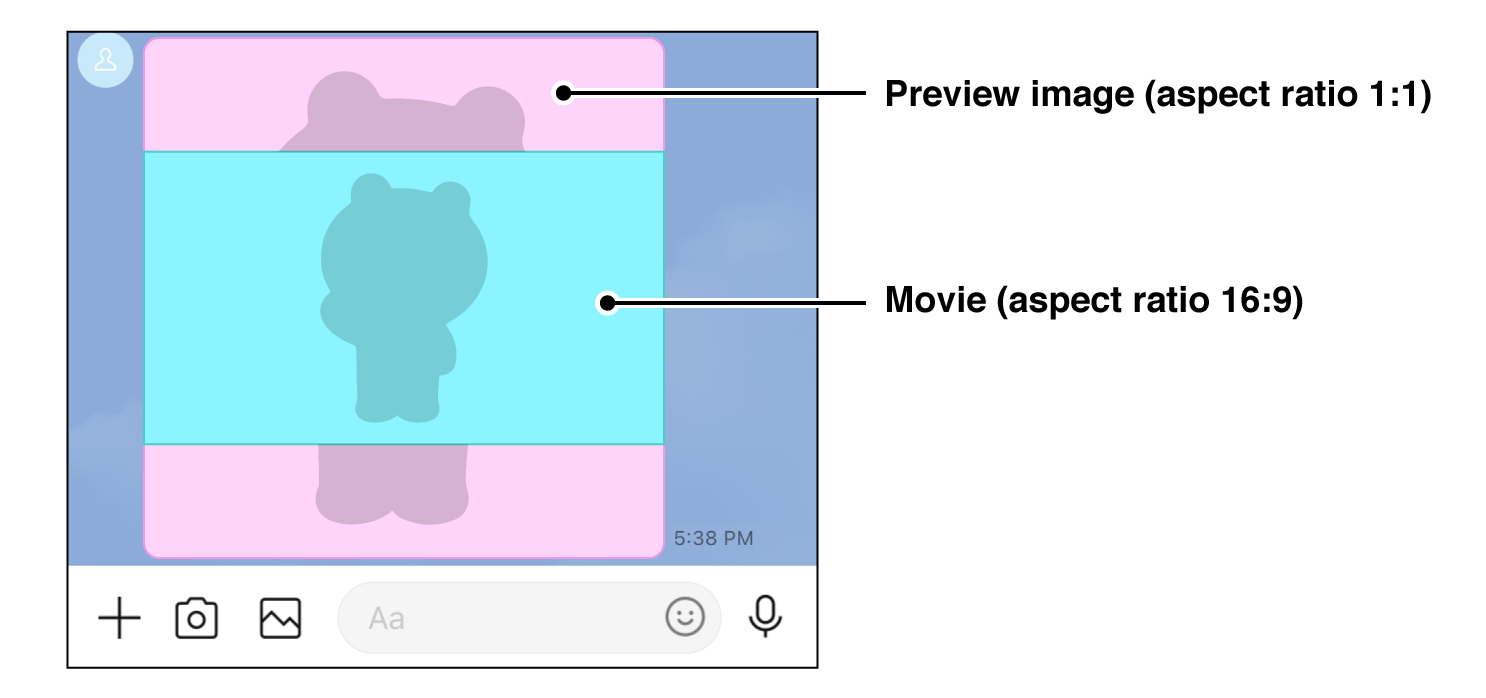
type
String
`video`
originalContentUrl
String
Video file URL (Max character limit: 2000)\
Protocol: HTTPS (TLS 1.2 or later)\
Video format: mp4\
Max file size: 200 MB
The URL should be percent-encoded using UTF-8. For more information, see [About the encoding of a URL specified in a request body property](https://developers.line.biz/en/reference/messaging-api/#url-encoding).
previewImageUrl
String
Preview image URL (Max character limit: 2000)\
Protocol: HTTPS (TLS 1.2 or later)\
Image format: JPEG or PNG\
Max file size: 1 MB
The URL should be percent-encoded using UTF-8. For more information, see [About the encoding of a URL specified in a request body property](https://developers.line.biz/en/reference/messaging-api/#url-encoding).
trackingId
String
ID used to identify the video when [Video viewing complete event](https://developers.line.biz/en/reference/messaging-api/#video-viewing-complete) occurs. If you send a video message with `trackingId` added, the video viewing complete event occurs when the user finishes watching the video.
You can use the same ID in multiple messages.
- Max character limit: 100
- Supported character types: Half-width alphanumeric characters (`a-z`, `A-Z`, `0-9`) and symbols (`-.=,+*()%$&;:@{}!?<>[]`)
**Note**
You can't use the `trackingId` property in messages addressed to group chats or multi-person chats.
_Video message example_
```json
{
"type": "video",
"originalContentUrl": "https://example.com/original.mp4",
"previewImageUrl": "https://example.com/preview.jpg",
"trackingId": "track-id"
}
```
### Audio message
type
String
`audio`
originalContentUrl
String
Audio file URL (Max character limit: 2000)\
Protocol: HTTPS (TLS 1.2 or later)\
Audio format: mp3 or m4a\
Max file size: 200 MB
The URL should be percent-encoded using UTF-8. For more information, see [About the encoding of a URL specified in a request body property](https://developers.line.biz/en/reference/messaging-api/#url-encoding).
duration
Number
Length of audio file (milliseconds)
_Audio message example_
```json
{
"type": "audio",
"originalContentUrl": "https://example.com/original.m4a",
"duration": 60000
}
```
### Location message
type
String
`location`
title
String
Title\
Max character limit: 100
address
String
Address\
Max character limit: 100
latitude
Decimal
Latitude
longitude
Decimal
Longitude
_Location message example_
```json
{
"type": "location",
"title": "my location",
"address": "1-3 Kioicho, Chiyoda-ku, Tokyo, 102-8282, Japan",
"latitude": 35.67966,
"longitude": 139.73669
}
```
### Coupon message
Coupon messages are messages that send coupons to users by specifying a coupon ID.
type
String
`coupon`
couponId
String
Coupon ID.\
You can obtain the coupon ID (`couponId`) in the [response](https://developers.line.biz/en/reference/messaging-api/#create-coupon-response) when you [create a coupon](https://developers.line.biz/en/reference/messaging-api/#create-coupon). You can also check coupon ID in the endpoint to [get a list of coupons](https://developers.line.biz/en/reference/messaging-api/#get-coupons-list).
deliveryTag
String
Name of the coupon display path.\
Max character limit: 30\
Supported character types: Half-width alphanumeric characters (`a-z`, `A-Z`, `0-9`) and underscore (`_`)
If you don't specify `deliveryTag`, the path will be displayed as `Unknown`. For more information, see [Insight - Coupons](https://www.lycbiz.com/jp/manual/OfficialAccountManager/insight_coupon/) (only available in Japanese) in LINE for Business.
_Coupon message example_
```json
{
"type": "coupon",
"couponId": "01JYNW8JMQVFBNWF1APF8Z3FS7",
"deliveryTag": "2025_winter_campaign"
}
```
### Imagemap message
Imagemap messages are messages configured with an image that has multiple tappable areas. You can assign one tappable area for the entire image or different tappable areas on divided areas of the image.
You can also play a video on the image and display a label with a hyperlink after the video is finished.
**If the video doesn't play properly**
Even if a message that contains a video is successfully sent, the video may not play properly on the user's device. For more information, see [Why can't I play a video that I sent as a message?](https://developers.line.biz/en/faq/#why-cant-i-play-a-video-i-sent) in the FAQ.
**Video aspect ratio**
The aspect ratio of the video specified in `originalContentUrl` and the preview image specified in `previewImageUrl` should be the same. If the aspect ratio is different, a preview image will appear behind the video.

type
String
`imagemap`
baseUrl
String
Image base URL (Max character limit: 2000)\
Protocol: HTTPS (TLS 1.2 or later)\
For more information about supported images in imagemap messages, see [How to configure an image](https://developers.line.biz/en/reference/messaging-api/#base-url).
The URL should be percent-encoded using UTF-8. For more information, see [About the encoding of a URL specified in a request body property](https://developers.line.biz/en/reference/messaging-api/#url-encoding).
altText
String
Alternative text. When a user receives a message, it will appear as an alternative to the image in the notification or chat list of their device.\
Max character limit: 1500
baseSize.width
Number
Width of base image in pixels. Set to 1040.
baseSize.height
Number
Height of base image. Set to the height that corresponds to a width of 1040 pixels.
video.originalContentUrl
String
Video file URL (Max character limit: 2000)\
Protocol: HTTPS (TLS 1.2 or later)\
Video format: mp4\
Max file size: 200 MB
The URL should be percent-encoded using UTF-8. For more information, see [About the encoding of a URL specified in a request body property](https://developers.line.biz/en/reference/messaging-api/#url-encoding).
**Note**
A very wide or tall video may be cropped when played in some environments.
video.previewImageUrl
String
Preview image URL (Max character limit: 2000)\
Protocol: HTTPS (TLS 1.2 or later)\
Image format: JPEG or PNG\
Max file size: 1 MB
The URL should be percent-encoded using UTF-8. For more information, see [About the encoding of a URL specified in a request body property](https://developers.line.biz/en/reference/messaging-api/#url-encoding).
video.area.x
Number
Horizontal position of the video area relative to the left edge of the imagemap area. Value must be `0` or higher.
video.area.y
Number
Vertical position of the video area relative to the top of the imagemap area. Value must be `0` or higher.
video.area.width
Number
Width of the video area
video.area.height
Number
Height of the video area
video.externalLink.linkUri
String
Webpage URL. Called when the label displayed after the video is tapped.\
Max character limit: 1000\
The available schemes are `http`, `https`, `line`, and `tel`. For more information about the LINE URL scheme, see [Use LINE features with the LINE URL scheme](https://developers.line.biz/en/docs/messaging-api/using-line-url-scheme/).
The URL should be percent-encoded using UTF-8. For more information, see [About the encoding of a URL specified in a request body property](https://developers.line.biz/en/reference/messaging-api/#url-encoding).
video.externalLink.label
String
Label. Displayed after the video is finished.\
Max character limit: 30
actions
Array of [imagemap action objects](https://developers.line.biz/en/reference/messaging-api/#imagemap-action-objects)
Action when tapped\
Max: 50
*1 This property is required if you set a video to play on the imagemap.\
*2 This property is required if you set a video to play and a label to display after the video on the imagemap.
_Imagemap message example with two tappable areas_
```json
{
"type": "imagemap",
"baseUrl": "https://example.com/bot/images/rm001",
"altText": "This is an imagemap",
"baseSize": {
"width": 1040,
"height": 1040
},
"video": {
"originalContentUrl": "https://example.com/video.mp4",
"previewImageUrl": "https://example.com/video_preview.jpg",
"area": {
"x": 0,
"y": 0,
"width": 1040,
"height": 585
},
"externalLink": {
"linkUri": "https://example.com/see_more.html",
"label": "See More"
}
},
"actions": [
{
"type": "uri",
"linkUri": "https://example.com/",
"area": {
"x": 0,
"y": 586,
"width": 520,
"height": 454
}
},
{
"type": "message",
"text": "Hello",
"area": {
"x": 520,
"y": 586,
"width": 520,
"height": 454
}
}
]
}
```
#### How to configure an image
Images used in imagemap messages must meet the following requirements:
- Image format: JPEG or PNG
- Image width: 240px, 300px, 460px, 700px, 1040px
- Max file size: 10 MB
**Using transparent PNG**
It is possible to use transparent PNG in your imagemap messages.
Make it possible to access images of 5 different sizes using the `baseUrl/{image width}` URL format. LINE will then download an image at the appropriate resolution based on the device.
For example, if we had a base URL of `https://example.com/images/cats`, the URL for the image with a width of 700px would be `https://example.com/images/cats/700`. To confirm all images display properly, access the image URLs.
| Image width | Example URL |
| --- | --- |
| 240px | `https://example.com/bot/images/rm001/240` |
| 300px | `https://example.com/bot/images/rm001/300` |
| 460px | `https://example.com/bot/images/rm001/460` |
| 700px | `https://example.com/bot/images/rm001/700` |
| 1040px | `https://example.com/bot/images/rm001/1040` |
**Exclude image extension from URL**
Don't include the extension in the image filename. The image will not display in the imagemap message if the URL contains the image file extension (e.g. `https://example.com/bot/images/rm001/700.png`).
#### Imagemap action objects
Object which specifies the actions and tappable areas of an imagemap. When an area is tapped, the following actions are triggered for each type of action:
- `uri`: The user is redirected to the specified URI.
- `message`: The specified message is sent.
- `clipboard`: The specified string is copied to the user's device clipboard.
##### Imagemap URI action object
type
String
`uri`
label
String
Label for the action. Spoken when the accessibility feature is enabled on the client device.\
Max character limit: 100
linkUri
String
Webpage URL\
Max character limit: 1000\
The available schemes are `http`, `https`, `line`, and `tel`. For more information about the LINE URL scheme, see [Use LINE features with the LINE URL scheme](https://developers.line.biz/en/docs/messaging-api/using-line-url-scheme/).
The URL should be percent-encoded using UTF-8. For more information, see [About the encoding of a URL specified in a request body property](https://developers.line.biz/en/reference/messaging-api/#url-encoding).
area
[Imagemap area object](https://developers.line.biz/en/reference/messaging-api/#imagemap-area-object)
Defined tappable area
_Example imagemap URI action object_
```json
{
"type": "uri",
"label": "https://example.com/",
"linkUri": "https://example.com/",
"area": {
"x": 0,
"y": 0,
"width": 520,
"height": 1040
}
}
```
##### Imagemap message action object
type
String
`message`
label
String
Label for the action. Spoken when the accessibility feature is enabled on the client device.\
Max character limit: 100
text
String
Message to send\
Max character limit: 400
area
[Imagemap area object](https://developers.line.biz/en/reference/messaging-api/#imagemap-area-object)
Defined tappable area
_Example imagemap message action object_
```json
{
"type": "message",
"label": "hello",
"text": "hello",
"area": {
"x": 520,
"y": 0,
"width": 520,
"height": 1040
}
}
```
##### Imagemap clipboard action object
This feature is available on LINE version `14.0.0` or later for iOS or Android.
type
String
`clipboard`
label
String
Label for the action. Spoken when the accessibility feature is enabled on the client device. \
Max character limit: 100
clipboardText
String
Text that is copied to the clipboard
- Max character limit: 1000
area
[Imagemap area object](https://developers.line.biz/en/reference/messaging-api/#imagemap-area-object)
Defined tappable area
_Example imagemap clipboard action object_
```json
{
"type": "clipboard",
"label": "Copy",
"clipboardText": "3B48740B",
"area": {
"x": 520,
"y": 0,
"width": 520,
"height": 1040
}
}
```
###### Imagemap area object
Defines the size of a tappable area. The top left is used as the origin of the area. Set these properties based on the `baseSize.width` property and the `baseSize.height` property.
x
Number
Horizontal position relative to the left edge of the area. Value must be `0` or higher.
y
Number
Vertical position relative to the top of the area. Value must be `0` or higher.
width
Number
Width of the tappable area
height
Number
Height of the tappable area
_Example imagemap area object_
```json
{
"x": 520,
"y": 0,
"width": 520,
"height": 1040
}
```
### Template messages
Template messages are messages with predefined layouts which you can customize. For more information, see [Template messages](https://developers.line.biz/en/docs/messaging-api/message-types/#template-messages).
The following template types are available:
- [Buttons](https://developers.line.biz/en/reference/messaging-api/#buttons)
- [Confirm](https://developers.line.biz/en/reference/messaging-api/#confirm)
- [Carousel](https://developers.line.biz/en/reference/messaging-api/#carousel)
- [Image carousel](https://developers.line.biz/en/reference/messaging-api/#image-carousel)
If you want to send messages with more flexible layouts, use [Flex Message](https://developers.line.biz/en/reference/messaging-api/#flex-message).
#### Common properties of template message objects
The following properties are common to all template message objects.
type
String
`template`
altText
String
Alternative text. When a user receives a message, it will appear in the device's notifications, chat list, and [quote messages](https://developers.line.biz/en/docs/messaging-api/sending-messages/#send-quote-messages) as an alternative to the template message.\
Max character limit: 1500
template
Object
A [Buttons](https://developers.line.biz/en/reference/messaging-api/#buttons), [Confirm](https://developers.line.biz/en/reference/messaging-api/#confirm), [Carousel](https://developers.line.biz/en/reference/messaging-api/#carousel), or [Image Carousel](https://developers.line.biz/en/reference/messaging-api/#image-carousel) object.
#### Buttons template
Template with an image, title, text, and multiple action buttons.
type
String
`buttons`
thumbnailImageUrl
String
Image URL (Max character limit: 2000)\
Protocol: HTTPS (TLS 1.2 or later)\
Image format: JPEG or PNG\
Max width: 1024px\
Max file size: 10 MB
The URL should be percent-encoded using UTF-8. For more information, see [About the encoding of a URL specified in a request body property](https://developers.line.biz/en/reference/messaging-api/#url-encoding).
**Recommended file size**
To avoid delays in displaying messages, keep the size of individual image files small (1 MB or less recommended).
imageAspectRatio
String
Aspect ratio of the image. One of:
- `rectangle`: 1.51:1
- `square`: 1:1
Default: `rectangle`
imageSize
String
Size of the image. One of:
- `cover`: The image fills the entire image area. Parts of the image that do not fit in the area are not displayed.
- `contain`: The entire image is displayed in the image area. A background is displayed in the unused areas to the left and right of vertical images and in the areas above and below horizontal images.
Default: `cover`
imageBackgroundColor
String
Background color of the image. Specify a RGB color value. Default: `#FFFFFF` (white)
title
String
Title\
Max character limit: 40
text
String
Message text\
Max character limit: 160 (no image or title)\
Max character limit: 60 (message with an image or title)
defaultAction
[Action object](https://developers.line.biz/en/reference/messaging-api/#action-objects)
Action when image, title or text area is tapped.
actions
Array of [action objects](https://developers.line.biz/en/reference/messaging-api/#action-objects)
Action when tapped\
Max objects: 4
_Buttons template message example_
```json
{
"type": "template",
"altText": "This is a buttons template",
"template": {
"type": "buttons",
"thumbnailImageUrl": "https://example.com/bot/images/image.jpg",
"imageAspectRatio": "rectangle",
"imageSize": "cover",
"imageBackgroundColor": "#FFFFFF",
"title": "Menu",
"text": "Please select",
"defaultAction": {
"type": "uri",
"label": "View detail",
"uri": "http://example.com/page/123"
},
"actions": [
{
"type": "postback",
"label": "Buy",
"data": "action=buy&itemid=123"
},
{
"type": "postback",
"label": "Add to cart",
"data": "action=add&itemid=123"
},
{
"type": "uri",
"label": "View detail",
"uri": "http://example.com/page/123"
}
]
}
}
```
#### Confirm template
Template with two action buttons.
type
String
`confirm`
text
String
Message text\
Max character limit: 240
actions
Array of [action objects](https://developers.line.biz/en/reference/messaging-api/#action-objects)
Action when tapped\
Set 2 actions for the 2 buttons
_Confirm template message example_
```json
{
"type": "template",
"altText": "this is a confirm template",
"template": {
"type": "confirm",
"text": "Are you sure?",
"actions": [
{
"type": "message",
"label": "Yes",
"text": "yes"
},
{
"type": "message",
"label": "No",
"text": "no"
}
]
}
}
```
#### Carousel template
Template with multiple columns which can be cycled like a carousel. The columns are shown in order when scrolling horizontally.
type
String
`carousel`
columns
Array of [column objects](https://developers.line.biz/en/reference/messaging-api/#column-object-for-carousel)
Array of columns\
Max columns: 10
imageAspectRatio
String
Aspect ratio of the image. One of:
- `rectangle`: 1.51:1
- `square`: 1:1
Applies to all columns. Default: `rectangle`
imageSize
String
Size of the image. One of:
- `cover`: The image fills the entire image area. Parts of the image that do not fit in the area are not displayed.
- `contain`: The entire image is displayed in the image area. A background is displayed in the unused areas to the left and right of vertical images and in the areas above and below horizontal images.
Applies to all columns. Default: `cover`.
_Carousel template message example_
```json
{
"type": "template",
"altText": "this is a carousel template",
"template": {
"type": "carousel",
"columns": [
{
"thumbnailImageUrl": "https://example.com/bot/images/item1.jpg",
"imageBackgroundColor": "#FFFFFF",
"title": "this is menu",
"text": "description",
"defaultAction": {
"type": "uri",
"label": "View detail",
"uri": "http://example.com/page/123"
},
"actions": [
{
"type": "postback",
"label": "Buy",
"data": "action=buy&itemid=111"
},
{
"type": "postback",
"label": "Add to cart",
"data": "action=add&itemid=111"
},
{
"type": "uri",
"label": "View detail",
"uri": "http://example.com/page/111"
}
]
},
{
"thumbnailImageUrl": "https://example.com/bot/images/item2.jpg",
"imageBackgroundColor": "#000000",
"title": "this is menu",
"text": "description",
"defaultAction": {
"type": "uri",
"label": "View detail",
"uri": "http://example.com/page/222"
},
"actions": [
{
"type": "postback",
"label": "Buy",
"data": "action=buy&itemid=222"
},
{
"type": "postback",
"label": "Add to cart",
"data": "action=add&itemid=222"
},
{
"type": "uri",
"label": "View detail",
"uri": "http://example.com/page/222"
}
]
}
],
"imageAspectRatio": "rectangle",
"imageSize": "cover"
}
}
```
##### Column object for carousel
thumbnailImageUrl
String
Image URL (Max character limit: 2000)\
Protocol: HTTPS (TLS 1.2 or later)\
Image format: JPEG or PNG\
Aspect ratio: 1.51:1 (width : height)\
Max width: 1024px\
Max file size: 10 MB
The URL should be percent-encoded using UTF-8. For more information, see [About the encoding of a URL specified in a request body property](https://developers.line.biz/en/reference/messaging-api/#url-encoding).
**Recommended file size**
To avoid delays in displaying messages, keep the size of individual image files small (1 MB or less recommended).
imageBackgroundColor
String
Background color of the image. Specify a RGB color value. The default value is `#FFFFFF` (white).
title
String
Title\
Max character limit: 40
text
String
Message text\
Max character limit: 120 (no image or title)\
Max character limit: 60 (message with an image or title)
defaultAction
[Action object](https://developers.line.biz/en/reference/messaging-api/#action-objects)
Action when image, title or text area is tapped.
actions
Array of [action objects](https://developers.line.biz/en/reference/messaging-api/#action-objects)
Action when tapped\
Max objects: 3
**Note**
Keep the number of actions consistent for all columns. If you use an image or title for a column, make sure to do the same for all other columns.
#### Image carousel template
Template with multiple images which can be cycled like a carousel. The images are shown in order when scrolling horizontally.
type
String
`image_carousel`
columns
Array of [column objects](https://developers.line.biz/en/reference/messaging-api/#column-object-for-image-carousel)
Array of columns\
Max columns: 10
_Image carousel template message example_
```json
{
"type": "template",
"altText": "this is a image carousel template",
"template": {
"type": "image_carousel",
"columns": [
{
"imageUrl": "https://example.com/bot/images/item1.jpg",
"action": {
"type": "postback",
"label": "Buy",
"data": "action=buy&itemid=111"
}
},
{
"imageUrl": "https://example.com/bot/images/item2.jpg",
"action": {
"type": "message",
"label": "Yes",
"text": "yes"
}
},
{
"imageUrl": "https://example.com/bot/images/item3.jpg",
"action": {
"type": "uri",
"label": "View detail",
"uri": "http://example.com/page/222"
}
}
]
}
}
```
##### Column object for image carousel
imageUrl
String
Image URL (Max character limit: 2000)\
Protocol: HTTPS (TLS 1.2 or later)\
Image format: JPEG or PNG\
Aspect ratio: 1:1 (width : height)\
Max width: 1024px\
Max file size: 10 MB
The URL should be percent-encoded using UTF-8. For more information, see [About the encoding of a URL specified in a request body property](https://developers.line.biz/en/reference/messaging-api/#url-encoding).
**Recommended file size**
To avoid delays in displaying messages, keep the size of individual image files small (1 MB or less recommended).
action
[Action object](https://developers.line.biz/en/reference/messaging-api/#action-objects)
Action when image is tapped
### Flex Message
Flex Messages are messages with a customizable layout. You can customize the layout freely based on the specification for [CSS Flexible Box (CSS Flexbox)](https://www.w3.org/TR/css-flexbox-1/). For more information, see [Send Flex Messages](https://developers.line.biz/en/docs/messaging-api/using-flex-messages/) in the Messaging API documentation.
- [Container](https://developers.line.biz/en/reference/messaging-api/#container)
- [Bubble](https://developers.line.biz/en/reference/messaging-api/#bubble)
- [Carousel](https://developers.line.biz/en/reference/messaging-api/#f-carousel)
- [Component](https://developers.line.biz/en/reference/messaging-api/#flex-component)
- [Box](https://developers.line.biz/en/reference/messaging-api/#box)
- [Button](https://developers.line.biz/en/reference/messaging-api/#button)
- [Image](https://developers.line.biz/en/reference/messaging-api/#f-image)
- [Video](https://developers.line.biz/en/reference/messaging-api/#f-video)
- [Icon](https://developers.line.biz/en/reference/messaging-api/#icon)
- [Text](https://developers.line.biz/en/reference/messaging-api/#f-text)
- [Span](https://developers.line.biz/en/reference/messaging-api/#span)
- [Separator](https://developers.line.biz/en/reference/messaging-api/#separator)
- [Filler](https://developers.line.biz/en/reference/messaging-api/#filler) (deprecated)
type
String
`flex`
altText
String
Alternative text. When a user receives a message, it will appear in the device's notifications, talk list, and [quote messages](https://developers.line.biz/en/docs/messaging-api/sending-messages/#send-quote-messages) as an alternative to the Flex Message.\
Max character limit: 1500
contents
Object
Flex Message [container](https://developers.line.biz/en/reference/messaging-api/#container)
_Flex Message example_
```json
{
"type": "flex",
"altText": "this is a flex message",
"contents": {
"type": "bubble",
"body": {
"type": "box",
"layout": "vertical",
"contents": [
{
"type": "text",
"text": "hello"
},
{
"type": "text",
"text": "world"
}
]
}
}
}
```
#### Operating environment
Flex Messages are supported in all LINE versions. The features listed below aren't supported in all LINE versions:
| Feature | LINE for iOS LINE for Android | LINE for PC (macOS, Windows) |
| --- | :-: | :-: |
|
`maxWidth` property of [box](https://developers.line.biz/en/reference/messaging-api/#box)
`maxHeight` property of [box](https://developers.line.biz/en/reference/messaging-api/#box)
`lineSpacing` property of [text](https://developers.line.biz/en/reference/messaging-api/#f-text)
The `deca` and `hecto` values in the `size` property of [bubble](https://developers.line.biz/en/reference/messaging-api/#bubble) \*2
`scaling` property of [button](https://developers.line.biz/en/reference/messaging-api/#button), [text](https://developers.line.biz/en/reference/messaging-api/#f-text), and [icon](https://developers.line.biz/en/reference/messaging-api/#icon)
| 13.6.0 or later | 7.17.0 or later |
\*1 To make the video component in Flex Messages rendered properly on versions that don't support the video component, specify the `altContent` property. The image you specify in this property gets displayed instead.
\*2 If the version of LINE is lower than the version that supports `deca` and `hecto`, the size of the bubble will be displayed as `kilo`.
#### Container
Container is the top-level building block of Flex Messages. Available container types are:
- [Bubble](https://developers.line.biz/en/reference/messaging-api/#bubble)
- [Carousel](https://developers.line.biz/en/reference/messaging-api/#f-carousel)
For JSON samples and usage of containers, see [Flex Message elements](https://developers.line.biz/en/docs/messaging-api/flex-message-elements/) in the API documentation.
##### Bubble
Bubble is a container that contains only one instance of a message bubble. It can contain four blocks: header, hero, body, and footer. For more information about using each block, see [Block](https://developers.line.biz/en/docs/messaging-api/flex-message-elements/#block) in the API documentation.
The maximum size of JSON data that defines a bubble is 30 KB.
type
String
`bubble`
size
String
The size of the bubble. You can specify one of the following values: `nano`, `micro`, `deca`, `hecto`, `kilo`, `mega`, or `giga`. The default value is `mega`.
`deca` and `hecto` are supported on the following version of LINE:
- LINE for iOS and Android: 13.6.0 or later
- LINE for macOS and Windows: 7.17.0 or later
If the version of LINE is lower than the version that supports `deca` and `hecto`, the size of the bubble will be displayed as `kilo`.
direction
String
Text directionality and the direction of placement of components in horizontal boxes. Specify one of the following values:
- `ltr`: The text is left-to-right horizontal writing, and the components are placed from left to right
- `rtl`: The text is right-to-left horizontal writing, and the components are placed from right to left
The default value is `ltr`.
header
Object
Header block. Specify a [Box](https://developers.line.biz/en/reference/messaging-api/#box).
hero
Object
Hero block. Specify a [box](https://developers.line.biz/en/reference/messaging-api/#box), an [image](https://developers.line.biz/en/reference/messaging-api/#f-image) or a [video](https://developers.line.biz/en/reference/messaging-api/#f-video).
body
Object
Body block. Specify a [Box](https://developers.line.biz/en/reference/messaging-api/#box).
footer
Object
Footer block. Specify a [Box](https://developers.line.biz/en/reference/messaging-api/#box).
styles
Object
Style of each block. Specify a [bubble style](https://developers.line.biz/en/reference/messaging-api/#bubble-style).
action
Object
Action performed when this image is tapped. Specify an [action object](https://developers.line.biz/en/reference/messaging-api/#action-objects).
_Bubble example_
```json
{
"type": "bubble",
"header": {
"type": "box",
"layout": "vertical",
"contents": [
{
"type": "text",
"text": "Header text"
}
]
},
"hero": {
"type": "image",
"url": "https://example.com/flex/images/image.jpg"
},
"body": {
"type": "box",
"layout": "vertical",
"contents": [
{
"type": "text",
"text": "Body text"
}
]
},
"footer": {
"type": "box",
"layout": "vertical",
"contents": [
{
"type": "text",
"text": "Footer text"
}
]
},
"styles": {
"comment": "See the example of a bubble style object"
}
}
```
##### Objects for the block style
Use the following two objects to define the style of blocks in a bubble.
_Example of a bubble style and block style_
```json
"styles": {
"header": {
"backgroundColor": "#00ffff"
},
"hero": {
"separator": true,
"separatorColor": "#000000"
},
"footer": {
"backgroundColor": "#00ffff",
"separator": true,
"separatorColor": "#000000"
}
}
```
###### Bubble style
header
Object
Header block. Specify a [block style](https://developers.line.biz/en/reference/messaging-api/#block-style).
hero
Object
Hero block. Specify a [block style](https://developers.line.biz/en/reference/messaging-api/#block-style).
body
Object
Body block. Specify a [block style](https://developers.line.biz/en/reference/messaging-api/#block-style).
footer
Object
Footer block. Specify a [block style](https://developers.line.biz/en/reference/messaging-api/#block-style).
###### Block style
backgroundColor
String
Background color of the block. Use a hexadecimal color code.
separator
Boolean
`true` to place a separator above the block. The default value is `false`.
separatorColor
String
Color of the separator. Use a hexadecimal color code.
**Note**
You cannot place a separator above the first block.
##### Carousel
Carousel is a container that contains multiple bubbles. You can browse the bubbles in a carousel by scrolling sideways.
The maximum size of JSON data that defines a carousel is 50 KB.
type
String
`carousel`
contents
Array of objects
[Bubbles](https://developers.line.biz/en/reference/messaging-api/#bubble) within a carousel. Max: 12 bubbles
**Bubble width**
A carousel can't contain bubbles of different widths (`size` property). Each bubble in a carousel should have the same width.
**Bubble height**
The body of each bubble will stretch to match the tallest bubble in the carousel. However, bubbles with no body will not change height.
_Carousel example_
```json
{
"type": "carousel",
"contents": [
{
"type": "bubble",
"body": {
"type": "box",
"layout": "vertical",
"contents": [
{
"type": "text",
"text": "First bubble"
}
]
}
},
{
"type": "bubble",
"body": {
"type": "box",
"layout": "vertical",
"contents": [
{
"type": "text",
"text": "Second bubble"
}
]
}
}
]
}
```
#### Component
Component is a unit that composes a block. Available components are:
- [Box](https://developers.line.biz/en/reference/messaging-api/#box)
- [Button](https://developers.line.biz/en/reference/messaging-api/#button)
- [Image](https://developers.line.biz/en/reference/messaging-api/#f-image)
- [Video](https://developers.line.biz/en/reference/messaging-api/#f-video)
- [Icon](https://developers.line.biz/en/reference/messaging-api/#icon)
- [Text](https://developers.line.biz/en/reference/messaging-api/#f-text)
- [Span](https://developers.line.biz/en/reference/messaging-api/#span)
- [Separator](https://developers.line.biz/en/reference/messaging-api/#separator)
- [Filler](https://developers.line.biz/en/reference/messaging-api/#filler) (deprecated)
For JSON samples and usage of each component, see [Flex Message elements](https://developers.line.biz/en/docs/messaging-api/flex-message-elements/) and [Flex Message layout](https://developers.line.biz/en/docs/messaging-api/flex-message-layout/) in the Messaging API documentation.
##### Box
This component defines a horizontal or vertical layout orientation and holds components together. Any component can be contained, including a box. You can also include a box in a box.
type
String
`box`
layout
String
The layout style of components in this box. For more information, see [Box component orientation](https://developers.line.biz/en/docs/messaging-api/flex-message-layout/#box-component-orientation) in the API documentation.
contents
Array of objects
Components in this box. Here are the types of components available:
- When the `layout` property is `horizontal` or `vertical`: [box](https://developers.line.biz/en/reference/messaging-api/#box), [button](https://developers.line.biz/en/reference/messaging-api/#button), [image](https://developers.line.biz/en/reference/messaging-api/#f-image), [text](https://developers.line.biz/en/reference/messaging-api/#f-text), [separator](https://developers.line.biz/en/reference/messaging-api/#separator), and [filler](https://developers.line.biz/en/reference/messaging-api/#filler)
- When the `layout` property is `baseline`: [icon](https://developers.line.biz/en/reference/messaging-api/#icon), [text](https://developers.line.biz/en/reference/messaging-api/#f-text), and [filler](https://developers.line.biz/en/reference/messaging-api/#filler)
Components are rendered in the same order specified in the array. You may also specify an empty array.
backgroundColor
String
Background color of the block. In addition to the RGB color, an alpha channel (transparency) can also be set. Use a hexadecimal color code. (e.g. #RRGGBBAA) The default value is `#00000000`.
borderColor
String
Color of box border. Use a hexadecimal color code.
borderWidth
String
Width of box border. You can specify a value in pixels or any one of `none`, `light`, `normal`, `medium`, `semi-bold`, or `bold`. A value of `none` means that borders are not rendered; the other values are listed in order of increasing width.
cornerRadius
String
Radius at the time of rounding the corners of the border. You can specify a value in pixels or any one of `none`, `xs`, `sm`, `md`, `lg`, `xl`, or `xxl`. `none` doesn't round the corner while the others increase in radius in the order of listing. The default value is `none`.
width
String
Box width. The value should be given in pixels or as a percentage of the width of the parent element. For more information, see [Box width](https://developers.line.biz/en/docs/messaging-api/flex-message-layout/#box-width) in the Messaging API documentation.
maxWidth
String
Max width of the box. The value should be given in pixels or as a percentage of the width of the parent element. For more information, see [Max width of a box](https://developers.line.biz/en/docs/messaging-api/flex-message-layout/#box-width) in the Messaging API documentation.
This property is supported on the following version of LINE:
- LINE for iOS and Android: 11.22.0 or later
- LINE for macOS and Windows: 7.7.0 or later
height
String
Box height. The value should be given in pixels or as a percentage of the height of the parent element. For more information, see [Box height](https://developers.line.biz/en/docs/messaging-api/flex-message-layout/#box-height) in the Messaging API documentation.
maxHeight
String
Max height of the box. The value should be given in pixels or as a percentage of the height of the parent element. For more information, see [Max height of a box](https://developers.line.biz/en/docs/messaging-api/flex-message-layout/#box-height) in the Messaging API documentation.
This property is supported on the following version of LINE:
- LINE for iOS and Android: 11.22.0 or later
- LINE for macOS and Windows: 7.7.0 or later
flex
Number
The ratio of the width or height of this component within the parent box. For more information, see [Component size](https://developers.line.biz/en/docs/messaging-api/flex-message-layout/#component-size) in the Messaging API documentation.
spacing
String
Minimum space between components in this box. The default value is `none`. For more information, see [`spacing` property for boxes](https://developers.line.biz/en/docs/messaging-api/flex-message-layout/#spacing-property) in the Messaging API documentation.
margin
String
The minimum amount of space to include before this component in its parent container. For more information, see [`margin` property of components](https://developers.line.biz/en/docs/messaging-api/flex-message-layout/#margin-property) in the Messaging API documentation.
paddingAll
String
Free space between the borders of this box and the child element. For more information, see [Position child component with box padding](https://developers.line.biz/en/docs/messaging-api/flex-message-layout/#padding-property) in the Messaging API documentation.
paddingTop
String
Free space between the border at the upper end of this box and the upper end of the child element. For more information, see [Position child component with box padding](https://developers.line.biz/en/docs/messaging-api/flex-message-layout/#padding-property) in the Messaging API documentation.
paddingBottom
String
Free space between the border at the lower end of this box and the lower end of the child element. For more information, see [Position child component with box padding](https://developers.line.biz/en/docs/messaging-api/flex-message-layout/#padding-property) in the Messaging API documentation.
paddingStart
String
- If the text directionality in the [bubble](https://developers.line.biz/en/reference/messaging-api/#bubble) is LTR: Free space between the border at the left end of this box and the left end of the child element.
- If the text directionality in the [bubble](https://developers.line.biz/en/reference/messaging-api/#bubble) is RTL: Free space between the border at the right end of this box and the right end of the child element.
For more information, see [Position child component with box padding](https://developers.line.biz/en/docs/messaging-api/flex-message-layout/#padding-property) in the Messaging API documentation.
paddingEnd
String
- If the text directionality in the [bubble](https://developers.line.biz/en/reference/messaging-api/#bubble) is LTR: Free space between the border at the right end of this box and the right end of the child element.
- If the text directionality in the [bubble](https://developers.line.biz/en/reference/messaging-api/#bubble) is RTL: Free space between the border at the left end of this box and the left end of the child element.
For more information, see [Position child component with box padding](https://developers.line.biz/en/docs/messaging-api/flex-message-layout/#padding-property) in the Messaging API documentation.
position
String
Reference position for placing this box. Specify one of the following values:
- `relative`: Use the previous box as reference.
- `absolute`: Use the top left of parent element as reference.
The default value is `relative`. For more information, see [Offset](https://developers.line.biz/en/docs/messaging-api/flex-message-layout/#component-offset) in the Messaging API documentation.
offsetTop
String
Offset. For more information, see [Offset](https://developers.line.biz/en/docs/messaging-api/flex-message-layout/#component-offset) in the Messaging API documentation.
offsetBottom
String
Offset. For more information, see [Offset](https://developers.line.biz/en/docs/messaging-api/flex-message-layout/#component-offset) in the Messaging API documentation.
offsetStart
String
Offset. For more information, see [Offset](https://developers.line.biz/en/docs/messaging-api/flex-message-layout/#component-offset) in the Messaging API documentation.
offsetEnd
String
Offset. For more information, see [Offset](https://developers.line.biz/en/docs/messaging-api/flex-message-layout/#component-offset) in the Messaging API documentation.
action
Object
Action performed when this image is tapped. Specify an [action object](https://developers.line.biz/en/reference/messaging-api/#action-objects).
justifyContent
String
How child elements are aligned along the main axis of the parent element. If the parent element is a horizontal box, this only takes effect when its child elements have their `flex` property set equal to 0. For more information, see [Child component arrangement with free space](https://developers.line.biz/en/docs/messaging-api/flex-message-layout/#justify-property) in the Messaging API documentation.
alignItems
String
How child elements are aligned along the cross axis of the parent element. For more information, see [Child component arrangement with free space](https://developers.line.biz/en/docs/messaging-api/flex-message-layout/#justify-property) in the Messaging API documentation.
background.type
String
The type of background used. Specify these values:
- `linearGradient`: Linear gradient. For more information, see [Linear gradient backgrounds](https://developers.line.biz/en/docs/messaging-api/flex-message-layout/#linear-gradient-bg) in the Messaging API documentation.
background.angle
String
The angle at which a linear gradient moves. Specify the angle using an integer value like `90deg` (90 degrees) or a decimal number like `23.5deg` (23.5 degrees) in the half-open interval [0, 360). The direction of the linear gradient rotates clockwise as the angle increases. Given a value of `0deg`, the gradient starts at the bottom and ends at the top; given a value of `45deg`, the gradient starts at the bottom-left corner and ends at the top-right corner; given a value of `90deg`, the gradient starts at the left and ends at the right; and given a value of `180deg`, the gradient starts at the top and ends at the bottom. For more information, see [Angle of linear gradient](https://developers.line.biz/en/docs/messaging-api/flex-message-layout/#linear-gradient-bg-angle) in the Messaging API documentation.
This is required when `background.type` is `linearGradient`.
background.startColor
String
The color at the gradient's starting point. Use a hexadecimal color code in the `#RRGGBB` or `#RRGGBBAA` format.
This is required when `background.type` is `linearGradient`.
background.endColor
String
The color at the gradient's ending point. Use a hexadecimal color code in the `#RRGGBB` or `#RRGGBBAA` format.
This is required when `background.type` is `linearGradient`.
background.centerColor
String
The color in the middle of the gradient. Use a hexadecimal color code in the `#RRGGBB` or `#RRGGBBAA` format. Specify a value for the `background.centerColor` property to create a gradient that has three colors. For more information, see [Intermediate color stops for linear gradients](https://developers.line.biz/en/docs/messaging-api/flex-message-layout/#linear-gradient-bg-center-color) in the Messaging API documentation.
background.centerPosition
String
The position of the intermediate color stop. Specify an integer or decimal value between `0%` (the starting point) and `100%` (the ending point). This is `50%` by default. For more information, see [Intermediate color stops for linear gradients](https://developers.line.biz/en/docs/messaging-api/flex-message-layout/#linear-gradient-bg-center-color) in the Messaging API documentation.
_Box example_
```json
{
"type": "bubble",
"body": {
"type": "box",
"layout": "vertical",
"contents": [
{
"type": "image",
"url": "https://example.com/flex/images/image.jpg"
},
{
"type": "separator"
},
{
"type": "text",
"text": "Text in the box"
},
{
"type": "box",
"layout": "vertical",
"contents": [],
"width": "30px",
"height": "30px",
"background": {
"type": "linearGradient",
"angle": "90deg",
"startColor": "#FFFF00",
"endColor": "#0080ff"
}
}
],
"height": "400px",
"justifyContent": "space-evenly",
"alignItems": "center"
}
}
```
##### Button
This component renders a button. You can set an [action](https://developers.line.biz/en/docs/messaging-api/actions/) to be executed when a user taps the button.
type
String
`button`
action
Object
Action performed when this button is tapped. Specify an [action object](https://developers.line.biz/en/reference/messaging-api/#action-objects).
flex
Number
The ratio to use for the width or height of this component within the parent element. By default, a horizontal box's components have their `flex` property set equal to `1`. By default, a vertical box's components have their `flex` property set equal to `0`. For more information, see [Component size](https://developers.line.biz/en/docs/messaging-api/flex-message-layout/#component-size) in the Messaging API documentation.
margin
String
The minimum amount of space to include before this component in its parent container. For more information, see [`margin` property for components](https://developers.line.biz/en/docs/messaging-api/flex-message-layout/#margin-property) in the Messaging API documentation.
position
String
Reference for `offsetTop`, `offsetBottom`, `offsetStart`, and `offsetEnd`. Specify one of the following values:
- `relative`: Use the previous box as reference.
- `absolute`: Use the top left of parent element as reference.
The default value is `relative`. For more information, see [Offset](https://developers.line.biz/en/docs/messaging-api/flex-message-layout/#component-offset) in the API documentation.
offsetTop
String
Offset. For more information, see [Offset](https://developers.line.biz/en/docs/messaging-api/flex-message-layout/#component-offset) in the Messaging API documentation.
offsetBottom
String
Offset. For more information, see [Offset](https://developers.line.biz/en/docs/messaging-api/flex-message-layout/#component-offset) in the Messaging API documentation.
offsetStart
String
Offset. For more information, see [Offset](https://developers.line.biz/en/docs/messaging-api/flex-message-layout/#component-offset) in the Messaging API documentation.
offsetEnd
String
Offset. For more information, see [Offset](https://developers.line.biz/en/docs/messaging-api/flex-message-layout/#component-offset) in the Messaging API documentation.
height
String
Height of the button. You can specify `sm` or `md`. The default value is `md`.
style
String
Style of the button. Specify one of the following values:
- `primary`: Style for dark color buttons
- `secondary`: Style for light color buttons
- `link`: HTML link style
The default value is `link`.
color
String
Character color when the `style` property is `link`. Background color when the `style` property is `primary` or `secondary`. Use a hexadecimal color code.
gravity
String
Alignment style in vertical direction. For more information, see [Vertically align text, images, or button](https://developers.line.biz/en/docs/messaging-api/flex-message-layout/#gravity-property) in the Messaging API documentation.
adjustMode
String
The method by which to adjust the text font size. Specify this value:
- `shrink-to-fit`: Automatically shrink the font size to fit the width of the component. This property takes a "best-effort" approach that may work differently—or not at all!—on some platforms. For more information, see [Automatically shrink fonts to fit](https://developers.line.biz/en/docs/messaging-api/flex-message-layout/#adjusts-fontsize-to-fit) in the Messaging API documentation.
scaling
Boolean
If you set the `scaling` property to `true`, the font size of the text will be automatically scaled according to the font size setting of the LINE app. The default value is `false`. For more information, see [Scaling to size according to the font size setting](https://developers.line.biz/en/docs/messaging-api/flex-message-layout/#size-scaling) in the Messaging API documentation.
This property is supported on the following version of LINE:
- LINE for iOS and Android: 13.6.0 or later
- LINE for macOS and Windows: 7.17.0 or later
_Button example_
```json
{
"type": "button",
"action": {
"type": "uri",
"label": "Tap me",
"uri": "https://example.com"
},
"style": "primary",
"color": "#0000ff"
}
```
##### Image
This component renders an image.
type
String
`image`
url
String
Image URL (Max character limit: 2000)\
Protocol: HTTPS (TLS 1.2 or later)\
Image format: JPEG or PNG\
Max image size: 1024 x 1024 pixels\
Max file size: 10 MB (300 KB when the `animated` property is `true`)
The URL should be percent-encoded using UTF-8. For more information, see [About the encoding of a URL specified in a request body property](https://developers.line.biz/en/reference/messaging-api/#url-encoding).
**Recommended file size**
To avoid delays in displaying messages, keep the size of individual image files small (1 MB or less recommended).
flex
Number
The ratio of the width or height of this component within the parent box. For more information, see [Component size](https://developers.line.biz/en/docs/messaging-api/flex-message-layout/#component-size) in the Messaging API documentation.
margin
String
The minimum amount of space to include before this component in its parent container. For more information, see [`margin` property of components](https://developers.line.biz/en/docs/messaging-api/flex-message-layout/#margin-property) in the Messaging API documentation.
position
String
Reference for `offsetTop`, `offsetBottom`, `offsetStart`, and `offsetEnd`. Specify one of the following values:
- `relative`: Use the previous box as reference.
- `absolute`: Use the top left of parent element as reference.
The default value is `relative`. For more information, see [Offset](https://developers.line.biz/en/docs/messaging-api/flex-message-layout/#component-offset) in the Messaging API documentation.
offsetTop
String
Offset. For more information, see [Offset](https://developers.line.biz/en/docs/messaging-api/flex-message-layout/#component-offset) in the Messaging API documentation.
offsetBottom
String
Offset. For more information, see [Offset](https://developers.line.biz/en/docs/messaging-api/flex-message-layout/#component-offset) in the Messaging API documentation.
offsetStart
String
Offset. For more information, see [Offset](https://developers.line.biz/en/docs/messaging-api/flex-message-layout/#component-offset) in the Messaging API documentation.
offsetEnd
String
Offset. For more information, see [Offset](https://developers.line.biz/en/docs/messaging-api/flex-message-layout/#component-offset) in the Messaging API documentation.
align
String
Alignment style in horizontal direction. For more information, see [Horizontally align text or images](https://developers.line.biz/en/docs/messaging-api/flex-message-layout/#align-property) in the Messaging API documentation.
gravity
String
Alignment style in vertical direction. For more information, see [Alignment in vertical direction](https://developers.line.biz/en/docs/messaging-api/flex-message-layout/#gravity-property) in the Messaging API documentation.
size
String
The maximum image width. This is `md` by default. For more information, see [Image size](https://developers.line.biz/en/docs/messaging-api/flex-message-layout/#image-size) in the Messaging API documentation.
aspectRatio
String
Aspect ratio of the image. `{width}:{height}` format. Specify the value of `{width}` and `{height}` in the range from 1 to 100000. However, you cannot set `{height}` to a value that is more than three times the value of `{width}`. The default value is `1:1`.
aspectMode
String
The display style of the image if the aspect ratio of the image and that specified by the `aspectRatio` property do not match. For more information, see [About the drawing area](https://developers.line.biz/en/reference/messaging-api/#drawing-area).
backgroundColor
String
Background color of the image. Use a hexadecimal color code.
action
Object
Action performed when this image is tapped. Specify an [action object](https://developers.line.biz/en/reference/messaging-api/#action-objects).
animated
Boolean
When this is `true`, an animated image (APNG) plays. You can specify a value of `true` up to 10 images in a single message. You can't send messages that exceed this limit. This is `false` by default. Animated images larger than 300 KB aren't played back.
**How to create animated images**
Create animated images using an APNG editor. Refer to information related to creating animated stickers as you create your APNG files. For more information, see the [Creation Guidelines](https://creator.line.me/en/guideline/animationsticker/) for Animated Stickers in the LINE Creators Market.
**What if my animated image doesn't play?**
If your image appears but no animation plays, check the following:
- Did you set the value of the `animated` property to `true`?
- Is the image file size less than or equal to 300 KB?
In some cases, animations may not be played due to the settings of the LINE app that received the message. Also check the following:
- Is `Auto-play GIFs` enabled in the LINE app settings?
The animation repeats for the number of times specified by the `num_plays` field in the `acTL` chunk of an APNG. You can also specify a value of 0 to repeat the animation indefinitely.
_Image example_
```json
{
"type": "image",
"url": "https://example.com/flex/images/image.jpg",
"size": "full",
"aspectRatio": "1.91:1"
}
```
###### About the drawing area
Specify the max width of the image with the `size` property and the aspect ratio (width-to-height ratio) of the image with the `aspectRatio` property. The rectangular area determined by the `size` and `aspectRatio` properties is called the **drawing area**. The image is rendered in this drawing area.
- If the image width specified by the `flex` property is larger than that calculated from the [`size` property](https://developers.line.biz/en/docs/messaging-api/flex-message-layout/#component-size), the width of the drawing area is scaled down to the width of the component.
- If the aspect ratio of the image and that specified by the `aspectRatio` property do not match, the image is displayed according to the `aspectMode` property. The default value is `fit`.
- If the value of `aspectMode` is `cover`: The image fills the entire drawing area. Parts of the image that do not fit in the drawing area are not displayed.
- If the value of `aspectMode` is `fit`: The entire image is displayed in the drawing area. A background is displayed in the unused areas to the left and right of vertical images and in the areas above and below horizontal images.
##### Video
This component renders a video.
Video component is supported on the following version of LINE:
- LINE for iOS and Android: 11.22.0 or later
- LINE for macOS and Windows: 7.7.0 or later
If the version of LINE is lower than the version that supports the video, the component specified as the value of the altContent property will be displayed.
**If the video doesn't play properly**
Even if a message that contains a video is successfully sent, the video may not play properly on the user's device. For more information, see [Why can't I play a video that I sent as a message?](https://developers.line.biz/en/faq/#why-cant-i-play-a-video-i-sent) in the FAQ.
**Video aspect ratio**
A very wide or tall video may be cropped when played in some environments.
Also, the aspect ratio of the video specified in the `url` property and the following two aspect ratios should be the same. If these aspect ratios are different, the layout may result in an unexpected layout:
- The aspect ratio specified by the `aspectRatio` property
- The aspect ratio of the preview image specified by the `previewUrl` property

**Use conditions of the video component**
The following conditions must be met to use the video component:
- The video component is specified directly under the hero [block](https://developers.line.biz/en/docs/messaging-api/flex-message-elements/#block)
- `kilo`, `mega` or `giga` is specified as the value of the `size` property of the bubble
- The bubble is not the child element of a carousel
type
String
`video`
url
String
Video file URL (Max character limit: 2000)\
Protocol: HTTPS (TLS 1.2 or later)\
Video format: mp4\
Max file size: 200 MB
The URL should be percent-encoded using UTF-8. For more information, see [About the encoding of a URL specified in a request body property](https://developers.line.biz/en/reference/messaging-api/#url-encoding).
previewUrl
String
Preview image URL (Max character limit: 2000)\
Protocol: HTTPS (TLS 1.2 or later)\
Image format: JPEG or PNG\
Max file size: 1 MB
The URL should be percent-encoded using UTF-8. For more information, see [About the encoding of a URL specified in a request body property](https://developers.line.biz/en/reference/messaging-api/#url-encoding).
altContent
component
Alternative content. The alternative content will be displayed on the screen of a user device that is using a version of LINE that doesn't support the video component. Specify a [box](https://developers.line.biz/en/reference/messaging-api/#box) or an [image](https://developers.line.biz/en/reference/messaging-api/#f-image).
aspectRatio
String
Aspect ratio of the video. `{width}:{height}` format. Specify the value of `{width}` and `{height}` in the range from 1 to 100000. However, you can't set `{height}` to a value that is more than three times the value of `{width}`. The default value is `1:1`.
action
Object
[URI action](https://developers.line.biz/en/reference/messaging-api/#uri-action). For more information, see [URI action](https://developers.line.biz/en/docs/messaging-api/create-flex-message-including-video/#uri-action) in the Messaging API documentation.
_Video example_
```json
{
"type": "bubble",
"size": "mega",
"hero": {
"type": "video",
"url": "https://example.com/video.mp4",
"previewUrl": "https://example.com/video_preview.jpg",
"altContent": {
"type": "image",
"size": "full",
"aspectRatio": "20:13",
"aspectMode": "cover",
"url": "https://example.com/image.jpg"
},
"aspectRatio": "20:13"
}
}
```
##### Icon
This component renders an icon for decorating the adjacent text. You can use this component only in a [baseline box](https://developers.line.biz/en/docs/messaging-api/flex-message-layout/#baseline-box).
type
String
`icon`
url
String
Image URL (Max character limit: 2000)\
Protocol: HTTPS (TLS 1.2 or later)\
Image format: JPEG or PNG\
Max image size: 1024 x 1024 pixels\
Max file size: 1 MB
The URL should be percent-encoded using UTF-8. For more information, see [About the encoding of a URL specified in a request body property](https://developers.line.biz/en/reference/messaging-api/#url-encoding).
margin
String
The minimum amount of space to include before this component in its parent container. For more information, see [`margin` property of components](https://developers.line.biz/en/docs/messaging-api/flex-message-layout/#margin-property) in the Messaging API documentation.
position
String
Reference for `offsetTop`, `offsetBottom`, `offsetStart`, and `offsetEnd`. Specify one of the following values:
- `relative`: Use the previous box as reference.
- `absolute`: Use the top left of parent element as reference.
The default value is `relative`. For more information, see [Offset](https://developers.line.biz/en/docs/messaging-api/flex-message-layout/#component-offset) in the Messaging API documentation.
offsetTop
String
Offset. For more information, see [Offset](https://developers.line.biz/en/docs/messaging-api/flex-message-layout/#component-offset) in the Messaging API documentation.
offsetBottom
String
Offset. For more information, see [Offset](https://developers.line.biz/en/docs/messaging-api/flex-message-layout/#component-offset) in the Messaging API documentation.
offsetStart
String
Offset. For more information, see [Offset](https://developers.line.biz/en/docs/messaging-api/flex-message-layout/#component-offset) in the Messaging API documentation.
offsetEnd
String
Offset. For more information, see [Offset](https://developers.line.biz/en/docs/messaging-api/flex-message-layout/#component-offset) in the Messaging API documentation.
size
String
Maximum size of the icon width. This is `md` by default. For more information, see [Icon, text, and span size](https://developers.line.biz/en/docs/messaging-api/flex-message-layout/#other-component-size) in the Messaging API documentation.
scaling
Boolean
If you set the `scaling` property to `true`, the icon size will be automatically scaled according to the font size setting of the LINE app. The default value is `false`. For more information, see [Scaling to size according to the font size setting](https://developers.line.biz/en/docs/messaging-api/flex-message-layout/#size-scaling) in the Messaging API documentation.
This property is supported on the following version of LINE:
- LINE for iOS and Android: 13.6.0 or later
- LINE for macOS and Windows: 7.17.0 or later
aspectRatio
String
Aspect ratio of the icon. `{width}:{height}` format. The values of `{width}` and `{height}` must be in the range 1–100000. `{height}` can't be more than three times the value of `{width}`. The default value is `1:1`.
The icon's `flex` property is fixed to `0`.
_Icon example_
```json
{
"type": "icon",
"url": "https://example.com/icon/png/caution.png",
"size": "lg",
"aspectRatio": "1.91:1"
}
```
##### Text
This component renders a text string. You can specify the font color, size, and weight.
type
String
`text`
text
String
Text. Be sure to set either one of the `text` property or `contents` property. If you set the `contents` property, `text` is ignored.
contents
Array of objects
Array of [spans](https://developers.line.biz/en/reference/messaging-api/#span). Be sure to set either one of the `text` property or `contents` property. If you set the `contents` property, `text` is ignored.
adjustMode
String
The method by which to adjust the text's font size. Specify this value:
- `shrink-to-fit`: Automatically shrink the font size to fit the width of the component. This property takes a "best-effort" approach that may work differently—or not at all!—on some platforms. For more information, see [Automatically shrink fonts to fit](https://developers.line.biz/en/docs/messaging-api/flex-message-layout/#adjusts-fontsize-to-fit) in the Messaging API documentation.
flex
Number
The ratio of the width or height of this component within the parent box. For more information, see [Component size](https://developers.line.biz/en/docs/messaging-api/flex-message-layout/#component-size) in the Messaging API documentation.
margin
String
The minimum amount of space to include before this component in its parent container. For more information, see [`margin` property of components](https://developers.line.biz/en/docs/messaging-api/flex-message-layout/#margin-property) in the Messaging API documentation.
position
String
Reference for `offsetTop`, `offsetBottom`, `offsetStart`, and `offsetEnd`. Specify one of the following values:
- `relative`: Use the previous box as reference.
- `absolute`: Use the top left of parent element as reference.
The default value is `relative`. For more information, see [Offset](https://developers.line.biz/en/docs/messaging-api/flex-message-layout/#component-offset) in the Messaging API documentation.
offsetTop
String
Offset. For more information, see [Offset](https://developers.line.biz/en/docs/messaging-api/flex-message-layout/#component-offset) in the Messaging API documentation.
offsetBottom
String
Offset. For more information, see [Offset](https://developers.line.biz/en/docs/messaging-api/flex-message-layout/#component-offset) in the Messaging API documentation.
offsetStart
String
Offset. For more information, see [Offset](https://developers.line.biz/en/docs/messaging-api/flex-message-layout/#component-offset) in the Messaging API documentation.
offsetEnd
String
Offset. For more information, see [Offset](https://developers.line.biz/en/docs/messaging-api/flex-message-layout/#component-offset) in the Messaging API documentation.
size
String
Font size. This is `md` by default. For more information, see [Icon, text, and span size](https://developers.line.biz/en/docs/messaging-api/flex-message-layout/#other-component-size) in the Messaging API documentation.
scaling
Boolean
If you set the `scaling` property to `true`, the font size of the text will be automatically scaled according to the font size setting of the LINE app. The default value is `false`. For more information, see [Scaling to size according to the font size setting](https://developers.line.biz/en/docs/messaging-api/flex-message-layout/#size-scaling) in the Messaging API documentation.
If this property is `true`, the text in [span](https://developers.line.biz/en/reference/messaging-api/#span) set by the `contents` property is also automatically scaled in font size.
This property is supported on the following version of LINE:
- LINE for iOS and Android: 13.6.0 or later
- LINE for macOS and Windows: 7.17.0 or later
align
String
Alignment style in horizontal direction. For more information, see [Horizontally align text or images](https://developers.line.biz/en/docs/messaging-api/flex-message-layout/#align-property) in the Messaging API documentation.
gravity
String
Alignment style in vertical direction. The default value is `top`. For more information, see [Alignment in vertical direction](https://developers.line.biz/en/docs/messaging-api/flex-message-layout/#gravity-property) in the Messaging API documentation.
wrap
Boolean
`true` to wrap text. The default value is `false`. If set to `true`, you can use a new line character (`\n`) to begin on a new line. For more information, see [Wrapping text](https://developers.line.biz/en/docs/messaging-api/flex-message-elements/#text-wrap) in the Messaging API documentation.
lineSpacing
String
Line spacing in a wrapping text. Specify a positive integer or decimal number that ends in px. The `lineSpacing` property doesn't apply to the top of the start line and the bottom of the last line. For more information, see [Increase the line spacing in a text](https://developers.line.biz/en/docs/messaging-api/flex-message-elements/#text-line-spacing) in the Messaging API documentation.
This property is supported on the following version of LINE:
- LINE for iOS and Android: 11.22.0 or later
- LINE for macOS and Windows: 7.7.0 or later
maxLines
Number
Max number of lines. If the text exceeds the specified number of lines, the last line will end in an ellipsis (…). If set to `0`, entire text is displayed. The default value is `0`.
weight
String
Font weight. You can specify one of the following values: `regular` or `bold`. Specifying `bold` makes the font bold. The default value is `regular`.
color
String
Font color. Use a hexadecimal color code.
action
Object
Action performed when this image is tapped. Specify an [action object](https://developers.line.biz/en/reference/messaging-api/#action-objects).
style
String
Style of the text. Specify one of these values:
- `normal`: Normal
- `italic`: Italic
The default value is `normal`.
decoration
String
Decoration of the text. Specify one of these values:
- `none`: No decoration
- `underline`: Underline
- `line-through`: Strikethrough
The default value is `none`.
_Text example_
```json
{
"type": "text",
"text": "Hello, World!",
"size": "xl",
"weight": "bold",
"color": "#0000ff"
}
```
##### Span
This component renders multiple text strings in different styles. You can specify the color, size, weight, and decoration of each text. Span is set to `contents` property of [texts](https://developers.line.biz/en/reference/messaging-api/#text).
type
String
`span`
text
String
Text. If the `wrap` property of the parent text is set to `true`, you can use a new line character (`\n`) to begin on a new line.
color
String
Font color. Use a hexadecimal color code.
size
String
Font size. For more information, see [Icon, text, and span size](https://developers.line.biz/en/docs/messaging-api/flex-message-layout/#other-component-size) in the Messaging API documentation.
weight
String
Font weight. You can specify one of the following values: `regular` or `bold`. Specifying `bold` makes the font bold. The default value is `regular`.
style
String
Style of the text. Specify one of these values:
- `normal`: Normal
- `italic`: Italic
The default value is `normal`.
decoration
String
Decoration of the text. Specify one of these values:
- `none`: No decoration
- `underline`: Underline
- `line-through`: Strikethrough
The default value is `none`.
**Note**
The decoration set in the `decoration` property of the [text](https://developers.line.biz/en/reference/messaging-api/#f-text) cannot be overwritten by the `decoration` property of the span.
_Span example_
```json
{
"type": "span",
"text": "蛙",
"size": "xxl",
"weight": "bold",
"style": "italic",
"color": "#4f8f00"
}
```
##### Separator
This component renders a separating line inside a [box](https://developers.line.biz/en/reference/messaging-api/#box). A vertical line is drawn if included in a box with the horizontal layout. Similarly, a horizontal line is drawn if included in a box with the vertical layout.
type
String
`separator`
margin
String
The minimum amount of space to include before this component in its parent container. For more information, see [`margin` property of components](https://developers.line.biz/en/docs/messaging-api/flex-message-layout/#margin-property) in the Messaging API documentation.
color
String
Color of the separator. Use a hexadecimal color code.
_Separator example_
```json
{
"type": "separator",
"color": "#000000"
}
```
##### Filler
**Filler is deprecated**
To add a space, use the properties of each component instead of adding fillers. For more information, see [Component position](https://developers.line.biz/en/docs/messaging-api/flex-message-layout/#component-position) in the Messaging API documentation.
This component renders an empty space. You can put a space in between, before, or after components within a [box](https://developers.line.biz/en/reference/messaging-api/#box).
type
String
`filler`
flex
Number
The ratio of the width or height of this component within the parent box. For more information, see [Component size](https://developers.line.biz/en/docs/messaging-api/flex-message-layout/#component-size) in the Messaging API documentation.
The `spacing` property of the parent element will be ignored for fillers.
_Filler example_
```json
{
"type": "filler"
}
```
## Action objects
These are types of actions for your bot to take when a user taps a button or an image in a message.
- [Postback action](https://developers.line.biz/en/reference/messaging-api/#postback-action)
- [Message action](https://developers.line.biz/en/reference/messaging-api/#message-action)
- [URI action](https://developers.line.biz/en/reference/messaging-api/#uri-action)
- [Datetime picker action](https://developers.line.biz/en/reference/messaging-api/#datetime-picker-action)
- [Camera action](https://developers.line.biz/en/reference/messaging-api/#camera-action)
- [Camera roll action](https://developers.line.biz/en/reference/messaging-api/#camera-roll-action)
- [Location action](https://developers.line.biz/en/reference/messaging-api/#location-action)
- [Richmenu Switch Action](https://developers.line.biz/en/reference/messaging-api/#richmenu-switch-action)
- [Clipboard action](https://developers.line.biz/en/reference/messaging-api/#clipboard-action)
### Postback action
When a control associated with this action is tapped, a [postback event](https://developers.line.biz/en/reference/messaging-api/#postback-event) is returned via webhook with the specified string in the `data` property.
type
String
`postback`
label
String
Label for the action. The specification depends on which object the action is set to. For more information, see [Specifications of the label](https://developers.line.biz/en/reference/messaging-api/#action-object-label-spec).
data
String
String returned via webhook in the `postback.data` property of the [postback event](https://developers.line.biz/en/reference/messaging-api/#postback-event)\
Max character limit: 300
displayText
String
Text displayed on the LINE chat screen as a message sent by the user when the action is performed.\
Max character limit: 300\
The `displayText` and `text` properties can't both be used at the same time.
text
String
【Deprecated】 Text displayed on the LINE chat screen as a message sent by the user when the action is performed. Returned from the server through a webhook. This property shouldn't be used with quick reply buttons.\
Max character limit: 300\
The `displayText` and `text` properties cannot both be used at the same time.
inputOption
String
The display method of such as rich menu based on user action. Specify one of the following values:
- `closeRichMenu`: Close rich menu
- `openRichMenu`: Open rich menu
- `openKeyboard`: Open keyboard
- `openVoice`: Open voice message input mode
This property is available on LINE version `12.6.0` or later for iOS or Android.
fillInText
String
String to be pre-filled in the input field when the keyboard is opened. Valid only when the `inputOption` property is set to `openKeyboard`. The string can be broken by a newline character (`\n`).\
Max character limit: 300
This property is available on LINE version `12.6.0` or later for iOS or Android.
#### Specifications of the label
The `label` property of the following actions has different specifications for each object on which the action is set:
- [Postback action](https://developers.line.biz/en/reference/messaging-api/#postback-action)
- [Message action](https://developers.line.biz/en/reference/messaging-api/#message-action)
- [URI action](https://developers.line.biz/en/reference/messaging-api/#uri-action)
- [Datetime picker action](https://developers.line.biz/en/reference/messaging-api/#datetime-picker-action)
- [Clipboard action](https://developers.line.biz/en/reference/messaging-api/#clipboard-action)
The label specifications for the actions listed above are as follows. For label specifications for actions other than those listed above, see the specifications for each action.
\*1 Spoken when the accessibility feature is enabled on the client device.
\*2 The specified label isn't displayed.
_Example postback action object_
```json
{
"type": "postback",
"label": "Buy",
"data": "action=buy&itemid=111",
"displayText": "Buy",
"inputOption": "openKeyboard",
"fillInText": "---\nName: \nPhone: \nBirthday: \n---"
}
```
### Message action
When a control associated with this action is tapped, the string in the `text` property is sent as a message from the user.
type
String
`message`
label
String
Label for the action. The specification depends on which object the action is set to. For more information, see [Specifications of the label](https://developers.line.biz/en/reference/messaging-api/#action-object-label-spec).
text
String
Text sent when the action is performed\
Max character limit: 300
_Example message action object_
```json
{
"type": "message",
"label": "Yes",
"text": "Yes"
}
```
### URI action
When a control associated with this action is tapped, the URI specified in the `uri` property is opened in LINE's in-app browser.
type
String
`uri`
label
String
Label for the action. The specification depends on which object the action is set to. For more information, see [Specifications of the label](https://developers.line.biz/en/reference/messaging-api/#action-object-label-spec).
uri
String
URI opened when the action is performed (Max character limit: 1000)\
The available schemes are `http`, `https`, `line`, and `tel`. For more information about the LINE URL scheme, see [Use LINE features with the LINE URL scheme](https://developers.line.biz/en/docs/messaging-api/using-line-url-scheme/).
The URI should be percent-encoded using UTF-8. For more information, see [About the encoding of a URL specified in a request body property](https://developers.line.biz/en/reference/messaging-api/#url-encoding).
altUri.desktop
String
URI opened on LINE for macOS and Windows when the action is performed (Max character limit: 1000)\
If the `altUri.desktop` property is set, the `uri` property is ignored on LINE for macOS and Windows.\
The available schemes are `http`, `https`, `line`, and `tel`. For more information about the LINE URL scheme, see [Use LINE features with the LINE URL scheme](https://developers.line.biz/en/docs/messaging-api/using-line-url-scheme/).
The URI should be percent-encoded using UTF-8. For more information, see [About the encoding of a URL specified in a request body property](https://developers.line.biz/en/reference/messaging-api/#url-encoding).
**Note**
The `altUri.desktop` is supported when you set URI actions in Flex Messages, but it doesn't work in quick reply.
_Example URI action object_
```json
// Example of opening a specified URL in LINE's in-app browser
{
"type": "uri",
"label": "Menu",
"uri": "https://example.com/menu"
}
// Example of opening different URLs for smartphone and desktop versions of LINE
{
"type":"uri",
"label":"View details",
"uri":"http://example.com/page/222",
"altUri": {
"desktop" : "http://example.com/pc/page/222"
}
}
// Example of opening a call app by specifying a phone number
{
"type": "uri",
"label": "Phone order",
"uri": "tel:09001234567"
}
// Example of sharing LINE Official Account through LINE URL scheme
{
"type": "uri",
"label": "Recommend to friends",
"uri": "https://line.me/R/nv/recommendOA/%40linedevelopers"
}
```
### Datetime picker action
When a control associated with this action is tapped, a [postback event](https://developers.line.biz/en/reference/messaging-api/#postback-event) is returned via webhook with the date and time selected by the user from the date and time selection dialog. The datetime picker action does not support time zones.
type
String
`datetimepicker`
label
String
Label for the action. The specification depends on which object the action is set to. For more information, see [Specifications of the label](https://developers.line.biz/en/reference/messaging-api/#action-object-label-spec).
data
String
String returned via webhook in the `postback.data` property of the [postback event](https://developers.line.biz/en/reference/messaging-api/#postback-event)\
Max character limit: 300
mode
String
Action mode\
`date`: Pick date\
`time`: Pick time\
`datetime`: Pick date and time
initial
String
Initial value of date or time
max
String
Largest date or time value that can be selected. Must be greater than the `min` value.
min
String
Smallest date or time value that can be selected. Must be less than the `max` value.
_Example datetime picker action object_
```json
{
"type": "datetimepicker",
"label": "Select date",
"data": "storeId=12345",
"mode": "datetime",
"initial": "2017-12-25t00:00",
"max": "2018-01-24t23:59",
"min": "2017-12-25t00:00"
}
```
#### Date and time format
The date and time formats for the `initial`, `max`, and `min` values are shown below. The `full-date`, `time-hour`, and `time-minute` formats follow the [RFC3339](https://www.ietf.org/rfc/rfc3339.txt) protocol.
| Mode | Format | Example |
| --- | --- | --- |
| date | `full-date` Max: 2100-12-31 Min: 1900-01-01 | 2017-06-18 |
| time | `time-hour`:`time-minute` Max: 23:59 Min: 00:00 | 00:00 06:15 23:59 |
| datetime | `full-date`T`time-hour`:`time-minute` or `full-date`t`time-hour`:`time-minute` Max: 2100-12-31T23:59 Min: 1900-01-01T00:00 | 2017-06-18T06:15 2017-06-18t06:15 |
### Camera action
This action can be configured only with quick reply buttons. When a button associated with this action is tapped, the camera screen in LINE is opened.
type
String
`camera`
label
String
Label for the action\
Max character limit: 20
_Example camera action object_
```json
{
"type": "camera",
"label": "Camera"
}
```
### Camera roll action
This action can be configured only with quick reply buttons. When a button associated with this action is tapped, the camera roll screen in LINE is opened.
type
String
`cameraRoll`
label
String
Label for the action\
Max character limit: 20
_Example camera roll action object_
```json
{
"type": "cameraRoll",
"label": "Camera roll"
}
```
### Location action
This action can be configured only with quick reply buttons. When a button associated with this action is tapped, the location screen in LINE is opened.
type
String
`location`
label
String
Label for the action\
Max character limit: 20
_Example location action object_
```json
{
"type": "location",
"label": "Location"
}
```
### Rich menu switch action
This action can be configured only with rich menus. It can't be used for Flex Messages or quick replies. When you tap a rich menu associated with this action, you can switch between rich menus, and a [postback event](https://developers.line.biz/en/reference/messaging-api/#postback-event) including the rich menu alias ID selected by the user is returned via a webhook. For more information, see [Switch between tabs on rich menus](https://developers.line.biz/en/docs/messaging-api/switch-rich-menus/) in the Messaging API documentation.
type
String
`richmenuswitch`
label
String
Action label. Optional for rich menus. Read when the user's device accessibility feature is enabled.
- Max character limit: 20
richMenuAliasId
String
Rich menu alias ID to switch to.
data
String
String returned by the `postback.data` property of the [postback event](https://developers.line.biz/en/reference/messaging-api/#postback-event) via a webhook
- Max character limit: 300
_Rich menu switch action object example_
```json
{
"type": "richmenuswitch",
"richMenuAliasId": "richmenu-alias-b",
"data": "richmenu-changed-to-b"
}
```
### Clipboard action
When a user taps a control associated with this action, the text specified in the `clipboardText` property is copied to the device clipboard.
This feature is available on LINE version `14.0.0` or later for iOS or Android.
type
String
`clipboard`
label
String
Label for the action. The specification depends on which object the action is set to. For more information, see [Specifications of the label](https://developers.line.biz/en/reference/messaging-api/#action-object-label-spec).
clipboardText
String
Text that is copied to the clipboard
- Max character limit: 1000
_Example clipboard action object_
```json
{
"type": "clipboard",
"label": "Copy",
"clipboardText": "3B48740B"
}
```
## Rich menu structure
Rich menus consist of either of these objects.
- [Rich menu object](https://developers.line.biz/en/reference/messaging-api/#rich-menu-object) without the rich menu ID. Use this object when you [create a rich menu](https://developers.line.biz/en/reference/messaging-api/#create-rich-menu).
- [Rich menu response object](https://developers.line.biz/en/reference/messaging-api/#rich-menu-response-object) with the rich menu ID. This object is returned when you [get a rich menu](https://developers.line.biz/en/reference/messaging-api/#get-rich-menu) or [get a list of rich menus](https://developers.line.biz/en/reference/messaging-api/#get-rich-menu-list).
[Area objects](https://developers.line.biz/en/reference/messaging-api/#area-object) and [action objects](https://developers.line.biz/en/reference/messaging-api/#action-objects) are included in these objects.
### Rich menu object
**Checking a rich menu object is valid**
If you want to check that a rich menu object is valid, you can use the [Validate rich menu object](https://developers.line.biz/en/reference/messaging-api/#validate-rich-menu-object) endpoint.
size
Object
[`size` object](https://developers.line.biz/en/reference/messaging-api/#size-object) which contains the width and height of the rich menu displayed in the chat. The width of the rich menu image must be between 800px and 2500px. The height must be at least 250px. However, the aspect ratio (width / height) must be at least 1.45.
selected
Boolean
`true` to display the rich menu by default. Otherwise, `false`.
name
String
Name of the rich menu. This value can be used to help manage your rich menus and is not displayed to users.\
Max character limit: 300
chatBarText
String
Text displayed in the chat bar\
Max character limit: 14
areas
Array
Array of [area objects](https://developers.line.biz/en/reference/messaging-api/#area-object) which define the coordinates and size of tappable areas\
Max: 20 area objects
_Example rich menu object_
```json
{
"size": {
"width": 2500,
"height": 1686
},
"selected": false,
"name": "Nice rich menu",
"chatBarText": "Tap to open",
"areas": [
{
"bounds": {
"x": 0,
"y": 0,
"width": 2500,
"height": 1686
},
"action": {
"type": "postback",
"data": "action=buy&itemid=123"
}
}
]
}
```
### Rich menu response object
richMenuId
String
ID of a rich menu
size
Object
[`size` object](https://developers.line.biz/en/reference/messaging-api/#size-object) which contains the width and height of the rich menu displayed in the chat. The width of the rich menu image must be between 800px and 2500px. The height must be at least 250px. However, the aspect ratio (width / height) must be at least 1.45.
selected
Boolean
`true` to display the rich menu by default. Otherwise, `false`.
name
String
Name of the rich menu. This value can be used to help manage your rich menus and is not displayed to users.\
Max character limit: 300
chatBarText
String
Text displayed in the chat bar\
Max character limit: 14
areas
Array
Array of [area objects](https://developers.line.biz/en/reference/messaging-api/#area-object) which define the coordinates and size of tappable areas\
Max: 20 area objects
_Example rich menu response object_
```json
{
"richMenuId": "{richMenuId}",
"size": {
"width": 2500,
"height": 1686
},
"selected": false,
"name": "Nice rich menu",
"chatBarText": "Tap to open",
"areas": [
{
"bounds": {
"x": 0,
"y": 0,
"width": 2500,
"height": 1686
},
"action": {
"type": "postback",
"label": "Buy",
"data": "action=buy&itemid=123"
}
}
]
}
```
#### `size` object
width
Number
Width of the rich menu. The width of the rich menu image must be between `800` and `2500`. However, the aspect ratio (width / height) must be at least 1.45.
height
Number
Height of the rich menu. The height must be at least `250`. However, the aspect ratio (width / height) must be at least 1.45.
_Example size object_
```json
{
"width": 2500,
"height": 1686
}
```
#### Area object
bounds
Object
Object describing the boundaries of the area in pixels. See [`bounds` object](https://developers.line.biz/en/reference/messaging-api/#bounds-object).
action
Object
Action performed when the area is tapped. See [action objects](https://developers.line.biz/en/reference/messaging-api/#action-objects).
_Example area object_
```json
{
"bounds": {
"x": 0,
"y": 0,
"width": 2500,
"height": 1686
},
"action": {
"type": "postback",
"label": "Buy",
"data": "action=buy&itemid=123"
}
}
```
##### `bounds` object
x
Number
Horizontal position of the top-left corner of the tappable area relative to the left edge of the image. Value must be `0` or higher.
y
Number
Vertical position of the top-left corner of the tappable area relative to the left edge of the image. Value must be `0` or higher.
width
Number
Width of the tappable area.
height
Number
Height of the tappable area.
_Example bounds object_
```json
{
"x": 0,
"y": 0,
"width": 2500,
"height": 1686
}
```