

Understanding Messaging API rate limits and the token bucket algorithm with a bucket-and-water analogy
Hello! I'm Furuki, a technical writer.
Each Messaging API endpoint has a rate limit that controls how frequently requests can be sent. If a request exceeds the rate limit, the API returns the 429 Too Many Requests status code with the error message The API rate limit has been exceeded. Try again later.
A rate limit of "60 requests per hour" may sound as if the request count resets at the beginning of every hour. However, Messaging API rate limits don't work that way.
This article takes a closer look at how Messaging API rate limits work and explains the token bucket algorithm used by the Messaging API.
How the token bucket algorithm works
With the token bucket algorithm, tokens available for sending requests are stored in a bucket with a fixed capacity. Sending a request consumes tokens, and the bucket is gradually refilled with tokens over time.
Think of the tokens as water:
- The bucket contains water (available tokens).
- Scooping one cupful of water (the tokens consumed by one request) lowers the water level in the bucket.
- The bucket is refilled with water at a steady rate through the faucet (the token bucket is refilled with tokens over time).
- The bucket can't store more water than its capacity.
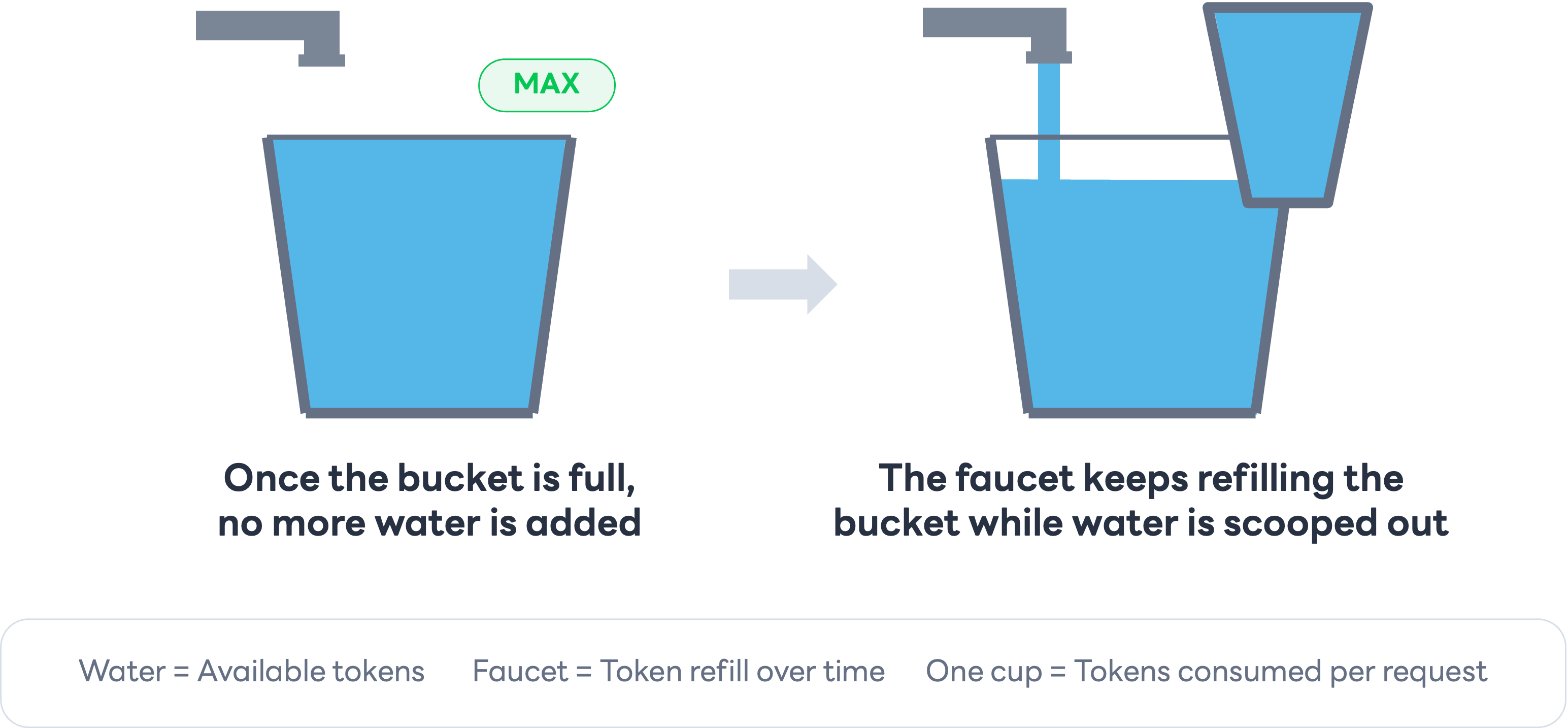
As long as water is scooped out more slowly than it flows into the bucket, the amount of water in the bucket doesn't decrease. However, if water continues to be scooped out faster than it flows in, the amount of water in the bucket decreases, and the bucket eventually runs short of water. When there isn't enough water, another cupful can't be scooped out.
This shortage of water means that there aren't enough tokens available for the request. If you send a request in this state, the API returns 429 Too Many Requests.
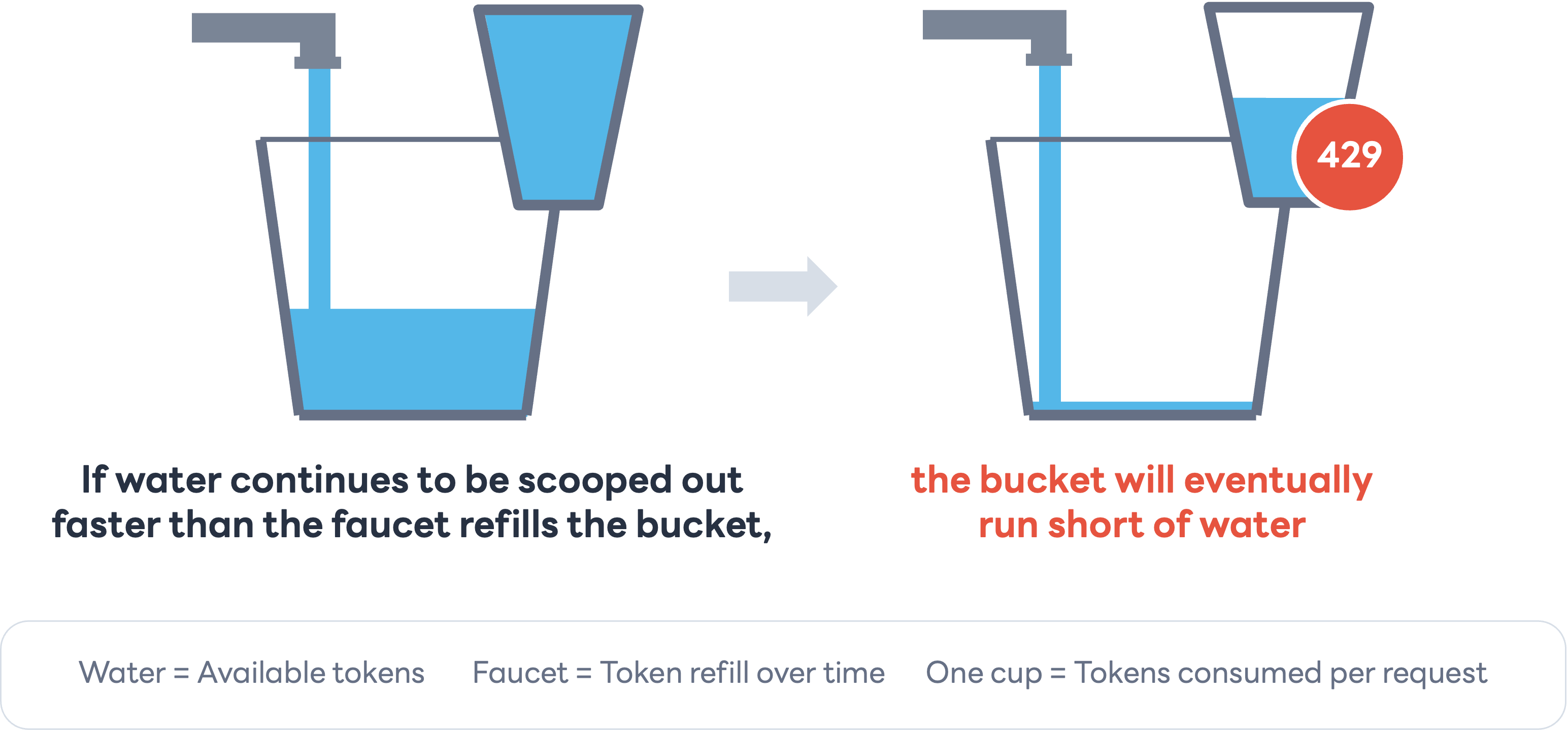
These diagrams are conceptual illustrations of the token bucket algorithm. They don't represent actual token counts or refill intervals.
The bucket is gradually refilled with tokens over time
As illustrated by the bucket-and-water analogy, the bucket in the token bucket algorithm is gradually refilled with tokens over time to replace consumed tokens. For an endpoint with a rate limit of 60 requests per hour, it takes one minute to refill the bucket with enough tokens for one request.
As long as the bucket contains enough tokens for a request, you can send requests at a rate that temporarily exceeds the refill rate. For example, if the rate limit is 60 requests per hour and the bucket contains tokens for 60 requests, the following occurs:
- Send 60 requests in one second.
- This consumes all tokens and temporarily empties the bucket.
- After one minute, the bucket is refilled with enough tokens for one request, allowing you to send one request.
- If you send a request before the bucket is refilled with enough tokens, the API returns
429 Too Many Requests.
- If you send a request before the bucket is refilled with enough tokens, the API returns
Immediately after receiving a 429 Too Many Requests response caused by a rate limit, the bucket doesn't contain enough tokens for another request. Lower the request rate and wait for the bucket to regain enough tokens before sending another request.
If you need to send a large number of requests, avoid sending them all within a short period. Using a queue or similar mechanism to control the request rate helps prevent the bucket from running out of tokens.
The Messaging API applies rate limits to each API function (endpoint) on a per-channel basis. For example, requests from multiple servers or tools to the same endpoint for the same channel are subject to the same rate limit.
Wrap-up
In this article, I explained the token bucket algorithm, which is the rate limit system used by the Messaging API.
With the token bucket algorithm, you can send a request even if the request rate temporarily exceeds the token refill rate, as long as the bucket contains enough tokens for that request. However, avoid sending many requests in a short period, and wait before sending the next request if you receive an error message indicating that the rate limit has been exceeded.
For more information about rate limits, including their values and scope, see Rate limits in the Messaging API reference.
About the author
Furuki (Technical Writer): In charge of documentation for the LINE Developers site. Also organizes Technical Writing Meetup, a community about technical writing.