

How to develop LIFF apps locally: tips for HTTPS support
Hello! I'm Oka from the technical support team.
Have you ever struggled to verify the behavior of a LIFF app in a local development environment?
When developing standard web applications, you typically start a local development server and access a URL like http://localhost:3000 to check how the app works.
However, for LIFF apps, the endpoint URL registered in the LINE Developers Console must use the HTTPS protocol.
This article introduces a method for verifying LIFF app behavior over HTTPS while still using a local development server.
Why HTTPS is required for local development
Just like standard web applications, LIFF apps allow you to use a local server during development.
For instance, using development tools like Vite lets you launch an application at a URL such as http://localhost:5173.
However, this URL presents two challenges.
First, because the URL uses the HTTP protocol, it cannot be registered as a LIFF endpoint URL, which requires HTTPS.
Second, localhost refers to the device currently being used. Consequently, other devices cannot access the server running on your development PC using this URL.
One solution to these two challenges is to use a tunneling service.
Enabling HTTPS connections with tunneling services
Tunneling services allow you to access a web server running in your local environment via the internet.
Examples of tunneling services include ngrok and Cloudflare Tunnel.
By using these services, you can access your application via a public HTTPS URL without having to configure HTTPS directly on your local development server.
An example configuration is shown below:
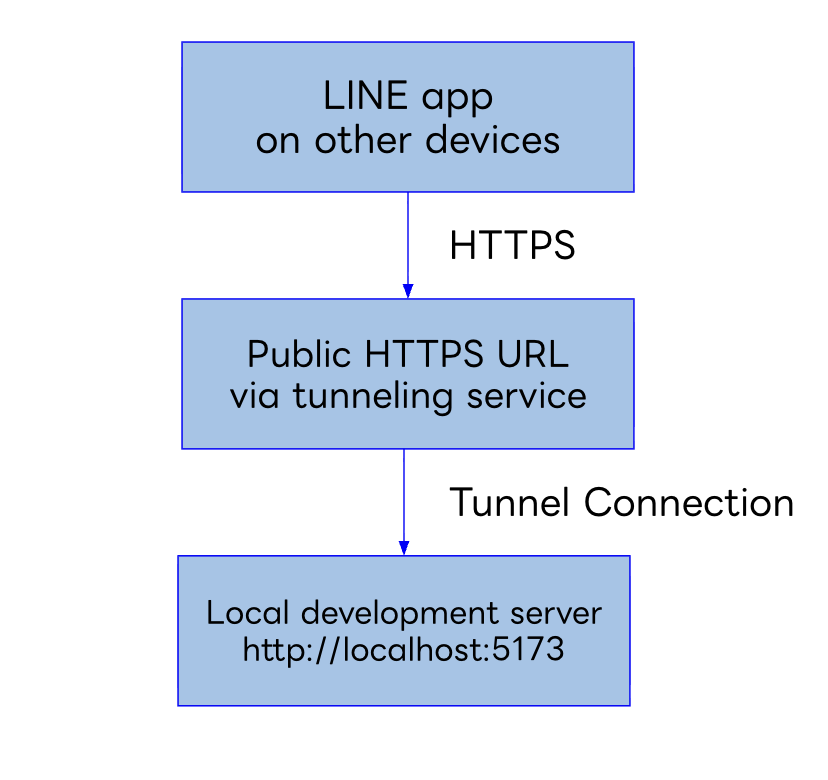
Specifically, you set the HTTPS URL issued by the tunneling service as the LIFF app's endpoint URL in the LINE Developers Console.
This allows you to access the LIFF app currently under development in your local environment from the LINE app on your smartphone.
Note that depending on the tunneling service settings or your subscription plan, the public URL may change each time you reconnect. In such cases, you must update the LIFF endpoint URL accordingly.
To access your local development environment from other devices, you can also configure your local development server to use HTTPS directly, rather than using a tunneling service.
However, when accessing the server from devices like smartphones, be sure to pay attention to network settings and certificate trust configurations.
Preparing a LIFF app for development
When conducting local development, it is convenient to prepare a separate LIFF app for development purposes, distinct from the production app.
For the development LIFF app, set the HTTPS URL issued by the tunneling service. For the production LIFF app, set the URL of the web server that will actually serve the app to users.
By separating environments in this way, changing the endpoint URL during development will not affect the production LIFF app.
Note that since the LIFF IDs differ between the development and production apps, your application code must use the appropriate LIFF ID for the current environment.
Points to note when using a tunneling service
Using a tunneling service may make your local development server accessible from the entire internet.
Be mindful of security—for example, avoid placing sensitive information in the development environment and configure access restrictions as necessary.
Also, please stop the tunnel connection when you have finished development.
Summary
When developing LIFF apps locally, you need to consider the HTTPS requirement for the endpoint URL and how to access the app from other devices.
Using a tunneling service, as introduced here, is one option for addressing these challenges.
Although not covered here, there are other ways to enable HTTPS directly on a local development server, as well as methods to launch the server via HTTPS or expose it to the outside world using the LIFF CLI.
Choose the method that best suits your development environment and use it to facilitate your LIFF app development.