

In-app purchase overview
This page provides an overview of the in-app purchase feature for LINE MINI Apps.
In-app purchase is a system that allows users to purchase digital content within verified MINI Apps.
This is an optional feature, and to use it, you need to apply through the LINE Developers Console and receive approval. For more information on how to apply, see Apply to use in-app purchase.
What is in-app purchase
In-app purchase is a system that allows users to purchase digital content provided by the LINE MINI App within a verified MINI App.
Currently, only consumable digital content is available for purchase.
In-app purchase has the following features:
- Uses the payment mechanism of App Store and Google Play.
- Provides payment verification and notification functions by the LINE Platform.
- Implements the client using the LIFF SDK.
- Performs server-side integration using webhooks.
For more information on implementation, see Integrate the in-app purchase feature.
Flow to start using in-app purchase
The flow to start using in-app purchase is as follows. For more information, see each document.
| Step | Details |
|---|---|
| Step 1: Apply to use in-app purchase | Apply to use from the In-app purchase tab of your LINE MINI App channel on the LINE Developers Console. When applying, enter all information accurately, including the company name. Only verified LINE MINI Apps can offer in-app purchase to users. However, you can apply to use in-app purchase even with unverified MINI Apps. |
| Step 2: Set up in-app purchase | Once your application to use in-app purchase has the status of "Approved", register the webhook URL and testers for test payment in the In-app purchase settings tab within the In-app purchase tab. |
| Step 3: Integrate in-app purchase into your LINE MINI App channel for Developing and perform test payment | Integrate the in-app purchase feature on your LINE MINI App channel for Developing and perform test payments. |
| Step 4: Apply for a verification review | Apply for review from the Review request tab on the LINE Developers Console to publish as a verified MINI App. When applying, turn on the Release the in-app purchase feature toggle button in the Review request tab. If you have integrated in-app purchase into an app that is already published as a verified MINI App, you need to undergo review again. |
| Step 5: Release the LINE MINI App with in-app purchase | Once Step 4, the verification review, is approved, you can release the LINE MINI App with in-app purchase. If it was already a verified MINI App, the procedure is different. For more information, see Submitting LINE MINI App. |
System architecture
In-app purchase consists of the following components:
| Component | Role |
|---|---|
| LINE MINI App | Receives user actions and initiates the purchase transaction. |
| LINE MINI App server | Reserves purchases, receives webhooks, and manages purchase results. |
| LINE Platform | Verifies store payments and sends webhook events. |
| App store | Performs actual payment transactions.
|
Conditions
The conditions and requirements for using in-app purchase are as follows.
In-app purchase use conditions
The LINE MINI App must have both "Region to provide the service" and "Company or owner's country or region" set to "Japan" on the LINE MINI App channel.
In-app purchase requirements
- The LINE MINI App is a verified MINI App (*)
- LIFF SDK version of the LINE MINI App is 2.26.0 or later
- The LINE MINI App is opened in the LIFF browser
- The user has registered a Japanese phone number with their LINE account
- The user's LINE version is 15.6.0 or later
* Unverified MINI Apps will only work on LINE MINI Apps for Developing and Review.
Available items and prices
Items available for purchase through in-app purchase are pre-defined on the LINE Platform.
Item prices are defined in Japanese yen.
When displaying items available for purchase through in-app purchase to users, you must display prices in the currency localized to the region of the app store the user is using to avoid degrading the user experience.
Prices localized to match the region of the app store the user is using can be obtained using the liff.iap.getPlatformProducts() method. Using this method minimizes the difference between the price displayed in your LINE MINI App and the price shown in the app store during payment.
In-app purchase cancellation
LY Corporation does not support cancellations of payments completed using in-app purchase. For fraudulent use or accidental payment, check the latest refund policy of each app store such as App Store or Google Play and instruct users to request a refund directly.
- Request a refund for apps or content that you bought from Apple
- Learn about Google Play refund policies
Example process flow
An example of a basic in-app purchase process flow.
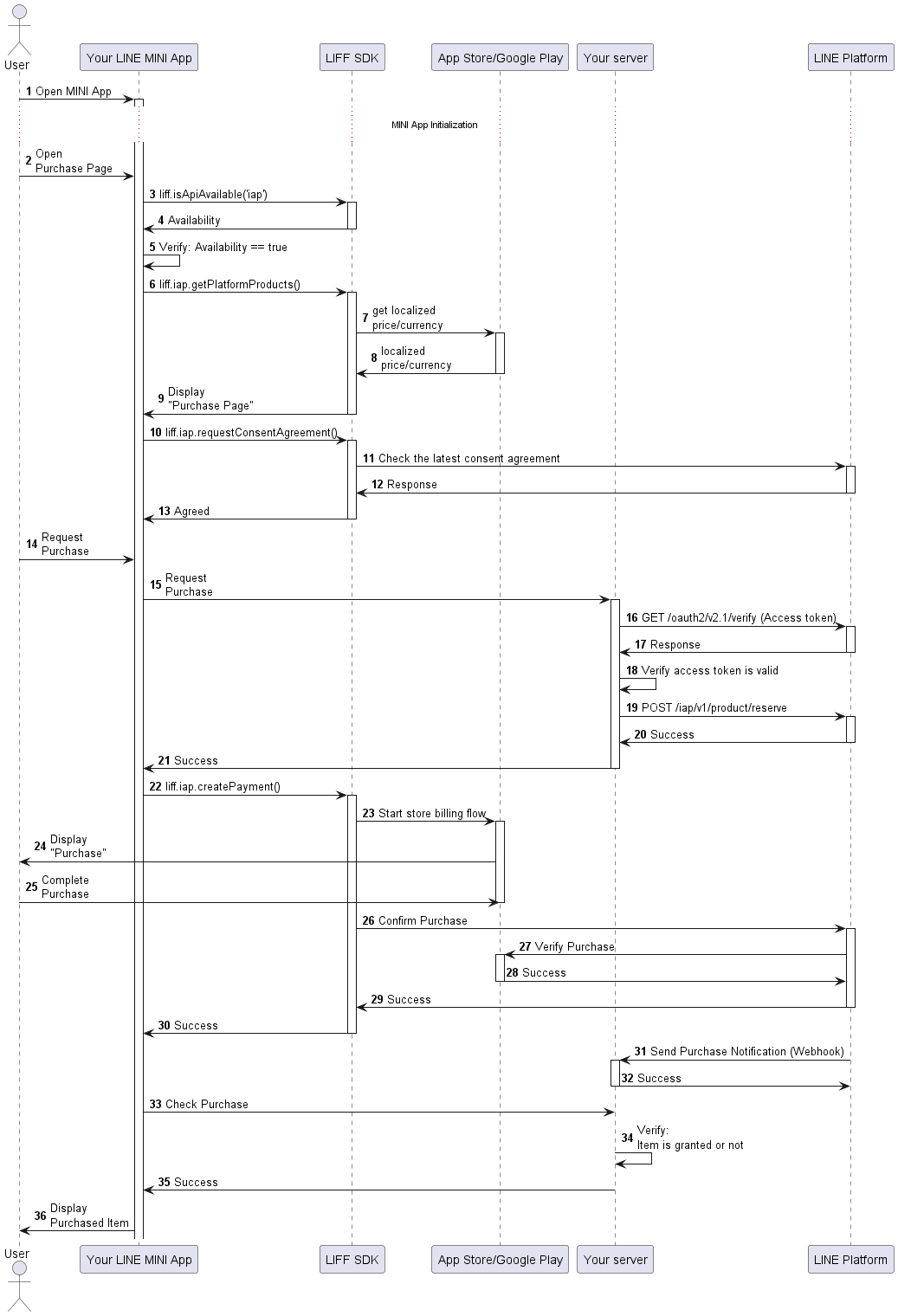
- 1~5: Check if the environment is compatible with in-app purchase
- 6~9: Get a list of purchasable items and display to users
- 10~13: Obtain user consent for using in-app purchase
- 14~21: Reserve the purchase from your LINE MINI App server
- 22~30: Start the purchase transaction at the app store (App Store, Google Play)
- 31~36: Receive the webhook, confirm purchase completion, and grant the item