

LINE MINI App API reference
Service Messages
This feature is only available for verified MINI Apps. For unverified MINI Apps, you can test the feature on the internal channel for Developing, but you can't use the feature on the internal channel for Published.
The Service Message API enables you to send service messages from your service to your LINE MINI App users.
Sending service messages requires a service notification token and a template.
Issuing a service notification token
Issues a service notification token. Service notification tokens are used to send a service message to the associated user.
Service notification tokens have the following features:
- A service notification token expires 1 year (31,536,000 seconds) after being issued. While it is still valid, up to 5 service messages can be sent.
- Every time you use the service notification token, the token value is renewed unless it expired or no longer has remaining message counts. If you are planning to send successive service messages to a user, keep the renewed service notification token.
Issuing multiple service notification tokens reusing an access token obtained by liff.getAccessToken() (LIFF access token) is not allowed.
Only one service notification token can be issued per LIFF access token.
Each service notification token is associated with one user. You can't use a service notification token associated with one user to send a service message to other users.
Example request
HTTP request
POST https://api.line.me/message/v3/notifier/token
Request headers
Content-Type
application/json
Authorization
Bearer {channel access token}
For more information, see Channel access token in the LINE Platform basics.
Long-lived channel access tokens and channel access token with a user-specified expiration (Channel Access Token v2.1) can't be used for LINE MINI App channels.
When developing LINE MINI Apps, either stateless channel access tokens or short-lived channel access tokens can be used. Stateless channel access tokens are recommended among those two. Stateless channel access tokens have an unlimited number of issuances, so there is no need for the application to manage the token lifecycle.
Request body
liffAccessToken
String
User access token obtained by liff.getAccessToken() (LIFF access token).
Response
Returns status code 200 and a JSON object with the following information.
notificationToken
String
Service notification token
expiresIn
Number
The amount of time remaining in seconds before the service notification token expires. A service notification token expires 1 year (31,536,000 seconds) after being issued.
remainingCount
Number
The number of times you can send a service message with the issued service notification token
sessionId
String
The session ID. For more information, see Sending service messages.
Example response
Error response
Returns one of the following status codes and error messages.
| Status code | Description |
|---|---|
| 400 Bad request | This status code means one of the following:
|
| 401 Unauthorized | This status code means one or both of the following:
|
| 403 Forbidden | This channel isn't authorized to issue service messages. |
| 500 Internal Server Error | Error on the internal server |
Example error response
Sending service messages
Sends a service message to a user specified in the service notification token.
Once a service message is sent, the token's value is renewed unless the token expired or no longer has remaining message counts. If you are planning to send successive service messages to a user, keep the renewed service notification token.
Example request
HTTP request
POST https://api.line.me/message/v3/notifier/send
Request headers
Content-Type
application/json
Authorization
Bearer {channel access token}
For more information, see Channel access token in the LINE Platform basics.
Long-lived channel access tokens and channel access token with a user-specified expiration (Channel Access Token v2.1) cannot be used for LINE MINI App channels.
When developing LINE MINI Apps, either stateless channel access tokens or short-lived channel access tokens can be used. Stateless channel access tokens are recommended among those two. Stateless channel access tokens have an unlimited number of issuances, so there is no need for the application to manage the token lifecycle.
Query parameters
target
service
Request body
templateName
String
The name of the template that was added and will be used for the service message. You can check the template name in the LINE Developers Console. For more information, see Types of service messages that can be sent.
Use with a BCP 47 language tag suffix.
Format: {template name}_{BCP 47 language tag}
Max character limit: 30
The languages and language tags supported by the service message are as follows.
- Japanese:
ja - English:
en - Chinese (Traditional):
zh-TW - Thai:
th - Indonesian:
id - Korean:
ko
params
object
JSON Object to specify each template variable-value pair.
If the template has no template variable, specify an empty JSON object ({ }).
The template variables are defined for each template. If a template variable is part of the required elements, be sure to specify a template variable-value pair.
For more information, see Adding service message templates to the channel.
notificationToken
String
Service notification token
Response
Returns status code 200 and a JSON object with the following information.
notificationToken
String
A renewed service notification token. Use this service notification token to send successive service messages.
expiresIn
Number
The remaining amount of time in seconds until renewed service notification token expires
remainingCount
Number
The number of times you can send successive service messages with the renewed service notification token.
sessionId
String
The session ID. For more information, see Sending service messages.
If the values of expiresIn and remainingCount are 0, it means that the service message was sent, but the service notification token couldn't be renewed.
Example response
Error response
Returns one of the following status codes and error messages.
| Status code | Description |
|---|---|
| 400 Bad request | This status code means one of the following:
|
| 401 Unauthorized | This status code means one or both of the following:
|
| 403 Forbidden | This status code means one of the following:
|
Example error response
Common Profile Quick-fill
To use Common Profile Quick-fill, your LINE MINI App must be verified and you must apply to use Quick-fill. For more information, see Steps for using Quick-fill.
Quick-fill is a feature that automatically fills in the necessary profile information by tapping the Auto-fill button on the LINE MINI App. You can easily use the Common Profile information that a user has set in the Account Center in the LINE MINI App. For more information, see Overview of Common Profile Quick-fill.
liff.$commonProfile.get()
Gets the information in the Common Profile that the user has set in the Account Center.
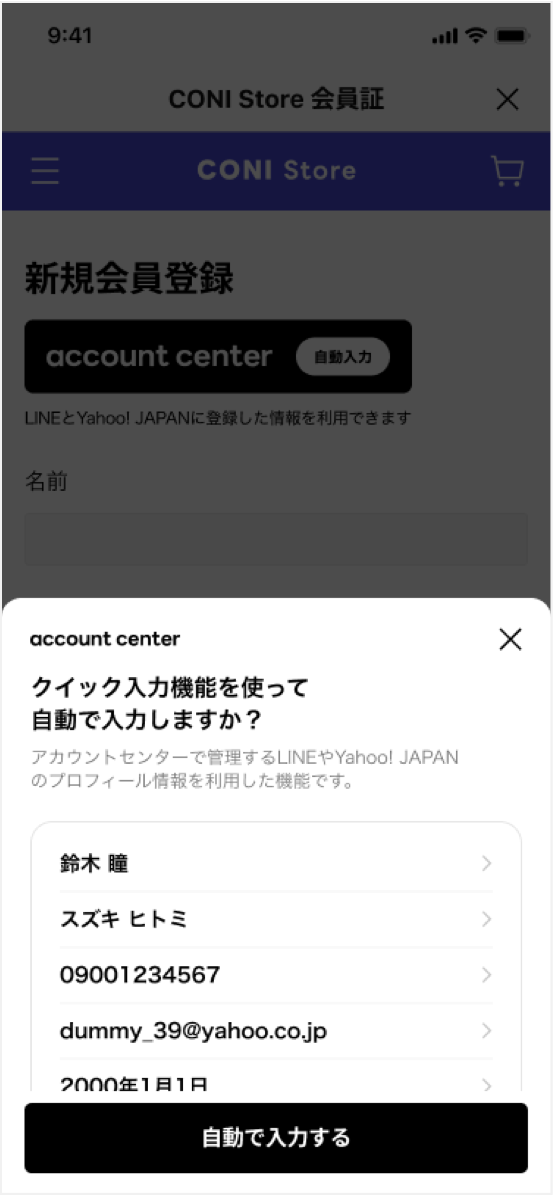
When you execute the liff.$commonProfile.get() method, a modal will appear to confirm the user's profile. After confirming the profile in the displayed modal, the user can tap Auto-fill and the profile information will be entered automatically.
Example of a modal display:
Example
Syntax
liff.$commonProfile.get(scopes, options);
Arguments
scopes
Array of strings
Specify the scope of the Common Profile you want to obtain.
For information on the values that can be specified for scopes, see The scopes parameters that can be specified and its return value.
options
Object
Options for getting Common Profile information
options.formatOptions
Object
Options related to the format of information. Specify a formatOptions object for each scope specified in the scopes property.
Specify the scope for which you want to set the option in camel case format as the key. For example, when the scope is given-name, the key is givenName.
formatOptions object
excludeEmojis
Boolean
Whether to remove emojis from the string. The default is true. This can only be specified in the following scopes:
- givenName
- familyName
excludeNonJp
Boolean
Whether to exclude phone numbers with 12 or more digits. The default is true. If true, an empty string and error information are returned when the phone number has 12 or more digits. This can only be specified in the following scope:
- tel
digitsOnly
Boolean
Whether to exclude postal codes that contain non-numeric characters. The default is true. If true, an empty string and error information are returned when the postal code contains characters other than numbers. This can only be specified in the following scope:
- postalCode
Example
Return value
Returns Promise object of type { data: Partial<CommonProfile>, error: Partial<CommonProfileError>}.
When Promise is resolved, an object of type Partial<CommonProfile> containing the user's Common Profile information is passed to the data property, and an object of type Partial<CommonProfileError> containing error information is passed to the error property.
In the following cases, the property of data will be undefined or null:
- Cases where the property value becomes
undefined- If the target item isn't specified in the
scopesparameter - If the target item is specified in the
scopesparameter, but the user doesn't authorized permission for that item
- If the target item isn't specified in the
- Cases where the property value becomes
null- If the user hasn't set a value for the target item in the Common Profile
- If an error occurs when retrieving the target item in the Common Profile
For information on the values of the properties that can be obtained according to the specified scopes, see The scopes parameters that can be specified and its return value.
Example of an object of type Partial<CommonProfile>
Example of an object of type Partial<CommonProfileError>
Error response
When the Promise is rejected, LiffError is passed.
Example of calling the API without installing the plugin correctly
Example of API being called in a browser other than LIFF browser
liff.$commonProfile.getDummy()
Gets the dummy data for the Common Profile. There are 10 types of dummy data available, and you can specify the dummy data to get using the caseId.
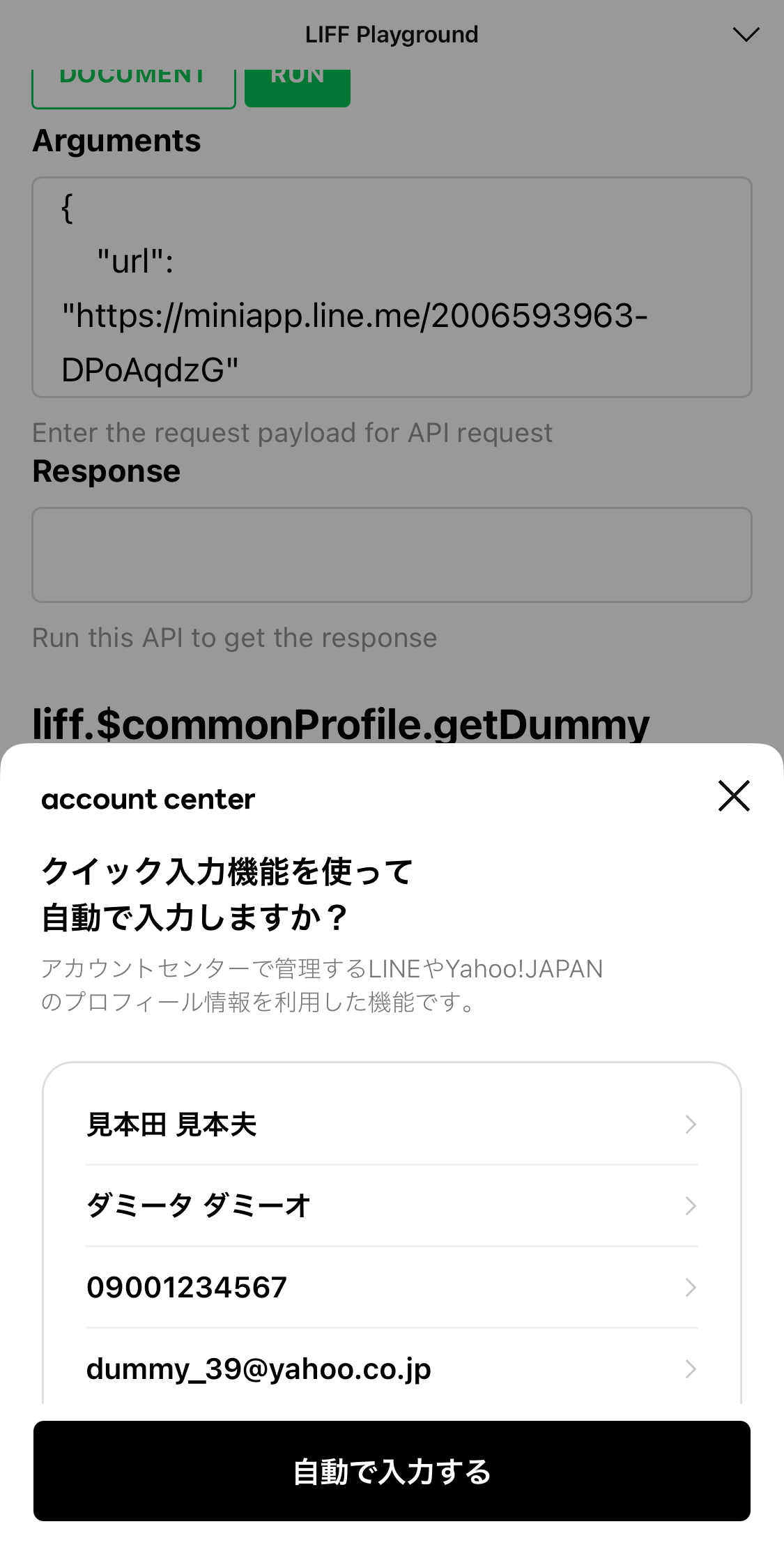
When you execute the liff.$commonProfile.getDummy() method, a modal will appear to confirm the dummy profile. You can get dummy data for the Common Profile by tapping Auto-fill.
Example of a modal display:
Example
Syntax
liff.$commonProfile.getDummy(scopes, options, caseId);
Arguments
scopes
Array of strings
Specify the scope of the Common Profile you want to obtain.
For information on the values that can be specified for scopes, see The scopes parameters that can be specified and its return value.
options
Object
Options for getting Common Profile information
options.formatOptions
Object
Options related to the format of information. Specify a formatOptions object for each scope specified in the scopes property.
Specify the scope for which you want to set the option in camel case format as the key. For example, when the scope is given-name, the key is givenName.
caseId
number
Specify the ID of the dummy data you want to get. Dummy data with IDs from 1 to 10 is available.
For information about dummy data for each caseId, see Dummy data for Common Profile that can be obtained.
Return value
Returns Promise object of type { data: Partial<CommonProfile>, error: Partial<CommonProfileError>}.
When Promise is resolved, an object of type Partial<CommonProfile> containing the dummy data of the Common Profile is passed to the data property, and an object of type Partial<CommonProfileError> containing error information is passed to the error property.
In the following cases, the property of data will be undefined or null:
- Cases where the property value becomes
undefined- If the target item isn't specified in the
scopesparameter
- If the target item isn't specified in the
- Cases where the property value becomes
null- If the dummy data doesn't have a value for the target item
For information on the dummy data you can get for the specified ID, see Dummy data for Common Profile that can be obtained.
Example of an object of type Partial<CommonProfile>
Example of an object of type Partial<CommonProfileError>
Error response
When the Promise is rejected, LiffError is passed.
Example of calling the API without installing the plugin correctly
Example of API being called in a browser other than LIFF browser
liff.$commonProfile.fill()
Automatically fills the form with the Common Profile information you have obtained. The data-liff-autocomplete attribute is used to link each profile information to the form.
Automatic input using liff.$commonProfile.fill() is performed using the data-liff-autocomplete attribute of the form. At this time, the value specified in the data-liff-autocomplete attribute of the form must match the scope of the profile information obtained (family-name, tel, bday-year, etc.)
For example, if you want to automatically fill in a form after retrieving the year of birth (bday-year), month of birth (bday-month), and day of birth (bday-day) information and then process it into a format like 20110623, you can use document.getElementById().value or document.querySelector().value instead of liff.$commonProfile.fill().
Example of automatically filling the family name, phone number, and gender as they were obtained
Example of automatically filling some of the common profile information that has been obtained in a slightly different format
Syntax
liff.$commonProfile.fill(profile);
Arguments
profile
Partial<CommonProfile>
Specify the profile information that is automatically fill into the form as a Partial<CommonProfile> type.
For information on the scopes, that can be specified, see The scopes parameters that can be specified and its return value.
Return value
None
In-app purchase (Client)
To use the in-app purchase feature, you must apply for use. For more information, see In-app purchase overview in the LINE MINI App documentation.
liff.iap.getPlatformProducts()
Gets a list of items available for purchase via in-app purchase.
Example
Syntax
liff.iap.getPlatformProducts({ productIds });
Arguments
productIds
Array of strings
Array of product IDs for items you want to retrieve
Return value
A Promise object is returned. When the Promise object is resolved, an object with the product ID as a key and the following properties is passed:
currency
String
Currency code in ISO 4217 format. Returned in the currency localized to the region of the app store the user is using.
price
Number
Price of the item. Returned in the currency localized to the region of the app store the user is using.
productName
String
Name of the item. Returned in the representation localized to the region of the app store the user is using.
Example return value
Error response
When the Promise is rejected, a LiffError is passed.
Possible errors include the following:
| Error message | Description |
|---|---|
| Need access_token for api call, Please login first | The user is not logged in. |
| In-App Purchase is not allowed in external browser | The method was executed in an external browser. |
| In-App Purchase is not allowed in this LIFF app | The LINE MINI App being run by the user does not support in-app purchase. |
liff.iap.requestConsentAgreement()
Requests user consent for the Terms of Use: LINE In-App Purchase System.
If the user has not yet agreed to the "Terms of Use: LINE In-App Purchase System" or if new consent is required, a consent screen will be displayed.
If the Terms of Use: LINE In-App Purchase System are updated, re-consent will be required. Before starting in-app purchase, be sure to call this method to check the latest consent status.
Syntax
await liff.iap.requestConsentAgreement();
Arguments
None
Return value
A Promise object is returned.
- Resolves if the user agrees.
- Rejects with an error object if the user doesn't agree, or if the operation fails due to a network issue, a problem on the user's device, or an internal error on the LINE Platform.
Error response
When the Promise is rejected, a LiffError is passed.
Possible errors include the following:
| Error message | Description |
|---|---|
| The user did not agree to the terms. | The user did not agree to the Terms of Use: LINE In-App Purchase System . |
| Need access_token for api call, Please login first | The user is not logged in. |
| In-App Purchase is not allowed in external browser | The method was executed in an external browser. |
| In-App Purchase is not allowed in this LIFF app | The LINE MINI App being run by the user does not support in-app purchase. |
Error response example
liff.iap.createPayment()
Launches the app store payment confirmation screen (App Store, Google Play) and starts the purchase transaction.
Syntax
liff.iap.createPayment({ productId, orderId });
Arguments
productId
String
Pre-defined product ID
orderId
String
Order ID obtained from the "Reserve purchase" endpoint
Return value
Returns a Promise<void> object.
- Resolves if the purchase completes successfully.
- Rejects with an error object if the purchase is canceled, or if the operation fails due to a network issue, a problem on the user's device, or an internal error on the LINE Platform.
Error response
When the Promise is rejected, a LiffError is passed.
Possible errors include the following:
| Error message | Description |
|---|---|
| Need access_token for api call, Please login first | The user is not logged in. |
| In-App Purchase is not allowed in external browser | The method was executed in an external browser. |
| In-App Purchase is not allowed in this LIFF app | The LINE MINI App being run by the user does not support in-app purchase. |
In-app purchase (Server)
To use the in-app purchase feature, you must apply for use. For more information, see In-app purchase overview in the LINE MINI App documentation.
Response headers
In-app purchase responses include the following HTTP header. Save it to logs so you can reference them in future inquiries to LY Corporation.
| Response header | Description |
|---|---|
| x-line-request-id | Request ID. An ID that is issued for each request. |
Error response
When the HTTP status code is in the 4xx or 5xx, a response body containing the following JSON data is returned:
errorCode
String
Error code
message
String
Error message
details
array
Error details
details[].message
String
Detailed message
details[].property
String
Location where error occurred
Error response example
When the HTTP status code is in the 4xx
When the HTTP status code is in the 5xx
Reserve purchase
Reserve the purchase before starting the app store payment.
The order ID (orderId) included in the response is also included in the purchase complete event. The order ID is required for inquiries and investigations to LY Corporation, so be sure to save it.
Also, a successful reservation does not guarantee purchase completion, so grant items based on the purchase complete event.
Request example
HTTP request
POST https://api.line.me/iap/v1/product/reserve
Request headers
Authorization
Bearer {user access token}
The current user's access token. Can be obtained with the liff.getAccessToken() method.
Content-Type
application/json
Request body
clientIp
String
The IP address of the user's device obtained from the server. Specify in IPv4 or IPv6 format.
clientOs
String
The value obtained from the liff.getOS() method. Either ios or android.
productId
String
The product ID of the item to be purchased.
shopProductName
String
The item name displayed in the purchase history.
Emojis and symbols can't be used. Set an appropriate value so that users can recognize the item they purchased.
Maximum characters: 20 (UTF-16)
Response
Returns a JSON object containing the status code 200 and the following information:
orderId
String
Order ID.
Response example
Error response
For more information on error response format, see Error response.
Errors that may occur in addition to general ones include the following:
| Error code | Description |
|---|---|
| VALIDATION_ERROR | Request constraints are not met. For example, a value other than ios or android is passed to clientOs. |
| WEBHOOK_URL_IS_NOT_SET | The webhook URL to receive payment completion notifications is not set. |
| PRODUCT_ID_NOT_FOUND | The requested product ID does not exist. |
| BLOCKED_USER | This user has been determined to be a fraudulent user by the LINE Platform. Requests related to this user can't be processed. |
| INTERNAL_SERVER_ERROR | A temporary issue has occurred on the LINE Platform. For endpoints where retries are possible, retry using exponential backoff or similar methods. |
| TERMS_AGREEMENT_ERROR | Occurs when the latest terms and conditions have not been agreed to by this user in "Obtain user consent for in-app purchase". |
Error response example
Get webhook event history
Gets the history of webhook events sent by the LINE Platform. You can retrieve up to 100 events at a time using cursor-based pagination.
The sort order is in ascending order of the date and time when the LINE Platform started sending webhook events.
You can only retrieve webhook events sent in the past 7 days. Currently, only purchase complete events are available, and refund events will be supported in the future.
Example request
HTTP request
GET https://api.line.me/iap/v1/webhook/events
Request headers
Authorization
Bearer {channel access token}
For more information, see Channel access token in the LINE Platform Basics.
Query parameters
startEpochSeconds
Number
Specifies the start date and time of the period for which you want to retrieve webhook event history. The specified date and time are included in the retrieval target. Specify a UNIX time (in seconds) within the past 7 days.
endEpochSeconds
Number
Specifies the end date and time of the period for which you want to retrieve webhook event history. The specified date and time are included in the retrieval target. Specify a UNIX time (in seconds) within the past 7 days.
cursor
String
Cursor for the webhook event page.
Do not specify this in the first request. For the second and subsequent requests, you can retrieve the subsequent webhook events by specifying the nextCursor value included in the response from the previous request.
pageSize
Number
Number of webhook events per page.
- Minimum value: 1
- Maximum value: 100
status
String
Status of the webhook events you want to retrieve. Specify one of the following:
SUCCESS: Retrieves the history of webhook events received successfully.FAILED: Retrieves the history of webhook events that failed to be received.
If not specified, the history of all webhook events is retrieved regardless of whether the receipt was successful or failed.
During pagination, make requests without changing parameters other than cursor. If you want to change parameters, start from the first page again.
Response
When successful, returns a JSON object with status code 200 and the information below.
events
Array
List of webhook events.
events[].transactionType
String
Always returns PRODUCT.
events.event
Object
nextCursor
String
Cursor for the next page.
If the next page does not exist, the value is null.
Example response
Error responses
For more information on error response format, see Error response.
Errors that may occur in addition to general ones include the following:
| Error code | Description |
|---|---|
| VALIDATION_ERROR | Request constraints are not met. For example, a value other than SUCCESS or FAILED is passed to status. |
| INTERNAL_SERVER_ERROR | A temporary issue has occurred on the LINE Platform. For endpoints that allow retries, retry using exponential backoff or similar methods. |
In-app purchase webhook event object
To use the in-app purchase feature, you must apply for use. For more information, see In-app purchase overview in the LINE MINI App documentation.
Verify signature
When your LINE MINI App server receives a webhook request, verify the signature included in the request header before processing the webhook event. This verification step is important to confirm that the webhook came from the LINE Platform and wasn't tampered with during transmission.
For more information, see Verify webhook signature in the Messaging API documentation.
Purchase complete event
This event occurs when a user purchases a reserved item at an app store (App Store, Google Play) and the payment is settled by LY Corporation. The webhook payload contains information about the purchased item.
Webhook payload
type
String
The type of webhook event. purchaseComplete is specified.
orderId
String
The ID of the order purchased by the user. Included in the response of the "Reserve purchase" endpoint.
productId
String
The product ID (productId) of the item purchased by the user.
userId
String
The user ID of the user who made the purchase.
purchaseTimestamp
number
The time when the payment was completed on the LINE Platform. The unit is UNIX time (in seconds).
This time is not the time when the user actually completed the payment.
channelId
String
The channel ID of the LINE MINI App channel.
Example
Refund event
This event occurs when a refund was issued for an item purchased by a user at an app store (App Store, Google Play). The event contains information about the item refunded.
Webhook payload
type
String
The type of webhook event. refundComplete is specified.
orderId
String
The ID of the order that was refunded by the user. Included in the response of the Reserve purchase endpoint.
productId
String
The product ID (productId) of the item that was refunded by the user.
userId
String
The user ID of the user who requested the refund.
purchaseTimestamp
number
The time when the refunded item was purchased. The unit is UNIX time (in seconds).
Matches the purchaseTimestamp of the purchase complete event. This time is not when the user actually completed the refund.
channelId
String
The channel ID of the LINE MINI App channel.
Example