2026/08/20
Flex Messageは、画像に頼らず、自由度の高いレイアウトを作成できるメッセージです。一方で、端末の画面幅、OS、LINEアプリのバージョン、言語設定、フォントなどによって、同じJSONでもテキストの改行位置や表示範囲が異なる場合があります。
パート1では、現在Flex Messageで送信可能なメッセージの例をいくつか紹介しました。この記事では、端末による表示の違いを踏まえてFlex Messageのレイアウトを作るときのポイントを紹介します。
商品名、店舗名、イベント名、表示名などは、文字数が一定とは限りません。短いサンプルデータだけでレイアウトを作ると、実際のデータを入れたときにテキストが途中で切れたり、隣の要素を圧迫したりすることがあります。
テキストコンポーネントでは、wrapをtrueにするとテキストを折り返して表示できます。一方で、すべてのテキストを無制限に折り返すと、メッセージ全体が長くなりすぎることがあります。その場合は、maxLinesを使って表示する行数を制限します。
{
  "type": "text",
  "text": "ワイヤレスノイズキャンセリングイヤホン Pro",
  "size": "md",
  "weight": "bold",
  "wrap": true,
  "maxLines": 2
}
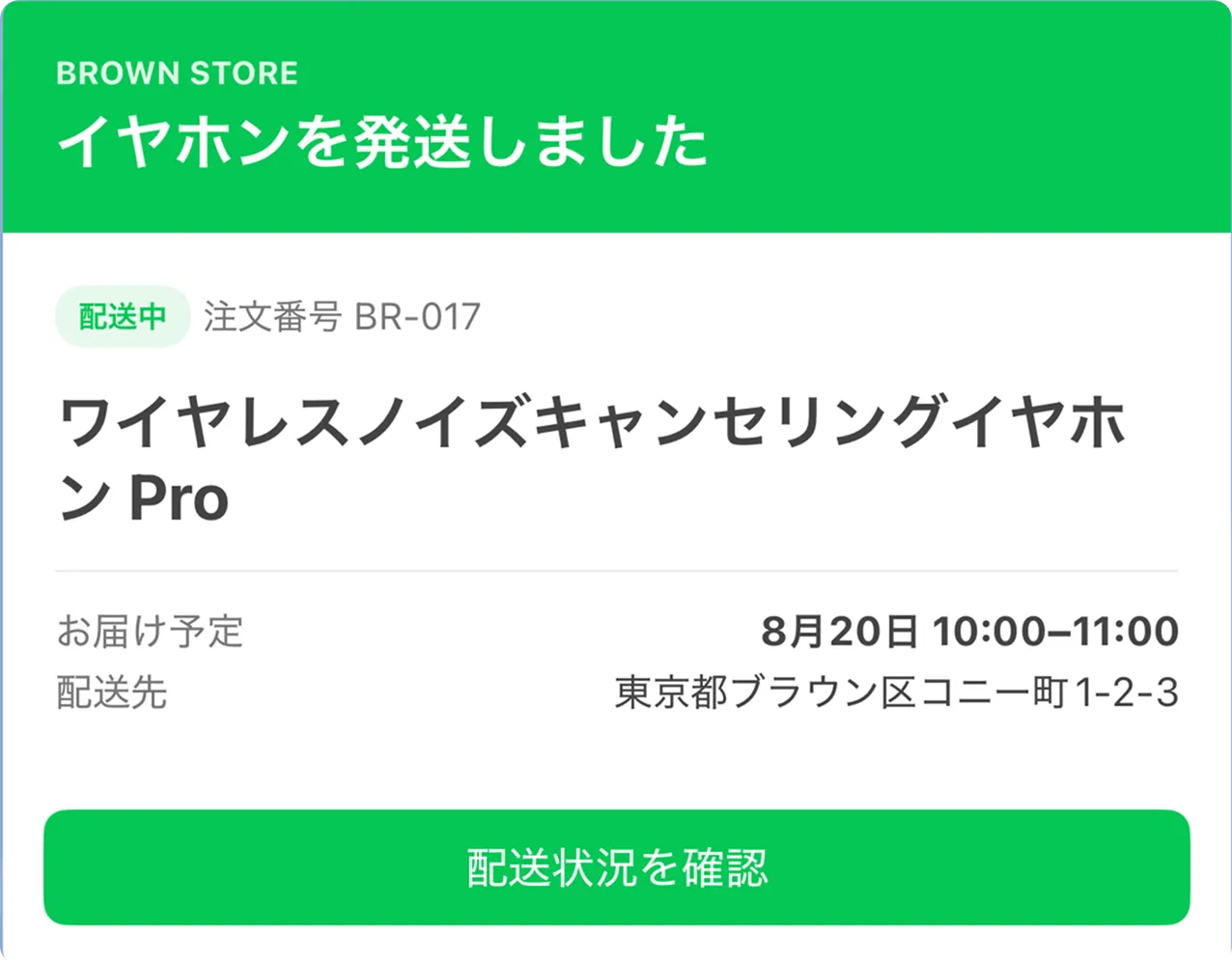
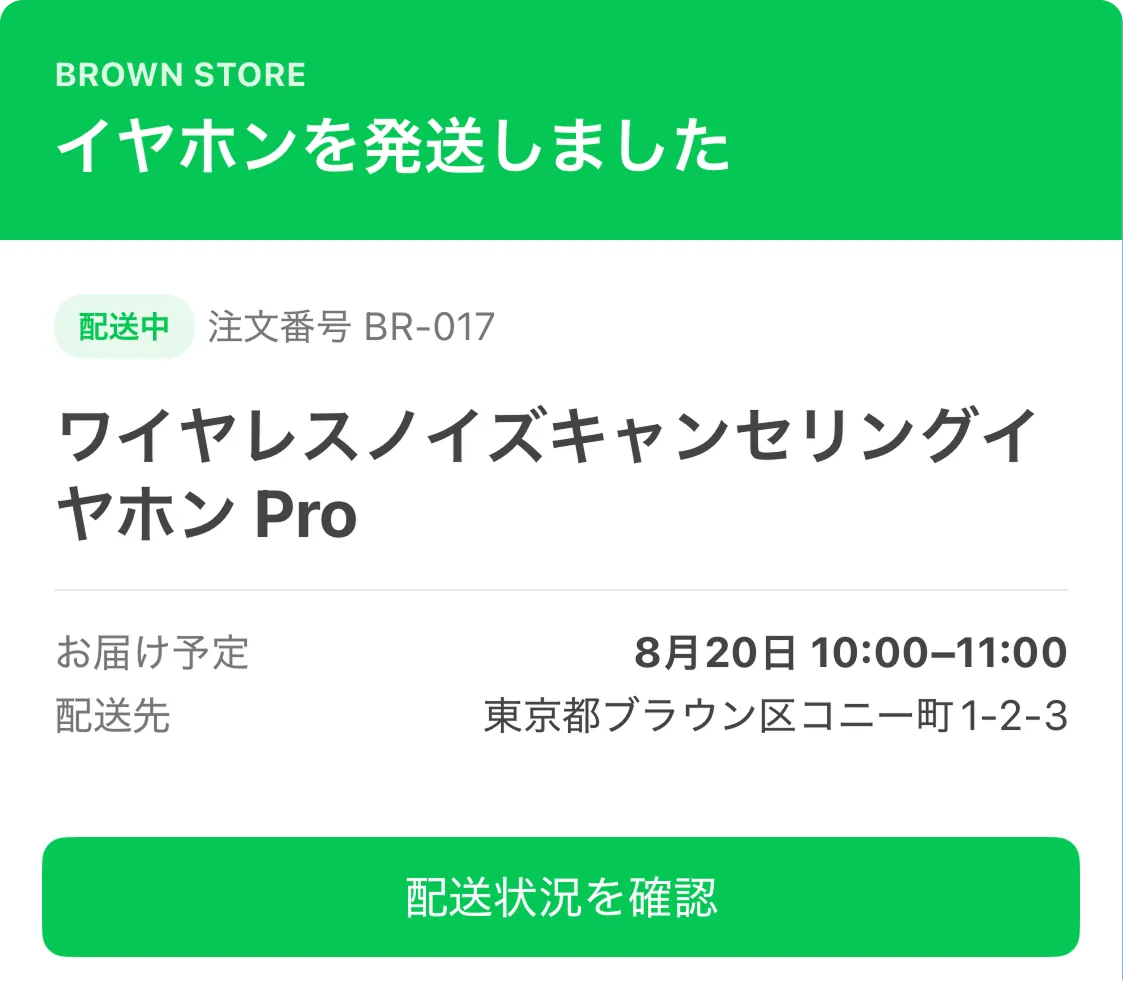
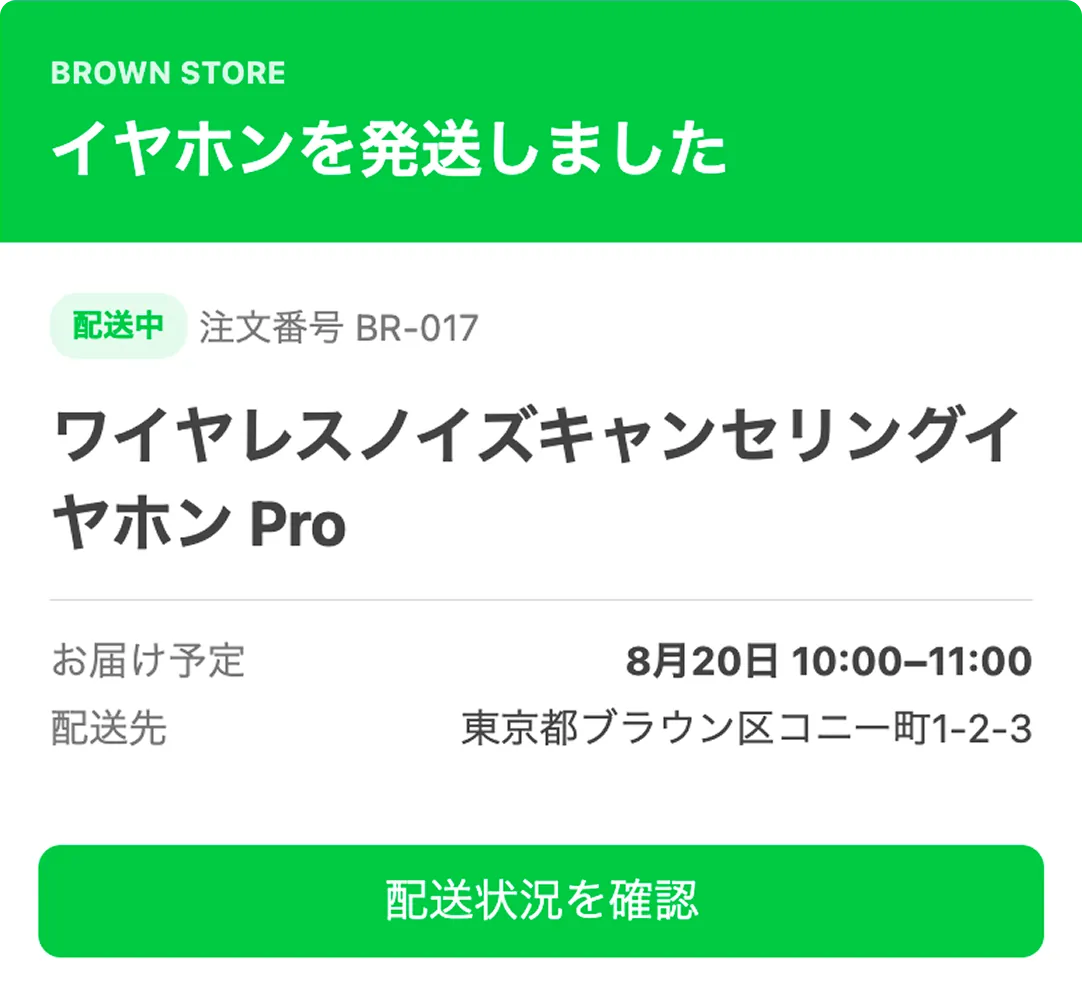
maxLinesは表示する行数を制限しますが、表示文字数を保証するものではありません。端末の画面幅、OS、言語設定、フォントなどによって1行に収まる文字数が変わるため、同じmaxLines: 2を設定していても、端末によって改行位置が異なります。また、テキストが指定した行数に収まらない場合は、表示される文字数や省略される位置も異なる可能性があります。詳しくは、「テキストを折り返す」を参照してください。
以下は、同じmaxLines: 2のFlex Messageで改行位置が異なる例です。
| iOS(画面幅が広い端末) | iOS(画面幅が狭い端末) | Flex Message Simulator |
|---|
 |  |  |
{
  "type": "bubble",
  "size": "giga",
  "header": {
    "type": "box",
    "layout": "vertical",
    "paddingAll": "18px",
    "backgroundColor": "#06C755",
    "contents": [
      {
        "type": "text",
        "text": "BROWN STORE",
        "size": "xxs",
        "weight": "bold",
        "color": "#DDF7E5"
      },
      {
        "type": "text",
        "text": "イヤホンを発送しました",
        "size": "xl",
        "weight": "bold",
        "color": "#FFFFFF",
        "margin": "sm",
        "wrap": true
      }
    ]
  },
  "body": {
    "type": "box",
    "layout": "vertical",
    "paddingAll": "18px",
    "spacing": "lg",
    "contents": [
      {
        "type": "box",
        "layout": "horizontal",
        "spacing": "sm",
        "contents": [
          {
            "type": "box",
            "layout": "vertical",
            "flex": 0,
            "paddingTop": "4px",
            "paddingBottom": "4px",
            "paddingStart": "8px",
            "paddingEnd": "8px",
            "cornerRadius": "10px",
            "backgroundColor": "#E8F9ED",
            "contents": [
              {
                "type": "text",
                "text": "配送中",
                "size": "xxs",
                "weight": "bold",
                "color": "#06C755"
              }
            ]
          },
          {
            "type": "text",
            "text": "注文番号 BR-017",
            "size": "xs",
            "color": "#777777",
            "gravity": "center",
            "flex": 0
          }
        ]
      },
      {
        "type": "text",
        "text": "ワイヤレスノイズキャンセリングイヤホン Pro",
        "size": "xl",
        "weight": "bold",
        "wrap": true,
        "maxLines": 2
      },
      {
        "type": "separator"
      },
      {
        "type": "box",
        "layout": "vertical",
        "spacing": "sm",
        "contents": [
          {
            "type": "box",
            "layout": "horizontal",
            "spacing": "md",
            "contents": [
              {
                "type": "text",
                "text": "お届け予定",
                "size": "sm",
                "color": "#777777",
                "flex": 0
              },
              {
                "type": "text",
                "text": "8月20日 10:00–11:00",
                "size": "sm",
                "weight": "bold",
                "align": "end",
                "wrap": true,
                "flex": 1
              }
            ]
          },
          {
            "type": "box",
            "layout": "horizontal",
            "spacing": "md",
            "contents": [
              {
                "type": "text",
                "text": "配送先",
                "size": "sm",
                "color": "#777777",
                "flex": 0
              },
              {
                "type": "text",
                "text": "東京都ブラウン区コニー町1-2-3",
                "size": "sm",
                "align": "end",
                "wrap": true,
                "flex": 1
              }
            ]
          }
        ]
      }
    ]
  },
  "footer": {
    "type": "box",
    "layout": "vertical",
    "paddingAll": "14px",
    "contents": [
      {
        "type": "button",
        "style": "primary",
        "color": "#06C755",
        "height": "sm",
        "action": {
          "type": "uri",
          "label": "配送状況を確認",
          "uri": "https://example.com/orders/BR-017"
        }
      }
    ]
  }
}
水平ボックスでは、利用できる幅を子コンポーネントで分け合います。配送先や店舗名などの可変長テキストを横並びにすると、画面幅が狭い端末ではテキストが早く折り返され、ボックス全体の高さが変わる可能性があります。
可変長テキストを含む子ボックスのflexプロパティに0を指定すると、その子ボックスは親ボックスの幅を上限として、内容をすべて表示するために必要な幅を取ろうとします。
そのため、親ボックスからはみ出した部分が表示されないことがあります。短いラベルを含む子ボックスにはflex: 0を指定します。可変長テキストを含む子ボックスにはflex: 1を指定し、子ボックス内のテキストにはwrap: trueを指定すると、残りの幅を子ボックスに割り当ててテキストを折り返せます。
以下は、可変長テキストを含む子ボックスにflex: 0を指定した場合と、子ボックスにflex: 1、テキストにwrap: trueを指定した場合を比較した例です。
flex: 0 | flex: 1とwrap: true |
|---|
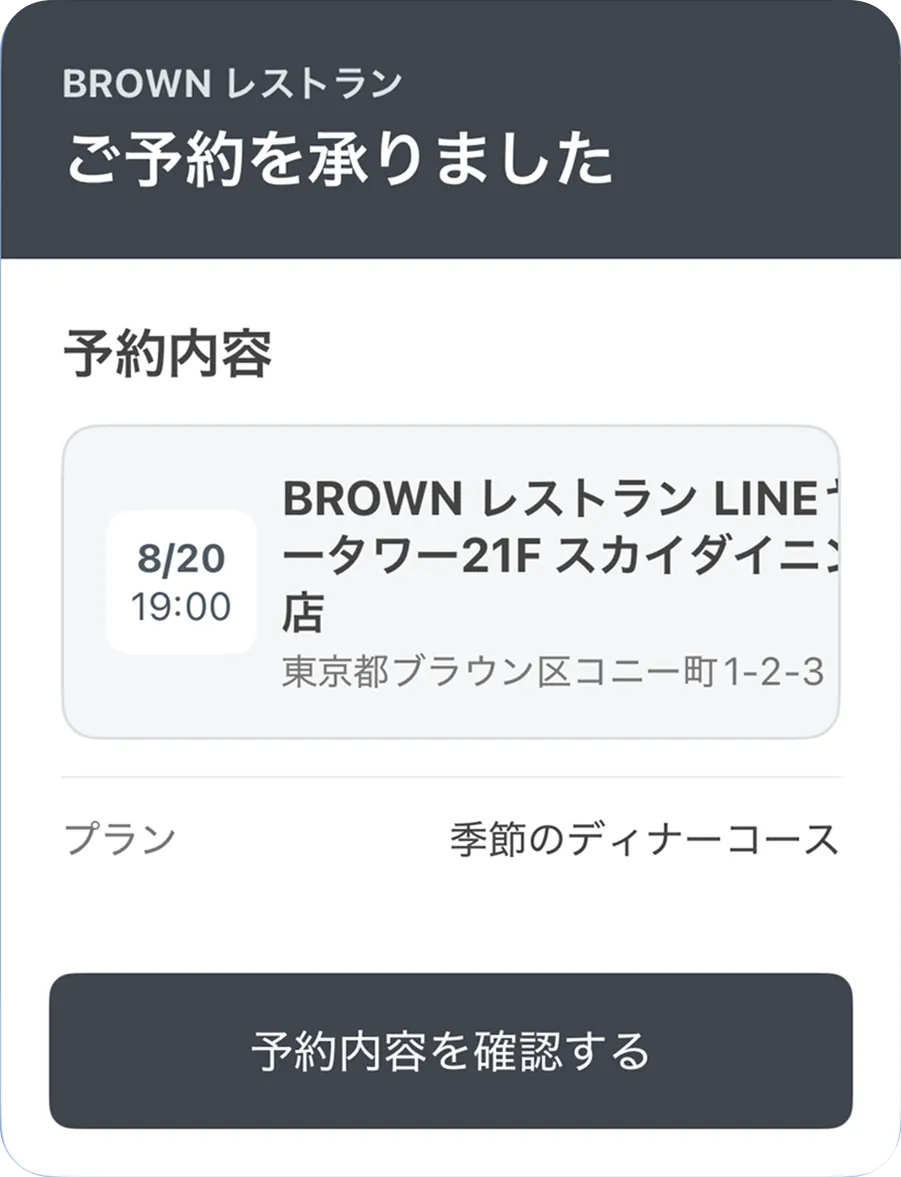 | 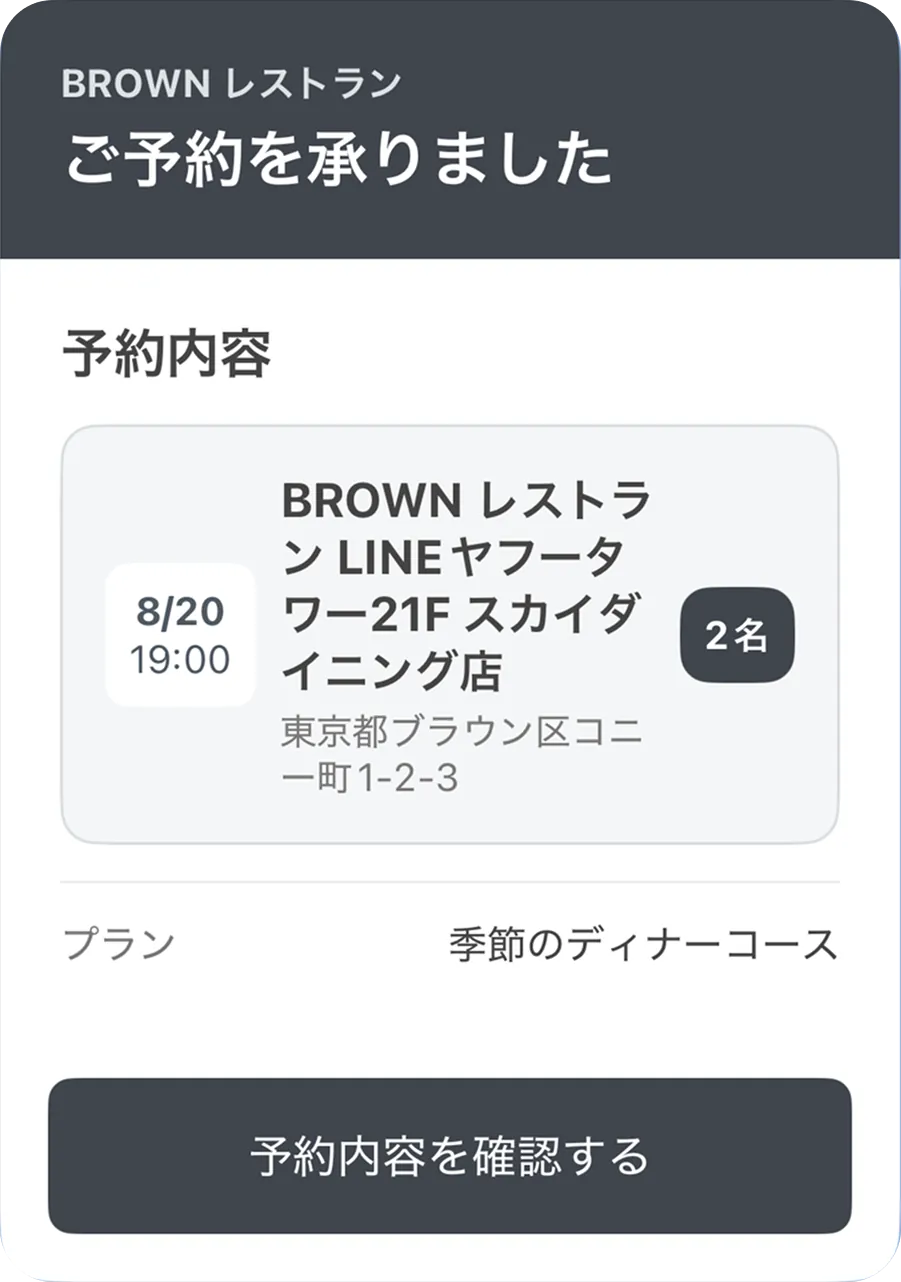 |
| 店舗情報が必要な幅を取るため、店舗名の末尾と後ろにある「2名」が表示されません。 | 残りの幅に店舗名と住所が折り返され、すべての情報が表示されます。 |
以下のJSONは、左側のflex: 0の例です。右側の例にするには、店舗情報を含むボックスのflexプロパティを1に変更します。
{
  "type": "bubble",
  "size": "mega",
  "header": {
    "type": "box",
    "layout": "vertical",
    "paddingAll": "20px",
    "backgroundColor": "#3F454D",
    "contents": [
      {
        "type": "text",
        "text": "BROWN レストラン",
        "size": "xs",
        "weight": "bold",
        "color": "#DDE1E5"
      },
      {
        "type": "text",
        "text": "ご予約を承りました",
        "size": "xl",
        "weight": "bold",
        "color": "#FFFFFF",
        "margin": "sm",
        "wrap": true
      }
    ]
  },
  "body": {
    "type": "box",
    "layout": "vertical",
    "paddingAll": "20px",
    "spacing": "lg",
    "contents": [
      {
        "type": "text",
        "text": "予約内容",
        "size": "lg",
        "weight": "bold"
      },
      {
        "type": "box",
        "layout": "horizontal",
        "alignItems": "center",
        "spacing": "md",
        "paddingAll": "14px",
        "cornerRadius": "12px",
        "backgroundColor": "#F5F6F7",
        "borderWidth": "1px",
        "borderColor": "#DADDE1",
        "contents": [
          {
            "type": "box",
            "layout": "vertical",
            "flex": 0,
            "paddingAll": "8px",
            "cornerRadius": "8px",
            "backgroundColor": "#FFFFFF",
            "contents": [
              {
                "type": "text",
                "text": "8/20",
                "size": "xs",
                "weight": "bold",
                "color": "#4F5963",
                "align": "center"
              },
              {
                "type": "text",
                "text": "19:00",
                "size": "xs",
                "color": "#4F5963",
                "align": "center"
              }
            ]
          },
          {
            "type": "box",
            "layout": "vertical",
            "spacing": "xs",
            "flex": 0,
            "contents": [
              {
                "type": "text",
                "text": "BROWN レストラン LINEヤフータワー21F スカイダイニング店",
                "size": "md",
                "weight": "bold",
                "wrap": true
              },
              {
                "type": "text",
                "text": "東京都ブラウン区コニー町1-2-3",
                "size": "xs",
                "color": "#777777",
                "wrap": true
              }
            ]
          },
          {
            "type": "box",
            "layout": "vertical",
            "flex": 0,
            "paddingAll": "8px",
            "cornerRadius": "10px",
            "backgroundColor": "#3F454D",
            "contents": [
              {
                "type": "text",
                "text": "2名",
                "size": "xs",
                "weight": "bold",
                "color": "#FFFFFF"
              }
            ]
          }
        ]
      },
      {
        "type": "separator"
      },
      {
        "type": "box",
        "layout": "horizontal",
        "contents": [
          {
            "type": "text",
            "text": "プラン",
            "size": "sm",
            "color": "#777777",
            "flex": 0
          },
          {
            "type": "text",
            "text": "季節のディナーコース",
            "size": "sm",
            "align": "end",
            "wrap": true,
            "flex": 1
          }
        ]
      }
    ]
  },
  "footer": {
    "type": "box",
    "layout": "vertical",
    "paddingAll": "16px",
    "contents": [
      {
        "type": "button",
        "style": "primary",
        "color": "#3F454D",
        "action": {
          "type": "uri",
          "label": "予約内容を確認する",
          "uri": "https://example.com/reservations/BR-017"
        }
      }
    ]
  }
}
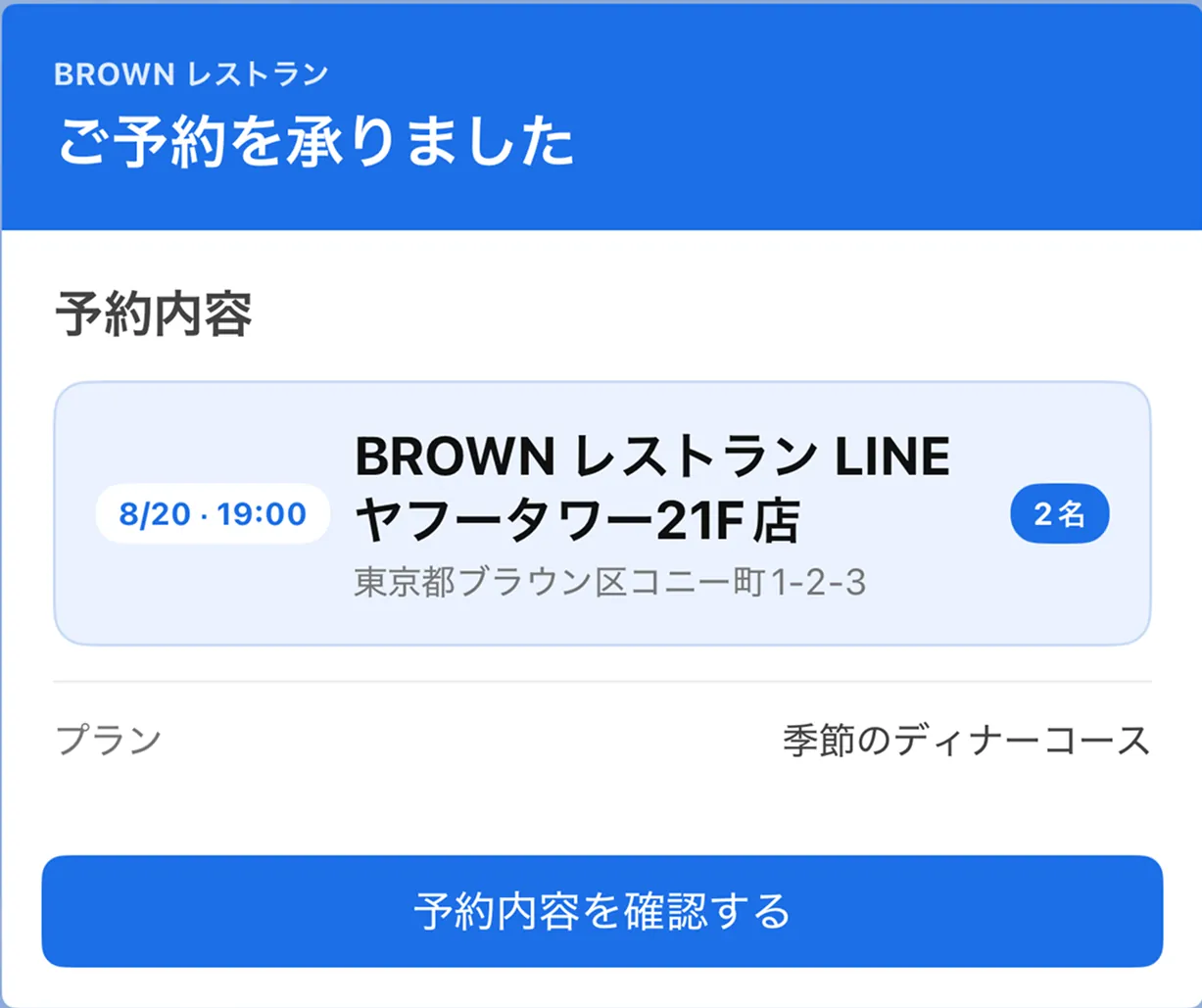
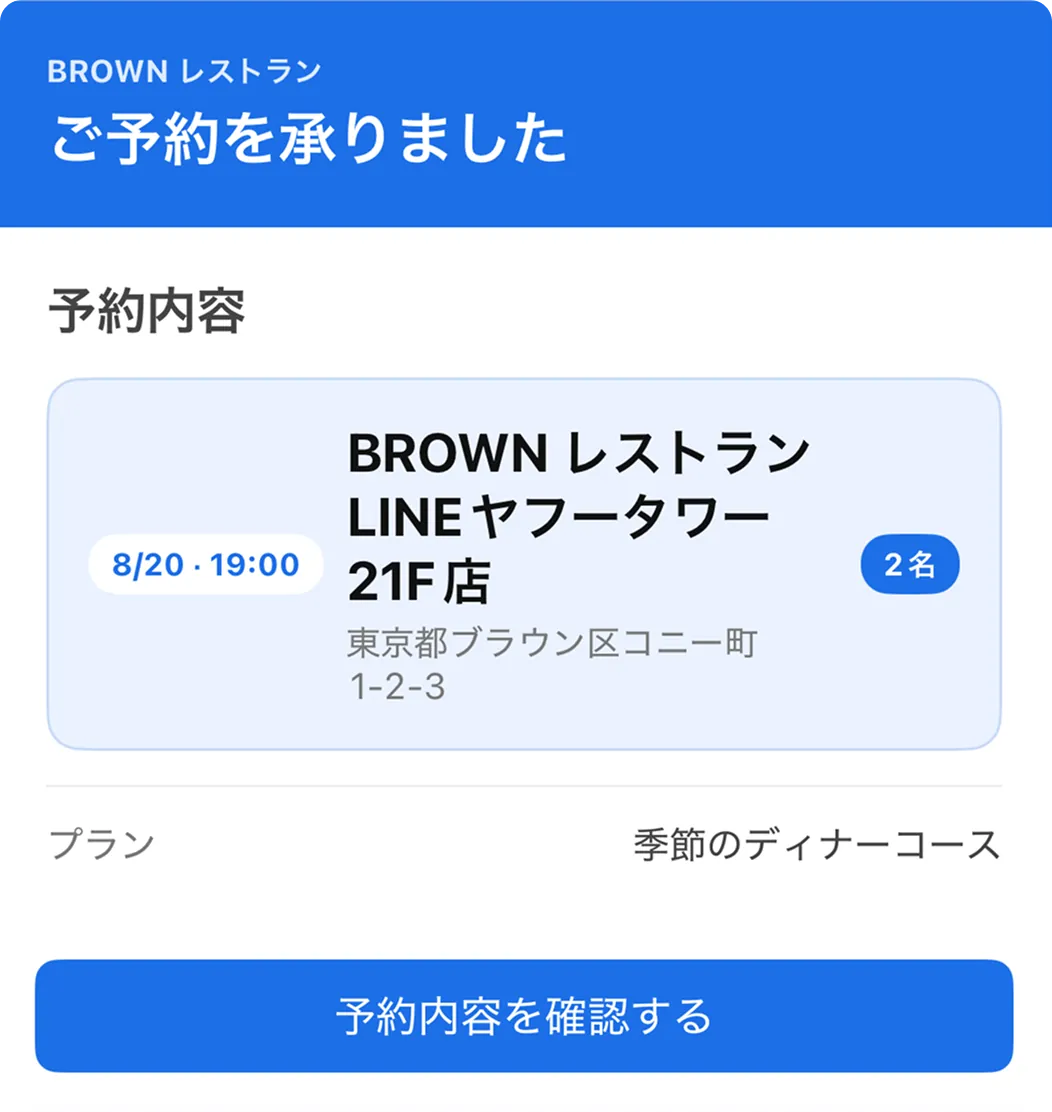
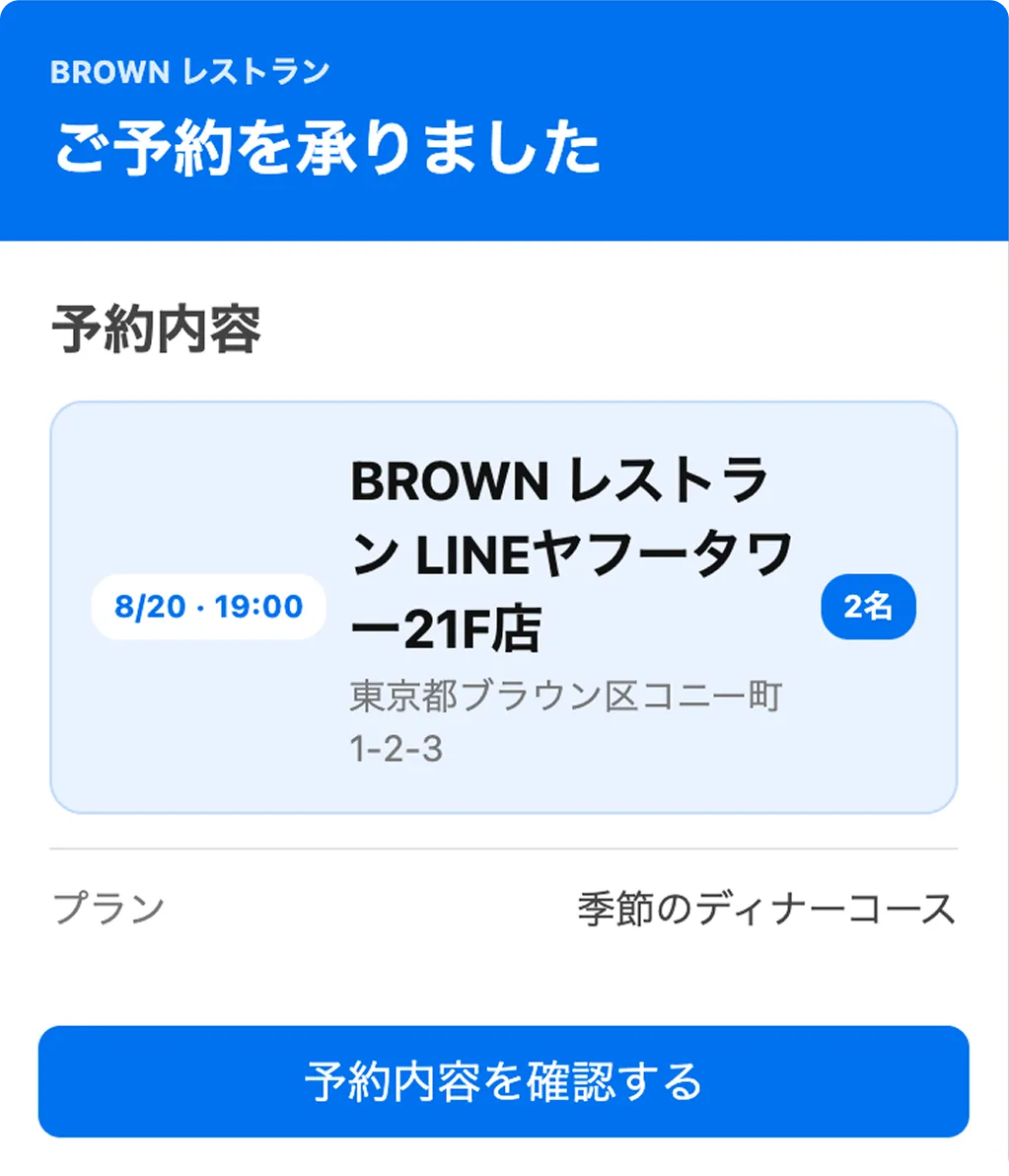
また、以下は同じFlex Messageを画面幅の異なるiOS端末とFlex Message Simulatorで表示した例です。
| iOS(画面幅が広い端末) | iOS(画面幅が狭い端末) | Flex Message Simulator |
|---|
 |  |  |
{
  "type": "bubble",
  "size": "giga",
  "header": {
    "type": "box",
    "layout": "vertical",
    "paddingAll": "18px",
    "backgroundColor": "#1D6FE8",
    "contents": [
      {
        "type": "text",
        "text": "BROWN レストラン",
        "size": "xxs",
        "weight": "bold",
        "color": "#DCEAFF"
      },
      {
        "type": "text",
        "text": "ご予約を承りました",
        "size": "xl",
        "weight": "bold",
        "color": "#FFFFFF",
        "margin": "sm",
        "wrap": true
      }
    ]
  },
  "body": {
    "type": "box",
    "layout": "vertical",
    "paddingAll": "18px",
    "spacing": "lg",
    "contents": [
      {
        "type": "text",
        "text": "予約内容",
        "size": "lg",
        "weight": "bold"
      },
      {
        "type": "box",
        "layout": "horizontal",
        "alignItems": "center",
        "spacing": "md",
        "paddingAll": "14px",
        "cornerRadius": "12px",
        "backgroundColor": "#EAF2FF",
        "borderWidth": "1px",
        "borderColor": "#C8DAF6",
        "contents": [
          {
            "type": "box",
            "layout": "vertical",
            "flex": 0,
            "paddingTop": "4px",
            "paddingBottom": "4px",
            "paddingStart": "8px",
            "paddingEnd": "8px",
            "cornerRadius": "10px",
            "backgroundColor": "#FFFFFF",
            "contents": [
              {
                "type": "text",
                "text": "8/20 · 19:00",
                "size": "xxs",
                "weight": "bold",
                "color": "#1D6FE8"
              }
            ]
          },
          {
            "type": "box",
            "layout": "vertical",
            "spacing": "xs",
            "flex": 1,
            "contents": [
              {
                "type": "text",
                "text": "BROWN レストラン LINEヤフータワー21F店",
                "size": "lg",
                "weight": "bold",
                "color": "#111111",
                "wrap": true
              },
              {
                "type": "text",
                "text": "東京都ブラウン区コニー町1-2-3",
                "size": "xs",
                "color": "#777777",
                "wrap": true
              }
            ]
          },
          {
            "type": "box",
            "layout": "vertical",
            "flex": 0,
            "paddingTop": "4px",
            "paddingBottom": "4px",
            "paddingStart": "8px",
            "paddingEnd": "8px",
            "cornerRadius": "10px",
            "backgroundColor": "#1D6FE8",
            "contents": [
              {
                "type": "text",
                "text": "2名",
                "size": "xxs",
                "weight": "bold",
                "color": "#FFFFFF"
              }
            ]
          }
        ]
      },
      {
        "type": "separator"
      },
      {
        "type": "box",
        "layout": "vertical",
        "spacing": "sm",
        "contents": [
          {
            "type": "box",
            "layout": "horizontal",
            "contents": [
              {
                "type": "text",
                "text": "プラン",
                "size": "sm",
                "color": "#777777",
                "flex": 0
              },
              {
                "type": "text",
                "text": "季節のディナーコース",
                "size": "sm",
                "align": "end",
                "wrap": true,
                "flex": 1
              }
            ]
          }
        ]
      }
    ]
  },
  "footer": {
    "type": "box",
    "layout": "vertical",
    "paddingAll": "14px",
    "contents": [
      {
        "type": "button",
        "style": "primary",
        "color": "#1D6FE8",
        "height": "sm",
        "action": {
          "type": "uri",
          "label": "予約内容を確認する",
          "uri": "https://example.com/reservations/BR-017"
        }
      }
    ]
  }
}
テキスト、ボタン、アイコンのscalingプロパティをtrueにすると、ユーザーが設定したLINEアプリのフォントサイズに応じて、フォントやアイコンのサイズが拡大縮小されます。フォントサイズを大きく設定している場合は、テキストが早く折り返されたり、コンポーネントの高さが変わったりする可能性があります。
ボタンやテキストには、adjustModeプロパティでshrink-to-fitを指定できます。ただし、adjustModeプロパティはベストエフォートで機能するため、プラットフォームによって動作が異なる、または動作しない場合があります。
以下は、iOS版LINEのフォントサイズを[特大]に設定し、各コンポーネントのscalingプロパティを切り替えた場合の表示例です。どちらのボタンにもadjustMode: shrink-to-fitを指定しています。
scaling: true | scaling: false |
|---|
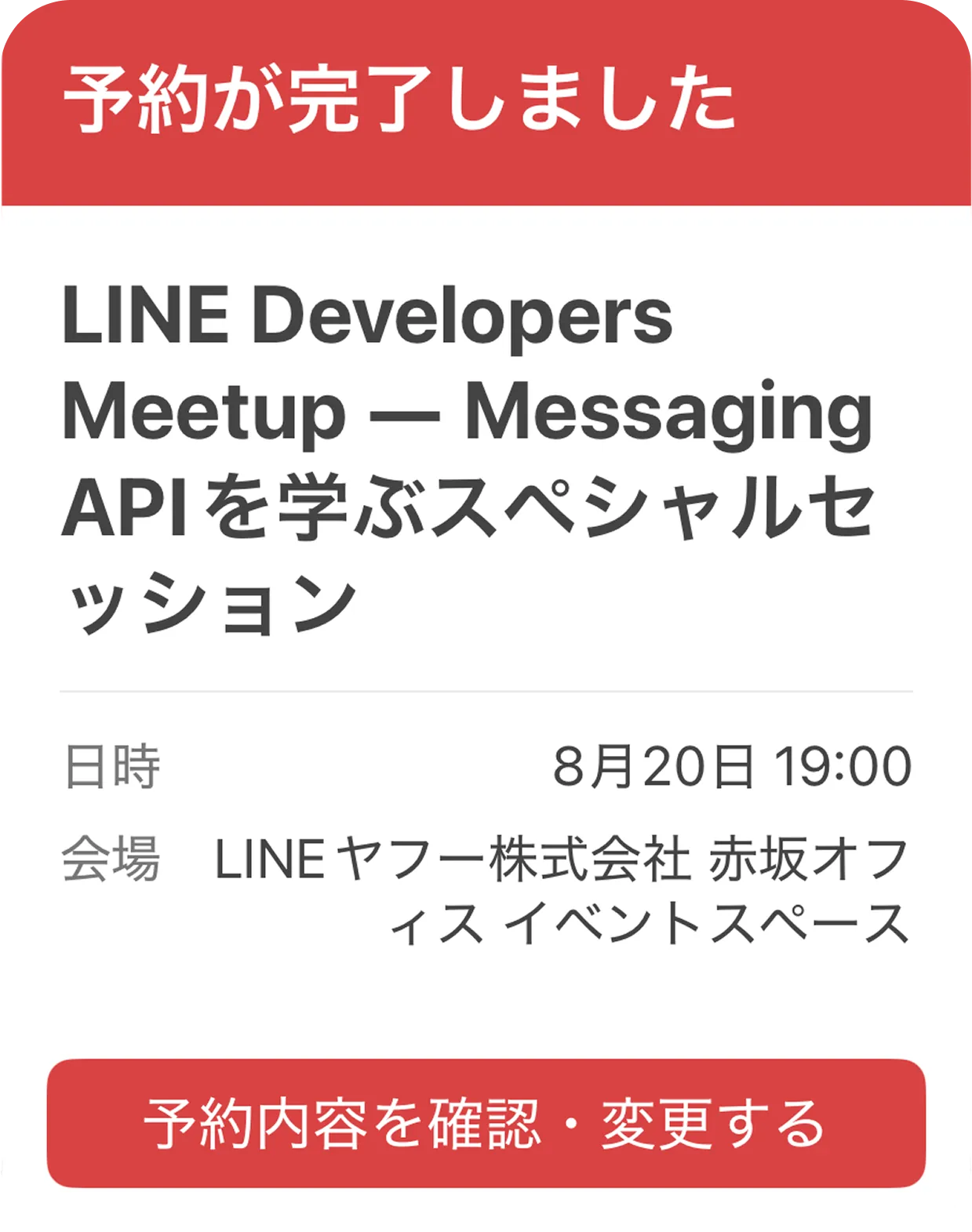 | 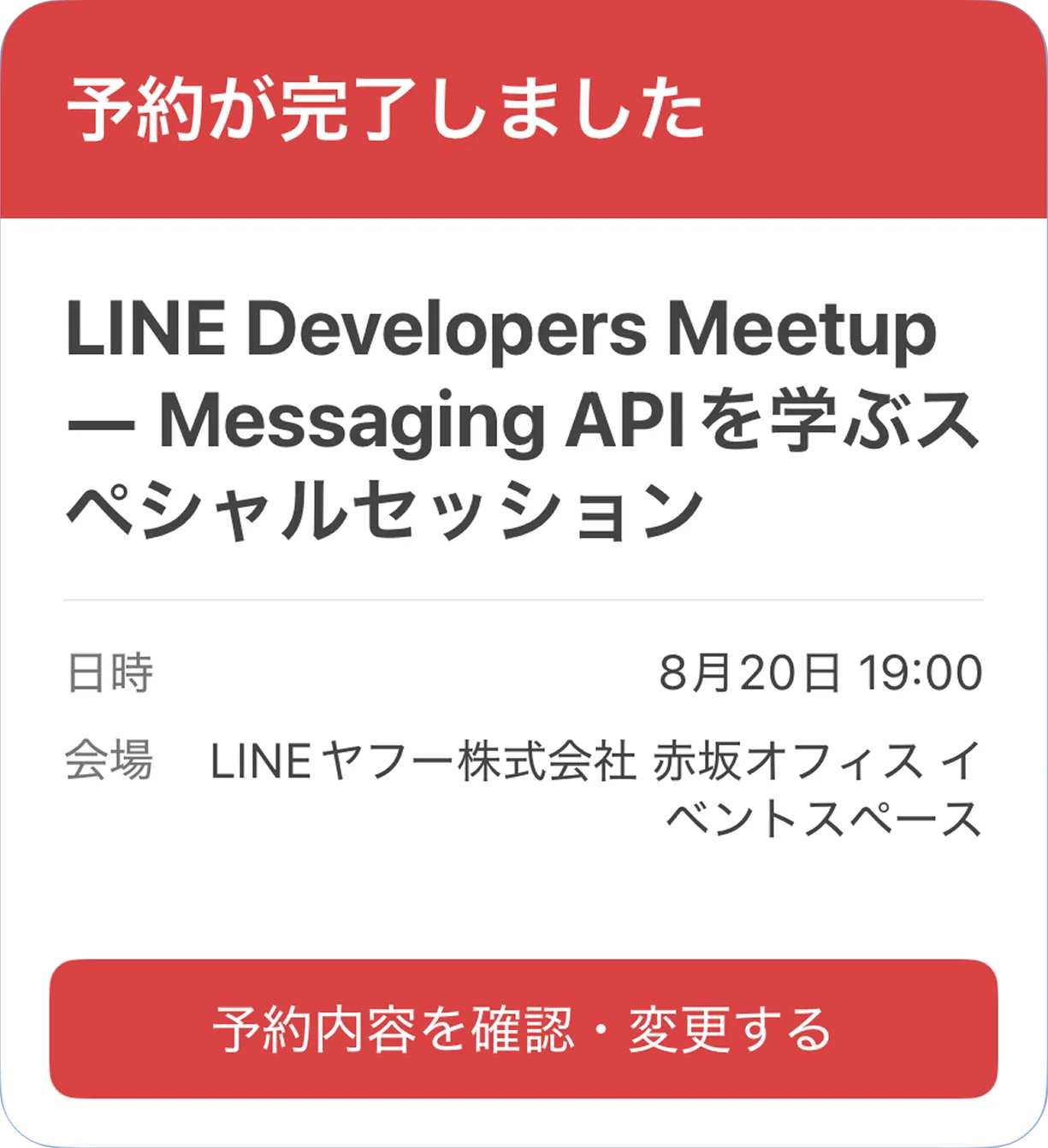 |
レイアウトの変化を避けるためにscaling: falseを指定するのではなく、scaling: trueを指定したうえで、フォントサイズが変わっても重要な情報を読めるレイアウトにしてください。
{
  "type": "bubble",
  "size": "mega",
  "header": {
    "type": "box",
    "layout": "vertical",
    "paddingAll": "18px",
    "backgroundColor": "#D94343",
    "contents": [
      {
        "type": "text",
        "text": "予約が完了しました",
        "size": "xl",
        "weight": "bold",
        "color": "#FFFFFF",
        "scaling": true
      }
    ]
  },
  "body": {
    "type": "box",
    "layout": "vertical",
    "paddingAll": "18px",
    "spacing": "lg",
    "contents": [
      {
        "type": "text",
        "text": "LINE Developers Meetup ― Messaging APIを学ぶスペシャルセッション",
        "size": "xl",
        "weight": "bold",
        "wrap": true,
        "scaling": true
      },
      {
        "type": "separator"
      },
      {
        "type": "box",
        "layout": "vertical",
        "spacing": "md",
        "contents": [
          {
            "type": "box",
            "layout": "horizontal",
            "spacing": "md",
            "contents": [
              {
                "type": "text",
                "text": "日時",
                "size": "sm",
                "color": "#777777",
                "flex": 0,
                "scaling": true
              },
              {
                "type": "text",
                "text": "8月20日 19:00",
                "size": "sm",
                "align": "end",
                "wrap": true,
                "flex": 1,
                "scaling": true
              }
            ]
          },
          {
            "type": "box",
            "layout": "horizontal",
            "spacing": "md",
            "contents": [
              {
                "type": "text",
                "text": "会場",
                "size": "sm",
                "color": "#777777",
                "flex": 0,
                "scaling": true
              },
              {
                "type": "text",
                "text": "LINEヤフー株式会社 赤坂オフィス イベントスペース",
                "size": "sm",
                "align": "end",
                "wrap": true,
                "flex": 1,
                "scaling": true
              }
            ]
          }
        ]
      }
    ]
  },
  "footer": {
    "type": "box",
    "layout": "vertical",
    "paddingAll": "14px",
    "contents": [
      {
        "type": "button",
        "style": "primary",
        "color": "#D94343",
        "height": "sm",
        "scaling": true,
        "adjustMode": "shrink-to-fit",
        "action": {
          "type": "uri",
          "label": "予約内容を確認・変更する",
          "uri": "https://example.com/reservations/meetup"
        }
      }
    ]
  }
}
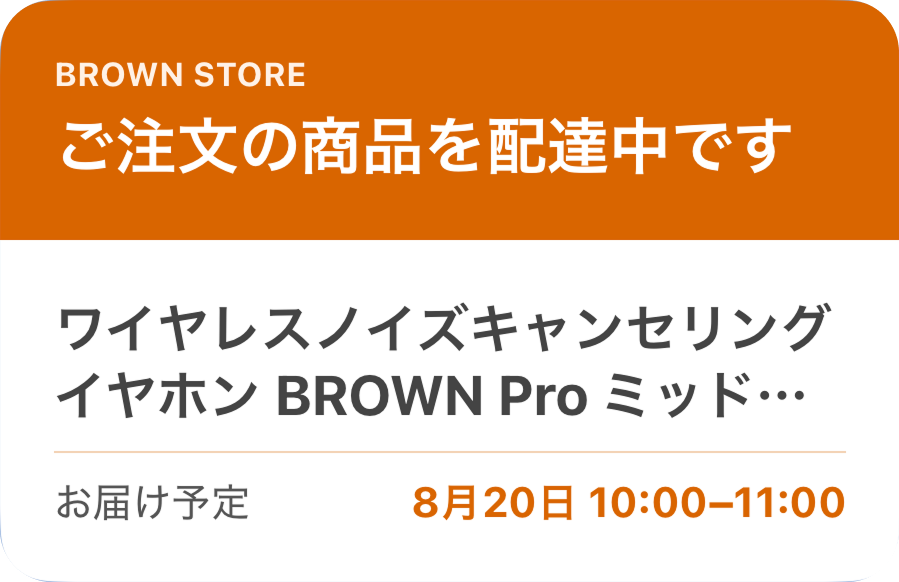
支払期限、予約日時、注文ステータスなどの重要な情報は、長い商品名や説明文に含めず、独立したテキストコンポーネントとして配置します。これにより、商品名や説明文が途中で省略されても、重要な情報を表示できます。
以下は、商品名とお届け予定を別のコンポーネントにしたFlex MessageをiOS端末で表示した例です。
{
  "type": "bubble",
  "size": "mega",
  "header": {
    "type": "box",
    "layout": "vertical",
    "paddingAll": "18px",
    "backgroundColor": "#D96500",
    "contents": [
      {
        "type": "text",
        "text": "BROWN STORE",
        "size": "xxs",
        "weight": "bold",
        "color": "#FFF1E6"
      },
      {
        "type": "text",
        "text": "ご注文の商品を配達中です",
        "size": "xl",
        "weight": "bold",
        "color": "#FFFFFF",
        "margin": "sm",
        "wrap": true
      }
    ]
  },
  "body": {
    "type": "box",
    "layout": "vertical",
    "paddingAll": "18px",
    "spacing": "md",
    "contents": [
      {
        "type": "text",
        "text": "ワイヤレスノイズキャンセリングイヤホン BROWN Pro ミッドナイトブルースペシャルエディション",
        "size": "lg",
        "weight": "bold",
        "wrap": true,
        "maxLines": 2
      },
      {
        "type": "separator",
        "color": "#F3D2B5"
      },
      {
        "type": "box",
        "layout": "horizontal",
        "spacing": "md",
        "contents": [
          {
            "type": "text",
            "text": "お届け予定",
            "size": "sm",
            "color": "#555555",
            "flex": 0
          },
          {
            "type": "text",
            "text": "8月20日 10:00–11:00",
            "size": "sm",
            "weight": "bold",
            "color": "#D96500",
            "align": "end",
            "wrap": true,
            "flex": 1
          }
        ]
      }
    ]
  }
}
レイアウトを固定しすぎない
可変長テキストを含むレイアウトでは、コンポーネントの幅をピクセル値で固定すると、画面幅によって表示できるテキストが少なくなります。また、positionプロパティにabsoluteを指定したコンポーネントは他のコンポーネントの配置に影響しないため、要素同士が重なる可能性があります。重要な情報は可変長テキストと分け、flexプロパティを使う通常のレイアウト内に配置することをおすすめします。
Flex Messageはレイアウトの自由度が高いぶん、端末の画面幅やフォントサイズなどによる表示の違いに備えることが重要です。必要に応じてmaxLinesで表示する行数を制限し、flexとwrapを使って可変長テキストを適切に折り返してください。また、重要な情報を別のコンポーネントに分けることで、テキストの表示範囲が変わっても情報を伝えやすくなります。
Flex Messageを作成するときは、完成した見た目だけでなく、「長いテキストを入れても重要な情報が表示されるか」「画面幅が変わっても要素が重なったり、表示されなくなったりしないか」「フォントサイズを変更しても読みやすいか」も確認してください。