

LINE MINI App authorization flow
For a LIFF app to get user information or send messages to users, users need to consent to the corresponding permissions on the channel consent screen when they access the LIFF app for the first time.
In LINE MINI Apps, with the "Channel consent simplification" feature, users only need to consent to the simplification once. After that, when users access another LINE MINI App for the first time, the channel consent screen is skipped, allowing users to start using the LINE MINI App immediately.
This page explains the "Channel consent simplification" feature and the authorization flow based on it.
- What is the "Channel consent simplification" feature
- Authorization flow in LINE MINI Apps where the "Channel consent simplification" feature is enabled
- Authorization flow in LINE MINI Apps where the "Channel consent simplification" feature is disabled
- Differences in behavior based on whether users have consented to the simplification
What is the "Channel consent simplification" feature
The "Channel consent simplification" feature is a mechanism that simplifies the permission consent required when users access a LINE MINI App for the first time. Once users agree to the simplification, they are considered to have consented to the required permissions for other LINE MINI Apps as well. For LINE MINI Apps that users access for the first time thereafter (*), the channel consent screen is skipped, allowing them to start using the LINE MINI App immediately.
However, based on LY Corporation’s privacy policy, the only permission whose consent is skipped by the "Channel consent simplification" feature is getting the user ID (the openid scope). Permissions required to get user profile information or send messages (such as the profile scope and the chat_message.write scope) aren't included in the "Channel consent simplification" feature. For these additional permissions, the verification screen is displayed within each LINE MINI App at the time the permissions are needed. For more information, see Request permissions other than the openid scope on the verification screen.
Enabling the "Channel consent simplification" feature makes it easier for users to access LINE MINI Apps. To improve the user experience, we recommend enabling the "Channel consent simplification" feature.
For new LINE MINI App channels in Japan, the "Channel consent simplification" feature is always enabled. For more information, see the news from January 8, 2026.
* In LINE MINI Apps where the "Channel consent simplification" feature is disabled, the channel consent screen is displayed.
If your LINE MINI App is designed to call the LINE Login API using an access token or an ID token retrieved via the LIFF SDK, the "Channel consent simplification" feature may cause your LINE MINI App to behave differently than expected.
For example, if your LINE MINI App is designed to call the Verify ID token endpoint and use the retrieved user profile information to create a service account for your LINE MINI App, the ID token payload won't include the user's profile information because the "Channel consent simplification" feature skips consent for retrieving the user's profile information (the profile scope). As a result, you can't use the user's profile information to create a service account.
To avoid this issue, before getting an access token or an ID token, display the verification screen using the liff.permission.query() method and the liff.permission.requestAll() method, and request the required permissions from the user. For more information, see Request permissions other than the openid scope on the verification screen.
The "Channel consent simplification" feature setup
The "Channel consent simplification" feature can be configured only if all of the following conditions are met:
- Region to provide the service is set to "Japan" in the LINE MINI App channel.
- The status of the LINE MINI App channel is "Not yet reviewed".
For LINE MINI App channels created before January 8, 2026, to enable the "Channel consent simplification" feature, turn on the toggle in the Channel consent simplification section on the Web app settings tab of the LINE MINI App channel in the LINE Developers Console.
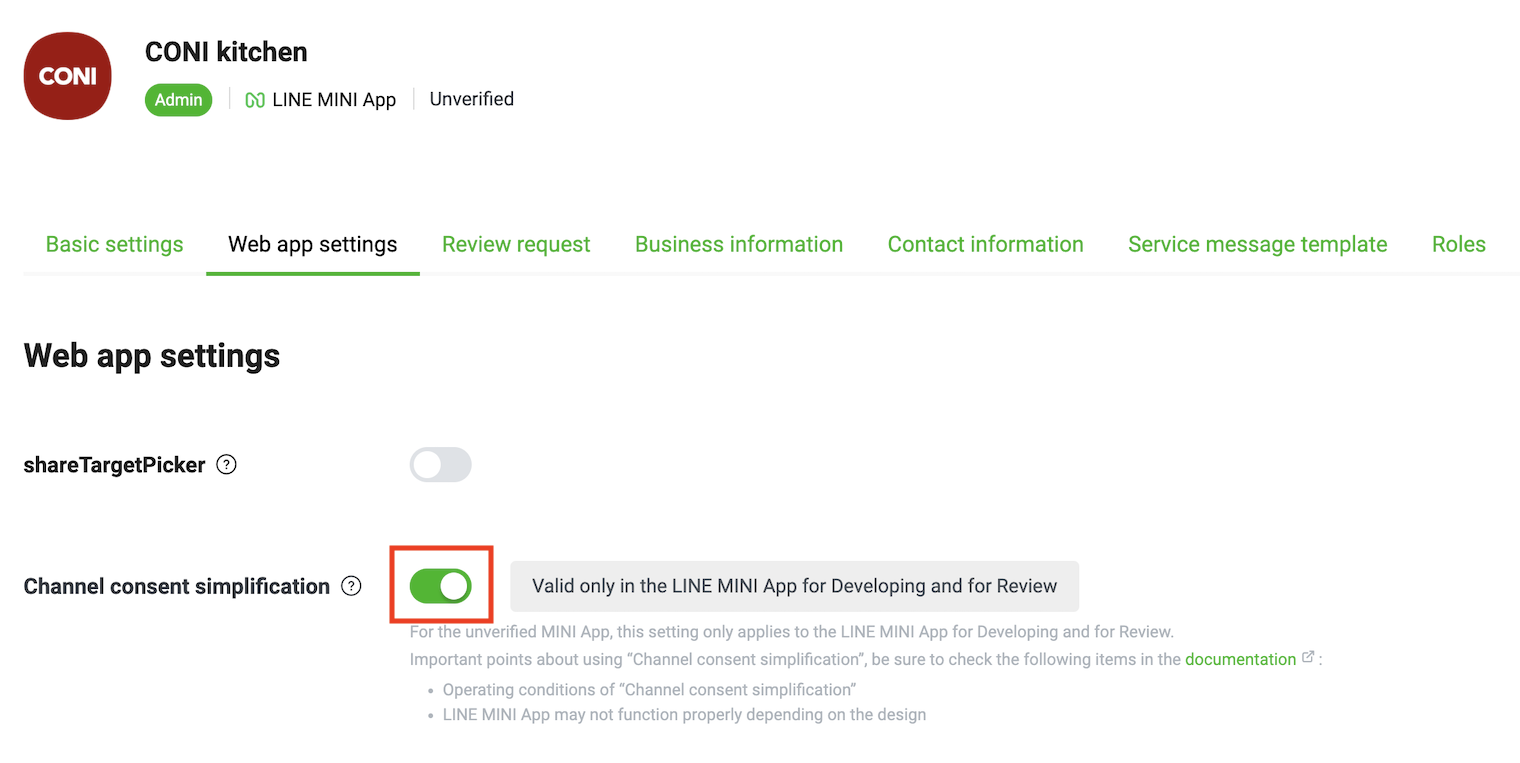
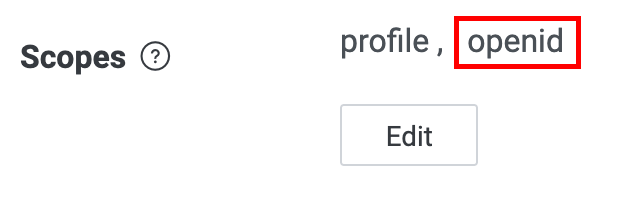
Note that because the "Channel consent simplification" feature simplifies consent for getting the user ID (the openid scope), enabling it also automatically enables openid in the Scope section.
For LINE MINI App channels created on or after January 8, 2026, the "Channel consent simplification" feature is always enabled. No configuration is required in the LINE Developers Console.
Operating conditions for the "Channel consent simplification" feature
For the "Channel consent simplification" feature to work, all of the following conditions must be met:
- LINE MINI App is a verified MINI App (*).
- The LIFF SDK version of the LINE MINI App is v2.13.x or later.
- The LINE MINI App isn't opened via a LIFF-to-LIFF transition.
* For unverified MINI Apps, this feature works only in the LINE MINI App for Developing and for Review.
Authorization flow in LINE MINI Apps where the "Channel consent simplification" feature is enabled
LINE MINI Apps where the "Channel consent simplification" feature is enabled request permissions from users in the following two steps:
- Request permission to get the user ID (the
openidscope) on the simplification consent screen - Request permissions other than the
openidscope on the verification screen
1. Request permission to get the user ID (the openid scope) on the simplification consent screen
When users access a LINE MINI App where the "Channel consent simplification" feature is enabled for the first time, the simplification consent screen is displayed. On the simplification consent screen, users are asked whether they want to allow the LINE MINI App to get their user ID (the openid scope).
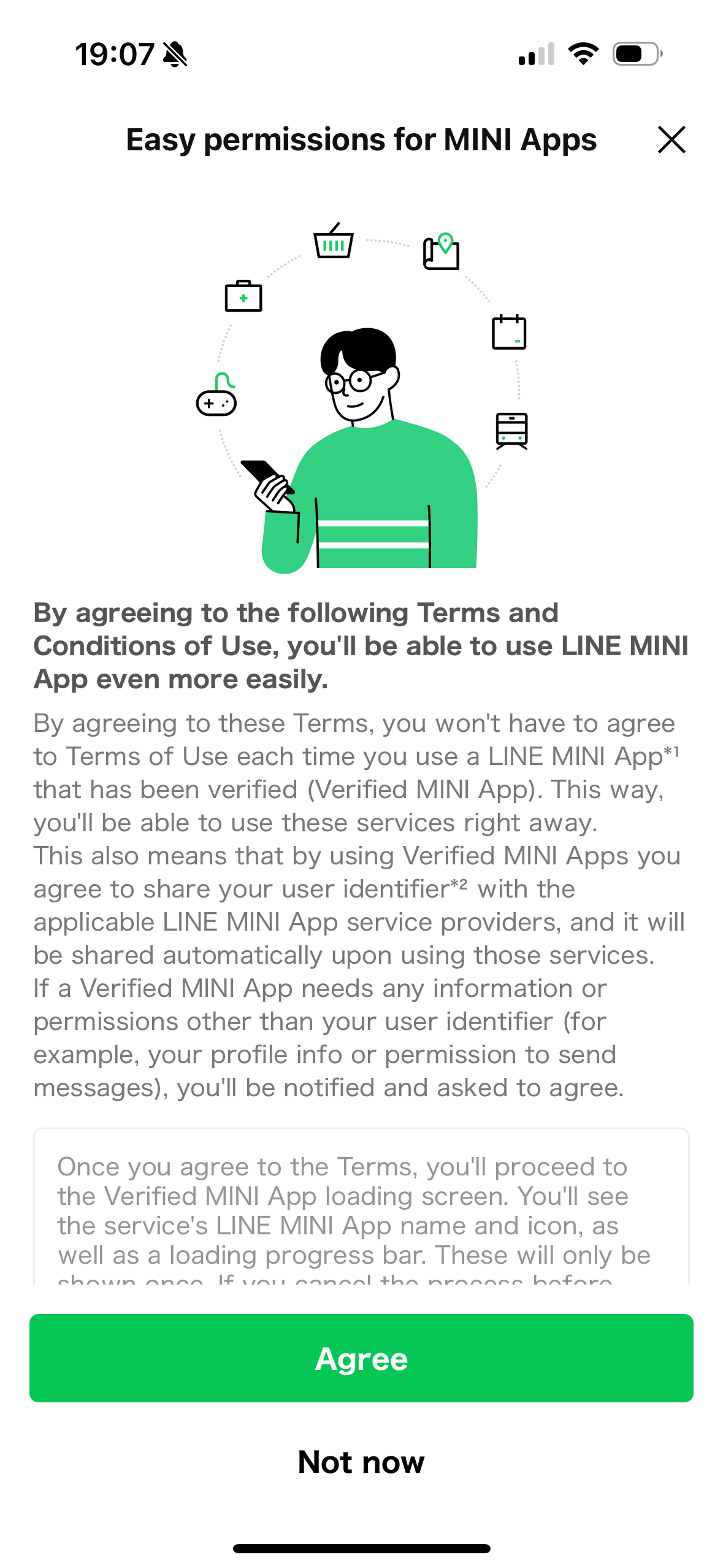
When users taps Agree, a loading screen is displayed, after which users can start using the LINE MINI App.
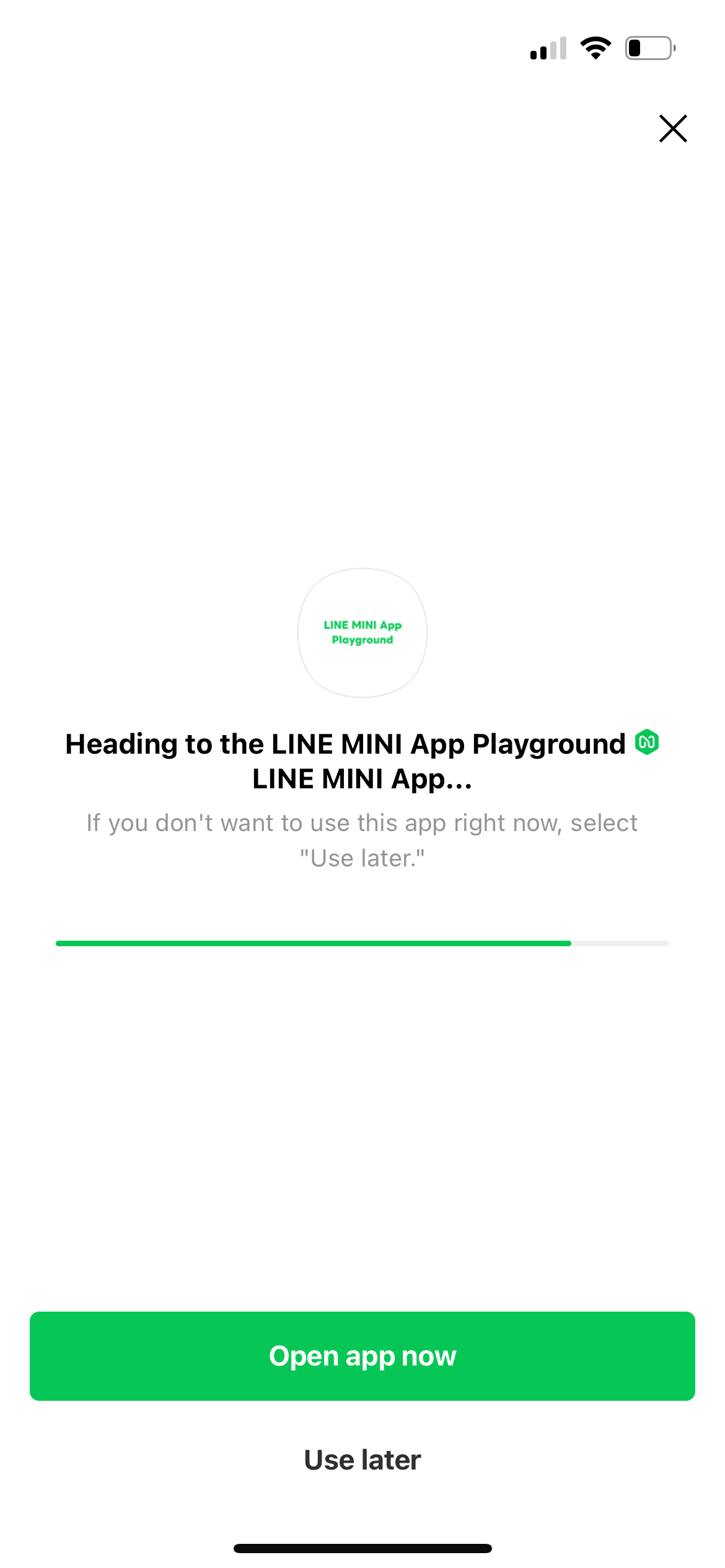
By tapping Agree, users are also considered to have consented to the retrieval of their user ID by other LINE MINI Apps. After that, when users access a LINE MINI App where the "Channel consent simplification" feature is enabled for the first time, the channel consent screen is skipped, allowing them to start using the LINE MINI App immediately.
When users tap Not now, consent to the simplification is skipped. After that, even if users open LINE MINI Apps where the "Channel consent simplification" feature is enabled, the simplification consent screen will no longer be displayed. Once 24 hours have passed after skipping, the simplification consent screen will be displayed again.
In addition, while consent to the simplification is skipped, individual channel consent screens are displayed for each LINE MINI App, just as in the authorization flow in LINE MINI Apps where the "Channel consent simplification" is disabled.
2. Request permissions other than the openid scope on the verification screen
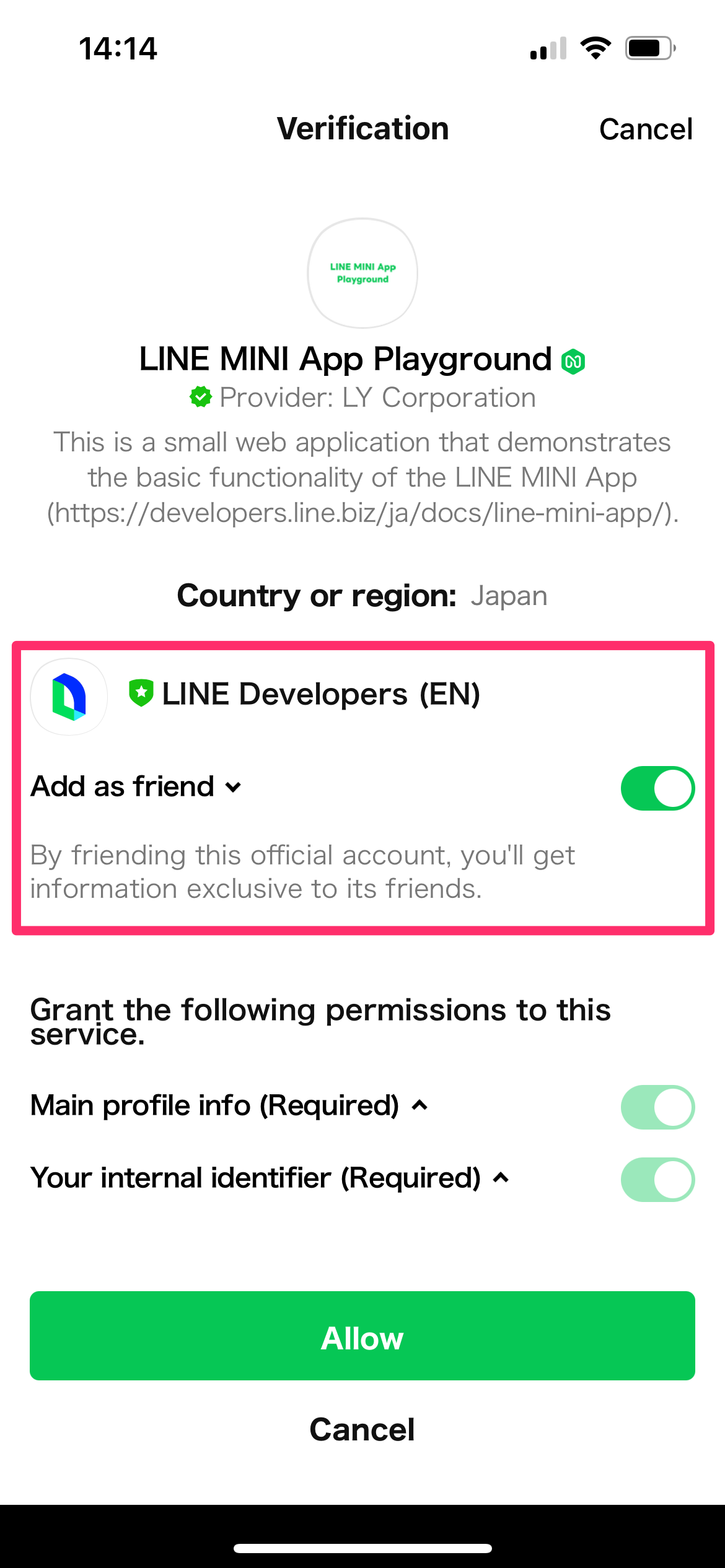
When you execute methods that require permissions other than the openid scope, such as the liff.getProfile() method or the liff.sendMessages() method, the verification screen is displayed. On the verification screen, the additional permissions requested by the LINE MINI App are shown, and users are asked whether they want to grant those permissions.
The following methods require permissions other than the openid scope:
| Scope | Method |
|---|---|
email | |
profile | |
chat_message.write |
You can use the liff.permission.query() method and the liff.permission.requestAll() method to display the verification screen at any time.
liff.permission.query("profile").then((permissionStatus) => {
  if (permissionStatus.state === "prompt") {
    liff.permission.requestAll();
  }
});
For more information, see liff.permission.query() and liff.permission.requestAll() in the LIFF API reference.
The "verification screen" is first displayed, not when a user first opens a LINE MINI App, but when permissions for scopes other than the openid scope (the profile scope or the chat_message.writescope etc.) are required.
Therefore, if you've designed your LINE MINI App so that immediately after it's launched, it executes requests that require permissions other than the openid scope, such as the liff.getProfile() method, when users access your LINE MINI App, it would appear as if the channel consent screen were displayed without being skipped. We recommend implementing your LINE MINI App so that requests requiring permissions other than the openid scope are executed only when they are actually needed, whenever possible.
Important points about using the "Channel consent simplification" feature together with the add friend option
In the LINE MINI App, you can use the add friend option to prompt users to add your LINE Official Account from the verification screen or the channel consent screen.
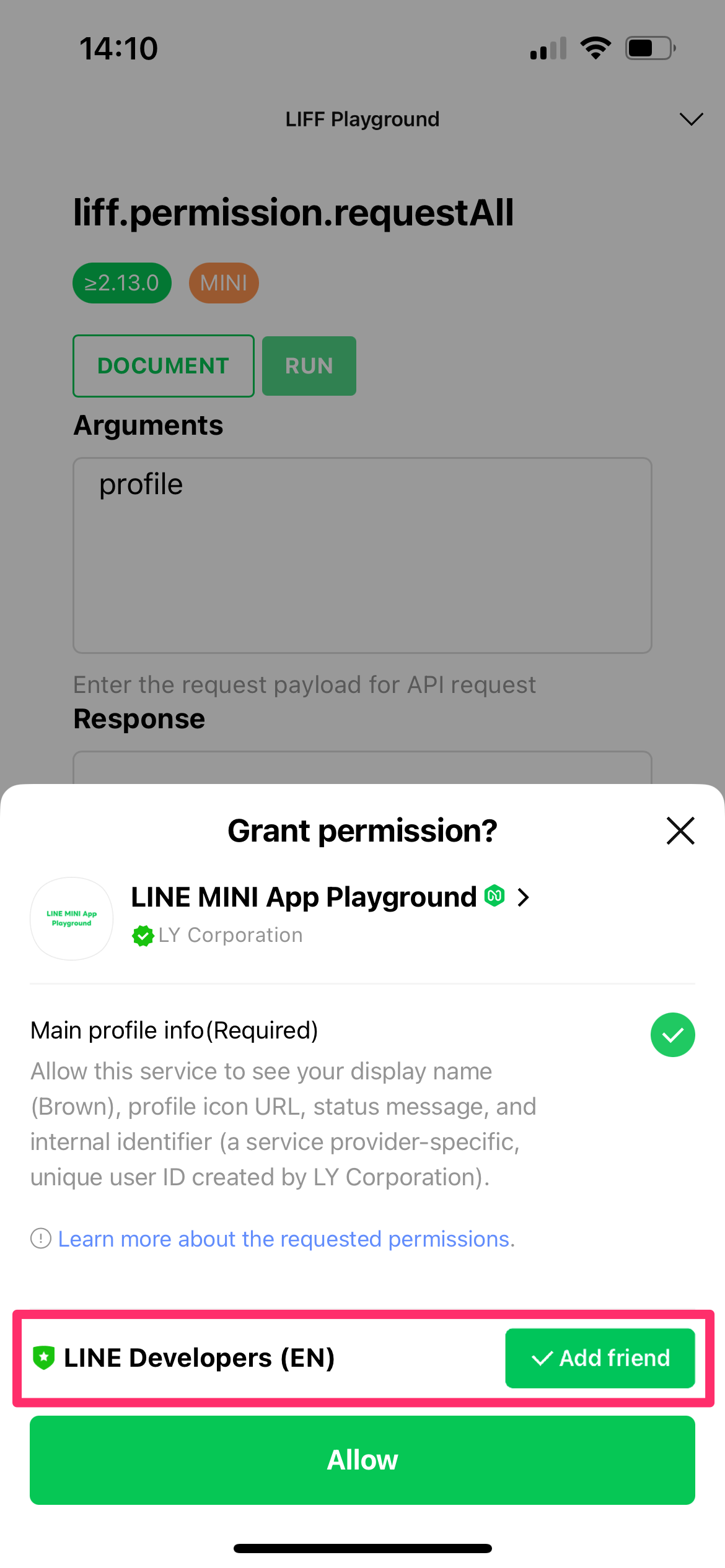
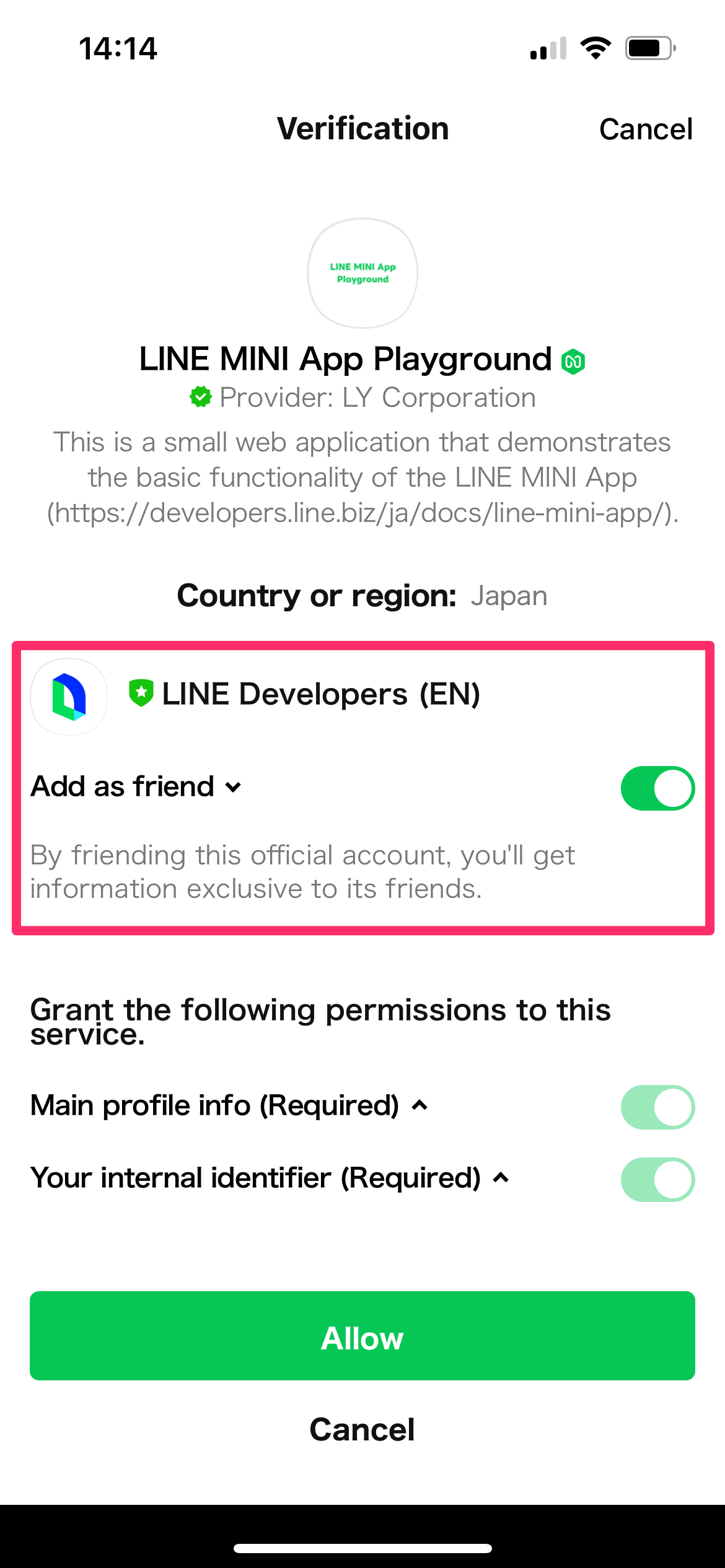
However, if only openid is specified in the Scope section of the Web app settings tab in your LINE MINI App channel, enabling the "Channel consent simplification" feature will prevent the verification screen and the channel consent screen from appearing. As a result, you can't prompt users to add friends using the add friend option.
When using the "Channel consent simplification" feature together with the add friend option, we recommend specifying scopes other than openid in the Scope section of the Web app settings tab in your LINE MINI App channel, and displaying the verification screen. For more information, see Request permissions other than the openid scope on the verification screen.
You can also use the liff.requestFriendship() method to display a subwindow at any time, prompting users to add your LINE Official Account as a friend or unblock it.
Authorization flow in LINE MINI Apps where the "Channel consent simplification" feature is disabled
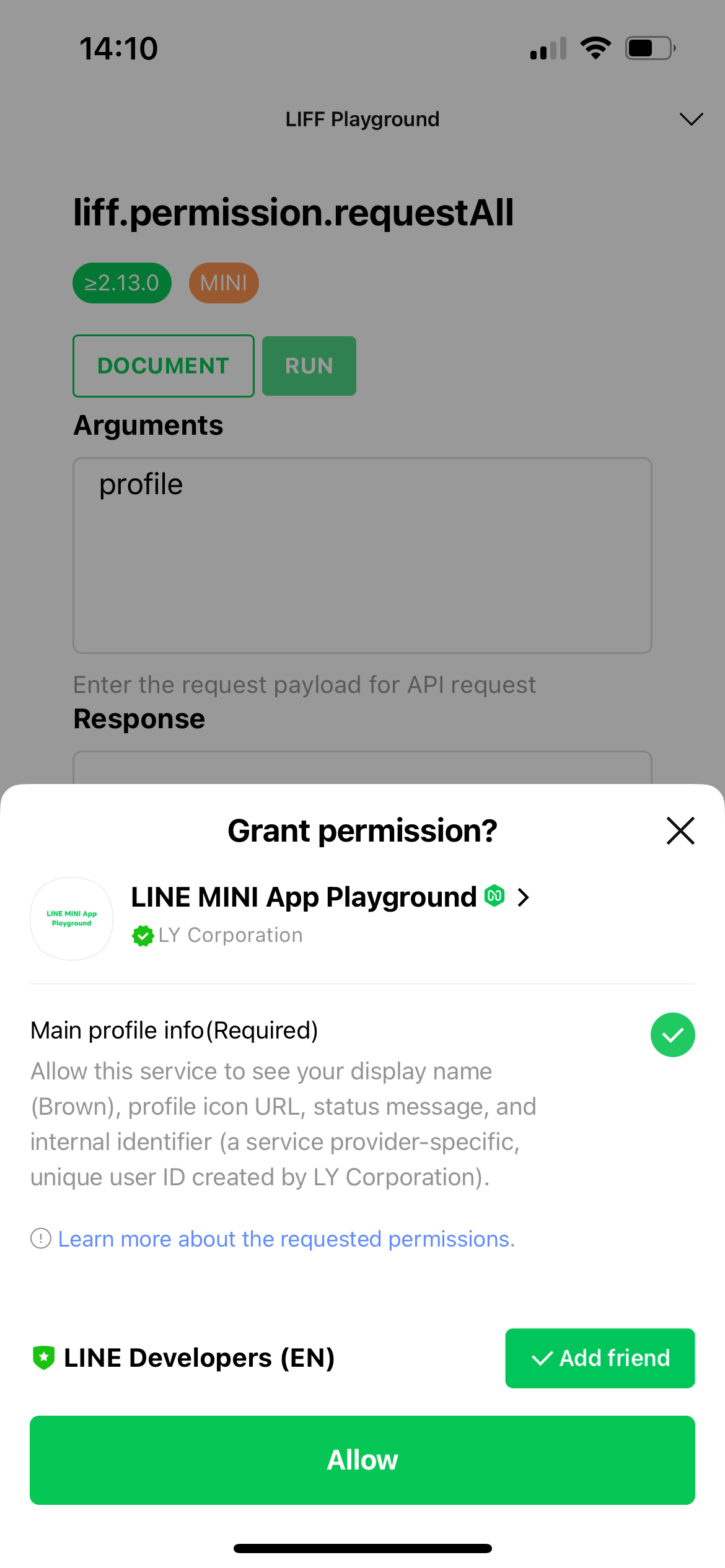
When users access a LINE MINI App where the "Channel consent simplification" feature is disabled for the first time, the channel consent screen is displayed. On the channel consent screen, a list of permissions requested by the LINE MINI App is shown, and users are asked whether they want to grant those permissions.
When users tap Allow, they can start using the LINE MINI App.
Differences in behavior based on whether users have consented to the simplification
If users have consented to the simplification on the simplification consent screen, the channel consent screen is skipped when they access a LINE MINI App where the "Channel consent simplification" feature is enabled for the first time, allowing users to start using the LINE MINI App immediately after a loading screen is shown.
On the other hand, if users haven't consented to the simplification on the simplification consent screen, the channel consent screen is displayed when they access a LINE MINI App for the first time, regardless of whether the "Channel consent simplification" feature is enabled for that LINE MINI App.
The following table shows the differences in behavior when users access a LINE MINI App for the first time, depending on whether they have consented to the simplification:
| LINE MINI App | Users have consented to the simplification | Users haven't consented to the simplification |
|---|---|---|
| LINE MINI App where the "Channel consent simplification" feature is enabled | 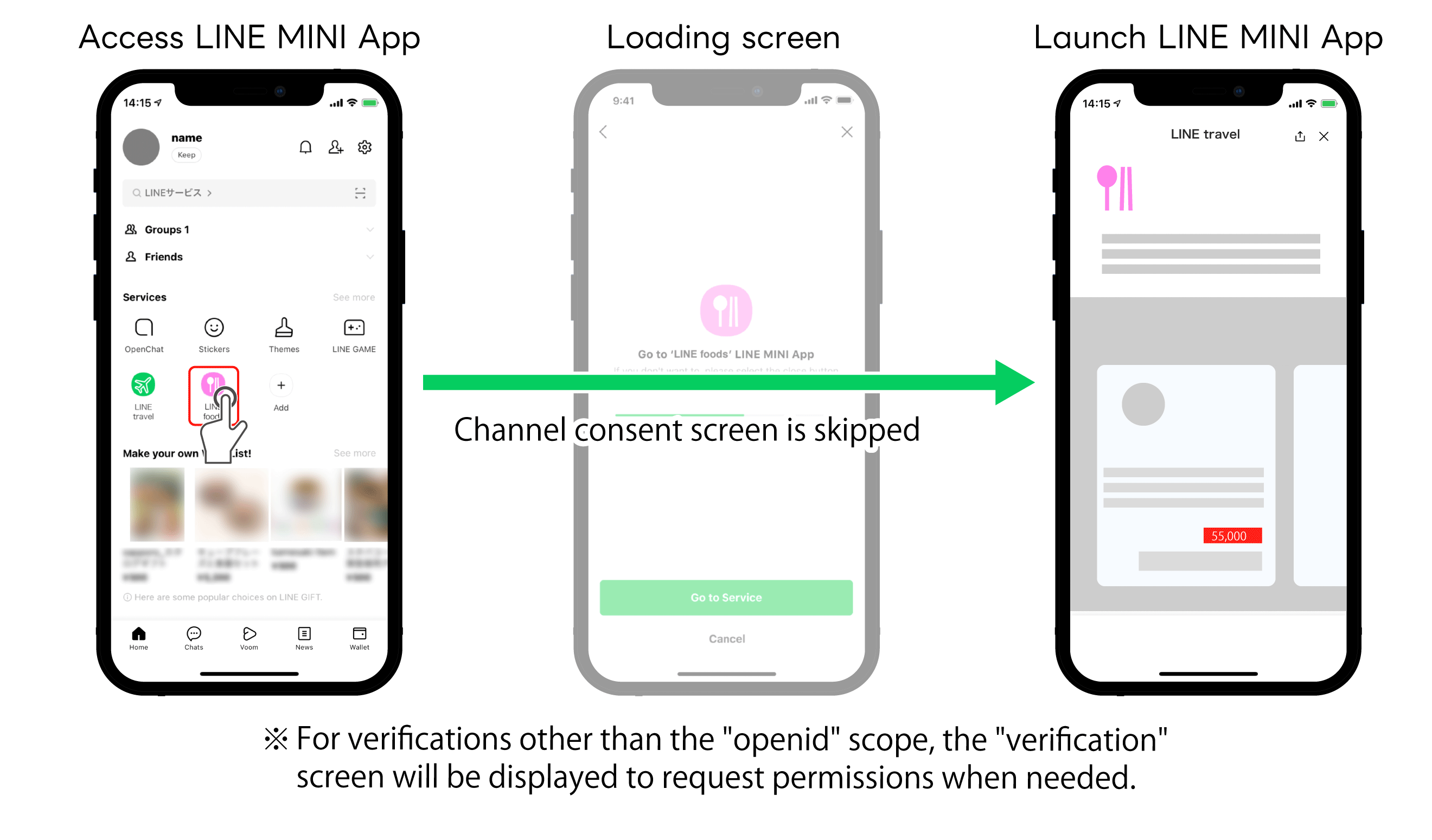 The channel consent screen is skipped. | 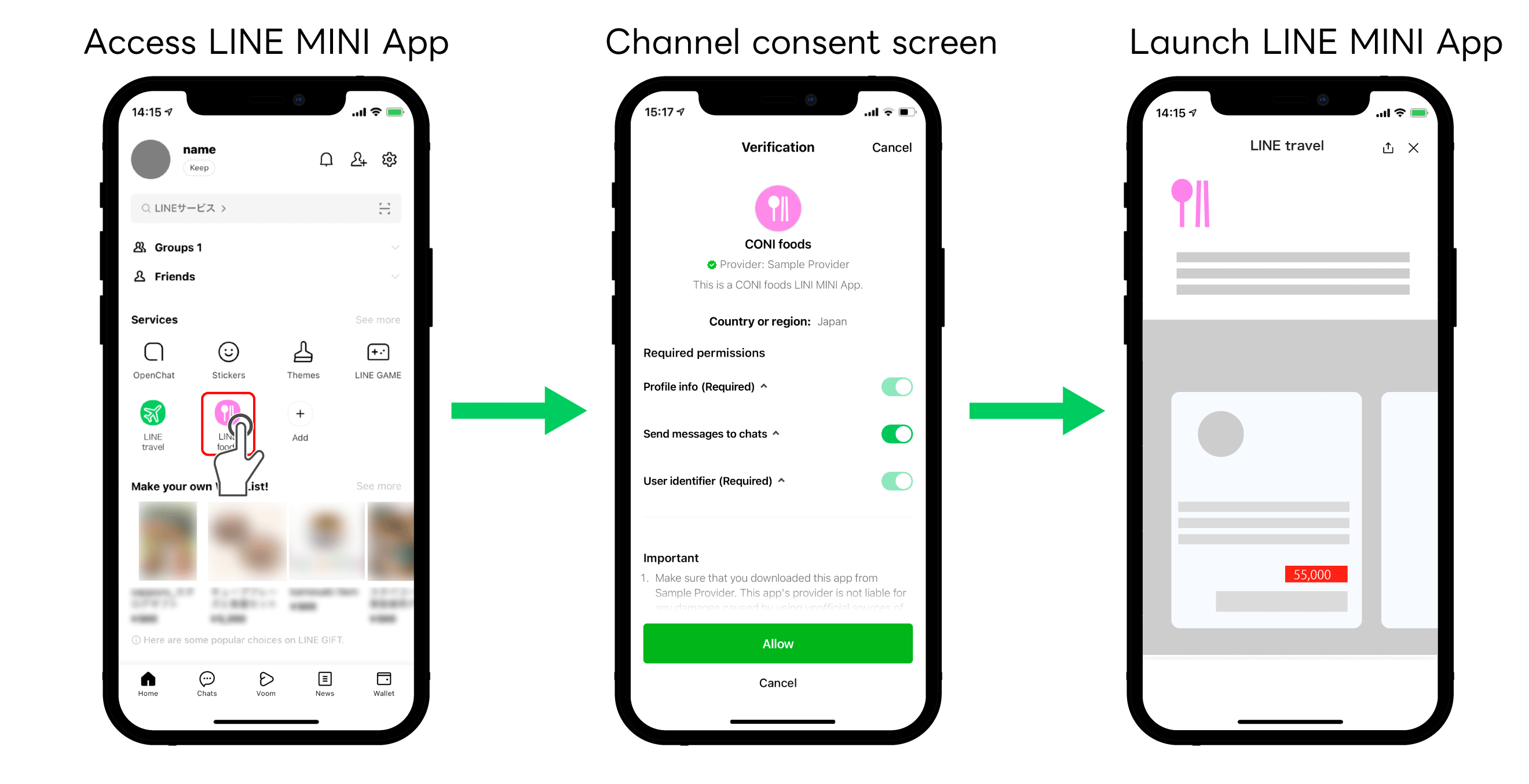 The channel consent screen is displayed. |
| LINE MINI App where the "Channel consent simplification" feature is disabled | The channel consent screen is displayed. | The channel consent screen is displayed. |