LINE DevelopersLINE Developers
About
News
Products
Documentation
FAQ
Glossary
More
 
  1. Home
Introducing our feedback form
2017/12/20

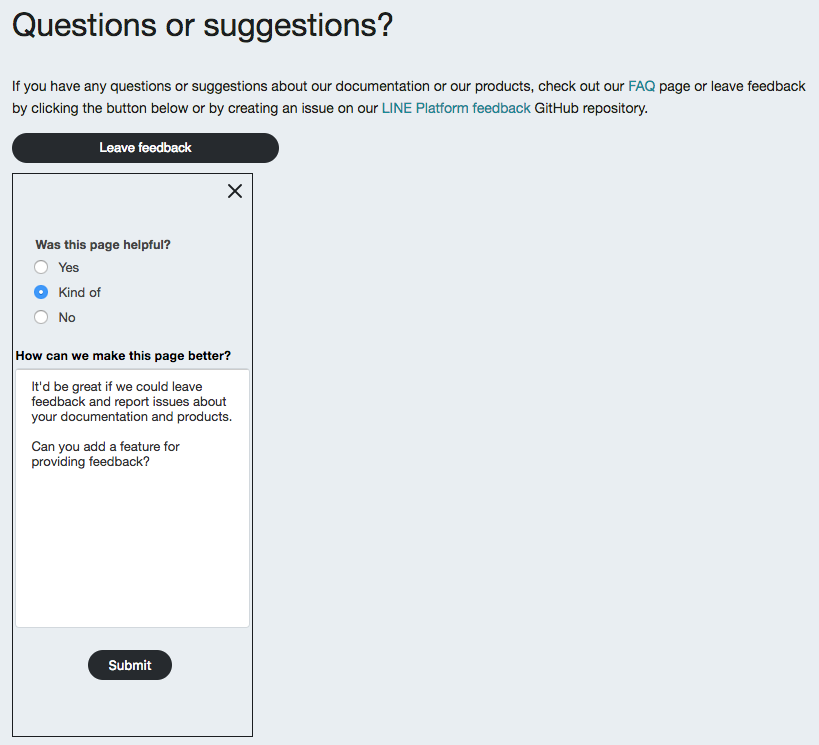
In order to improve the quality of our documentation and products, we've added a feedback form to our documentation pages. If you would like to report any bugs in our documentation or would like to leave any suggestions, click the "Leave feedback" button on the bottom of our documentation pages and complete the form.

We greatly appreciate your feedback and we are committed to improving your experience using our developer products.

Feedback form

Docs

Previous post
Community SDK section released
Next post
[Resolved] Notice about service outage for LINE Login and the Messaging API
[Resolved] Notice about service outage for LINE Login and the Messaging API
2017/12/15

We'd like to inform you about a service outage regarding our Messaging API and LINE Login products. The issue has now been resolved but we sincerely apologize for any inconvenience that this may have caused.

Date and time of outage

Date: December 14, 2017 Time: 16:40 - 17:08 (UTC+9)

Cause of the outage

Issue with our servers.

Details

  1. Requests and responses (Messaging API and LINE Login) that contained user IDs either failed or returned incorrect user IDs.
  2. Webhooks for the Messaging API did not return correct user IDs.
  3. Push message requests with specified user IDs failed.

We will continue to improve the quality of the services we provide to our developers and we greatly appreciate your understanding.

Outage ReportLINE Platform

Previous post
Introducing our feedback form
Next post
New article on sharing bots
2017/12/13

We've added a new article on how you can gain more friends and expand the reach of your bot. For example, you can use a QR code, add an "Add friend" button, or link your bot with a LINE Login channel.

Check out the article at Sharing your bot with users.

DocsMessaging API

Previous post
[Resolved] Notice about service outage for LINE Login and the Messaging API
Next post
Search feature released on website
2017/12/06

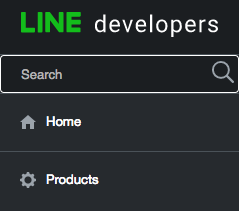
We've added a new search feature to our site to make it easier for you to find the information you want. You can now search all of our content in the Products, Documentation, and FAQ sections of the site from the search bar found at the top of the side menu.

Search bar

Docs

Previous post
New article on sharing bots
Next post
LINE Login v1 to be discontinued
2017/12/05

Note: This notice only applies to LINE Login v1 users. These changes do not apply if you are using the latest v2.1 or v2 endpoints.

We will be discontinuing the LINE Login v1 endpoints listed below on March 31, 2018. Once these endpoints are discontinued, a 4xx status code and error message will be returned.

  • Access token endpoint: https://api.line.me/v1/oauth/accessToken
  • Verify endpoint: https://api.line.me/v1/oauth/verify
  • Profile endpoint: https://api.line.me/v1/profile
  • Logout endpoint: https://api.line.me/v1/oauth/logout

Also note that versions 3.x.x and below of the LINE SDK for iOS and Android will no longer work after LINE Login v1 is discontinued.

If you are currently using LINE Login v1, we highly recommend updating your app to the latest version of LINE Login as soon as possible to avoid any issues when LINE Login v1 is discontinued. For information on the latest version of LINE Login, see the following pages.

  • Integrating LINE Login with your iOS app
  • Integrating LINE Login with your Android app
  • Integrating LINE Login with your web app
  • Social API reference
LINE Login

Previous post
Search feature released on website
Next post
New options for template message images
2017/11/30

We have released imageAspectRatio, imageSize, and imageBackgroundColor fields for Buttons and Carousel template messages. Using these fields, you can configure the aspect ratio, size, and background color for images used in template messages. For more information, see the reference documentation below.

  • Buttons template message
  • Carousel template message
Messaging APITemplate message

Previous post
LINE Login v1 to be discontinued
Next post
LINE URL scheme information released
2017/11/27

We've added an article about the LINE URL scheme to our LINE Login and Messaging API documentation. You can use the URL schemes to help your users navigate to specific content such as the camera, location, or settings screens in LINE. The LINE URL scheme can be used in your bot (Messaging API) from within LINE or in your native or web apps to automatically open LINE.

See the new articles below.

  • Using LINE features with the LINE URL scheme (Messaging API)
  • Using LINE features with the LINE URL scheme (LINE Login)
DocsMessaging APILINE Login

Previous post
New options for template message images
Next post
Link your bot to your LINE Login channel
2017/11/21

We've added an option to display a prompt to let you display an option for users to add your bot as a friend when logging in to your app with LINE Login. To do this, first, link a bot to your LINE Login account from the new "Bot linked to this channel" item in the LINE Developers Console, then include the bot_prompt query parameter in the authorization URL for LINE Login.

For more information on this feature, see Linking a bot with your LINE Login channel.

In addition, we've released a new resource for the Social API which lets you get the friendship status between your bot and a user. Send a GET request to https://api.line.me/friendship/v1/status to see if the user has added your bot as a friend or not.

To see the API reference for this resource, go to Get friendship status.

Note: This feature is not currently available to enterprise users. If you are an enterprise user and would like to use this feature, please contact your LINE representative.

DocsMessaging APILINE LoginSocial API

Previous post
LINE URL scheme information released
Next post
LINE Login and Messaging API glossaries
2017/11/10

To help you better understand the terms and concepts used in our documentation, we've added glossaries for both LINE Login and Messaging API.

Check them out using the links below.

  • LINE Login glossary
  • Messaging API glossary
DocsMessaging APILINE Login

Previous post
Link your bot to your LINE Login channel
Next post
Specification change for rich menu resources
2017/11/08

We've made changes to the response of the rich menu resources of the Messaging API listed below. When sending a request to delete or upload a rich menu or to link or unlink a rich menu for a user, the LINE Platform will now return a 200 status code and an empty JSON object on success instead of returning only a 200 status code.

See the updated API reference documentation below.

  • Delete rich menu
  • Link rich menu to user
  • Unlink rich menu from user
  • Upload rich menu
Messaging APIRich menu

Previous post
LINE Login and Messaging API glossaries
Next post
LINE API Expert program released
2017/11/01

We have released the new "LINE API Expert" program which was announced at LINE Developer Day 2017. This program recognizes skilled engineers, who have a deep understanding of the various APIs provided by LINE and are active in the community, by giving them the title of "LINE API expert." To apply for the program, visit the LINE API Expert page.

The kind of "experts" we are looking for

We expect the following three things of the LINE API experts who represent this program.

  • A discerning eye and high overall technical abilities as an engineer
  • Deep understanding and development experience with developer APIs/SDKs provided by LINE
  • Active engagement in the developer community

Incentives await

Everyone recognized as a LINE API expert is a valuable partner to LINE and we will provide various incentives to support the activities of our experts. Below are some examples.

  • We will provide LINE API experts with early-access to LINE developer products and will provide opportunities to give feedback directly to our LINE development teams and CTO.
  • We will provide venues for seminars and hackathons and dispatch evangelists and engineer support staff.

For more information about the incentives, see the LINE API Expert page.

Accepting invitations now!

Although applications will be screened, there are no specific requirements necessary for applying. We are looking forward to your applications and to working together with engineers who are eager to be leaders in the LINE developer community and are striving to reach their next step as developers.

LINE API Expert

Previous post
Specification change for rich menu resources
Next post
Column objects for template messages increased
2017/10/30

We've increased the number of column objects that you can include in your carousel and image carousel template messages from 5 to 10 objects.

For more information, see the updated reference documentation below.

  • Carousel
  • Image carousel
Messaging APITemplate message

Previous post
LINE API Expert program released
Next post
Rich menu features for Messaging API released
2017/10/23

We've released rich menu features for the Messaging API which lets you display different rich menus to different users. By using the newly released rich menu endpoints, you can create, link, and manage your rich menus programmatically via the API instead of using LINE@ Manager. The rich menu endpoints provide greater freedom in designing rich menus and the ability to set postback actions to specified areas.

In addition to the current rich menu size of 2500x1686 on LINE@ Manager, you can now create smaller rich menus that are 2500x843 with the Messaging API. This smaller rich menu size lets you display more of the chat screen while still providing an interactive menu for the user.

Both rich menus created using LINE@ Manager and the Messaging API are supported and can be used at the same time.

Note: These rich menu features are only supported on LINE 7.14.0 and later for Android and iOS.

For more information on how to use the new rich menu features, see the following pages.

  • Using rich menus
  • Rich menu reference
Messaging APIRich menu

Previous post
Column objects for template messages increased
Next post
[Resolved] Notice about LINE Login service outage
[Resolved] Notice about LINE Login service outage
2017/10/19

This is a notice to inform you about a recent service outage for LINE Login. The issue has now been resolved but we apologize for any inconvenience that this may have caused.

Date and time

Date: October 16, 2017 Time: 16:30 – 17:36 (UTC+9)

Cause

Issue with our servers.

Situation

During the date and time stated above, certain channels may have received the following error when making an API call to retrieve an access token.

{"error":"invalid_grant","error_description":"authorization code expired or incompatible"}

We will continue to improve the quality of the services we provide to our developers and we greatly appreciate your understanding.

LINE Login

Previous post
Rich menu features for Messaging API released
Next post
LINE SDK for Android 4.0.6 released
2017/09/29

The LINE SDK for Android version 4.0.6 has been released. For more information on downloading the LINE SDK, see below.

  • Download LINE SDK

Changes:

  • Fixed an infinite loading indicator problem that occurs when the user presses the back button while LINE's passcode prompt is on screen.

We will continue to provide improvements so that you can code more easily.

AndroidLINE Login SDK

Previous post
[Resolved] Notice about LINE Login service outage
Next post
LINE Login v2.1 released
2017/09/28

We have released LINE Login v2.1 which provides new features to make it easier for you to implement a login feature to your application. The new version adds support for the OpenID Connect 1.0 specification which is an identity layer on top of OAuth 2.0.

Here are some of the key changes.

ID tokens

With LINE Login 2.1, you'll be able to get ID tokens which contain user profile information when you retrieve the access token. This means that you no longer need to send a separate request to retrieve a user's profile information.

For more information, see ID tokens.

Login sessions

In version 2.1, when users are redirected to the authorization endpoint, we'll be able to check the login session to determine if the user is logged in to LINE or not. If users are logged in to LINE and their browsing session is valid, they will not be required to enter their email and passwords to log in.

For more information, see Authentication process.

Updated endpoints

We have updated our authorization endpoints where you can use the new version 2.1 features. You can find more detailed information on the following pages.

  • Integrating LINE Login with your web app
  • Social API reference

Note: You'll still be able to use our LINE Login v2 endpoints.

LINE Login

Previous post
LINE SDK for Android 4.0.6 released
Next post
Introducing the redesigned LINE Developers site
2017/09/21

We are excited to introduce our new, redesigned LINE Developers site. We hope that this update will improve the experience for developers, making it easier to use our products (such as LINE Login and Messaging API) and to find the documentation that you need. Here, we'll take you through some of the key changes to the site.

READMORE
  • LINE Developers Console
  • Homepage and product overviews
  • Documentation updates
  • FAQ

LINE Developers Console

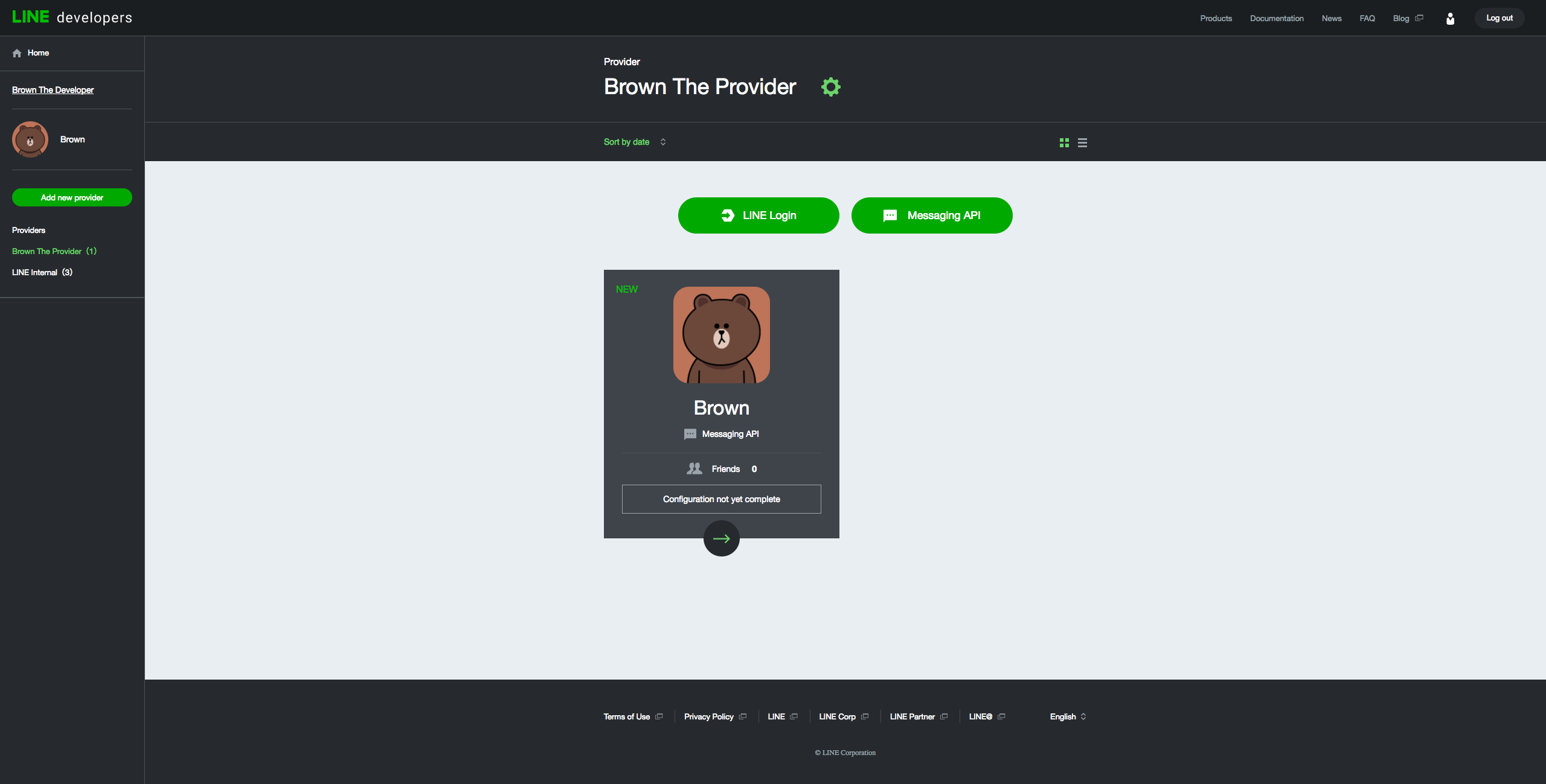
Console top

The new and improved "LINE Developers Console" makes it easier to create and manage your channels. You can login to the LINE Developers Console to register a developer account, create a provider, and create channels for Messaging API and LINE Login.

If you have created channels on the LINE Business Center (discontinued on September 21, 2017), you'll be able to see and manage the channels from the LINE Developers Console. Note that "Enterprises" on the LINE Business Center are called "Providers" on the LINE Developers Console.

When creating a new Messaging API channel, you no longer need to go to the "Messaging API Settings" page of LINE@ Manager to enable API features and configure settings. Those settings are now available on the "Channel settings" page of the LINE Developers Console. However, you will still need to use LINE@ Manager if you want to configure a rich menu and account page for your bot.

For information on how to create new channels for LINE Login and Messaging API, see the links below.

  • Getting started with LINE Login
  • Getting started with the Messaging API

Homepage and product overviews

We've overhauled our homepage and have made it easier to access the LINE Developers Console, documentation, and news. We've also added product overview pages for LINE Login and Messaging API to the site.

Documentation updates

We have updated our documentation structure, integrated our API reference docs into the site, and revised our existing documentation.

Structure

Our documentation is now organized into the categories listed below, each with their own sidebars. You can also easily browse the documentation available from the Documentation overview page.

  • LINE Login
  • Messaging API
  • LINE SDK for iOS
  • LINE SDK for Android
  • Social API

In addition, you can find the links to the LINE Social Plugins and LINE Notify websites.

Reference documentation

Our API and SDK reference documentation has been updated and integrated into the site. The existing reference documentation at https://devdocs.line.me will no longer be updated and discontinued in around one month. For the latest reference information, please use the new pages below.

  • Messaging API reference
  • LINE SDK for iOS reference
  • LINE SDK for Android reference
  • Social API reference

New and updated documentation

We have added various new articles for the Messaging API and have made updates to various other documents. Check out some of the new and updated articles below.

  • Building a sample bot
  • Building a bot
  • Message types
  • Group chats
  • Managing roles
  • Social API overview

Enterprise documentation

Our existing enterprise-facing content (Business Connect, mission stickers, link messages) has been separated from our public-facing content. If you are a partner and require access to the enterprise documentation, please contact your LINE representative for information.

FAQ

We have a new frequently asked questions (FAQ) section where you can find answers to questions about LINE Login and Messaging API. Note that the questions from the line-bot-faq GitHub repository have been integrated into the FAQ section.

Conclusion

We will continue to make improvements to the LINE Developers site and our developer documentation to make it easier for you to develop apps using our products.

If you want to keep up-to-date with our latest developments, add the LINE Developers Official Account as a friend on LINE using the QR code or the button below.


LINE Developers account QR code

Add friend

DocsLINE Developers Console

Previous post
LINE Login v2.1 released
Next post
LINE Developers site redesign and maintenance
2017/09/06

To improve the experience for developers and to make the process of creating channels for the Messaging API and LINE Login easier, we will be releasing a new redesigned site on September 21, 2017. Please note that the LINE Developers site will be unavailable at the following date and time.

Date: September 21, 2017

Time: 11:00 – 17:00 (UTC+9)

Upcoming changes to the site

The following are some of the major changes that will be made to the site.

  • New look and feel of the website
  • More streamlined process for creating channels through the LINE Developers Console. (The LINE Business Center will be discontinued.)
  • The current API reference (https://devdocs.line.me) page will be integrated into the LINE Developers site (https://developers.line.me)
  • Updates to our developer documentation

We will provide more details of the changes when the new version of the site is released.

Maintenance

Previous post
Introducing the redesigned LINE Developers site
Next post
New template message features released
2017/09/01

We have released the following features for the Messaging API.

Image carousel template

The image carousel template lets you send multiple images in a single message that users can cycle through like a carousel. You can then set template actions for when an image is tapped.

For more information, see the image carousel reference.

Datetime picker action

With the datetime picker template action, you can provide an easy way for users to pick a date and time without having to type it in manually. The datetime picker action can be used in any type of template message and returns a postback event when the action is tapped.

Note: The datetime picker action is supported on LINE 7.9.0 and later for iOS and 7.12.0 and higher for Android.

For more information, see the datetime picker action reference.

Template message

Previous post
LINE Developers site redesign and maintenance
Next post
Get user IDs and profiles of group and room members
2017/07/27

We’ve released resources for the Messaging API which lets you get the user IDs and LINE user profiles of the members of a group or room that your bot is in.

For more information on how to use these resources, see the API reference items below.

  • Get group member profile, Get room member profile
  • Get group member IDs, Get room member IDs (Note: This resource is only available for LINE@ Approved accounts and LINE Official Accounts.)
Group

Previous post
New template message features released
Next post
LINE SDK for Android 4.0.5 released
2017/06/02

The LINE SDK for Android version 4.0.5 has been released. For more information on downloading the LINE SDK, see below.

  • Download LINE SDK

Changes:

  • Fixed an issue where a runtime error occurs upon calling startActivityForActivity with a login intent when using appcompat version 25.0.0 or higher.

We will continue to provide improvements so that you can code more easily.

AndroidLINE Login SDK

Previous post
Get user IDs and profiles of group and room members
Next post
Changes to the user consent process and data retrieved in webhooks
2017/05/31

The user consent process and the data included in certain webhooks will change from LINE version 7.5.0 (iOS and Android). The details of the changes are shown below.

  1. Changes to the user consent process
    The way that users give consent to bots (LINE@ accounts and LINE Official Accounts) will change with the release of LINE version 7.5.0. Instead of requiring users to agree to a consent screen for every bot they want to add as a friend or start a chat with, from version 7.5.0, users will provide consent to all bots at once through a new consent screen (called the "Official Accounts Terms of Use"). After users have agreed to this screen once, they will be able to add other bots as friends and add them to chats in a single action.
    For more information on the user consent process, see User consent
  2. Changes to the Messaging API specifications
    Webhooks will include the user ID of users who send messages in a group or a room if the user has agreed to the "Official Accounts Terms of Use". Note that the user ID will not be included in the webhook if the user is using a version of LINE below 7.5.0.
Messaging API

Previous post
LINE SDK for Android 4.0.5 released
Next post
Messaging API SDK for Node.js released
2017/05/12

We have released the Messaging API SDK for Node.js. This makes it easier for you to build a bot on LINE with Node.js using the Messaging API.

See the Messaging API SDK repository below.

  • https://github.com/line/line-bot-sdk-nodejs

For more information on how to use the Messaging API SDK for Node.js, see the documentation.

Messaging API

Previous post
Changes to the user consent process and data retrieved in webhooks
Next post
LINE SDK for Android 4.0.4 released
2017/04/26

The LINE SDK for Android version 4.0.4 has been released. For more information on download the LINE SDK, see below.

  • Download LINE SDK

Changes:

  • Made a minor change to the SDK's authentication logic to fix a problem where onActivityResult does not get executed during app-to-app login.
  • Fixed a known issue in 4.0.2 where onActivityResult returns a result of "CANCEL" on the first time that a user logs into an application using app-to-app login.

We will continue to provide improvements so that you can code more easily.

AndroidLINE Login SDK

Previous post
Messaging API SDK for Node.js released
Next post
Changes to the LINE Login review criteria
2017/04/13

The LINE Login review criteria has been modified. Up until now, a review was required to change the status of LINE Login channels from "developing" to "published". However, from now on, LINE Login channels created on the LINE Business Center will automatically have the "published" status.

For existing LINE Login channels, you will be able to change the status to "published" from the Channel Console without a review.

Note that the LINE Login review criteria may change at a later date upon the release of new APIs or features. You should also make sure that your app complies with the LINE Login Button Usage Guidelines and LINE Developers Agreement.

LINE Login

Previous post
LINE SDK for Android 4.0.4 released
Next post
LINE SDK for Android 4.0.2 released
2017/04/10

The LINE SDK for Android version 4.0.2 has been released. You can download the SDK from the following page.

  • Download LINE SDK

Changes:

  • Fixed an issue where browser login fails with an INTERNAL_ERROR on Android 4.x devices.

Known issues:

  • On Android 4.x devices, onActivityResult returns a result of "CANCEL" the first time that a user logs into an application using the app-to-app login. However, the user will be able to successfully log in from their second attempt. This issue is caused by a problem in LINE and will be resolved in a future update.

We will continue to provide improvements so that you can code more easily.

AndroidLINE Login SDK

Previous post
Changes to the LINE Login review criteria
Next post
LINE SDK for iOS CocoaPod released
2017/03/22

We have released the LINE SDK for iOS on CocoaPods. You can now download the LINE SDK for iOS using CocoaPods for your Objective-C and Swift projects.

For information on how to download the SDK with CocoaPods, see the link below.

  • Download with CocoaPods

We will continue to provide improvements so that developers can code more easily.

iOSLINE Login SDK

Previous post
LINE SDK for Android 4.0.2 released
Next post
LINE Developers site temporarily unavailable on February 7
2017/02/06

The LINE Developers site (https://developers.line.me) will be unavailable at the following date and time.

Date
February 7, 2017 15:00 - 16:00 (UTC+9)

Impact
You won’t be able to access https://developers.line.me

Maintenance

Previous post
LINE SDK for iOS CocoaPod released
Next post
LINE SDK for iOS 4.0.1 released
2017/01/27

The LINE SDK for iOS version 4.0.1 has been released. You can download the SDK from the following page.

  • Download LINE SDK

Changes:

  • Fixed an issue which causes an authentication error when using Web Login.

We will continue to provide improvements so that developers can code more easily.

iOSLINE Login SDK

Previous post
LINE Developers site temporarily unavailable on February 7
Next post
New versions of Web Login and the LINE SDK released
2017/01/24

New versions of Web Login, LINE SDK for Android, and LINE SDK for iOS have been released. Details of each release are outlined below.

Web Login v2

Key changes:

  • Endpoint URLs contain "v2" instead of "v1"
  • userId is returned in get user profile requests. mid is no longer returned in the response.
  • scope is returned with the default value of p for permission to get user profile information
  • error and state parameters are returned in error responses for authorization

For more information, see the updated documentation below.

  • Integration guide
  • API reference

You can also use the LINE Login starter application to help you get started with Web Login.

  • LINE Login starter application

Note: Web Login v1 will be discontinued in January 2018. If you are using Web Login v1, please migrate to the Web Login v2 before that time.

LINE SDK for Android 4.0.0

Key changes:

  • Implements the Auto Login feature using Chrome custom tabs, instead of app-to-app authorization
  • Automatically gets user profile information at login
  • Has a method to verify the access token
  • Has a method to refresh the access token
  • Has a method to log the user out

For more detailed information on how to use the LINE SDK for Android, see the updated documentation below.

  • Using the LINE SDK for Android
  • API reference

Download the LINE SDK for Android

  • Download LINE SDK
LINE SDK for iOS 4.0.0

Key changes:

  • Automatically gets user profile information at login
  • Has a method to verify the access token
  • Has a method to refresh the access token
  • Has a method to log the user out

For more detailed information on how to use the LINE SDK for iOS, see the updated documentation below.

  • Using the LINE SDK for iOS
  • API reference

Download the LINE SDK for iOS

  • Download LINE SDK

Note: The reference documentation for the LINE SDK for Android and iOS are currently only available in English.

We will continue to provide improvements so that developers can code more easily.

iOSAndroidLINE LoginLINE Login SDK

Previous post
LINE SDK for iOS 4.0.1 released
Next post
Multicast feature released
2017/01/23

We've released the multicast feature which lets you send messages to multiple users at any time.

See the updated documentation in the API reference below.

  • Multicast reference

We will continue to provide improvements so that developers can code more easily.

Messaging API

Previous post
New versions of Web Login and the LINE SDK released
Next post
LINE SDK for iOS 3.2.2 released
2017/01/10

The LINE SDK for iOS has been updated to version 3.2.2. You can download it from the LINE SDK archives on the following page:

Download LINE SDK

Changes:

  • Fixed an issue with bitcode.

We will continue to provide improvements so that developers can code more easily.

iOSLINE Login SDK

Previous post
Multicast feature released
Next post
Change to requirement on whitelisting LINE domains

Filter by
news tag

AndroidBot DesignerChannel access tokenCLOVACLOVA Extensions KitDevelopers CommunityLINE Developers ConsoleDeprecatedDocsEnd of lifeFlex MessageFlex Message SimulatorFlutterGroupImagemap messageiOSLife cycleLIFFLINE AdsLINE API ExpertLINE Blockchain PlatformLINE Developers siteLINE LoginLINE MINI AppLINE Official AccountLINE PlatformLINE Login SDKLINE ThingsLINE TVMaintenanceMessaging APIOptions for corporate customersOutage ReportRich menuSocial APILINE Social PluginsSSL/TLSTemplate messageUnity

LINE Developers Official Account

Subscribe for the latest information on the LINE Platform
LINE Developers QR Code
© LY Corporation
  • About LINE Developers site
  • Terms and Policies
  • About trademarks
  • LINE API Status