

[Updated] Overview of the LIFF SDK vulnerability in LIFF/LINE MINI App and restrictions on using older versions
We have added a note about usage from LINE's in-app browser to Overview of the vulnerability.
In connection with LIFF v2.31.1 released on September 30, 2026, we would like to provide an overview of the resolved security vulnerability in the LIFF/LINE MINI App and the accompanying usage restriction for older versions of the LIFF SDK.
To ensure user safety, we plan to restrict the use of older versions of the LIFF SDK (v2.20.0 - v2.31.0) around November 24, 2026. If you are using an affected version, update to LIFF v2.31.1 or later immediately.
Overview of the vulnerability
A cross-site scripting (XSS) vulnerability was identified in LIFF v2.20.0 - v2.31.0. This vulnerability was reported by an external security researcher through our vulnerability reporting program.
- CVE: CVE-2026-112148
- GitHub Advisory: CVE-2026-112148
Under certain conditions, when a LIFF/LINE MINI App is opened in an external browser from a malicious URL, arbitrary JavaScript may be executed on the LIFF/LINE MINI App's domain. This could allow an attacker to obtain authentication information, such as access tokens, and information displayed on the screen.
If you open a LIFF/LINE MINI App's endpoint URL in LINE's in-app browser instead of using a LIFF URL, it is treated as an external browser and is therefore also subject to this vulnerability.
Impact
The following apps using older versions of the LIFF SDK (v2.20.0 - v2.31.0) are affected:
- LIFF apps
- LINE MINI Apps
Investigation results regarding this vulnerability
As a result of our investigation, we have not confirmed any successful attacks exploiting this vulnerability, nor any damage such as actual data leaks or unauthorized use at this time.
However, we cannot completely guarantee that there is no impact across all environments. Since the vulnerability information has been disclosed, there is a risk of future exploitation. To prevent any damage, if you are using an affected version, update your app immediately.
Usage restriction for older versions
To prevent any damage, we plan to restrict the use of older versions of the LIFF SDK (v2.20.0 - v2.31.0) according to the following schedule.
Scheduled date
Around November 24, 2026 (Tuesday)
The date of the restriction may be moved forward without prior notice.
Impact of the restriction
Once the restriction begins, opening a LIFF/LINE MINI App that uses an affected version in an external browser may result in the following:
- LINE Login and other LIFF features may become unavailable
- The LIFF/LINE MINI App may not function properly
Usage restrictions alone cannot completely eliminate the vulnerability risk. Do not wait for the restriction date. Update to LIFF v2.31.1 or later immediately.
How to update to LIFF v2.31.1 or later
The required action depends on how you have integrated the LIFF SDK. The following shows how to update to the current latest version, LIFF v2.31.2.
If you are using the CDN edge path
If you are using the CDN edge path, it has been automatically updated to v2.31.2. No additional action is required.
If you are using a CDN fixed path
If you are using a CDN fixed path, change the version you load to v2.31.2.
<script charset="utf-8" src="https://static.line-scdn.net/liff/edge/versions/2.31.2/sdk.js"></script>
If you are using the npm package
If you are using the npm package, update @line/liff to v2.31.2.
We will continue to improve the quality of our services. Thank you for your understanding.
Notice of the end of the LINE API Expert program in Japan
The LINE API Expert program in Japan will end when current appointments expire. The LINE API Platform Evangelist program in Japan will also end at that time. Beginning in 2027, no new appointments will be made in Japan. Existing appointments won't be renewed.
However, the LINE API Expert programs in Taiwan and Thailand will continue in 2027 and beyond.
Reflecting on the end of the LINE API Expert program
The LINE API Expert program appoints developers with a deep understanding of LINE APIs. Appointees have advanced technical skills and influence in the community. The program began in 2017. In early 2026, LINE API Platform Evangelist was introduced. It's a role for LINE API Experts. People in this role lead the operation and growth of the community.
The LINE API Expert program is approaching its 10th anniversary. Over the past decade, LINE API Experts appointed in Japan have raised awareness of LINE APIs. They've done so through well over 400 community activities, including meetups and hands-on seminars. These efforts have been a major driving force in expanding the reach of LINE APIs across Japan. They've also provided tremendous support to us as the provider of the LINE Platform.
To everyone who has contributed, we offer our deepest respect and gratitude. We're sincerely grateful for the time we've spent working together.
Although the LINE API Expert program in Japan is ending, we'll continue to improve our services. We'll also continue to improve the quality of the LINE Developers site and developer documentation. Our goal is to make it easier for developers to build services using LINE APIs.
We hope you'll continue to make active use of LINE APIs and that they'll help you create innovative services.
LINE MINI App Policy has been revised on October 14, 2026
As announced on September 14, 2026, the LINE MINI App Policy has been revised on October 14, 2026.
Date of revision
October 14, 2026
Details of revision
- Clarification of the conditions for serving ads within LINE MINI Apps
- Other formatting-related updates
Background of the revision
To improve the safety of ads served within LINE MINI Apps and prevent fraudulent or malicious ads, we've clarified that, in principle, LY Ads Network is the only ad network platform that can be used.
We've also clarified the rules that apply to ads served through LY Ads Network, ads placed directly by service providers, and direct-sold ads served under contracts with advertisers.
We'll continue our efforts to provide an environment where users can use LINE MINI Apps safely and securely. Thank you for your understanding.
LIFF v2.31.2 released
We've released LIFF v2.31.2.
In LIFF v2.31.2, we've made the following change.
We've changed how the ? character is handled in LIFF URL query parameter values
As announced on August 31, 2026, we've changed how the ? character is handled in query parameter values included in a LIFF URL.
When a user accesses a LIFF URL, the LIFF app first navigates to the primary redirect URL and then to the secondary redirect URL. In LIFF v2.31.2, we've changed the processing used in the LIFF browser to restore query parameter values in the LIFF URL to the secondary redirect URL. As shown in the examples below, ? characters in query parameter values are no longer replaced with &.
This change applies when a LIFF app is opened in the LIFF browser. The behavior hasn't changed when a LIFF app is opened in an external browser.
Examples
For example, suppose that the LIFF app's endpoint URL is https://example.com and a user accesses https://liff.line.me/{liffId}/?key=foo?bar. The secondary redirect URL will be as follows:
| Before change (LIFF v2.31.1 or earlier) | After change (LIFF v2.31.2 or later) |
|---|---|
https://example.com?key=foo&bar | https://example.com?key=foo?bar |
When accessing a LIFF URL such as https://liff.line.me/{liffId}/?key=foo%3Fbar with the ? character in a query parameter value percent-encoded, the LIFF app may also be affected depending on how the URL is accessed. The behavior for each method of opening the LIFF app in the LIFF browser is as follows:
| Access method | Before change (LIFF v2.31.1 or earlier) | After change (LIFF v2.31.2 or later) |
|---|---|---|
| On an iOS device, from an app other than the LINE app | https://example.com?key=foo&bar | https://example.com?key=foo?bar |
| On an iOS device, from the LINE app | https://example.com?key=foo%3Fbar | No change |
| On an Android device | https://example.com?key=foo%3Fbar | No change |
Notes on the specification change
If your LIFF app uses query parameters whose values are URLs, it may be affected by this change when opened in the LIFF browser (e.g. if return_url contains the URL of the page from which the user navigated). Even if you percent-encode the query parameter values, the LIFF app may be affected depending on how the LIFF URL is accessed.
When updating the LIFF SDK to v2.31.2, check that your LIFF app works correctly after the change.
How to update to LIFF v2.31.2
The required action depends on how you've integrated the LIFF SDK.
If you're using the CDN edge path
If you're using the CDN edge path, it has been automatically updated to v2.31.2. No additional action is required.
If you're using a CDN fixed path
If you're using a CDN fixed path, change the version you load to v2.31.2.
<script charset="utf-8" src="https://static.line-scdn.net/liff/edge/versions/2.31.2/sdk.js"></script>
If you're using the npm package
If you're using the npm package, update @line/liff to v2.31.2.
For more information on integrating the LIFF SDK, see Integrating the LIFF SDK with the LIFF app in the LIFF documentation.
LIFF v2.20.0 - v2.31.0 have been deprecated because an issue with potential security implications was identified. If you're using LIFF v2.20.0 - v2.31.0, update to LIFF v2.31.1 or later immediately. For more information, see the news from September 30, 2026.
[Resolved] Notice about service outage for the LINE Platform
We'd like to inform you about a service outage regarding the LINE Platform. The issue has now been resolved. We sincerely apologize for any inconvenience that this may have caused.
Date and time of outage
October 6, 2026 around 17:22 - around 17:30 (UTC+9)
Cause of the outage
Network failure
Impact
- Messaging API
- LINE Login
- LIFF/LINE MINI App
- LINE Developers Console
Details
These are the main impacts per product:
Messaging API
- There were instances where sending webhook events was delayed or didn't work properly.
- Some requests weren't processed properly, resulting in errors with status code 5xx.
Due to this outage, the messages that weren't properly sent even if the API requests succeeded, won't be counted as the LINE Official Account usage fees and the "number of sent messages" that can be confirmed in some way such as the Get number of sent push messages endpoint.
Retrying a failed API request
In some APIs, you can safely retry a request while preventing the same request from being accepted in duplicate by using a retry key (X-Line-Retry-Key) when an error with status code 5xx occurs or when the request times out.
For more information, see Retry failed API requests and Specify the retry key always in the Messaging API documentation.
LINE Login
There were instances where LINE Login didn't work per usual.
LIFF/LINE MINI App
- There were instances where LIFF/LINE MINI App couldn't be used per usual.
- There were instances where service messages weren't sent per usual.
LINE Developers Console
There were instances where some features of the LINE Developers Console couldn't be used per usual.
When an outage occurs, we post a preliminary report on the LINE API Status. For more information, see Check the availability of the LINE Platform (LINE API Status) in the LINE Platform basics.
We will continue to improve the quality of our services to prevent future outages. Thank you for your understanding.
We revised the fees for additional messages sent by LINE Official Accounts in Japan on October 1, 2026
As announced on September 1, 2026, we revised the fees for additional messages (messages sent beyond the limit of free messages) for LINE Official Accounts in Japan on October 1, 2026.
For more information, see Important: Notice of changes to additional message fees for LINE Official Accounts (only available in Japanese) in LY for Business.
You can now apply for a program that reduces App Store fees for LINE MINI App in-app purchases
LINE MINI Apps that use in-app purchase can apply for the Mini Apps Partner Program, offered by Apple Inc.
When the Mini Apps Partner Program applies to a LINE MINI App, the fees payable to Apple Inc. in connection with the payment of sales proceeds from App Store transactions on iOS shall be reduced. If the fees are reduced under the Mini Apps Partner Program, the amount equivalent to the fees payable by LY Corporation to the App Store shall also be reduced. Accordingly, the amount to be deducted from the gross sales amount pursuant to the LINE In-App Purchase Terms of Use (for LINE MINI App Provider) shall also be reduced.
Note that you don't need to implement separate in-app purchase flows based on whether the Mini Apps Partner Program applies. Therefore, if you've already implemented in-app purchase, you don't need to change the purchase flow after the program takes effect.
For more information, see Reduced App Store fees through the Mini Apps Partner Program in the LINE MINI App documentation.
Apply for the Mini Apps Partner Program
You can optionally apply for the Mini Apps Partner Program for each LINE MINI App for which your in-app purchase application has been approved. Apply for the program when submitting the LINE MINI App for a verification review in the LINE Developers Console.
For more information, see Apply for the Mini Apps Partner Program in the LINE MINI App documentation.
LIFF v2.31.1 released
We've released LIFF v2.31.1.
In LIFF v2.31.1, we've fixed the following bug.
We've fixed an issue with potential security implications
LIFF v2.20.0 - v2.31.0 have been deprecated because an issue with potential security implications was identified. If you're using LIFF v2.20.0 - v2.31.0, update to LIFF v2.31.1 immediately.
Affected versions
LIFF v2.20.0 - v2.31.0
If you're using an affected version, update to LIFF v2.31.1 immediately because the issue may have security implications. For more information, see How to update to LIFF v2.31.1.
Conditions
This issue occurs when a LIFF app is opened in an external browser using a URL containing crafted query parameters.
Changes
We've modified the internal processing of the LIFF SDK to enhance security. There are no changes to LIFF app functionality.
We'll provide more information about the impact of this issue at a later date.
How to update to LIFF v2.31.1
The required action depends on how you've integrated the LIFF SDK.
If you're using the CDN edge path
If you're using the CDN edge path, it has been automatically updated to v2.31.1. No additional action is required.
If you're using a CDN fixed path
If you're using a CDN fixed path, change the version in the path to v2.31.1.
<script charset="utf-8" src="https://static.line-scdn.net/liff/edge/versions/2.31.1/sdk.js"></script>
If you're using the npm package
If you're using the npm package, update @line/liff to v2.31.1.
We will revise the pricing for LINE Official Accounts in Taiwan on November 1, 2026
We're planning to revise the subscription plans and the rates for additional messages (messages sent beyond the limit of free messages) for LINE Official Accounts in Taiwan on November 1, 2026.
For more information, see 2026年 LINE 官方帳號方案價格調整 (only available in Traditional Chinese) in LINE Biz-Solutions.
Messaging API, LINE Login, and LINE MINI App demo apps will be discontinued
We will discontinue the following demo apps available on the LINE Developers site on September 30, 2026:
- Messaging API demo
- LINE Login demo
- LINE MINI App demos
- Store reservation demo
- Table order demo
- Membership card demo
- Event experience demo
- Mobile experience demo
- Purchase experience demo
- Travel experience demo
Before discontinuing the demo apps, we removed the corresponding pages and sections from the LINE Developers site on September 28, 2026.
We will continue to work to further improve our services to our customers. Thank you for your understanding.
[Resolved] Notice about service outage for the Messaging API
We'd like to inform you about a service outage regarding the Messaging API. The issue has now been resolved. We sincerely apologize for any inconvenience that this may have caused.
Date and time of outage
September 15, 2026 around 23:58 - September 16, 2026 around 3:43 (UTC+9)
Cause of the outage
Network failure
Impact
- All Messaging API endpoints
- Send a LINE notification message (flexible) (Options for corporate customers)
- Send a LINE notification message (template) (Options for corporate customers)
Details
During the stated date and time, some requests weren't processed properly, resulting in errors with status code 5xx.
Retrying a failed API request
In some APIs, you can safely retry a request while preventing the same request from being accepted in duplicate by using a retry key (X-Line-Retry-Key) when an error with status code 5xx occurs or when the request times out.
For more information, see Retry failed API requests and Specify the retry key always in the Messaging API documentation.
We'll continue to improve the quality of our services to prevent future outages. Thank you for your understanding.
[Updated] We've temporarily suspended part of the feature for using multiple LINE Official Accounts with the add friend option in LINE MINI Apps
We've updated the resumption date to early November 2026.
Due to a technical issue, we've temporarily suspended part of the feature for using multiple LINE Official Accounts with the add friend option in LINE MINI Apps.
We sincerely apologize for any inconvenience that this may cause.
Temporarily suspended feature
The feature to switch the LINE Official Account displayed on the channel consent screen
Impact
While the feature is suspended, adding the prompt_bot_id query parameter to a LIFF URL or permanent link won't switch the LINE Official Account displayed on the channel consent screen to the specified account.
You can continue to use the features to switch the LINE Official Account displayed on the verification screen and to switch the LINE Official Account displayed in the subwindow that prompts users to add or unblock the account.
Resumption date
Early November 2026
The resumption date is subject to change without notice.
We sincerely apologize again for any inconvenience this may cause.
LINE MINI App Policy will be revised on October 14, 2026
LINE MINI App Policy will be revised on October 14, 2026.
Scheduled date of revision
October 14, 2026
The content and date are subject to change.
Details of revision
- Clarification of the conditions for serving ads within LINE MINI Apps
- Other formatting-related updates
The differences between before and after the revision are as follows:
| Before the revision (current) | After the revision |
|---|---|
| LINE MINI App Policy | LINE MINI App Policy |
Background of the revision
To improve the safety of ads served within LINE MINI Apps and prevent fraudulent or malicious ads, we'll clarify that, in principle, LY Ads Network is the only ad network platform that can be used.
We'll also clarify the rules that apply to ads served through LY Ads Network, ads placed directly by service providers, and direct-sold ads served under contracts with advertisers.
We'll continue our efforts to provide an environment where users can use LINE MINI Apps safely and securely. Thank you for your understanding.
Starting September 10, 2026, AI will be used to generate descriptions for LINE MINI Apps
In Japan, the Apps tab in LINE features a section called "Daily top trends". In addition to rankings, this section includes multiple categories such as "Restaurants" and "Games", displaying the names of LINE MINI Apps along with a short description for each app.
Starting September 10, 2026, AI will be used to set categories and generate descriptions for LINE MINI Apps, and these updates will be reflected sequentially.
Effective date
From September 10, 2026 onward
Details
Based on the content of "Channel description" entered by developers for each LINE MINI App channel, AI will be used to automatically assign categories and generate descriptions. If a description for the LINE MINI App was already set on or before September 9, 2026, it will be excluded from this AI-generated update.
Only verified MINI Apps are displayed in the "Daily top trends".
Display example
Here is a display example of "Daily top trends".
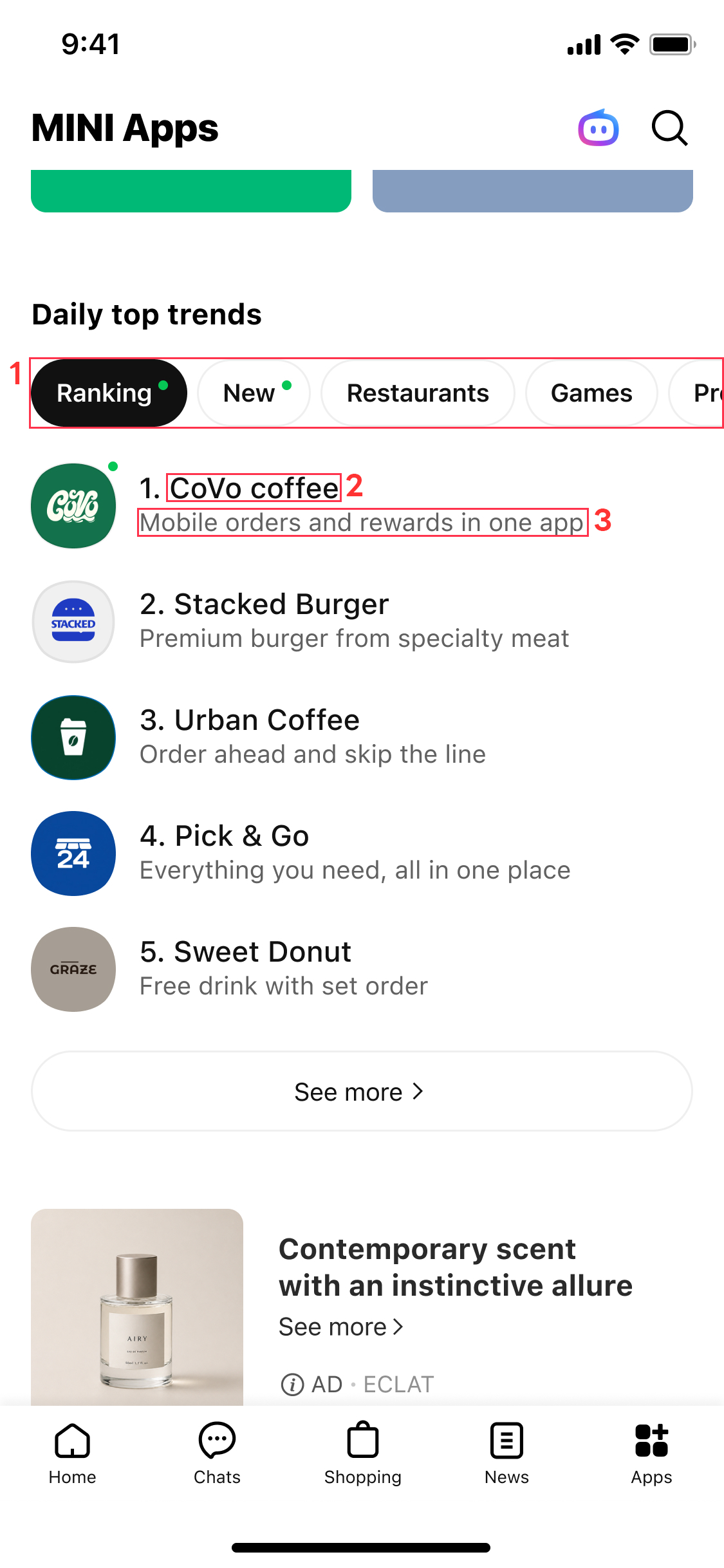
- Category: AI determines and sets the category that the LINE MINI App belongs to.
- LINE MINI App name: Displays the Channel name of the LINE MINI App channel.
- LINE MINI App description: AI generates descriptions (the maximum character limit is 21 full-width characters for Japanese, or 42 half-width alphanumeric characters).
Request to developers
Developers don't need to make any additional settings to enable AI description generation and category assignment.
However, descriptions and categories are generated and set based on the content entered in the Channel description field under the Basic settings tab of the relevant LINE MINI App channel. Therefore, enter the app description specifically and clearly in the Channel description field.
For more information, see Channel description in the LINE MINI App documentation.
[Updated] You can now use multiple LINE Official Accounts with the add friend option in LINE MINI Apps
There was an error in the requirements for using multiple LINE Official Accounts. We apologize for the error and have corrected it.
| Incorrect | Correct |
|---|---|
|
|
You can now use multiple LINE Official Accounts with the add friend option in LINE MINI Apps.
With this feature, you can display an appropriate LINE Official Account to add as a friend based on the user's situation, from the LINE Official Accounts added in the allowlist (*) in advance.
* A list of LINE Official Accounts that can be displayed on the verification screen, channel consent screen, and other screens.
Requirements for using multiple LINE Official Accounts
To use multiple LINE Official Accounts with the add friend option, in addition to the requirements for the add friend option, Region to provide the service for the LINE MINI App channel must be set to "Japan".
How to use multiple LINE Official Accounts
To use multiple LINE Official Accounts with the add friend option, configure and implement the feature as follows:
- Configure the feature to use multiple LINE Official Accounts in the LINE Developers Console
- Switch the LINE Official Account that users are prompted to add as a friend in the LINE MINI App
For more information, see Use multiple LINE Official Accounts with the add friend option in the LINE MINI App documentation.
We will revise the additional message fees for LINE Official Accounts in Japan on October 1, 2026
We are planning to revise the rates for additional messages (messages sent beyond the limit of free messages) for LINE Official Accounts in Japan on October 1, 2026.
For more information, see Important: Notice of rate changes for additional messages on LINE Official Accounts (only available in Japanese) in LY for Business.
[Updated] LIFF v2.31.0 released
To ensure user safety, we plan to restrict the use of older versions of the LIFF SDK (v2.20.0 through v2.31.0) around November 24, 2026. If you are using LIFF v2.31.0, update to LIFF v2.31.1 or later immediately. For more information, see the news from October 20, 2026, Overview of the LIFF SDK vulnerability in LIFF/LINE MINI App and restrictions on using older versions.
LIFF v2.31.0 has been deprecated because an issue with potential security implications was identified. If you're using LIFF v2.31.0, update to LIFF v2.31.1 or later. For more information, see LIFF v2.31.1 released.
We've released LIFF v2.31.0.
In LIFF v2.31.0, we've made changes to the internal behavior of the LIFF SDK. There is no change in features.
How to update to LIFF v2.31.0
If you're using the CDN edge path (https://static.line-scdn.net/liff/edge/2/sdk.js), you'll automatically update LIFF to v2.31.0.
If you're using an npm package, you can update to v2.31.0 by executing either npm install @line/liff@2.31.0 or yarn add @line/liff@2.31.0.
For more information on integrating the LIFF SDK, see Integrating the LIFF SDK with the LIFF app in the LIFF documentation.
[Updated] As of October 7, 2026, the handling of the "?" character in LIFF URL query parameter values will change
We've changed the affected versions.
| Before | After |
|---|---|
| LIFF v2.31.1 or later | LIFF v2.31.2 or later |
Starting with LIFF v2.31.2, scheduled for release on October 7, 2026, we will change how the ? character is handled in query parameter values included in a LIFF URL. As a result, the secondary redirect URL generated when accessing a LIFF URL may change.
Scheduled date of change
October 7, 2026
Affected versions
LIFF v2.31.2 or later
Changes
When a user accesses a LIFF URL, the LIFF app first navigates to the primary redirect URL and then to the secondary redirect URL. Starting with LIFF v2.31.2, we will change part of the implementation used in the LIFF browser to restore query parameter values in the LIFF URL to the secondary redirect URL. As shown in the examples below, ? characters in query parameter values will no longer be replaced with &.
This change applies when a LIFF app is opened in the LIFF browser. The behavior will not change when a LIFF app is opened in an external browser.
Examples
For example, suppose that the LIFF app's endpoint URL is https://example.com and a user accesses https://liff.line.me/{liffId}/?key=foo?bar. The secondary redirect URL before and after the change will be as follows:
| Before change (current) | After change (LIFF v2.31.2 or later) |
|---|---|
https://example.com?key=foo&bar | https://example.com?key=foo?bar |
When accessing a LIFF URL such as https://liff.line.me/{liffId}/?key=foo%3Fbar with the ? character in a query parameter value percent-encoded, the LIFF app may be affected depending on how the URL is accessed. For the behavior before and after the change for each method of opening the LIFF app in the LIFF browser, see the table below:
| Access method | Before change (current) | After change (LIFF v2.31.2 or later) |
|---|---|---|
| On an iOS device, from an app other than the LINE app | https://example.com?key=foo&bar | https://example.com?key=foo?bar |
| On an iOS device, from the LINE app | https://example.com?key=foo%3Fbar | No change |
| On an Android device | https://example.com?key=foo%3Fbar | No change |
Notes on the specification change
If your LIFF app uses query parameters whose values are URLs, it may be affected by this change when opened in the LIFF browser (e.g. if return_url contains the URL of the page from which the user navigated). Even if you percent-encode the query parameter values, the LIFF app may be affected depending on how the LIFF URL is accessed.
If your LIFF app relies on the behavior before the change, it may not function correctly after the change is applied. We recommend implementing your LIFF app to ensure it works correctly both before and after the change.
We will continue to work to further improve our services to our customers. Thank you for your understanding.
Users can now open LINE MINI Apps with the "Channel consent simplification" feature enabled more smoothly
As of August 26, 2026, the authorization flow for verified MINI Apps in Japan with the "Channel consent simplification" feature enabled has changed.
Previously, when the "Channel consent simplification" feature was enabled, the simplification consent screen or the loading screen was displayed when users accessed a LINE MINI App for the first time. Now, these screens will no longer be displayed, allowing users to open LINE MINI Apps more smoothly.
| Before change | After change (current) |
|---|---|
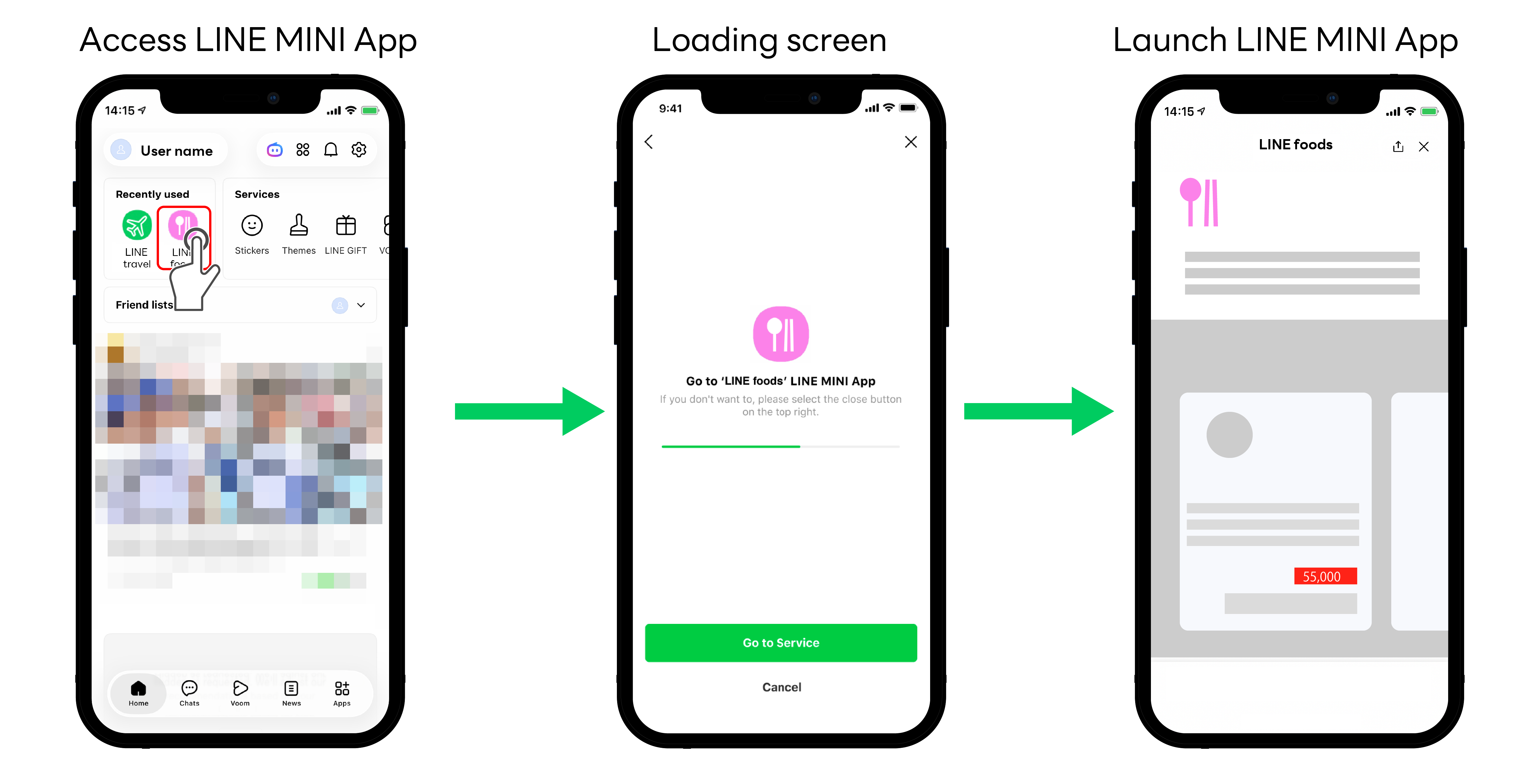 | 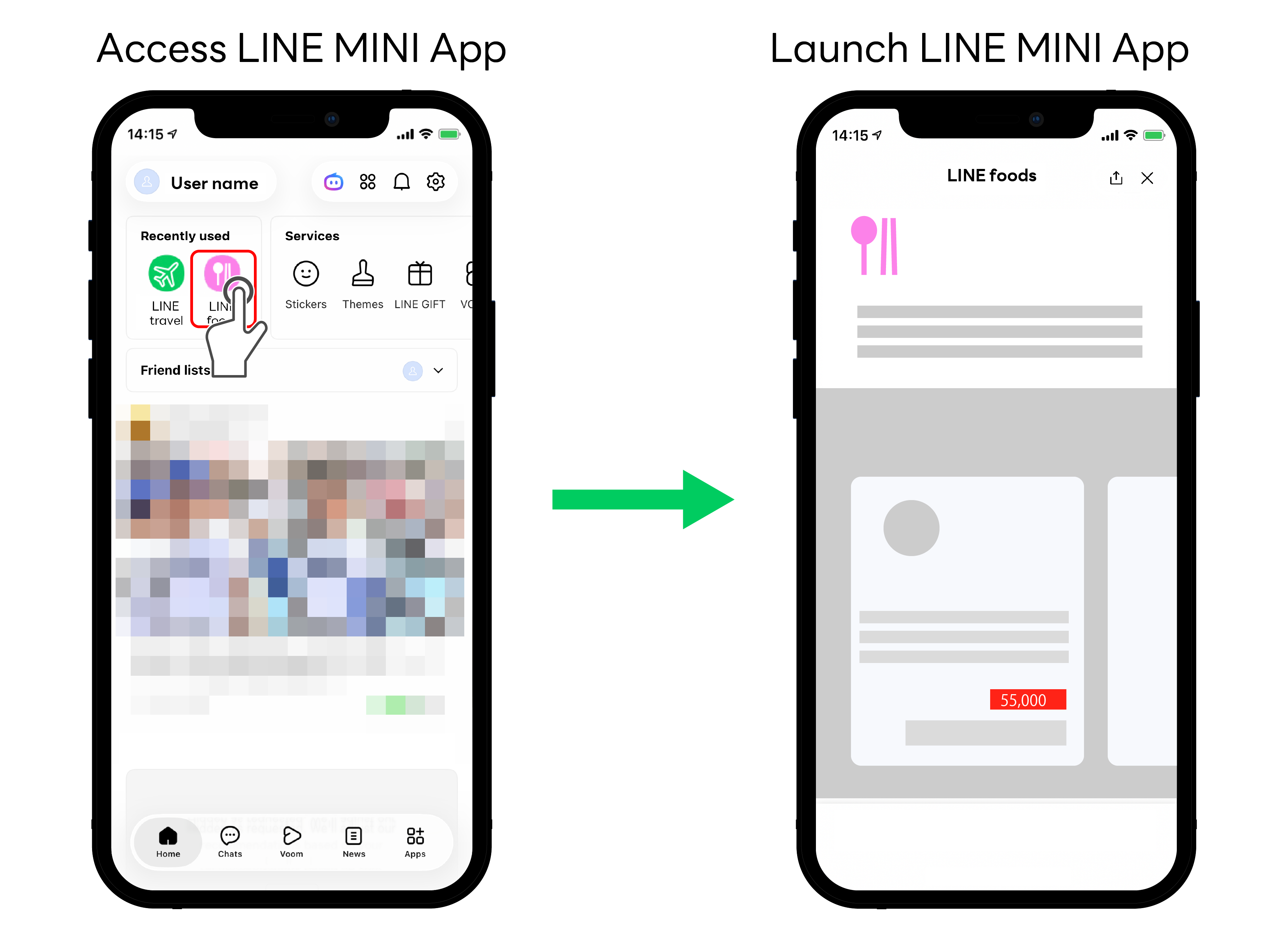 |
For more information about the "Channel consent simplification" feature, see LINE MINI App authorization flow in the LINE MINI App documentation.
We will continue to work to further improve our service to our customers. Thank you for your understanding.
In LINE Social Plugins, we have changed specifications for the Add friend and Like buttons
We have discontinued the feature that displays the Home icons for the Add friend and Like buttons in LINE Social Plugins.
Previously, users could navigate to the LINE Official Account's LINE VOOM account page via the Home icon, but since LINE VOOM is scheduled to be discontinued, we have ended support for the Home icon.
| Button | Before the change | After the change (current) |
|---|---|---|
| Add friend button | 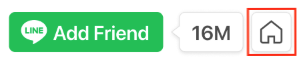 You could display the Add friend button, the number of friends, and the Home icon. |  The option to include the Home icon is no longer selectable when creating a button. In addition, the Home icon is no longer displayed on existing buttons where it was previously shown. |
| Like button |  When the Like button and Add friend button were displayed together, users who had already added your LINE Official Account as a friend saw the Home icon. |  The Home icon does not appear, and the Add friend button is always displayed. |
For more information on the discontinuation of LINE VOOM, see the following notices:
- For Japan: 「LINE VOOM」サービス終了のお知らせ
- For Taiwan: LINE VOOM 服務終止通知
- For Thailand: ประกาศยุติการให้บริการ “LINE VOOM” ในประเทศไทย
In addition, due to this change, we have removed the references to LINE VOOM from the Usage Guidelines for the LINE Social Plugin.
We will continue to work to further improve our service to our customers. Thank you for your understanding.
[Updated] LIFF v2.30.0 released
To ensure user safety, we plan to restrict the use of older versions of the LIFF SDK (v2.20.0 through v2.31.0) around November 24, 2026. If you are using LIFF v2.30.0, update to LIFF v2.31.1 or later immediately. For more information, see the news from October 20, 2026, Overview of the LIFF SDK vulnerability in LIFF/LINE MINI App and restrictions on using older versions.
LIFF v2.30.0 has been deprecated because an issue with potential security implications was identified. If you're using LIFF v2.30.0, update to LIFF v2.31.1 or later. For more information, see LIFF v2.31.1 released.
We've released LIFF v2.30.0.
In LIFF v2.30.0, we've added the following feature.
Ahead of the release of a new feature for the LINE MINI App's add friend option, you can now pass arguments to some methods
We plan to introduce a feature that allows multiple LINE Official Accounts to be linked in the add friend option for LINE MINI Apps. Ahead of this release, you can now pass arguments to the following three methods:
The arguments for these methods are available only when Use multiple accounts is enabled for the LINE MINI App channel. Use multiple accounts is scheduled to be available for LINE MINI Apps in Japan in September 2026.
How to update to LIFF v2.30.0
If you're using the CDN edge path (https://static.line-scdn.net/liff/edge/2/sdk.js), you'll automatically update LIFF to v2.30.0.
If you're using an npm package, you can update to v2.30.0 by executing either npm install @line/liff@2.30.0 or yarn add @line/liff@2.30.0.
For more information on integrating the LIFF SDK, see Integrating the LIFF SDK with the LIFF app in the LIFF documentation.
Important notes on specifying endpoints when sending requests to the Messaging API
When you send a request to a Messaging API endpoint, specify the correct endpoint shown in the Messaging API reference. If you don't specify the correct endpoint, for example by adding an unnecessary trailing slash (/) to the end of the endpoint path, the behavior isn't guaranteed.
| ✅️ Example of a correct endpoint | ❌️ Example of an incorrect endpoint |
|---|---|
https://api.line.me/v2/bot/message/push | https://api.line.me/v2/bot/message/push/ |
If you implement your integration using the Messaging API official SDKs, you don't need to worry about endpoint URLs or paths — they're always correct.
Users can now edit messages in group chats with a LINE Official Account
Users can now edit messages in group chats with a LINE Official Account. We've added a new edit event (messageEdited) to the webhook event objects in the Messaging API.
Background on adding the edit event
The message editing feature has been released in LINE Labs (only available in Japanese), and users can now edit text messages they've already sent in group chats with a LINE Official Account.
When a user edits a text message in a group chat with a LINE Official Account, the LINE Platform sends an edit event to the bot server specified in the Webhook URL in the LINE Developers Console.
| Webhook event | One-on-one chats | Group chats | Multi-person chats |
|---|---|---|---|
| Edit event | ❌ | ✅ | ❌ |
The edit event includes a reply token (replyToken), allowing your LINE Official Account to reply to the edited message.
LINE Messaging API SDK updates
For more information about the update status of each SDK release in line with the addition of these new features, see the LINE Messaging API SDKs release notes.
[Resolved] Notice about service outage for the Messaging API
We'd like to inform you about a service outage regarding the Messaging API. The issue has now been resolved. We sincerely apologize for any inconvenience that this may have caused.
Date and time of outage
August 4, 2026 around 16:11 - around 16:41 (UTC+9)
Cause of the outage
Server failure
Impact
- Get profile
- Mark messages from users as read (Options for corporate customers)
Details
During the stated date and time, some requests weren't processed properly, resulting in errors with status code 5xx.
We'll continue to improve the quality of our services to prevent future outages. Thank you for your understanding.
[Updated] LIFF v2.29.2 released
To ensure user safety, we plan to restrict the use of older versions of the LIFF SDK (v2.20.0 through v2.31.0) around November 24, 2026. If you are using LIFF v2.29.2, update to LIFF v2.31.1 or later immediately. For more information, see the news from October 20, 2026, Overview of the LIFF SDK vulnerability in LIFF/LINE MINI App and restrictions on using older versions.
LIFF v2.29.2 has been deprecated because an issue with potential security implications was identified. If you're using LIFF v2.29.2, update to LIFF v2.31.1 or later. For more information, see LIFF v2.31.1 released.
We've released LIFF v2.29.2.
In LIFF v2.29.2, we've made changes to the internal behavior of the LIFF SDK. There is no change in features.
How to update to LIFF v2.29.2
If you're using the CDN edge path (https://static.line-scdn.net/liff/edge/2/sdk.js), you'll automatically update LIFF to v2.29.2.
If you're using an npm package, you can update to v2.29.2 by executing either npm install @line/liff@2.29.2 or yarn add @line/liff@2.29.2.
For more information on integrating the LIFF SDK, see Integrating the LIFF SDK with the LIFF app in the LIFF documentation.
[Resolved/Updated] Notice about service outage for the LINE Platform
We've updated the Cause of the outage.
We've updated the Date and time of outage and Details following the resolution of the issue.
We'd like to inform you about a service outage regarding the LINE Platform. The issue has now been resolved. We sincerely apologize for any inconvenience that this may have caused.
Date and time of outage
July 28, 2026 around 16:46 - around 21:11 (UTC+9)
Cause of the outage
Server failure
Impact
- Messaging API
- LINE Login
- LIFF/LINE MINI App
- LINE Developers Console
- LINE notification messages
Details
These are the main impacts per product:
Messaging API
- There were instances where sending webhook events was delayed or didn't work properly.
- Some requests weren't processed properly, resulting in errors with status code 5xx.
LINE Login
There were instances where adding a LINE Official Account as a friend or unblocking it using the add friend option didn't work properly.
LIFF/LINE MINI App
- There were instances where adding a LINE Official Account as a friend or unblocking it using the add friend option or the
liff.requestFriendship()method didn't work properly. - There were instances where service messages were delayed or weren't sent properly.
LINE Developers Console
There were instances where channel settings couldn't be changed properly.
LINE notification messages
- There were instances where sending webhook events (delivery completion events) was delayed or didn't work properly.
- Some requests weren't processed properly, resulting in errors with status code 5xx.
- There were instances where messages weren't sent even after users configured their LINE notification message reception settings or completed SMS authentication and became eligible to receive LINE notification messages.
- We plan to send each affected user an apology and information about this outage.
When an outage occurs, we post a preliminary report on the LINE API Status. For more information, see Check the availability of the LINE Platform (LINE API Status) in the LINE Platform basics.
We'll continue to improve the quality of our services to prevent future outages. Thank you for your understanding.
The LINE In-App Purchase Terms of Use (for LINE MINI App Provider) were revised on July 27, 2026
As announced on July 17, 2026, the LINE In-App Purchase Terms of Use (for LINE MINI App Provider) were revised on July 27, 2026.
Date of revision
July 27, 2026
Details of revision
- Clarifying provisions based on the responsibilities, authority, etc. of each party
- Other formatting-related updates
The English translation is provided for reference purposes only. Only the Japanese version shall be regarded as original and the English translation shall have no legal effect.
We'll continue to work to further improve our service to our customers. Thank you for your understanding.
The LINE In-App Purchase Terms of Use (for LINE MINI App Provider) will be revised on July 27, 2026
The LINE In-App Purchase Terms of Use (for LINE MINI App Provider) will be revised on July 27, 2026.
Scheduled date of revision
July 27, 2026
The content and date are subject to change.
Details of revision
- Clarifying provisions based on the responsibilities, authority, etc. of each party
- Other formatting-related updates
The differences between before and after the revision are as follows:
| Before the revision (current) | After the revision |
|---|---|
| (Reference translation) LINE In-App Purchase Terms of Use (for LINE MINI App Provider) | (Reference translation) LINE In-App Purchase Terms of Use (for LINE MINI App Provider) |
These English translations are provided for reference purposes only. Only the Japanese version shall be regarded as original and the English translation shall have no legal effect.
- Japanese: Current version / Revised version
We'll continue to work to further improve our service to our customers. Thank you for your understanding.
You can now retrieve statistics for rich menus created using the Messaging API
You can now retrieve statistics, such as the number of times a rich menu was displayed and clicked, for rich menus created using the Messaging API.
Added endpoints
Previously, statistics could only be viewed in Insight - Rich menus (only available in Japanese) for rich menus created using LINE Official Account Manager. With this addition, you can now also retrieve statistics for rich menus created using the Messaging API.
Statistics for rich menus created using the Messaging API can't be viewed in LINE Official Account Manager. Similarly, statistics for rich menus created using LINE Official Account Manager can't be retrieved using the Messaging API.
LINE Messaging API SDK updates
For more information about the update status of each SDK release in line with the addition of these new features, see the LINE Messaging API SDKs release notes.
Notice of the introduction of service fees for the LINE MINI App in-app purchase feature
As announced on June 5, 2026, we have started applying service fees to the LINE MINI App in-app purchase feature.
With the introduction of service fees, we have revised the LINE In-App Purchase Terms of Use (for LINE MINI App Provider).
Fee effective date
Applicable service fees will be charged for usage from July 2026 onward.
The fee rate that applies will be the rate specified at the time of your application.
Date of revision
July 1, 2026
Details of revision
The main revisions are as follows:
- Clarification of descriptions related to fee calculation and settlement/payment methods
- Other formatting changes
These English translations are provided for reference purposes only. Only the Japanese version shall be regarded as original and the English translation shall have no legal effect.
We will continue to work to further improve our service to our customers. Thank you for your understanding.
[Updated] LIFF v2.29.1 released
To ensure user safety, we plan to restrict the use of older versions of the LIFF SDK (v2.20.0 through v2.31.0) around November 24, 2026. If you are using LIFF v2.29.1, update to LIFF v2.31.1 or later immediately. For more information, see the news from October 20, 2026, Overview of the LIFF SDK vulnerability in LIFF/LINE MINI App and restrictions on using older versions.
LIFF v2.29.1 has been deprecated because an issue with potential security implications was identified. If you're using LIFF v2.29.1, update to LIFF v2.31.1 or later. For more information, see LIFF v2.31.1 released.
We've released LIFF v2.29.1.
In LIFF v2.29.1, we've made changes to the internal behavior of the LIFF SDK. There is no change in features.
How to update to LIFF v2.29.1
If you're using the CDN edge path (https://static.line-scdn.net/liff/edge/2/sdk.js), you'll automatically update LIFF to v2.29.1.
If you're using an npm package, you can update to v2.29.1 by executing either npm install @line/liff@2.29.1 or yarn add @line/liff@2.29.1.
For more information on integrating the LIFF SDK, see Integrating the LIFF SDK with the LIFF app in the LIFF documentation.
Developer accounts can now be deleted on the LINE Developers Console
You can now delete your developer account on the LINE Developers Console.
When you delete your developer account, you can no longer log in to the LINE Developers Console with that developer account. Note that the Business ID and LINE account associated with the developer account won't be deleted.
Once you delete your developer account, it can't be restored. If no other developer account can access the providers or channels for which the deleted developer account had roles, no one will be able to view information or change settings for those providers or channels.
Before deleting your developer account, make sure to grant the necessary roles to other developer accounts to avoid disrupting active services.
How to delete your developer account
You can delete your developer account from the Delete your developer account section on the profile screen of the LINE Developers Console.
To delete a developer account, at least one other developer account must have the Admin role for each provider or channel for which the account has the Admin role.
For more information, see Delete your developer account in the LINE Developers Console documentation.
Verified MINI Apps in Japan can now link their LINE MINI App channels to Business Manager organizations
Verified MINI Apps in Japan can now link their LINE MINI App channels to Business Manager organizations.
By linking a LINE MINI App channel to a Business Manager organization, you can integrate with accounts of other services linked to the same organization.
Currently, the only supported integration is with LINE Official Accounts. We plan to expand the available features in the future, including the ability to display information about your LINE MINI App on the business profile of a linked LINE Official Account.
Requirements for linking to a Business Manager organization
To link a LINE MINI App channel to a Business Manager organization, all of the following conditions must be met:
- The LINE MINI App is a verified MINI App.
- Region to provide the service for the LINE MINI App channel is set to "Japan".
- The provider and the service company of your LINE MINI App for Published must match (*).
- Region for the Business Manager organization is set to "Japan".
* On the Business information tab of the published data for the LINE MINI App channel, one of the following conditions must be met:
- Same as the service company in the "Development company information" section is enabled
- Same as the service company in the "Development company information" section is disabled and Provider in the "Provider information" section is set to "Service company"
How to link to a Business Manager organization
To link a LINE MINI App channel to a Business Manager organization, send a link request from the Business Manager link tab. For more information, see Link a LINE MINI App channel to a Business Manager organization in the LINE MINI App documentation.
End of the no-fee period and revisions to the In-App Purchase Terms of Use for LINE MINI Apps
The LINE MINI App in-app purchase feature is offered free of charge until the end of June 2026 so that more customers can use it. From July 1, 2026, the applicable service fees will be charged.
With the introduction of service fees, we'll revise the LINE In-App Purchase Terms of Use (for LINE MINI App Provider).
Fee effective date
From payments processed on or after July 1, 2026, the applicable fees will be charged.
The fee rate applied will be the rate specified at the time of your application.
Scheduled revision date
July 1, 2026
The content and date are subject to change.
Details of revision
Main revisions:
- Clarifying descriptions based on the methods of calculating fees and of settlement/payment
- Other formatting changes
The differences between before and after the revision are as follows:
| Before the revision (current) | After the revision |
|---|---|
| (Reference translation) LINE In-App Purchase Terms of Use (for LINE MINI App Provider) | (Reference translation) LINE In-App Purchase Terms of Use (for LINE MINI App Provider) |
These English translations are provided for reference purposes only. Only the Japanese version shall be regarded as original and the English translation shall have no legal effect.
- Japanese: Current version / Revised version
We'll continue to work to further improve our service to our customers. Thank you for your understanding.
The rate limit for the "Get rich menu list" endpoint in the Messaging API changed on May 26, 2026
As announced on May 7, 2026, we have changed the rate limit for the Get rich menu list endpoint as of May 26, 2026.
Date of specification change
May 26, 2026
Details
The rate limits before and after the change are as follows:
| Endpoint | Before | After (current) |
|---|---|---|
| Get rich menu list | 2,000 requests per second | 10 requests per second |
There are no changes to the rate limits for endpoints other than those listed above.
We will continue to work to further improve our services to our customers. Thank you for your understanding.
Changes to LIFF browser header specifications from LINE version 26.7.0
Starting from LINE version 26.7.0, the specifications for the header of the LIFF browser used to display LINE MINI Apps and LIFF apps have been updated. These changes include updates to the action button icon and its behavior when tapped, as well as replacing the minimize button with the close button.
Target version
LINE version 26.7.0 or later
Changes
The main changes are as follows:
Action button icon
Previously, the action button used an icon representing the multi-tab view. From LINE version 26.7.0 or later, the action button icon has been changed to a vertical ellipsis icon.
| Before change | LINE version 26.7.0 or later |
|---|---|
 |  |
Action button tap behavior
Previously, tapping the action button opened the multi-tab view. From LINE version 26.7.0 or later, tapping the action button now opens a dropdown menu.
| Before change | LINE version 26.7.0 or later |
|---|---|
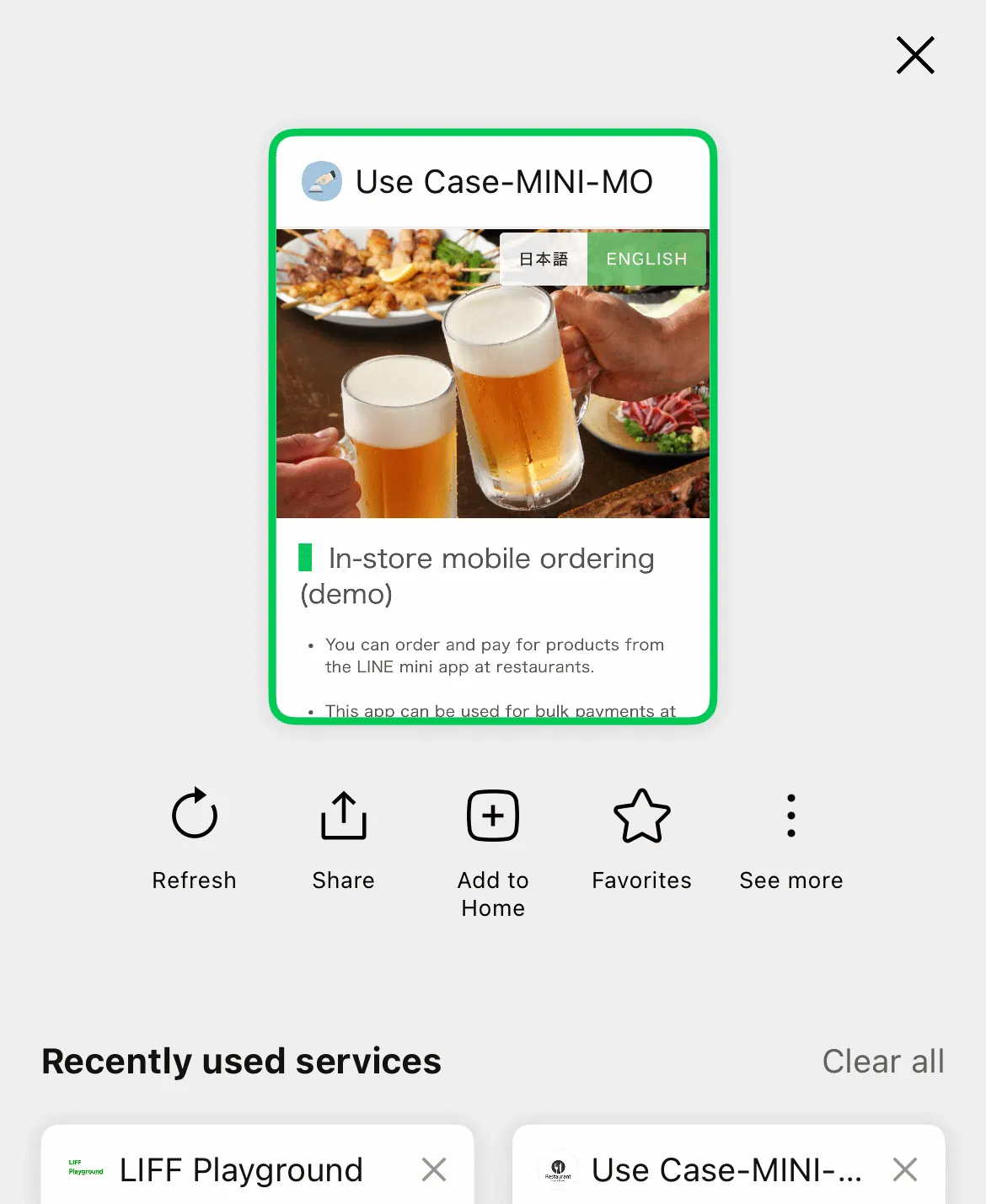 | 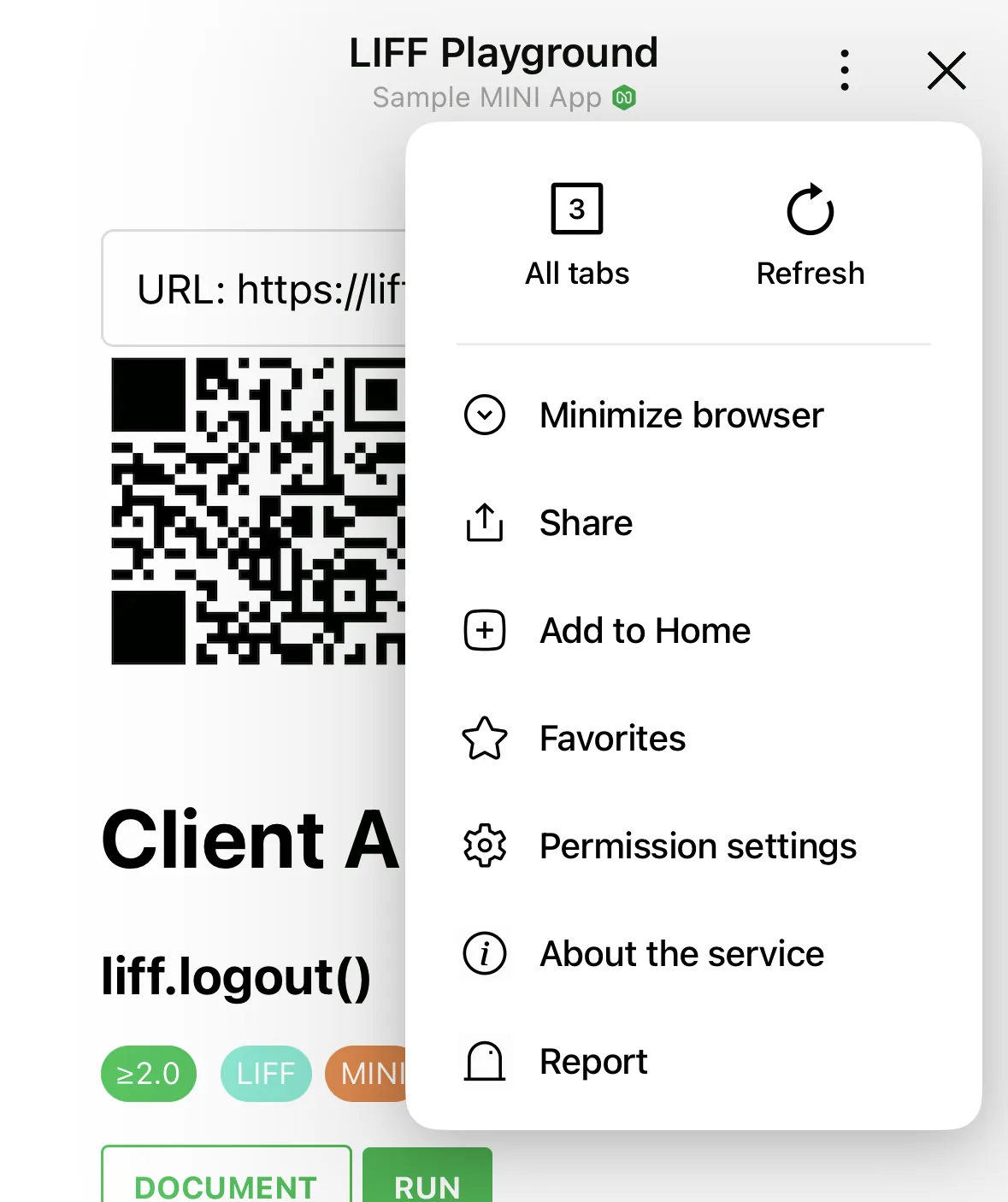 |
The dropdown menu contains the following items:
| Item | Description |
|---|---|
| All tabs | Displays the multi-tab view. |
| Refresh | Reloads the currently open page. |
| Minimize browser | Minimizes the LIFF browser. |
| Share | Shares the permanent link of the current page via a LINE message. |
| Add to Home | Displays the screen to add a shortcut to the current page. |
| Favorites | Adds the current LINE MINI App to your favorites. |
| Permission settings | Opens the permission settings screen. |
| About the service | Displays the provider page. |
| Report | Opens the LINE app inquiry form in an external browser. |
The items displayed in the dropdown menu vary depending on factors such as whether the app is a LINE MINI App or a LIFF app, and whether the LINE MINI App is verified. For more information, see Dropdown menu in the LINE MINI App documentation and Dropdown menu in the LIFF documentation.
Minimize button
For verified MINI Apps, the minimize button was previously displayed in the header. From LINE version 26.7.0 or later, the minimize button has been moved into the dropdown menu, and the close button is now displayed in its place.
| Before change | LINE version 26.7.0 or later |
|---|---|
| |
We'll continue to improve the quality of our products and developer documentation to make it easier for developers to create services using the LINE Platform.
[Updated] LIFF v2.29.0 released
To ensure user safety, we plan to restrict the use of older versions of the LIFF SDK (v2.20.0 through v2.31.0) around November 24, 2026. If you are using LIFF v2.29.0, update to LIFF v2.31.1 or later immediately. For more information, see the news from October 20, 2026, Overview of the LIFF SDK vulnerability in LIFF/LINE MINI App and restrictions on using older versions.
LIFF v2.29.0 has been deprecated because an issue with potential security implications was identified. If you're using LIFF v2.29.0, update to LIFF v2.31.1 or later. For more information, see LIFF v2.31.1 released.
We've released LIFF v2.29.0.
In LIFF v2.29.0, we've made changes to the internal behavior of the LIFF SDK. There is no change in features.
How to update to LIFF v2.29.0
If you're using the CDN edge path (https://static.line-scdn.net/liff/edge/2/sdk.js), you'll automatically update LIFF to v2.29.0.
If you're using an npm package, you can update to v2.29.0 by executing either npm install @line/liff@2.29.0 or yarn add @line/liff@2.29.0.
For more information on integrating the LIFF SDK, see Integrating the LIFF SDK with the LIFF app in the LIFF documentation.
[Resolved/Updated] Notice about service outage for LIFF/LINE MINI App
We've released a fixed version of LINE.
We've added a Workaround section.
The following issues were occurring in the LIFF/LINE MINI App, but we've released an updated version of LINE that resolves them. We sincerely apologize for any inconvenience that this may have caused.
Date and time of outage
April 27, 2026 - May 14, 2026
Cause of the outage
Bug in LINE for Android versions 26.6.0 and 26.6.1
Details
The following issues were occurring in LIFF/LINE MINI Apps under specific conditions:
- User profiles couldn't be retrieved
- The LIFF API wasn't working properly
Impact
This issue occurred when all of the following conditions were met:
- A user uses LINE for Android.
- The user's LINE version is
26.6.0or26.6.1. - While the LIFF browser is open, the same or a different LIFF/LINE MINI App is launched using Intent or App Links.
If all of the above conditions are met, updating the user's LINE version to 26.6.2 or later will resolve the issue.
Workaround
This issue occurred when the LIFF SDK referenced an invalid access token. You can potentially work around the issue by performing the following steps on your LIFF/LINE MINI App, even on devices where LINE hasn't been updated:
- When navigating from a LIFF/LINE MINI App to the same or a different LIFF/LINE MINI App, use
location.hreffor the transition. - If a LIFF SDK error that may be caused by this issue is detected in a LIFF/LINE MINI App (e.g., error code
invalid_request), call theliff.logout()method and then call theliff.login()method as follows:
const params = new URLSearchParams(location.search)
const liffState = params.get('liff.state')
const redirectUri = liffState
    ? new URL('.' + liffState, location.href).toString()
    : location.href
liff.login({ redirectUri })
We sincerely apologize for any inconvenience.
As of May 26, 2026, in the Messaging API, the rate limit for the "Get rich menu list" endpoint will change
In the Messaging API, rate limits are set for each endpoint. We would like to inform you that we plan to change the rate limit for the Get rich menu list endpoint as of May 26, 2026.
Scheduled date of specification change
May 26, 2026
The content and date of this specification change are subject to change.
Details
The rate limits before and after the change are as follows:
| Endpoint | Before (current) | After |
|---|---|---|
| Get rich menu list | 2,000 requests per second | 10 requests per second |
There are no changes to the rate limits for endpoints other than those listed above.
We will continue to work to further improve our services to our customers. Thank you for your understanding.
[Resolved] Notice about service outage for LIFF/LINE MINI App
We would like to inform you about a service outage regarding LIFF/LINE MINI App. The issue has now been resolved. We sincerely apologize for any inconvenience that this may have caused.
Date and time of outage
- April 27, 2026 around 19:46 - around 20:05 (UTC+9)
- April 27, 2026 around 19:46 - April 28, 2026 around 0:12 (UTC+9)
Cause of the outage
Server failure
Impact
- LIFF
- LINE MINI App
Details
Failed to load LIFF SDK
There were instances where the LIFF SDK failed to load in LIFF apps and LINE MINI Apps using the CDN path to load the LIFF SDK during the period described in item 1.
Failed to initialize LIFF app
There were instances where the initialization of the LIFF app using the liff.init() method failed during the period described in item 2, causing LIFF apps and LINE MINI Apps to become unavailable.
We will continue to improve the quality of our services to prevent future outages. Thank you for your understanding.
[Resolved] Notice about service outage for the Messaging API
We would like to inform you about a service outage regarding the Messaging API. The issue has now been resolved.
We sincerely apologize for any inconvenience that this may have caused.
Date and time of outage
April 17, 2026 around 11:37 - around 11:40 (UTC+9)
Cause of the outage
Server failure
Impact
This issue affected the endpoints in the following sections:
Details
During the stated date and time, some requests were not processed properly, resulting in errors with status code 5xx.
We will continue to improve the quality of our services to prevent future outages. Thank you for your understanding.
The Markdown files for the LINE Developers site documentation are now available on GitHub
On the LINE Developers site, some documentation and references are available in Markdown format. We've published these Markdown files on GitHub.
LINE Developers Documentation Source Files
Pages that are available in Markdown format now show the View on GitHub button near the page title. Clicking the View on GitHub button opens the Markdown file for that page on GitHub.

We'll continue to improve the quality of the LINE Developers site and developer documentation to make it even easier for developers to develop apps using our services.
In Japan, LINE Ads API will be discontinued in March 2027 due to the discontinuation of LINE Ads
We would like to inform you that the LINE Ads API will be discontinued in March 2027, following the discontinuation of LINE Ads in Japan.
Scheduled discontinuation date
End of March 2027
The specific discontinuation date will be announced by LINE Ads once it is determined.
Details
For more information about the discontinuation of LINE Ads, see Announcement regarding the launch date of LY Ads Display Ads and platform integration (only available in Japanese) in LINE for Business.
The LINE Ads API will remain available in Taiwan and Thailand. If you are using the LINE Ads API in these regions, see the LINE Ads API documentation.
If you have any questions regarding the discontinuation of the LINE Ads API, contact us at ml-lads-api-support@lycorp.co.jp.
We will continue to work to further improve our services to our customers. Thank you for your understanding.
Partial content from the LINE API Use Case site has been migrated to the LINE Developers site
We've migrated partial content from the LINE API Use Case site, which introduced technical information, use cases, client stories, and demo apps related to the LINE Platform, to the LINE Developers site.
The LINE API Use Case site will be closed on March 31, 2026.
Migrated content
- Practical scenarios and demo apps for the LINE Platform
- LINE MINI App demos
- User adoption stories for the LINE Platform
We'll continue to improve the quality of the LINE Developers site and developer documentation to make it even easier for developers to develop services using the LINE Platform.
[Updated] LIFF v2.28.0 released
To ensure user safety, we plan to restrict the use of older versions of the LIFF SDK (v2.20.0 through v2.31.0) around November 24, 2026. If you are using LIFF v2.28.0, update to LIFF v2.31.1 or later immediately. For more information, see the news from October 20, 2026, Overview of the LIFF SDK vulnerability in LIFF/LINE MINI App and restrictions on using older versions.
LIFF v2.28.0 has been deprecated because an issue with potential security implications was identified. If you're using LIFF v2.28.0, update to LIFF v2.31.1 or later. For more information, see LIFF v2.31.1 released.
We've released LIFF v2.28.0.
In LIFF v2.28.0, we've made the following change.
We've added the liff.requestFriendship() method which prompts the user to add the LINE Official Account as a friend
We've added the liff.requestFriendship() method which displays a subwindow that prompts the user to add the LINE Official Account as a friend, or to unblock it.
For more information, see Requesting the user to add the LINE Official Account as a friend or unblock it in the LIFF documentation.
How to update to LIFF v2.28.0
If you're using the CDN edge path (https://static.line-scdn.net/liff/edge/2/sdk.js), you'll automatically update LIFF to v2.28.0.
If you're using an npm package, you can update to v2.28.0 by executing either npm install @line/liff@2.28.0 or yarn add @line/liff@2.28.0.
For more information on integrating the LIFF SDK, see Integrating the LIFF SDK with the LIFF app in the LIFF documentation.
[Resolved] Notice about service outage for the LINE Developers Console
We'd like to inform you about a service outage regarding the LINE Developers Console. The issue has now been resolved. We sincerely apologize for any inconvenience that this may have caused.
Date and time of outage
March 20, 2026 around 11:28 - March 23, 2026 around 11:37 (UTC+9)
Cause of the outage
Server failure
Impact
LINE Developers Console
Details
In the emails sent to invite developers to providers and channels, the URLs for accepting invitations in emails sent on or after around 11:28 on March 20, 2026, all became invalid around 11:37 on March 23, 2026. The issue has now been resolved, and emails containing valid URLs are being sent.
Emails containing invalid URLs sent during the service outage will not be resent via the LINE Developers Console. If you open the URL in the email and see the message "The token used for this invitation has expired", you will need to request a new invitation from a member with provider or channel permissions.
For more information on inviting developers to providers and channels, see Managing roles in the LINE Developers Console documentation.
LINE will continue to improve the quality of its services to prevent future outages. Thank you for your understanding.
[Resolved] Notice about service outage for the LINE Platform
We'd like to inform you about a service outage regarding the LINE Platform. The issue has now been resolved. We sincerely apologize for any inconvenience that this may have caused.
Date and time of outage
March 19, 2026 around 12:15 - around 12:16 (UTC+9)
Cause of the outage
Server failure
Impact
- Messaging API
- LINE Login
- LIFF/LINE MINI App
Details
These are the main impacts per product:
Messaging API
- There were instances where sending webhook events was delayed.
- Some requests weren't processed properly, resulting in errors with status code 5xx.
Due to this outage, the messages that weren't properly sent even if the API requests succeeded, won't be counted as the LINE Official Account usage fees and the "number of sent messages" that can be confirmed in some way such as the Get number of sent push messages endpoint.
Retrying a failed API request
In some APIs, you can safely retry a request while preventing the same request from being accepted in duplicate by using a retry key (X-Line-Retry-Key) when an error with status code 5xx occurs or when the request times out.
For more information, see Retry failed API requests and Specify the retry key always in the Messaging API documentation.
LINE Login
- There were instances where LINE Login didn't work per usual.
- Some requests weren't processed properly, resulting in errors with status code 5xx.
LIFF/LINE MINI App
- There were instances where LIFF/LINE MINI App couldn't be used per usual.
- Some requests weren't processed properly, resulting in errors with status code 5xx.
When an outage occurs, we post a preliminary report on the LINE API Status. For more information, see Check the availability of the LINE Platform (LINE API Status) in the LINE Platform basics.
We will continue to improve the quality of our services to prevent future outages. Thank you for your understanding.
As of March 11, 2026, anyone can now publish LINE MINI Apps in Taiwan and Thailand
As of March 11, 2026, anyone who is a permitted customer in the LINE MINI App Policy can create a LINE MINI App channel for services in Taiwan or Thailand.
As a result, LINE MINI Apps whose region to provide the service is Taiwan or Thailand can now be published as unverified MINI Apps.
For more information, see Create a LINE MINI App Channel in the LINE MINI App documentation.
Date of change
March 11, 2026
Regarding verification review for LINE MINI Apps
If the region to provide the service is Taiwan or Thailand, only LINE MINI App channels under a certified provider can apply for the verification review to publish the LINE MINI App as a verified MINI App.
For more information, see Submitting LINE MINI App in the LINE MINI App documentation.
We'll continue to improve the quality of our products and developer documentation to make it easier for developers to create services using the LINE Platform.
LINE MINI App Policy has been revised on February 19, 2026
As announced on February 6, 2026, the LINE MINI App Policy has been revised on February 19, 2026.
Date of revision
February 19, 2026
Details of revision
- Changes related to digital content
- Clarifications to the privacy policy
- Other formatting-related updates
Background of the revision
Previously, the sale of virtual items such as digital content was generally prohibited in LINE MINI Apps. However, starting today in Japan, virtual items can now be sold by using the in-app purchase feature, which has become available. Accordingly, the LINE MINI App Policy has been revised.
We'll continue to work to further improve our service to our customers. Thank you for your understanding.
In-app purchase feature for LINE MINI Apps in Japan has been officially released
We've officially released the "in-app purchase" feature for LINE MINI Apps in Japan.
The in-app purchase feature allows users to buy digital content offered within LINE MINI Apps.
This feature was initially rolled out to select companies starting in July 2025. With this release, verified MINI Apps can now utilize the in-app purchase feature by applying to use in-app purchase via the LINE Developers Console.
To start using the in-app purchase feature, after submitting an application, you must undergo our in-app purchase review and the verification review.
Release date
February 19, 2026
Release details
The following updates have been released:
- Apply to use in-app purchase
- Test payment in a Developing channel
- Webhook URL configuration and test payment feature tester registration
In-app purchase use conditions
The LINE MINI App must have both "Region to provide the service" and "Company or owner's country or region" set to "Japan" on the LINE MINI App channel.
In-app purchase requirements
- The LINE MINI App is a verified MINI App (*)
- LIFF SDK version of the LINE MINI App is 2.26.0 or later
- The LINE MINI App is opened in the LIFF browser
- The user has registered a Japanese phone number with their LINE account
- The user's LINE version is 15.6.0 or later
* Unverified MINI Apps will only work on LINE MINI Apps for Developing and Review.
For more information, see In-app purchase overview in the LINE MINI App documentation and LINE In-App Purchase Terms of Use (for LINE Mini App Provider).
We'll continue to improve the quality of our products and developer documentation to make it easier for developers to create services using the LINE Platform.
Starting on 9 March 2026, edge-to-edge support in the Android version of LINE will affect the layout
Starting March 9, 2026, Edge-to-edge will be applied to the Android version of LINE.
This may cause buttons and content placed at the bottom of LIFF apps and LINE MINI Apps to overlap with the navigation bar area, potentially impairing usability and visibility. Therefore, we ask developers to check for potential impacts and take necessary actions in advance.
Specification change date
March 9, 2026 (UTC+9)
Target versions
LINE version 26.3.0 or later for Android
Affected LIFF apps/LINE MINI Apps
All LIFF apps and LINE MINI Apps are affected. Also, all of the Size of the LIFF browser—Full, Tall, and Compact—are affected.
Specification changes
Google provides Edge-to-edge enforcement for all apps on Android 15 and later. Accordingly, the Android version of the LINE app will also support edge-to-edge, which will affect LIFF apps and LINE MINI Apps as follows:
| Navigation type | Before (Current) | After |
|---|---|---|
| Gesture navigation | WebView area extends up to the top of gesture navigation | WebView area extends to the bottom of the screen |
The WebView area remains unchanged in the status bar at the top of the screen.
Impact and requests
This change may cause buttons and content placed at the bottom of LIFF apps and LINE MINI Apps to overlap with the navigation bar area, potentially impairing usability and visibility.
Developers providing LIFF apps and LINE MINI Apps are requested to check the following points by the specification change date:
- Ensure that elements at the bottom of the screen don't obstruct operation
- If necessary, use
safe-area-inset-bottomto control content that should not overlap with the gesture navigation area
CSS example for handling the navigation area
For environments with WebView version 144 or later, use safe-area-inset-bottom. For environments with WebView version earlier than 144, use --android-safe-area-inset-bottom as a fallback.
When the device is in landscape orientation, the behavior remains unchanged. The left and right safe-area-inset and --android-safe-area-inset values will always be set to 0.
We'll continue to work to further improve our service to our customers. Thank you for your understanding.
We've launched Tips for Developers on the LINE Developers site
We've launched a new content section called Tips for Developers on the LINE Developers site.
What is Tips for Developers
Tips for Developers is a lightweight, easy-to-read content category. It's separate from the documentation and API reference.
The LINE Developers site covers a wide range of products, such as the Messaging API and the LINE MINI App. The documentation also spans many topics. We publish updates in the news section for major feature additions or specification changes. However, we also make many small improvements and additions. There are also many useful existing features that aren’t newly released but are not widely known, along with documentation that explains how to use them.
That's why we started Tips for Developers. It's a place to highlight the small improvements and existing features and documentation that we want developers to know about, as well as best practices for development, case studies and other things that aren't new information, but deserve a fresh spotlight.
We'll continue to improve the quality of the LINE Developers site and developer documentation to make it even easier for developers to develop apps using our services.
LINE MINI App Policy will be revised on February 19, 2026
LINE MINI App Policy will be revised on February 19, 2026.
Scheduled date of revision
February 19, 2026
The content and date are subject to change.
Details of revision
- Changes related to digital content
- Clarifications to the privacy policy
- Other formatting-related updates
The differences between before and after the revision are as follows:
| Before the revision (current) | After the revision |
|---|---|
| LINE MINI App Policy | LINE MINI App Policy |
Background of the revision
Until now, the sale of virtual items such as digital content has generally not been allowed in LINE MINI Apps. Going forward, in Japan, virtual items will be able to be sold using the upcoming in-app purchase feature. Accordingly, the LINE MINI App Policy will be revised.
We'll continue to work to further improve our service to our customers. Thank you for your understanding.
[Resolved] Notice about service outage for the Messaging API
We'd like to inform you about a service outage regarding the Messaging API. The issue has now been resolved.
We sincerely apologize for any inconvenience that this may have caused.
Date and time of outage
February 3, 2026 around 14:13 - around 15:44 (UTC+9)
Cause of the outage
Server failure
Impact
Details
During the stated date and time, some requests weren't processed properly, resulting in errors with status code 400.
We will continue to improve the quality of our services to prevent future outages. Thank you for your understanding.
Web traffic audiences using Tracking Tag are now available in the Messaging API
You can now use web traffic audiences using Tracking Tag in the LINE Official Account and Messaging API, in addition to web traffic audiences using LINE Tag.
Web traffic audiences using Tracking Tag can be created in the LINE Official Account Manager. You can retrieve information about the created web traffic audiences using endpoints such as the Get audience data endpoint.
About Tracking Tag
Tracking Tag is a tag used to measure performance across various LY Corporation services. For more information, see Announcement: Launch of Tracking Tag for LINE Official Accounts (only available in Japanese) in LINE for Business.
Requirements for using Tracking Tag
In order to use Tracking Tag with your LINE Official Account, all of the following conditions must be met:
- The LINE Official Account is for Japan
- The LINE Official Account is connected to an authenticated organization in Business Manager (only available in Japanese)
- The LINE Official Account is either a verified account or a premium account
About LINE Tag
LINE Tag will be discontinued in the future. If you plan to use tags for measurement, consider using Tracking Tag. We'll announce the details regarding the discontinuation once they have been determined.
LINE Ads will continue to support LINE Tag only. If you are sharing LINE Tag between LINE Ads and your LINE Official Account, continue to use LINE Tag as well.
LINE Messaging API SDK updates
For more information about the update status of each SDK release related to the above, see the LINE Messaging API SDKs release notes.
For new LINE MINI App channels in Japan, the "Channel consent simplification" feature is always enabled as of January 8, 2026
As announced on October 31, 2025, for new LINE MINI App channels in Japan, the use of the "Channel consent simplification" feature has been mandatory as of January 8, 2026.
Specification change date and time
January 8, 2026 12:00 (UTC+9)
LINE MINI App channels subject to the specification changes
LINE MINI App channels created after the specification changes and whose Region to provide the service under the Basic settings tab is set to "Japan"
LINE MINI App channels not subject to the specification changes
- LINE MINI App channels created before the specification changes
- LINE MINI App channels whose Region to provide the service under the Basic settings tab is set to "Thailand" or "Taiwan"
Specification changes
The applicable LINE MINI App channels have been changed as follows:
- The "Channel consent simplification" feature is always enabled.
- Accordingly, the toggle button for Channel consent simplification under the Web app settings tab has been removed, and you can no longer disable the feature.
The above changes also apply to unverified MINI Apps if the LINE MINI App channels are subject to the specification changes. However, the "Channel consent simplification" feature is available only in unverified MINI Apps for Developing and for Review.
Impact on the add friend option
In the LINE MINI App, you can use the add friend option to prompt users to add your LINE Official Account from the verification screen or the channel consent screen.
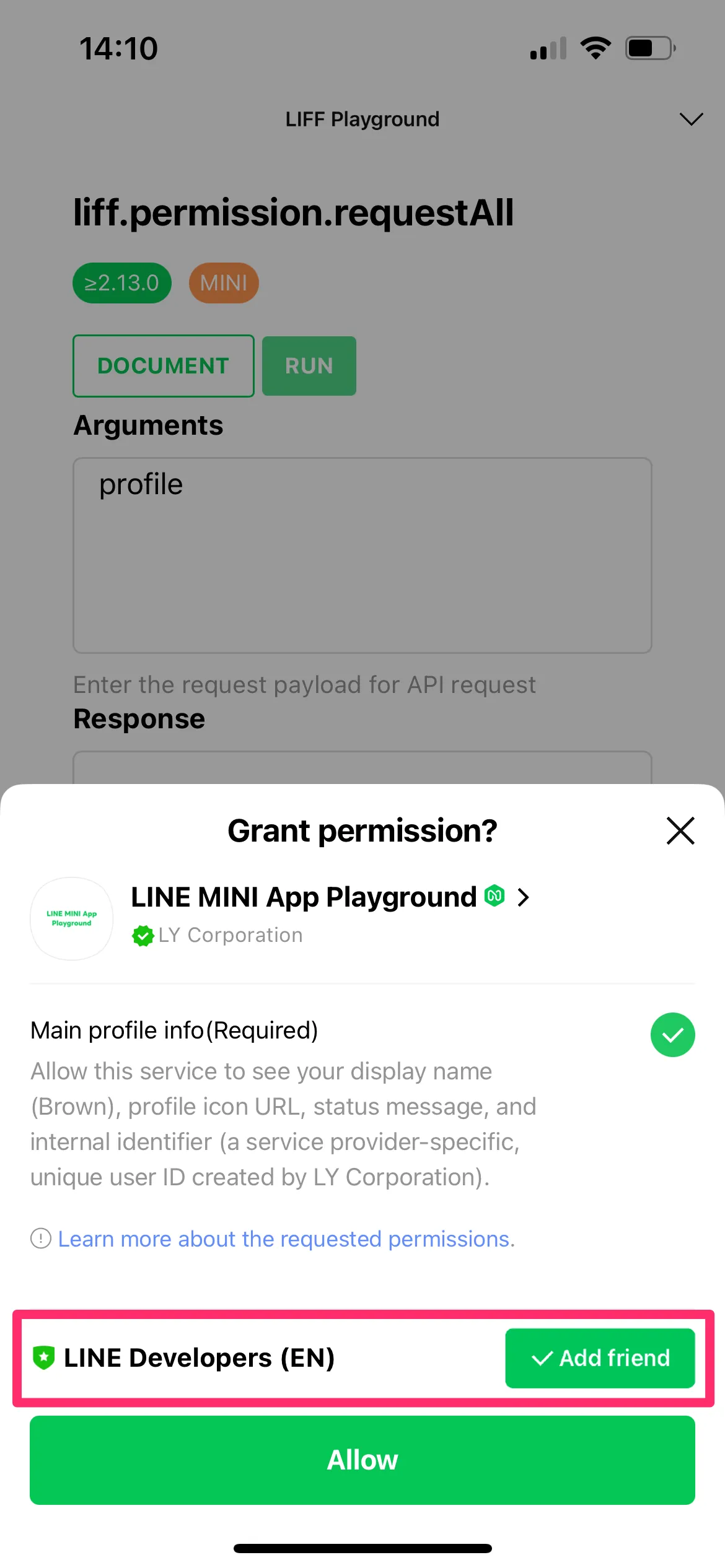
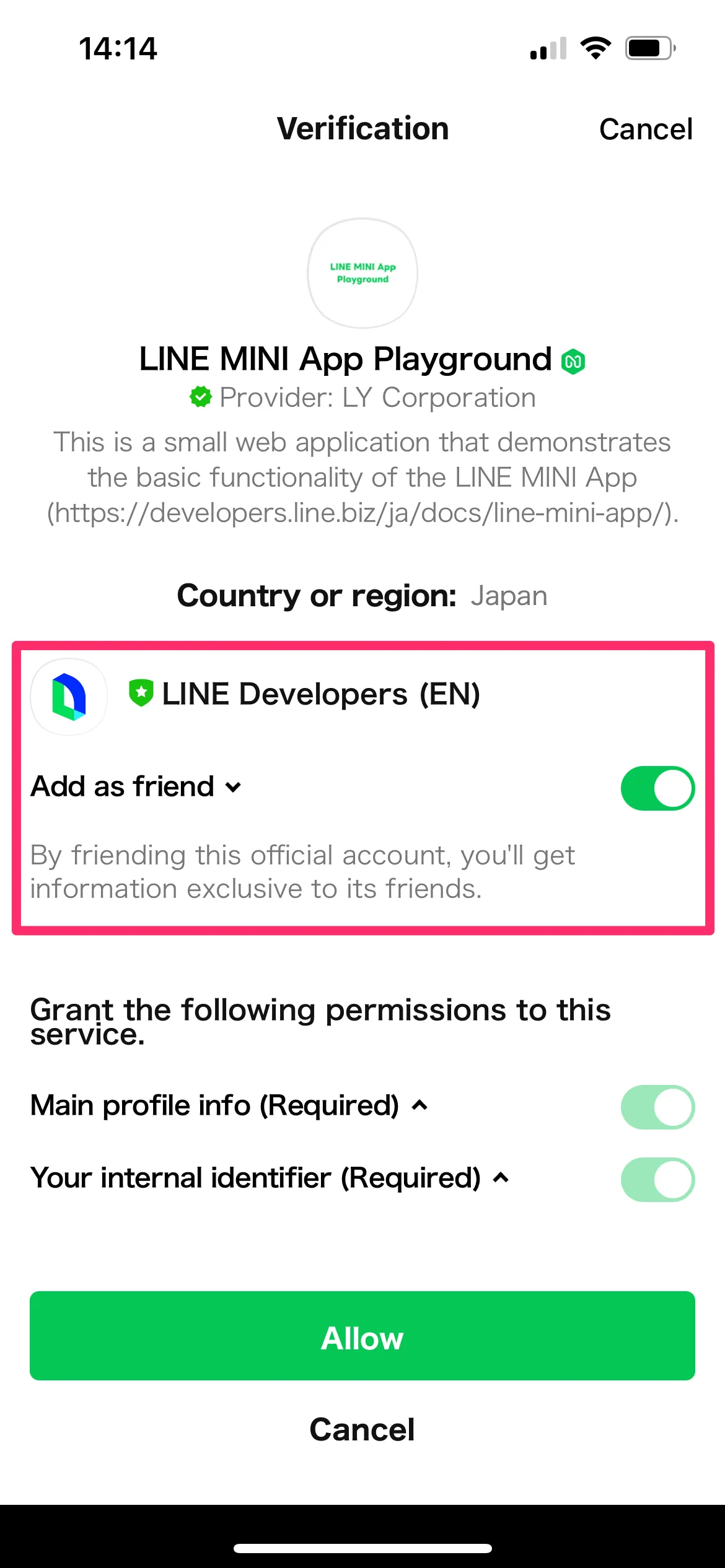
However, if only openid is specified in the "Scope" section of the Web app settings tab in your LINE MINI App channel, enabling the "Channel consent simplification" feature will prevent the verification screen and the channel consent screen from appearing. As a result, you can't prompt users to add friends using the add friend option.
To prompt users to add your LINE Official Account as a friend using the add friend option, specify scopes other than openid in the "Scope" section of the Web app settings tab in your LINE MINI App channel, and display the verification screen using one of the following methods:
- Method 1. Use the
liff.permission.query()method and theliff.permission.requestAll()method - Method 2. Use methods that require permissions other than the
openidscope
Method 1. Use the liff.permission.query() method and the liff.permission.requestAll() method
You can use the liff.permission.query() method and the liff.permission.requestAll() method to display the verification screen.
// Display the verification screen when the user hasn't consented to the profile scope
liff.permission.query("profile").then((permissionStatus) => {
  if (permissionStatus.state === "prompt") {
    liff.permission.requestAll();
  }
});
For more information, see liff.permission.query() and liff.permission.requestAll() in the LIFF API reference.
Method 2. Use methods that require permissions other than the openid scope
You can use methods that require permissions other than the openid scope to display the verification screen. The following methods require permissions other than the openid scope:
| Scope | Method |
|---|---|
email | |
profile | |
chat_message.write |
To prompt users to add your LINE Official Account as a friend right after your LINE MINI App launches, like the channel consent screen does, implement Method 1 or Method 2 so that they run right after your LINE MINI App launches.
Background of the specification changes
The specification changes aim to improve the user experience and encourage the use of LINE MINI Apps by allowing users to use them more smoothly.
We'll continue to work to further improve our service to our customers. Thank you for your understanding.
LINE Developers Console maintenance notice
Maintenance is scheduled on the LINE Developers Console.
Date and time of maintenance
January 19, 2026 10:00 - 12:00 (UTC+9)
Note that the end time of the maintenance may change without notice.
Impact
For about one minute during the maintenance, the following operations on the LINE Developers Console will be unavailable.
- Creating a LINE MINI App channel
- Changing the settings of a LINE MINI App channel
- Requesting a review of a LINE MINI App
Existing LINE MINI Apps will remain available to users during the maintenance.
We sincerely apologize for any inconvenience that this may cause and thank you for your understanding.
